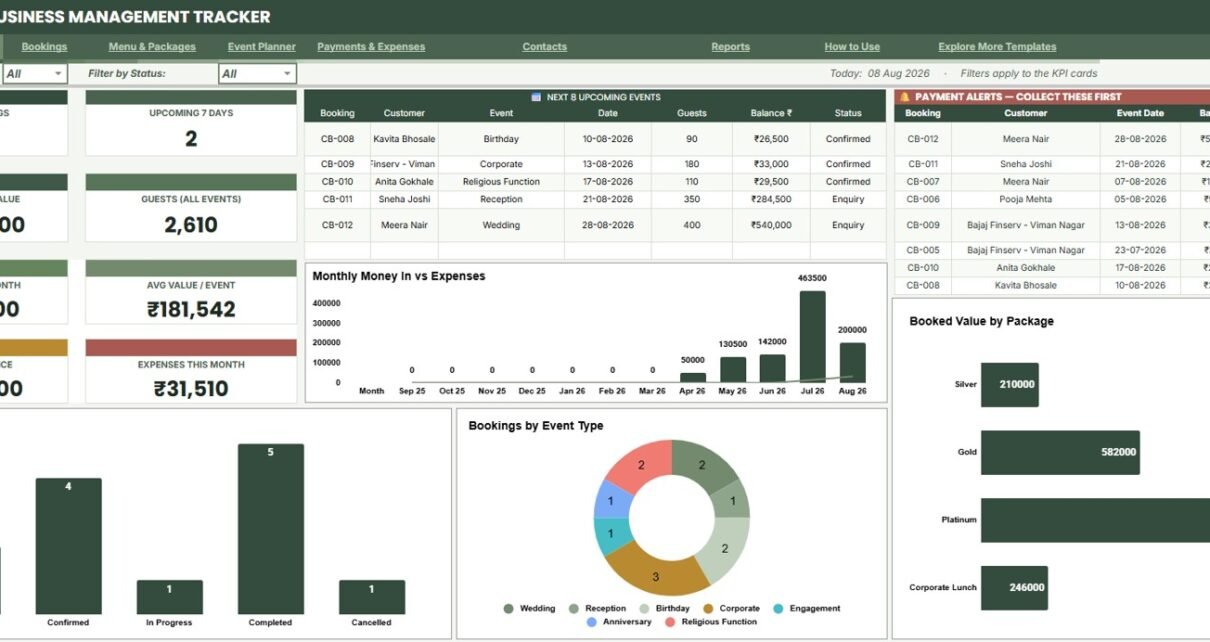
Catering operations can become hard to manage when bookings, menus, customer contacts, supplier details, event tasks, payments, and expenses sit in different notebooks or spreadsheets. The Catering Business Management Tracker in Google Sheets gives catering teams 7 connected sheet tabs, 8 high-level dashboard cards, and 44 analysis views across bookings, menu packages, event planning, payments, expenses, contacts, and reports.Catering Business Management Tracker in Google Sheets
This tracker is built for small and growing catering businesses that want an editable spreadsheet before moving into a heavier paid system. Because it runs in Google Sheets, the file can be copied to Google Drive and shared with selected team members. Google also documents Drive sharing controls in its official Google Docs Editors Help.
Get the Catering Business Management Tracker in Google Sheets
Key Features of Catering Business Management Tracker in Google Sheets
- 7 connected sheet tabs: Overview, Event Bookings Register, Menu Packages and Menu Item Library, Event Planner, Payments and Expenses, Contacts Directory, and Reports.
- 8 headline KPI cards: Track Total Bookings, Upcoming 7 Days, Total Booked Value, Guests All Events, Revenue This Month, Avg Value / Event, Pending Balance, and Expenses This Month.
- Booking control: Monitor customers, booking IDs, event dates, event type, guests, package value, payment mode, status, balance, and days to go.
- Menu package setup: Track per-plate rates, minimum guests, items included, item categories, cost per unit, and menu type.
- Event preparation: Follow total tasks, completed tasks, overdue items, assignment, task notes, and percent complete.
- Payment and expense tracking: Review customer payments, payment modes, payment type, booking ID, expense category, supplier, and paid status.
- Customer and supplier contacts: Store contact names, phone, email, city, type, source or category, total business, and outstanding balances.
- Reports sheet: Summarize monthly performance, guests by event type, booked value, booking status, top customers, upcoming events, and overdue balances.
Dashboard Pages Explanation
1 – Overview Page
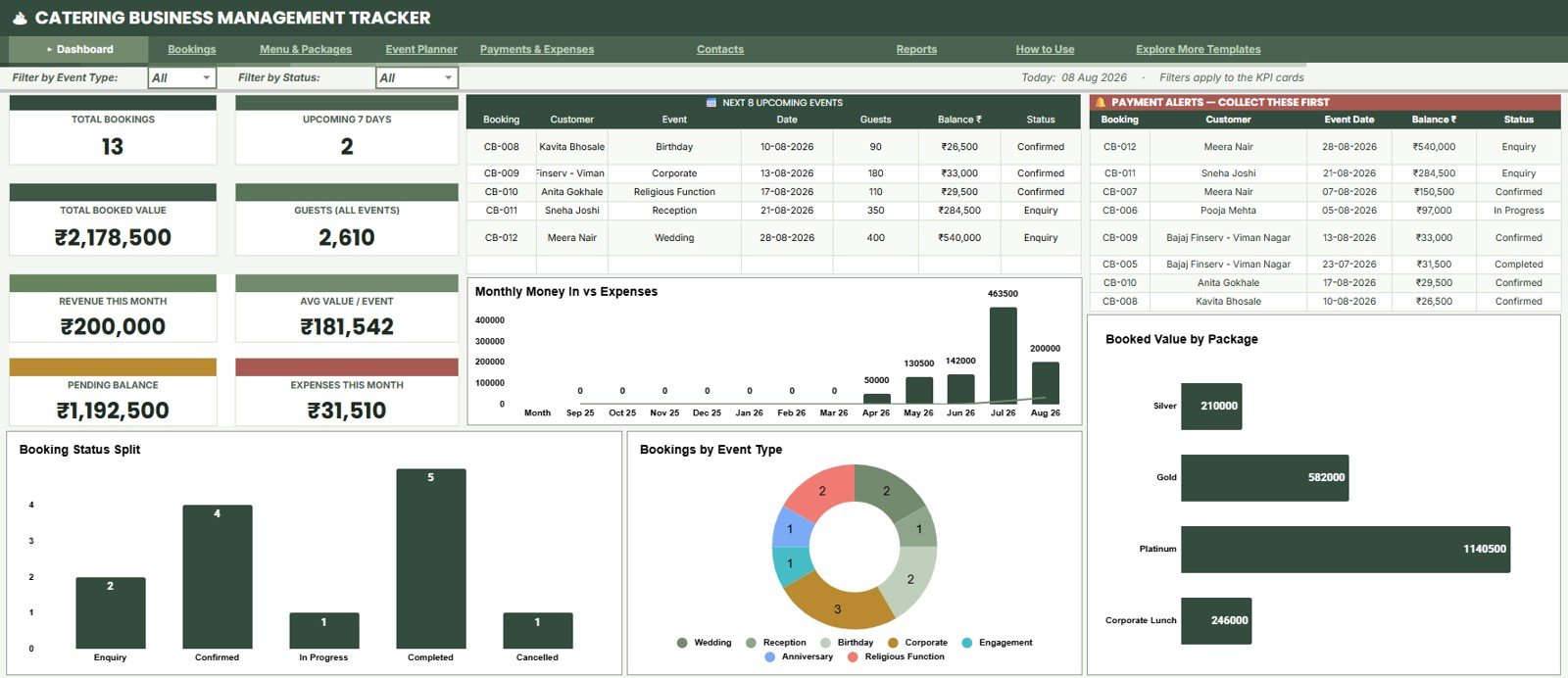
The Overview Page is the main dashboard for quick owner review. The top cards show Total Bookings, Upcoming 7 Days, Total Booked Value, Guests All Events, Revenue This Month, Avg Value / Event, Pending Balance, and Expenses This Month.
Money In vs Expenses by Month: This chart compares collections and expenses month by month so the owner can see whether revenue growth is being matched by cost pressure.
It is useful before month-end review because it highlights months where payment inflow and operating spend are out of balance.
Bookings by Status: This chart groups bookings by status such as confirmed, pending, completed, cancelled, or custom stages.
It helps the team understand the current booking pipeline and which events still need attention.
Bookings by Event Type: This chart shows which catering event types are driving booking volume.
It can guide package planning, staff preparation, and marketing focus for weddings, corporate events, parties, or other categories.
Booked Value by Package: This chart compares total booked value across menu or catering packages.
It helps identify packages that bring stronger revenue and packages that may need pricing or menu review.
Upcoming Events by Event Date: This chart shows near-term events by date, making daily preparation easier.
It helps managers check which events are coming soon and whether task planning is on track.
Payment Alerts by Balance: This chart highlights bookings with unpaid or partially paid balances.
It supports follow-up before the event date so cash collection does not get buried under operations.
2 – Event Bookings Register
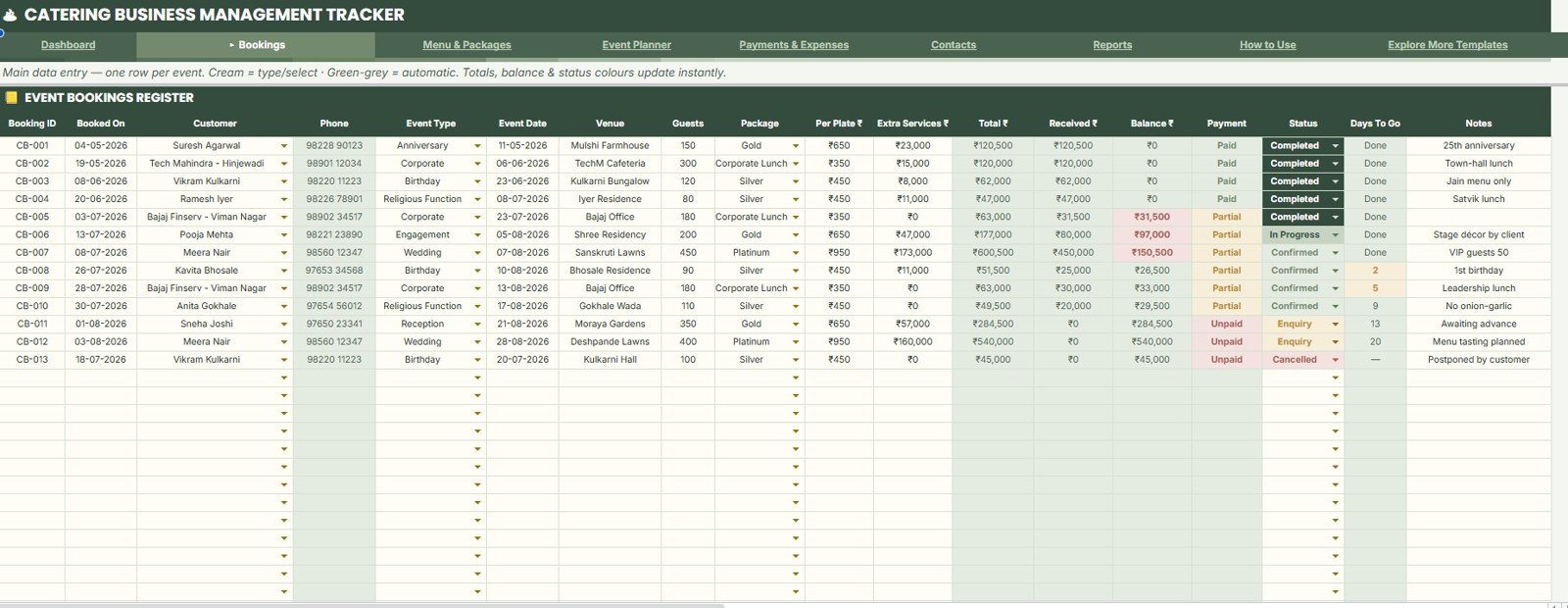
The Event Bookings Register is the main operating register for confirmed and planned catering events. It gives the team a single place for customer, booking, event date, event type, guest count, package, payment, status, balance, and days-to-go details.
Bookings by Customer: This analysis shows which customers account for the most bookings.
It helps catering businesses spot repeat clients and plan follow-up for high-value relationships.
Event Date by Booking ID: This analysis connects each booking ID with its event date.
It makes schedule review easier when several events are close together.
Guests by Event Type: This view compares guest count across event types.
It helps estimate food quantity, staff load, and setup needs by catering format.
Total Value by Package: This view compares booked value across package selections.
It supports package pricing decisions and shows which menu bundles are producing more revenue.
Received Amount by Payment Mode: This chart summarizes collections by cash, bank transfer, card, UPI, or custom payment mode.
It helps reconcile how customers are paying and where follow-up may be needed.
Balance by Booking Status: This view shows outstanding balance against current booking status.
It helps separate balances that are still expected from balances that may already be overdue.
Days To Go by Event Date: This analysis turns event dates into urgency.
It helps managers prioritize the bookings that need menu confirmation, task follow-up, or payment reminders first.
3 – Menu Packages and Menu Item Library
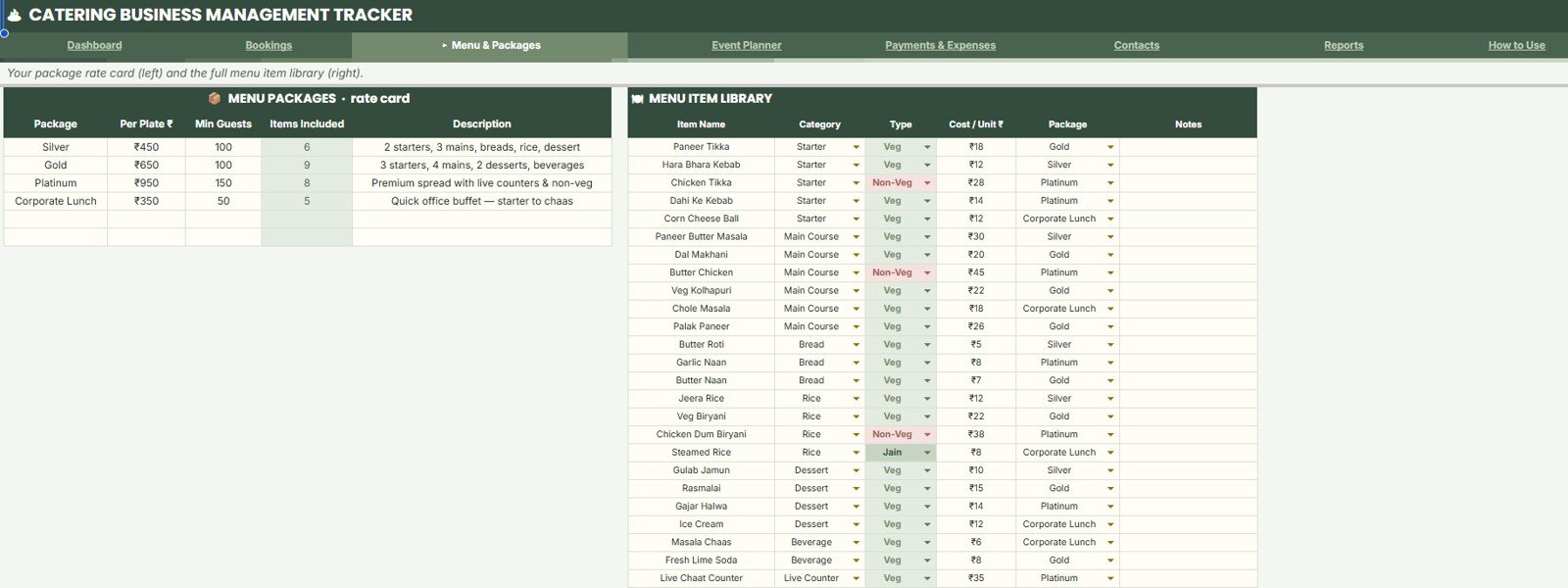
The Menu Packages and Menu Item Library sheet keeps package rates, minimum guest rules, included items, menu categories, costs, and menu type in one structured area. This reduces the chance of quoting one package one way and recording it another way.
Per Plate Rate by Package: This view compares package pricing side by side.
It helps owners check whether basic, premium, custom, or event-specific packages are positioned correctly.
Minimum Guests by Package: This analysis shows the minimum guest rule for each package.
It helps prevent underpriced small events from being quoted without a threshold.
Items Included by Package: This view explains which items are included under each package.
It supports clearer conversations with clients and reduces last-minute menu confusion.
Menu Items by Category: This analysis groups menu items by category such as starter, main course, dessert, beverage, or custom labels.
It helps chefs and planners understand the item mix across the library.
Cost Per Unit by Item Name: This view highlights item-level cost control.
It helps identify menu items that may need pricing review or substitution.
Menu Type by Package: This analysis separates package types such as vegetarian, non-vegetarian, buffet, plated, or custom service styles.
It supports faster filtering when planning client-specific proposals.
4 – Event Planner
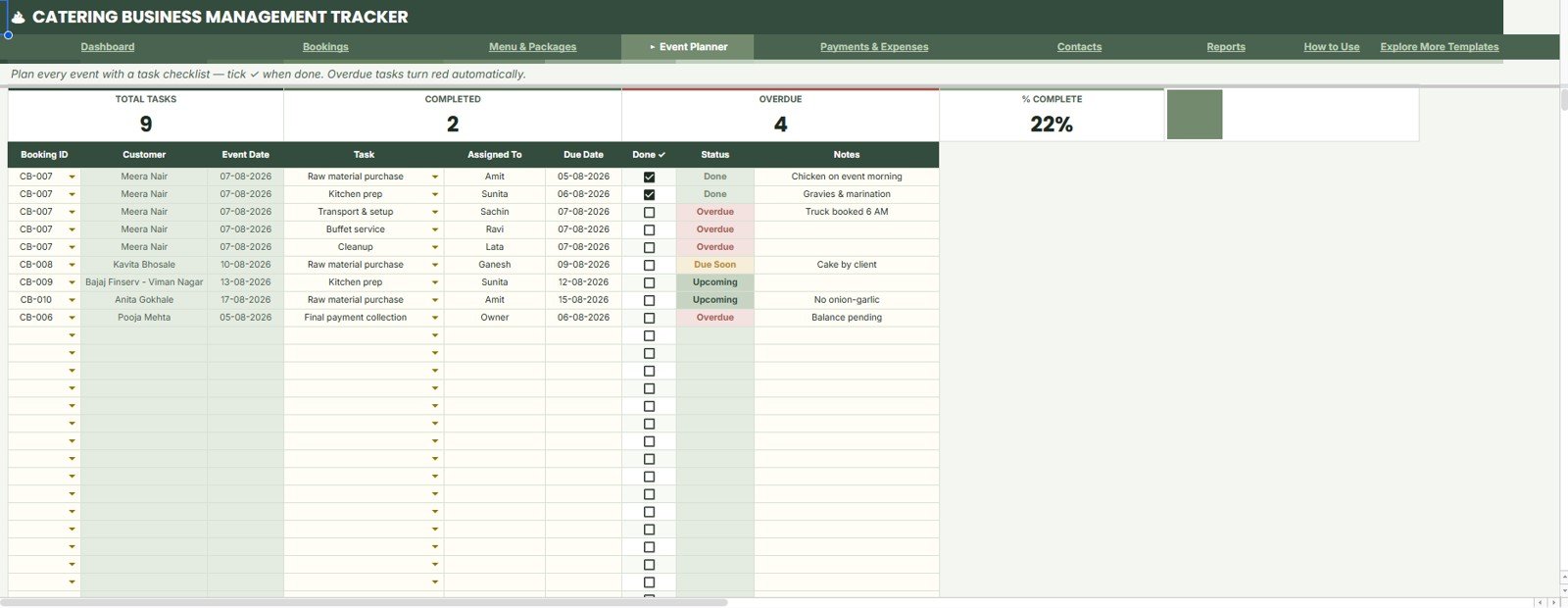
The Event Planner sheet helps the team track task preparation by booking ID, due date, owner, status, notes, and event date. It is useful for setup, menu confirmation, vendor coordination, kitchen preparation, transport, service, and cleanup tasks.
Total Tasks by Booking ID: This view shows how much work is attached to each booking.
It helps operations teams identify events that need more coordination.
Completed Tasks by Status: This analysis shows how many tasks are completed or still pending by status.
It gives a quick progress check before the event date.
Overdue Tasks by Due Date: This chart highlights tasks that missed their due date.
It helps managers catch preparation risk before it affects the customer event.
Task Assignment by Assigned To: This view shows task load by team member or role.
It helps balance work across planners, chefs, service staff, vendors, and support teams.
Task Notes by Event Date: This analysis connects operational notes to the date they matter.
It helps the team review special instructions before an event starts.
Percent Complete by Task Status: This view summarizes preparation progress as a percentage.
It makes it easier to see which events are ready and which need escalation.
5 – Payments and Expenses
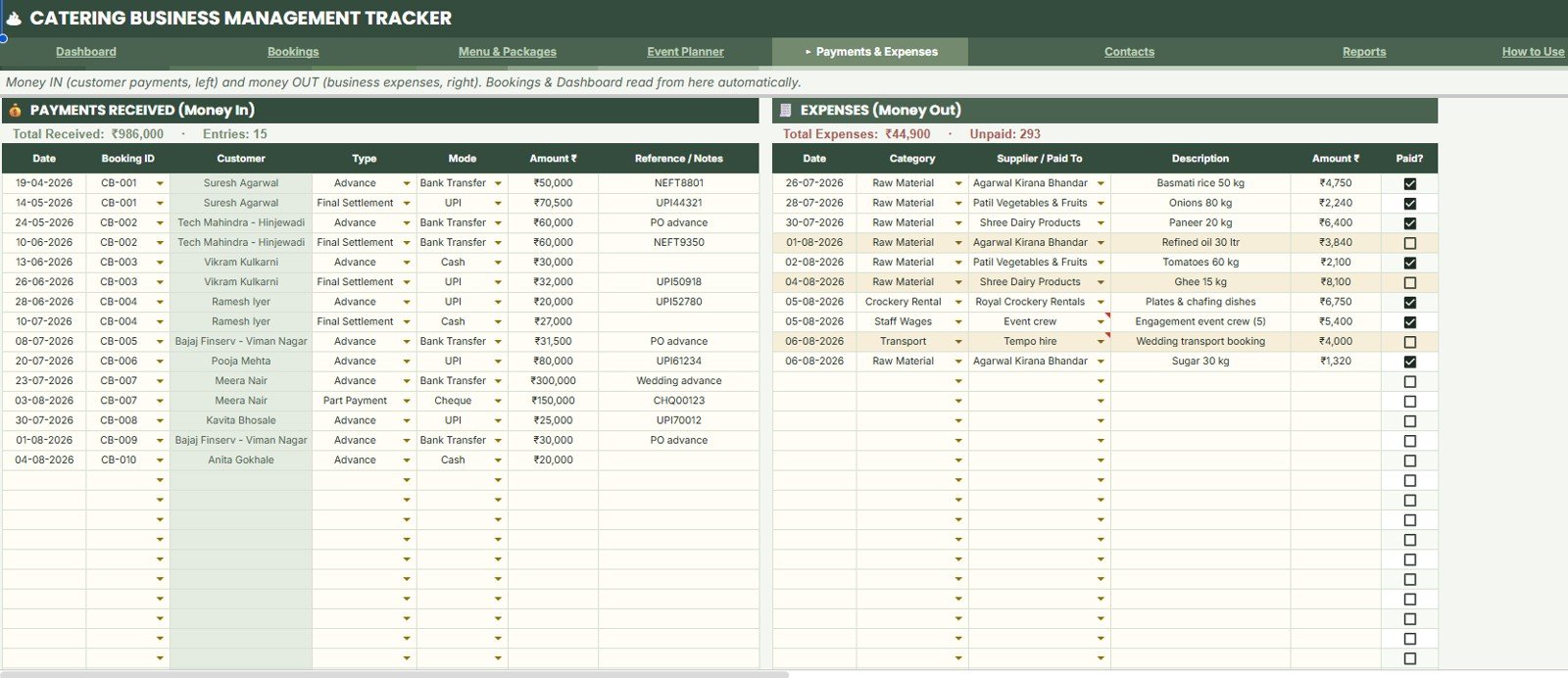
The Payments and Expenses sheet brings receipts and spending into one review area. It helps catering owners see collections, payment mode, booking references, expense categories, supplier names, and paid status without jumping across several finance files.
Payments Received by Customer: This chart shows collection value by customer.
It helps identify customers who have paid most and customers who may still need follow-up.
Amount Received by Payment Mode: This view groups receipts by payment mode.
It supports reconciliation when cash, bank transfer, card, UPI, or other modes are used.
Payment Type by Booking ID: This analysis connects advance, partial, final, or custom payment type to each booking.
It helps finance teams understand where each booking stands.
Expenses by Category: This chart groups expenses by category such as ingredients, staff, transport, decor, rental, or custom categories.
It helps the owner spot which costs are driving total spend.
Expenses by Supplier or Paid To: This view summarizes cost by supplier, vendor, or payee.
It helps monitor vendor spend and prepare supplier reviews.
Paid Status by Expense Date: This analysis shows whether expenses are paid, pending, or partially paid by date.
It supports cleaner payable follow-up and cash planning.
6 – Data Sheet Tab
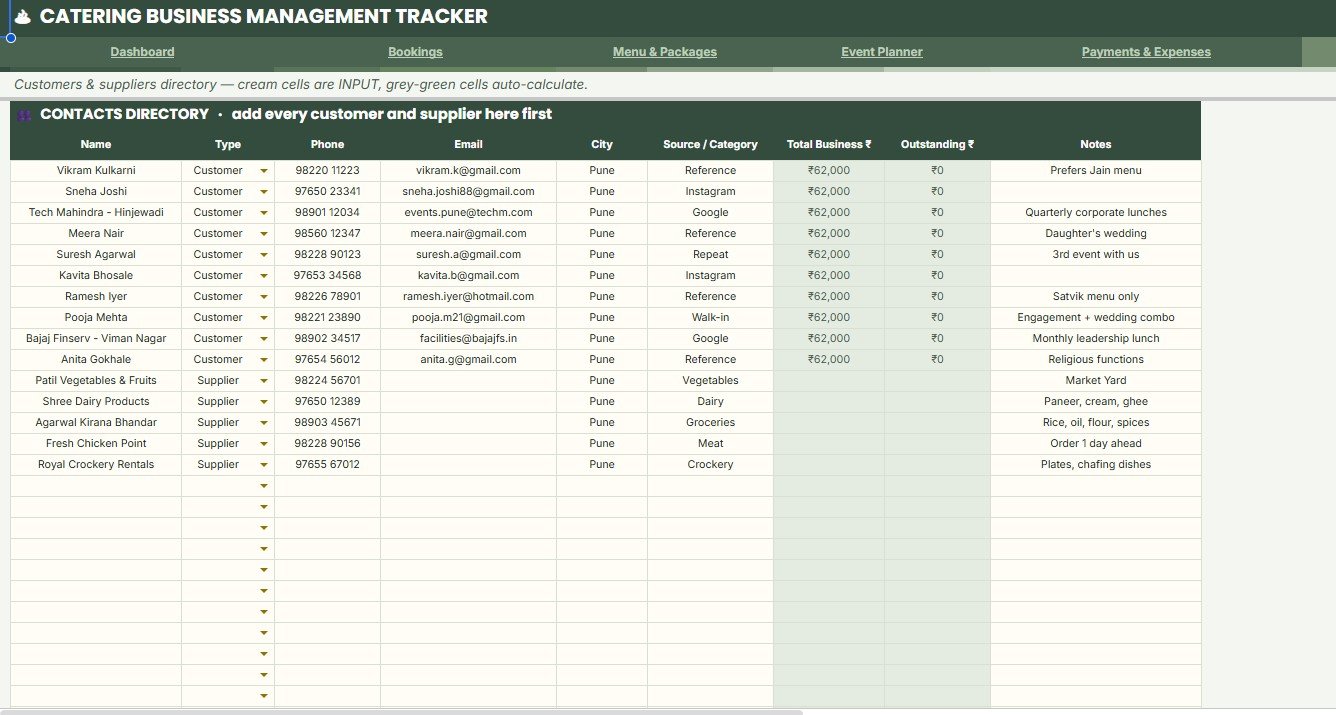
The Data Sheet tab is the Contacts Directory for customers and suppliers. Add every customer and supplier in the same format so names, contact details, city, source, category, total business, and balances remain consistent.
Contact Name by Type: This view separates contacts by customer, supplier, vendor, or other contact type.
It helps the team find the right group quickly.
Phone and Email by Contact: This view keeps contact communication details tied to the contact name.
It reduces time spent searching old chats or emails.
City by Contact: This analysis shows where customers and suppliers are located.
It helps with local follow-up, delivery planning, and regional service review.
Source or Category by Contact: This view tracks lead source or supplier category.
It helps identify which channels and vendor groups matter most.
Total Business by Customer: This analysis ranks customer value over time.
It helps owners identify repeat or high-value customers.
Outstanding Balance by Customer: This chart shows customer-level pending balances.
It supports payment follow-up without scanning every booking row.
7 – Reports Sheet
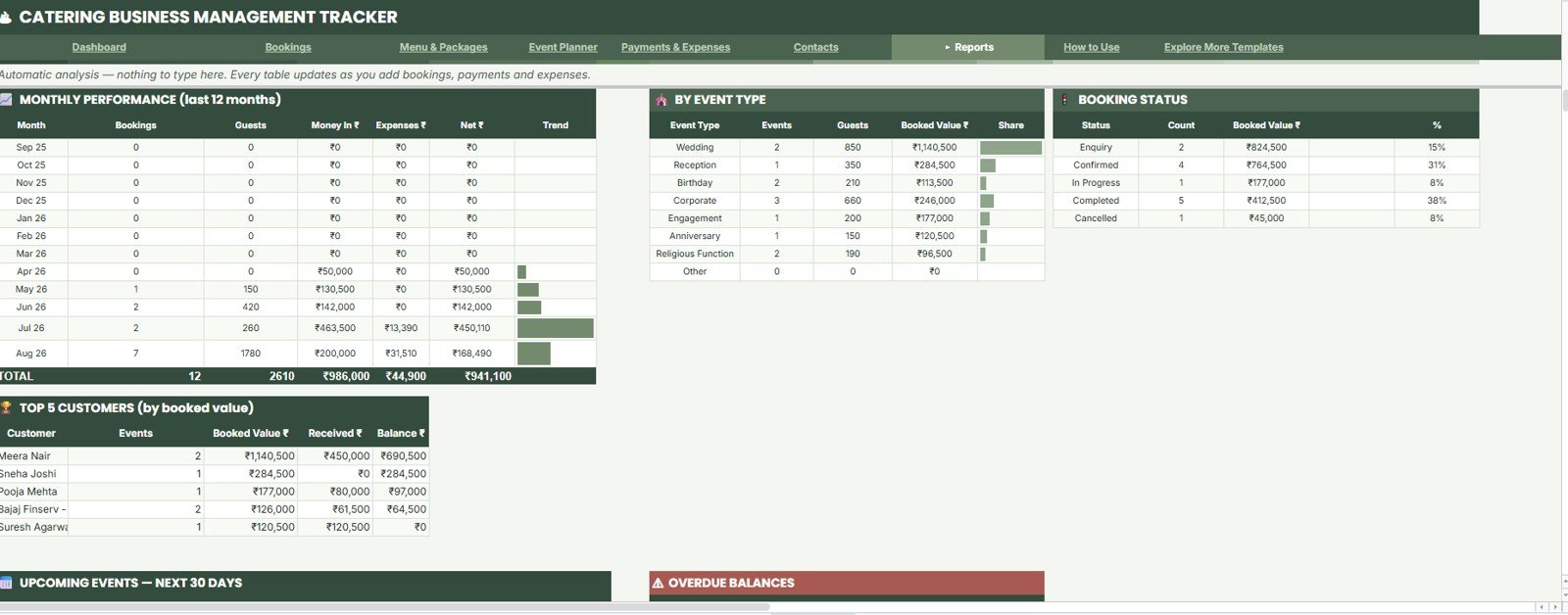
The Reports Sheet gives automatic analysis as you add bookings, payments, and expenses. It is designed for owner review, weekly meetings, monthly closing, and follow-up planning.
Monthly Performance by Month: This chart summarizes catering performance by month.
It helps owners see seasonality and prepare for busier periods.
Guests by Event Type: This view compares guest volume by event category.
It supports food planning, staffing, and package-level decision making.
Booked Value by Event Type: This analysis compares booked revenue by event type.
It helps show which event categories are bringing the highest value.
Bookings by Status: This view summarizes the booking pipeline by status.
It helps the team understand how much work is confirmed, pending, completed, or cancelled.
Top Customers by Booked Value: This chart ranks customers by booked value.
It helps prioritize relationship management and repeat booking follow-up.
Upcoming Events by Event Date: This analysis lists near-term work by event date.
It keeps operations aligned with the calendar.
Overdue Balances by Customer: This chart highlights unpaid customer balances.
It makes payment follow-up easier before or after the event.
Catering Business Management Tracker in Google Sheets vs. Microsoft Excel Tracker vs. Paid CRM/SaaS – Feature Comparison
| Feature | This Google Sheets tracker | Microsoft Excel tracker | Paid catering or event SaaS |
|---|---|---|---|
| Cost | $9.99 one-time sale price | Template cost plus possible Microsoft license | Usually monthly or per-user subscription |
| Platform | Google Sheets in Google Drive | Excel desktop or Microsoft 365 | Vendor-hosted web app |
| Setup time | Copy file, update settings, start entering bookings | Open workbook and customize | Account setup and onboarding may be required |
| Real-time team collaboration | Native Google sharing | Depends on OneDrive or SharePoint setup | Usually available by seat or plan |
| Mobile access | Google Sheets app or browser | Excel app or browser | Usually available |
| Customizable fields | Editable sheets, labels, lists, and formulas | Editable if workbook is unlocked | Limited by vendor configuration |
| Share with link | Yes, through Drive permissions | Yes, through Microsoft sharing | Usually login based |
| Year-1 cost at 5 users | $9.99 before any Google Workspace cost | Template plus software licensing | Often much higher with recurring seats |
| Catering-specific tracking | Bookings, menus, tasks, payments, expenses, contacts, reports | Depends on workbook design | Usually deeper but less editable |
Who Should Use This Template
- Catering business owners who need a simple shared tracker for bookings and payments.
- Wedding caterers who manage guest count, menus, packages, balances, and event preparation.
- Corporate catering teams that need upcoming event visibility and payment follow-up.
- Banquet and hospitality teams that want a Google Sheets file before buying a larger system.
- Event planners who coordinate catering tasks with vendors, suppliers, and internal staff.
- Consultants who need a starter operating file for a catering client.
Real-World Use Cases
Wedding catering week: A caterer reviews upcoming events, guest counts, package choices, overdue tasks, and pending balances before assigning work to the kitchen and service teams.
Corporate lunch program: A catering manager tracks booking IDs, customer names, payment mode, menu package, event date, and task percent complete across multiple client locations.
Month-end owner review: The owner checks money in vs expenses, bookings by status, top customers, overdue balances, and monthly performance before planning next month.
Supplier and customer cleanup: The team updates the Contacts Directory so phone, email, city, category, total business, and outstanding balance stay consistent.
Advantages of Catering Business Management Tracker in Google Sheets
- Easy to start: Copy the file to Google Drive and replace sample data with your own catering records.
- Focused on daily operations: The tracker stays close to bookings, menus, tasks, payments, expenses, contacts, and reporting.
- Team-friendly: Google Sheets makes it easier to share one working file with selected staff.
- Lower first-year cost: A one-time template can be enough before the business needs a full app or SaaS rollout.
- Editable structure: Labels, package names, event types, statuses, and dropdown values can be adjusted for your catering process.
Opportunities for Improvement
This tracker is intentionally spreadsheet-based. It does not collect online payments, send automated reminders, issue invoices, integrate with accounting software, generate public customer portals, or manage staff payroll. If those workflows are required, the tracker can still act as a planning and reporting layer, but a broader web app or dedicated catering system may be needed.
Advanced users can extend the tracker with Google Forms, Apps Script reminders, additional dashboard charts, invoice templates, or separate supplier tabs. Before changing formulas, chart ranges, or sheet structure, make a backup copy in Google Drive.
Best Practices
- Update bookings as soon as an event is confirmed or changed.
- Keep package names, event types, payment modes, statuses, and contact types consistent.
- Use the Event Planner before each event date instead of relying on memory.
- Record payments and expenses daily during busy event weeks.
- Review Payment Alerts by Balance before the event date.
- Check Reports weekly so overdue balances and upcoming events do not surprise the team.
- Share edit access only with team members who should change data.
- Make a backup copy before changing formulas, columns, or chart ranges.
Explore Relevant Templates
- Catering Business Management Tracker in Google Sheets – the product page for this template.
- Banquet Hall Tracker in Google Sheets – useful for venue bookings, leads, halls, preparation tasks, payments, and reports.
- Event Success Tracking Dashboard in Google Sheets – useful for event revenue, cost, attendance, venue, and client reporting.
- Catering Services KPI Dashboard in Excel – useful for catering KPI and performance reporting in Excel.
- Catering Services Dashboard in Power BI – useful for a more BI-focused catering analytics workflow.
- Hospitality and Restaurant Bundle – useful for broader hospitality and restaurant templates.
Want to build skills like this step by step? The NextGenTemplates Academy learning paths teach the spreadsheet skills behind trackers like this, with practice files.
Frequently Asked Questions
What is the Catering Business Management Tracker in Google Sheets?
It is an editable Google Sheets template for tracking catering bookings, menu packages, event tasks, payments, expenses, contacts, balances, and reports.
What sheets are included?
The file includes Overview, Event Bookings Register, Menu Packages and Menu Item Library, Event Planner, Payments and Expenses, Contacts Directory, and Reports.
Can I customize event types and package names?
Yes. The tracker is editable in Google Sheets, so you can adjust package names, event types, payment modes, statuses, contact types, and other labels.
Does it include a contacts directory?
Yes. The Contacts Directory stores customer and supplier names, phone, email, city, source or category, total business, and outstanding balance.
Can my team collaborate in the same file?
Yes. After copying the file to Google Drive, you can share access with selected team members using Google Sheets permissions.
Does this tracker process customer payments?
No. It tracks payment information, balances, payment modes, expenses, and paid status, but it does not process transactions.
Is this a replacement for full catering software?
No. It is best for spreadsheet-based tracking and reporting. Larger needs such as customer portals, automated reminders, payment collection, and accounting sync may require a dedicated app.
About the Author
Built by PK – Microsoft Certified Professional with 15+ years of Excel, Google Sheets, and Power BI experience. Founder of NextGenTemplates, reaching 300K+ subscribers across YouTube channels. Every template is hand-built and tested before release.
Conclusion
The Catering Business Management Tracker in Google Sheets gives catering businesses a practical way to manage bookings, menus, preparation tasks, payments, expenses, contacts, balances, and reports in one editable spreadsheet. It is a good fit when the business needs more structure than scattered notes but is not ready for a full custom app or recurring SaaS platform.
Get the Catering Business Management Tracker in Google Sheets
Last updated: August 8, 2026.