A small car wash team can lose money in simple ways: an unpaid balance that is forgotten, a repeat customer who never receives the promised loyalty wash, an upcoming booking buried in a chat thread, or an expense that never reaches the monthly profit view. The Car Wash Management System Tracker in Google Sheets is designed around those gaps. It gives owners and managers 7 focused sheet tabs, 10 overview KPI cards, customer loyalty tracking, booking follow-up, expense reporting, and monthly analysis in a file that can be copied into Google Drive.Car Wash Management System Tracker in Google Sheets
Get the Car Wash Management System Tracker in Google Sheets
This template is useful when your business is too active for a paper register, but not yet ready for a full monthly software subscription.
Key Features of Car Wash Management System Tracker in Google Sheets
- Overview dashboard: Track revenue, wash count, average ticket, pending balance, target progress, daily activity, upcoming bookings, customer count, and loyalty due.
- Wash log: Review every wash by customer, vehicle type, service, price, discount, free wash, paid amount, balance, payment mode, and status.
- Customer tracker: Monitor total washes, total spent, outstanding balance, loyalty count, next free wash status, customer type, vehicle details, and last visit.
- Booking tracker: Manage booking dates, time slots, services, estimated prices, booking status, reminders, countdown, and notes.
- Expenses and P&L: Compare expense categories, payment methods, revenue, expenses, profit, margin, and revenue versus expenses by month.
- Settings page: Maintain services, vehicle types, payment modes, statuses, time slots, expense categories, customer types, pricing, currency, and loyalty rules.
- Reports page: Analyze monthly performance, weekday demand, service revenue, payment revenue, top customers, and this month versus last month.
Dashboard Pages Explanation
Overview Page
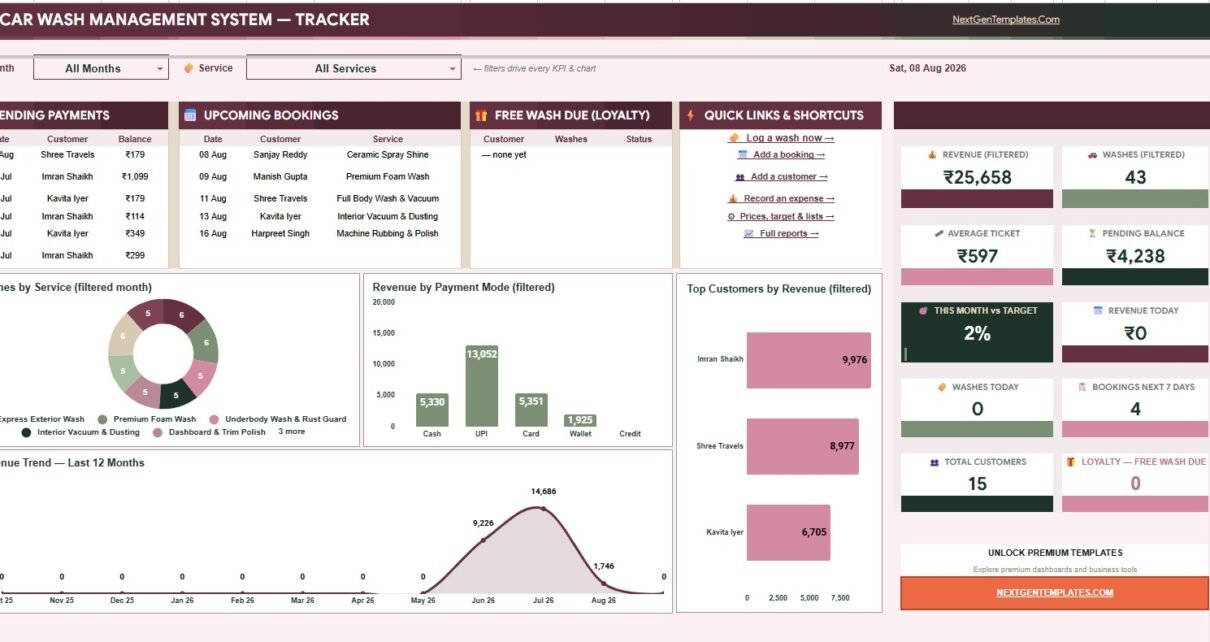
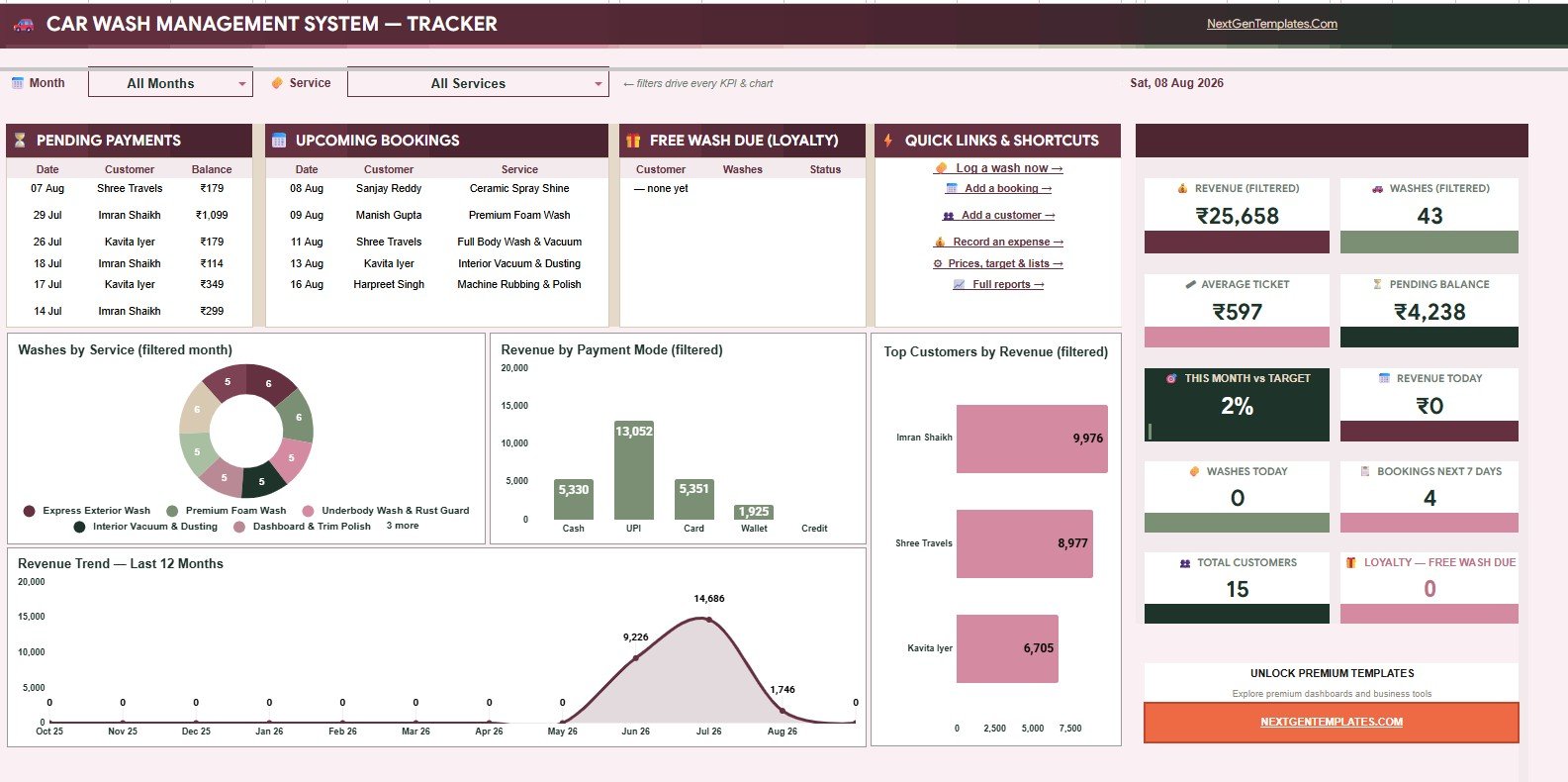
The Overview Page is the owner view. It shows Revenue Filtered, Washes Filtered, Average Ticket, Pending Balance, This Month vs Target, Revenue Today, Washes Today, Bookings Next 7 Days, Total Customers, and Loyalty Free Wash Due.Car Wash Management System Tracker in Google Sheets
Washes by Service: This chart shows which services are being sold most often. It helps you see whether basic washes, premium packages, or detailing services are driving volume.Car Wash Management System Tracker in Google Sheets
Revenue by Payment Mode: This view breaks revenue into cash, card, online, or any custom payment modes from your settings. It helps reconcile daily payments and understand customer payment habits.
Top Customers by Revenue: This chart highlights high-value customers based on total revenue. Use it for loyalty follow-up, repeat service offers, and VIP customer care.
Revenue Trend by Month: This view shows whether monthly revenue is rising, flat, or declining. It is useful for comparing seasonal traffic, promotions, or pricing changes.Car Wash Management System Tracker in Google Sheets
Pending Payments by Customer: This chart identifies customers with unpaid balances. It gives the owner a quick reminder list for follow-up before balances become difficult to collect.
Upcoming Bookings by Customer: This chart shows which customers are booked next. It helps the team plan staffing, time slots, and service preparation.
Wash Log
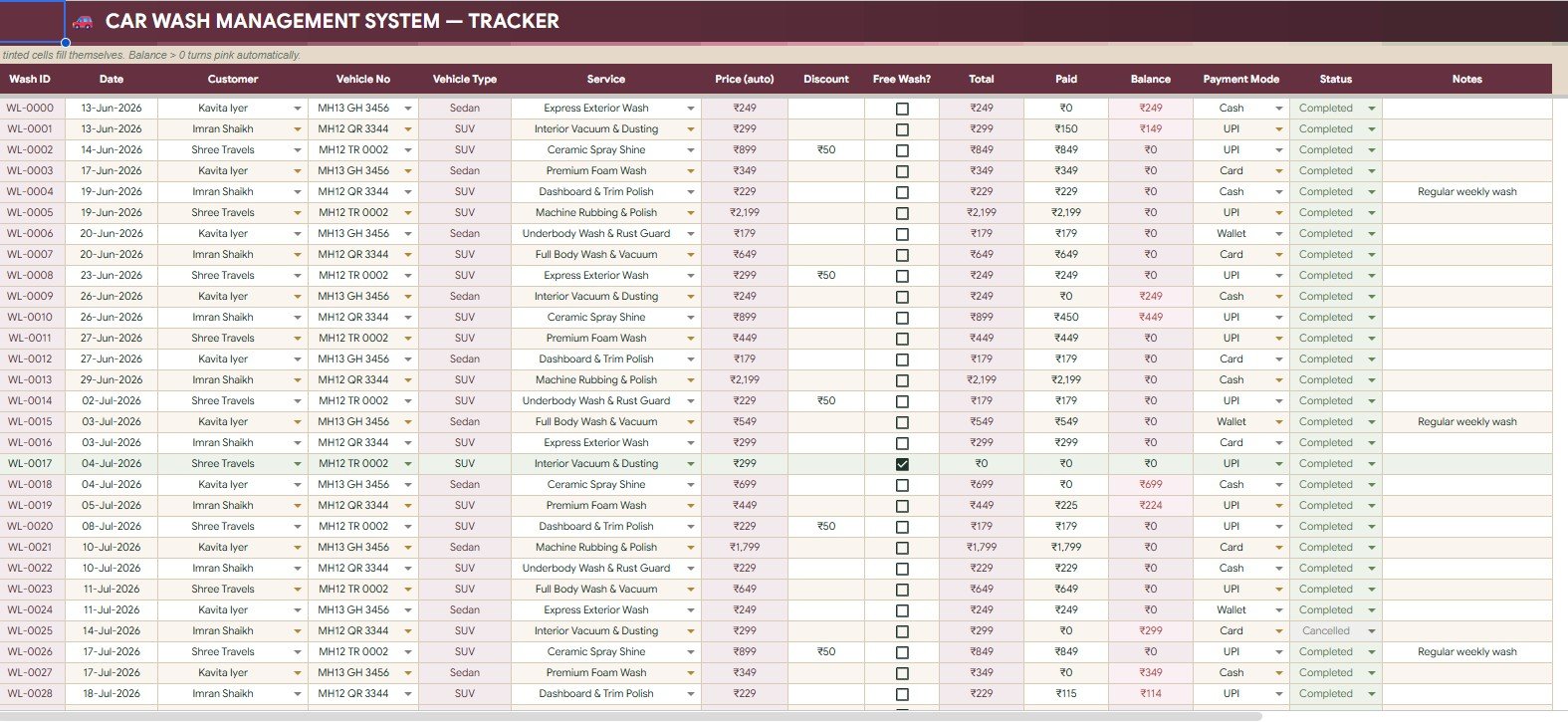
The Wash Log tab is where completed service activity becomes structured business data. It analyzes Washes by Customer, Washes by Vehicle Type, Service by Customer, Price by Service, Discount by Wash, Free Wash by Customer, Total by Wash ID, Paid by Payment Mode, Balance by Customer, and Status by Wash ID.
Customers

The Customers tab tracks Total Washes by Customer, Total Spent by Customer, Outstanding by Customer, Loyalty Count by Customer, Next Wash Free by Customer, Customer Type by Customer, Vehicle Type by Customer, Brand and Model by Customer, and Last Visit by Customer.
Bookings
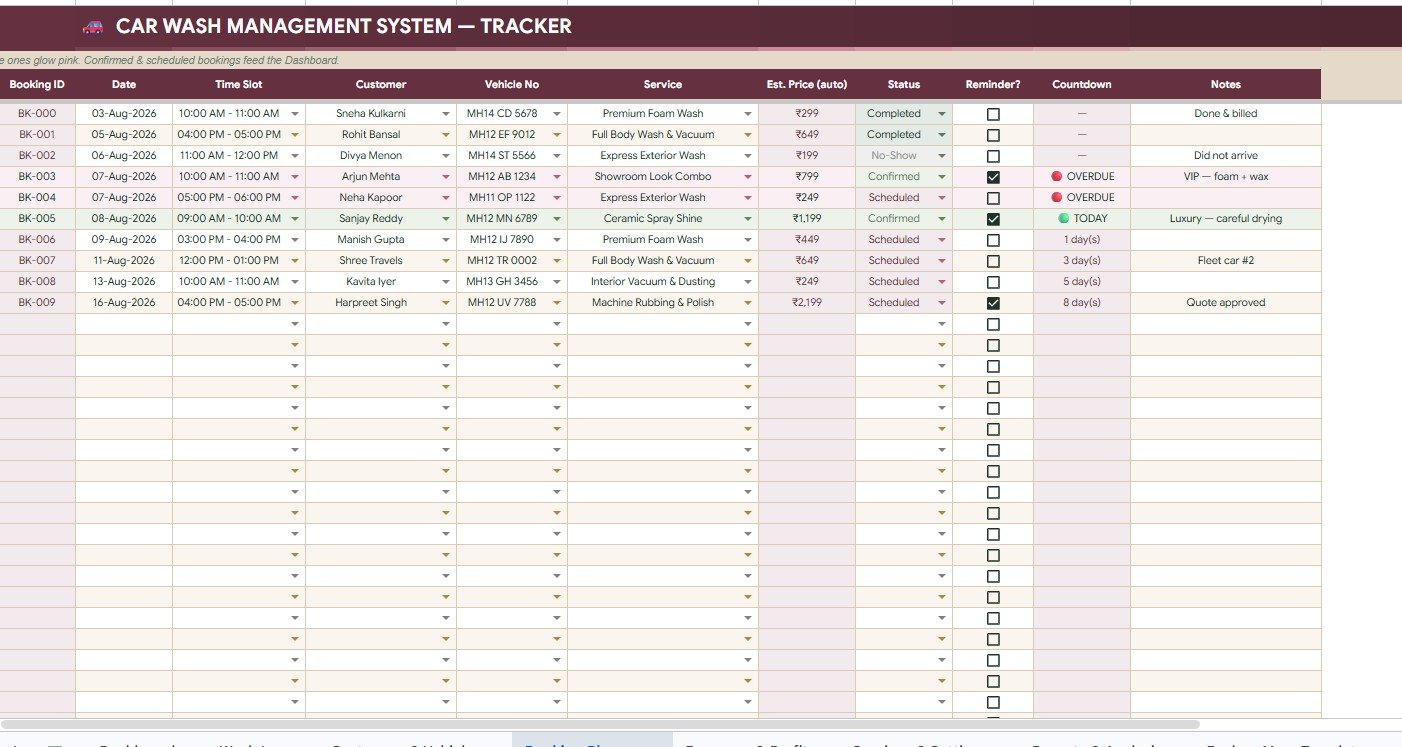
The Bookings tab includes Bookings by Date, Time Slot by Booking, Service by Customer, Estimated Price by Booking, Booking Status by Booking, Reminder by Booking, Countdown by Booking, and Notes by Customer.Car Wash Management System Tracker in Google Sheets
Expenses and P and L
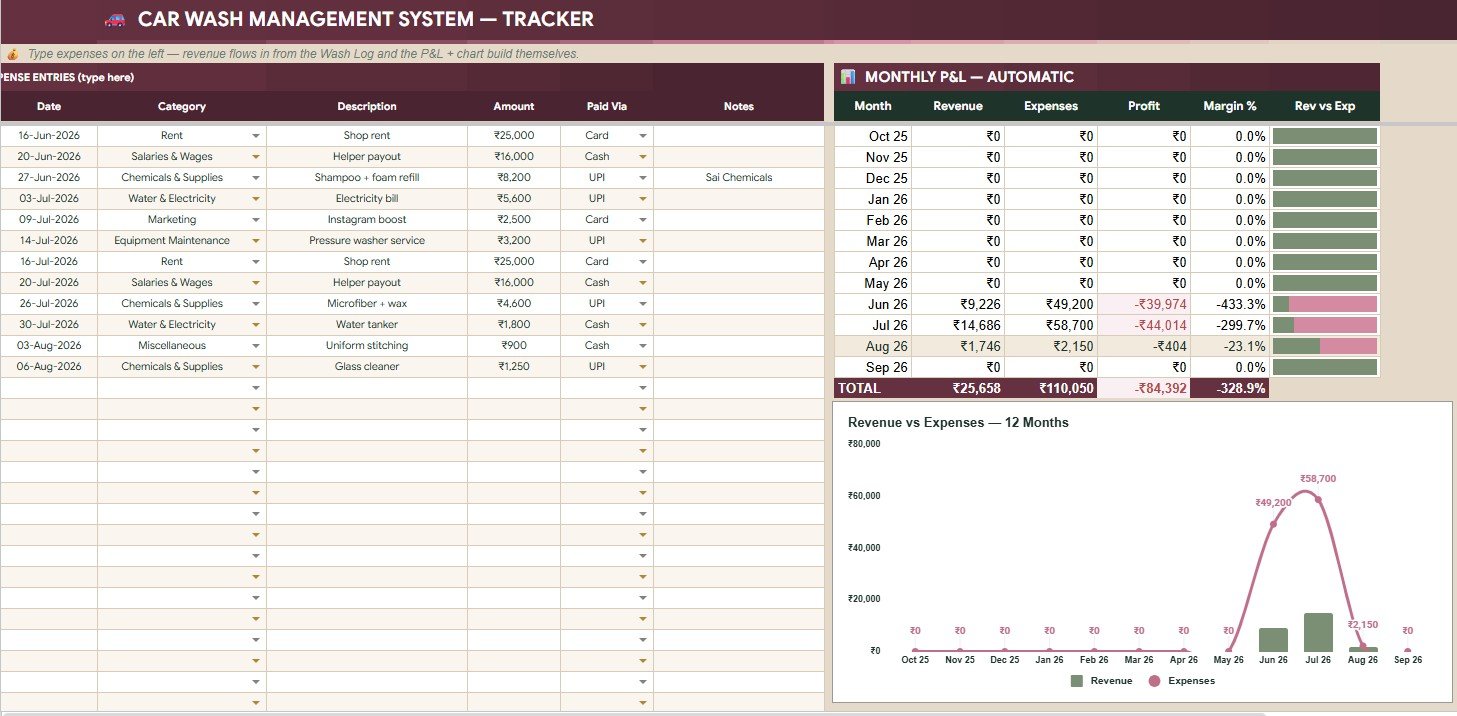
The Expenses and P and L tab analyzes Expense Amount by Category, Expense Amount by Paid Via, Revenue by Month, Expenses by Month, Profit by Month, Margin Percent by Month, and Revenue vs Expenses by Month.
Settings and Dropdown Lists

The Settings and Dropdown Lists tab stores Business Name by Settings, Currency Symbol by Settings, Loyalty Free Wash Rule by Settings, Monthly Revenue Target by Settings, Price by Service and Vehicle Type, Minutes by Service, Vehicle Types by Dropdown List, Payment Modes by Dropdown List, Wash Status by Dropdown List, Booking Status by Dropdown List, Time Slots by Dropdown List, Expense Categories by Dropdown List, and Customer Types by Dropdown List.Car Wash Management System Tracker in Google Sheets
Reports and Analysis

The Reports and Analysis tab includes Washes by Month, Revenue by Month, Expenses by Month, Profit by Month, Average Ticket by Month, Margin Percent by Month, Revenue vs Expenses by Month, Washes by Day of Week, Revenue by Service, Revenue by Payment Mode, Top Customers by Revenue, and This Month vs Last Month by Metric.Car Wash Management System Tracker in Google Sheets
Car Wash Management System Tracker in Google Sheets vs. Microsoft Excel Workbook vs. Paid CRM/SaaS – Feature Comparison
| Feature | This Google Sheets tracker | Microsoft Excel workbook | Paid CRM/SaaS |
|---|---|---|---|
| Cost | One-time template purchase | One-time workbook, with possible Microsoft licensing | Monthly subscription |
| Platform | Google Sheets and Google Drive | Excel desktop or Microsoft 365 | Vendor cloud platform |
| Setup time | Copy the file and update settings | Download and configure manually | Account setup and onboarding |
| Real-time team collaboration | Easy for small teams using Google Drive sharing | Works best with OneDrive or SharePoint | Usually strong, but priced by users or modules |
| Mobile access | Google Sheets mobile app | Excel mobile app | Vendor app or responsive portal |
| Customizable fields | Editable settings and dropdown lists | Editable workbook, depending on protection | May require admin setup or higher plan |
| Share with link | Simple through Google Drive permissions | Possible through Microsoft cloud storage | Usually account-based |
| Year-1 cost at 5 users | Template price only | Workbook plus licensing if needed | Can become much higher |
| Car wash loyalty tracking | Included | Custom build needed unless included | May require a loyalty module |
| Expense and P&L view | Included | Custom build needed unless included | May require accounting integration |
Who Should Use This Template
This template is a good fit for independent car wash owners, mobile detailing teams, auto spa counters, driveway wash businesses, and small service businesses that want a shared tracker.
It is also useful for businesses already using Google Drive. Google explains that Drive files can be shared with permission levels such as viewer, commenter, and editor, which makes a Google Sheets tracker practical for controlled team access. See Google’s official guidance here: Share files from Google Drive.
Real-World Use Cases
Daily counter operations
A cashier records each wash, selected service, payment mode, paid amount, balance, and wash status. At closing time, the owner checks daily revenue and payment mode totals.
Mobile detailing schedule control
A mobile team uses the Bookings tab to plan appointments, estimated service price, notes, reminders, and countdown.
Repeat customer loyalty
The owner reviews loyalty count and Next Wash Free by Customer so repeat customers can be rewarded at the right time.
Monthly profit review
At month end, the manager compares revenue, expenses, profit, margin percent, and this month versus last month.Car Wash Management System Tracker in Google Sheets
Advantages of Car Wash Management System Tracker in Google Sheets
The biggest advantage is practical visibility. Instead of separating bookings, customer history, unpaid balances, and expenses into different notebooks or files, this tracker keeps them inside one Google Sheets workbook.
It also has low setup friction. You update the settings, enter services and prices, then start recording business activity. The Overview and Reports tabs give the owner quick access to revenue trends, average ticket, top customers, pending payments, service mix, and monthly profit.
Opportunities for Improvement
This template is intentionally spreadsheet-based, so it does not include payment gateway integration, SMS automation, biometric attendance, barcode scanning, or multi-location role controls. If your operation requires those features, the next step may be a custom Google Apps Script web app, a mini SaaS tool, or a full car wash management platform.
Another improvement opportunity is a video walkthrough. No YouTube URL was provided for this listing, so the current draft should not include a video embed or VideoObject schema. Once a demo video is available, add it near the dashboard explanation section.Car Wash Management System Tracker in Google Sheets
Best Practices
- Update settings before entering daily records.
- Use consistent customer names to avoid duplicates.
- Record payment mode and paid amount on the same day.
- Review pending balances every week.
- Use booking status consistently so the next 7 days view stays accurate.
- Set a realistic monthly revenue target.
- Limit edit access to people who should change the data.
Explore Relevant Templates
For more business templates, browse Google Sheets templates and Google Sheets trackers on NextGenTemplates. Related tools include Customer Complaint Tracker in Google Sheets, Customer Feedback Tracker in Google Sheets, Customer Service Request Tracker in Google Sheets, Weekly Expense Tracker in Google Sheets, and Equipment Maintenance Log Tracker in Google Sheets.
Prefer to learn the skills behind a tracker like this? The NextGenTemplates Academy learning paths walk through them step by step with practice files.
Get the Car Wash Management System Tracker in Google Sheets
Frequently Asked Questions
What is the Car Wash Management System Tracker in Google Sheets?
It is a ready-to-use Google Sheets tracker for managing washes, customers, bookings, payments, loyalty, expenses, profit, and reports for a car wash or detailing business.
How many pages are included?
The template includes 7 main sheet tabs: Overview, Wash Log, Customers, Bookings, Expenses and P and L, Settings and Dropdown Lists, and Reports and Analysis.
Can I customize the services and prices?
Yes. The Settings and Dropdown Lists tab includes service and vehicle type pricing, plus dropdown lists for vehicle types, payment modes, statuses, time slots, expense categories, and customer types.
Can I use this for a mobile detailing business?
Yes. The booking, customer, service, vehicle, payment, and expense sections are suitable for both fixed-location car washes and mobile detailing teams.
Does it process payments?
No. It tracks payment mode, paid amount, balance, and status, but it does not connect to a payment gateway or process transactions.
Does it include a video tutorial?
No video URL was provided for this draft. Add a YouTube embed later if a walkthrough video is produced.
About the Author
Built by PK – Microsoft Certified Professional with 15+ years of Excel, Google Sheets, and Power BI experience. Founder of NextGenTemplates, reaching 300K+ subscribers across YouTube channels. Every template is hand-built and tested before release.
Conclusion
The Car Wash Management System Tracker in Google Sheets gives a small car wash business a practical way to manage daily operations and monthly reporting in one place. It covers the work that matters most: washes, customers, bookings, payment balances, loyalty, expenses, revenue, profit, and trends. For owners who want better control without starting with expensive software, this tracker is a clean first step.Car Wash Management System Tracker in Google Sheets