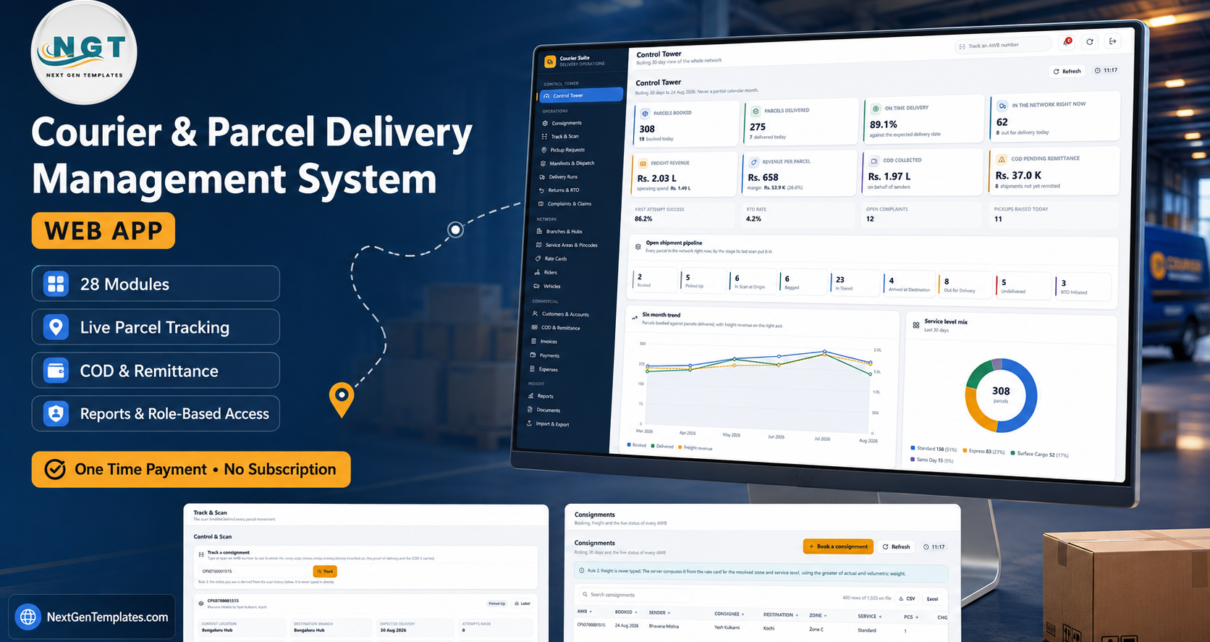
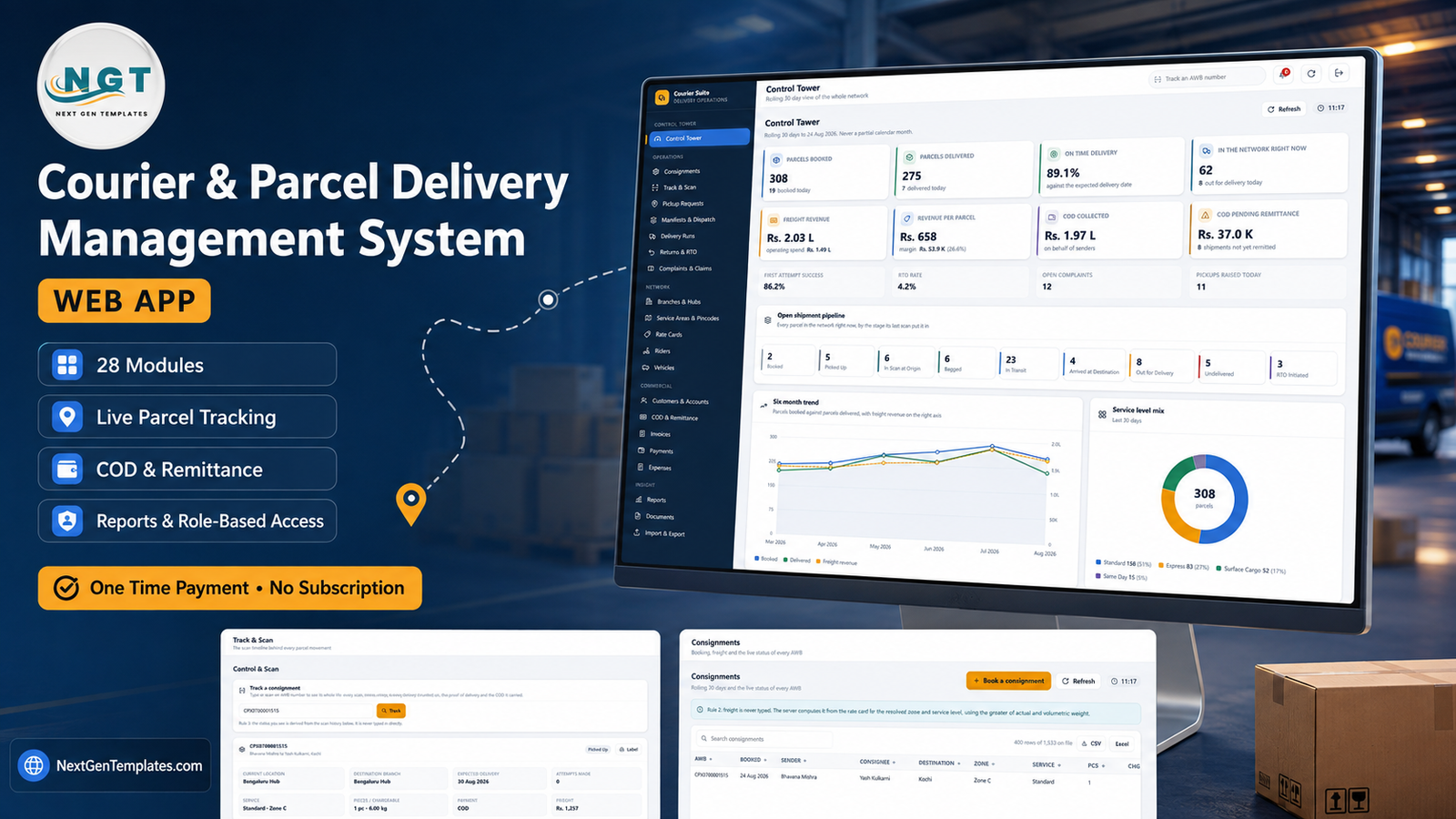
Most small and mid-sized courier companies run on three disconnected things: a booking register, a WhatsApp group for the riders, and a COD notebook that only one person understands. The Courier & Parcel Delivery Management System Web App replaces all three with one Google Apps Script application that lives in your own Google account. It ships with 28 modules, 17 operating reports, 6 permission roles and 28 database sheets seeded with 13,384 rows – 1,533 consignments, 6,379 tracking events, 1,806 delivery attempts, 223 manifests and 207 COD remittances – so the dashboard you open on day one already shows 308 parcels booked, 275 delivered, 89.1% on time and Rs. 11.81 L of lifetime COD that reconciles to the rupee.
Courier & Parcel Delivery Management System Web App
This walkthrough covers what each module actually does, where the product is strong, and – just as importantly – what it deliberately does not do.

🚀 Try the Live Demo Before You Buy
We have deployed this web app in our own Google account so you can test every page, every role, every report and the freight calculator – with real sample data – before purchasing. No signup, no email required.
🔑 Test Login Credentials
Sign in as admin to reach every module, then sign back in as hub.supervisor to see the role separation for yourself – every freight, yield, revenue and margin figure is stripped from that payload on the server, so it cannot be recovered by editing the page in a browser. All eight seeded accounts are below.
💡 These credentials are public on purpose. They are the seeded logins of a shared demonstration instance that resets – not of a customer’s deployment. After purchase you get the full source code plus the user manual, so you can deploy your own private instance in your own Google account in under 15 minutes.
Get the Courier & Parcel Delivery Management System Web App
Key Features of the Courier & Parcel Delivery Management System Web App
- A Control Tower that reconciles. Eight headline cards – parcels booked, parcels delivered, on-time delivery, parcels in the network right now, freight revenue against operating spend, revenue per parcel, COD collected, COD pending remittance – plus first-attempt success, RTO rate, open complaints and pickups raised today.
- A nine-stage open shipment pipeline. Booked, Picked Up, In Scan at Origin, Bagged, In Transit, Arrived at Destination, Out for Delivery, Undelivered, RTO Initiated. Every parcel in the network sits in exactly one bucket, decided by its last scan.
- Freight computed from a real rate card. 96 zone-by-service-level rows across Same Day, Express, Standard and Surface Cargo, split by Retail, Corporate, E-commerce and Franchise customer categories, each carrying base kg, base rate, per-extra-500g, fuel percentage, COD fee percentage, COD minimum, docket charge, minimum kg and a divisor for volumetric weight.
- Six roles, with money masked on the server. Not a CSS trick – the Hub Supervisor payload never contains the numbers.
- Seventeen reports across Operations, Network and Money, every one honouring the date range, branch and zone filters, printable on A4 and exportable to CSV or Excel.
- Three print sizes. 3 inch thermal roll, 4 inch thermal label (default) and A4, honoured by the consignment note, pickup slip, manifest loading sheet, proof of delivery, COD remittance advice, tax invoice, payment receipt and every report. Courier & Parcel Delivery Management System Web App
Module-by-Module Walkthrough

Control Tower
A rolling 30-day view of the whole network – deliberately never a partial calendar month. Under the cards sit a six-month trend of parcels booked against parcels delivered with freight revenue on the right axis, a service level mix donut (Standard 158 at 51%, Express 83 at 27%, Surface Cargo 52 at 17%, Same Day 15 at 5%), a branch performance bar chart and a rider load table showing what each rider delivered, what is still on the round and how much COD they are carrying.
Consignments and Track & Scan
Consignments is the booking register – AWB, booked date, sender, consignee, destination, zone, service, pieces and charges, with column filters and CSV/Excel export. Track & Scan is where the parcel actually moves.
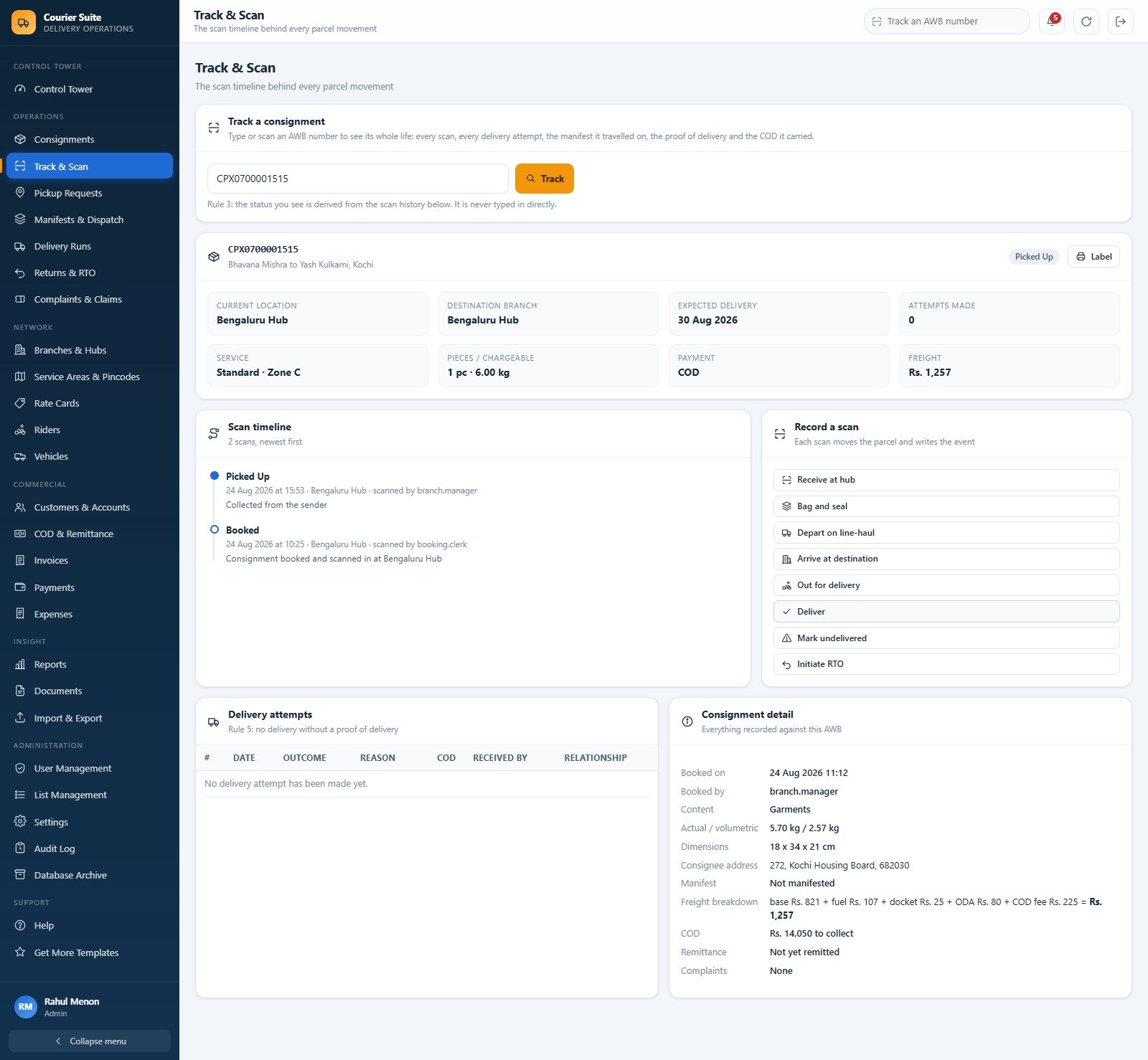
Enter an AWB and you get its current location, destination branch, expected delivery date, attempts made, service and zone, chargeable weight, payment mode and freight – then the full scan timeline, the delivery attempts with outcome and receiver, and a consignment detail panel that breaks the freight down line by line: base Rs. 821 + fuel Rs. 107 + docket Rs. 25 + ODA Rs. 80 + COD fee Rs. 225 = Rs. 1,257. Eight scan actions run down the right: receive at hub, bag and seal, depart on line-haul, arrive at destination, out for delivery, deliver, mark undelivered, initiate RTO.
Pickup Requests, Manifests & Dispatch, Delivery Runs
Pickup Requests handles doorstep collections – reference, customer, pincode, time slot, expected and collected counts, assigned rider and status – and converts straight into a booking. Manifests & Dispatch bags and seals parcels onto pickup runs and line-haul runs, each with a route, vehicle, bag count, piece count, weight and a seal number, moving through Dispatched, Arrived and Closed.

Delivery Runs is the attempt log: date, time, AWB, attempt number, rider, branch, outcome, reason, COD collected, COD mode and who received it. Failure reasons such as “Office closed” and “Address incorrect” sit alongside the successes, which is what makes the first-attempt success figure of 86.2% trustworthy.
Rate Cards and the freight calculator
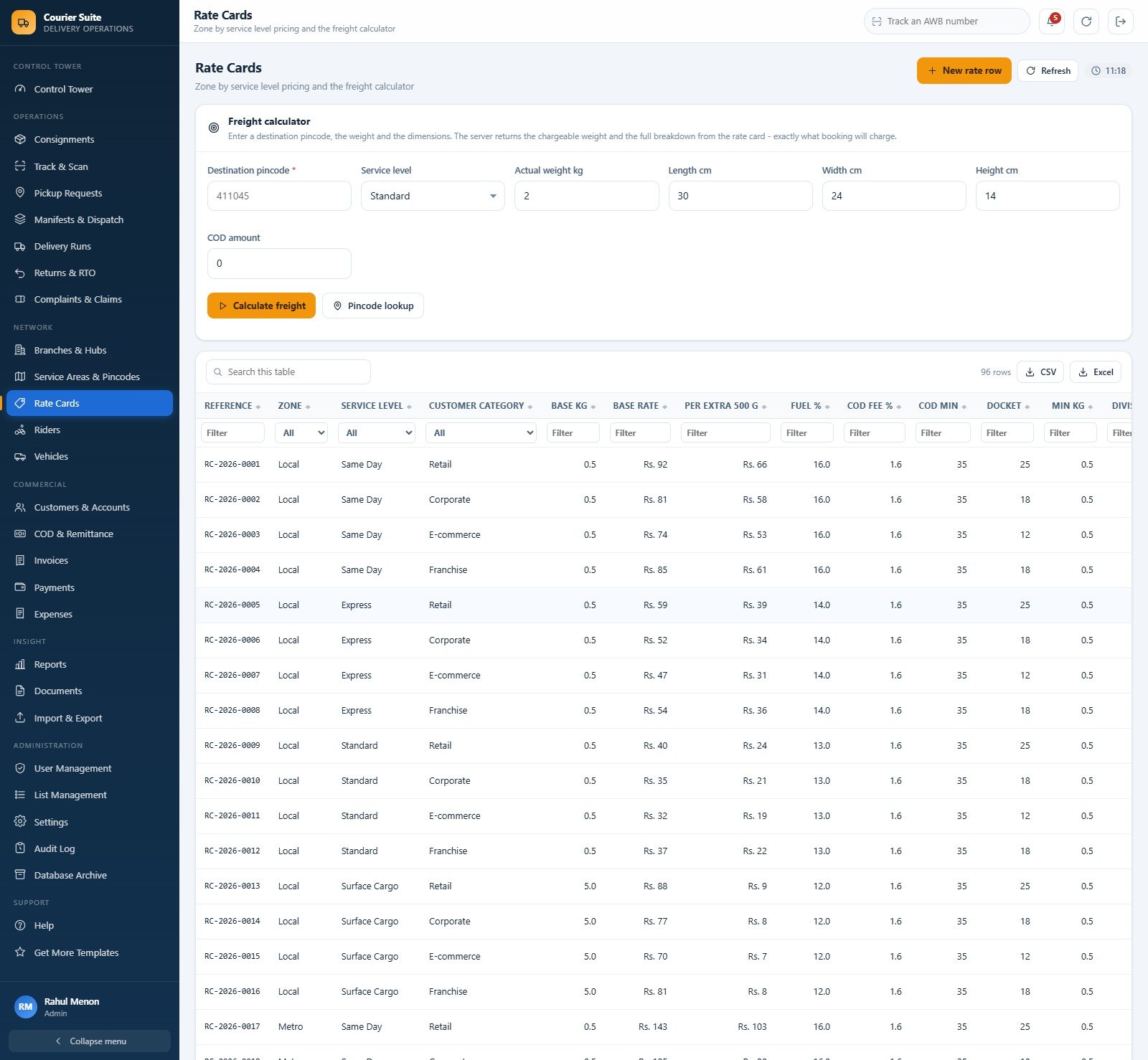
Above the 96-row table sits a calculator: destination pincode, service level, actual weight, length, width, height and COD amount. Press Calculate freight and the server returns the chargeable weight and the same breakdown booking will charge. There is a pincode lookup beside it for the 140 seeded service areas, each carrying its city, state, zone, servicing branch, service type, whether COD is allowed and whether it is an ODA location. Courier & Parcel Delivery Management System Web App
COD & Remittance
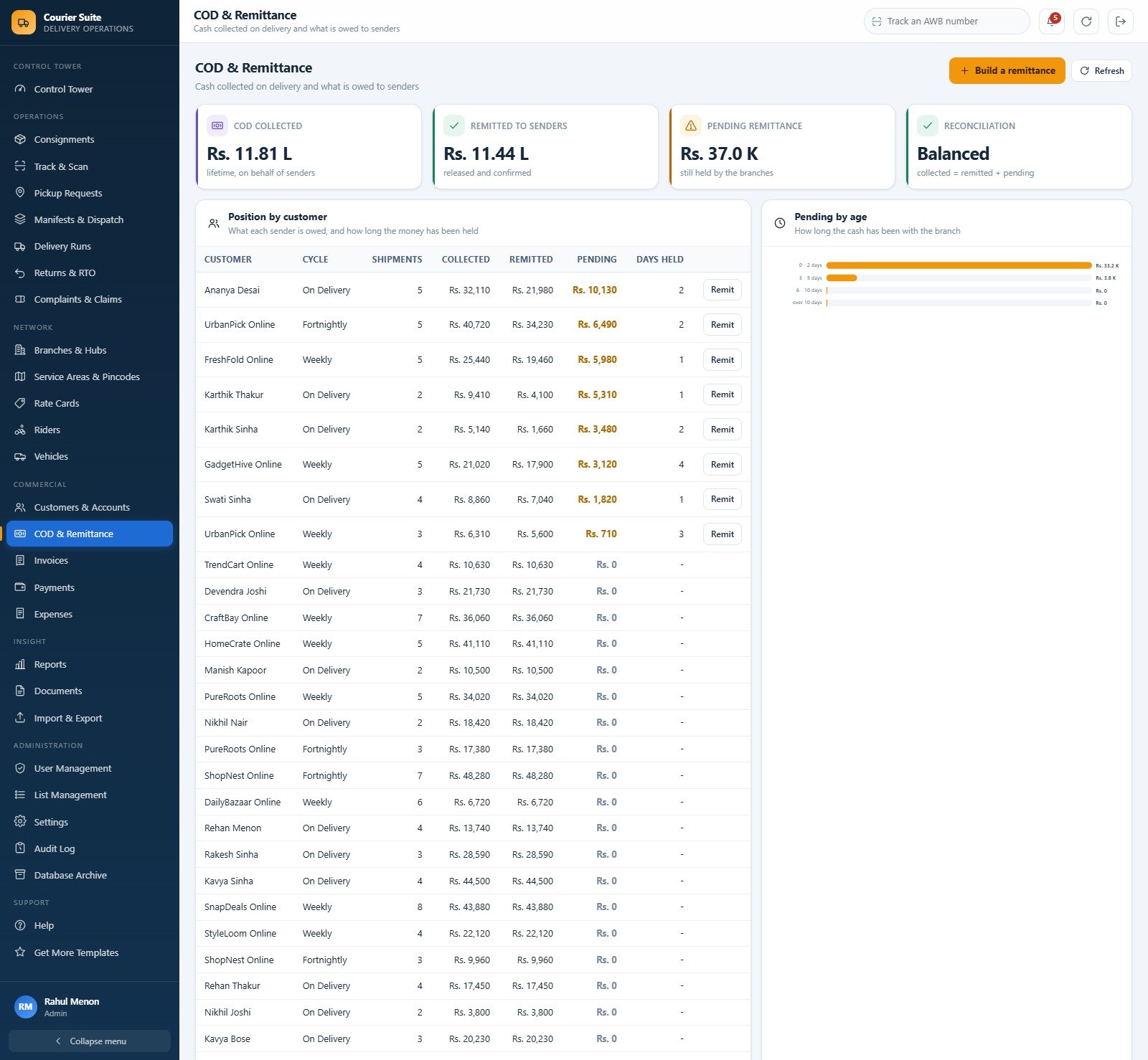
This is the module that pays for the product. Four cards – COD collected Rs. 11.81 L lifetime, remitted to senders Rs. 11.44 L, pending remittance Rs. 37.0 K, and a Reconciliation card reading Balanced because collected equals remitted plus pending. Below, Position by customer lists every sender with their remittance cycle (On Delivery, Weekly, Fortnightly), shipments, collected, remitted, pending and days held, with a Remit button on each outstanding row. A Pending by age chart buckets the money into 0-2 days, 3-5, 6-10 and over 10.
Reports, Users and Settings
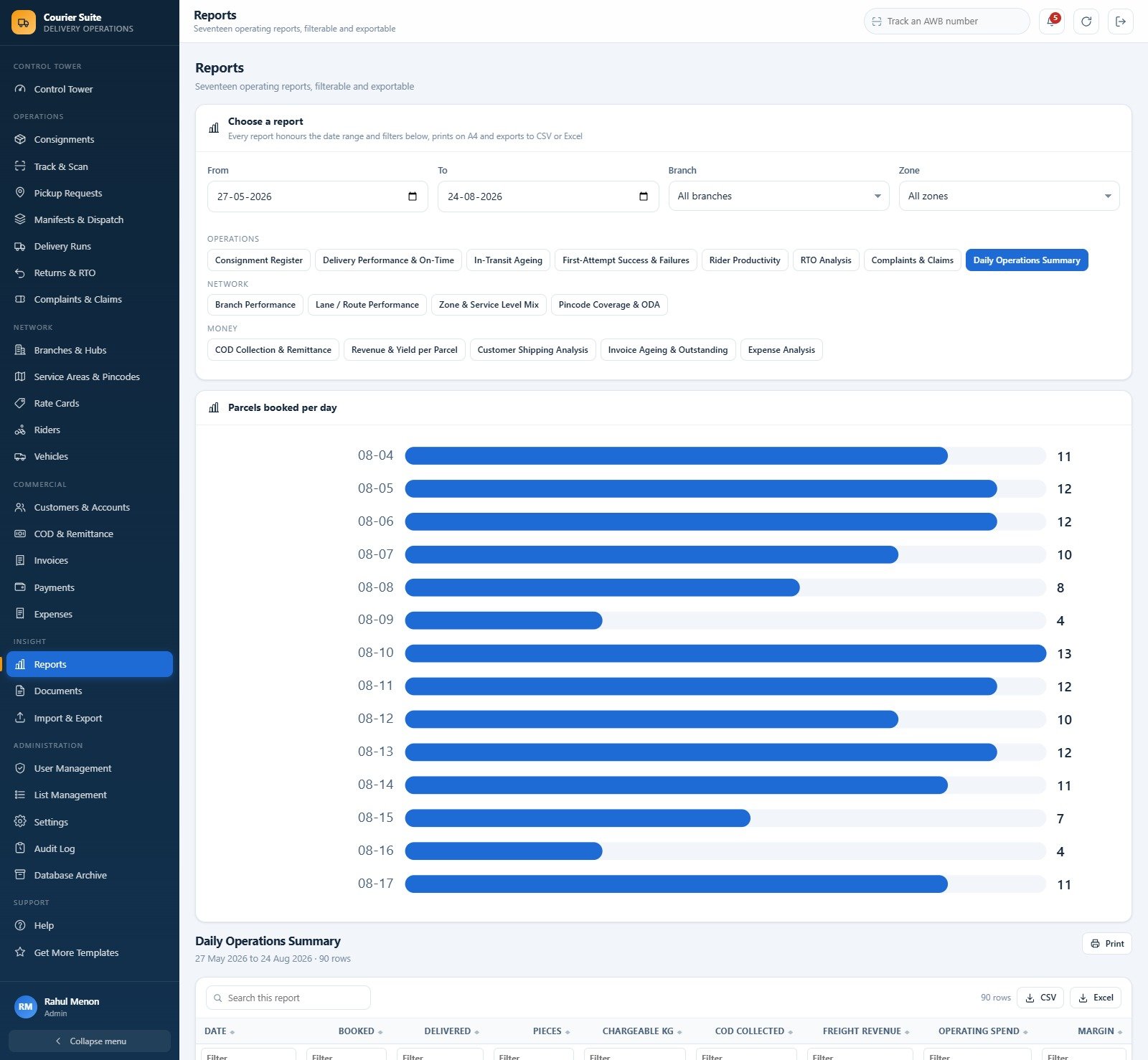
Seventeen reports: Consignment Register, Delivery Performance & On-Time, In-Transit Ageing, First-Attempt Success & Failures, Rider Productivity, RTO Analysis, Complaints & Claims and Daily Operations Summary under Operations; Branch Performance, Lane / Route Performance, Zone & Service Level Mix and Pincode Coverage & ODA under Network; COD Collection & Remittance, Revenue & Yield per Parcel, Customer Shipping Analysis, Invoice Ageing & Outstanding and Expense Analysis under Money. User Management holds the accounts and a Roles & permissions tab where an administrator ticks the modules each role may open, the action rights it holds and whether it may see money. Settings covers company details, finance (currency code, currency symbol, GST percentage, credit days, COD handling fee and its floor, remittance cycle, invoice due days), operations, printing and email. List Management drives all 194 dropdown values used across the product, and the Audit Log records who changed what. Courier & Parcel Delivery Management System Web App
Courier & Parcel Delivery Management System Web App vs. Spreadsheets vs. Paid Courier SaaS – Feature Comparison
| Point of comparison | This web app | A manual Google Sheets / Excel register | Paid courier SaaS |
|---|---|---|---|
| Cost | One payment of $39.99 | Free, plus your maintenance time | $40-$120 per user per month, often plus a per-shipment fee |
| Platform | Google Apps Script + Google Sheets, in your Google account | A spreadsheet file | The vendor’s cloud |
| Setup time | About 15 minutes | Immediate, but you build every formula | Days to weeks with onboarding |
| Real-time team collaboration | Yes, with 6 permission roles | Shared editing, no roles | Yes |
| Mobile access | Yes, responsive browser, no install | Awkward on a phone | Yes, usually a native app |
| Customizable fields | Yes, via List Management | Yes, by hand | Only what the vendor exposes |
| Share with link | Yes, one web app URL | Yes, but everyone sees everything | Login accounts only |
| Year-1 cost at 5 users | $39.99, once | $0 plus maintenance time | $2,400-$7,200 |
| Zone rate card and freight engine | 96 rows, volumetric weight, fuel, docket, ODA, COD fee | Lookup tables you build yourself | Yes, usually with carrier rate shopping |
| Carrier API, postage purchase, GPS tracking | No – none of these | No | Yes, that is what you are paying for |
| Role-level money masking | Yes, enforced on the server | No | Sometimes, at a higher tier |
| Who owns the data and the code | You – both in your Google Drive | You | The vendor |
Who Should Use This Template
A regional courier or last-mile company running a handful of branches and hubs. A franchise network booking at the counter that needs branch-scoped visibility without letting every branch see every branch’s money. A third-party logistics operator handling e-commerce COD volume where remittance discipline is the whole business. And any operator whose bookings, manifests and COD currently live in three unconnected spreadsheets.
It is the wrong tool if you need carrier integration. This system does not connect to any carrier API. It does not buy postage, it does not print carrier-compliant shipping labels for FedEx, UPS, DHL, India Post, Delhivery or anyone else, and it does no rate shopping. There is no real-time GPS tracking and it ingests no carrier scan events – every status here is entered by your own staff from your own scans. It is also not accounting software, and it files no GST returns, e-invoices or e-way bills; the GSTIN you enter is printed on documents and nothing more. There is no customs or international shipping documentation and no dangerous-goods handling. If any of that is essential, buy a carrier integration platform. Courier & Parcel Delivery Management System Web App
Real-World Use Cases
The counter. A booking clerk raises a pickup request, assigns a rider, converts the collection into a consignment, and the destination pincode resolves the zone while the rate card computes the freight. She prints a 4 inch label and never types a price – so the day’s revenue is right without anyone auditing it. Courier & Parcel Delivery Management System Web App
The night sort. A hub supervisor scans inbound, bags and seals, builds a line-haul manifest with a seal number and dispatches. He sees every parcel and every rider and no freight or margin figure at all – which is exactly what the branch owner wanted when the sort was contracted out.Courier & Parcel Delivery Management System Web App
The accounts desk. Rs. 37.0 K is held across eight shipments, the oldest for four days. Accounts builds the remittance advice for a weekly-cycle e-commerce sender, releases it, and the pending figure clears itself because pending is always collected minus remitted.
Advantages of the Courier & Parcel Delivery Management System Web App
- The numbers cannot drift. Five rules are enforced on the server, not merely described: the AWB is the spine, freight is never typed, a parcel only moves on a scan, COD money belongs to the sender, and no delivery happens without a proof of delivery.
- You own everything. The script, the spreadsheet and the data sit in your own Google Drive. No vendor lock-in and no per-seat licence.
- It stays fast. The Database Archive copies the live database out first, registers the copy, then trims only closed consignments and their children. Masters and open shipments never move, and departed freight rolls into a brought-forward column so lifetime figures hold.
- Bulk loading is safe. The four-step import wizard validates before it commits, and eight modules export straight to CSV or Excel.
- Documented. A full user manual PDF ships with the source, and an in-app Help page states the five rules, walks a day in the system and answers the questions that actually come up.
Opportunities for Improvement
Two honest notes from reviewing the shipped build. First, the seeded demonstration data is Indian – INR figures, lakh notation, pincodes and GSTIN. Nothing in the product hard-codes it: Settings > Finance carries the currency code and the currency symbol that is prefixed to every money figure, so a European or US operator changes two fields. But you will be re-typing the rate card and the service areas regardless, so budget an afternoon for localisation.
Second, in the screenshot set that ships with this product, twelve of the twenty-nine captures render the wide free-text column of a list view (sender, customer, description, area) with a large blank block, so only one row is legible. The same tables render correctly in other captures and in the live demo, so this reads as an artefact of how those screenshots were taken rather than a fault in the app – but check the affected list views in the demo yourself before buying, and we have left those images out of the product gallery.
Beyond that, the obvious extensions are a customer-facing tracking page, an SMS or WhatsApp notification hook on the delivery scan, and a rider mobile view stripped down to today’s round. All three are straightforward additions once you own the code.
Best Practices
- Change the admin password before anyone else signs in, then delete or deactivate the seven other seeded accounts you do not need.
- Load the rate card and the service areas before you book anything. Freight is derived, so an empty rate card produces empty revenue.
- Set the roles deliberately. Decide early which roles may see money; that is the single decision that most changes how the system feels to your team.
- Scan honestly. The dashboard is only as good as the scan discipline behind it – the pipeline counts, the on-time percentage and the first-attempt figure all come from the same events.
- Remit on a cycle, not on request. Set each customer’s remittance cycle and work the Pending by age chart from the oldest bucket down. Courier & Parcel Delivery Management System Web App
- Publish a new version after every code edit. Apps Script keeps serving the last deployed version – Deploy > Manage deployments > Edit > Version: New version > Deploy. The URL stays the same. The official Google Apps Script web apps documentation covers the deployment model in detail.
- Archive before it hurts. Plan an archive once the tracking event sheet starts to feel heavy, not after.Courier & Parcel Delivery Management System Web App
If you are deploying an Apps Script web app for the first time, this ten-minute walkthrough covers the whole process:
Explore Relevant Templates
- Courier & Parcel Delivery Management System Web App – the product this walkthrough covers.
- Logistics Management System Web App – the freight-forwarding sibling, built around shipments and lane costing rather than parcels.
- Cold Storage Management System Web App – if you run warehousing behind the delivery network.
- Concert & Ticketing Management System Web App – the same architecture applied to venue and event operations.
- Courier Service KPI Dashboard in Google Sheets and Logistics Dashboard in Google Sheets – monthly analytics over the same numbers.
- Browse the full Web Apps category.
Interested in the spreadsheet skills that sit underneath systems like this? The NextGenTemplates Academy learning paths teach them step by step, with practice files.
Get the Courier & Parcel Delivery Management System Web App
Frequently Asked Questions
Does this connect to FedEx, UPS, DHL, India Post or any other carrier?
No. There is no carrier API integration of any kind. It does not buy postage, it does not print carrier-compliant labels, it does no rate shopping, it provides no real-time GPS tracking and it pulls no carrier scan events. Every status in the system is entered by your own staff.
Can I try it before buying?
Yes – the live demo above is a fully seeded deployment with all eight accounts open, so you can test every module and every role first.
What exactly do I download?
Code.cs.txt (the Apps Script back end), Index.txt (the front end) and a full user manual PDF. Nothing else to install.
Do I need Google Workspace?
No, a free personal Google account is enough.
Can I change the currency from Indian Rupees?
Yes. Settings > Finance holds the currency code and the currency symbol prefixed to every money figure, along with the GST rate, credit days and COD handling fee.
How many people can use it?
There is no seat limit and no per-user charge. Create as many accounts as you need and re-point the six roles at whatever modules and rights suit your operation.
What happens when the data gets big?
Use the Database Archive. It copies the whole database out first, registers the copy, then trims only closed consignments and their child rows.
About the Author
Built by PK – Microsoft Certified Professional with 15+ years of Excel, Google Sheets, and Power BI experience. Founder of NextGenTemplates, reaching 300K+ subscribers across YouTube channels. Every template is hand-built and tested before release.
Conclusion
The Courier & Parcel Delivery Management System Web App is not trying to be a carrier integration platform, and it says so plainly. What it is, is a complete internal operations system for a courier company that wants its bookings, scans, manifests, deliveries, COD and invoicing to agree with each other – for one payment, in its own Google account, with the source code included. The five server-enforced rules are what make the numbers hold, and the role model is what makes it safe to hand to a contractor running your night sort.
The fastest way to judge it is to open the live demo, sign in as admin and then as hub.supervisor, and see whether the difference between those two screens is the difference your operation needs. If it is, the full system is here.