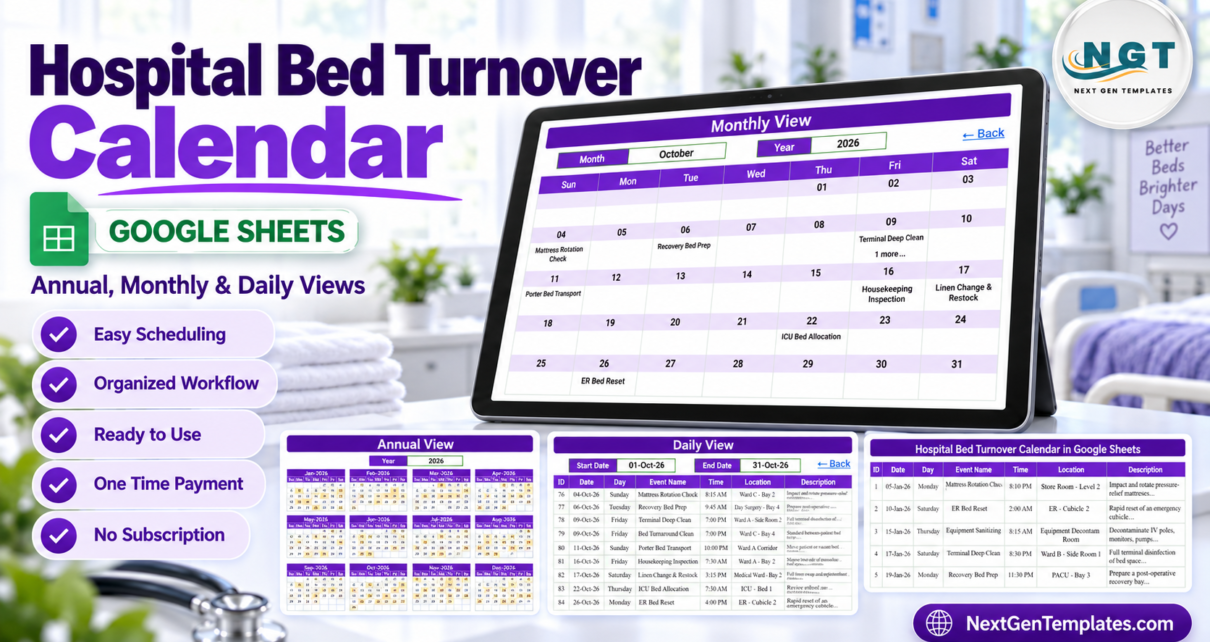
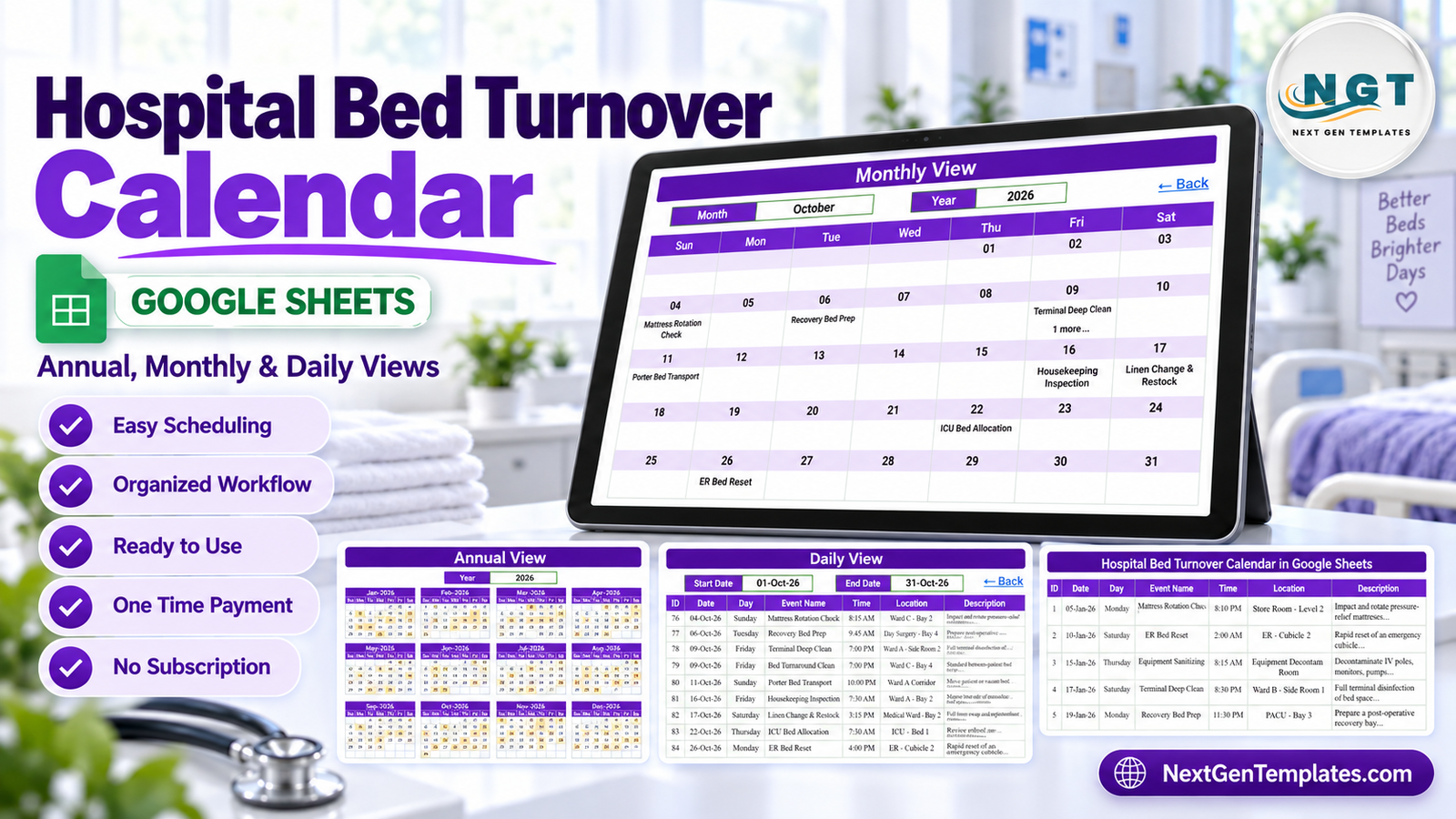
Bed-turnover coordination involves many small, time-sensitive administrative activities. A mattress rotation check may be due in one ward, a recovery bed may need preparation elsewhere, and a housekeeping inspection may be scheduled later in the week. The Hospital Bed Turnover Calendar in Google Sheets gives operations teams one editable place to plan and review these activities across annual, monthly, and daily views.
This template is intentionally focused on scheduling. It is not a hospital bed-management system, EHR, clinical decision-support tool, infection-control solution, or capacity guarantee. It does not approve admissions, discharges, isolation, clinical placement, or bed release.
What is a Hospital Bed Turnover Calendar in Google Sheets?
A hospital bed turnover calendar is an administrative schedule for recording routine events associated with preparing, cleaning, checking, moving, or maintaining beds and related spaces. This Google Sheets version combines a central event register with three calendar views. Users can enter an event once, then review it from a year, month, or selected date-range perspective.
The sample file demonstrates general operational labels including terminal deep clean, recovery bed preparation, porter bed transport, linen change and restock, housekeeping inspection, and bed-frame maintenance. These labels illustrate how the calendar can be populated; they do not prescribe a clinical or infection-control protocol.
Why administrative teams need a shared turnover schedule
When activities live in separate notebooks, emails, and shift messages, coordinators can lose the broad picture. A yearly view helps reveal busy periods. A monthly view supports near-term planning. A filtered daily table helps staff focus on the relevant date range. Keeping those perspectives connected to one event list reduces repeated schedule entry and provides a consistent point of reference.Hospital Bed Turnover Calendar in Google Sheets
A shared sheet can also make routine review easier. A supervisor can scan whether recurring maintenance or preparation events have been scheduled, while team members can use the description field for concise, non-sensitive operational notes. The value comes from visibility and disciplined data entry, not from automation of clinical decisions.
How the template is structured
Home page
The Home page provides four clear navigation buttons: Annual View, Monthly View, Daily View, and Events. This keeps the workbook easy to move through even for users who do not work in spreadsheets every day.Hospital Bed Turnover Calendar in Google Sheets
Annual View
The Annual View places all twelve months on one page. Dates containing events are highlighted, giving coordinators a quick visual check of how work is distributed across the year. It is useful for broad planning and spotting gaps before moving into detailed views.
Monthly View
The Monthly View presents one month in a familiar calendar grid. An event name appears inside its date cell, and a “more” indicator identifies dates with additional entries. This makes the view readable while still signaling that more detail is available.Hospital Bed Turnover Calendar in Google Sheets
Daily View
The Daily View uses start-date and end-date inputs to show matching events in a table. Columns include event ID, date, day, event name, time, location, and description. The ID is an internal event identifier, not a patient identifier.
Events sheet
The Events sheet is the central register behind the calendar. Each row holds the information used by the other views. Users can replace the examples with approved event names, dates, times, locations, and operational descriptions relevant to their facility.Hospital Bed Turnover Calendar in Google Sheets
How to set up the calendar
- Purchase and download the PDF guide.
- Open the Google Sheets copy link and save an editable copy in your own Drive.
- Review the sample Events rows to understand the expected fields.
- Replace example entries with authorized administrative activities.
- Use consistent event names and general locations so monthly and daily reviews are easy to scan.
- Check Annual View for coverage, Monthly View for near-term planning, and Daily View for a selected date range.
- Share the workbook only with people who need access.
Google provides controls for sharing files with specific people or through links. Administrators should follow their organization’s access policy and review the official Google Drive file-sharing guidance before collaborating.
Privacy-conscious use in a healthcare setting
The sample content contains no patient names, medical record numbers, or other person identifiers. Locations are general areas such as wards, bays, corridors, and recovery spaces. However, the Location and Description columns are free text. A user could enter sensitive information even though the template does not require it.
Use general operational wording wherever possible. Do not place patient names, MRNs, diagnoses, dates of birth, or other protected information in this calendar unless your organization has expressly approved that use, configured appropriate access controls, and confirmed the relevant legal and contractual requirements. Keep authoritative patient and clinical records in approved systems.
The template makes no HIPAA, GDPR, or other regulatory compliance claim. Compliance depends on the organization’s technology configuration, policies, agreements, user behavior, retention practices, and jurisdiction—not on a spreadsheet layout.
Useful scheduling scenarios
- Routine preparation: schedule general bed-preparation activities without recording patient identity.
- Housekeeping coordination: record planned inspections, cleaning events, and linen-related tasks as administrative reminders.
- Porter logistics: add non-clinical transport activities with a time and general location.
- Maintenance planning: plan mattress rotation, frame maintenance, or equipment checks.
- Operational review: filter a date range before a shift or team meeting.
These scenarios are scheduling examples only. Completion, verification, escalation, and release must follow the organization’s approved operational and clinical processes.
Template versus other planning options
| Option | Best suited for | Important limitation |
|---|---|---|
| Hospital Bed Turnover Calendar in Google Sheets | Editable administrative event scheduling with annual, monthly, and daily views | No EHR integration, live capacity logic, clinical workflow, or compliance certification |
| Basic paper or wall calendar | Very small teams needing an offline visual reference | Harder to filter, share remotely, or maintain one current version |
| Hospital bed-management or EHR software | Organizations requiring governed integrations and specialized workflows | Typically requires implementation, administration, training, and a larger budget |
The spreadsheet fits teams that need a focused administrative calendar. It should complement—not replace—approved hospital systems and procedures.
Benefits of a Google Sheets calendar
Google Sheets is familiar, accessible in a browser, and easy to adapt. Users can change event wording, update schedules, and collaborate without installing a specialized desktop application. The one-time-purchase template has no template subscription, although a Google account, internet connection, and any managed Workspace services are separate.
The workbook is also transparent. The Events register shows the underlying schedule in a simple table, while the visual calendar views help different users consume the same data at the level they need.
Practical governance for a shared spreadsheet
Assign a clear owner for the calendar and agree on who may add, edit, or remove events. Use consistent naming conventions so similar activities can be recognized quickly. Review old entries, duplicated events, and sharing permissions on a routine cadence. If an activity must be confirmed, documented, or audited, record that evidence in the organization’s approved operational system rather than treating a calendar entry as proof of completion.Hospital Bed Turnover Calendar in Google SheetsHospital Bed Turnover Calendar in Google Sheets
Version discipline matters as well. Ask collaborators to work in the same authorized copy, and avoid distributing unmanaged exports that can become outdated. These governance practices do not turn the spreadsheet into a regulated system, but they can make an administrative schedule more dependable and easier to review.Hospital Bed Turnover Calendar in Google SheetsHospital Bed Turnover Calendar in Google Sheets
Related templates for healthcare administration
If your team manages other administrative schedules, explore the Lab Sample Collection Calendar in Google Sheets, Medical Equipment Calibration Calendar in Google Sheets, and Operation Theatre Booking Calendar in Google Sheets. For higher-level reporting, see the Hospitals Dashboard in Google Sheets. Each is a separate product and does not automatically exchange data with this calendar.Hospital Bed Turnover Calendar in Google Sheets
Browse more practical ideas in the Google Sheets articles collection.Hospital Bed Turnover Calendar in Google Sheets
Frequently asked questions
Does this template manage live bed availability?
No. It is an administrative scheduling calendar and does not calculate, confirm, or guarantee real-time capacity or availability.Hospital Bed Turnover Calendar in Google Sheets
Is it an EHR or patient-tracking system?
No. It has no EHR integration and is not intended to store or track patient records.Hospital Bed Turnover Calendar in Google Sheets
Does the sample data contain patient identifiers?
No patient names, MRNs, or other person identifiers are present in the supplied sample rows. Because some fields are free text, users must still apply privacy-conscious data-entry and sharing practices.Hospital Bed Turnover Calendar in Google Sheets
Is the template HIPAA or GDPR compliant?
No compliance certification is claimed. Compliance depends on the user’s organizational controls, configuration, agreements, policies, and legal obligations.Hospital Bed Turnover Calendar in Google Sheets
What views are included?
The workbook includes Home, Annual View, Monthly View, Daily View, and Events sheets.
How is the file delivered?
The purchase download is a PDF containing a Google Sheets copy link. Use that link to create an editable copy in your own Google Drive.Hospital Bed Turnover Calendar in Google Sheets
Start planning administrative bed-turnover events
The Hospital Bed Turnover Calendar in Google Sheets offers a practical structure for teams that want one event register and three planning horizons. Use it to keep routine operational activities visible, apply privacy-conscious wording, and support conversations between authorized facilities and administrative colleagues.Hospital Bed Turnover Calendar in Google Sheets
View the Hospital Bed Turnover Calendar in Google Sheets and create an editable administrative schedule for your team.