Managing automotive operations without structured reporting creates confusion. Many fleet managers, automotive companies, and transport departments track data in scattered sheets. As a result, they struggle to monitor fuel cost, maintenance cost, vehicle activity, and mileage trends effectively.
Therefore, businesses need a centralized and interactive dashboard. More importantly, they need a ready-to-use system that converts raw data into powerful insights.
That is exactly where the Automotive Dashboard in Google Sheets becomes essential.
This ready-to-use dashboard helps organizations track vehicle performance, operational cost, regional analysis, and monthly trends — all in one place.
What Is the Automotive Dashboard in Google Sheets?
Click to Buy Automotive Dashboard in Google Sheets
The Automotive Dashboard in Google Sheets is a fully interactive and ready-to-use reporting template designed to monitor fleet and automotive performance.
Instead of analyzing multiple spreadsheets, users can:
- Track total cost
- Monitor fuel and maintenance expenses
- Measure mileage and fuel efficiency
- Compare department and regional performance
- Analyze vehicle type performance
- Review monthly trends
Because it runs in Google Sheets, teams can access it anytime and collaborate in real time.
Overview Page
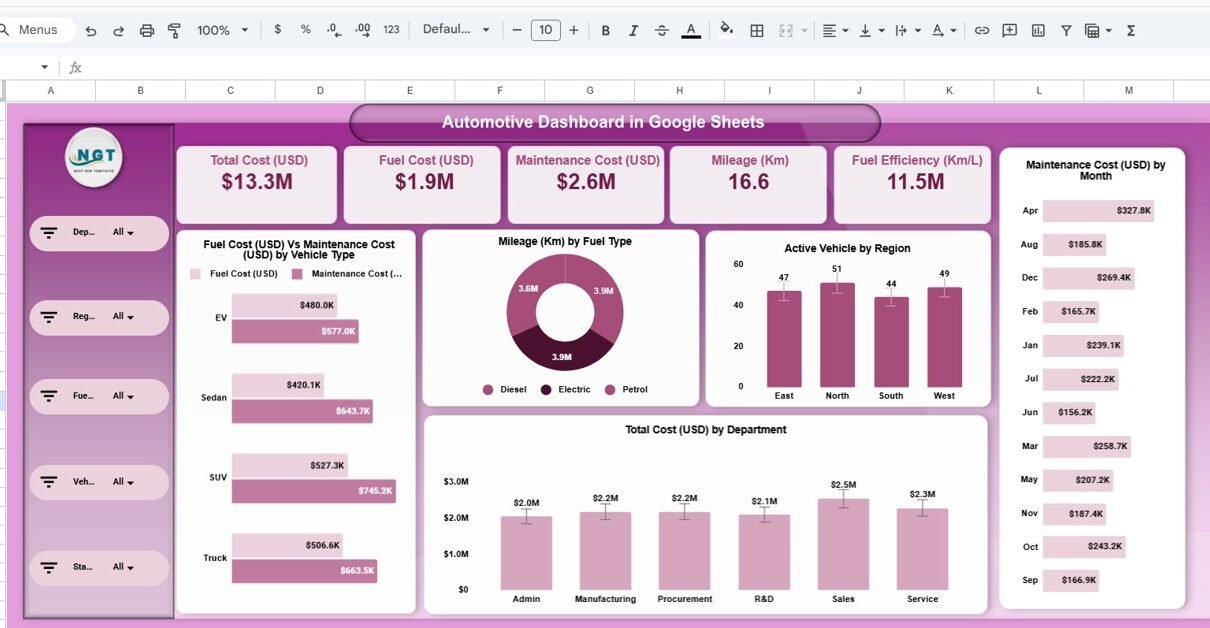
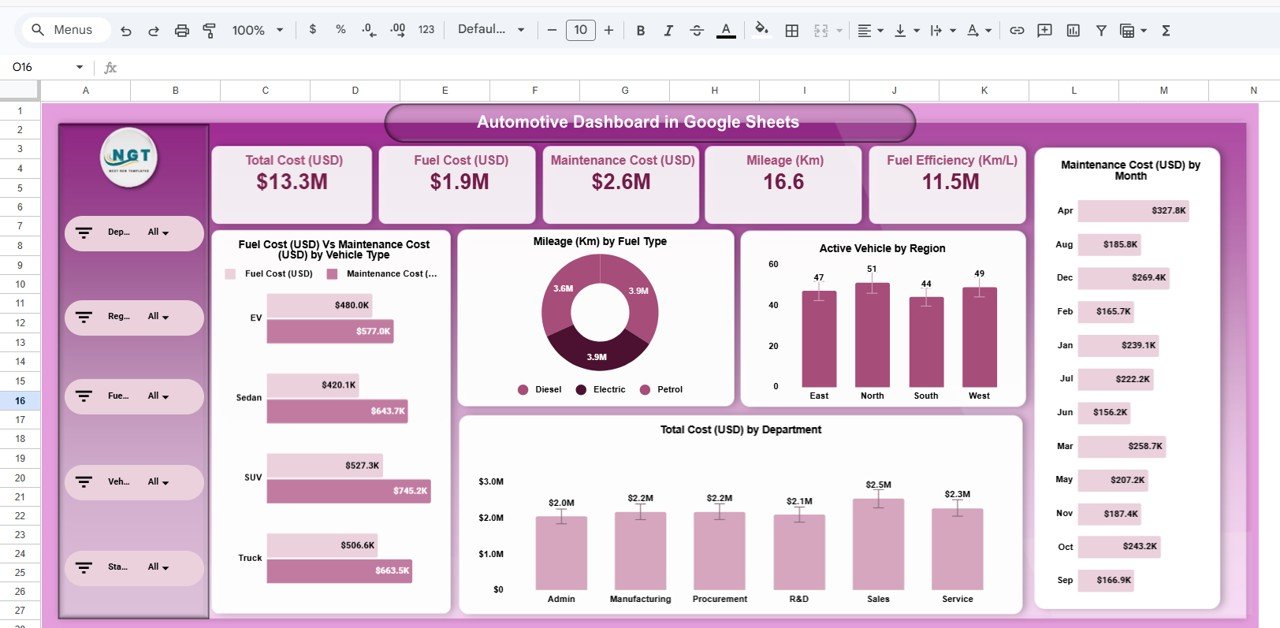
The Overview Page provides a high-level summary of automotive operations.
Top KPI Cards Display:
- Total Cost (USD)
- Fuel Cost (USD)
- Maintenance Cost (USD)
- Mileage (Km)
- Fuel Efficiency (Km/L)
These KPIs give instant clarity about overall operational performance.
Key Visuals on Overview Page
- Fuel Cost vs Maintenance Cost by Vehicle Type
- Mileage by Fuel Type (Donut Chart)
- Active Vehicles by Region
- Maintenance Cost by Month
- Total Cost by Department
Click to Buy Automotive Dashboard in Google Sheets
Department Analysis Page
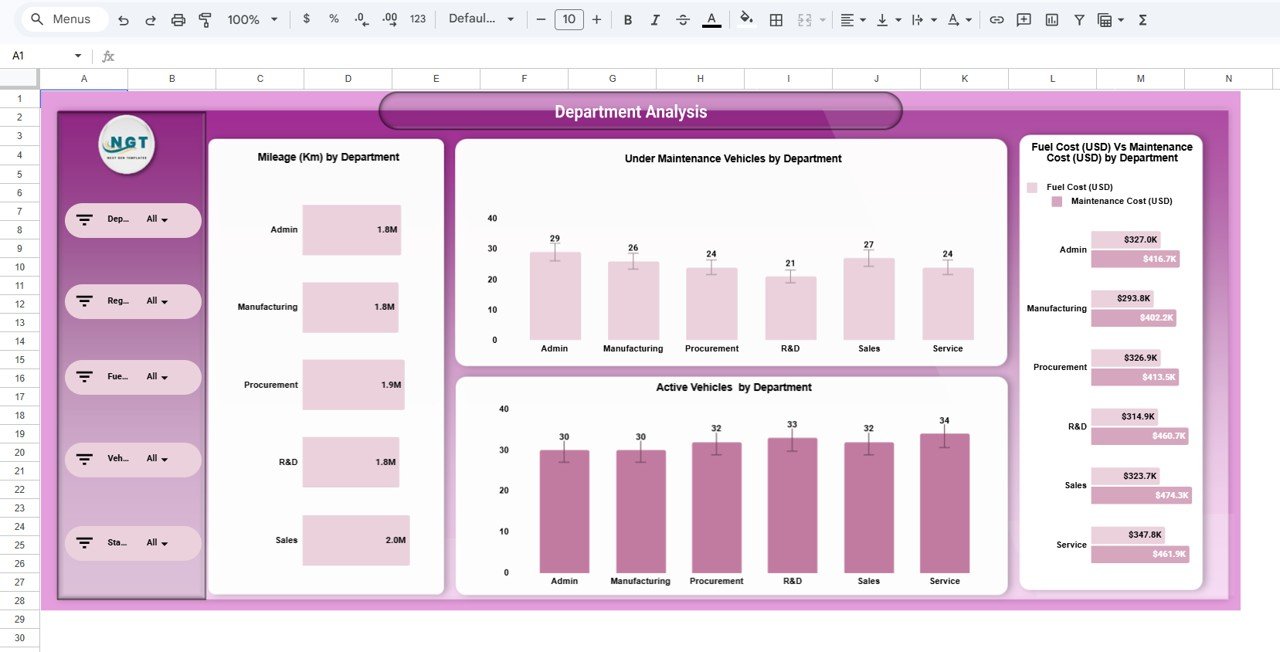
The Department Analysis page focuses on performance comparison across departments.
Visual Reports Included:
- Mileage (Km) by Department
- Under Maintenance Vehicles by Department
- Active Vehicles by Department
- Fuel Cost vs Maintenance Cost by Department
Why This Page Matters
This page helps you:
- Identify high-cost departments
- Detect maintenance issues
- Compare operational efficiency
- Monitor vehicle utilization
Therefore, department heads can improve cost control and performance.
Click to Buy Automotive Dashboard in Google Sheets
Region Analysis Page
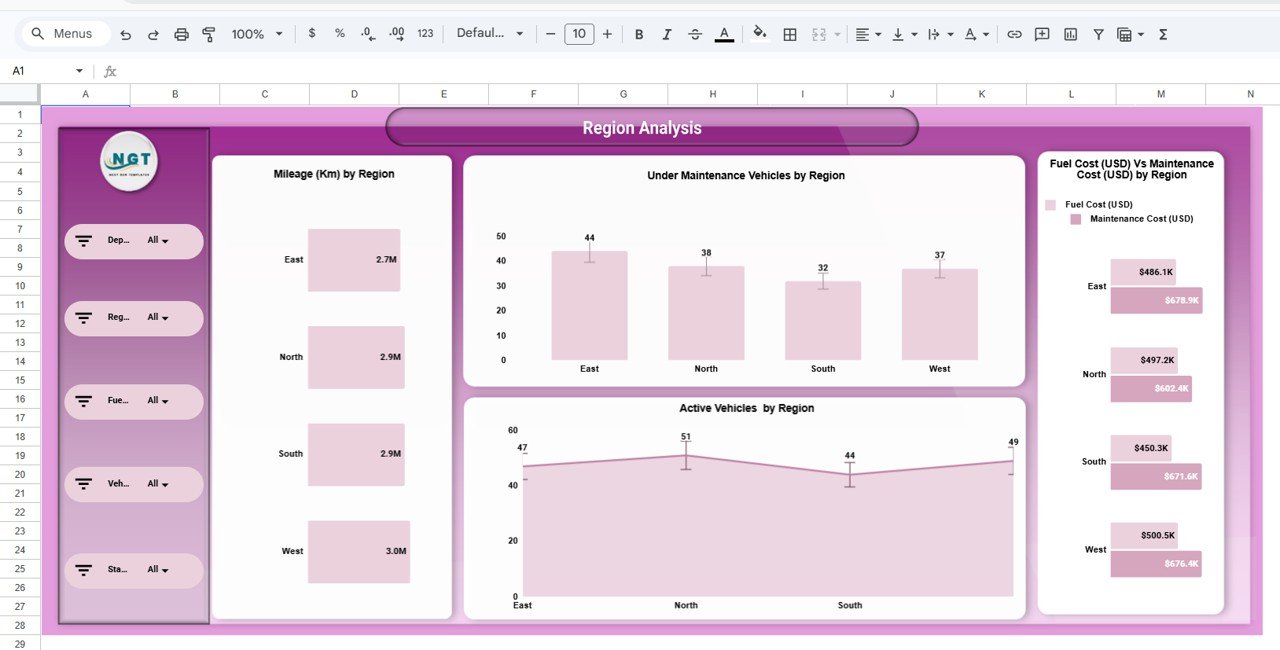
The Region Analysis page helps evaluate geographic performance.
Included Charts:
-
Mileage by Region
-
Under Maintenance Vehicles by Region
-
Active Vehicles by Region
-
Fuel Cost vs Maintenance Cost by Region
Click to Buy Automotive Dashboard in Google Sheets
Vehicle Analysis Page
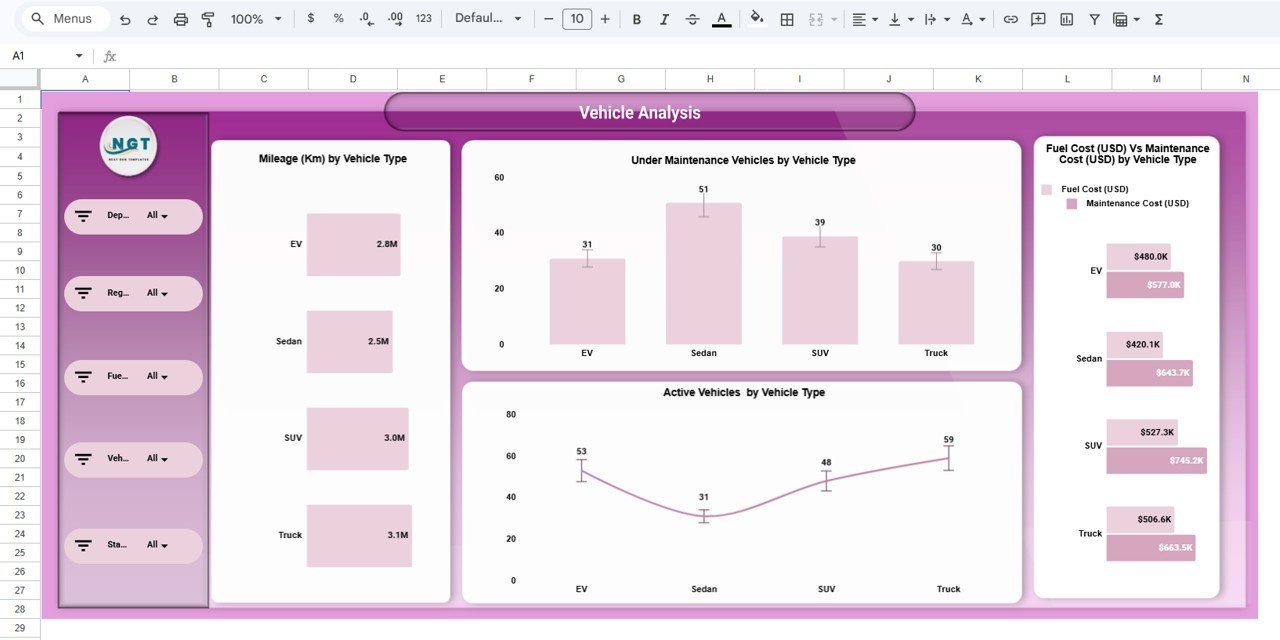
The Vehicle Analysis page focuses on vehicle categories such as EV, Sedan, SUV, and Truck.
Available Visuals:
- Mileage by Vehicle Type
- Under Maintenance Vehicles by Vehicle Type
- Active Vehicles by Vehicle Type
- Fuel Cost vs Maintenance Cost by Vehicle Type
Click to Buy Automotive Dashboard in Google Sheets
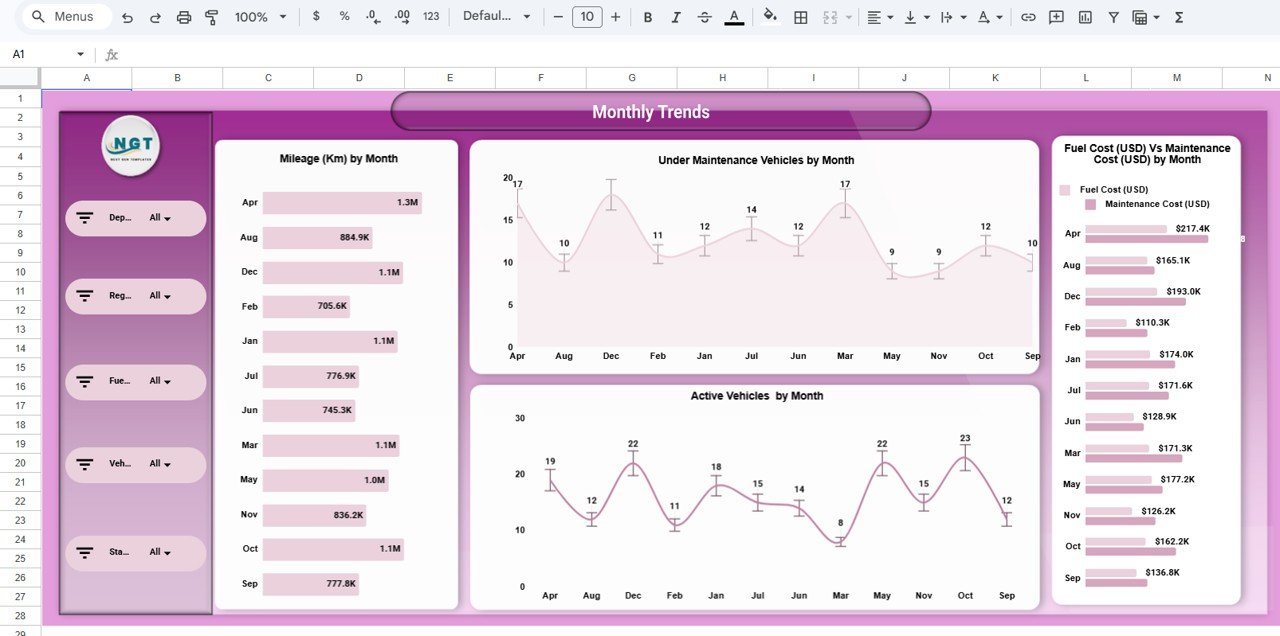
Monthly Trends Page
The Monthly Trends page provides time-based analysis.
Key Monthly Reports:
-
Mileage by Month
-
Under Maintenance Vehicles by Month
-
Active Vehicles by Month
-
Fuel Cost vs Maintenance Cost by Month
Click to Buy Automotive Dashboard in Google Sheets
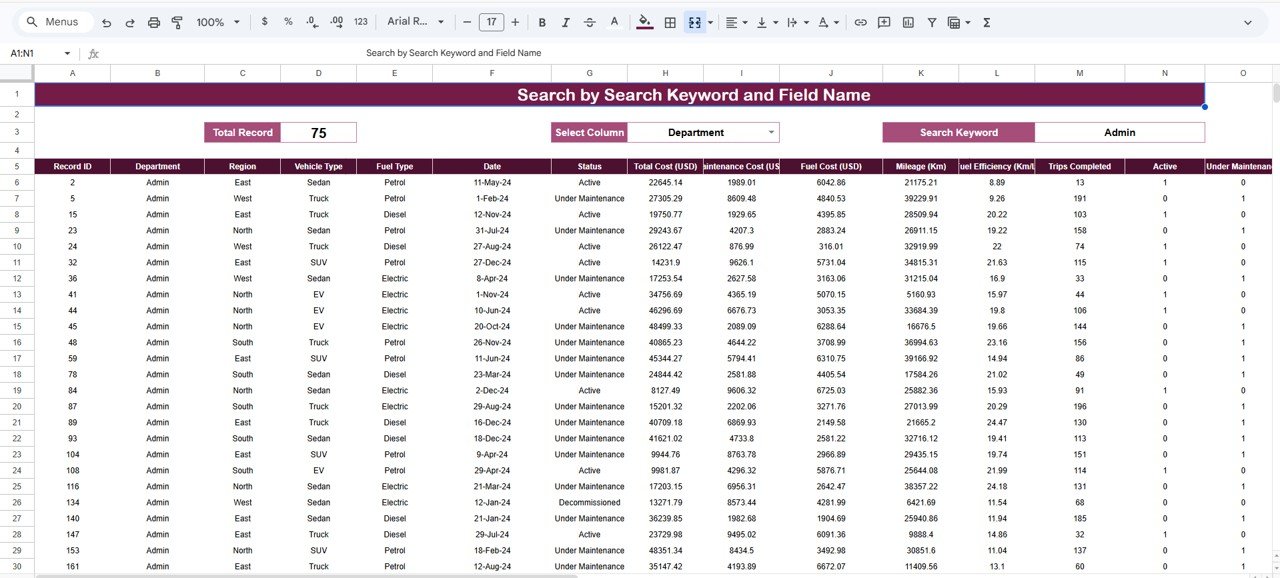
Search & Record Analysis Section
The dashboard also includes a powerful Search by Keyword and Field Name feature.
Users can:
- Select specific column
- Enter search keyword
- View filtered records instantly
This feature improves data exploration and reporting flexibility.
Click to Buy Automotive Dashboard in Google Sheets
Advantages of Automotive Dashboard in Google Sheets
Implementing this dashboard provides multiple benefits.
1. Centralized Fleet Monitoring
All fleet data stays in one structured dashboard. Therefore, teams avoid scattered reporting.
2. Real-Time Data Updates
Because Google Sheets updates instantly, users see live performance metrics.
3. Cost Transparency
Fuel and maintenance cost breakdown helps management control expenses.
4. Better Maintenance Planning
Under-maintenance tracking helps reduce downtime.
5. Improved Decision-Making
Clear visuals and KPIs support faster business decisions.
6. User-Friendly Interface
Slicers and dropdown filters make navigation simple and efficient.
Best Practices for Automotive Dashboard in Google Sheets
Click to Buy Automotive Dashboard in Google Sheets
To maximize value, follow these best practices.
Maintain Accurate Data Entry
Always update fuel cost, maintenance cost, and mileage regularly. Because data accuracy drives insight accuracy, consistency matters.
Review Performance Weekly
Although monthly review helps, weekly tracking improves responsiveness.
Use Filters Strategically
Apply slicers wisely to focus on specific departments or regions.
Monitor High Maintenance Vehicles
Identify vehicles with repeated maintenance issues and take corrective action.
Analyze Trends Before Making Decisions
Never rely on single-month data. Instead, analyze monthly trends for better forecasting.
Who Should Use This Dashboard?
Click to Buy Automotive Dashboard in Google Sheets
This Automotive Dashboard benefits:
- Fleet Managers
- Transport Companies
- Automotive Service Providers
- Logistics Companies
- Corporate Fleet Departments
- Government Transport Authorities
Because automotive operations require continuous monitoring, this dashboard fits multiple industries.
Conclusion
The Automotive Dashboard in Google Sheets provides a structured, interactive, and ready-to-use solution for fleet and automotive performance management.
Instead of depending on manual reports, organizations gain real-time visibility into:
- Total operational cost
- Fuel and maintenance expenses
- Vehicle activity
- Regional performance
- Department performance
- Monthly trends
Moreover, the powerful filters and visual insights ensure better operational control and cost management.
If you want to improve fleet efficiency, reduce maintenance cost, and make data-driven decisions, this dashboard delivers exactly what you need.
Frequently Asked Questions (FAQs)
Click to Buy Automotive Dashboard in Google Sheets
What is the main purpose of the Automotive Dashboard in Google Sheets?
It helps track fleet performance, costs, mileage, and maintenance in one interactive dashboard.
Can I customize this dashboard?
Yes. You can modify KPIs, filters, and visual elements based on your needs.
Does it support multiple regions and departments?
Yes. The dashboard allows filtering by department, region, vehicle type, and fuel type.
Is it suitable for small fleets?
Yes. Both small and large fleet operations can use this dashboard.
Do I need advanced Google Sheets knowledge?
No. Basic knowledge is enough to operate the dashboard effectively.
Visit our YouTube channel to learn step-by-step video tutorials
Youtube.com/@NeotechNavigators
Watch the step-by-step video tutorial: