Every chit foreman keeps the same three numbers in three different places. The auction register says what was bid. The counter book says what came in. The bank statement says what went out. Getting them to agree at the end of the month is the job, and a notebook has never once made it easy.
The Chit Fund Management System Web App puts all three in one workspace built on Google Apps Script, with a Google Sheet behind it as the database. It arrives with a complete sample book already loaded – 16 chit groups, 92 subscribers, 342 tickets, 220 auctions, 5,039 instalment rows, 4,920 receipts and 232 prize payouts across 20 database sheets, 12,560 rows in total – so nothing is empty when you first sign in. Six roles, sixteen modules, eighteen exportable reports and an audit log that cannot be switched off.
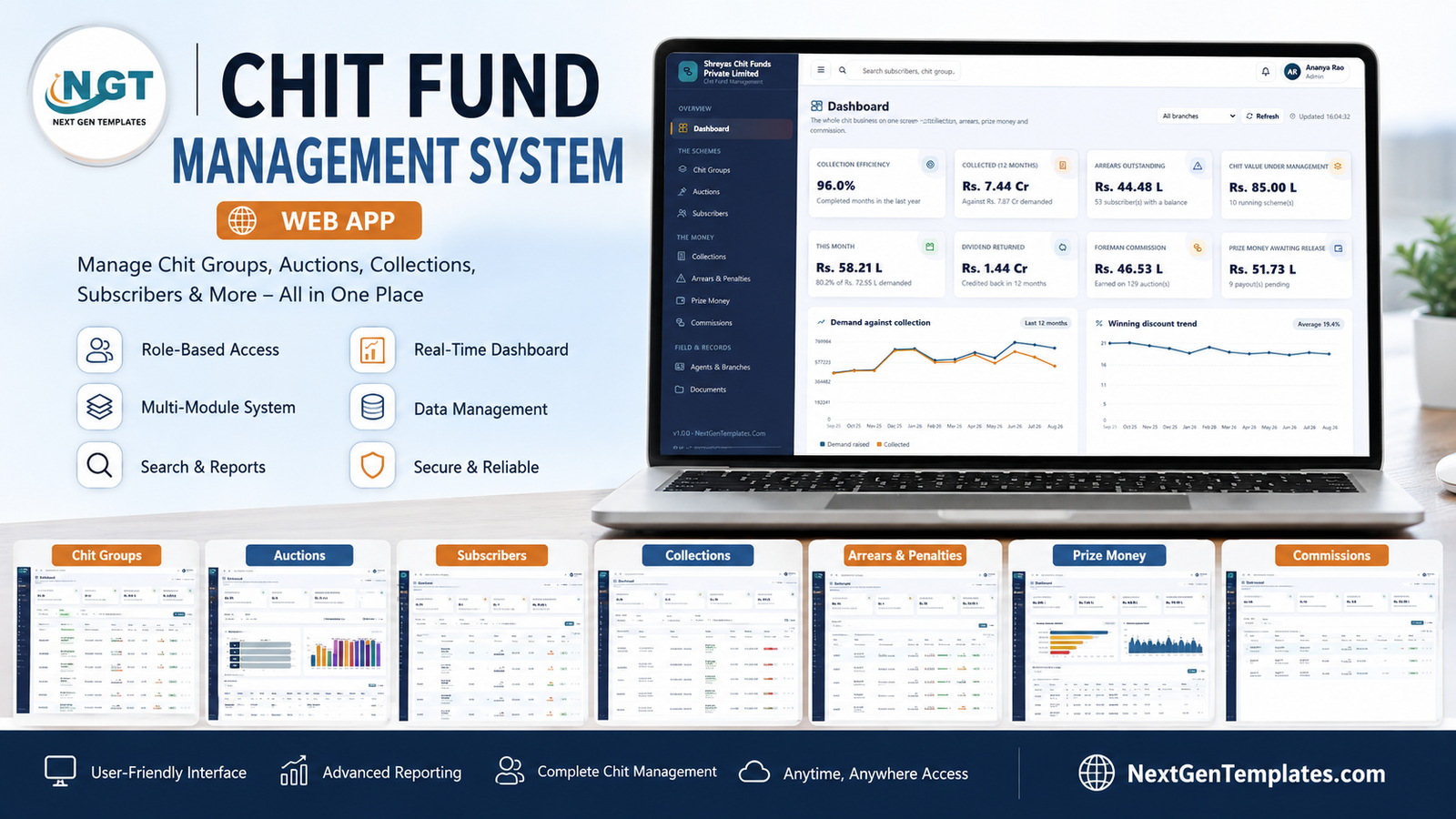
Before anything else, the plain version: this is record-keeping software. It does not register, license, audit or make compliant a chit fund, committee, ROSCA, susu or any savings and credit scheme. It is not a banking, NBFC, lending, deposit-taking or investment product. It gives no financial, legal, tax or investment advice, and it promises no return, yield or payout to anybody. Chit-style schemes are regulated – in India under the Chit Funds Act and by state Registrars, elsewhere under other rules entirely. Whether you may run one, and on what terms, is a question for your own lawyer, accountant and regulator, and installing software changes none of it.
Try the Live Demo – Free, No Signup
The system is deployed with the sample book loaded. Open it and sign in with any of the accounts below.
Demo Logins – One Per Role
| Role | Username | Password | What that role can reach |
|---|---|---|---|
| Admin | admin | Admin@2026 | Everything, including user management, settings and the audit log |
| Foreman | foreman | Foreman@2026 | Schemes, auctions, collections, arrears, prize money, commission, agents, reports |
| Branch Manager | branch | Branch@2026 | Branch work; cannot delete, cannot approve a release, no commission ledgers |
| Accountant | accounts | Accounts@2026 | Receipts, prize money release, commission settlement, statements; no auctions |
| Collection Agent | agent | Agent@2026 | Field collection only – no commission, no prize money, no scheme profitability |
| Auditor | auditor | Auditor@2026 | Read-only across the business plus the audit log; can export, changes nothing |
These logins are public deliberately. They belong to a shared demo instance that is periodically reset, not to anybody’s live system. Your own deployment runs on your own Google account with your own passwords.
Key Features of the Chit Fund Management System Web App
- The auction does its own arithmetic. Enter the winning bid and the app derives the discount, the foreman commission, the dividend pool, the dividend per ticket, the payable and the prize money, then raises the demand against every ticket in the group.
- Six roles, guarded on the server. One permission map drives both the sidebar and every endpoint, so taking a page away from a role takes the data away too.
- Instalment-level demand. Every row carries subscription, dividend, payable, paid, balance, days late, status and the agent responsible.
- Arrears ranked by risk, not just by age. Buckets of 0-30, 31-60, 61-90 and over 90 days, with prized-but-behind accounts flagged Critical whatever the ageing says.
- A paperwork gate on payouts. Prize money moves through Pending, Approved, Held and Paid, and a release can be blocked until the surety and agreement documents are filed.
- Two commission ledgers. Foreman commission per auction, and agent commission computed on what was actually banked rather than what was demanded.
- Eighteen exportable reports across Assurance, Schemes, Collections, Arrears, Payouts, Earnings and Subscribers.
- A document register in your own Drive – KYC proofs, chit agreements, prize money agreements and surety documents, filed against the record they belong to.
- 26 editable dropdown lists holding 128 values, from occupation and payment mode to ticket fraction and waive reason.
- A staged, resumable installer. Setup runs in eleven stages inside a four-minute budget, so the six-minute Apps Script ceiling on a free Google account cannot break it, and re-running it never duplicates a row.
Module by Module – What Each Screen Does
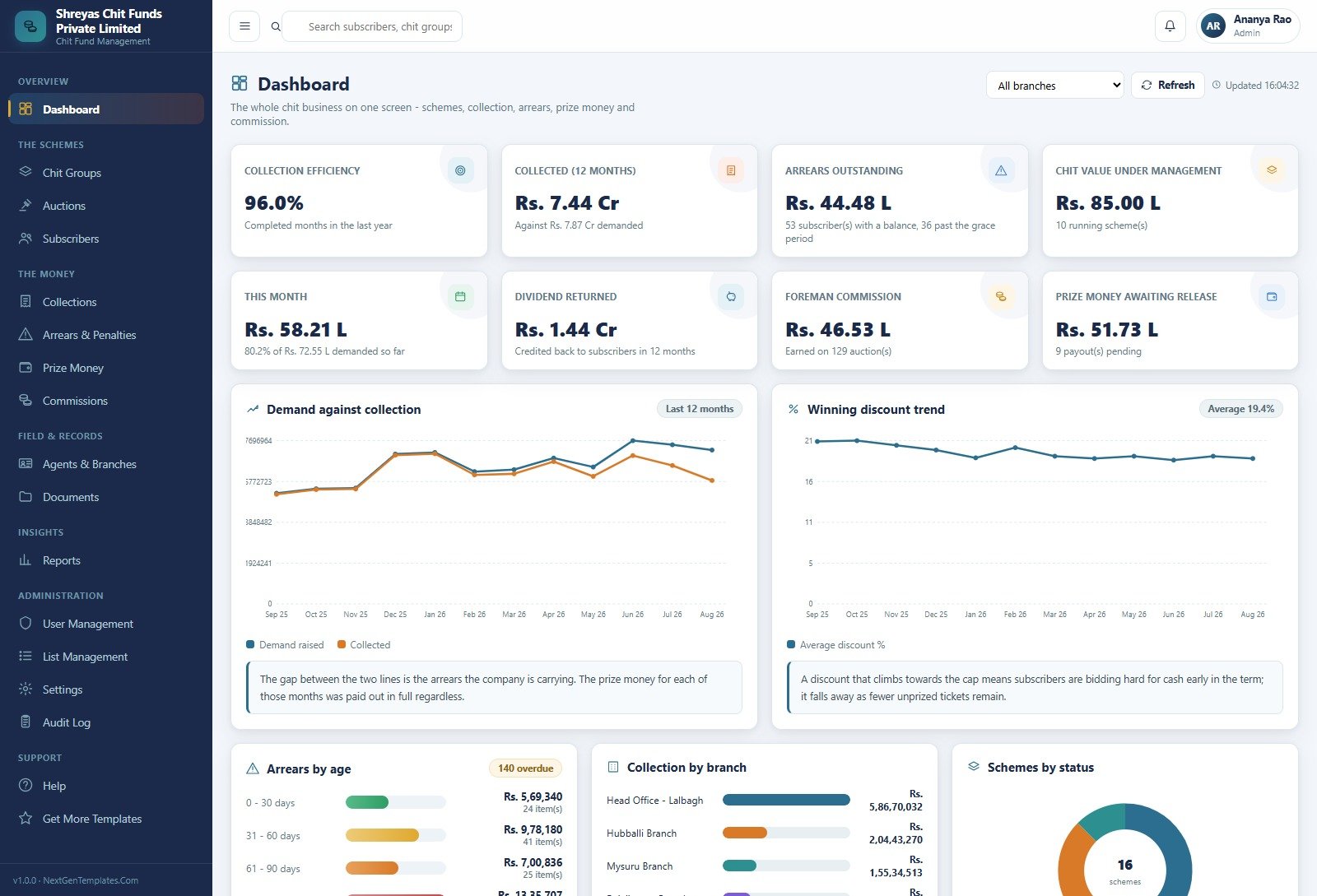
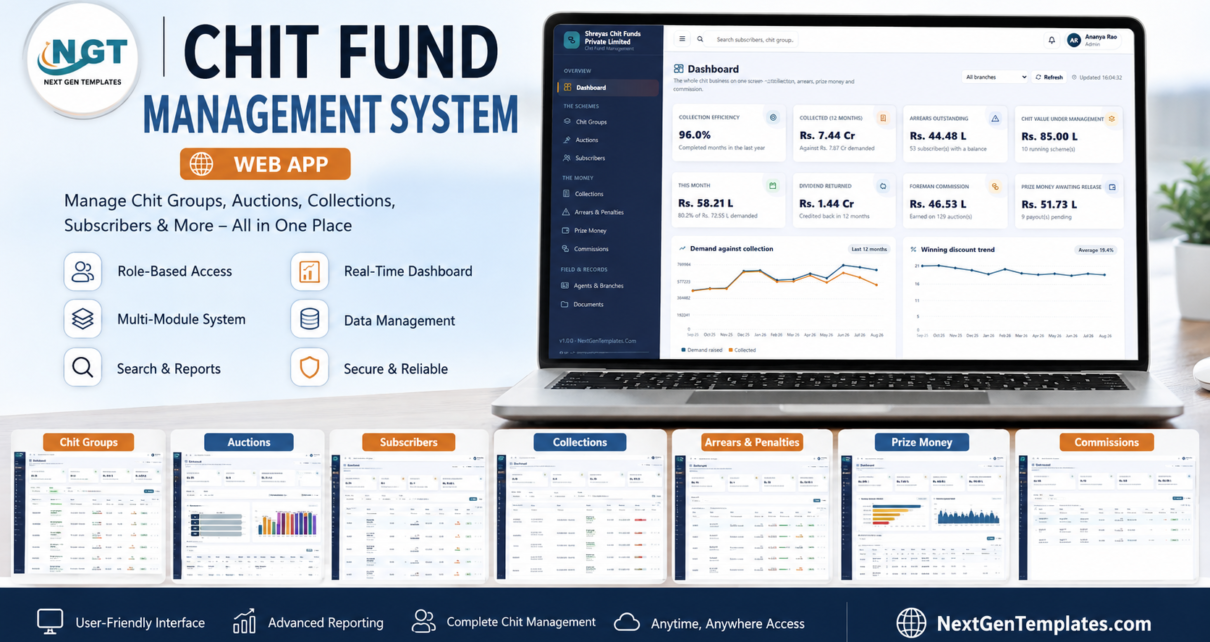
Dashboard. Eight cards – collection efficiency, collected over twelve months, arrears outstanding, chit value under management, this month’s demand, dividend returned, foreman commission and prize money awaiting release – all filterable by branch. Underneath sit five charts: Demand against collection, Winning discount trend, Arrears by age, Collection by branch and Schemes by status. Two of them carry a plain-English note explaining what the shape means, which is a nice touch on a screen most people scan rather than read.
Chit Groups. Every scheme on one row – code, name, branch, foreman, status, chit value, tickets filled, term progress, collected, arrears, efficiency and commission – with filters for status, branch, running-only and in-arrears-only, and Excel and CSV export. Vacant tickets are counted at the top, because a scheme cannot start until every ticket is filled.
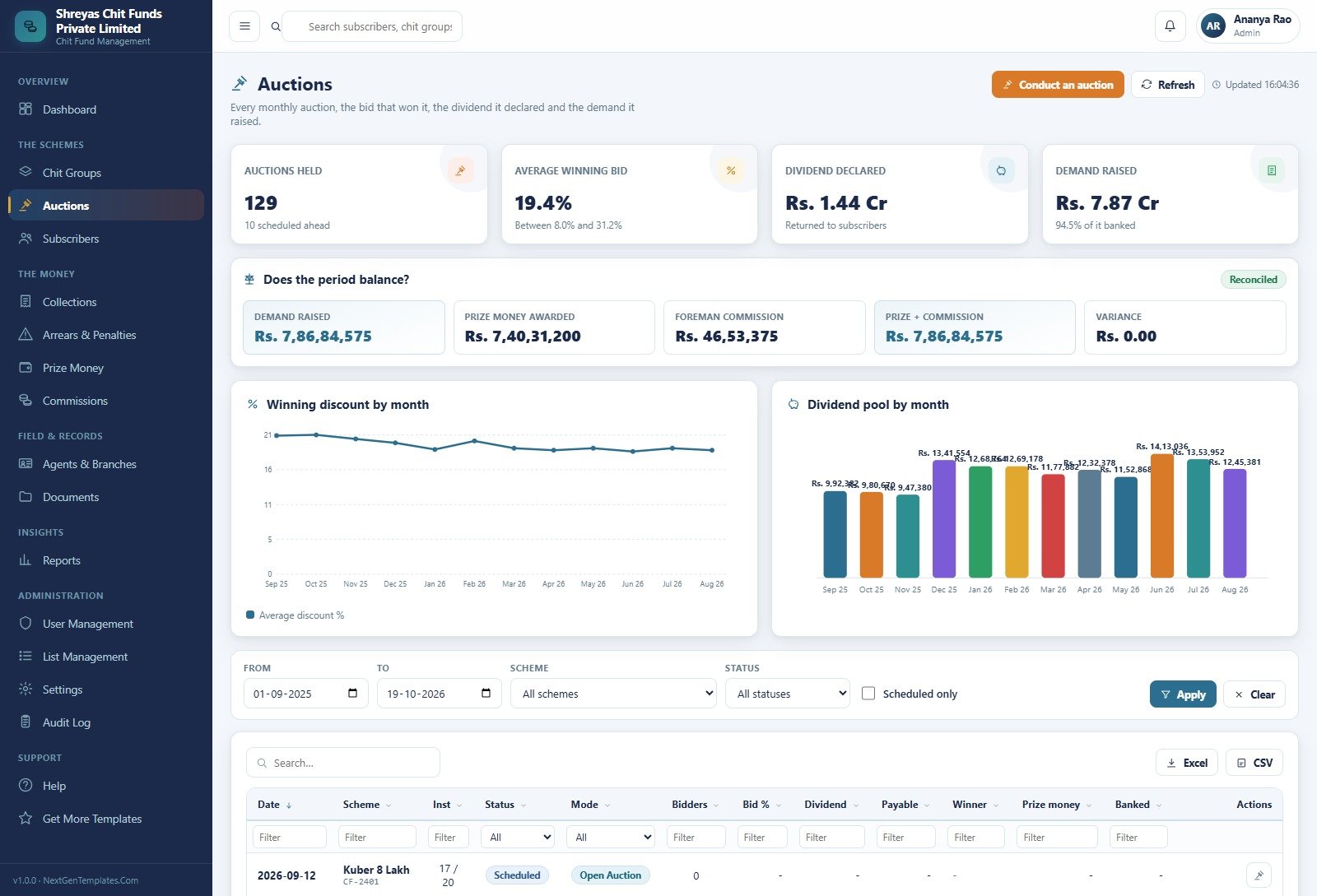
Auctions. The register of every monthly auction with its date, scheme, instalment number, mode, bidder count, bid percentage, dividend, payable, winner, prize money and whether it was banked. Above it sits a Does the period balance? panel that sets demand raised against prize money awarded plus foreman commission and prints the variance. On a healthy book that variance is zero, and being able to see it in one glance is the single most useful thing on the page.
Subscribers. Who subscribes, what they hold, what they owe and who stands surety for them, with a KYC state and a credit rating per member, plus a separate sureties tab.
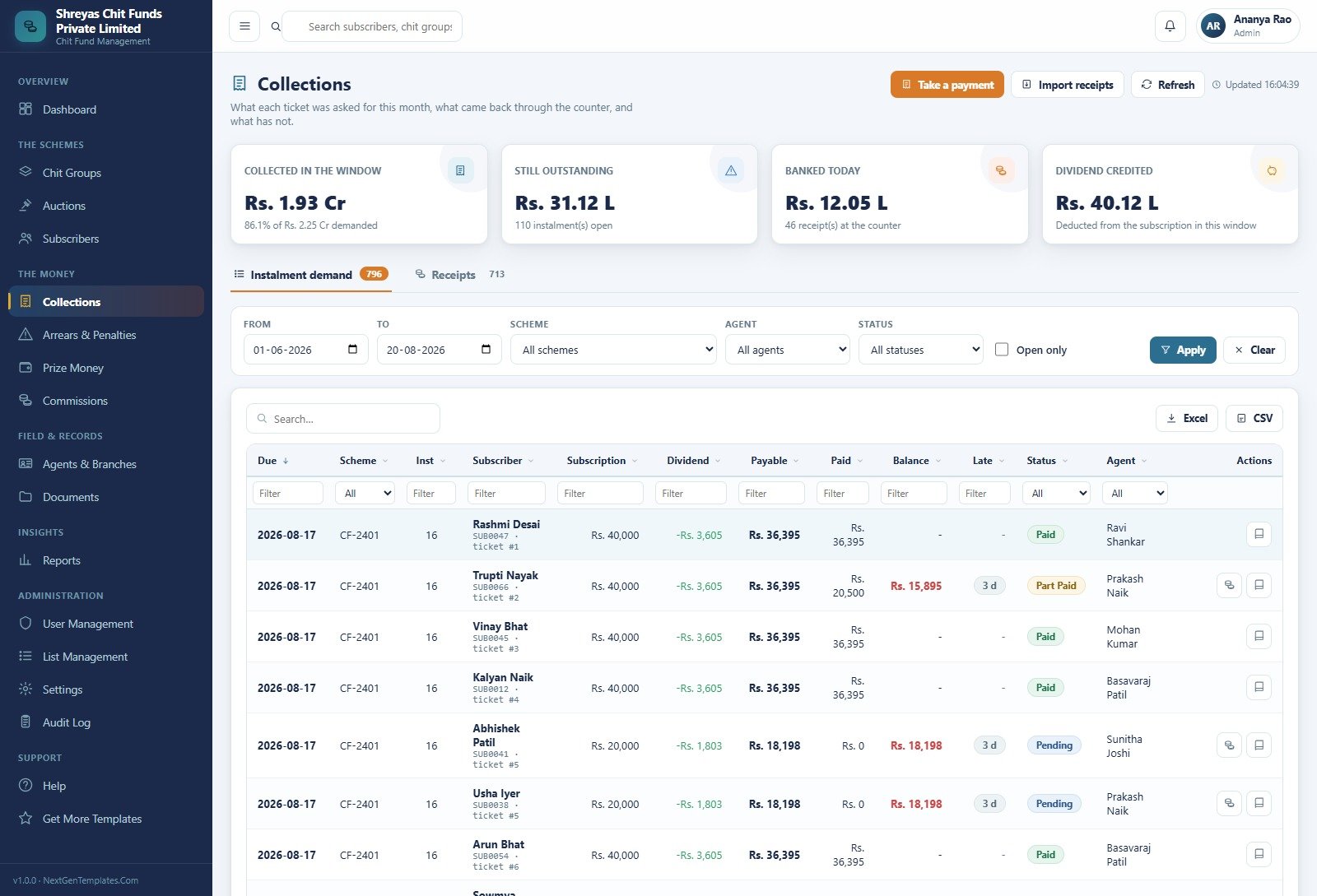
Collections. What each ticket was asked for in the window, what came back through the counter and what did not, split into an instalment-demand tab and a receipts tab. Payments are taken one at a time at the counter or imported in bulk, and statuses run Paid, Part Paid and Pending.
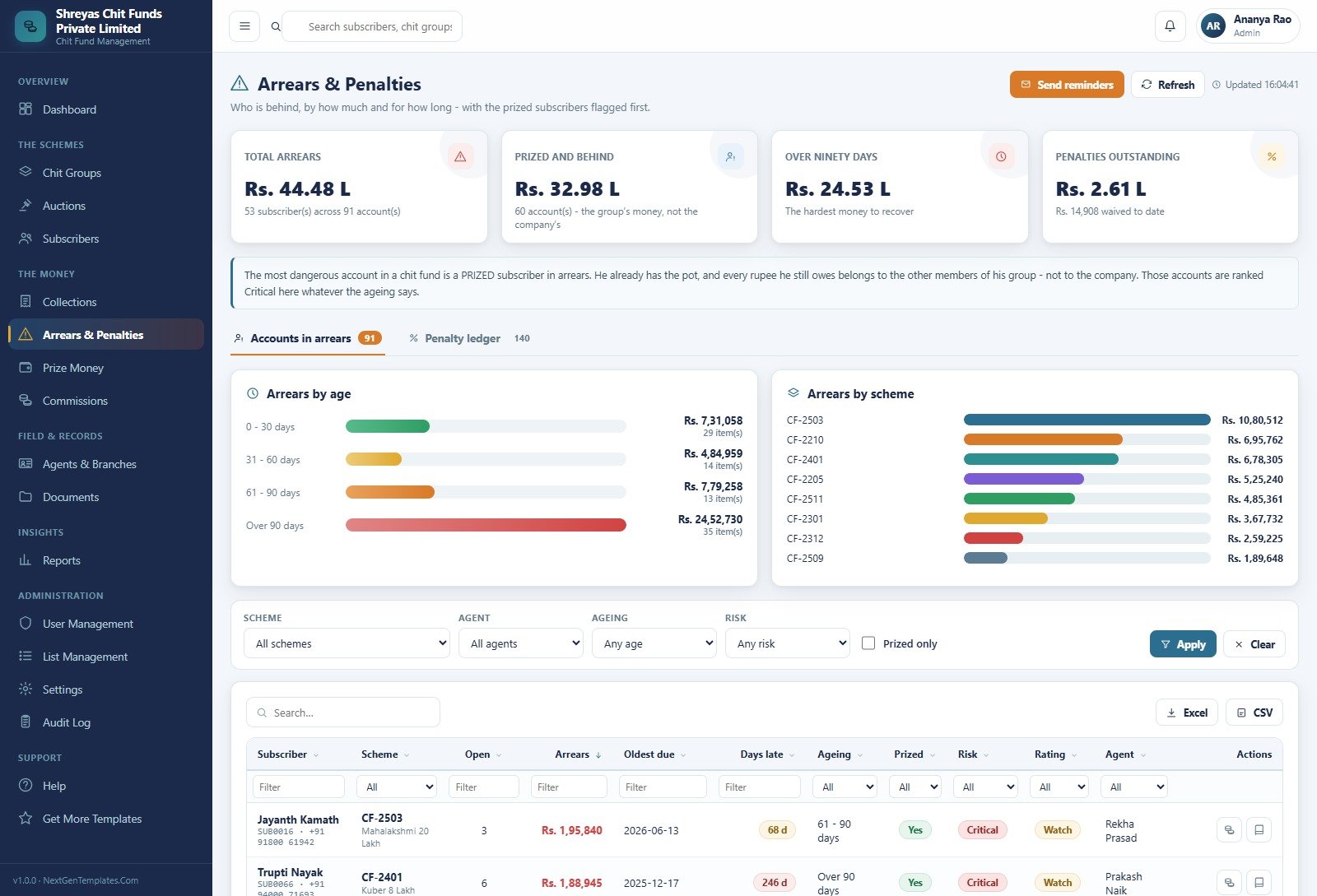
Arrears & Penalties. Ageing buckets and an arrears-by-scheme ranking, a penalty ledger on a second tab, and a reminder mailer. The page states the logic openly: the most dangerous account in a chit fund is a prized subscriber in arrears, because he already has the pot and every rupee he still owes belongs to the other members of his group rather than to the company.
Prize Money. Awarded, released, awaiting release and blocked on paperwork, with a payouts-by-status breakdown and a table showing deductions and net payable per winner.
Commissions. Foreman commission by auction and agent commission by month, with a top-earning-agents chart and a note that collection commission is calculated on money actually banked, not on names on a list.
Agents & Branches, Documents. The field force and the offices they work from, with collection by agent and by branch; and a document register that files every upload into one folder tree under a single application root folder in your own Drive.
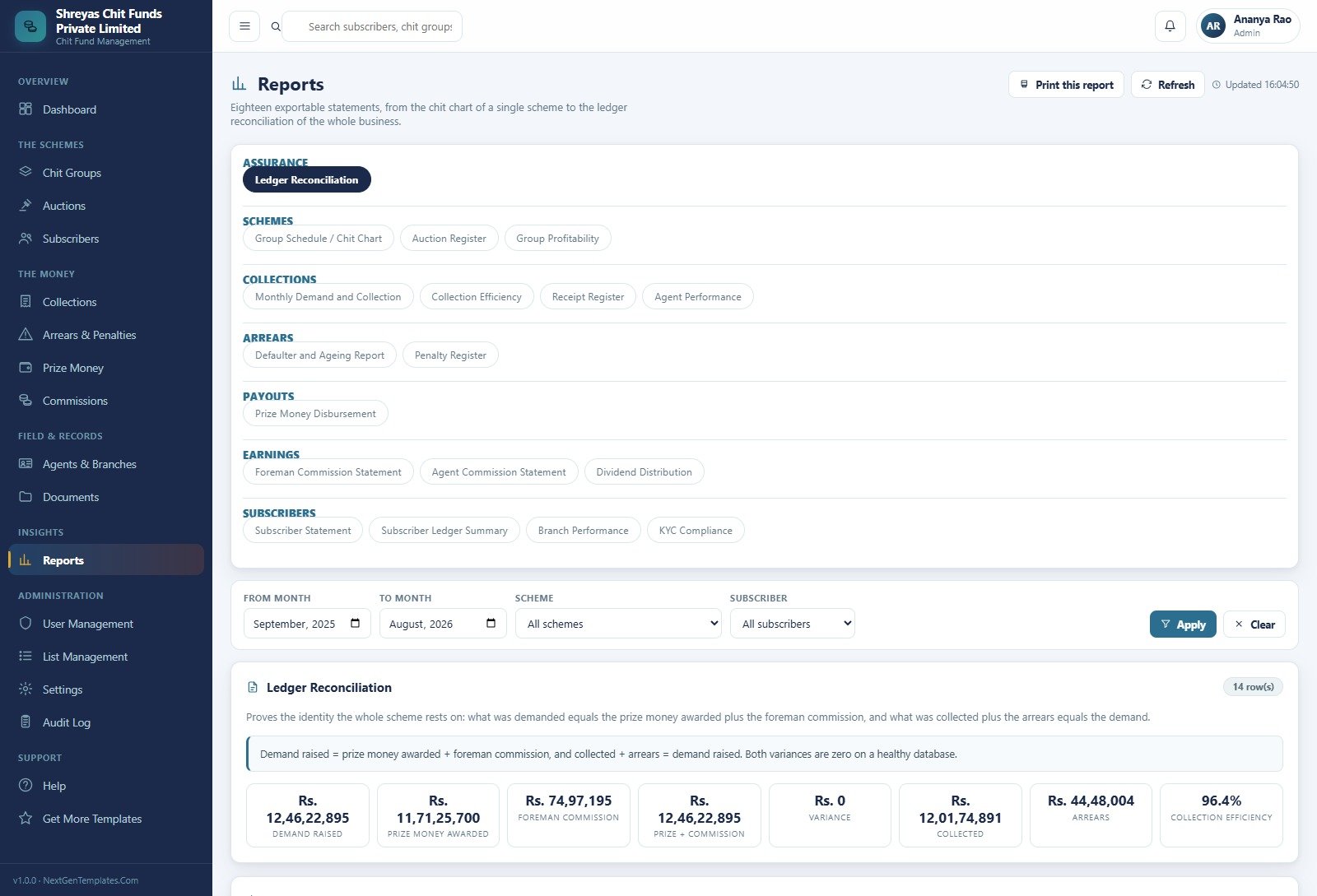
Reports. Eighteen statements: Ledger Reconciliation; Group Schedule / Chit Chart, Auction Register, Group Profitability; Monthly Demand and Collection, Collection Efficiency, Receipt Register, Agent Performance; Defaulter and Ageing Report, Penalty Register; Prize Money Disbursement; Foreman Commission Statement, Agent Commission Statement, Dividend Distribution; Subscriber Statement, Subscriber Ledger Summary, Branch Performance and KYC Compliance. Each one prints and exports.
Administration and Support. User Management with editable role permissions, List Management for the 26 dropdowns, Settings in seven groups, the Audit Log, a seven-tab Help centre and a Get More Templates page.
Chit Fund Management System Web App vs. a Spreadsheet Workbook vs. Paid Chit Fund SaaS – Feature Comparison
| This web app | A spreadsheet workbook | Paid chit fund SaaS | |
|---|---|---|---|
| Cost | One payment, yours to keep | Free if you build it yourself | Recurring subscription, usually per branch or per user |
| Platform | Google Apps Script front end, Google Sheets database | Excel or Google Sheets | Vendor-hosted |
| Setup time | Paste two files, run setup, deploy | Weeks of formula work | Vendor-scheduled onboarding |
| Real-time team collaboration | Yes – one deployment for the whole office | Fragile with several editors | Yes |
| Mobile access | Yes, any browser | Awkward on a phone | Yes |
| Customisable fields | 26 editable lists, editable roles, editable code | Anything, by hand | Only what the vendor exposes |
| Share with a link | Yes – your deployment URL | File sharing | Yes |
| Where the data lives | Your own Google account and Drive | Your own file | The vendor’s servers |
| Auction arithmetic computed for you | Yes | Only if you write it | Usually |
| Role-based access enforced server-side | Yes | No | Usually |
| Year-one cost for a five-person office | The purchase price, once | Your own time | Twelve subscription payments |
Who Should Use This Template
It suits a foreman or a small chit company that is currently running schemes on paper, in a ledger or across a pile of spreadsheets, and that has branches and collection agents whose numbers need to meet somewhere. It suits anyone who would rather keep the book inside their own Google account than on a vendor’s server. And it suits developers who want a working, readable Apps Script system to study or adapt rather than starting from an empty editor.
It does not suit anyone who needs a regulator-approved or certified system, a statutory filing tool, or software that carries legal or audit weight – it is none of those and cannot be configured into being one. It is also wrong if you need built-in payment collection, an SMS gateway or bank reconciliation on day one, or if your book runs to hundreds of thousands of transaction rows: the database is a Google Sheet, which is why an archive function ships with it.
Real-World Use Cases
A five-branch company. Each branch used to send a weekly collection sheet and the totals never matched head office. With every receipt booked at the counter it was taken at, the Collection by branch chart answers the question before lunch.
A foreman with eleven running groups. The auction was never the hard part; remembering which winner had not yet signed the prize money agreement was. Those payouts now sit as Blocked on paperwork until the document is filed.
The person who keeps the books. One identity has to hold every month – demand raised equals prize money awarded plus foreman commission, and collected plus arrears equals demand. The Ledger Reconciliation report puts both halves on a page with a variance figure, and the read-only Auditor login lets a reviewer check the whole business without touching a record.
Advantages of the Chit Fund Management System Web App
The arithmetic is the strongest part. Chit maths is not difficult but it is fiddly, and the app is explicit about how it works: the dividend is declared in whole rupees, exactly as it is announced at an auction, and the odd amounts that will not divide by the ticket count are retained with the foreman commission. That is why the reconciliation can close at zero instead of drifting by a few rupees a month, which is the failure mode of nearly every hand-built chit spreadsheet.
Ownership is the second. It runs inside your own Google account under standard Apps Script web app quotas, the data sits in your own Sheet, and the uploads sit in your own Drive. There is no hosting bill, no seat licence and nobody to ask before you export.
The third is that the code ships unlocked and unobfuscated, and the parts most people want to change – dropdown lists, role permissions, chit rules, print sizes, email toggles – are all editable from inside the app without opening the editor at all.
Opportunities for Improvement
The Google Sheets database is the real ceiling. A chit company books one instalment row per ticket per month, so a large book grows quickly; the built-in archive exists precisely for that, but it is something to plan for rather than discover. There is no payment gateway, no SMS integration and no bank-statement import, so receipts are entered or imported rather than matched automatically. Email depends on your Google account’s daily sending quota. And the sample data is written for an Indian company, so the seeded screens show rupees with lakh and crore grouping – the currency symbol is one setting under Settings > Chit Rules, but you will want to change it, along with the commission percentage, discount cap, grace days and penalty rate, before your first real auction.
Best Practices
- Change all six seeded passwords before a single real record goes in.
- Set the chit rules first. Changing one afterwards affects the next auction only; auctions already held keep the figures they were struck at, which is what everyone involved expects.
- Give people the narrowest role that lets them work. The Collection Agent login is a good demonstration of why – it sees field collection and nothing else.
- Run the reconciliation monthly and treat any non-zero variance as a data problem to fix that week, not a rounding quirk to live with.
- Take the built-in backup copy before month-end, and archive old cycles rather than letting the sheet grow without limit.
- File the surety and agreement documents as you go, so no release is ever blocked on paperwork at the moment somebody is waiting for money.
Explore Relevant Templates
If you want the full listing, screenshots and download, the Chit Fund Management System Web App is on NextGenTemplates. Neighbouring systems from the same line include the Auditing Firm Management System Web App, the Accounting Firm Client Management System Web App and the Payroll and Salary Management System Web App. For something far lighter, the Money Lent & Borrowed Tracker and the Loan EMI Repayment Tracker are single-sheet trackers, and the Credit Union Dashboard in Google Sheets covers the reporting side only.
Curious how systems like this are put together? The NextGenTemplates Academy learning paths take you from spreadsheet basics to building your own trackers and management tools.
Frequently Asked Questions
Does this make my chit fund compliant, registered or legal?
No. It is record-keeping software and nothing else. It does not register a scheme, apply for a licence, satisfy a Registrar, produce a statutory filing or certify anything, and installing it changes your legal position not at all. Chit funds, committees, ROSCAs and similar arrangements are regulated differently in different places – in India under the Chit Funds Act and by state Registrars, elsewhere under other financial rules. Settle that with your own lawyer, accountant and regulator first, and treat this app as the ledger you keep afterwards.
Is it a banking, lending or investment product? Does it promise a return?
No on both counts. It holds no money, moves no money, connects to no bank or payment gateway, offers no financial, legal, tax or investment advice, and promises no return, yield or payout to anybody. It records what you tell it happened.
Can I try it before buying?
Yes – the live demo above is the complete system with the sample book loaded, and there is one login per role so you can see exactly what each person on your team would and would not be able to reach. No signup and no card.
Can I use my own currency instead of rupees?
Yes. The sample book was written for an Indian company, which is why the seeded screens show rupees. The currency symbol is a single setting under Settings > Chit Rules, next to the foreman commission percentage, the maximum discount, the due-day offset, the grace days and the penalty rate.
Do I need to be a developer?
No. Deployment is create an Apps Script project, paste the code file into Code.gs, paste the interface file into an HTML file named Index, run setup once and press Deploy. The PDF manual in the download walks every step, and setup is resumable if a free Google account’s execution limit interrupts it.
What is in the download?
A ZIP with the Apps Script code file, the HTML interface file and an illustrated PDF user manual covering deployment, every module, the roles, printing, email, import, archive, backup and troubleshooting.
About the Author
Built by PK – Microsoft Certified Professional with 15+ years of Excel, Google Sheets, and Power BI experience. Founder of NextGenTemplates, reaching 300K+ subscribers across YouTube channels. Every template is hand-built and tested before release.
Conclusion
A chit book is not complicated, it is just unforgiving: one missed receipt or one dividend rounded the wrong way and the month stops reconciling. What this app really sells is the ability to see, on one screen, that demand raised still equals prize money plus commission and that collected plus arrears still equals demand – with a variance figure printed next to it. Everything else, the sixteen modules and eighteen reports, exists to keep that identity true.
The honest caveats are worth repeating: it is a Google Sheet underneath, it has no payment or SMS integration, and it is record-keeping software only – it registers nothing, certifies nothing, advises nothing and promises no return. Whether you may run a scheme at all is a question for your regulator, not for a template.
The fastest way to judge it is to open the live demo, sign in as the Auditor and open the Ledger Reconciliation report. If that page shows you something your current book cannot, the full listing is here. For walkthroughs of this and the rest of the catalogue, see youtube.com/@PKAnExcelExpert.