Managing contracts is a critical responsibility for every organization. When contract data sits across emails, folders, and spreadsheets, teams face delays, compliance issues, missed renewals, and increased business risk. Because of this, companies now rely on smart dashboards to track contract status, risk levels, responsible persons, and renewal timelines.
One of the most efficient, easy-to-use, and cost-effective tools for this purpose is the Contract Risk & Status Intelligence Dashboard in Google Sheets.Contract Risk & Status Intelligence Dashboard in Google Sheets
This ready-to-use dashboard gives your organization complete visibility of all contracts in one place. It shows contract risk, approval score, contract value, responsible person performance, and renewal readiness. With dynamic charts, slicers, and summary cards, this dashboard supports faster and smarter decision-making.Contract Risk & Status Intelligence Dashboard in Google Sheets
What Is a Contract Risk & Status Intelligence Dashboard?
Click to Buy Contract Risk & Status Intelligence Dashboard in Google Sheets
A Contract Risk & Status Intelligence Dashboard is a visual reporting system that helps teams analyze, track, and manage contracts efficiently. It provides insights related to:
- Contract value
- Contract status
- Risk classification
- Renewal readiness
- Approval score
- Responsible person performance
- Contract types
Because it is built in Google Sheets, the dashboard becomes:
- Easy to use
- Cloud-based
- Collaborative
- Accessible anywhere
- Real-time updatable
- Highly customizable
This makes it ideal for legal teams, procurement teams, finance teams, and contract administrators.
Why Use Google Sheets for Contract Risk & Status Tracking?
Google Sheets offers several advantages for contract management:
- Real-Time Collaboration: Multiple users can view, review, and update contract information simultaneously.
- Cloud-Based Access: Teams can access contract records from any location or device.
- Zero Installation: Works directly in the browser—no complex software setup needed.
- Dynamic Charts & KPIs: Provides visual insights into risk levels, contract count, and responsible person performance.
- Cost-Effective: No need for expensive contract management tools.
Because of these strengths, Google Sheets is a reliable and practical platform for contract intelligence dashboards.
Dashboard Structure & Features
Click to Buy Contract Risk & Status Intelligence Dashboard in Google Sheets
Your Contract Risk & Status Intelligence Dashboard in Google Sheets includes several analysis sections, each designed to give deep and meaningful insights. Below is a detailed breakdown.
1. Overview Sheet Tab
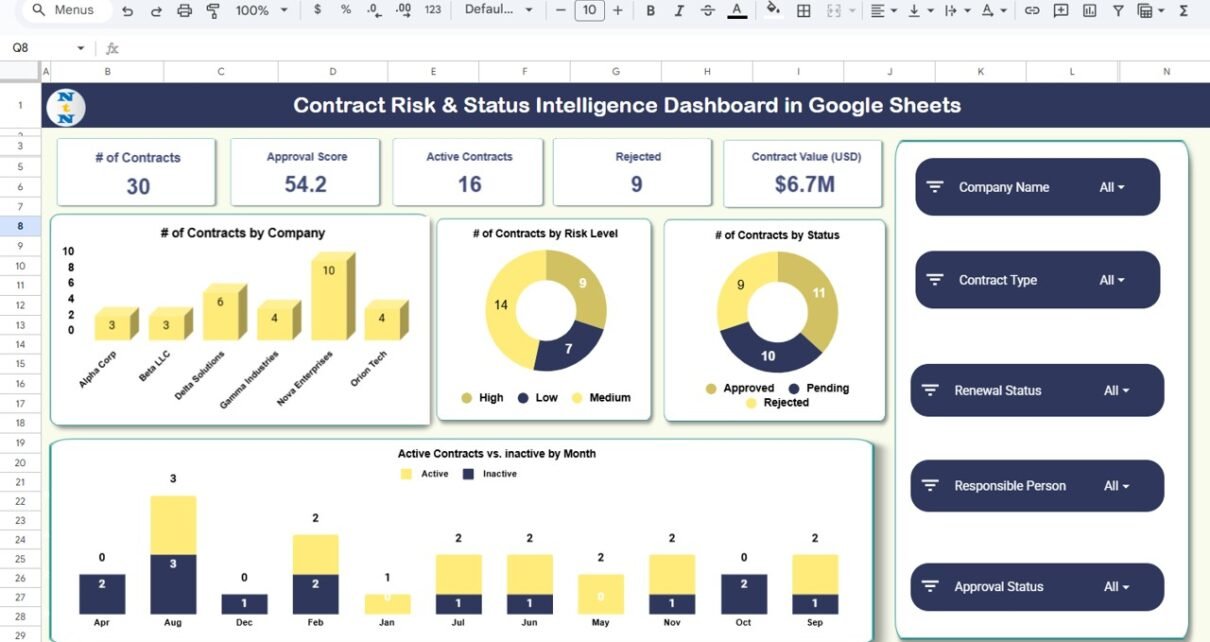
This is the main summary page of the dashboard. It displays high-level contract insights using cards and charts.
Summary Cards Included:
-
# of Contracts
-
Approval Score
-
Active Contracts
-
Rejected
-
Contract Value (USD)
These cards instantly show the total number of contracts, approval performance, active status, and financial value.
Charts Included:
#of Contracts by Company
Shows contract count per client or vendor company.
#of Contracts by Risk Level
Helps teams identify high-risk and low-risk contracts.
# of Contracts by Status
Visualizes contract stages such as approved, rejected, in-review, or pending.
Active Contracts vs. Inactive by Month
Shows monthly trend of active and inactive contracts.
These charts help identify which companies generate the most contracts and where potential risks exist.

Click to Buy Contract Risk & Status Intelligence Dashboard in Google Sheets
2. Renewal Analysis Sheet
Renewal readiness is important for contract planning. This section analyzes renewal-related metrics.
Charts Included:
Active Contracts by Renewal Status
Shows how many active contracts are renewable, expiring soon, or not renewable.
# of Contracts by Renewal Status
Displays counts such as “Due Soon,” “Auto-Renew,” “Manual Renewal,” and “Expired.”
Contract Value (USD) by Renewal Status
Shows total value linked to each renewal category.
This section helps teams plan renewals and avoid revenue loss.

Click to Buy Contract Risk & Status Intelligence Dashboard in Google Sheets
3. Responsible Person Analysis Sheet
This page evaluates the performance and workload of the contract responsible persons.
Charts Included:
Active Contracts by Responsible Person
Shows how many active contracts each team member handles.
# of Contracts by Responsible Person
Displays workload distribution.
Avg. Approval Score by Responsible Person
Helps identify top performers and improvement opportunities.
Contract Value (USD) by Responsible Person
Shows financial value managed by each person.
This analysis improves accountability and resource allocation.

Click to Buy Contract Risk & Status Intelligence Dashboard in Google Sheets
Contract Analysis Sheet
This tab breaks down contract performance based on contract type.
Charts Included:
Active Contracts by Contract Type
Shows how many active contracts belong to each type.
# of Contracts by Contract Type
Displays counts for categories such as Service Contracts, Vendor Contracts, NDAs, Licensing, etc.
Contract Value (USD) by Contract Type
Shows which contract types hold the most financial value.
Avg. Approval Score by Contract Type
Measures approval quality across different contract categories.
This analysis helps companies understand which types of contracts require more attention.

Click to Buy Contract Risk & Status Intelligence Dashboard in Google Sheets
5. Search Sheet Tab
This sheet improves usability by allowing quick lookup of contract details.
Features:
-
Search by Keyword
-
Search by Field Name (Status, Risk Level, Company, Type, Responsible Person, etc.)
-
Instantly filter results
-
Helps teams save time and reduce errors

6. Data Sheet Tab
This is the base sheet containing:
- Contract details
- Status
- Type
- Risk level
- Responsible person
- Dates
- Renewal details
- Approval score
- Contract value
All dashboard charts and KPIs draw their values from this dataset.

Click to Buy Contract Risk & Status Intelligence Dashboard in Google Sheets
Advantages of Using This Dashboard
- Better Risk Management: Identify high-risk contracts quickly and plan mitigation steps.
- Improved Renewal Planning: Avoid missed renewals and revenue loss.
- Strong Performance Accountability: Track responsible person workload and approval performance.
- Accurate Reporting: Charts make it easier for management to understand contract status instantly.
- Real-Time Collaboration: Teams can update data together without version control issues.
Opportunities for Improvement
Here are some enhancements you can add:
- Automated Email Reminders: Send renewal reminders before expiry dates.
- Contract Attachment Links: Add direct links to contract PDFs stored in Google Drive.
- SLA Tracking: Monitor approval turnaround time.
- Approval Workflow Automation: Use Google Apps Script for automated approvals.
- Risk Scoring Formula: Add scoring logic for financial, legal, operational, and compliance risks.
Best Practices for Using the Dashboard
Click to Buy Contract Risk & Status Intelligence Dashboard in Google Sheets
- Keep Contract Status Updated: Ensure each contract reflects its accurate stage.
- Assign Clear Responsibility: Every contract must have a responsible person.
- Review Risk Levels Monthly: Identify newly emerging risks and take action.
- Monitor Approval Score Regularly: Check quality and efficiency of contract approvals.
- Conduct Weekly Dashboard Reviews: Use insights for planning and decision-making.
- Ensure Data Accuracy: Clean and standardize all contract entries.
Conclusion
The Contract Risk & Status Intelligence Dashboard in Google Sheets is an essential tool for modern contract management. It helps organizations gain complete visibility into contract status, risk levels, responsible person performance, contract types, and renewal readiness.
Because the dashboard is built in Google Sheets, it remains simple to use, easy to update, and accessible to the entire team.
Whether you handle dozens or hundreds of contracts, this dashboard gives you the clarity, structure, and intelligence needed to manage contracts effectively.
Frequently Asked Questions (FAQs)
Click to Buy Contract Risk & Status Intelligence Dashboard in Google Sheets
1. What does this dashboard track?
It tracks contract risk, status, type, responsible person, approval score, and renewal readiness.
2. Who can use this dashboard?
Legal teams, finance teams, procurement teams, contract administrators, and management.
3. Can I customize the dashboard?
Yes, you can modify fields, add formulas, or adjust chart ranges easily.
4. Does it work for multiple companies?
Yes, it supports contract diagrams grouped by company.
5. Can I track renewals?
Yes, the Renewal Analysis section shows renewal status and financial value.
6. Do charts update automatically?
Yes, charts refresh when you update the Data sheet.
7. Can I search specific contracts?
Yes, the Search sheet allows searching by keyword and selected field name.
Visit our YouTube channel to learn step-by-step video tutorials
Youtube.com/@NeotechNavigators
Watch the step-by-step video Demo:
Click to Buy Contract Risk & Status Intelligence Dashboard in Google Sheets