Corporate gifting plays an important role in building strong relationships with clients, partners, employees, and stakeholders. Organizations frequently approve gift requests for festivals, client appreciation, employee recognition, onboarding, events, and promotions. However, managing these requests through emails or unstructured spreadsheets often creates confusion, delays approvals, and leads to budget overruns.
That is exactly why a Corporate Gift Request Tracker in Google Sheets becomes a powerful and practical solution. This ready-to-use tracker helps organizations log, track, approve, analyze, and control all corporate gift requests in one centralized system.
In this article, we will explain how the tracker works, what charts it includes, how the search feature helps teams, and why this tracker improves transparency, cost control, and compliance.
What Is a Corporate Gift Request Tracker in Google Sheets?
A Corporate Gift Request Tracker is a centralized tracking system designed to manage gift requests from initiation to approval and fulfillment. It captures request details such as recipient type, department, gift category, cost, approval status, and requester information.
Because the tracker is built in Google Sheets, it offers:
- Real-time collaboration
- Easy data entry
- Automatic chart updates
- No additional software cost
- Access from anywhere
This tracker becomes a single source of truth for HR, Admin, Finance, and Compliance teams.
Key Features of the Corporate Gift Request Tracker
Click to Buy Corporate Gift Request Tracker in Google Sheets
This ready-to-use tracker includes:
- A structured Tracker Sheet Tab
- Five interactive charts
- A powerful search feature
- Clean and easy-to-understand layout
- Real-time analytics
Let’s explore each feature in detail.
Tracker Sheet Tab
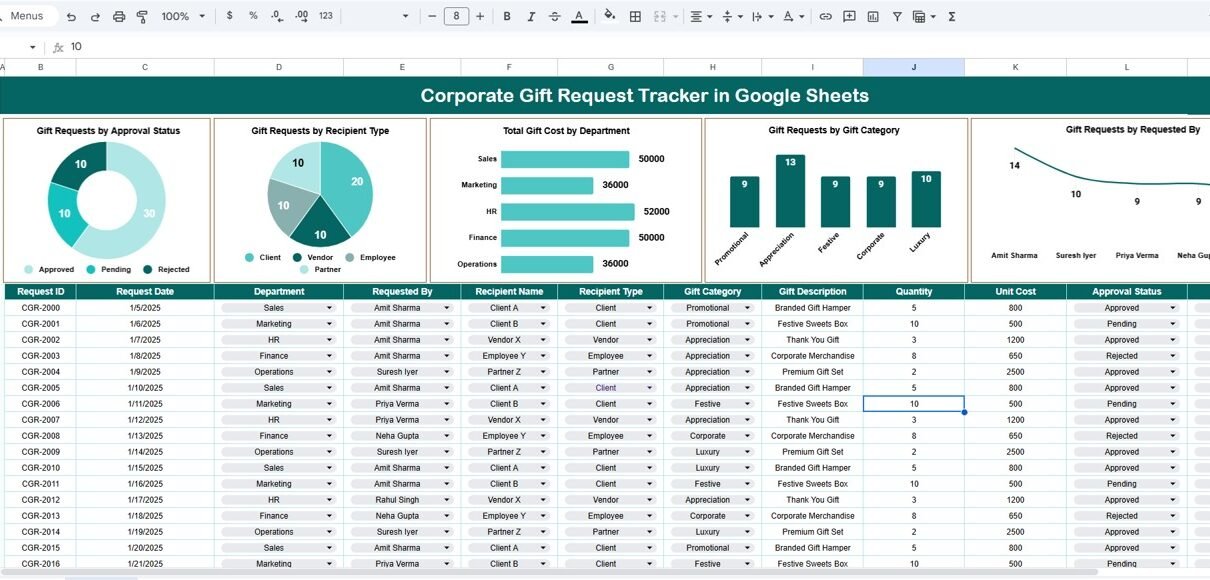
The Tracker Sheet is the core of the entire system. This is where all gift requests are recorded and maintained.
Typical fields included in the tracker are:
- Request ID
- Request Date
- Requested By
- Department
- Recipient Name
- Recipient Type (Client, Employee, Vendor, Partner)
- Gift Category
- Gift Description
- Estimated Cost
- Approval Status (Pending, Approved, Rejected)
- Approver Name
- Comments
Once you enter or update any record, all charts update automatically. This ensures accurate and up-to-date reporting at all times.
Charts Included in the Tracker
Click to Buy Corporate Gift Request Tracker in Google Sheets
The tracker includes five insightful charts that provide instant visibility into gift requests, approvals, and spending patterns.
1. Gift Requests by Approval Status
This chart shows the distribution of gift requests by approval status, such as:
- Pending
- Approved
- Rejected
It helps management quickly understand how many requests are awaiting action and whether approvals are moving smoothly.
2. Gift Requests by Recipient Type
This chart categorizes gift requests based on recipient type, such as:
- Clients
- Employees
- Vendors
- Partners
It helps organizations understand who receives most corporate gifts and supports better relationship planning.
3. Total Gift Cost by Department
This chart displays the total cost of gifts requested or approved by each department.
It helps:
- Monitor department-wise spending
- Control budgets
- Identify departments with high gifting activity
- Support finance and audit reviews
4. Gift Requests by Gift Category
This chart shows the number of requests by gift category, such as:
- Promotional Gifts
- Festive Gifts
- Employee Rewards
- Client Appreciation Gifts
- Event Gifts
It helps organizations understand gifting trends and optimize gift selection strategies.
Gift Requests by Requested By
This chart shows who raises the most gift requests.
It helps managers:
-
Identify frequent requesters
-
Balance approvals fairly
-
Detect unusual request patterns
-
Improve internal governance

Click to Buy Corporate Gift Request Tracker in Google Sheets
Search Functionality – Search by Keyword and Field Name
The tracker includes a smart search feature that allows users to quickly find specific gift requests.
You simply enter:
-
Search Keyword (e.g., department name, requester name, gift category)
-
Field Name (e.g., Department, Requested By, Approval Status)
The tracker instantly filters and displays matching records.
This feature helps teams:
- Respond quickly to management queries
- Prepare audit reports faster
- Track pending approvals easily
- Reduce time spent scrolling through data

Click to Buy Corporate Gift Request Tracker in Google Sheets
Advantages of Using a Corporate Gift Request Tracker
Using this tracker delivers multiple business benefits.
Improved Transparency
All gift requests stay visible and traceable from start to finish.
Better Cost Control
Department-wise cost tracking prevents budget overruns.
Faster Approvals
Approval status charts highlight pending requests instantly.
Centralized Record Keeping
All data stays in one secure location.
Audit-Ready Reporting
Clear history supports compliance and audits.
Easy to Use
Anyone with basic Google Sheets knowledge can manage it.
Opportunities for Improvement in the Tracker
Although the tracker is powerful, organizations can enhance it further by adding:
- Automated email notifications for approvals
- Budget limits by department
- SLA tracking for approval timelines
- Attachment support for invoices or quotes
- Approval workflow automation using Google Apps Script
These enhancements turn the tracker into a complete corporate gifting management system.
Best Practices for Using the Corporate Gift Request Tracker
Click to Buy Corporate Gift Request Tracker in Google Sheets
To get maximum value from the tracker, follow these best practices:
- Update requests in real time
- Standardize gift categories and recipient types
- Review approval status daily
- Monitor department budgets regularly
- Use charts during management reviews
- Restrict edit access to authorized users
Following these practices ensures clean data and reliable insights.
Conclusion
A Corporate Gift Request Tracker in Google Sheets simplifies how organizations manage gifting activities. It improves transparency, strengthens budget control, and ensures every request follows a structured approval process. Because the tracker offers real-time charts and an advanced search feature, teams can make faster and smarter decisions.
With this ready-to-use tracker, organizations gain full visibility into gift requests, reduce administrative effort, and maintain strong governance over corporate gifting programs.
Frequently Asked Questions (FAQs)
Click to Buy Corporate Gift Request Tracker in Google Sheets
1. Who should use a Corporate Gift Request Tracker?
Admin teams, HR teams, finance teams, compliance teams, and department managers.
2. Can I customize gift categories?
Yes, the tracker is fully customizable.
3. Does it support multiple departments?
Yes, you can track unlimited departments.
4. Is Google Sheets secure for this data?
Yes, when access permissions are configured properly.
5. Can I track gift budgets?
Yes, by adding budget columns and formulas.
6. Does the tracker update charts automatically?
Yes, charts update instantly when data changes.
Visit our YouTube channel to learn step-by-step video tutorials
Youtube.com/@NeotechNavigators
Watch the step-by-step video tutorial:
Click to Buy Corporate Gift Request Tracker in Google Sheets