Employee engagement directly impacts productivity, retention, and organizational success. However, many organizations struggle to measure engagement accurately because survey results remain scattered, inconsistent, or difficult to analyze. As a result, HR teams fail to turn feedback into action.Employee Engagement Survey KPI Dashboard in Google Sheets
That is exactly where an Employee Engagement Survey KPI Dashboard in Google Sheets becomes essential.
This ready-to-use dashboard transforms raw engagement survey data into clear KPIs, trends, and comparisons. It allows HR leaders, managers, and leadership teams to track engagement performance monthly and yearly while comparing targets and previous-year results. Because the dashboard runs entirely in Google Sheets, teams gain flexibility, transparency, and real-time insights without investing in complex HR analytics software.Employee Engagement Survey KPI Dashboard in Google Sheets
In this article, we will explain how this dashboard works, which KPIs it includes, how each worksheet supports analysis, and how organizations can use it to improve employee engagement outcomes.Employee Engagement Survey KPI Dashboard in Google Sheets
What Is an Employee Engagement Survey KPI Dashboard in Google Sheets?
Click to Buy Employee Engagement Survey KPI Dashboard in Google Sheets
An Employee Engagement Survey KPI Dashboard is a structured reporting solution that analyzes survey responses related to satisfaction, motivation, leadership, recognition, growth, and workplace culture.Employee Engagement Survey KPI Dashboard in Google Sheets
Instead of reviewing survey spreadsheets manually, HR teams use this dashboard to:
- Track engagement KPIs monthly and yearly
- Compare Actual vs Target performance
- Analyze Current Year vs Previous Year trends
- Identify engagement gaps early
- Support data-driven people decisions
Because the dashboard uses standardized KPIs and automated calculations, it ensures consistency and clarity across departments.Employee Engagement Survey KPI Dashboard in Google Sheets
Key Worksheets in the Employee Engagement Survey KPI Dashboard
Click to Buy Employee Engagement Survey KPI Dashboard in Google Sheets
The dashboard contains 6 interconnected worksheet tabs, each designed to support a specific purpose.
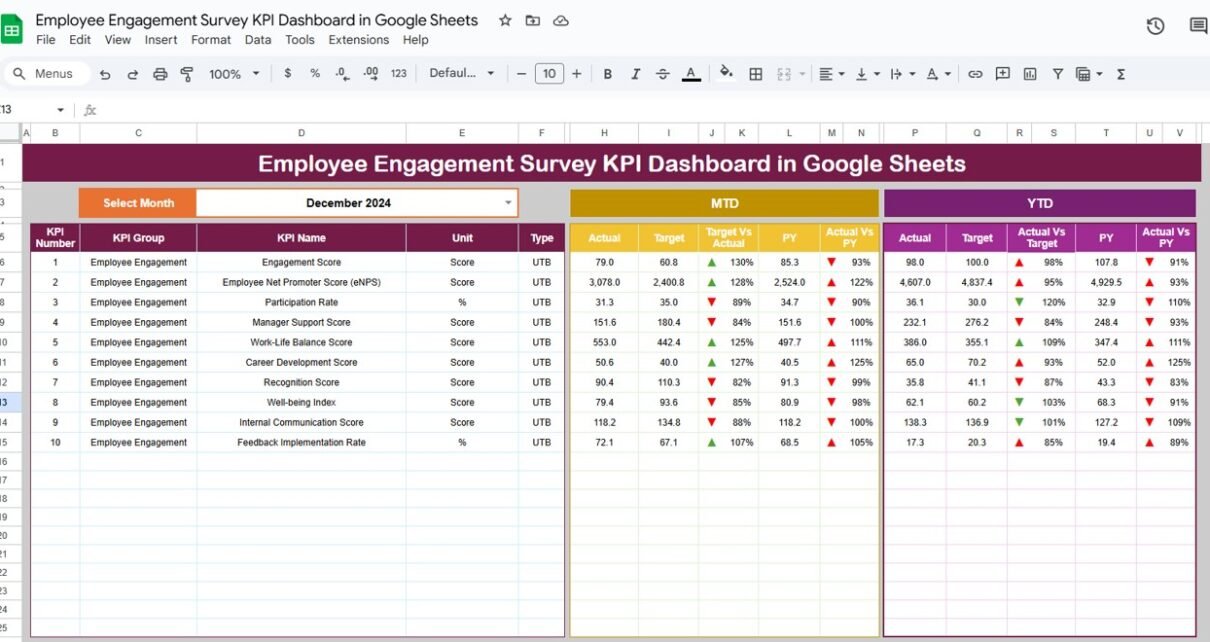
Dashboard Sheet Tab (Main Page)
This is the primary dashboard view.
-
You select the month from the dropdown in cell D3
-
All KPIs update instantly for that selected month
Metrics Displayed:
Month-to-Date (MTD)
- MTD Actual
- MTD Target
- MTD Previous Year
- Target vs Actual
- PY vs Actual
Year-to-Date (YTD)
- YTD Actual
- YTD Target
- YTD Previous Year
- Target vs Actual
- PY vs Actual
Conditional formatting with up and down arrows highlights performance:
-
Green arrow → improvement
-
Red arrow → decline
This allows leadership to review engagement performance in seconds.

Click to Buy Employee Engagement Survey KPI Dashboard in Google Sheets
KPI Trend Sheet Tab
This sheet focuses on deep KPI analysis.
-
Select a KPI from the dropdown in cell C3
The sheet displays:
- KPI Group
- KPI Unit
- KPI Type (Upper the Better / Lower the Better)
- KPI Formula
- KPI Definition
It also shows month-wise trends, helping teams understand whether engagement improves or declines over time.

Click to Buy Employee Engagement Survey KPI Dashboard in Google Sheets
Actual Number Sheet Tab
This sheet captures MTD and YTD actual engagement values.
-
Select the first month of the year in cell E1
-
Enter survey results month by month
-
The dashboard updates automatically
This sheet acts as the single source of truth for engagement performance.

Target Sheet Tab
This sheet stores engagement targets for each KPI.
- Enter MTD and YTD targets
- Align engagement goals with HR strategy
- Compare performance against expectations

Click to Buy Employee Engagement Survey KPI Dashboard in Google Sheets
Previous Year Number Sheet Tab
This sheet stores previous-year engagement scores.
It enables:
- Year-over-year comparison
- Long-term engagement trend analysis
- Measurement of improvement initiatives

KPI Definition Sheet Tab
This is the reference sheet for governance and clarity.
It includes:
- KPI Name
- KPI Group
- Unit
- Formula
- Definition
- KPI Type (UTB / LTB)
This ensures everyone interprets KPIs the same way.

Click to Buy Employee Engagement Survey KPI Dashboard in Google Sheets
Advantages of the Employee Engagement Survey KPI Dashboard
Centralized engagement tracking
All KPIs stay in one structured dashboard.
Faster decision-making
Leaders identify engagement issues quickly.
Target vs Actual visibility
Teams measure success against goals.
Year-over-year insights
HR tracks long-term engagement improvement.
No technical dependency
Google Sheets requires no advanced tools.
Opportunities for Improvement in Engagement Tracking
Click to Buy Employee Engagement Survey KPI Dashboard in Google Sheets
-
Add department-level engagement KPIs
-
Introduce sentiment analysis scoring
-
Integrate pulse surveys
-
Automate reminders using Apps Script
-
Link engagement KPIs with attrition data
Best Practices for Using the Dashboard
-
Conduct surveys consistently
-
Set realistic engagement targets
-
Review dashboard monthly
-
Share insights with managers
-
Act on low-scoring KPIs immediately
Conclusion
Click to Buy Employee Engagement Survey KPI Dashboard in Google Sheets
An Employee Engagement Survey KPI Dashboard in Google Sheets turns employee feedback into actionable insights. It helps organizations measure engagement accurately, identify risks early, and track improvement over time. Because the dashboard is structured, visual, and automated, it empowers HR teams and leaders to build a more engaged, motivated, and productive workforce.
Frequently Asked Questions (FAQs)
1. Who should use this dashboard?
HR teams, people managers, and leadership teams.
2. Can KPIs be customized?
Yes, KPIs are fully customizable.
3. Does it support MTD and YTD tracking?
Yes, both views are built in.
4. Is Google Sheets secure?
Yes, with proper access controls.
5. Can I compare departments?
Yes, using KPI trends and filters.
Visit our YouTube channel to learn step-by-step video tutorials
Youtube.com/@NeotechNavigators
Watch the step-by-step video tutorial:
Click to Buy Employee Engagement Survey KPI Dashboard in Google Sheets