Ensuring that all employees have read, understood, and acknowledged the company handbook is a crucial part of compliance and HR governance. Without a systematic method to record acknowledgments, HR teams may struggle to monitor completion, follow up with employees, and maintain accurate documentation.Employee Handbook Acknowledgment Tracker in Google Sheets
The Employee Handbook Acknowledgment Tracker in Google Sheets is a ready-to-use tool that simplifies this entire process. It helps HR departments track acknowledgment status, monitor department-wise completion, and ensure every employee complies with company policies.Employee Handbook Acknowledgment Tracker in Google Sheets
In this article, we explain the structure, features, advantages, and best practices of this tracker, along with frequently asked questions.
What Is the Employee Handbook Acknowledgment Tracker?
The Employee Handbook Acknowledgment Tracker is a Google Sheets–based tool that records acknowledgment data for each employee. Whether employees sign digitally, manually, or through a portal, this tracker helps store acknowledgment details in one centralized place.
It enables HR teams to:
-
Track acknowledgment completion
-
Filter acknowledgments by department, position, location, or method
-
Monitor pending acknowledgments
-
Generate quick insights using automated charts
-
Find acknowledgment records using a search tool
Why Use Google Sheets for This Tracker?
Click to Buy Employee Handbook Acknowledgment Tracker in Google Sheets
Google Sheets is a practical option because it provides:
-
Real-time updates
-
Access from anywhere
-
Collaboration for HR teams
-
Simple charting capabilities
-
No installation or software cost
-
Easy customization
It is ideal for small to large organizations that must maintain compliance records accurately.
Tracker Structure and Features
This ready-to-use tracker includes two main tabs designed for efficient acknowledgment tracking.
1. Tracker Sheet Tab
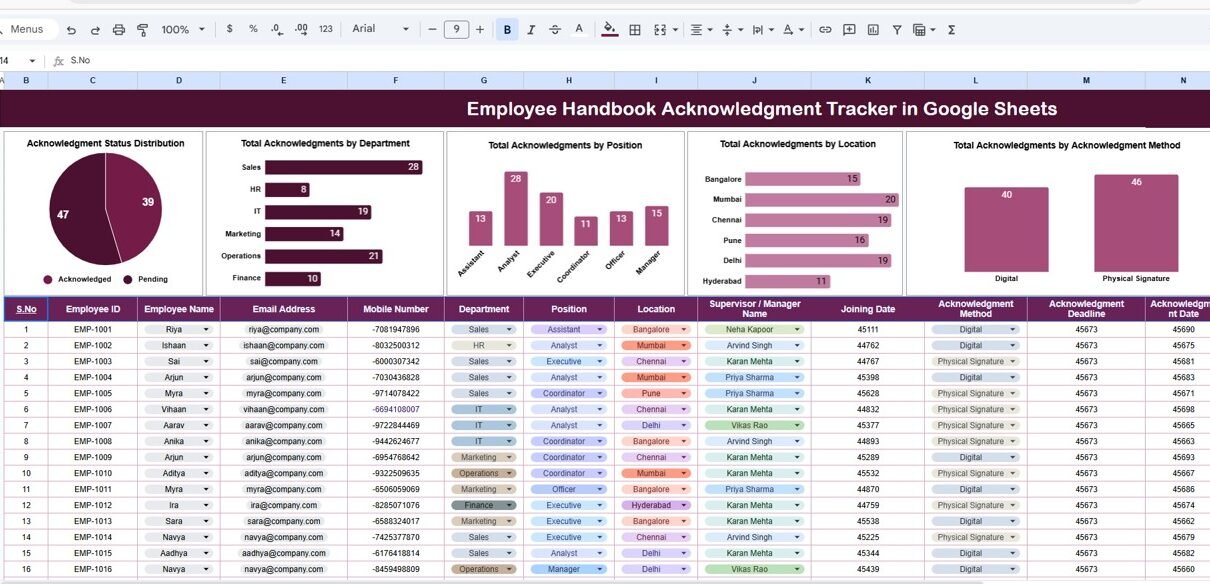
This is the main dashboard where all acknowledgment information is visually summarized.
Charts Included:
-
Acknowledgment Status Distribution
Shows how many employees have completed, pending, or not acknowledged the handbook. -
Total Acknowledgments by Department
Helps HR teams identify which departments have high or low acknowledgment rates. -
Total Acknowledgments by Position
Displays acknowledgment completion across job positions. -
Total Acknowledgments by Location
Useful for companies with multiple branches or geographic offices. -
Total Acknowledgments by Acknowledgment Method
Shows how employees acknowledged—digital signature, manual signature, email confirmation, etc.
These charts help HR managers instantly analyze compliance levels across the organization.

Click to Buy Employee Handbook Acknowledgment Tracker in Google Sheets
2. Search Sheet Tab
This tab allows quick lookup of acknowledgment records.
Search Options Include:
-
Search by Keyword
-
Search by Field Name (Employee Name, Department, Position, Location, Method, Status, etc.)
This feature saves time and avoids manual scrolling through large datasets.

Click to Buy Employee Handbook Acknowledgment Tracker in Google Sheets
Advantages of Using the Employee Handbook Acknowledgment Tracker
-
Centralized Recordkeeping
Keeps all acknowledgment details in one accessible place. -
Quick Compliance Insights
HR teams can easily view who has acknowledged and who still needs reminders. -
Department & Location Analysis
Charts highlight areas needing follow-up or additional communication. -
Improved Accountability
Departments and managers can ensure their teams stay compliant. -
Easy Customization
Add fields like acknowledgment date, document version, or signature type. -
Real-Time Collaboration
Multiple HR users can update or review data simultaneously.
Opportunities for Improvement
Click to Buy Employee Handbook Acknowledgment Tracker in Google Sheets
You can enhance this tracker further by adding:
-
Automated Email Reminders
Notify employees who haven’t acknowledged yet. -
Google Forms Integration
Employees can submit acknowledgments through a form that feeds into the tracker. -
Document Version Tracking
Track acknowledgments for each version of the handbook. -
Digital Signature Linkage
Add links to signed PDF acknowledgments. -
Employee Summary Dashboard
Add individual compliance scorecards for each employee.
Best Practices for Using This Tracker
-
Update Acknowledgment Records Regularly
Enter new hires immediately and update status after receiving acknowledgment. -
Clear Acknowledgment Methods
Standardize whether acknowledgment is digital, manual, or email-based. -
Use Filters for Quick Checks
Identify pending employees quickly before audits. -
Monitor Charts Weekly
Keep track of compliance trends across departments. -
Communicate Clearly with Departments
Sharing dashboard insights encourages faster acknowledgment. -
Version Control
Update the tracker whenever a new handbook version is released.
Conclusion
Click to Buy Employee Handbook Acknowledgment Tracker in Google Sheets
The Employee Handbook Acknowledgment Tracker in Google Sheets is a simple yet essential tool for HR teams. It ensures every employee acknowledges the company handbook, keeps compliance records accurate, and helps prepare for audits effortlessly.
With visual charts, easy search functionality, and a centralized data structure, HR departments can streamline their acknowledgment process and ensure complete workforce compliance.
Frequently Asked Questions (FAQs)
1. What does this tracker monitor?
It tracks acknowledgment status, department trends, position-wise completion, and acknowledgment methods.
2. Can I customize acknowledgment fields?
Yes, you can add or modify fields such as acknowledgment date or signature type.
3. Does it support digital acknowledgment tracking?
Yes, you can track digital signatures, email confirmations, or manual sign-offs.
4. Can multiple HR users collaborate?
Yes, Google Sheets allows real-time updates and teamwork.
5. Can I filter acknowledgment by department or location?
Yes, the charts and search tool allow quick filtering and analysis.
Visit our YouTube channel to learn step-by-step video tutorials
Youtube.com/@NeotechNavigators
Watch the step-by-step video Demo:
Click to Buy Employee Handbook Acknowledgment Tracker in Google Sheets