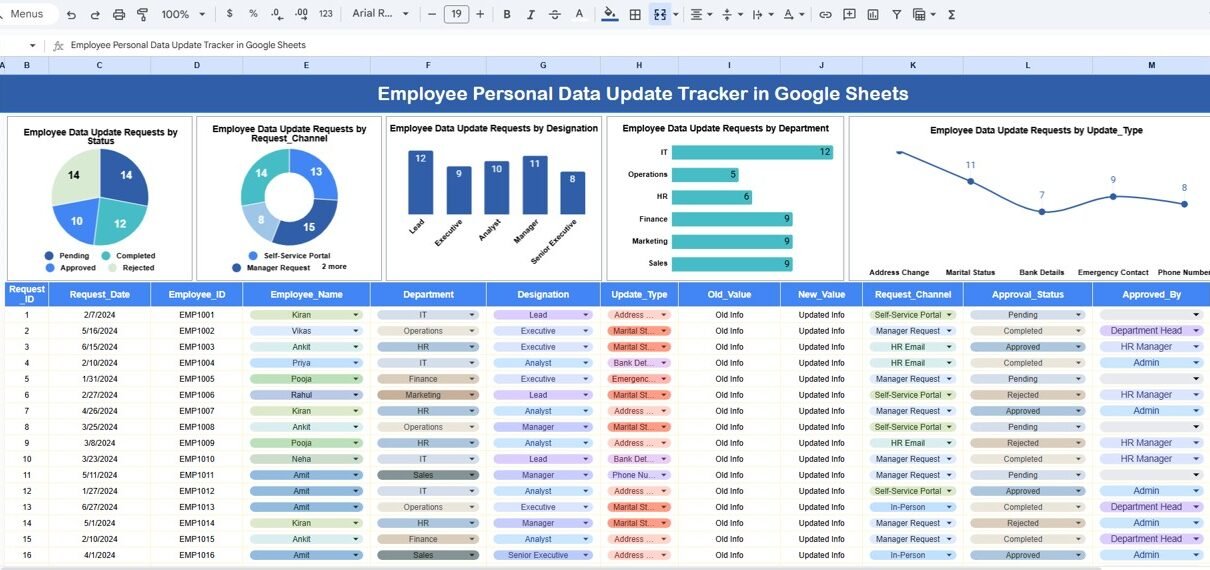
Managing employee personal information accurately is a critical responsibility for every organization. Employee data such as address, contact details, bank information, emergency contacts, identification documents, and personal records change frequently. However, many HR teams still rely on emails, manual registers, or scattered spreadsheets to track these updates. As a result, data inconsistencies, delays, compliance risks, and employee dissatisfaction increase.Employee Personal Data Update Tracker in Google Sheets
The Employee Personal Data Update Tracker in Google Sheets solves this problem effectively. It is a ready-to-use tracker designed to capture, track, analyze, and manage employee personal data update requests in one centralized place. Moreover, it provides visual insights through charts and allows quick record retrieval using a smart search feature.Employee Personal Data Update Tracker in Google Sheets
What Is an Employee Personal Data Update Tracker in Google Sheets?
Click to Buy Employee Personal Data Update Tracker in Google Sheets
An Employee Personal Data Update Tracker is a centralized tracking system that records all employee-initiated personal data change requests. It helps HR teams monitor request status, identify trends, reduce processing delays, and ensure data accuracy.
Because the tracker is built in Google Sheets, it offers:
-
Real-time collaboration
-
Easy data entry
-
Automatic chart updates
-
Secure access control
-
Zero software cost
This tracker is suitable for HR teams, payroll teams, compliance teams, and administrators across organizations of all sizes.
Why Do Organizations Need This Tracker?
Employee personal data changes occur regularly. These include:
- Address changes
- Phone number updates
- Email ID changes
- Bank account modifications
- Emergency contact updates
- Name corrections
- Identification document updates
Without a structured tracker, organizations face challenges such as:
- Missed update requests
- Incorrect payroll processing
- Compliance issues
- Delayed approvals
- Poor employee experience
The Employee Personal Data Update Tracker addresses all these challenges by offering a single source of truth.
Tracker Sheet Tab – Core Data Entry Sheet
Click to Buy Employee Personal Data Update Tracker in Google Sheets
The Tracker Sheet Tab is the foundation of this system. All employee data update requests are entered and maintained here.
Typical fields included in the tracker:
- Request ID
- Employee ID
- Employee Name
- Department
- Designation
- Request Channel
- Update Type
- Request Date
- Status
- Remarks
Once data is entered or updated in this sheet, all charts refresh automatically.
This structured approach ensures consistency, transparency, and audit-ready records.
Charts Included in the Employee Personal Data Update Tracker
The tracker includes five powerful charts, each designed to provide clear insights into request patterns and workload distribution.
1. Employee Data Update Requests by Status
This chart shows the distribution of requests based on their current status, such as:
- Open
- In Progress
- Completed
- Rejected
Why this chart matters:
- Helps HR teams identify pending workload
- Highlights bottlenecks in processing
- Improves turnaround time
A large number of open requests indicates the need for process optimization.
2. Employee Data Update Requests by Request Channel
Click to Buy Employee Personal Data Update Tracker in Google Sheets
This chart displays how employees submit their update requests, such as:
-
Email
-
HR Portal
-
Google Form
-
Walk-in
-
Internal Ticket System
Why this chart matters:
-
Helps HR identify preferred communication channels
-
Supports digital transformation decisions
-
Improves employee accessibility
3. Employee Data Update Requests by Designation
This chart shows how requests are distributed across employee designations, such as:
- Executives
- Managers
- Team Leads
- Staff
- Contract Employees
Why this chart matters:
-
Reveals which employee levels request updates more frequently
-
Helps design role-specific HR policies
-
Supports workforce analysis
4. Employee Data Update Requests by Department
This chart shows the number of requests coming from each department.
Why this chart matters:
-
Identifies departments with frequent data changes
-
Helps HR plan targeted communication
-
Supports department-wise HR workload planning
5. Employee Data Update Requests by Update Type
This chart breaks down requests by update type, such as:
- Address Change
- Bank Details Update
- Contact Information Update
- Emergency Contact Update
- Name Correction
- ID Document Updat

Click to Buy Employee Personal Data Update Tracker in Google Sheets
Search Functionality – Search by Keyword and Field Name
The tracker includes a Search Panel that allows instant filtering of records.
Search Inputs:
-
Search Keyword
-
Field Name (Employee Name, Department, Designation, Update Type, Status, etc.)
Key benefits of the search feature:
- Quickly locate employee records
- Respond faster to employee queries
- Support audits and compliance checks
- Reduce manual filtering time
- Improve overall HR productivity
This feature is especially useful when the tracker grows to hundreds or thousands of records.

Click to Buy Employee Personal Data Update Tracker in Google Sheets
Opportunities for Improvement in the Tracker
Although the tracker is powerful, organizations can enhance it further by adding:
🔹 Automated Email Notifications
Notify employees when their request status changes.
🔹 SLA Tracking
Measure turnaround time for each request.
🔹 Approval Workflow
Add multi-level approval logic.
🔹 Document Attachment Links
Store supporting documents securely.
🔹 Historical Change Logs
Track old vs new data values.
🔹 Dashboard Summary Page
Add KPI cards for total requests, pending requests, and average processing time.
Best Practices for Using the Employee Data Update Tracker
Click to Buy Employee Personal Data Update Tracker in Google Sheets
- Update request status daily
- Use standardized update types
- Train HR staff on consistent data entry
- Review charts weekly
- Restrict editing access to authorized users
- Archive completed records periodically
- Back up the Google Sheet regularly
Following these best practices ensures long-term efficiency and data reliability.
Who Can Use This Tracker?
This tracker is useful for:
- HR Teams
- Payroll Teams
- Compliance Officers
- Admin Departments
- Shared Service Centers
- Growing Startups
- Large Enterprises
Any organization that values accurate employee data will benefit from this tracker.
Conclusion
Click to Buy Employee Personal Data Update Tracker in Google Sheets
The Employee Personal Data Update Tracker in Google Sheets is a simple yet powerful solution for managing employee data changes efficiently. It eliminates manual tracking, improves transparency, and enhances HR productivity. With structured data entry, insightful charts, and a smart search feature, organizations can maintain accurate employee records while delivering a better employee experience.
Because it is cloud-based, flexible, and easy to use, this tracker becomes an essential HR tool for modern workplaces.
Frequently Asked Questions (FAQs)
1. Is this tracker suitable for large organizations?
Yes, it supports thousands of records efficiently.
2. Can we customize update types?
Yes, all fields and categories are fully customizable.
3. Does it support multiple HR users?
Yes, Google Sheets allows multi-user collaboration.
4. Is employee data secure?
Yes, access can be restricted using Google Sheets permissions.
5. Can we add automation later?
Yes, Google Apps Script can automate notifications and workflows.
6. Do we need technical skills?
No, basic Google Sheets knowledge is enough.
Visit our YouTube channel to learn step-by-step video tutorials
Youtube.com/@NeotechNavigators
Click to Buy Employee Personal Data Update Tracker in Google Sheets