Employee well-being plays a critical role in productivity, engagement, and long-term organizational success. When employees feel mentally and physically healthy, they perform better, collaborate effectively, and stay motivated. However, many organizations struggle to track employee wellness in a structured and measurable way. Scattered surveys, informal feedback, and unorganized spreadsheets often fail to provide meaningful insights.Employee Wellness Check Tracker in Google Sheets
That is exactly why an Employee Wellness Check Tracker in Google Sheets becomes an essential solution. This ready-to-use tracker helps organizations monitor mental health, physical health, stress levels, workload balance, energy levels, and work-life balance in one centralized system.Employee Wellness Check Tracker in Google Sheets
What Is an Employee Wellness Check Tracker in Google Sheets?
Click to Buy Employee Wellness Check Tracker in Google Sheets
An Employee Wellness Check Tracker is a structured Google Sheets tool designed to capture, analyze, and visualize employee wellness data. Instead of relying on assumptions, organizations can track real wellness indicators and make data-driven decisions.Employee Wellness Check Tracker in Google Sheets
This tracker allows HR teams to:
- Monitor mental and physical health status
- Identify stress and workload issues early
- Understand work-life balance by department
- Track energy and engagement levels by role
- Support proactive wellness initiatives
Because it runs on Google Sheets, the tracker remains cloud-based, collaborative, cost-effective, and easy to maintain.
Key Features of the Employee Wellness Check Tracker
This tracker includes:
- A central Tracker Sheet Tab
- Six insightful charts for wellness analysis
- A powerful search functionality
- A clean and user-friendly layout
- Real-time updates as data changes
Let us explore each part in detail.
Tracker Sheet Tab
Click to Buy Employee Wellness Check Tracker in Google Sheets
The Tracker Sheet Tab serves as the foundation of the entire wellness system. This sheet stores all employee wellness responses and related details, such as:
- Employee Name / ID
- Department
- Job Role
- Mental Health Status
- Physical Health Status
- Stress Level
- Energy Level
- Workload Level
- Work-Life Balance Rating
- Survey Date
- Comments or Notes
Once you enter or update data in this sheet, all charts and insights update automatically. As a result, HR teams gain real-time visibility into employee well-being.
Charts Included in the Tracker
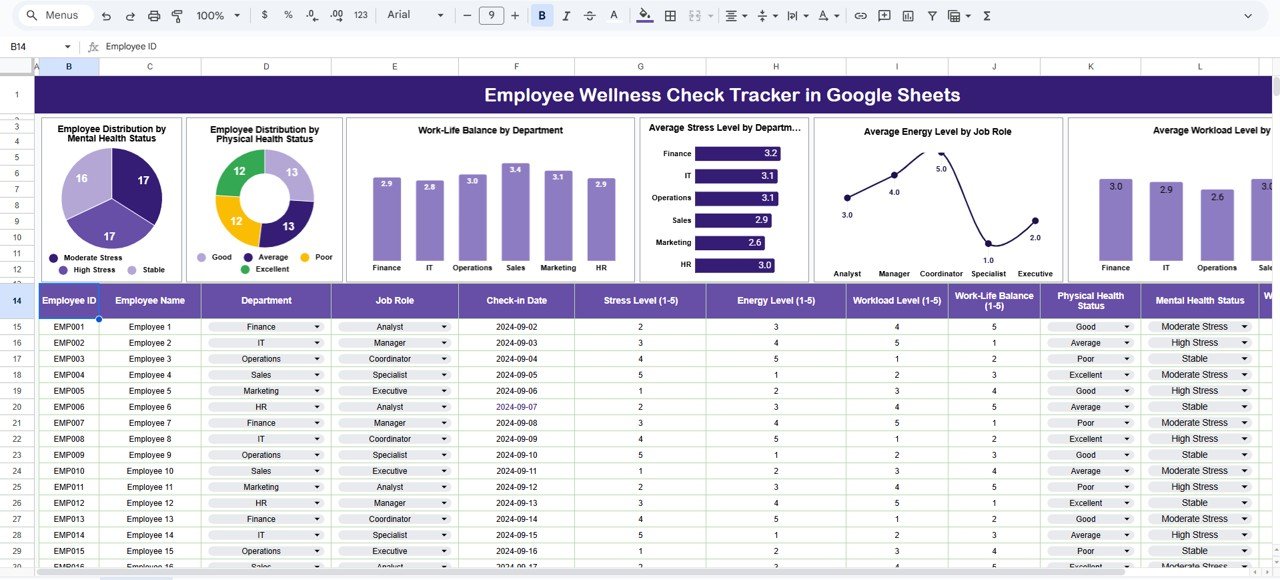
The Employee Wellness Check Tracker includes six powerful charts, each designed to highlight a specific aspect of employee health and engagement.
Employee Distribution by Mental Health Status
This chart shows how employees fall into different mental health categories, such as:
- Excellent
- Good
- Average
- At Risk
It helps HR teams identify early warning signs and prioritize mental health initiatives before issues escalate.
Employee Distribution by Physical Health Status
Click to Buy Employee Wellness Check Tracker in Google Sheets
This chart provides visibility into employees’ physical well-being. It highlights patterns related to fatigue, recurring health issues, or overall fitness levels across the organization.
As a result, organizations can plan wellness programs, health checkups, and ergonomic improvements more effectively.
Work-Life Balance by Department
This chart compares work-life balance scores across departments. It helps leaders identify:
- Departments with workload pressure
- Teams struggling with long working hours
- Areas that require policy or staffing changes
Balanced departments often show higher engagement and lower attrition.
Average Stress Level by Department
This chart reveals which departments experience higher stress levels. Because stress directly impacts productivity and morale, this insight helps managers intervene early and adjust workloads or processes.
Average Energy Level by Job Role
This chart shows how energy levels vary across job roles. Low energy levels often signal burnout, lack of motivation, or excessive workload.
Managers can use this insight to redesign roles, rotate responsibilities, or provide additional support.
Average Workload Level by Department
This chart highlights workload distribution across departments. It helps organizations ensure fair workload allocation and avoid overburdening specific teams.
Click to Buy Employee Wellness Check Tracker in Google Sheets
Search Functionality – Search by Keyword and Field Name
The tracker includes a smart search feature that allows users to find specific records instantly.
You simply enter:
-
Search Keyword
-
Field Name (Employee Name, Department, Job Role, Health Status, etc.)
The tracker immediately filters matching records. This feature helps HR teams:
-
Prepare for one-on-one discussions
-
Review department-specific wellness data
-
Respond quickly to employee concerns
-
Conduct audits or internal reviews efficiently

Click to Buy Employee Wellness Check Tracker in Google Sheets
Why Do Organizations Need an Employee Wellness Tracker?
Employee wellness directly affects:
-
Productivity
-
Employee engagement
-
Retention rates
-
Workplace culture
-
Long-term business performance
Without a structured tracking system, organizations react too late. A wellness tracker allows teams to act early, support employees proactively, and create a healthier work environment.
Advantages of the Employee Wellness Check Tracker
Click to Buy Employee Wellness Check Tracker in Google Sheets
Centralized Wellness Monitoring
All wellness data stays in one organized location.
Real-Time Insights
Charts update instantly when data changes.
Early Risk Identification
R teams identify stress, burnout, and workload issues early.
Better Decision-Making
Managers rely on data instead of assumptions.
Easy to Use
Anyone with basic Google Sheets knowledge can use it.
Supports Remote & Hybrid Teams
Cloud access allows wellness tracking from anywhere.
Opportunities for Improvement in Employee Wellness Tracking
Click to Buy Employee Wellness Check Tracker in Google Sheets
Although the tracker is powerful, organizations can enhance it further by adding:
-
Automated wellness alerts for high stress levels
-
Historical trend analysis across months or quarters
-
Integration with HR systems or survey tools
-
Personalized wellness action plans
-
Department-specific wellness benchmarks
These improvements make wellness tracking even more strategic.
Best Practices for Using the Wellness Check Tracker
-
Conduct wellness surveys regularly (monthly or quarterly)
-
Maintain confidentiality and data privacy
-
Encourage honest responses without fear
-
Review charts during leadership meetings
-
Act on insights, not just track data
-
Communicate wellness initiatives clearly to employees
Following these practices ensures meaningful and ethical wellness management.
Conclusion
Click to Buy Employee Wellness Check Tracker in Google Sheets
An Employee Wellness Check Tracker in Google Sheets provides organizations with a simple yet powerful way to understand employee well-being. It transforms wellness data into actionable insights through clear charts and structured tracking. Because it is ready to use, cloud-based, and easy to maintain, it fits organizations of all sizes.
By using this tracker effectively, companies can reduce burnout, improve engagement, and build a healthier, more productive workplace culture.
Frequently Asked Questions (FAQs)
Click to Buy Employee Wellness Check Tracker in Google Sheets
1. Who should use an Employee Wellness Check Tracker?
HR teams, people managers, leadership teams, and wellness coordinators.
2. How often should wellness data be collected?
Most organizations collect data monthly or quarterly.
3. Is Google Sheets secure for wellness data?
Yes, when access permissions and data controls are properly configured.
4. Can this tracker support remote employees?
Yes, it works perfectly for remote and hybrid teams.
5. Can I customize wellness parameters?
Yes, all fields and charts are fully customizable.
6. Does the tracker require technical skills?
No, basic Google Sheets knowledge is sufficient.
Visit our YouTube channel to learn step-by-step video tutorials
Youtube.com/@NeotechNavigators
Watch the step-by-step video tutorial:
Click to Buy Employee Wellness Check Tracker in Google Sheets