Managing eEmployee Work Hours Adjustment Request Tracker in Google Sheets has become more complex than ever. Flexible working hours, remote work, shift changes, and personal commitments require organizations to handle work hour adjustment requests efficiently. However, when these requests arrive through emails, chats, or verbal conversations, HR teams struggle to track approvals, maintain transparency, and ensure compliance.
That is exactly why an Employee Work Hours Adjustment Request Tracker in Google Sheets becomes an essential HR operations tool.
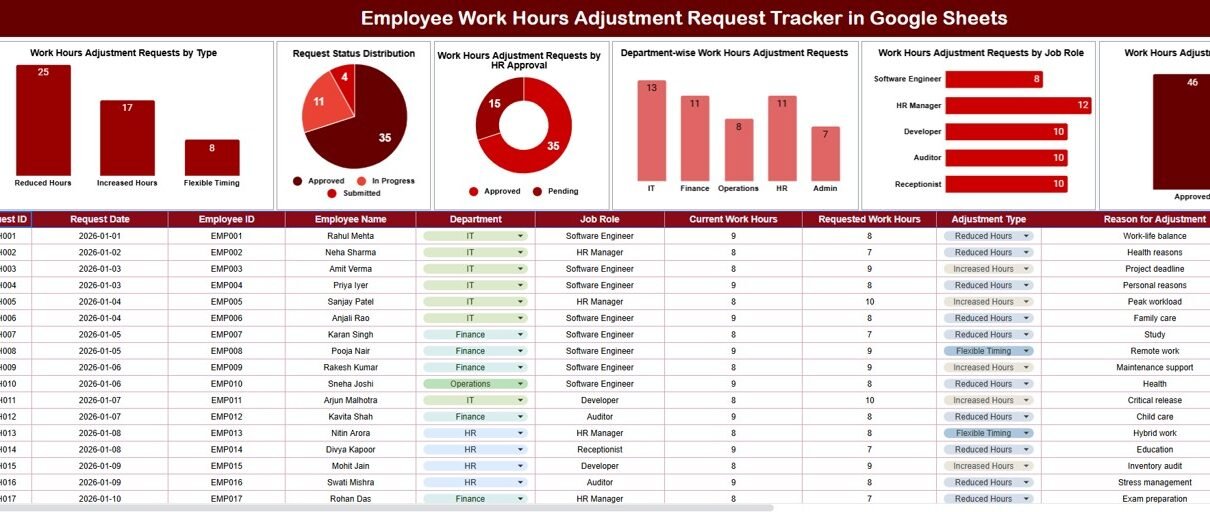
This ready-to-use tracker provides a structured and centralized way to manage work hours adjustment requests. It captures request details, approval status, department impact, and job role insights—while offering visual analytics and a powerful search feature.
In this article, we will explain how this tracker works, what charts it includes, why it is useful, and how organizations can use it to improve workforce management.Employee Work Hours Adjustment Request Tracker in Google Sheets
What Is an Employee Work Hours Adjustment Request Tracker in Google Sheets?
An Employee Work Hours Adjustment Request Tracker is a centralized system that records and manages requests related to changes in work hours. These requests may include:
-
Shift changes
-
Flexible work hours
-
Reduced or extended working hours
-
Temporary schedule changes
-
Special working arrangements
Because this tracker is built in Google Sheets, it enables real-time collaboration, easy updates, and transparent tracking without additional software.
Key Features of the Tracker
Click to Buy Employee Work Hours Adjustment Request Tracker in Google Sheets
This tracker includes:
-
A structured Tracker Sheet Tab
-
Five insightful charts for analysis
-
A smart Search by Keyword and Field Name feature
-
A scalable and easy-to-maintain design
Each feature helps HR teams manage requests efficiently and fairly.
Tracker Sheet Tab
The Tracker Sheet Tab is where all work hour adjustment requests are logged and maintained.
Typical fields include:
- Request ID
- Request Date
- Employee Name
- Department
- Job Role
- Adjustment Type (Shift Change, Flexible Hours, Temporary Adjustment, etc.)
- Requested Work Hours
- HR Approval Status (Pending, Approved, Rejected)
- Effective Date
- Comments or Remarks
As data updates, all charts refresh automatically.
Charts Included in the Tracker Dashboard
The dashboard provides five powerful charts that deliver instant insights.
1. Work Hours Adjustment Requests by Type
This chart categorizes requests based on adjustment type, such as:
-
Shift Change
-
Flexible Hours
-
Reduced Hours
-
Extended Hours
It helps HR understand which types of adjustments are most common.
2. Request Status Distribution
This chart shows the distribution of requests by status:
-
Pending
-
Approved
-
Rejected
It helps HR monitor workload and avoid approval delays.
3. Work Hours Adjustment Requests by HR Approval
This chart highlights how many requests are:
-
Approved
-
Rejected
-
Awaiting HR review
It ensures transparency and accountability in the approval process.
4. Department-Wise Work Hours Adjustment Requests
This chart compares request volume across departments.
It helps identify departments that require flexible scheduling policies or workforce planning adjustments.
5. Work Hours Adjustment Requests by Job Role
This chart analyzes requests based on job roles.
It helps management understand role-specific scheduling needs and operational impact.

Click to Buy Employee Work Hours Adjustment Request Tracker in Google Sheets
Search Functionality – Search by Keyword and Field Name
The tracker includes a Search feature that allows users to filter requests instantly.
Users can search by:
-
Employee Name
-
Department
-
Job Role
-
Adjustment Type
-
Approval Status
This feature helps HR teams:
-
Find specific requests quickly
-
Respond to employee queries faster
-
Prepare reports for audits or management reviews
-
Track historical adjustments easily

Click to Buy Employee Work Hours Adjustment Request Tracker in Google Sheets
Why Organizations Need This Tracker
Without a structured system, work hour adjustments can lead to confusion, inconsistency, and compliance risks. This tracker helps organizations:
-
Centralize work hour change requests
-
Ensure fair and transparent approvals
-
Improve workforce planning
-
Reduce manual follow-ups
-
Maintain audit-ready records
Advantages of the Employee Work Hours Adjustment Tracker
Click to Buy Employee Work Hours Adjustment Request Tracker in Google Sheets
-
Centralized request management
-
Clear approval visibility
-
Reduced HR workload
-
Better departmental planning
-
Improved employee satisfaction
-
Easy collaboration through Google Sheets
Opportunities for Improvement
Organizations can enhance this tracker by:
-
Integrating Google Forms for request submission
-
Adding SLA timelines for approvals
-
Automating notifications for pending requests
-
Linking approvals to payroll systems
-
Tracking impact on overtime or costs
Best Practices for Using the Tracker
Click to Buy Employee Work Hours Adjustment Request Tracker in Google Sheets
-
Define clear adjustment policies
-
Review pending requests daily
-
Communicate decisions promptly
-
Monitor department-level trends
-
Maintain confidentiality and access controls
-
Use insights for long-term workforce planning
Conclusion
An Employee Work Hours Adjustment Request Tracker in Google Sheets simplifies the management of flexible work arrangements. It brings transparency, structure, and efficiency to HR operations while supporting employee needs.
Because the tracker is easy to use, scalable, and insight-driven, it becomes a valuable long-term tool for modern workforce management.
Visit our YouTube channel to learn step-by-step video tutorials
Youtube.com/@NeotechNavigators
Watch the step-by-step video tutorial:
Click to Buy Employee Work Hours Adjustment Request Tracker in Google Sheets