Freelancing gives you freedom. However, freedom without structure creates confusion. Many freelancers work hard every month, yet they still struggle to measure growth clearly. As a result, income becomes unstable, productivity drops, and long-term planning suffers.
So, how can you manage your freelance business like a professional company?
The answer is simple.
You need a Freelancer KPI Dashboard in Google Sheets.
This powerful and structured dashboard helps you track revenue, profitability, productivity, client performance, and business growth in one centralized system. Moreover, it allows you to compare Month-to-Date (MTD), Year-to-Date (YTD), Target, and Previous Year performance instantly. Therefore, you gain clarity, control, and confidence.
In this detailed guide, you will learn:
- What a Freelancer KPI Dashboard in Google Sheets is
- All KPIs with unit, formula, and definition
- Explanation of all 6 worksheets
- Advantages of Freelancer KPI Dashboard
- Best practices for using the dashboard
- Frequently Asked Questions with Answers
Let us explore everything step by step.
What Is a Freelancer KPI Dashboard in Google Sheets?
A Freelancer KPI Dashboard in Google Sheets is a structured performance tracking system built inside Google Sheets. It helps freelancers monitor key performance indicators (KPIs) related to income, productivity, efficiency, and client management.
Instead of using multiple spreadsheets, you can:
- Track MTD and YTD income
- Compare Actual vs Target performance
- Analyze Previous Year growth
- Monitor profitability and expenses
- Identify productivity gaps
Because Google Sheets runs in the cloud, you can access your dashboard anytime and from any device. Therefore, you always stay in control of your business.
Why Do Freelancers Need a KPI Dashboard?
Freelancers often focus only on income. However, income alone does not define business success.
For example:
- You may earn more but work excessive hours.
- You may gain clients but lose profit due to discounts.
- You may stay busy but miss growth targets.
Therefore, you must track structured KPIs.
When you use a Freelancer KPI Dashboard:
- You measure growth clearly.
- You improve decision-making.
- You increase profitability.
- You plan future goals confidently.
As a result, you transform freelancing into a scalable business.
Key Features of Freelancer KPI Dashboard in Google Sheets
Click to Buy Freelancer KPI Dashboard in Google Sheets
This dashboard includes 6 powerful worksheets. Each sheet plays an important role in performance tracking.
Dashboard Sheet Tab – How Can You See Complete Performance in One View?
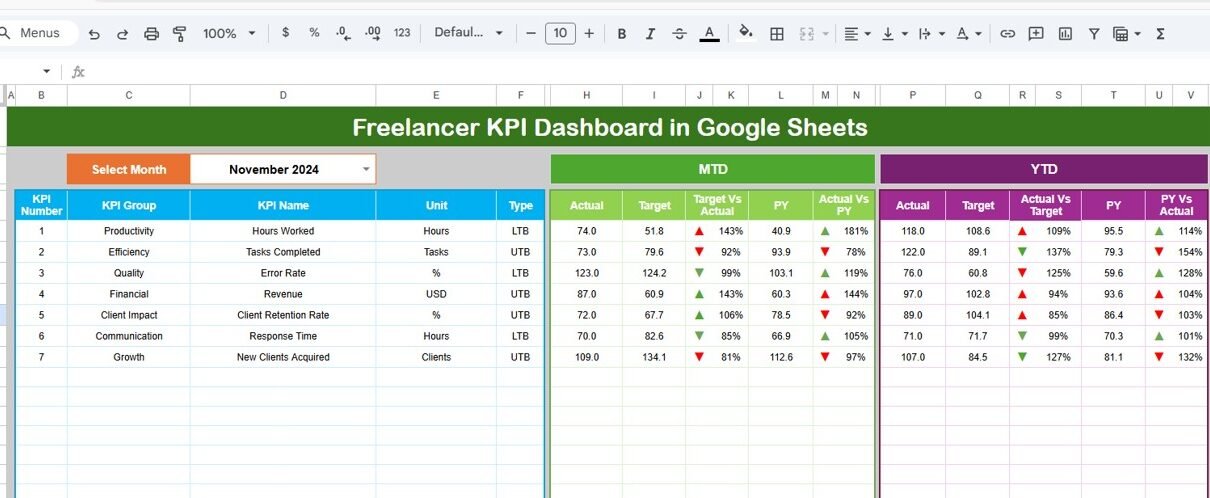
The Dashboard Sheet acts as the main summary page.
On Range D3, you can select the month from a dropdown list. Once you select a month, the entire dashboard updates automatically.
It Displays:
- MTD Actual
- MTD Target
- MTD Previous Year
- Target vs Actual (with up/down arrows)
- PY vs Actual (with up/down arrows)
- YTD Actual
- YTD Target
- YTD Previous Year
Because conditional formatting highlights performance using arrows, you can identify gaps quickly.

Click to Buy Freelancer KPI Dashboard in Google Sheets
KPI Trend Sheet Tab – How Does Each KPI Perform Over Time?
On this sheet, you can select the KPI name from dropdown in Range C3.
The sheet displays:
- KPI Group
- Unit of KPI
- Type (Lower or Upper the Better)
- KPI Formula
- KPI Definition
Moreover, trend charts show monthly performance visually. Therefore, you can detect growth patterns easily.

Click to Buy Freelancer KPI Dashboard in Google Sheets
Actual Number Sheet Tab – Where Do You Enter Actual Data?
Here, you enter MTD and YTD actual values.
You can change the month from Range E1. You should enter the first month of the year in E1.
Once you input numbers, the dashboard updates automatically.

Target Sheet Tab – How Do You Set Business Goals?
In this sheet, you enter monthly target values for each KPI.
You must enter:
- MTD Target
- YTD Target
Because targets drive growth, this sheet helps you stay focused.

Click to Buy Freelancer KPI Dashboard in Google Sheets
Previous Year Number Sheet Tab – Why Compare with Last Year?
In this sheet, you enter previous year data exactly like the current year.
Comparing previous year performance helps you measure true growth.

KPI Definition Sheet Tab – Where Do You Manage KPI Structure?
In this sheet, you define:
- KPI Name
- KPI Group
- Unit
- Formula
- KPI Definition
This sheet ensures clarity and consistency.

Click to Buy Freelancer KPI Dashboard in Google Sheets
Advantages of Freelancer KPI Dashboard in Google Sheets
Complete Business Visibility
You see income, expenses, and productivity in one place.
Target Tracking
You compare Actual vs Target instantly.
Growth Monitoring
You track MTD and YTD performance easily.
Previous Year Comparison
You measure improvement accurately.
Time Saving
You reduce manual reporting effort.
Cloud Access
You access your dashboard anytime.
Therefore, you manage freelancing like a professional business.
Best Practices for the Freelancer KPI Dashboard
Click to Buy Freelancer KPI Dashboard in Google Sheets
To maximize results, follow these best practices:
Update Data Monthly
Enter actual numbers regularly.
Set Realistic Targets
Avoid unrealistic goals.
Review Trends Weekly
Check performance trends frequently.
Control Expenses
Track expense ratio carefully.
Focus on Profit Margin
Revenue alone does not define success.
Analyze Client Retention
Long-term clients increase stability.
When you follow these practices, you improve performance consistently.
Conclusion
Click to Buy Freelancer KPI Dashboard in Google Sheets
Freelancing offers freedom. However, success requires structure and measurement. A Freelancer KPI Dashboard in Google Sheets helps you track income, profit, productivity, and growth systematically.
Moreover, with six structured worksheets, dynamic dropdowns, MTD/YTD comparison, and conditional formatting, you gain complete control over your freelance business.
Therefore, if you want to grow sustainably, increase profit, and make smarter decisions, you should start using a Freelancer KPI Dashboard today.
Frequently Asked Questions with Answers
Click to Buy Freelancer KPI Dashboard in Google Sheets
1. What is a Freelancer KPI Dashboard in Google Sheets?
It is a structured performance tracking system that helps freelancers monitor income, expenses, and productivity KPIs.
2. Can I customize KPIs in this dashboard?
Yes, you can modify KPI names, formulas, and targets easily.
3. Does this dashboard track MTD and YTD performance?
Yes, it tracks both MTD and YTD along with Previous Year comparison.
4. Is Google Sheets suitable for freelancers?
Yes, Google Sheets offers flexibility, automation, and cloud access.
5. How often should I update the dashboard?
You should update it monthly for accurate performance tracking.
6. Why should freelancers track profit margin?
Because profit margin shows real business efficiency.
7. Can beginners use this dashboard?
Yes, it is simple and easy to use.
Visit our YouTube channel to learn step-by-step video tutorials
Youtube.com/@NeotechNavigators
Watch the step-by-step video tutorial: