Employee engagement has become one of the most important success factors for modern organizations. Companies no longer measure performance using productivity alone. Instead, they focus on engagement levels, satisfaction scores, training participation, and employee involvement to build strong and sustainable workplaces.HR Engagement Insights Dashboard in Google Sheets
However, many HR teams still struggle with scattered reports, manual tracking, and delayed insights. As a result, leadership teams cannot clearly understand employee engagement trends.HR Engagement Insights Dashboard in Google Sheets
So, how can HR professionals monitor engagement metrics effectively using a simple and collaborative platform?
The answer is the HR Engagement Insights Dashboard in Google Sheets.
In this article, we will explain everything about the HR Engagement Insights Dashboard in Google Sheets, including its features, dashboard structure, analysis pages, benefits, best practices, and frequently asked questions.
What Is an HR Engagement Insights Dashboard in Google Sheets?
An HR Engagement Insights Dashboard in Google Sheets is an interactive analytics solution designed to monitor workforce engagement using structured KPIs and visual dashboards.
Instead of analyzing multiple HR reports manually, this dashboard consolidates employee data into one centralized system. Consequently, HR managers and executives can evaluate engagement performance instantly.
The dashboard tracks important HR metrics such as:
- Employee engagement score
- Satisfaction score
- Recognition count
- Training hours
- Project involvement
- Participation levels
Because Google Sheets works in the cloud, teams collaborate in real time while maintaining a single source of truth.
Why Is Employee Engagement Tracking Important?
Click to Buy HR Engagement Insights Dashboard in Google Sheets
Organizations with highly engaged employees experience better productivity, stronger retention, and improved workplace culture. Therefore, measuring engagement continuously becomes essential.
Without engagement analytics:
- HR teams rely on assumptions
- Employee dissatisfaction goes unnoticed
- Training investments remain unclear
- Performance gaps increase
- Retention risks grow
However, a structured dashboard provides visibility and clarity.
Key Features of HR Engagement Insights Dashboard in Google Sheets
This ready-to-use dashboard includes powerful analytics capabilities designed specifically for HR teams.
Core Dashboard Features
- Interactive KPI summary cards
- Dynamic slicers and filters
- Employee-level performance tracking
- Location-wise analysis
- Department-wise insights
- Job role performance analysis
- Monthly trend tracking
- Advanced search functionality
Because all visuals connect dynamically, users can explore insights instantly.
Dashboard Overview: Main HR Engagement Insights Page
Click to Buy HR Engagement Insights Dashboard in Google Sheets
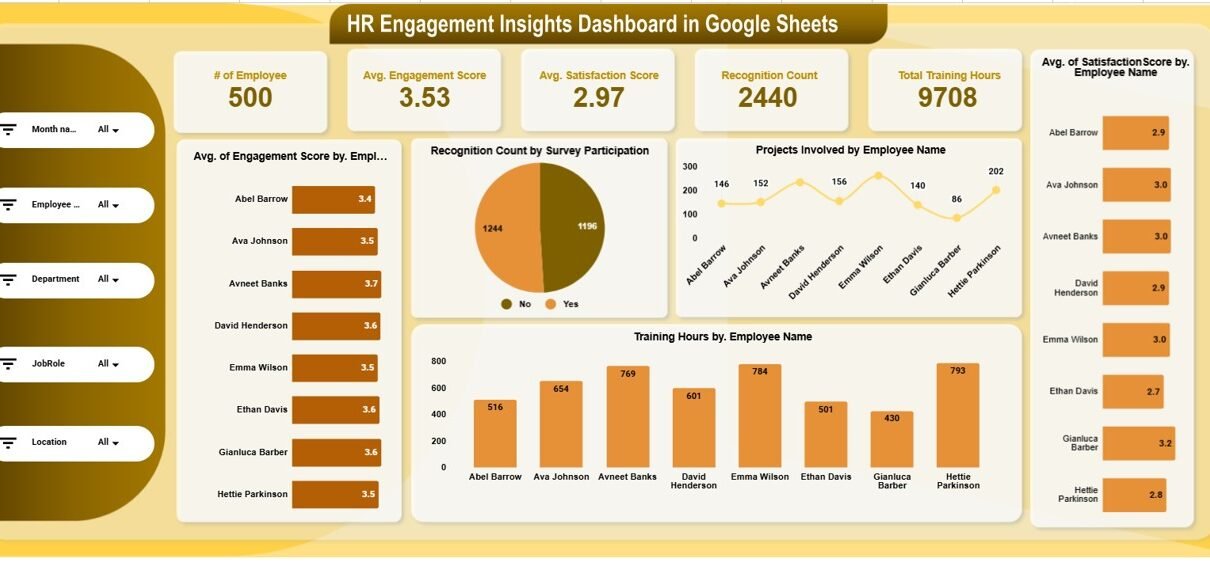
The main dashboard provides a complete overview of workforce engagement.
KPI Summary Cards
At the top, key metrics appear as cards:
-
Total Employees: 500
-
Average Engagement Score: 3.53
-
Average Satisfaction Score: 2.97
-
Recognition Count: 2440
-
Total Training Hours: 9708
These indicators provide an immediate snapshot of organizational health.
Interactive Filters
The dashboard includes slicers for:
- Month Name
- Employee
- Department
- Job Role
- Location
Therefore, HR managers can analyze specific workforce segments easily.
Visual Insights Included
The main page displays:
- Engagement score by employee
- Satisfaction score by employee
- Recognition participation analysis
- Projects involved by employee
- Training hours by employee
As a result, leaders quickly identify high-performing and disengaged employees.

Click to Buy HR Engagement Insights Dashboard in Google Sheets
Location Analysis Page – Workforce Insights by Geography
The Location Analysis page evaluates employee engagement across different regions.
Key Metrics Displayed
-
Average satisfaction score by location
-
Average engagement score by location
-
Projects involved by location
-
Training hours by location
This analysis helps organizations understand regional workforce performance.
Business Benefits
-
Identify high-performing offices
-
Detect engagement gaps by location
-
Optimize regional HR strategies

Click to Buy HR Engagement Insights Dashboard in Google Sheets
Department Analysis Page – Performance Across Teams
The Department Analysis page compares engagement metrics across departments.
Insights Available
-
Average satisfaction score by department
-
Average engagement score by department
-
Projects involved by department
-
Training hours by department
Because departments behave differently, this analysis helps HR leaders design targeted initiatives.

Click to Buy HR Engagement Insights Dashboard in Google Sheets
Job Role Analysis Page – Roe-Based Engagement Insights
The Job Role Analysis page focuses on engagement differences between roles.
Metrics Included
-
Satisfaction score by job role
-
Engagement score by job role
-
Projects involved by role
-
Training hours by role

Click to Buy HR Engagement Insights Dashboard in Google Sheets
Monthly Trend Page – Performance Over Time
The Monthly Trend page analyzes engagement trends across the year.
Trend Analysis Includes
-
Satisfaction score by month
-
Engagement score by month
-
Projects involved monthly
-
Training hours trend
Because trends reveal patterns, HR teams can evaluate the impact of policies and initiatives.

Click to Buy HR Engagement Insights Dashboard in Google Sheets
Search & Data Exploration Sheet
The dashboard also includes an advanced Search Sheet.
Features
- Search by keyword or field name
- Column selection dropdown
- Filtered employee records
- Total record count display
This functionality allows detailed employee-level investigation quickly.

Click to Buy HR Engagement Insights Dashboard in Google Sheets
Data Structure Behind the Dashboard
The dashboard connects structured HR data containing:
- Employee ID
- Employee Name
- Department
- Job Role
- Location
- Engagement Score
- Satisfaction Score
- Recognition Count
- Training Hours
- Survey Participation
- Projects Involved
- Engagement Level
Because the dataset remains standardized, analysis stays accurate.
Advantages of HR Engagement Insights Dashboard in Google Sheets
Centralized HR Analytics
All engagement metrics exist in one dashboard.
Real-Time Collaboration
HR teams work simultaneously in Google Sheets.
Improved Decision-Making
Leadership gains instant workforce insights.
Visual Performance Monitoring
Charts simplify complex HR data.
Employee-Level Analysis
Identify engagement risks early.
Flexible Customization
Add new KPIs easily.
Cloud Accessibility
Access dashboard anywhere.
How Does This Dashboard Improve HR Strategy?
Click to Buy HR Engagement Insights Dashboard in Google Sheets
When HR teams measure engagement consistently, organizational culture improves naturally.
The dashboard helps organizations:
-
Detect disengaged employees early
-
Improve training programs
-
Enhance recognition strategies
-
Increase employee satisfaction
-
Reduce turnover risks
Consequently, companies build stronger teams.
Best Practices for the HR Engagement Insights Dashboard in Google Sheets
Click to Buy HR Engagement Insights Dashboard in Google Sheets
To maximize dashboard effectiveness, follow these best practices.
1. Update Data Regularly
Maintain monthly updates for accurate insights.
2. Encourage Survey Participation
Higher participation improves analytics reliability.
3. Monitor Trends Instead of Single Metrics
Focus on long-term patterns.
4. Segment Workforce Analysis
Use filters for deeper insights.
5. Align KPIs With HR Goals
Ensure metrics support business objectives.
6. Use Insights for Action
Translate analytics into HR initiatives.
Who Can Benefit from This Dashboard?
This dashboard supports multiple organizational roles.
- HR Managers
- People Analytics Teams
- Business Leaders
- Department Heads
- Talent Management Teams
- Organizational Development Professionals
Because the dashboard remains easy to use, organizations of all sizes can adopt it quickly.
Why Choose Google Sheets for HR Dashboards?
Click to Buy HR Engagement Insights Dashboard in Google Sheets
Google Sheets provides flexibility and accessibility without complex software.
Key Advantages
- Cloud-based environment
- Automatic saving
- Easy sharing
- Real-time updates
- Low implementation cost
Therefore, it becomes an ideal platform for HR analytics.
Future of HR Analytics and Engagement Monitoring
HR analytics continues evolving rapidly. Organizations increasingly rely on data-driven workforce strategies.
Future trends include:
- AI-based engagement prediction
- Sentiment analysis integration
- Automated HR reporting
- Predictive attrition analytics
Hence, engagement dashboards will become essential tools for modern HR management.
Conclusion
Click to Buy HR Engagement Insights Dashboard in Google Sheets
Employee engagement drives organizational success. However, without structured analytics, companies cannot fully understand workforce performance.
The HR Engagement Insights Dashboard in Google Sheets transforms HR data into meaningful insights through interactive visuals, segmentation analysis, and trend monitoring.
By combining employee, department, location, role, and monthly analysis, this dashboard empowers HR teams to make smarter decisions and build a more engaged workforce.
Ultimately, organizations that measure engagement consistently create productive, satisfied, and high-performing teams.
Frequently Asked Questions (FAQs)
What is an HR Engagement Insights Dashboard?
It is a Google Sheets dashboard that tracks employee engagement, satisfaction, training, and participation metrics.
Do I need advanced Google Sheets skills?
No. You only need to update data; the dashboard calculates results automatically.
Can multiple users access the dashboard?
Yes. Google Sheets allows real-time collaboration.
What KPIs are tracked in this dashboard?
Engagement score, satisfaction score, recognition count, training hours, and project involvement.
Can I customize the dashboard?
Yes. You can modify KPIs, visuals, and filters according to business needs.
How often should HR data be updated?
Monthly updates are recommended for accurate trend analysis.
Visit our YouTube channel to learn step-by-step video tutorials
Youtube.com/@NeotechNavigators
Watch the step-by-step video tutorial:
Click to Buy HR Engagement Insights Dashboard in Google Sheets