Manufacturing organizations operate in a fast-paced environment where efficiency, quality, cost control, and productivity directly impact profitability. However, many manufacturing teams still track KPIs using scattered spreadsheets or static reports. As a result, leaders struggle to understand performance trends and take timely action.
That is exactly why a Manufacturing KPI Scorecard in Google Sheets becomes a powerful performance management tool.
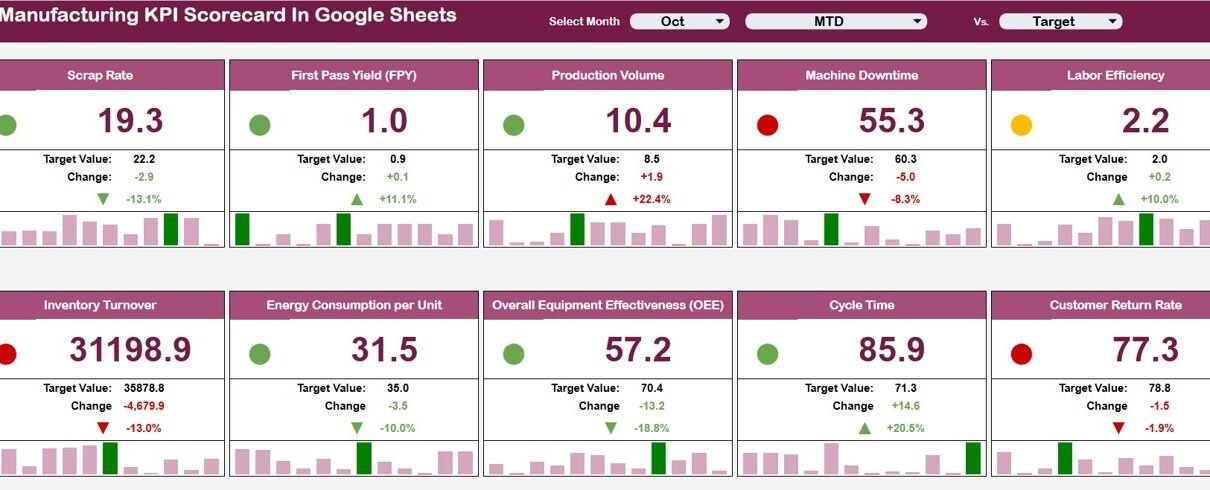
This ready-to-use scorecard template helps manufacturing teams track 10 critical KPIs in one centralized view. It provides monthly and yearly performance tracking with traffic lights, trend arrows, and percentage changes, all driven by a simple dropdown selection.
In this article, we explain how the scorecard works, its worksheet structure, and how it supports better manufacturing decisions.
What Is a Manufacturing KPI Scorecard in Google Sheets?
Click to Buy Manufacturing KPI Scorecard In Google Sheets
A Manufacturing KPI Scorecard is a structured performance tracking tool that summarizes key manufacturing KPIs in a single, easy-to-read format. Instead of analyzing multiple reports, managers get an instant performance snapshot.
Because this scorecard is built in Google Sheets, it offers:
-
Centralized KPI tracking
-
Easy collaboration across teams
-
Automatic calculations
-
Monthly and yearly views
-
No expensive BI software required
This scorecard suits plant managers, production heads, operations leaders, and continuous improvement teams.
Key Features of the Manufacturing KPI Scorecard
This scorecard is ready to use and designed for simplicity, clarity, and impact.
Main Scorecard Sheet
The Scorecard Sheet is the heart of the template.
🔹 Monthly KPI Selection
-
A Month dropdown at the top allows you to select any month
-
Once selected, all KPI values update automatically
🔹 KPI Coverage
-
The scorecard tracks 10 different manufacturing KPIs
-
Each KPI shows:
- Actual value
- Target value
- Previous period value
- Percentage change
Visual Indicators
-
Traffic light colors (Green / Amber / Red)
-
Up and down arrows for performance direction
These visuals help users understand performance instantly.

Click to Buy Manufacturing KPI Scorecard In Google Sheets
MTD and YTD View Toggle
The scorecard includes a toggle option:
-
Click MTD to view Month-to-Date performance
-
Click YTD to view Year-to-Date performance
This allows managers to analyze short-term results and long-term trends without switching files.
Trend Sheet Tab
The Trend Sheet provides detailed KPI-level analysis.
-
Select the KPI name from the dropdown in cell C3
The sheet displays:
-
KPI Group
-
Unit of Measurement
-
KPI Type (Lower the Better / Upper the Better)
-
KPI Trend over time
This helps teams identify improvement patterns and recurring issues.

Click to Buy Manufacturing KPI Scorecard In Google Sheets
KPI Definition Sheet Tab
The KPI Definition Sheet acts as a reference and governance layer.
Here, you define:
-
KPI Name
-
KPI Group
-
Unit
-
Formula
-
KPI Definition
This ensures:
-
KPI clarity
-
Consistent measurement
-
Easy onboarding for new users

Click to Buy Manufacturing KPI Scorecard In Google Sheets
Data Input Sheet Tab
The Data Input Sheet is where users enter raw KPI data.
-
Input monthly manufacturing KPI values
-
The scorecard and trend sheets update automatically
This separation keeps data entry clean and prevents formula errors.

Colour Settings
The template includes Color Settings to control:
-
Traffic light thresholds
-
Performance color rules
-
Consistent visual standards
This flexibility allows organizations to align the scorecard with internal performance benchmarks.

Click to Buy Manufacturing KPI Scorecard In Google Sheets
Why Manufacturing Teams Need a KPI Scorecard
Without a structured scorecard, manufacturing performance reviews become reactive and subjective. This scorecard helps teams:
-
Monitor performance at a glance
-
Detect issues early
-
Track improvements consistently
-
Align teams around common KPIs
-
Support data-driven decisions
A single scorecard creates clarity and accountability.
Advantages of Manufacturing KPI Scorecard
Click to Buy Manufacturing KPI Scorecard In Google Sheets
-
Centralized KPI visibility
-
Clear monthly and yearly tracking
-
Easy interpretation with visual indicators
-
Faster management reviews
-
Improved accountability across teams
-
Cost-effective Google Sheets solution
Opportunities for Improvement in Manufacturing KPI Tracking
You can enhance this scorecard further by adding:
-
Department-wise KPI breakdown
-
Shift-level performance tracking
-
Root cause analysis links
-
Automated data import from machines
-
Benchmark comparison with industry standards
These enhancements deepen operational insights.
Best Practices for Using the KPI Scorecard
Click to Buy Manufacturing KPI Scorecard In Google Sheets
-
Update KPI data regularly
-
Define clear KPI targets
-
Review MTD performance weekly
-
Review YTD performance monthly
-
Use trends to guide improvement actions
-
Keep KPI definitions consistent
Conclusion
A Manufacturing KPI Scorecard in Google Sheets provides a simple yet powerful way to track manufacturing performance. With monthly and yearly views, traffic light indicators, and trend analysis, the scorecard transforms raw data into actionable insights. Because it is ready to use and cloud-based, teams can start tracking performance immediately without technical complexity.
For manufacturing organizations focused on efficiency, quality, and continuous improvement, this scorecard becomes an essential management tool.
Frequently Asked Questions (FAQs)
Click to Buy Manufacturing KPI Scorecard In Google Sheets
1. Who should use this scorecard?
Plant managers, production managers, operations leaders, and CI teams.
2. Can KPIs be customized?
Yes, all KPIs, targets, and thresholds can be modified.
3. Does it support monthly and yearly analysis?
Yes, through MTD and YTD toggles.
4. Is the scorecard suitable for audits and reviews?
Yes, it provides structured and consistent KPI tracking.
5. Does it require technical expertise?
No, basic Google Sheets knowledge is enough.
6. Is Google Sheets secure for manufacturing data?
Yes, with proper sharing and access controls.
Visit our YouTube channel to learn step-by-step video tutorials
Youtube.com/@NeotechNavigators
Watch the step-by-step video tutorial: