Employee satisfaction does not depend only on work culture, salary, or benefits. Food also plays a major role in daily workplace experience. When employees enjoy cafeteria meals, morale improves, productivity increases, and engagement stays high. However, many organizations struggle to collect, organize, and act on cafeteria feedback. Suggestions often come through emails, chats, or informal conversations, which leads to missed ideas and poor follow-up.Office Cafeteria Menu Suggestion Tracker in Google Sheets
This is exactly where the Office Cafeteria Menu Suggestion Tracker in Google Sheets becomes a powerful and practical solution. This ready-to-use tracker helps organizations collect menu suggestions in a structured way, analyze trends using charts, and take data-driven decisions to improve cafeteria services.Office Cafeteria Menu Suggestion Tracker in Google Sheets
In this article, we will explain how this tracker works, its key features, charts, search functionality, advantages, improvement opportunities, best practices, and frequently asked questions.Office Cafeteria Menu Suggestion Tracker in Google Sheets
What Is an Office Cafeteria Menu Suggestion Tracker in Google Sheets?
An Office Cafeteria Menu Suggestion Tracker is a centralized system that records employee food suggestions, preferences, and feedback in one place. It allows HR teams, admin teams, or cafeteria management teams to track suggestions based on meal type, department, cuisine, category, and approval status.
Because this tracker runs on Google Sheets, it offers:
- Real-time collaboration
- Easy data entry
- Automatic chart updates
- Zero software cost
- High flexibility
Instead of guessing what employees want to eat, organizations can rely on real data.
Tracker Sheet Tab – Core of the System
Click to Buy Office Cafeteria Menu Suggestion Tracker in Google Sheets
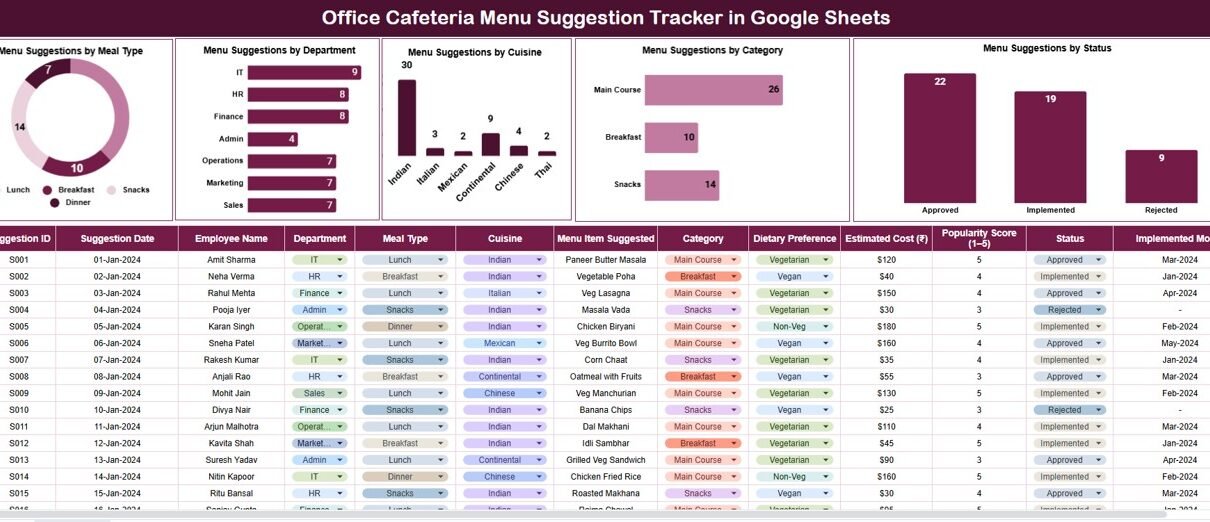
The Tracker Sheet is the main data entry area where all cafeteria menu suggestions are recorded.
Typical fields include:
- Suggestion ID
- Employee Name
- Department
- Meal Type (Breakfast, Lunch, Snacks, Dinner)
- Cuisine (Indian, Continental, Chinese, Italian, etc.)
- Category (Vegetarian, Non-Vegetarian, Vegan, Healthy)
- Suggested Dish
- Suggestion Status (New, Under Review, Approved, Rejected)
- Comments
Once data is entered, all charts and insights update automatically. This sheet ensures consistency, transparency, and easy tracking.
Charts Included in the Tracker
The dashboard contains five meaningful charts that convert raw suggestions into actionable insights.
Menu Suggestions by Meal Type
This chart shows how many suggestions employees submit for:
- Breakfast
- Lunch
- Snacks
- Dinner
It helps cafeteria teams understand which meal requires more variety or improvement. For example, high lunch suggestions may indicate dissatisfaction with current lunch menus.
Menu Suggestions by Department
This chart displays suggestion count by department.
It helps you:
- Identify departments with higher engagement
- Understand department-specific food preferences
- Spot departments that feel unheard
HR teams often use this insight to balance cafeteria planning across teams.
Menu Suggestions by Cuisine
This chart highlights cuisine preferences such as:
- Indian
- Continental
- Chinese
- Mexican
- Regional cuisines
It helps cafeteria vendors design menus that match employee taste trends rather than assumptions.
Menu Suggestions by Category
This chart shows how many suggestions fall into categories like:
- Vegetarian
- Non-Vegetarian
- Vegan
- Healthy / Low-Calorie
- Special Diet
Organizations use this chart to support wellness initiatives and inclusive food planning.
Menu Suggestions by Status
This chart tracks suggestions by status:
- New
- Under Review
- Approved
- Rejected
It improves accountability and ensures suggestions do not remain ignored.

Click to Buy Office Cafeteria Menu Suggestion Tracker in Google Sheets
Search Functionality – Search by Keyword and Field Name
The tracker includes a smart search feature that saves time and improves usability.
Users enter:
-
Search Keyword
-
Field Name (Department, Meal Type, Cuisine, Status, Employee Name)
The tracker instantly filters matching records.
This feature helps teams:
- Find specific suggestions quickly
- Review pending approvals
- Prepare cafeteria review meetings
- Respond to employee queries faster

Click to Buy Office Cafeteria Menu Suggestion Tracker in Google Sheets
Why Organizations Need a Cafeteria Menu Suggestion Tracker
Many organizations still manage cafeteria feedback informally. As a result:
- Good ideas get lost
- Employees feel ignored
- Menu planning becomes guesswork
- Engagement drops
A structured tracker solves these problems by bringing visibility, data, and fairness into cafeteria decisions.
Advantages of Office Cafeteria Menu Suggestion Tracker
Improves employee satisfaction
Employees feel heard when suggestions get tracked.
Encourages participation
Structured feedback increases engagement.
Data-driven menu planning
Decisions rely on trends, not assumptions.
Saves time
Charts and search eliminate manual analysis.
Easy to use
No training or technical skills required.
Cost-effective
Runs entirely on Google Sheets.
Opportunities for Improvement
Click to Buy Office Cafeteria Menu Suggestion Tracker in Google Sheets
Although the tracker works well, organizations can enhance it further by adding:
-
Voting or likes on suggestions
-
Monthly top-rated dish reports
-
Automatic approval notifications
-
Vendor performance linkage
-
Seasonal menu trend analysis
These improvements make cafeteria management even smarter.
Best Practices for Using the Tracker
-
Encourage employees to submit suggestions regularly
-
Review suggestions monthly
-
Update suggestion status consistently
-
Share approved menu changes with employees
-
Analyze charts before vendor discussions
-
Use search during feedback reviews
These practices ensure the tracker delivers long-term value.
Conclusion
Click to Buy Office Cafeteria Menu Suggestion Tracker in Google Sheets
The Office Cafeteria Menu Suggestion Tracker in Google Sheets is a simple yet powerful tool that helps organizations improve workplace dining experiences. It transforms unstructured feedback into actionable insights using charts and search features. Because it is easy to use, cost-effective, and collaborative, it fits perfectly into modern workplace operations.
By using this tracker, organizations not only improve food quality but also strengthen employee engagement and satisfaction.
Frequently Asked Questions (FAQs)
1. Who should use this tracker?
HR teams, admin teams, cafeteria managers, and facility teams.
2. Can we customize meal types or cuisines?
Yes, the tracker is fully customizable.
3. Does it work for multiple office locations?
Yes, you can add location fields easily.
4. Is Google Sheets secure for employee feedback?
Yes, with proper access control.
5. Can we track implemented suggestions?
Yes, using the status field.
6. Do employees need Sheet access?
Not mandatory. Data can be collected via forms and added later.
Watch the step-by-step video tutorial:
Visit our YouTube channel to learn step-by-step video tutorials
Youtube.com/@NeotechNavigators
Click to Buy Office Cafeteria Menu Suggestion Tracker in Google Sheets