Efficient management of equipment requests and tracking their approval status is essential for every organization — especially in departments where tools, devices, and assets are frequently borrowed. The Equipment Borrowing Request Tracker in Google Sheets provides an easy-to-use, cloud-based system to manage, track, and analyze equipment requests in real time.Equipment Borrowing Request Tracker in Google Sheets
In this article, we’ll explain the full structure, charts, and functionality of this tracker — along with best practices to help you streamline asset utilization and request management.Equipment Borrowing Request Tracker in Google Sheets
Get the Equipment Borrowing Request Tracker in Google Sheets
What Is an Equipment Borrowing Request Tracker in Google Sheets?
An Equipment Borrowing Request Tracker is a ready-to-use Google Sheets-based management tool that allows teams to record and monitor requests for borrowing company assets such as laptops, cameras, projectors, tools, or testing devices.
This tracker makes it simple to log details, monitor approval status, and visualize departmental demand. It also provides interactive charts that show equipment usage trends and approval analytics — helping asset managers make informed decisions.
Structure of the Tracker
The Equipment Borrowing Request Tracker in Google Sheets consists of two main functional sections:
Tracker Sheet Tab
Search Sheet Tab
Each section serves a specific purpose to make the process of monitoring requests seamless and efficient.
Tracker Sheet Tab
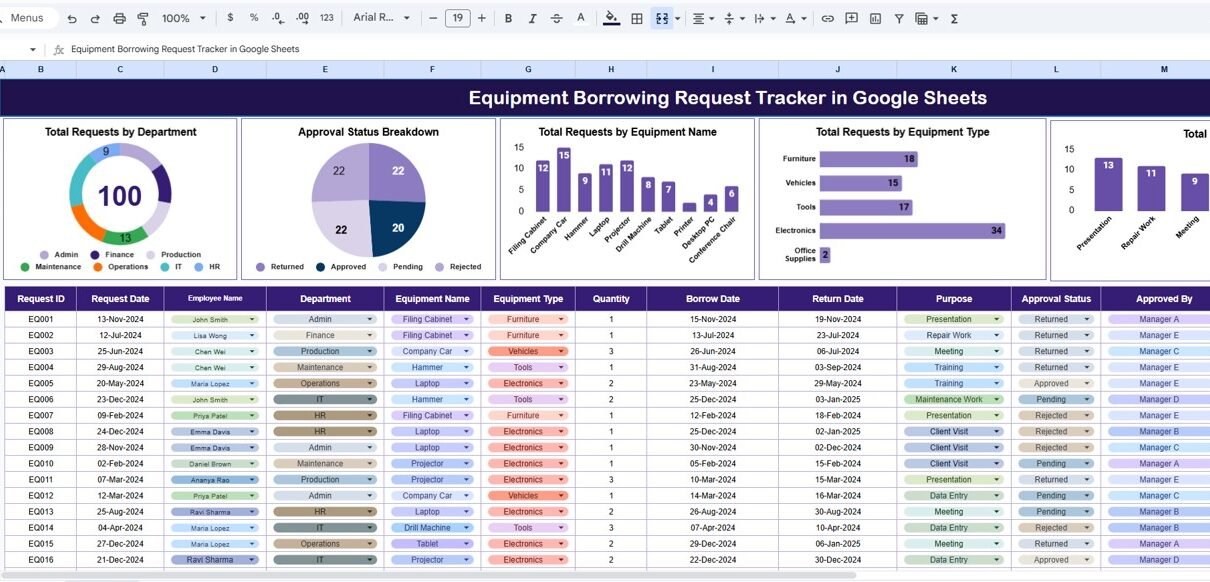
The Tracker Sheet Tab is the central dashboard where visual analytics and summary metrics are displayed. It pulls data directly from the data table and updates charts automatically when new records are added.
Charts Included:
-
Total Requests by Department
Shows which departments have made the most borrowing requests. This helps identify equipment demand across teams. -
Approval Status Breakdown
Visualizes the percentage of approved, pending, or rejected requests to measure process efficiency. -
Total Requests by Equipment Name
Displays how often specific assets (e.g., Laptops, Cameras, Drones, etc.) are requested. -
Total Requests by Equipment Type
Groups requests by asset category, helping identify which types of resources are in high demand. -
Total Requests by Purpose
Illustrates why equipment is borrowed — for training, client demos, fieldwork, or maintenance.
These charts refresh automatically based on the data entered, giving users an instant visual overview of all equipment-related activities.

Search Sheet Tab
The Search Sheet Tab simplifies the process of finding specific equipment or request records using keywords.
Examples:
-
Search “Status = Approved” → Lists all approved borrowing requests.
-
Search “Department = IT” → Displays all IT department requests.
-
Search “Equipment Type = Audio” → Shows all equipment requests for audio devices.
-
Search “Requested By = John Doe” → Finds all requests submitted by a specific employee.
This search functionality saves time, especially when managing hundreds of requests.

Advantages of the Equipment Borrowing Request Tracker
-
Centralized Request Management: Keeps all borrowing records in one location.
-
Improved Accountability: Tracks who borrowed what and when.
-
Visual Analytics: Provides instant insights through dynamic charts.
-
Departmental Insights: Highlights departments with the most requests.
-
Automated Calculations: Reduces manual reporting work.
-
Cloud-Based Collaboration: Multiple users can access and update data simultaneously.
Opportunities for Improvement
You can enhance this tracker further by:
-
Integrating Google Forms: Allow employees to submit borrowing requests online.
-
Adding Approval Workflows: Use Google Apps Script to send email alerts to approvers.
-
Tracking Equipment Condition: Include “Condition on Return” and “Maintenance Required” columns.
-
Including Asset Value: Add fields for equipment cost or depreciation.
-
Highlighting Delayed Returns: Use conditional formatting for overdue items.
Best Practices
-
Update request statuses promptly.
-
Use consistent naming for departments and equipment categories.
-
Protect dashboard and formula cells from accidental edits.
-
Review charts weekly to assess equipment utilization trends.
-
Back up the data sheet monthly for historical analysis.
Want to build up the spreadsheet skills behind request trackers like this? The NextGenTemplates Academy learning paths take you through them step by step with practice files.
Get the Equipment Borrowing Request Tracker in Google Sheets
Conclusion
The Equipment Borrowing Request Tracker in Google Sheets simplifies equipment management and approval tracking, ensuring transparency and accountability.
With automated charts, search capability, and cloud accessibility, it’s the perfect solution for organizations seeking to optimize asset utilization and reduce administrative overhead.