Employee performance and development are vital to organizational success. Measuring competencies helps identify strengths, skill gaps, and training needs across departments. The Employee Competency Assessment Tracker in Google Sheets is a ready-to-use solution designed to help HR professionals and managers evaluate employee competencies efficiently.Employee Competency Assessment Tracker in Google Sheets
In this article, we’ll explore its structure, key features, benefits, and best practices — so you can make the most of this powerful Google Sheets tracker.Employee Competency Assessment Tracker in Google Sheets
Get the Employee Competency Assessment Tracker in Google Sheets
What Is an Employee Competency Assessment Tracker in Google Sheets?
An Employee Competency Assessment Tracker is a performance management tool that records, tracks, and analyzes employee skills and proficiency levels across departments or job roles.
Built entirely in Google Sheets, this tracker offers interactive charts, automatic calculations, and easy search functionality — making it perfect for HR teams and department heads who want clear insights into workforce capabilities and growth opportunities.
Structure of the Tracker
The Employee Competency Assessment Tracker in Google Sheets is divided into two main sections for easy management and reporting:
Tracker Sheet Tab
Search Sheet Tab
Tracker Sheet Tab
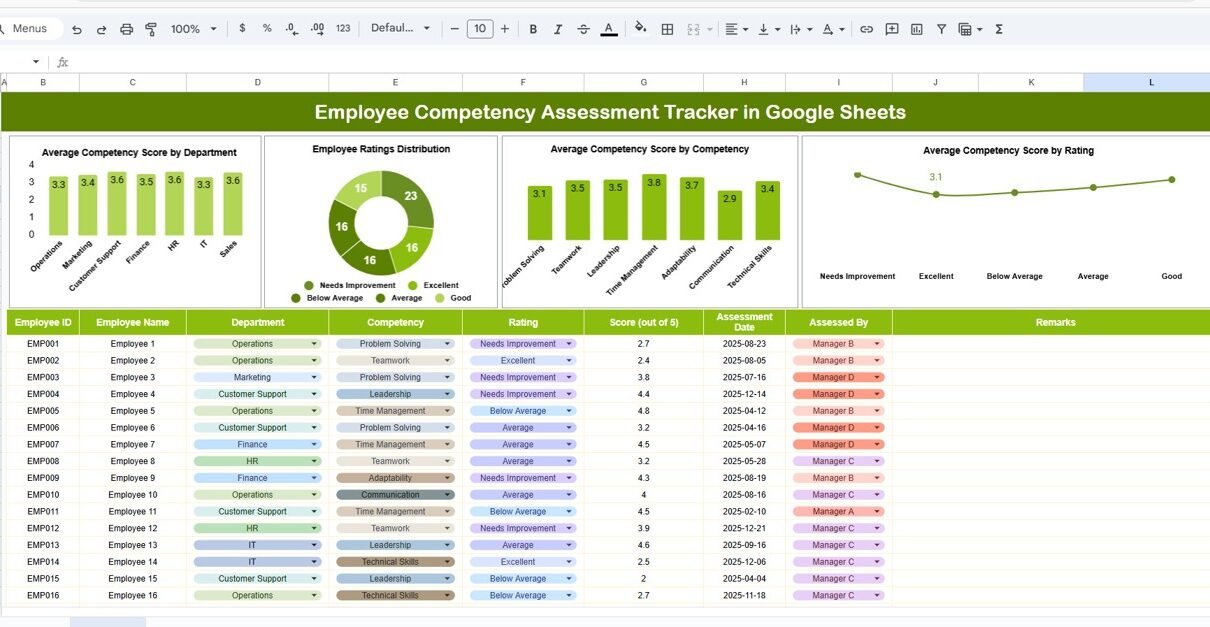
This is the main dashboard where all competency data and visual insights are displayed. It automatically generates analytics based on the data entered in the backend.
Charts Included:
-
Average Competency Score by Department:
Displays how each department performs on average across all competencies. Helps identify departments excelling in skill development versus those needing improvement. -
Employee Ratings Distribution:
Shows the spread of performance ratings (e.g., Excellent, Good, Average, Needs Improvement) across the workforce. -
Average Competency Score by Competency:
Breaks down performance by individual skills or competencies such as communication, problem-solving, teamwork, leadership, etc. -
Average Competency Score by Rating:
Correlates employee rating levels with overall competency performance to highlight consistency in evaluation standards.
These visual insights make it easy to identify skill trends and training priorities at a glance.

Search Sheet Tab
The Search Tab helps users quickly find specific employee or department data using keywords or field names.
Examples:
-
Search “Department = HR” → Displays competency data for HR employees.
-
Search “Competency = Leadership” → Shows all employees assessed on leadership.
-
Search “Rating ≥ 4” → Filters employees who performed above average.
This feature saves time by providing instant access to relevant performance records.

Advantages of the Employee Competency Assessment Tracker
-
Centralized Evaluation System: Manage all competency data in one location.
-
Automated Charts & KPIs: Instantly visualize strengths, weaknesses, and training needs.
-
Department-Level Insights: Identify top-performing and underperforming departments.
-
Training Decision Support: Pinpoint competencies that need development.
-
Cloud Collaboration: Multiple assessors can input or review data simultaneously.
-
Customizable Template: Adapt to different rating scales and competency frameworks.
Opportunities for Improvement
Enhance this tracker further by:
-
Integrating Google Forms: Automate data collection from assessors.
-
Adding Weightages: Apply weight-based scoring for key competencies.
-
Including Role-Based Views: Filter data by job role or level.
-
Implementing Trend Analysis: Track improvement over time with historical comparisons.
-
Automating Reports: Use Google Apps Script to generate periodic summaries for HR management.
Best Practices
-
Define clear competency rating criteria before assessment.
-
Regularly update data to maintain accuracy.
-
Protect cells containing formulas and chart links.
-
Review results quarterly to align with performance reviews.
-
Use consistent competency names across all departments.
Building trackers like this is a skill you can grow. The NextGenTemplates Academy learning paths walk you through spreadsheet fundamentals with practice files.
Get the Employee Competency Assessment Tracker in Google Sheets
Conclusion
The Employee Competency Assessment Tracker in Google Sheets provides a smart and transparent system for measuring employee skills and growth potential.
With real-time dashboards, automatic charts, and easy search options, it simplifies HR’s job in managing evaluations, identifying top talent, and planning learning interventions.