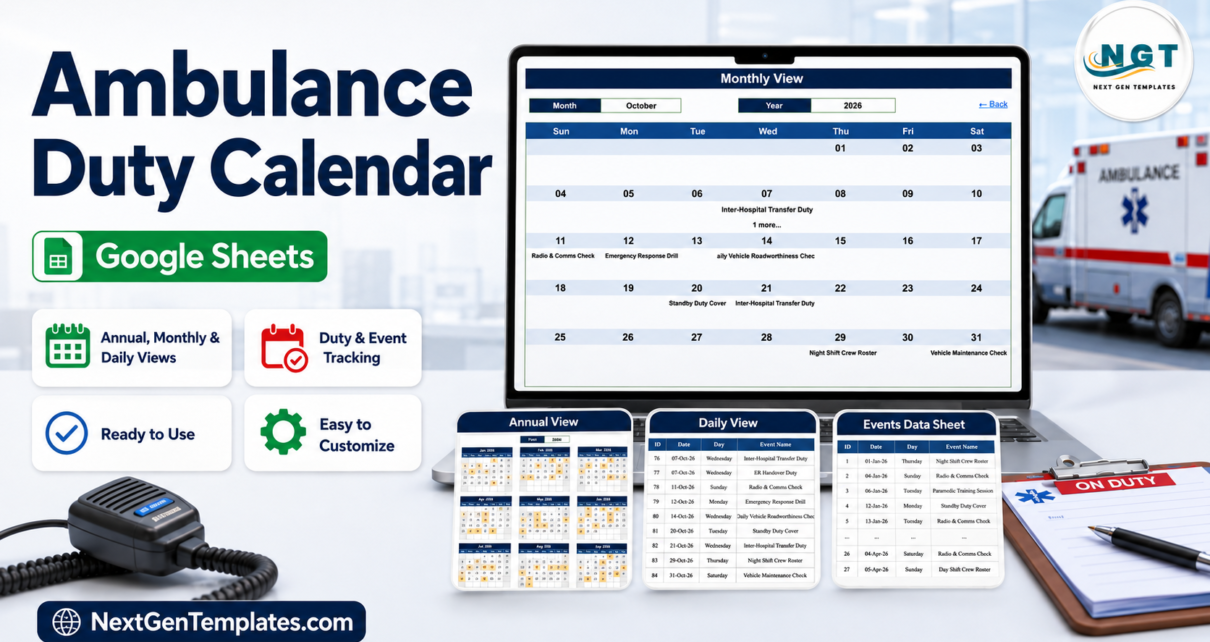
Most ambulance stations do not lose track of a duty because the software failed. They lose it because the duty board lives in three places at once – a whiteboard in the crew room, a WhatsApp group, and somebody’s notebook – and none of them agree. The Ambulance Duty Calendar in Google Sheets is a deliberately small answer to that: one table of duties, five tabs, three calendar views, and no software to install.
The file ships with exactly 100 sample ambulance-service duties, IDs 1 to 100, running from Thursday 01-Jan-2026 to Monday 28-Dec-2026, with eight or nine entries in every one of the twelve months. Those samples cover 15 duty types at 27 named locations, at 14 distinct start times from 06:00 to 23:00. Before this article was written, every one of the 100 rows was re-checked against a calendar: all 100 weekdays print correctly against their dates.
What this is, and what it is not. This is a duty-roster spreadsheet. It is not a dispatch or CAD system, not an emergency call-taking or 911/112 tool, not a patient care record or ePCR, and not a clinical-governance, compliance or accreditation reporting system. It measures no response time, tracks no vehicle location, sends no alerts and connects to nothing. It contains only what you type into your own copy.
There is also an Ambulance Duty Calendar in Excel. It is not the same file converted – the two were built separately, and they differ in real ways that this article sets out below. Pick the one that matches how your station works.
Key Features of the Ambulance Duty Calendar in Google Sheets
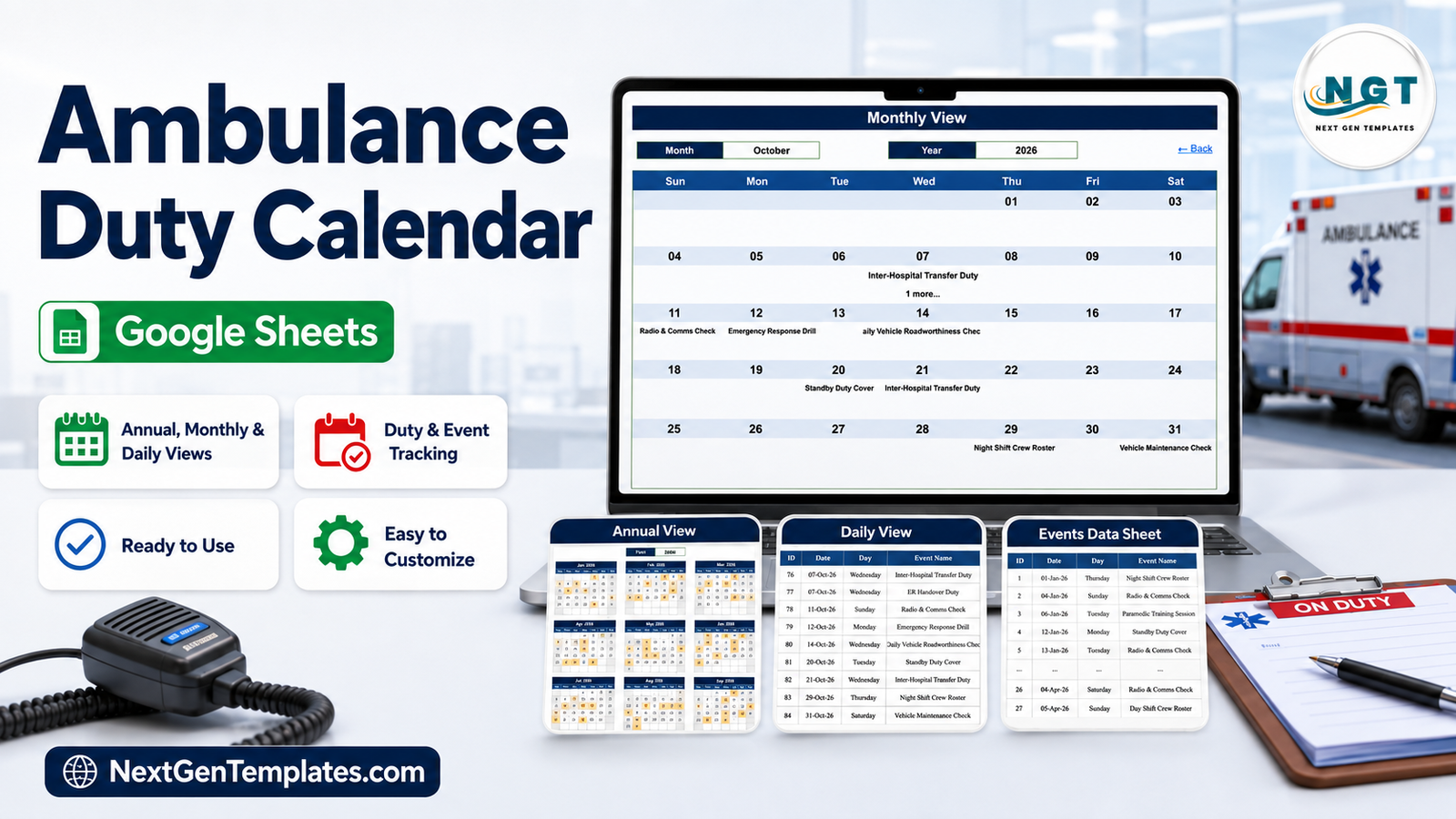
- Five working tabs – Home, Annual View, Monthly View, Daily View and Events – plus a hidden helper tab holding the month and year drop-down lists.
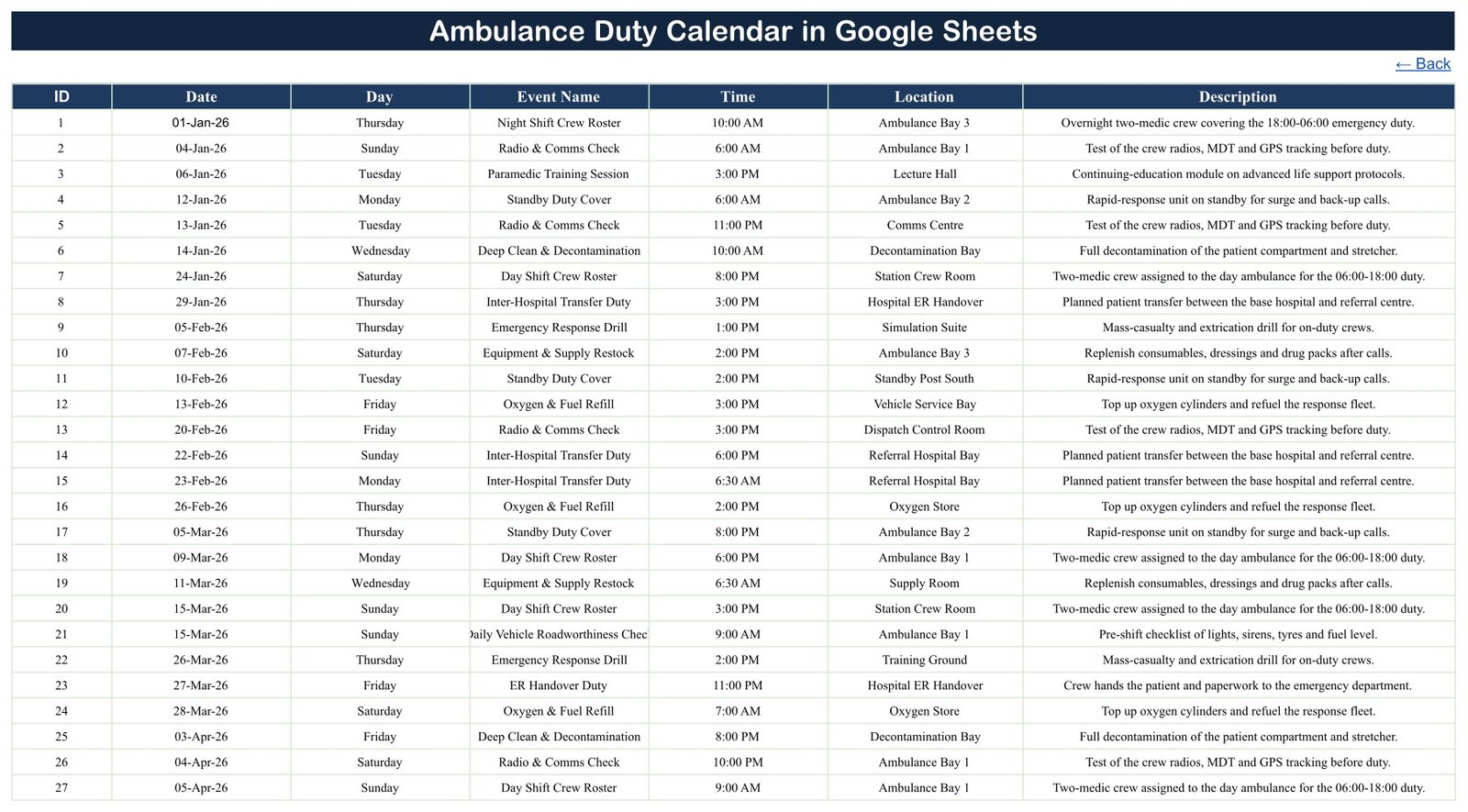
- One master table drives every view. The Events sheet has 7 columns: ID, Date, Day, Event Name, Time, Location and Description. Type a duty once and it appears in all three calendars.
- No macros, no Apps Script, no add-ons. Every view is ordinary worksheet formulas. Nothing to enable, nothing to authorise, no script to audit before your IT lead will allow it.
- 100 sample duties across a full year, so the layout is already populated when you open it.
- 15 duty types: Night Shift Crew Roster, Day Shift Crew Roster, On-Call Duty Roster, Standby Duty Cover, Dispatch Shift Handover, ER Handover Duty, Inter-Hospital Transfer Duty, Emergency Response Drill, Paramedic Training Session, Daily Vehicle Roadworthiness Check, Vehicle Maintenance Check, Oxygen & Fuel Refill, Equipment & Supply Restock, Deep Clean & Decontamination and Radio & Comms Check.
- 27 named locations, at station-floor granularity rather than just station names – Ambulance Bays 1 to 3, Dispatch Control Room, Comms Centre, Hospital ER Handover, Base Hospital Ramp, Referral Hospital Bay, Emergency Department Triage, Standby Posts North and South, Fleet Workshop, Vehicle Service Bay, Wash Bay, Decontamination Bay, Fuel Point, Oxygen Store, Medical Store, Supply Room, Crew Rest Room, Station Crew Room, Training Room A, Training Ground, Drill Yard, Lecture Hall, Simulation Suite and Base Station.
- Click-through navigation – four in-sheet links on Home, and a Back link on every view.
- Month and year drop-downs covering January to December and the years 2021 to 2039.
- No crew name, employee ID, licence number, phone number or pay column anywhere in the file.
The Five Tabs, Explained
Home
A branded landing tab with four links – Annual View, Monthly View, Daily View and Events. It exists so that the newest member of the crew can move around the file without being taught anything about spreadsheets.
Annual View
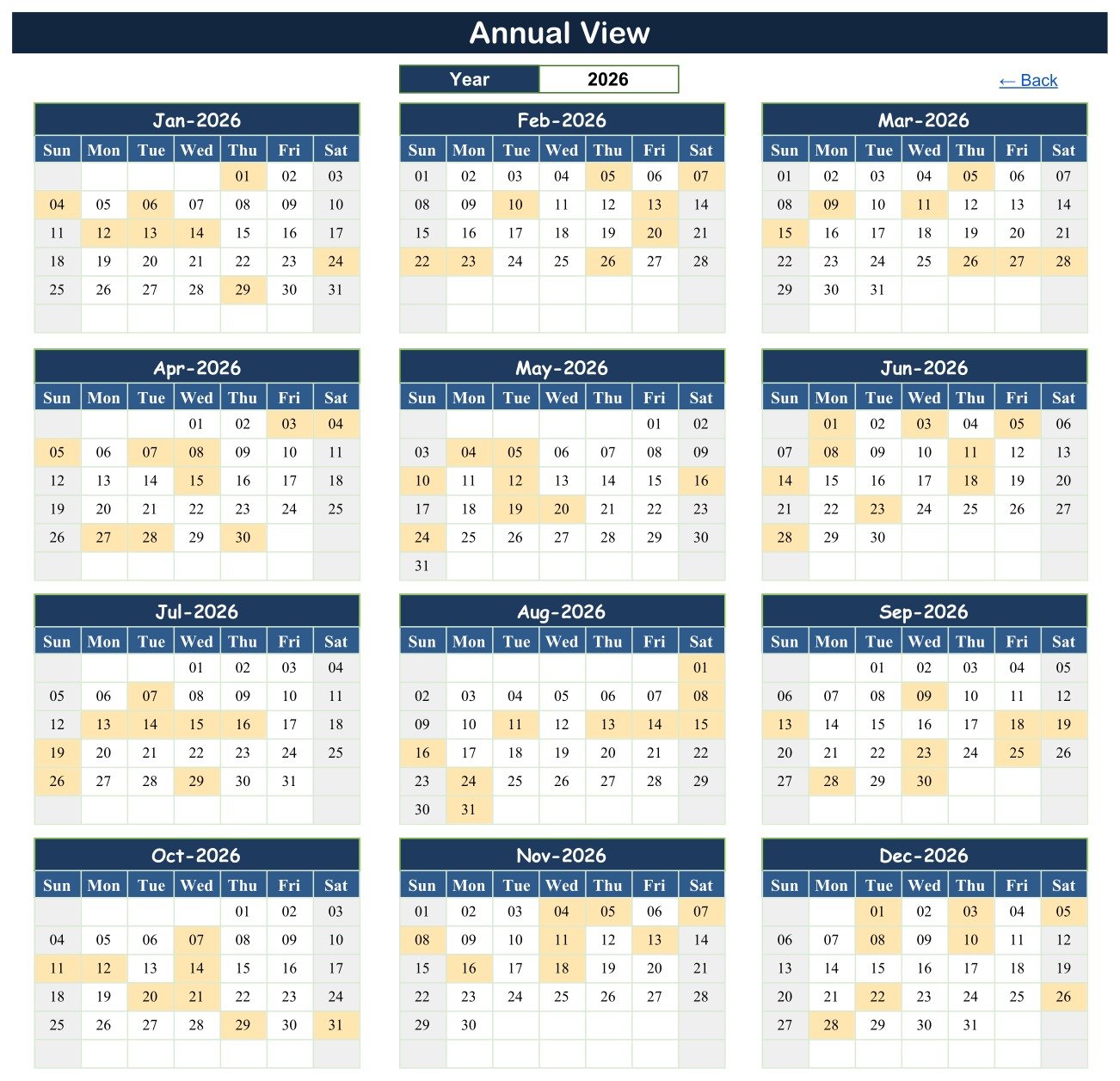
Twelve months of the chosen year on one screen, three across and four down, with every day carrying a duty shaded amber. The whole grid is generated with DATE, EOMONTH and TEXT, so changing the single year cell redraws all twelve blocks – including the leap-year and month-length differences – without anyone touching a formula. This is the tab you print for the noticeboard.
Monthly View
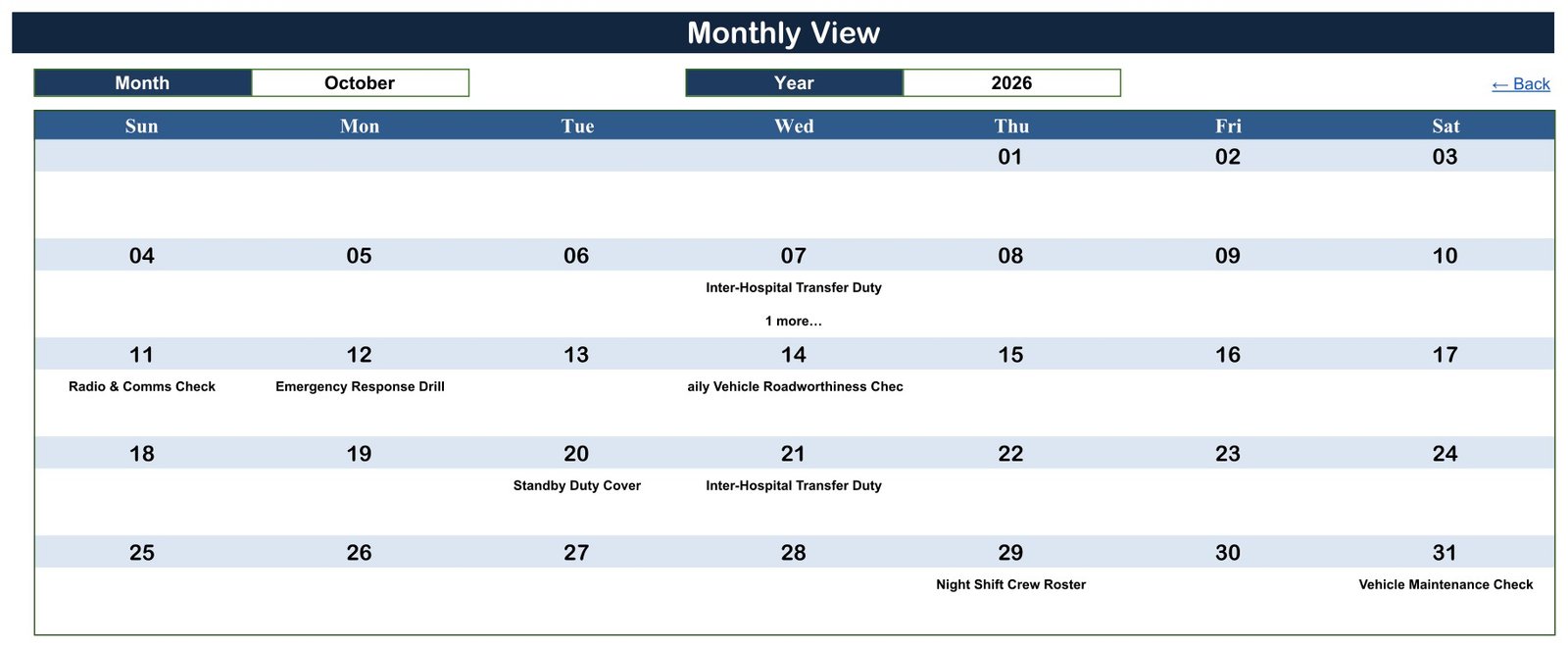
The working grid, and the tab most people will live in. Pick a month and a year from the two drop-downs and the month redraws Sunday to Saturday with the duty name printed inside each day cell. A VLOOKUP places the duty; a COUNTIF underneath adds a “1 more” note when a date carries more than one entry, so double-booked days are visible without opening anything.
Daily View
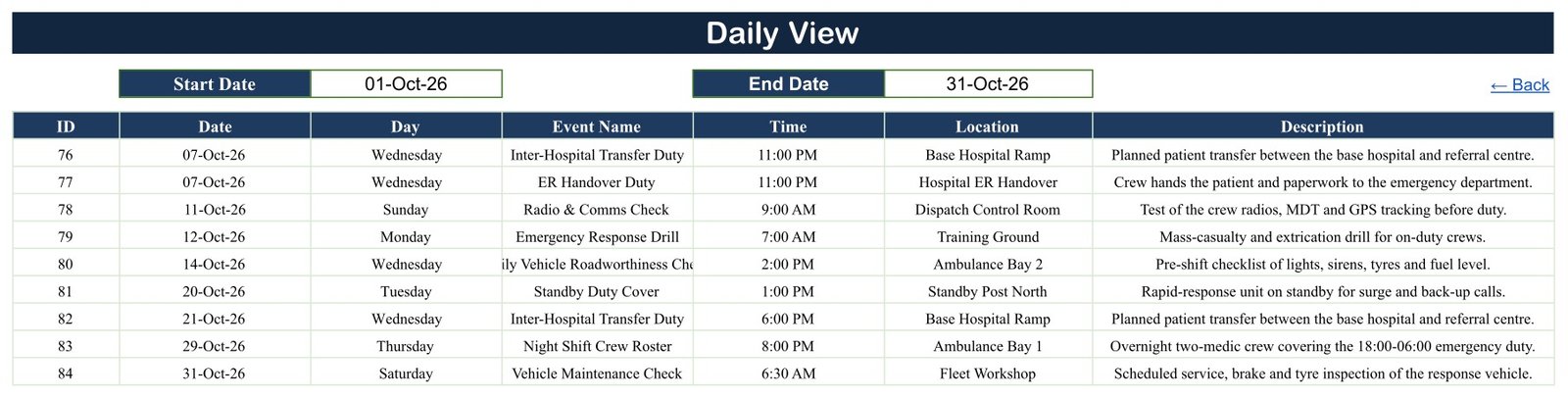
Two date boxes and a single FILTER formula. Type a start date and an end date and every duty in that window comes back with all seven columns. Set both boxes to the same day and you have a printable handover sheet; set them a week apart and you have the week’s run. In the screenshot below, 01-Oct-26 to 31-Oct-26 returns the nine October duties, IDs 76 to 84.
Events
The master table: 100 rows, sortable and filterable, and the only place you type. Clear rows 4 to 103, keep the header, and enter your own roster.
Google Sheets vs. Excel vs. Paid Shift-Scheduling SaaS – Feature Comparison
| This template (Google Sheets) | Ambulance Duty Calendar in Excel | Paid shift-scheduling SaaS | |
|---|---|---|---|
| Cost | 8.99 one-off (4.99 on offer) | 8.99 one-off (4.99 on offer) | Typically 3-8 per user per month |
| Platform | Any browser; Sheets mobile app | Excel for Windows, desktop only | Web and mobile app |
| Macros required | None – plain formulas | Yes, macro-enabled workbook | Not applicable |
| Sheets / tabs | 5 visible tabs | 7 worksheets | Not applicable |
| Views | Annual, Monthly, Daily | Annual, Monthly, Daily, This Month | Roster, timeline, per-person |
| Data entry form | No – type into the Events sheet | Yes – pop-up form, Add/Update/Delete | Yes |
| Colour themes | One navy theme | Five one-click themes on a Setting sheet | Branding on paid tiers |
| Sample duty types | 15 types, 27 locations | 27 types, 7 stations | You define them |
| Real-time collaboration | Yes, several editors at once | One editor at a time | Yes |
| Share with a link | Yes, Google sharing controls | No – send the file | Yes, via user accounts |
| Automatic shift reminders | No | No | Yes |
| Year-1 cost at 5 users | 8.99 total | 8.99 total | Roughly 180-480 |
The honest summary: the Excel edition is the richer application – it has a form, buttons, an extra This Month sheet and a theme switcher, and it needs macros to deliver them. This Google Sheets edition is the more portable document – fewer moving parts, nothing to enable, several people in it at once, and it opens on a phone at the ambulance bay.
Who Should Use This Template
It suits a single ambulance station, a private patient-transport operator, a hospital transport desk, a first-aid or event-medical provider, and EMS training officers who need the year’s drills visible on one page. It suits any team whose roster currently lives on a whiteboard.
It does not suit a service that needs live dispatch, call-taking or vehicle tracking; a service that must produce statutory, clinical-governance or accreditation returns; a service that needs automatic reminders and shift-swap requests; or one that needs a signed audit trail of who changed what. It provides none of those. If any of them is a requirement, this file is the wrong tool and no amount of customising will change that.
Real-World Use Cases
A two-vehicle base station. The station officer types the month’s crew rosters, standby cover and vehicle checks into the Events sheet on the first of the month, prints the Monthly View for the crew room, and mails the Daily View for the coming week to the on-call medics. One table, two printed outputs.
A private patient-transport fleet. The supervisor uses the Location column for bays and workshops rather than stations, so the Daily View doubles as the workshop’s morning list – roadworthiness checks, oxygen refills and deep cleans, each with the bay written beside it.
An EMS training officer. Drills and continuing-education sessions for the whole year go in during January. The Annual View then shows twelve months of shaded training days on one screen, which is a far easier conversation with a clinical lead than scrolling a list.
Advantages of the Ambulance Duty Calendar in Google Sheets
- Nothing to install or enable. No macro warning, no add-on permission prompt, no desktop Office licence. That matters in organisations where macro-enabled files are blocked outright.
- Several people at once. The station officer can edit while the shift lead reads, which a shared workbook on a drive cannot do.
- It works on a phone. The Google Sheets mobile app renders the same tabs and the same in-sheet navigation links.
- Every view is transparent. Anyone can click a cell and read the formula. There is no hidden code deciding what appears.
- Location granularity. The 27 sample locations are bays, stores, workshops and posts – the places duties actually happen – not just seven station names.
- It exports. Download as .xlsx if a colleague needs the data in Excel, or print any view to PDF.
Opportunities for Improvement
Three things are worth knowing before you buy, because none of them is hidden in the file and all three have a fix.
1. The Day column is typed text, not a formula. In the Events sheet, column C holds the weekday as literal text. All 100 shipped rows are correct – every one was verified – but if you edit a date afterwards, the old weekday stays behind and nothing warns you. The permanent fix takes ten seconds: put =TEXT(B4,"dddd") in cell C4 and fill it down column C. The Day column then follows the date for good.
2. The Monthly View shows one duty per day. Each day cell holds the first duty on that date plus a “1 more” note when there are others. That keeps the grid readable but means the month view is a summary, not the full picture – use the Daily View for the complete list. Two dates in the sample year carry a second duty.
3. Long duty names clip in the month grid. “Daily Vehicle Roadworthiness Check” renders as “aily Vehicle Roadworthiness Chec” at the shipped column width. Widen the column, shorten the name, or read it in the Daily View. It is a cosmetic issue in one view, not a data problem – the underlying value is intact.
Beyond those: there is no This Month tab and no Setting sheet with colour themes, both of which the Excel edition has. And the year drop-down stops at 2039.
Best Practices
- Convert the Day column to a formula first, before you type a single duty. It is the one change that prevents a silent error later.
- Keep one row per duty, not per crew member. The file is built around the duty, the time and the place; that is what makes the three views agree.
- Use internal codes, not names. If you must record who is on, put a code such as C-07 in the Description and keep the code-to-name key in a separate document. The sheet then holds no personal data.
- Share with named people, not “anyone with the link”. Google’s sharing controls are the only access control here – the file itself has no permissions, no encryption and no audit trail. Google’s own guide to sharing files from Drive covers the per-person options.
- Keep one file per year. Duplicate the sheet each January rather than letting the Events table grow indefinitely; the FILTER and VLOOKUP ranges reach row 999, which is plenty for a year and slow to scroll for five.
- Print the Annual View in January and the Monthly View each month. The two printed outputs are what stop the whiteboard from reappearing.
Explore Relevant Templates
- Ambulance Duty Calendar in Google Sheets – the template in this article.
- Ambulance Duty Calendar in Excel – the macro-driven edition with a pop-up entry form and five colour themes.
- Doctor On-Call Calendar in Google Sheets – the same three-view layout for on-call medical rotas.
- Home Nursing Visit Calendar in Google Sheets – community and home-visit scheduling.
- Dialysis Session Calendar in Google Sheets – recurring treatment slots by chair and shift.
- Medical Equipment Calibration Calendar in Google Sheets – service and calibration due dates.
- Blood Donation Camp Calendar in Google Sheets – camp and drive planning across a year.
Want to build planners like this yourself? The NextGenTemplates Academy learning paths take you through calendars, trackers and spreadsheet fundamentals step by step, with practice files.
Frequently Asked Questions
Do I need macros or Apps Script to use it?
No. Every view is built from ordinary worksheet formulas – DATE, EOMONTH, TEXT, VLOOKUP, COUNTIF and FILTER. There is no script attached to the file, so there is nothing to authorise and nothing for IT to review.
How do I get the file after buying?
You receive a PDF containing a “Make a copy” link. Clicking it saves the template into your own Google Drive with the 100 sample duties in place. The master file stays read-only, so your edits are yours alone.
Can I change the year?
Yes. The Annual View has a single year cell and the Monthly View has month and year drop-downs covering 2021 to 2039. Every grid is drawn from formulas, so changing the year redraws the calendar and your own duty rows decide which days are shaded.
Why does one date show “1 more” instead of both duties?
The month grid prints one duty name per day and counts the rest. Open the Daily View and set both date boxes to that date to see everything scheduled on it.
Is it safe to record crew names in it?
As shipped the file holds no personal data at all – no names, no patient details, no addresses, no phone numbers. If you add them, keep internal codes in the sheet with the key held separately, and share the file with named people rather than “anyone with the link”. The file has no access control of its own.
How is it different from the Excel edition?
They were built separately. The Excel edition is a macro-enabled workbook with seven sheets, a pop-up entry form, Add/Update/Delete buttons, a This Month sheet, five colour themes, and samples covering 27 duty types across 7 stations. This edition has five tabs, no macros and no form, uses 15 duty types across 27 specific locations, and in exchange runs in any browser with several editors at once.
Can it send shift reminders?
No. It has no notifications, no email and no integrations. It is a calendar you read, not a system that contacts anyone.
About the Author
Built by PK – Microsoft Certified Professional with 15+ years of Excel, Google Sheets, and Power BI experience. Founder of NextGenTemplates, reaching 300K+ subscribers across YouTube channels. Every template is hand-built and tested before release.
Conclusion
The Ambulance Duty Calendar in Google Sheets does one job: it keeps a station’s duty roster in a single table and shows it three ways – a year at a glance, a month to work from, and a date range to print. It ships with 100 verified sample duties so you can see the behaviour before you type anything, and it is honest about its limits: no dispatch, no ePCR, no reminders, no audit trail, and a Day column you should convert to a formula in your first minute with the file.
If your station needs a form, buttons and colour themes on the desktop, take the Excel edition. If it needs something several people can open in a browser with nothing to install, this is the one.
Get the Ambulance Duty Calendar in Google Sheets for 4.99 (regular 8.99). For more Google Sheets walkthroughs, subscribe on YouTube: @PKAnExcelExpert.