Most collection networks run on a whiteboard. The fasting slots, the drop-off windows, the Friday courier to the reference lab, the Saturday camp at the employer site — they live in somebody’s head, get rubbed out on Monday, and the phlebotomist who was off last week finds out the hard way. The Lab Sample Collection Calendar in Google Sheets puts that whole plan into one shared browser sheet: three linked views, one event table, 100 worked sample rounds across 2026, and nothing to install.
Let us be exact about what this is, because the word “lab” attracts claims it does not deserve. This is a calendar. It plans when and where collection happens. It is not a LIMS, it does no specimen tracking or accessioning, it keeps no chain of custody, it reports no results and it holds no patient records — and it carries no CLIA, CAP, ISO 15189 or NABL claim of any kind. Everything that happens to a sample after it is collected belongs in the validated system your lab already runs.
Also available as an Excel workbook.
There is a published Lab Sample Collection Calendar in Excel (and its own write-up here). It is not the same file in a different wrapper — it was built separately, ships its own sample data, adds a fourth “This Month” summary page, an Add/Update/Delete form and five colour themes, and runs on VBA macros rather than formulas. The comparison table further down sets the two side by side honestly.
What You Actually Get
Six tabs. Five you look at, one hidden helper.
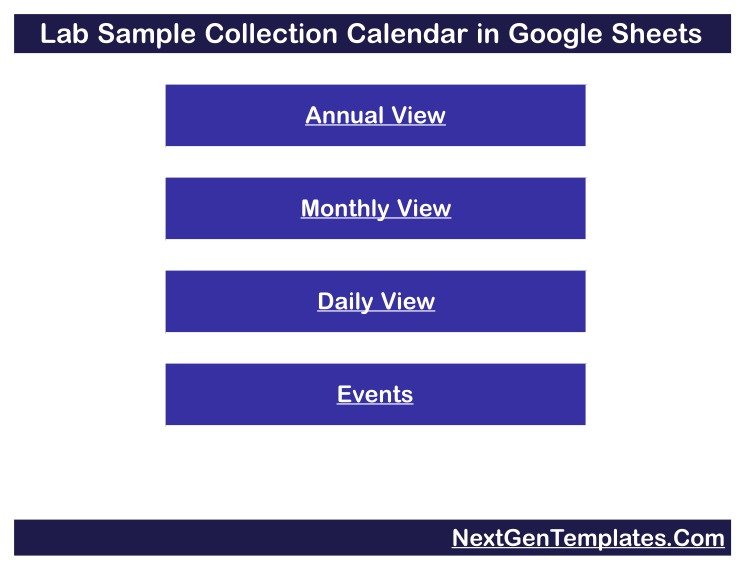
- Home — the title bar and four navigation buttons: Annual View, Monthly View, Daily View, Events. Every view has a “Back” link home.
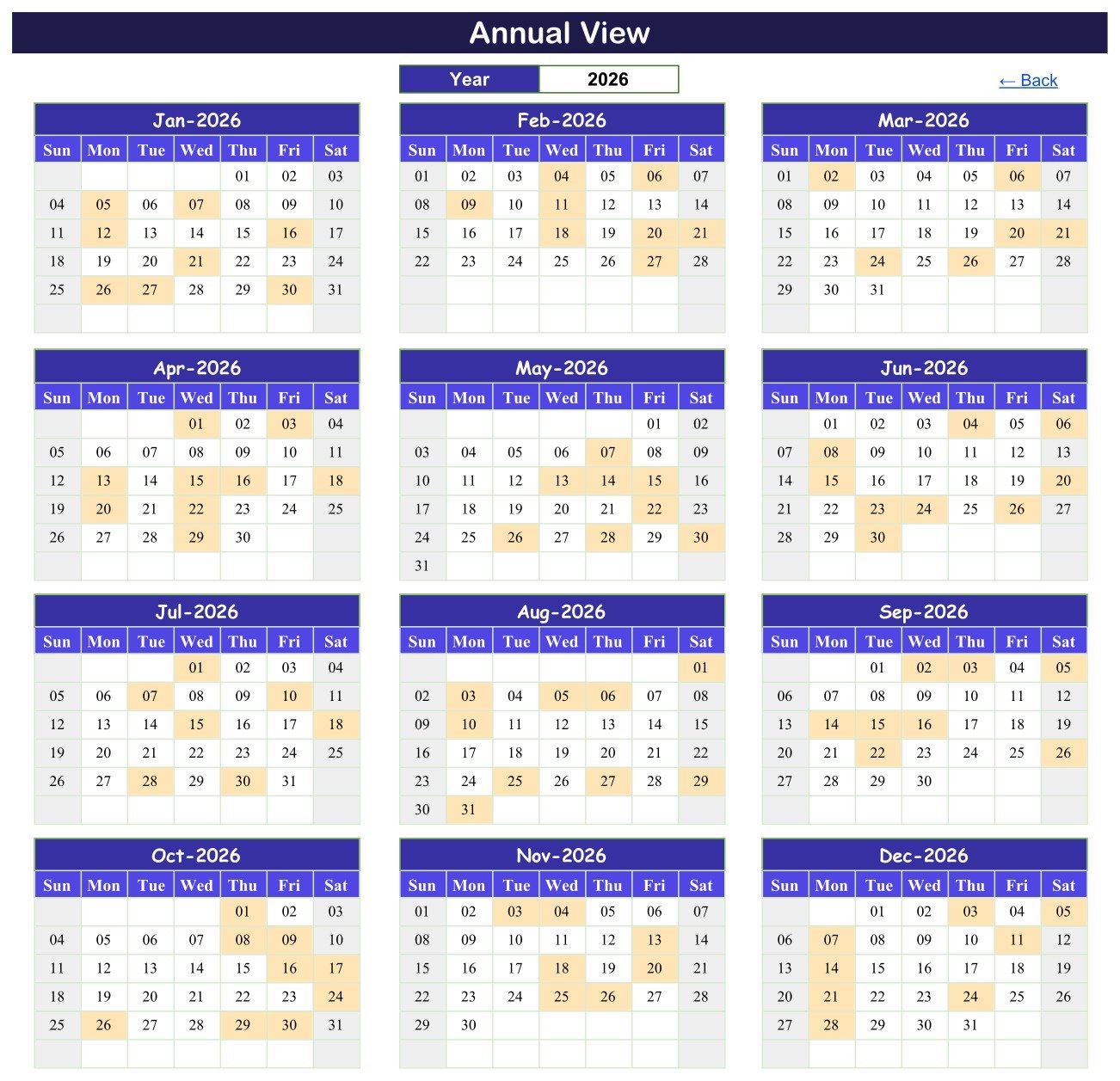
- Annual View — one Year cell and twelve month grids, three across and four down, Sunday to Saturday, with every scheduled day shaded amber. Around 196 formulas rebuild the entire page when you change that single cell.
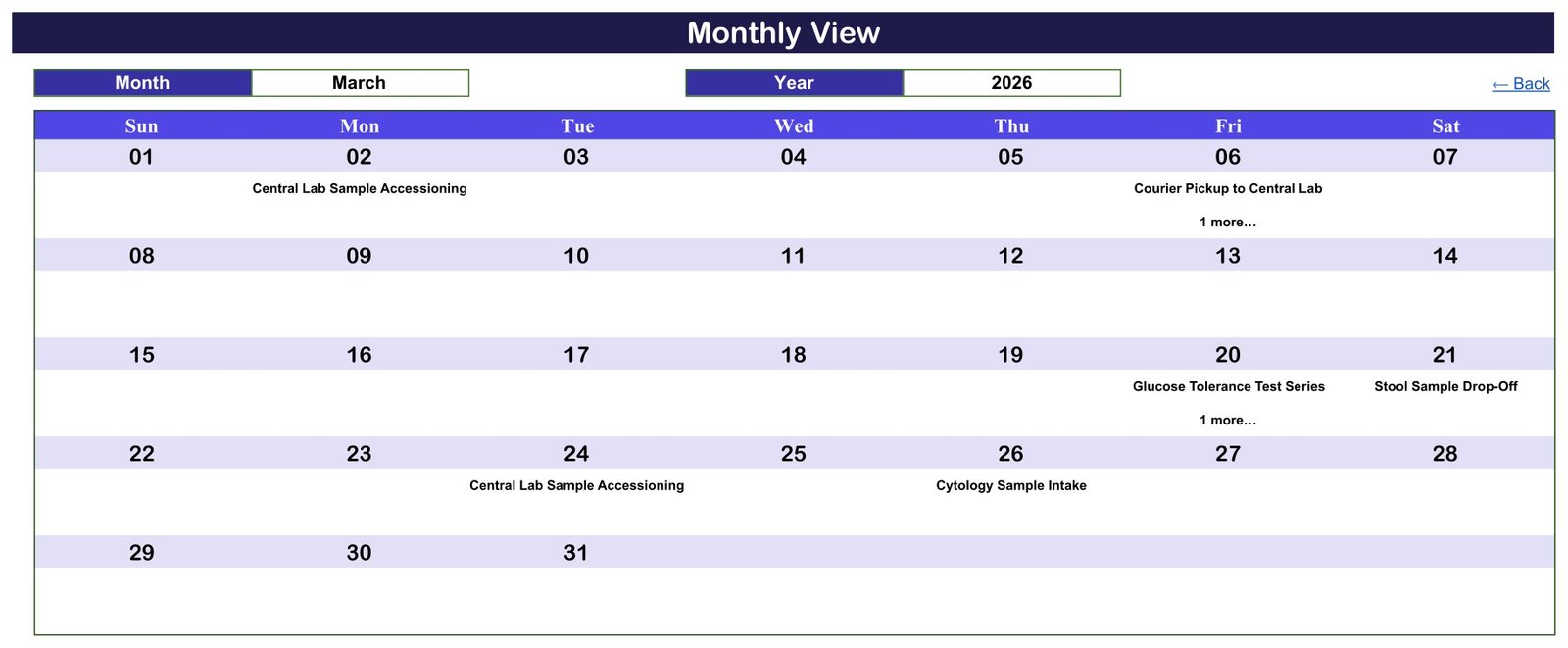
- Monthly View — Month and Year dropdowns feeding a Sun-to-Sat grid, with the round name printed inside each date cell.
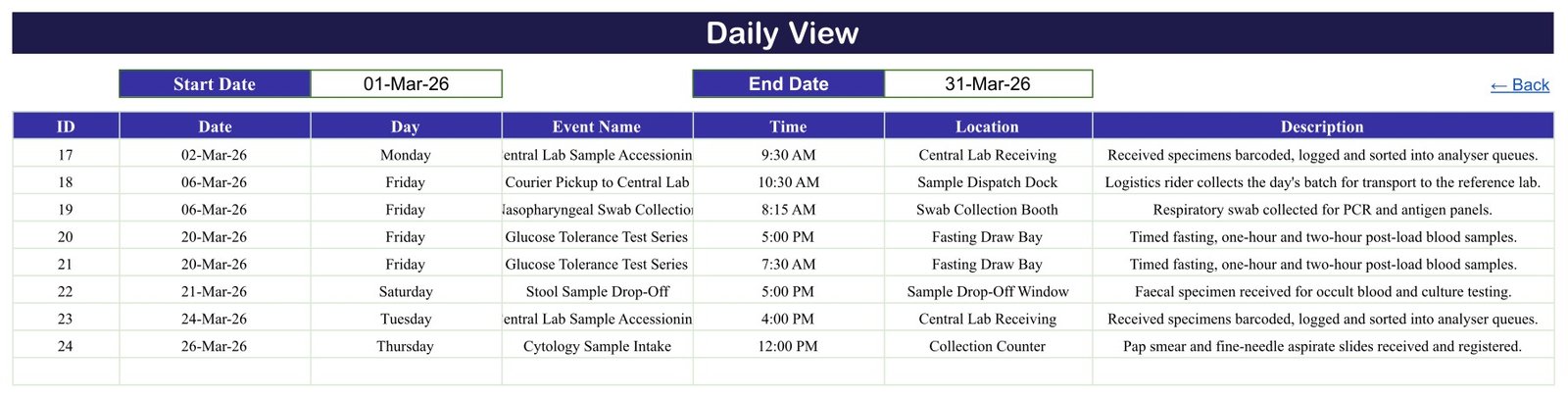
- Daily View — a Start Date and an End Date, and a single FILTER that returns every round in the range across all seven columns, in date order. This is your printable run sheet.
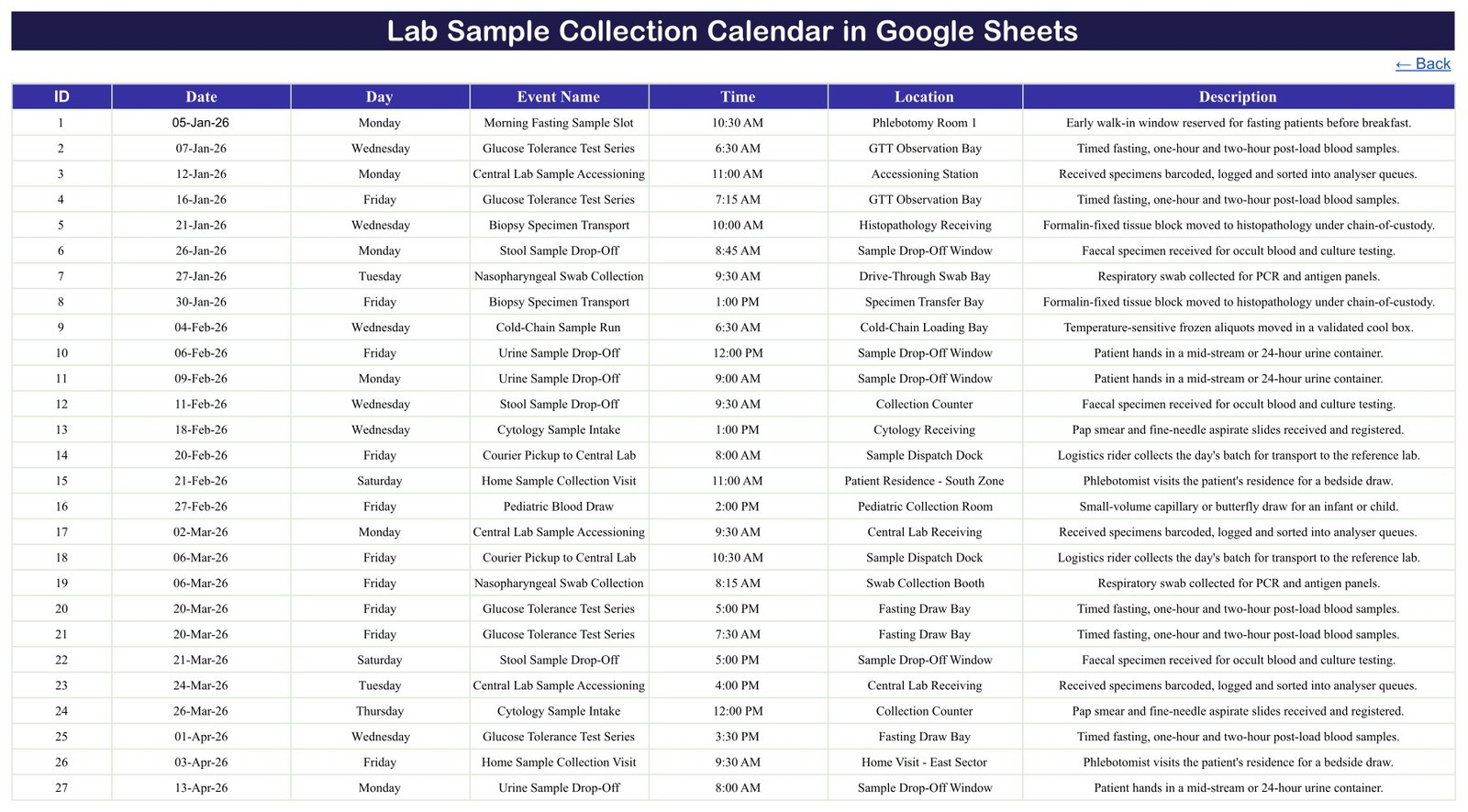
- Events — the one table everything reads. Headers in row 3, data from row 4, 100 rounds shipped, formulas written to row 999.
- List (hidden) — the month names and the year list that feed the dropdowns.
The sample data is not filler. There are 100 rounds numbered 1 to 100, dated 05-Jan-2026 to 28-Dec-2026, eight or nine every month for all twelve months, spread over 15 round types and 24 named collection points, at 19 start times between 6:30 AM and 5:00 PM. Eighty-six fall on weekdays and fourteen on Saturdays, with no Sundays — a six-day collection week, which is how most labs actually run.
The round types read like a real workload: Morning Fasting Sample Slot, Fasting Blood Draw, Glucose Tolerance Test Series, Pediatric Blood Draw, Blood Culture Collection, Nasopharyngeal Swab Collection, Urine Sample Drop-Off, Stool Sample Drop-Off, Cytology Sample Intake, Biopsy Specimen Transport, Cold-Chain Sample Run, Courier Pickup to Central Lab, Central Lab Sample Accessioning, Home Sample Collection Visit and Corporate Health-Camp Collection. The locations are the rooms and bays those happen in — Phlebotomy Room 1 and 2, the Fasting Draw Bay, the GTT Observation Bay, the Drive-Through Swab Bay, Cytology and Histopathology Receiving, the Cold-Chain Loading Bay, the Sample Dispatch Dock, the Accessioning Station, and two zone-level home-visit labels.
Formulas, Not Macros — and Why That Matters Here
This is the single biggest difference between the Google Sheets edition and its Excel sibling, and it is worth being precise about.
In this workbook every view is formula-driven. Annual View is built from DATE and EOMONTH. Monthly View anchors the month with DATEVALUE, pulls the round name with VLOOKUP and counts collisions with COUNTIF. Daily View is one FILTER over the Events table. Nothing runs in the background, nothing asks for permissions, there is no Apps Script and no add-on, and there is nothing to “enable” or “refresh”. Change a date on the Events tab and all three views have already updated by the time you switch to them.
In the Excel edition, by contrast, the Daily View and This Month pages are written by VBA — the macros are load-bearing, and the workbook does considerably less if a user opens it with macros disabled. That is a fair trade for what VBA buys there (a real data-entry form with date and time pickers, a settings panel, theme switching), but it is a trade. If your team is on mixed devices, or your IT policy is unfriendly to macro-enabled workbooks, the browser version removes the question entirely.
One Honest Quirk: the Day Column
We would rather write this down than let you discover it.
The Day column on the Events tab is typed text, not a formula. All 100 shipped rows are correct — every weekday label was recomputed against its date before release, 100 rows and zero mismatches — but if you edit a date, the day name beside it will quietly stay as it was. Nothing warns you, and the Daily View will happily print “Monday” next to a Thursday.
The fix takes ten seconds and is permanent. In cell C4 of the Events tab enter:
=TEXT(B4,"dddd")and fill it down the column. Or do the whole column in one go:
=ARRAYFORMULA(IF(B4:B999="","",TEXT(B4:B999,"dddd")))Do that before you enter your own rounds and the day name will follow the date forever after. (The Excel edition sidesteps this because its VBA form fills the Day field from the date picker.)
The “1 more…” Note on Busy Days
Monthly View uses VLOOKUP, which returns the first match for a date. When two rounds land on the same day, the grid prints one of them and a COUNTIF underneath adds a “1 more…” note, so a stacked day never looks emptier than it is. Open Daily View, set the range to that single date, and you see everything.
In the shipped sample year that happens on exactly four dates — 06-Mar, 20-Mar, 15-Jul and 04-Nov 2026. March is the easy one to check: the grid shows Courier Pickup to Central Lab on the 6th and Glucose Tolerance Test Series on the 20th, each with “1 more…” beneath, and Daily View for 01-Mar to 31-Mar lists all eight of that month’s rounds including the hidden Nasopharyngeal Swab Collection at 8:15 and the second GTT slot at 7:30.
It Schedules Rounds, Not People
Count the columns on the Events tab. There are seven: ID, Date, Day, Event Name, Time, Location and Description. There is no patient name, no patient ID, no hospital number, no date of birth, no phone number, no specimen barcode, no test code and no result. Not hidden, not optional — simply absent. Across all 100 sample rows no person is named anywhere: not a patient, not a phlebotomist, not a courier.
That is the design, not an oversight. A shared Google Sheet has no per-cell access control, no audit trail and no retention policy. It is a very good place to publish a plan and a very bad place to keep clinical identities.
Two of the 24 sample locations describe home visits at zone level — “Patient Residence – South Zone” and “Home Visit – East Sector”. No street address, postcode or contact detail appears anywhere in the file. Keep it that way. If your own home-collection rounds need to be told apart, put an internal route or job code in the Location cell and keep the code-to-address key in whatever system already holds your patient data, under its own access control. And when you share the sheet, use Share with specific people for your named collection team rather than “anyone with the link” — link sharing turns a routing sheet into a public document the moment somebody forwards the URL.
Google Sheets Edition vs. the Excel Edition vs. Paid Lab Software
| This Google Sheets edition | The Excel edition | Paid LIMS / lab software | |
|---|---|---|---|
| Price | $8.99, on sale $4.99, one payment | $8.99, on sale $4.99, one payment | Typically four to six figures a year, per site |
| Views | Three – Annual, Monthly, Daily | Four – plus a “This Month” summary page | Dozens of screens |
| Tabs | 6 (5 visible + 1 hidden List) | 7 | n/a |
| What drives the views | Live formulas – FILTER, VLOOKUP, COUNTIF, DATE, EOMONTH | VBA macros – Daily View and This Month are written by code, so macros must be enabled | A database and an application server |
| Adding a round | Type into the next Events row | Add / Update / Delete form with date and time pickers | Order entry, usually from the LIS |
| Sample data | 100 rounds, 05-Jan to 28-Dec-2026, 15 round types, 24 collection points, 19 start times | 100 rounds, 02-Jan to 28-Dec-2026, 18 round types, 8 collection points, 44 start times | None – you load your own |
| Working week in the sample | 86 weekday and 14 Saturday rounds | All 100 on weekdays | Whatever you configure |
| Day column | Typed text – replace with =TEXT(B4,”dddd”) once | Filled from the date by the entry form | Derived automatically |
| Themes | One fixed indigo palette | Five switchable colour themes | Corporate branding |
| Year range | Rolling, from YEAR(TODAY())-5 – currently 2021 to 2056 | Fixed 2021–2051 | Unlimited |
| Collaboration | Real time, on phones, several people at once | One person at a time | Concurrent, with roles |
| Works on | Any browser, any OS, iPad and Android included | Microsoft Excel on Windows with macros enabled | Web and desktop clients |
| Delivery | A PDF carrying a “Make a copy” link | A ZIP with the .xlsm plus a 5-page manual | Implementation project |
| Specimen tracking, results, custody, accreditation | None | None | Yes – that is what you are paying for |
Who Should Use It
Standalone pathology labs and diagnostic centres planning the week’s draws. Collection-centre managers who need fasting slots, drop-off windows and camp days on one page. Phlebotomy supervisors covering several rooms and bays. Courier and logistics coordinators scheduling pickups and cold-chain runs to the reference lab. Home-collection teams planning zone routes. Corporate wellness organisers running camps at employer sites. Small hospital labs currently keeping all of this in a group chat.
Who should not: anyone who needs specimen tracking, accessioning, chain of custody, result reporting or patient records — that is a LIMS, and this is emphatically not one. Anyone under an accreditation regime that requires a validated, auditable scheduling system. Anyone expecting automatic reminders or overdue alerts. And anyone tempted to type a patient’s name into it.
Getting Started in Five Minutes
- Buy it, open the PDF in your download, and click the “Make a copy” link. An editable copy lands in your own Google Drive.
- Wander through Annual, Monthly and Daily View with the sample year still in place, so you can see how the three connect.
- Put
=TEXT(B4,"dddd")in C4 of the Events tab and fill it down. - Select Events rows 4 to 103 and delete the contents — not the rows, so the formulas that read to row 999 survive.
- Type your own rounds: ID, Date, round name, start time, collection point, one-line note. Overwrite the shipped round names and locations; they are plain text, not a locked list.
- Set your year on Annual View, pick a month on Monthly View for the wall, and use Daily View as the morning run sheet.
- Share it with your named collection team, and keep patient identifiers out of it.
Want to build planners like this yourself? The NextGenTemplates Academy learning paths walk you through calendars and trackers in Google Sheets and Excel, with practice files at each stage.
Frequently Asked Questions
Is this a LIMS or a specimen-tracking system?
No. It is a scheduling spreadsheet. There is no barcode, accession number, aliquot, status, worklist or result anywhere in it.
One round is called “Central Lab Sample Accessioning” — does it do accessioning?
No. That is the name of a block of time at the accessioning station, just as “Courier Pickup to Central Lab” is the name of a time slot rather than a courier system. Nothing is logged, numbered or tracked.
Does it hold any patient or staff data?
None. Seven columns, and not one of them is a name, ID, hospital number, date of birth or contact detail. No person is named in any of the 100 sample rows, and there is no street address in the file.
Is it CLIA, CAP, ISO 15189 or NABL compliant?
No, and it claims nothing of the sort. It has no validation, no audit trail, no version control and no retention policy. Naming those standards here is a statement that it does not meet them.Lab Sample Collection Calendar in Google Sheets
Do I need Apps Script, macros or an add-on?
No. Native Google Sheets formulas only — FILTER, VLOOKUP, COUNTIF, DATE, EOMONTH, DATEVALUE, TEXT and IFERROR. Nothing asks for permissions.Lab Sample Collection Calendar in Google Sheets
Will it remind me about a round or warn me about a clash?
No to both. No email, no SMS, no notification, no overdue concept and no double-booking check.Lab Sample Collection Calendar in Google Sheets
How many rounds can it hold?
The view formulas run to Events row 999, so about 996 rows — roughly 896 free once the samples are cleared. That is several years of a busy collection centre’s diary.Lab Sample Collection Calendar in Google Sheets
Does the 2026 sample data mean it expires?
No. The rounds are demonstration data to overwrite, and the year list is built from YEAR(TODAY())-5, so the dropdown currently runs 2021 to 2056 and moves forward on its own.Lab Sample Collection Calendar in Google Sheets
What is actually in the download?
One PDF containing the “Make a copy” link. No .xlsx, no .zip, no installer.Lab Sample Collection Calendar in Google Sheets
Get the Template
Lab Sample Collection Calendar in Google Sheets — regular $8.99, currently $4.99. One payment, no subscription, no per-user licence. You get a PDF with the “Make a copy” link; the sheet is yours the moment you click it.
Prefer a desktop workbook with a data-entry form and colour themes? The Lab Sample Collection Calendar in Excel is the sibling edition at the same price.
Related Google Sheets Calendars
The same three-view layout runs across the healthcare calendar line: the Medical Equipment Calibration Calendar in Google Sheets for biomedical maintenance rounds, the Pharmacy Stock Expiry Calendar in Google Sheets for the other thing a department has to watch by date, and the Dialysis Session Calendar in Google Sheets for recurring treatment slots.
On the people side there are the Home Nursing Visit Calendar in Google Sheets and the Blood Donation Camp Calendar in Google Sheets, which handles the camp-day logistics this calendar only blocks out. For animal practices there is the Veterinary Clinic Calendar in Google Sheets, and for a personal record of appointments and results, the Doctor Appointments & Medical History Tracker in Google Sheets.