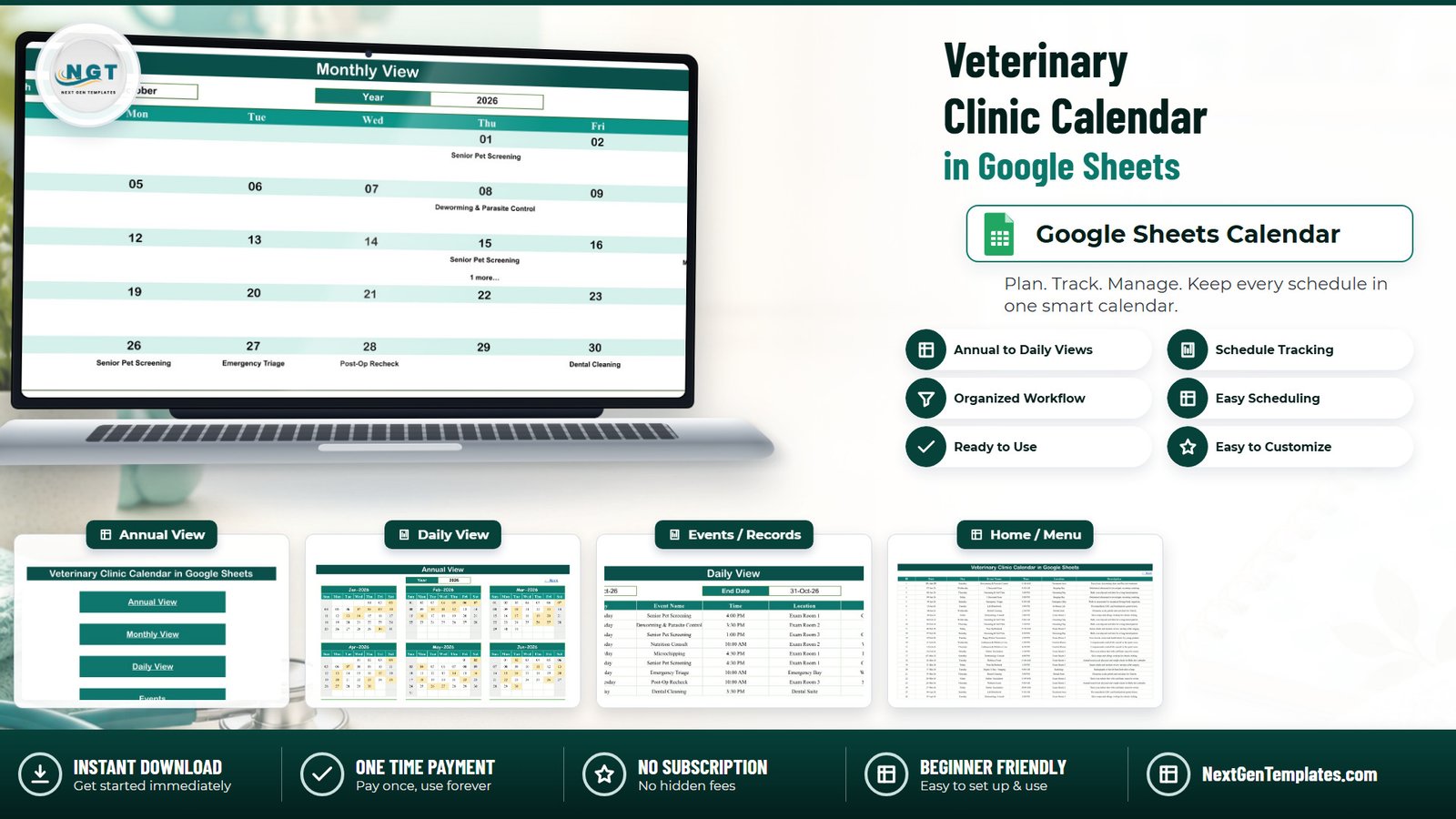
Most small animal practices still run the diary on paper, or on a wall planner that only one person can read at a time. This template moves that diary into one Google Sheet: five visible tabs, 100 sample bookings already loaded from 03-Jan-2026 to 30-Dec-2026, 18 appointment types, 13 clinic locations, 15 start times between 08:30 and 16:30, and three ways of looking at the same data – a year, a month, or a date range. Everything below was checked against the live sheet, not against the marketing artwork.
Get the Veterinary Clinic Calendar in Google Sheets
Key Features of the Veterinary Clinic Calendar in Google Sheets
- One data tab feeds three views. The Events tab is the only place you type. Annual, Monthly and Daily all read from it live.
- Formulas, not scripts. The whole file runs on FILTER, VLOOKUP, COUNTIF, DATE and EOMONTH plus in-sheet hyperlinks. There is no Apps Script, no macro and no add-on, so nothing asks for permissions the first time you open it.
- A rolling year list. The hidden List tab builds its year dropdown from
YEAR(TODAY())-5, which currently gives 2021 through 2056. The calendar does not go stale in January. - Capacity of roughly 996 bookings. Every formula range runs from Events row 4 to row 999.
- 100 demo rows you can read before you buy. Wellness Exam, Rabies Vaccination, Puppy/Kitten Vaccination, Spay Surgery, Neuter Surgery, Dental Cleaning, Post-Op Recheck, Deworming and Parasite Control, Dermatology Consult, Nutrition Consult, Senior Pet Screening, Lab Bloodwork, Ultrasound Scan, Digital X-Ray / Imaging, Microchipping, Grooming and Nail Trim, Emergency Triage, and Euthanasia and Palliative Care.
- Rooms that look like a real clinic. Exam Rooms 1, 2 and 3, Consult Room, Surgery Suite, Dental Suite, Imaging Bay, Radiology, In-House Lab, Treatment Area, Grooming Bay, Emergency Bay and a Comfort Room.
The Five Tabs, Explained
Home
A menu with four links – Annual View, Monthly View, Daily View, Events – and a NextGenTemplates footer link. Each view carries a “← Back” link home.
Annual View
Twelve month grids laid out three across and four down, under a single Year dropdown. Booked days are shaded automatically: a hidden helper row pulls every date out of the Events tab with FILTER, and conditional formatting shades any day cell that matches. In the shipped 2026 data that is 98 shaded days out of 365.

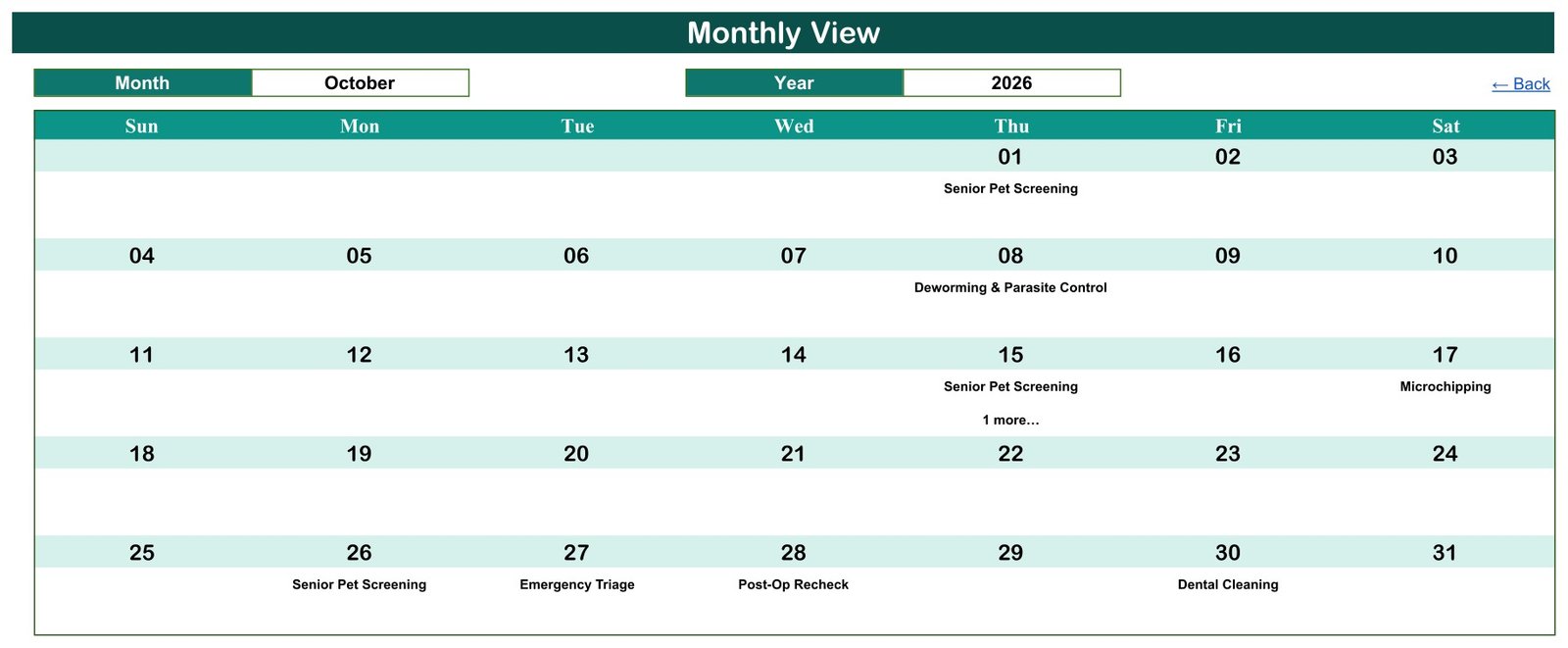
Monthly View
Month and Year dropdowns above a seven-column Sun-to-Sat grid. Under each date, a VLOOKUP into Events!B4:D999 prints the first booking on that day, and a COUNTIF underneath adds a “1 more…” note when the date carries more than one. In the shipped October 2026 you can see this on the 15th, which holds a Senior Pet Screening at 1:00 PM and a Nutrition Consult at 10:00 AM.
Daily View
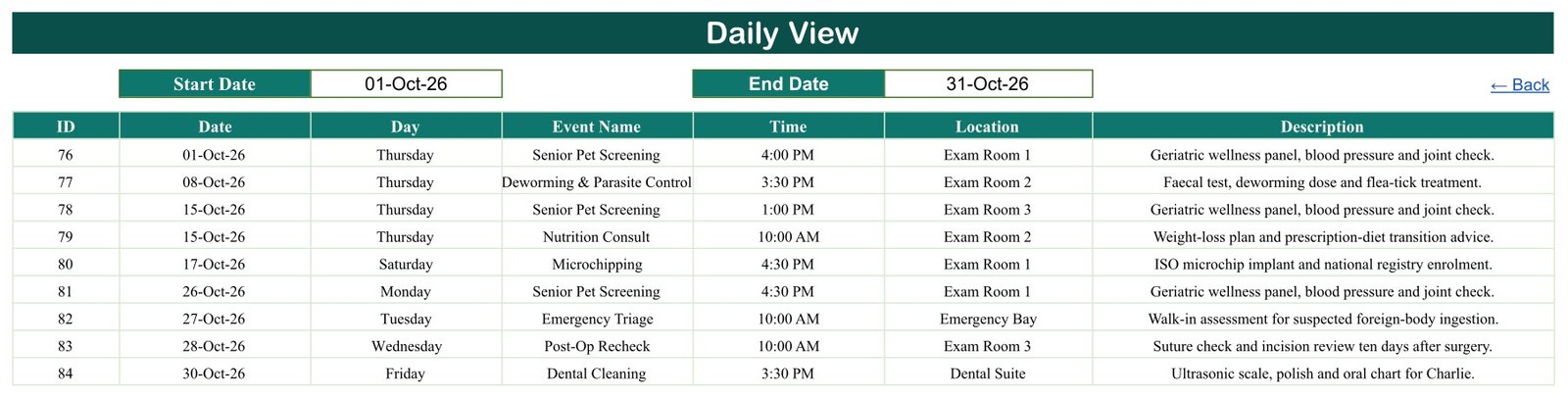
Not a single-day sheet – a date range. Set Start Date and End Date and one FILTER(Events!A4:G999, ...) returns every booking between them with all seven columns intact. The file ships set to 01-Oct-26 through 31-Oct-26, which returns nine rows, IDs 76 to 84.
Events
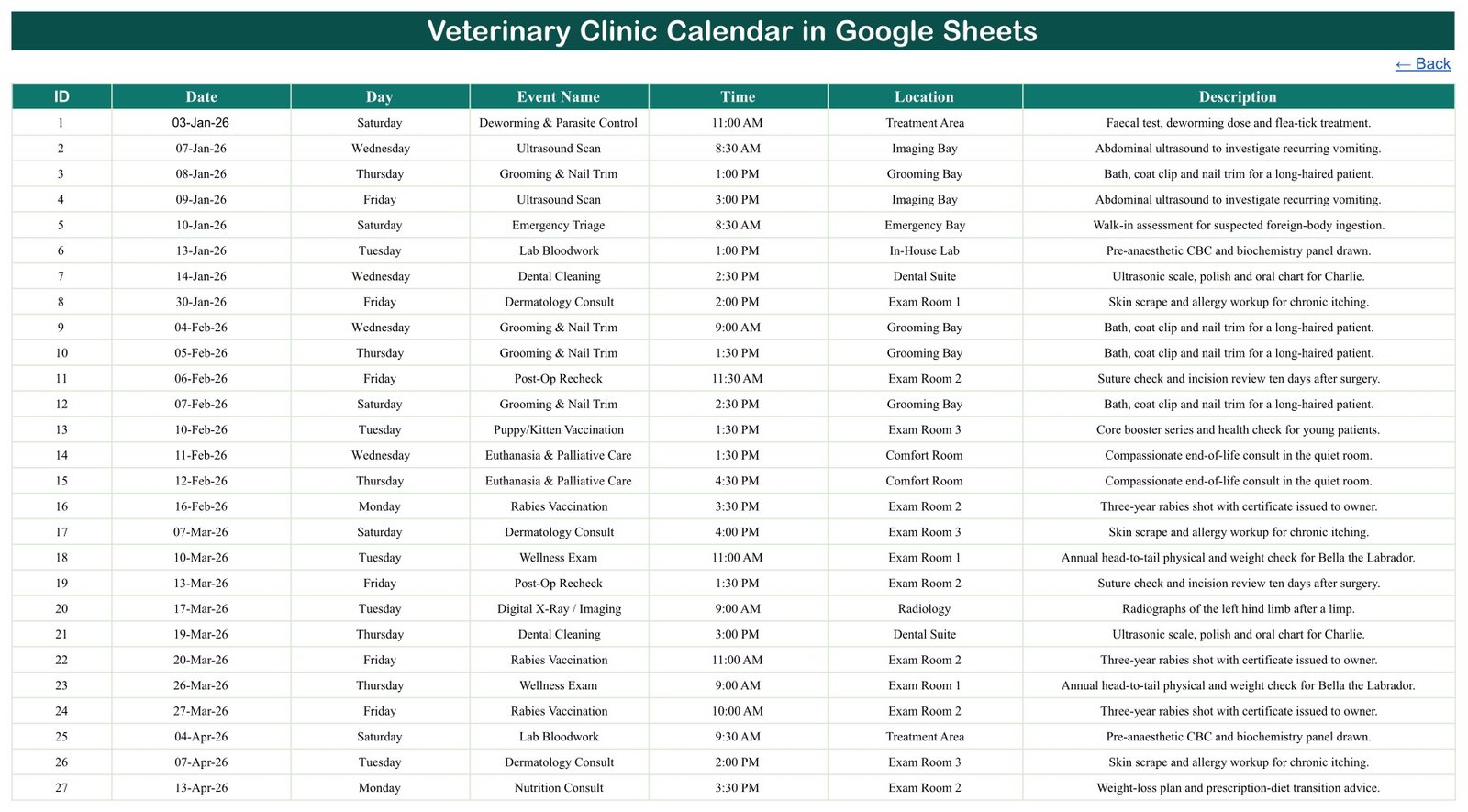
Seven columns – ID, Date, Day, Event Name, Time, Location, Description – holding rows 4 to 103 of sample data. The Date column carries date validation. Event Name and Location do not: they are free text, which is flexible but means nothing stops a typo creating a fourteenth “location”.
List (hidden)
Month names and the rolling year range that feed the two dropdowns. You will not normally touch it.
Google Sheets vs. Excel vs. Paid Veterinary Software – Feature Comparison
| This calendar (Google Sheets) | A desktop Excel calendar | Paid veterinary PIMS | |
|---|---|---|---|
| Cost | $8.99 once, currently $4.99 | One payment, similar range | Per-user monthly subscription |
| Platform | Browser, Google account | Microsoft Excel | Vendor cloud or server |
| Setup time | Minutes | Minutes | Days to weeks |
| Real-time team editing | Yes | Only via a shared workbook | Yes |
| Mobile access | Google Sheets mobile app; grids are built for a desktop screen | Excel mobile app | Purpose-built apps |
| Customisable fields | Yes, add columns freely | Yes | Only what the vendor exposes |
| Share with a link | Yes | No | Vendor accounts only |
| Year-1 cost at 5 users | $8.99 total | Similar, plus Excel licences | Hundreds to thousands of dollars |
| Double-booking prevention | No | No | Yes |
| Owner reminders (email/SMS) | No | No | Usually included |
| Clinical records, prescribing, invoicing | None | None | Yes |
Who Should Use This Template
A one-to-three-vet small animal practice moving off paper. A mobile or house-call vet who wants a printable week. A grooming-and-wellness clinic that needs a month at a glance. A practice manager who wants a second, shareable view of the diary sitting beside whatever system already runs the clinic.
It is not for a practice that needs the calendar to hold the record. This file is not a practice information management system, not a clinical or medical records system, not a prescribing or dispensing tool, not a controlled-drug register and not a billing system. It carries no claim about clinical governance, animal welfare assurance, treatment outcomes, or regulatory standing – no AVMA, RCVS, USDA, FDA, state veterinary board or practice-inspection standard is addressed, met or implied. It books time in rooms. That is the whole scope.
Real-World Use Cases
Reception desk, two-vet clinic. Daily View stays open with Start and End Date both set to today. Walk-ins typed into Events appear on the list immediately.
Mobile vet. Daily View set Monday to Friday on Sunday night, printed, and used as the week’s run sheet. The Location column carries site names rather than exam rooms.
Grooming and wellness practice. Monthly View to check how loaded the Grooming Bay already is before taking a block booking; Annual View to find the quiet weeks worth promoting a dental month in.
Advantages
- Nothing to install and nothing to authorise – it opens like any other spreadsheet.
- The whole team can be in it at once, which a desktop file cannot do.
- Every view updates the moment a row changes; there is no refresh step to forget.
- It is a spreadsheet, so adding a column for anything the build does not cover takes seconds.
- The sample data is dense enough to test against before you clear it – 100 rows across all twelve months.
Opportunities for Improvement
These are real gaps, checked in the file rather than guessed at, and they are worth knowing before you buy.
- Nothing prevents double-booking. The demo data itself puts two appointments on 30-Sep-2026 and two on 15-Oct-2026, and the sheet raises no warning about either.
- Monthly View shows only the first booking per day. The “1 more…” note tells you something is hidden; Daily View is where you see it.
- No end time or duration. Only a start time is stored, so you cannot calculate room or surgery utilisation from this file.
- No status field. Nothing records booked, arrived, completed, cancelled or no-show.
- No reminders and no sync. No email, no SMS, no notifications, no Google Calendar or practice-software integration in either direction.
- No recall engine. Entering a rabies vaccination does not create next year’s – if you need automatic recalls, this is not the tool.
- Validation is thin. Only the Date column is validated. Event Name and Location are free text.
- The Day column is typed, not calculated. It is a stored value, so a hand-typed weekday can drift from its date. In the shipped file it has not: all 100 Day values were recomputed against their dates and 100 of 100 match.
What It Does Not Store – and Why That Is Deliberate
The Events tab has exactly seven columns, and none of them identifies anybody. There is no owner name, no animal name, no species or breed, no microchip number, no case or patient number, no address, no phone and no email; there is also no fee, invoice or payment column, and no vet or technician column. A Google Sheet shared by link is not appropriate storage for client or patient records, and the template is built to keep you out of that position: book the slot here by procedure, time and room, and keep the identity in your clinical system.
One caveat in the interest of honesty: the Description column is free text and four of the 100 demo rows do name a pet in it. If you keep animal or owner names there, remember exactly who the sheet is shared with. An internal case code is the safer habit.
Best Practices
- Delete all 100 demo rows before you go live, so nobody mistakes sample data for a real booking.
- Agree one spelling for each room and each appointment type. Because those columns are free text, “Exam Room 1” and “Exam room 1” will look identical to you and different to a lookup.
- Give reception edit access and everyone else view access from the Google Sheets Share dialog – that is the only access control this file has. Google’s own guidance on sharing files is worth reading once.
- Keep IDs unique and sequential. Nothing enforces it, and duplicates make the Daily View list confusing.
- Scan Monthly View for “1 more…” notes at the start of each week, then open Daily View for those dates.
- Take a copy at the end of each year rather than deleting – Annual View reads whatever year you pick, so old data stays browsable.
Explore Relevant Templates
- Veterinary Clinic Calendar in Excel – the same subject as a desktop workbook. It is a separate build with its own sample data, not a converted copy of this sheet.
- Veterinary Clinic Dashboard in Google Sheets – charts and analysis rather than a diary.
- Veterinary Clinic KPI Dashboard in Google Sheets – a monthly KPI scorecard, a third and different product.
- Pet Care Business Dashboard in Google Sheets – for the wider pet-services business.
- Animal Shelter Management System Web App – a multi-user system for when a sheet is not enough.
- The full Google Sheets calendar range.
If the three-view pattern itself is what interests you, we have written it up on two other subjects: the Medical Equipment Calibration Calendar in Google Sheets and the Dental Clinic Appointment Calendar in Google Sheets. For the analysis side of a practice rather than the diary, see the Veterinary Clinic Dashboard in Google Sheets.
Prefer to learn how calendars like this are put together? The NextGenTemplates Academy learning paths cover the spreadsheet skills behind them, with practice files.
Get the Veterinary Clinic Calendar in Google Sheets
Frequently Asked Questions
Is this veterinary practice management software?
No. It is an appointment calendar built in a spreadsheet. No clinical records, no prescriptions, no invoices, and no regulatory or welfare claim of any kind.
Does it stop me double-booking a room?
No. There is no validation and no warning. The sample data deliberately includes two dates with two bookings each so you can see how the views behave.
Will it remind owners about appointments?
No. No email, no SMS, no notification, no calendar invite. There is no automation in the file at all.
Why does the month grid show only one appointment per day?
Each day cell holds a single lookup, so it prints the first booking and adds a “1 more…” counter. Daily View lists every one.
Do I need to allow a script or install an add-on?
No. Every view is ordinary spreadsheet formulas plus in-sheet hyperlinks, so there is nothing to authorise.
How many bookings will it hold?
About 996 – the formulas run to Events row 999. Extending them further is a find-and-replace.
Can the whole team use it at once?
Yes, like any Google Sheet. Access is controlled entirely by Google’s sharing settings; the file has no login, no permissions model, no audit trail and no record locking.
About the Author
Built by PK – Microsoft Certified Professional with 15+ years of Excel, Google Sheets, and Power BI experience. Founder of NextGenTemplates, reaching 300K+ subscribers across YouTube channels. Every template is hand-built and tested before release.
Conclusion
If your practice diary is a paper book or a whiteboard, this is a small, honest step forward: three views over one table, live for the whole team, for the price of a coffee. If you need reminders, recalls, utilisation figures or a clinical record, you need practice software, and this template says so rather than pretending otherwise. Within its scope it does the job cleanly, and every number quoted here was read out of the live sheet.
Get the Veterinary Clinic Calendar in Google Sheets – $4.99 today, regular $8.99. One payment, instant download, no subscription.