The Gym and Fitness Center Membership Management System Web App brings 25 connected screens — members, plans, payments, attendance, classes and renewals — into one Google Sheets backend with role-based login for five staff roles. The overview dashboard tracks 12 live KPIs, and the whole system runs as a private web app you deploy from your own Google account for a one-time price of $24.99 instead of $70–$300+ per month for gym SaaS.
Most independent gyms and studios still juggle a spreadsheet for members, a notebook for check-ins and a separate tool for billing. This gym management web app with login replaces all of that with a single system where your data stays inside your Google Drive. Below is a full walkthrough of how it works and where it fits.
🎥 Watch the Video Tutorial
🚀 Try the Live Demo Before You Buy
We have deployed this web app in our own Google account so you can test every page, every role — with real sample data — before purchasing. No signup, no email required.
Open the live demo in a new tab →
🔑 Test Login Credentials
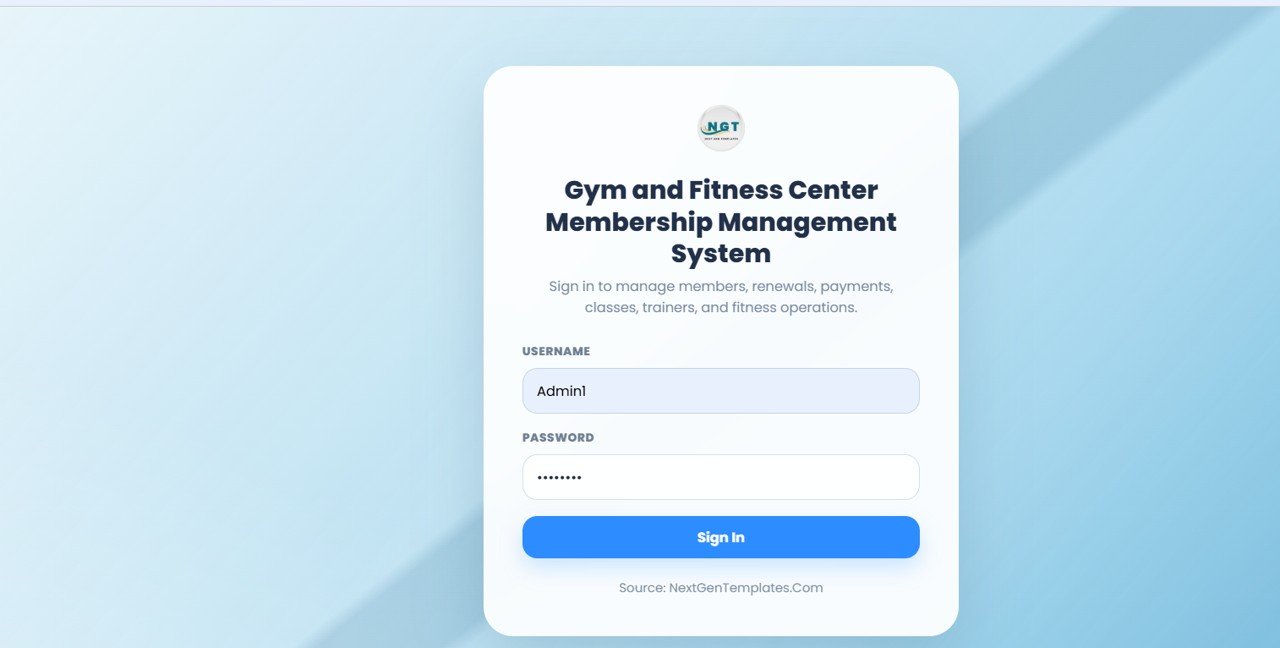
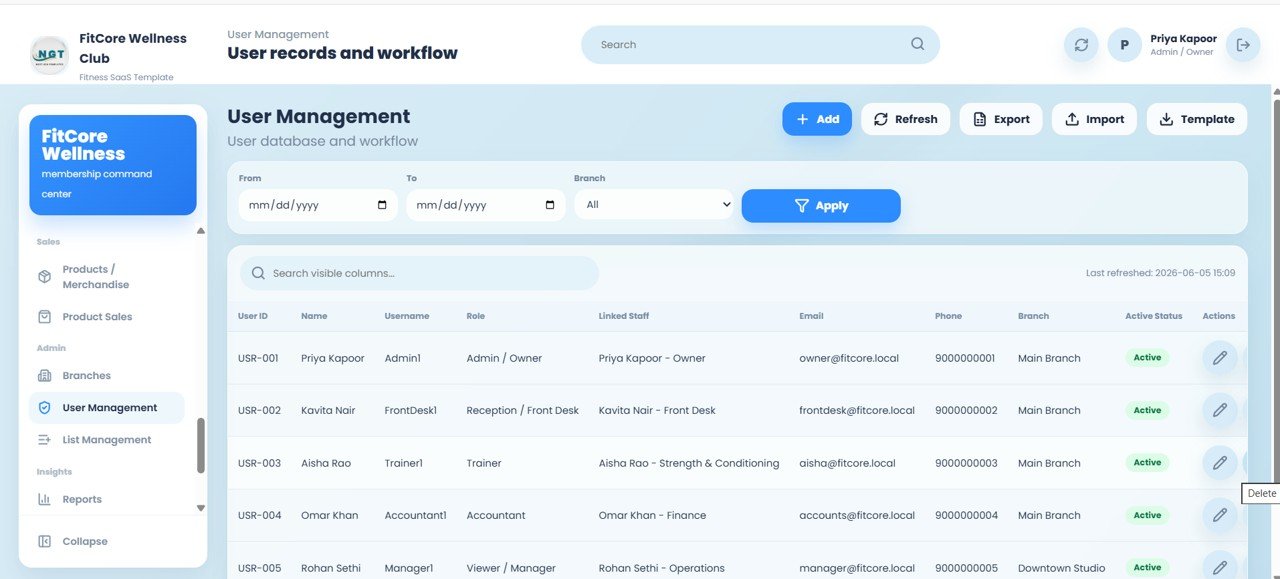
Sign in as Admin1 to manage all gym owner settings, members, payments, attendance, renewals, reports and system setup, or as FrontDesk1 to manage front desk operations including members, payments, attendance and renewals. Additional test users shown in User Management include Trainer1, Accountant1 and Manager1.
💡 What you get after purchase: The full source code (Code.gs + Index.html) plus a step-by-step deployment guide so you can deploy your own private instance in your own Google account in under 15 minutes.
Get the Gym Membership Management Web App
Key Features of the Gym and Fitness Center Membership Management System Web App
- 25 connected screens covering the entire membership lifecycle from lead to renewal — no separate apps to reconcile.
- Role-based login for 5 roles — Admin / Owner, Reception / Front Desk, Trainer, Accountant and Viewer / Manager — each restricted to the screens they need.
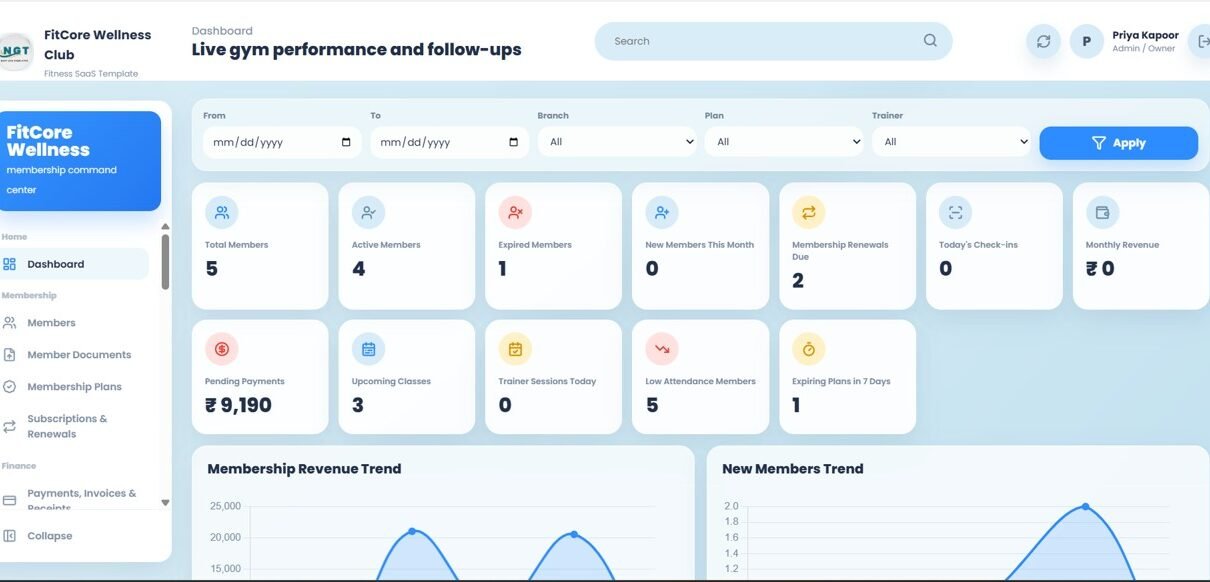
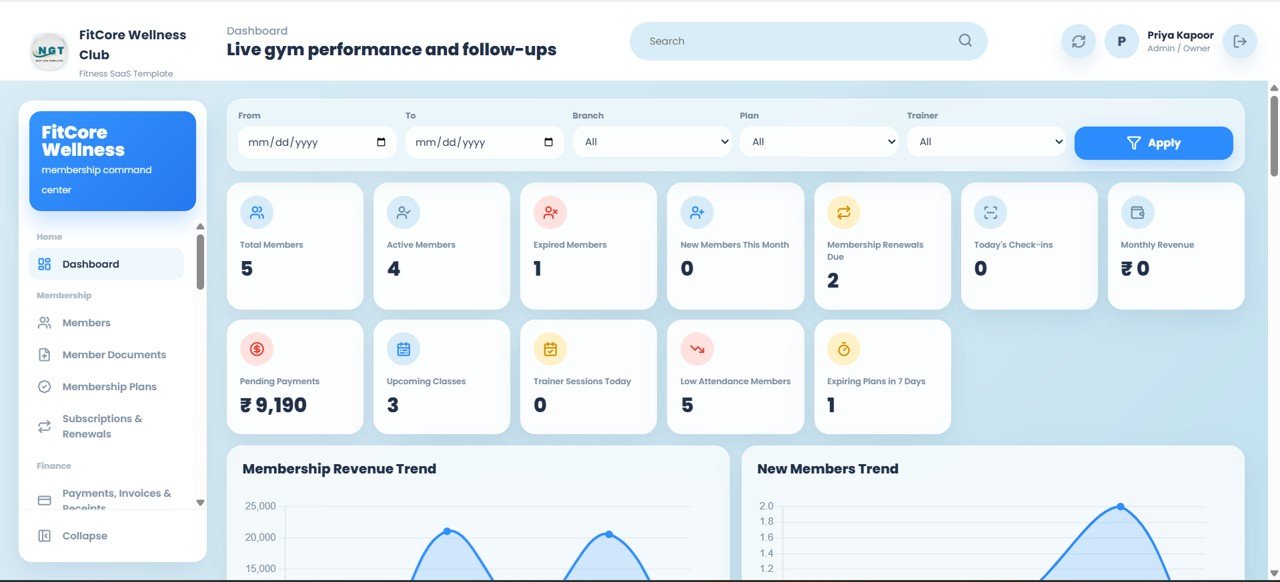
- A 12-KPI overview dashboard showing Total Members, Active Members, Expired Members, New Members This Month, Membership Renewals Due, Today’s Check-ins, Monthly Revenue, Pending Payments, Upcoming Classes, Trainer Sessions Today, Low Attendance Members and Expiring Plans in 7 Days.
- Multi-branch support with branch filters on the operational screens, so a two- or three-location business runs from one system.
- Built on Google Apps Script, deployed as your own web app — accessible from any browser or phone with your data in your Google Drive.
Dashboard Pages Explanation
Dashboard Overview
The landing screen after login. Twelve KPI cards summarise the business at a glance, and two charts — Membership Revenue Trend and New Members Trend — track income and acquisition. A filter bar with From and To dates plus Branch, Plan and Trainer dropdowns refocuses the whole view when you click Apply.
Dashboard Analytics
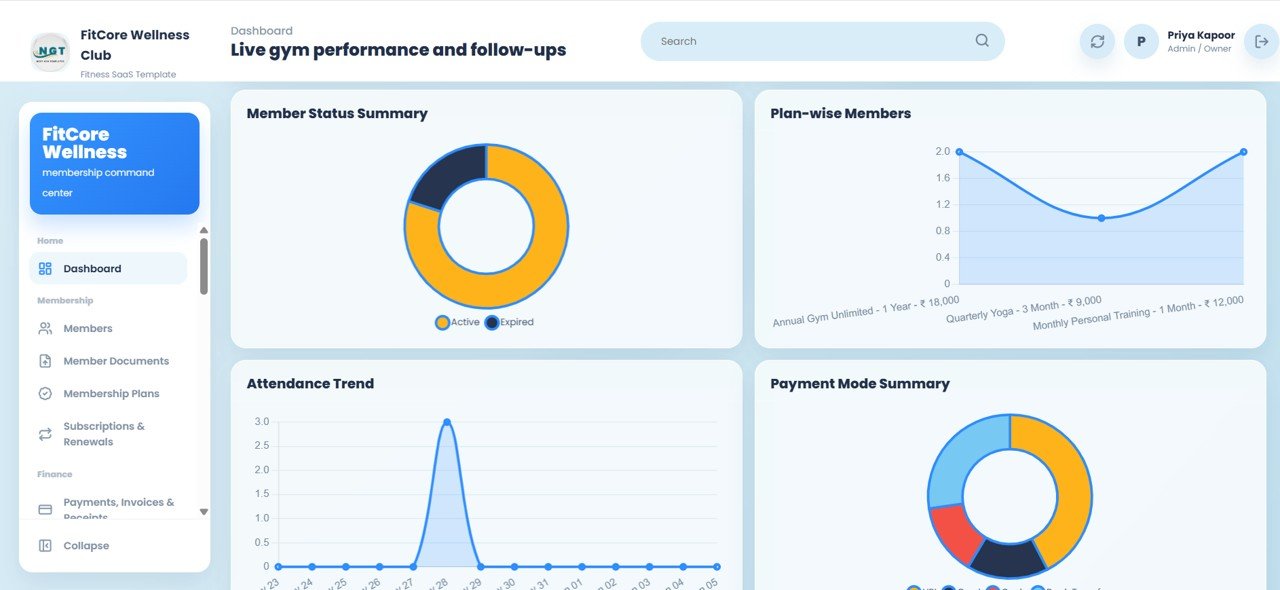
Scrolling down the dashboard reveals a deeper analytical layer: Member Status Summary (Active vs Expired), Plan-wise Members, Attendance Trend and Payment Mode Summary — useful for reading retention, plan mix, daily footfall and how members prefer to pay.
Members and Member Documents
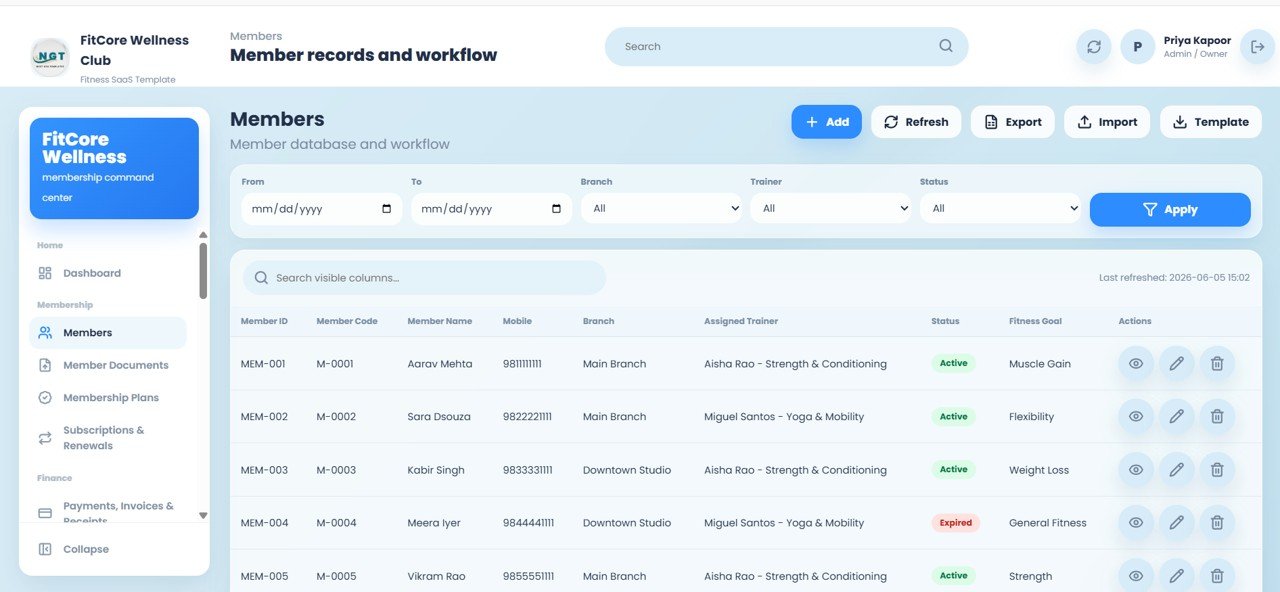
The Members screen holds every member with Member ID, Member Code, Member Name, Mobile, Branch, Assigned Trainer, Status and Fitness Goal, with Add, Refresh, Export, Import and Template tools plus View, Edit and Delete on each row. The Member Documents screen stores ID proofs and forms with file links, upload date and uploaded-by tracking.
Membership Plans, Subscriptions and Payments
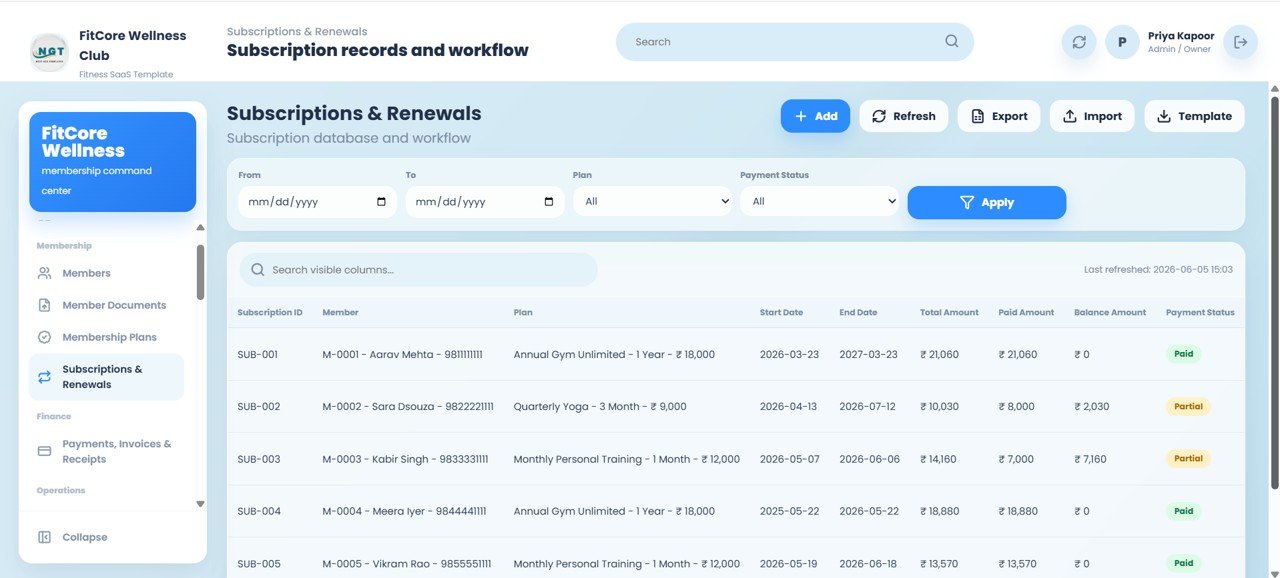
Membership Plans defines your offerings — the sample data includes Annual Gym Unlimited, Quarterly Yoga and Monthly Personal Training — with duration, price and tax. Subscriptions & Renewals tracks Start Date, End Date, Total Amount, Paid Amount and Balance Amount with a Paid or Partial payment status. Payments, Invoices & Receipts logs every transaction with the payment mode, receipt number and the staff member who collected it.
Attendance, Classes and PT Sessions
Attendance / Check-ins offers a Quick Check-In by member code or mobile, recording check-in date, check-in and check-out times, attendance type and class/session. Classes / Batches manages schedules, capacity and trainers; Class Attendance logs who attended; and Personal Training Sessions schedules and tracks one-to-one sessions with status.

Calendar, Reminders and Leads
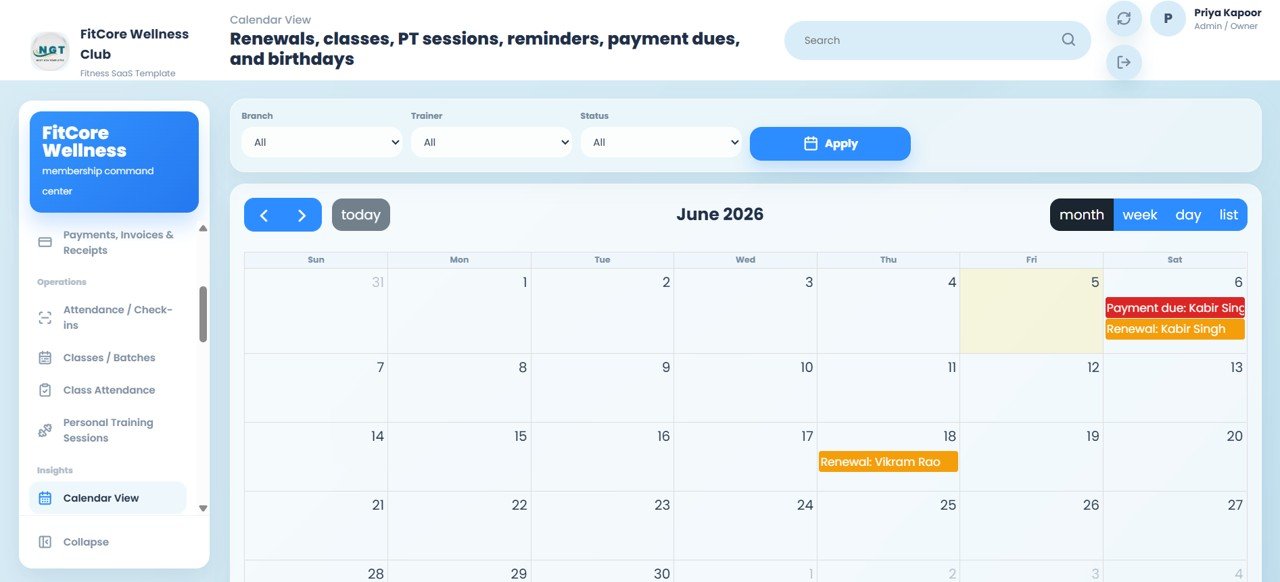
The Calendar View puts renewals, classes, PT sessions, reminders, payment dues and birthdays on a single month / week / day / list calendar, filtered by Branch, Trainer and Status. Reminders and Follow-ups manages renewal, payment-due and birthday reminders, while Leads and Enquiries captures prospects with their source, follow-up dates and assignment.
Training, Progress and Nutrition
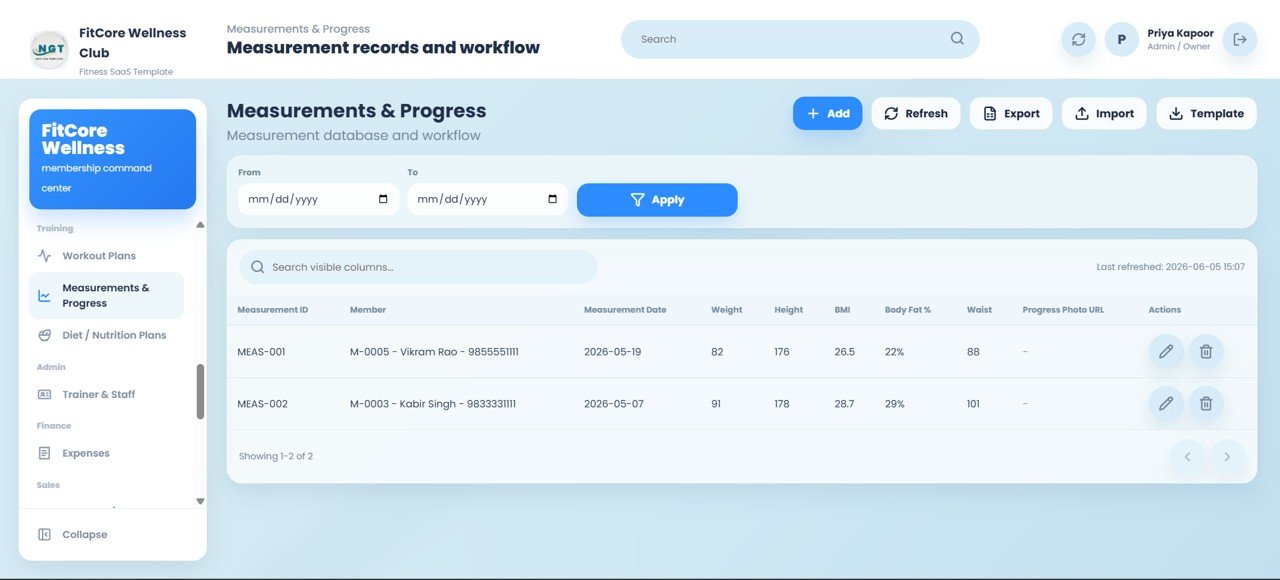
Workout Plans assigns exercises and goals per member with a print option, Measurements & Progress records Weight, Height, BMI, Body Fat %, Waist and a Progress Photo URL, and Diet / Nutrition Plans captures meal types and calorie targets set by a trainer or nutritionist.
Staff, Finance, Retail and Admin
Trainer & Staff manages roles and specializations; Expenses keeps operating costs visible; Products / Merchandise plus Product Sales handle supplement and gear inventory with automatic stock updates; Branches centralises every location; and User Management and List Management control logins and the dropdown values used across all screens.
How to Set It Up With Your Own Gym Data
- After purchase, make your copy of the Google Sheet and deploy the Apps Script project as a web app using the included guide. If you have never deployed one, this walkthrough helps: Deploy Your First Web App with Google Apps Script.
- Sign in with the default Admin login and change the password straight away.
- Add your Branches, Membership Plans and Trainer & Staff records, and adjust dropdown values in List Management.
- Create a login for each staff member in User Management with the right role.
- Enrol members (or use Import with the provided Template), then start recording subscriptions, payments and check-ins.
Gym Membership Web App vs. Spreadsheet Trackers vs. Paid Gym SaaS — Feature Comparison
| Feature | This Web App (Google Sheets) | Manual Spreadsheet Tracker | Mindbody / GymMaster / PushPress |
|---|---|---|---|
| Cost | $24.99 one-time | Free but manual | $70–$300+ / month |
| Platform | Google Sheets + Apps Script web app | Spreadsheet only | Cloud SaaS |
| Login & role-based access | ✅ 5 roles built in | ❌ None | ✅ Yes |
| Setup time | Under 30 minutes | Hours of formula building | Days + onboarding call |
| Mobile / browser access | ✅ Any browser | ⚠️ Limited | ✅ Yes |
| Data ownership | ✅ Your Google Drive | ✅ Your file | ❌ Vendor servers |
| Per-member fees | ✅ None | ✅ None | ❌ Tiered limits |
| Year-1 cost (1 branch) | $24.99 total | $0 + your time | $840–$3,600+ |
For gyms and studios that want full member, billing and attendance control without paying $70–$300 every month, this web app sits in the sweet spot.
Who Should Use This Template
Perfect for:
- Independent gyms, fitness studios and CrossFit boxes with 50–2,000 members
- Yoga and personal-training studios that bill plans and track attendance
- Multi-branch fitness businesses wanting one shared system without monthly fees
- Owners who want member data inside their own Google account
Not a fit if:
- You need turnstile hardware, biometric access, or SOC 2 / SSO compliance
- You want card payments charged inside the app (this logs payments, it does not process cards)
- You are not willing to make a one-time Google Sheet copy and deploy a web app
Real-World Use Cases
A two-branch gym with 600 members. The reception team uses the Front Desk login for daily check-ins and walk-in leads, while the owner watches Monthly Revenue, Membership Renewals Due and Pending Payments from the Admin dashboard instead of paying for a monthly gym platform.
A boutique yoga studio. The owner schedules classes and batches, tracks class attendance and uses renewal and birthday reminders to keep retention high with no per-member software cost.
A personal trainer with a private studio. The trainer logs PT sessions, builds workout and diet plans, and records measurements so clients can see their progress over time.
Advantages of the Gym and Fitness Center Membership Management System Web App
The biggest advantage is cost: a one-time $24.99 versus $840–$3,600+ in year-one SaaS fees. Beyond price, you keep full ownership of your data, you can customise any screen because it is built on Google Sheets, and your staff can access it from any browser. Because everything from leads to renewals lives in one system, nothing falls through the cracks between tools.
Limitations to Know Before You Buy
This system is not a fit for every gym. It logs payments but does not process card transactions, so you will still collect money through your existing UPI or card terminal. It also relies on Google’s infrastructure rather than dedicated access-control hardware, so gyms that need biometric turnstiles or enterprise SSO should look at full-scale SaaS. For most independent gyms and studios, those trade-offs are well worth the savings.
Best Practices
- Set up your branches, plans and staff before enrolling members so dropdowns are ready.
- Use the List Management screen to keep statuses and categories consistent across the app.
- Change the default Admin password immediately after the first login.
- Review the Membership Renewals Due and Expiring Plans in 7 Days KPIs weekly to drive renewals.
Explore Relevant Templates
If you want analytics alongside operations, pair this system with the Gym Fitness Business Dashboard in Google Sheets, the Gym Retention Dashboard in Google Sheets and the Fitness Trainer Dashboard in Google Sheets. Prefer a lighter spreadsheet? See the Gym Membership Tracker in Google Sheets. Running another kind of organisation? The School Management System Web App uses the same login-based approach.
Thinking about building your own membership tracker? The NextGenTemplates Academy learning paths teach the spreadsheet skills behind systems like this, with practice files to follow along.
Frequently Asked Questions
What does the Gym and Fitness Center Membership Management System Web App do?
It manages the full membership lifecycle across 25 screens — members, plans, subscriptions, payments, attendance, classes, PT sessions, leads, workout and diet plans, expenses and merchandise — on a Google Sheets backend with role-based login.
How does this compare to Mindbody or GymMaster?
Mindbody, GymMaster and PushPress cost $70–$300+ per month. This web app is a one-time $24.99 purchase with no per-member fees, and your data is stored in your own Google Drive rather than on a vendor’s servers.
How long does setup take?
Deploying the web app takes under 15 minutes with the included guide, and most owners are entering real data within 30 minutes. You make a copy of the Google Sheet, deploy the Apps Script web app, sign in with the default Admin login, and add your branches, plans and staff.
Can it handle multiple branches?
Yes. There is a dedicated Branches screen, and branch filters appear on the dashboard and on screens such as Members, Attendance and the Calendar View.
Who can log in to the system?
It supports five roles — Admin / Owner, Reception / Front Desk, Trainer, Accountant and Viewer / Manager — each limited to the screens they need. Logins are managed from the User Management screen.
Do I need coding skills to use it?
No coding is required for daily use. You only deploy the web app once following the included guide; after that, every screen works through the browser interface with simple Add, Edit and Delete actions.
About the Author
Built by PK — Microsoft Certified Professional with 15+ years of Excel, Google Sheets and Power BI experience. Founder of NextGenTemplates, reaching 300K+ subscribers across YouTube channels. Every template is hand-built and tested before release. Learn more about Google Apps Script web apps in the official Google Apps Script web app guide.
Wrapping Up
The Gym and Fitness Center Membership Management System Web App gives independent gyms and studios a complete, owned alternative to expensive monthly software. With 25 screens, a 12-KPI dashboard, role-based login and multi-branch support, it covers the day-to-day running of a fitness business end to end. Try the live demo first, then deploy your own copy when you are ready.
Get the Gym Membership Management Web App
Instant download · One-time payment · No subscription
📅 Last updated: October 2026