The School Management System Web App turns one Google Sheet into a working school office: 6 connected modules, 12 live dashboard KPIs, and role-based logins for Admin, Principal, Teacher, and Accountant. It runs on a Google Sheets database and deploys in under 10 minutes with a single ‘Make a Copy’, so a school can be live the same afternoon it buys the template.
Most small and mid-size schools are stuck choosing between scattered spreadsheets and an expensive cloud ERP that bills $1-3 per student every year. This School Management System Web App sits in between: real multi-user software you own outright, with admissions, attendance, fees, academics, payroll, and reports under one login and no recurring fee.

🎥 Watch the Video Tutorial
Get the School Management System Web App
🚀 Try the Live Demo Before You Buy
We have deployed this web app in our own Google account so you can test every page, every role — with real sample data — before purchasing. No signup, no email required.
🔑 Test Login Credentials
Sign in as admin for full system access, or try the principal, teacher, and accountant logins to see how role-based access changes which screens each staff member can open.
💡 What you get after purchase: The full source code (Code.gs + Index.html) plus a step-by-step deployment guide so you can deploy your own private instance in your own Google account in under 15 minutes.
Key Features of the School Management System Web App
The School Management System Web App is built around six connected modules — Dashboard, Student Admission & Master, Student Documents, Classes & Sections, Teacher & Staff Management, and Teacher Profiles — all reading and writing to the same Google Sheets backend, so a new admission instantly updates the dashboard counts.
The operations dashboard tracks 12 live KPI cards: Total Students, Active Students, New Admissions This Month, Total Teachers, Today’s Attendance %, Pending Fee Amount, Fees Collected This Month, Pending Assignments, Upcoming Exams, Notices Sent, Payroll Due, and Transport Students. Four role-based logins — Admin, Principal, Teacher, and Accountant — are authenticated against a Users sheet, so each staff member only sees the screens that match their job.
- Runs on Google Sheets: your data lives in your own Google Drive, not on a vendor’s server.
- No coding required: copy, deploy, and update the Users sheet to go live.
- Dashboard filters: Academic Year, Class, Section, and a date range narrow the dashboard numbers, and every register has its own column search.
- Fully customizable: open Apps Script and Sheets you can rename, extend, or rebrand.
Dashboard Modules Explanation
Secure Login and Daily Command Center
The sign-in screen checks each user against the Users sheet and presents the app as a daily command center for admissions, attendance, fees, academics, payroll, and reports. Invalid or inactive accounts are rejected, which keeps parent and student data behind a real login rather than an open spreadsheet link.
Operations Dashboard with 12 Live KPIs
After login, the dashboard greets the user by name and lays out the 12 KPI cards alongside quick actions for New Admission and Attendance. A principal can open it in the morning and read enrolment, attendance, pending fees, and payroll due in a few seconds.

Student Admission and Master
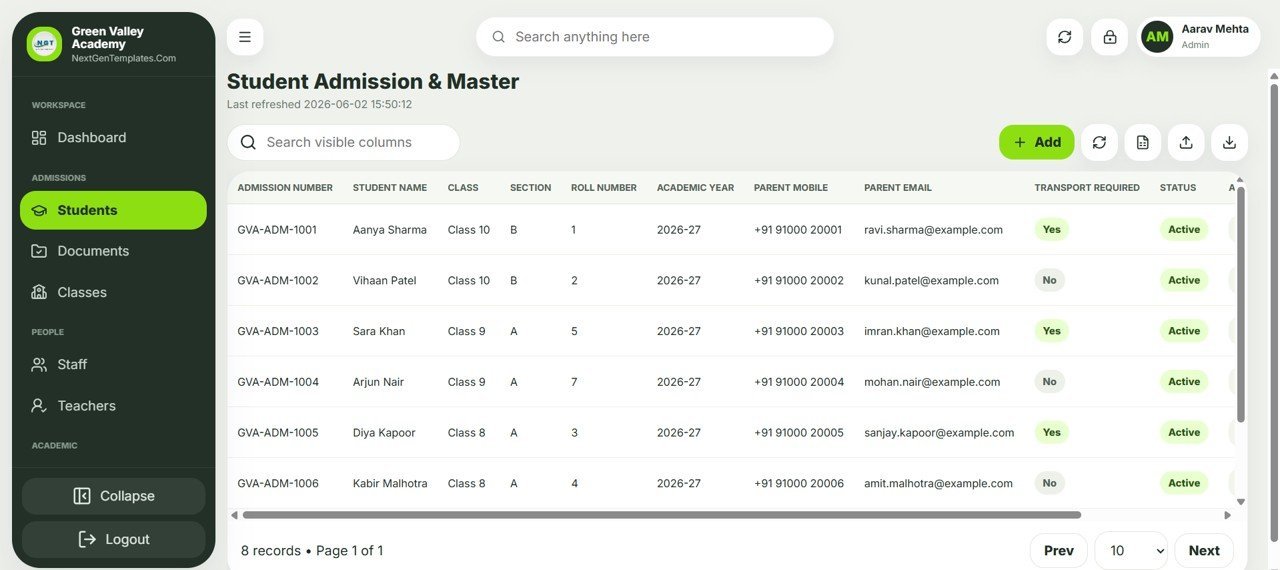
The admission register is the heart of the system, holding Admission Number, Student Name, Class, Section, Roll Number, Academic Year, Parent Mobile, Parent Email, Transport Required, and Status for every student. Staff can add, import, and export records from one toolbar, and a column search makes finding any student instant.
Student Documents Tracker
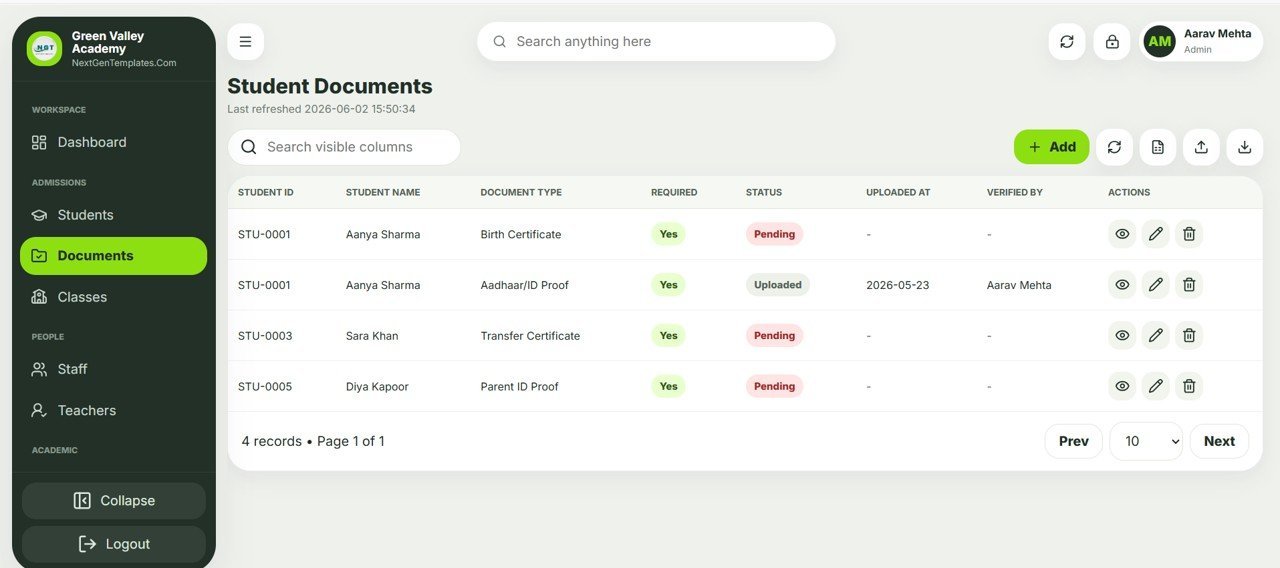
Admissions are rarely complete on day one, so the Documents module tracks each required file — Birth Certificate, Aadhaar/ID Proof, Transfer Certificate, and Parent ID Proof — with a Pending or Uploaded status, the upload date, and a Verified By name. That gives the office a clean audit trail of who checked which document and when.
Classes and Sections
Every class and section is defined once with its Class Teacher, Academic Year, Room Number, Capacity, and an Active flag. Because admissions reference this list, you never end up with students assigned to a class that does not exist or a section that was retired last year.

Teacher and Staff Management
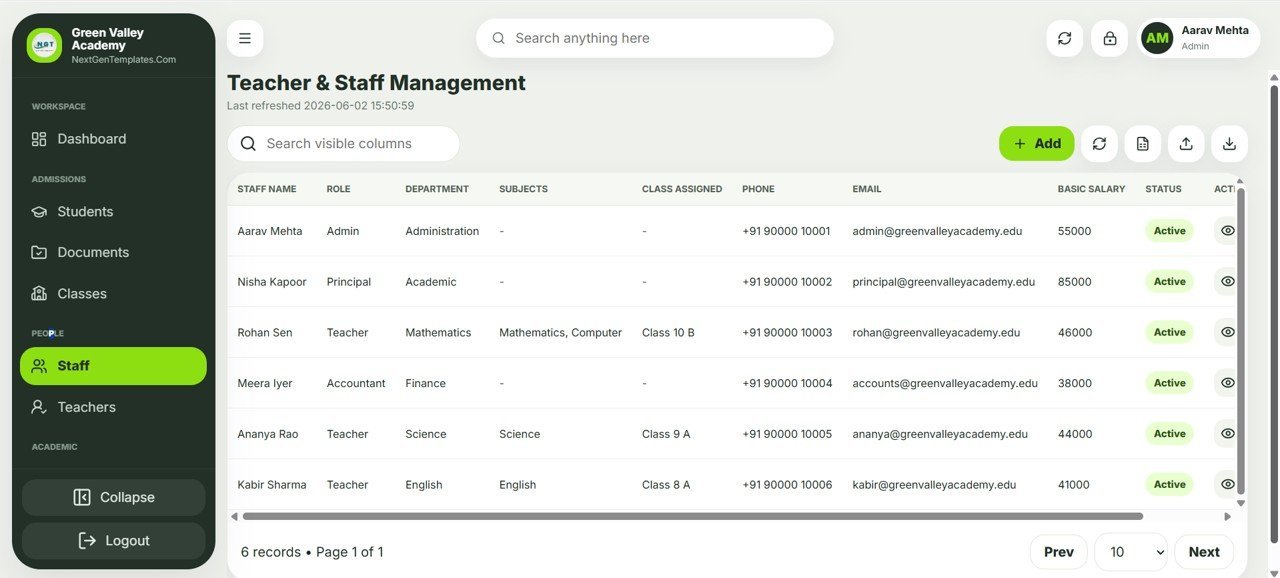
One roster covers all staff with Name, Role, Department, Subjects, Class Assigned, Phone, Email, Basic Salary, and Status. Each row carries a Basic Salary, and the Role column (Admin, Principal, Teacher, Accountant) lines up with the four login roles.
Teacher Profiles
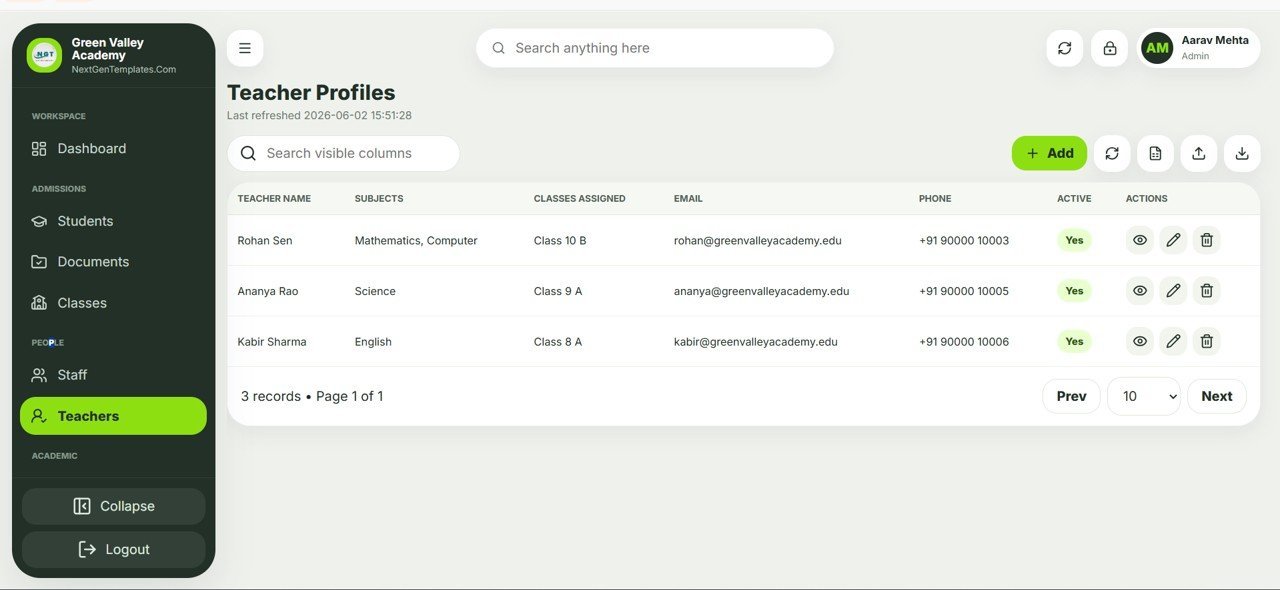
A focused teacher view lists Teacher Name, Subjects, Classes Assigned, Email, Phone, and Active status with view, edit, and delete actions. It is the quickest place to confirm which teacher is handling which class before timetabling or sending a class-wide notice.
School Management System Web App vs. Excel/VBA School Tool vs. Cloud School ERP — Feature Comparison
| Feature | School Management System Web App | Excel/VBA School Tool | Cloud School ERP (Fedena / Classe365) |
|---|---|---|---|
| Cost | $39.99 one-time | $20-60 one-time | $1-3 / student / year |
| Platform | Google Sheets + Apps Script web app | Desktop Excel file | Vendor cloud |
| Setup time | Under 10 minutes (Make a Copy) | Manual install + macros | Days of onboarding |
| Multi-user role-based login | Yes – 4 roles | No – single file | Yes |
| Access from any browser or phone | Yes | No – desktop only | Yes |
| Customize fields and logic | Yes – full Apps Script | Yes – VBA | Limited |
| Data stays in your Google Drive | Yes | Yes – local only | No – vendor servers |
| Per-student / per-user fees | None | None | Recurring |
| Year-1 cost at 500 students | $39.99 | ~$40 | $500-1,500 |
For schools that want real multi-user software without a per-student bill, the School Management System Web App sits in the sweet spot.
Who Should Use This Template
Perfect for:
- Independent K-12 schools, coaching centers, and academies with 50-2,000 students.
- Admins and principals who want admissions, fees, documents, and staff in one place.
- Founders who prefer a one-time, fully customizable tool over a recurring SaaS subscription.
Not a fit if:
- You are a large district that requires SOC 2, SSO, and a vendor support contract.
- Your team will not use Google Workspace or Google Drive.
- You need built-in online payment gateways or government compliance certification out of the box.
Real-World Use Cases
Aarav runs operations at a 600-student private academy. Each morning he opens the School Management System Web App to approve new admissions, glance at the day’s attendance percentage, and check the pending fee amount — replacing three separate spreadsheets and a paper register with one screen.
Nisha is the principal of a growing coaching center. She signs in with the Principal role to review teacher assignments, see which student documents are still pending verification, and read the payroll-due figure before approving salaries, then exports a class-wise list for her monthly board meeting.
Meera manages accounts for two small schools. She keeps a separate copy of the app for each school in its own Google Drive, tracking fees collected this month and staff basic salaries side by side without ever mixing the two schools’ data.
Advantages of the School Management System Web App
The biggest advantage is ownership economics. A cloud school ERP charging even $1 per student per year costs a 500-student school $500 in the first year and again every year after; the School Management System Web App is a single $39.99 purchase that you keep for life. Because it is built on Google Sheets and Apps Script, there is no hosting bill and no lock-in — the database is a sheet you already know how to read.
It is also genuinely multi-user. Unlike a shared Excel file that breaks the moment two people edit it, this web app gives each staff member a private login, a role, and a clean browser interface that works on a laptop or a phone. New staff are added in the Users sheet in seconds, with no per-seat charge.
Limitations to Know Before You Buy
The School Management System Web App is deliberately lightweight, so there are honest limits worth knowing. It does not include a built-in online payment gateway, automated SMS or email notice delivery, or government-board compliance reporting; those would need to be added with extra Apps Script or third-party services. Very large schools that need granular per-permission controls, single sign-on, or vendor SLAs will outgrow a Google Sheets backend and should plan for a dedicated ERP. For most schools under a couple of thousand students, none of these limits get in the way of daily work.
Best Practices
Change the default Admin, Principal, Teacher, and Accountant logins in the Users sheet before you share the web app URL with anyone. Keep one master copy as your live system and make a duplicate copy each academic year so historical data stays intact. Use Google Drive sharing carefully — the strength of this setup is that your data never leaves your Drive, so restrict edit access on the underlying sheet to office staff only and let everyone else interact through the deployed web app.
Explore Relevant Templates
If you are assembling a back-office stack, this pairs naturally with other Google Sheets web apps from NextGenTemplates. Use the GST Billing System Web App for fee invoicing, the Advanced Task Management System Web App to coordinate staff to-dos, and the Incident Tracker and Report Web App for campus safety logs. For finance and operations, see the Daily Sales Purchase System Web App and the Equipment Maintenance Management System Web App. If you also coach or tutor, the Tutoring Business Dashboard in Google Sheets is a useful companion. To understand how Apps Script web apps are deployed, Google’s own Apps Script web apps guide is the authoritative reference, and the short walkthrough below shows the same steps on screen.
Interested in the spreadsheet skills behind management systems like this? The NextGenTemplates Academy learning paths guide you through them step by step, with practice files to work through.
Frequently Asked Questions
What modules does the School Management System Web App include?
The School Management System Web App includes six modules: an operations Dashboard, Student Admission and Master, Student Documents, Classes and Sections, Teacher and Staff Management, and Teacher Profiles, all backed by one Google Sheets database.
Do I need coding skills to set it up?
No. You copy the Google Sheet with ‘Make a Copy’, deploy it as a web app, and update the Users sheet. The whole School Management System Web App setup takes under 10 minutes and needs no programming.
Where is my school’s data stored?
All data in the School Management System Web App lives in a Google Sheet inside your own Google Drive. You keep full ownership of student, parent, and payroll records with no third-party vendor server holding your information.
How many users and roles are supported?
The School Management System Web App ships with four roles — Admin, Principal, Teacher, and Accountant — and you can add as many staff logins as you need in the Users sheet at no extra per-user cost.
How does this compare to a cloud school ERP like Fedena or Classe365?
A cloud ERP typically charges $1-3 per student per year, while the School Management System Web App is a $39.99 one-time purchase you fully control. You trade vendor support for ownership, customization, and zero recurring fees.
Can I customize the fields and screens?
Yes. Because the School Management System Web App is open Google Apps Script and Google Sheets, you can rename fields, add columns, and adjust the dashboard logic to match how your school actually works.
Can I test it before buying?
Yes. A live demo runs with sample data for Green Valley Academy, and you can sign in as admin, principal, teacher or accountant to see how each role changes the screens you can open.
About the Author
Built by PK — Microsoft Certified Professional with 15+ years of Excel, Google Sheets, and Power BI experience. Founder of NextGenTemplates, reaching 300K+ subscribers across YouTube channels. Every template is hand-built and tested before release.
Wrapping Up
The School Management System Web App gives small and mid-size schools the multi-user software they actually need — admissions, documents, classes, staff, and a live KPI dashboard — without the per-student bill of a cloud ERP or the fragility of shared spreadsheets. Try the live demo with the four test logins first, then deploy your own private copy in your Google account.
Get the School Management System Web App
Instant download · One-time payment · No subscription
📅 Last updated: October 2026