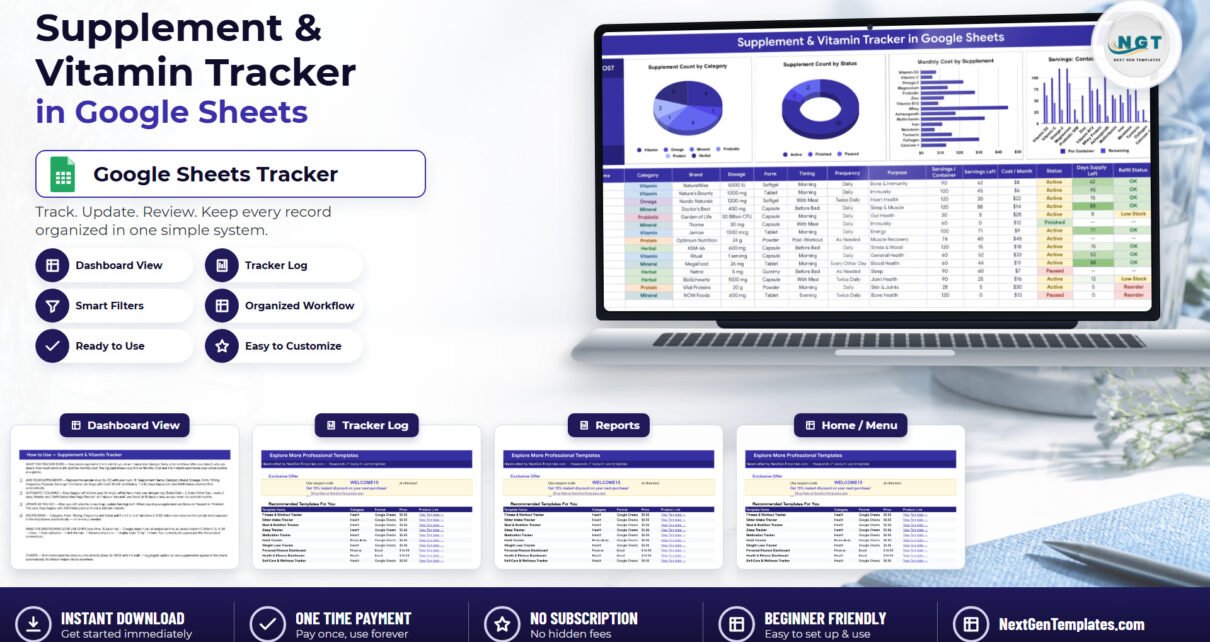
The Supplement & Vitamin Tracker in Google Sheets records 16 fields for every supplement you take, calculates one live KPI card, drives 4 charts and raises 2 automatic reorder flags. Its formulas and charts already cover rows 16 to 1000, so about 985 supplements fit without a single formula being dragged. The file ships with 15 sample supplements filled in, and replacing them takes under 10 minutes.
Most people who take supplements have the same three problems: they cannot remember what is actually in the cupboard, they discover a bottle is empty on the morning they need it, and they have never added up what the whole routine costs. A phone app solves the first two for a monthly fee and keeps your health log on someone else’s server. A spreadsheet solves all three for one payment and keeps the data in your own Google Drive — provided somebody has already written the awkward formulas. That is what this tracker is.
Get the Supplement & Vitamin Tracker in Google Sheets
Key Features of the Supplement & Vitamin Tracker in Google Sheets
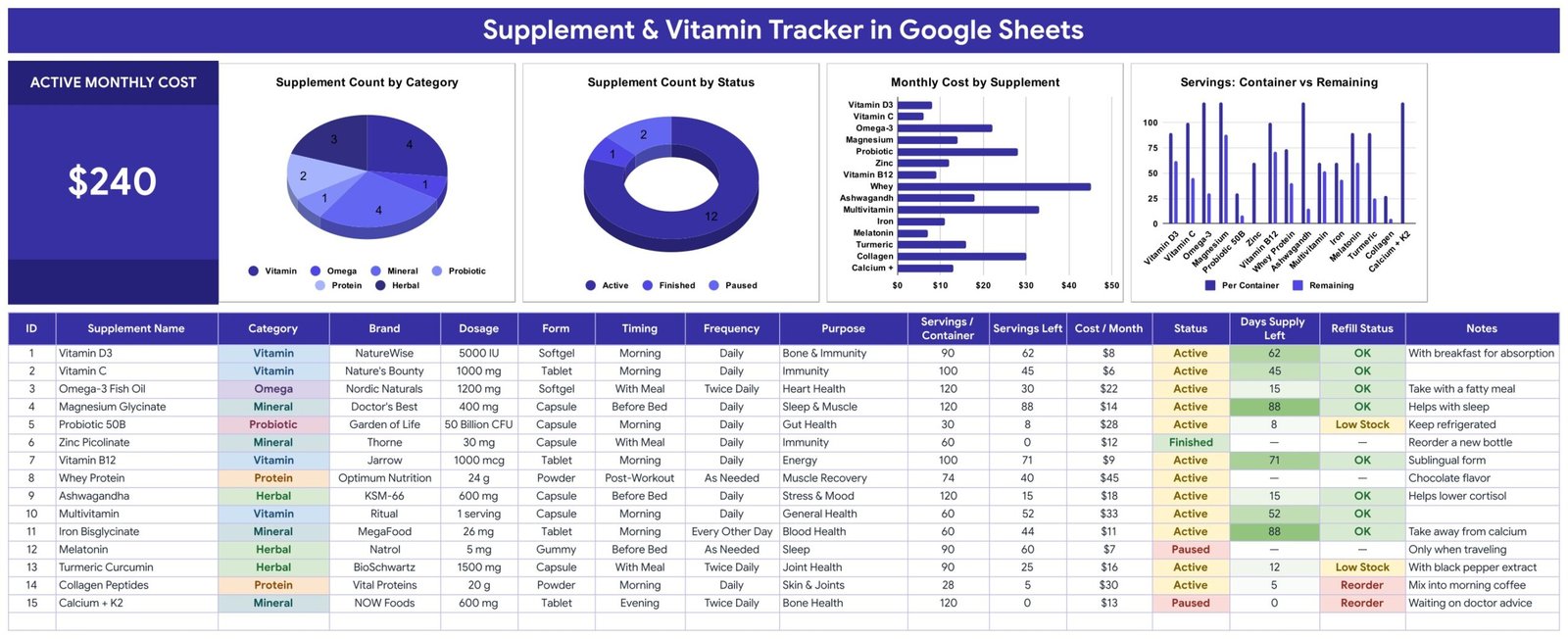
A 16-column log on one tab. The Supplement Tracker sheet holds ID, Supplement Name, Category, Brand, Dosage, Form, Timing, Frequency, Purpose, Servings / Container, Servings Left, Cost / Month, Status, Days Supply Left, Refill Status and Notes. Everything about a supplement lives on one row — including why you take it, which is the field people most often wish they had written down.
One KPI card: Active Monthly Cost. The large card at the top left sums the Cost / Month column for every row whose Status is Active. On the sample data it reads $240. Set a supplement to Paused or Finished and the card drops immediately, which makes “what would I save if I cut these two?” a five-second question instead of a spreadsheet exercise.
Three columns you never type into. ID, Days Supply Left and Refill Status are formula-driven. Days Supply Left divides Servings Left by the servings per day implied by the Frequency column — Twice Daily counts as 2, Every Other Day as one every two days, and Weekly and As Needed are handled too.
Two reorder thresholds. Refill Status reads Days Supply Left and shows Reorder at 7 days or fewer, Low Stock at 14 days or fewer, and OK above that. In the shipped sample, Collagen Peptides and Calcium + K2 come up Reorder while Probiotic 50B and Turmeric Curcumin come up Low Stock — so the four bottles that need attention are visible without reading a single number.
Five dropdowns that grow themselves. Category, Form, Timing, Frequency and Status are data-validation dropdowns sourced from rows 2 to 500 of the List tab. Out of the box that is 10 categories (Vitamin, Mineral, Herbal, Protein, Omega, Probiotic, Amino Acid, Fiber, Enzyme, Other), 7 forms, 7 timings, 5 frequencies and 3 statuses. Add a value to the List tab and it is in the dropdown — nothing to re-configure. Google’s data validation documentation covers the underlying feature if you want to extend it further.
Four charts, no helper tables. Every chart reads the tracker columns directly across rows 16 to 1000 using Google Sheets’ built-in Aggregate option. There is not a single hidden staging table in the file, which is why a supplement typed onto row 62 appears in all four charts instantly — and why the file stays easy to modify.
Sheets Explanation
The workbook has four tabs. Three of them you will look at; the fourth you will only open to extend a dropdown.
Supplement Tracker
The working page. The Active Monthly Cost card sits top left, with four charts across the top: Supplement Count by Category, Supplement Count by Status, Monthly Cost by Supplement, and Servings: Container vs Remaining. Below sits the 16-column table, pre-filled with 15 supplements — Vitamin D3, Vitamin C, Omega-3 Fish Oil, Magnesium Glycinate, Probiotic 50B, Zinc Picolinate, Vitamin B12, Whey Protein, Ashwagandha, Multivitamin, Iron Bisglycinate, Melatonin, Turmeric Curcumin, Collagen Peptides and Calcium + K2. Category, Status and Refill Status are colour-coded, and Days Supply Left carries a green intensity scale so a long supply reads darker than a short one.
Instructions
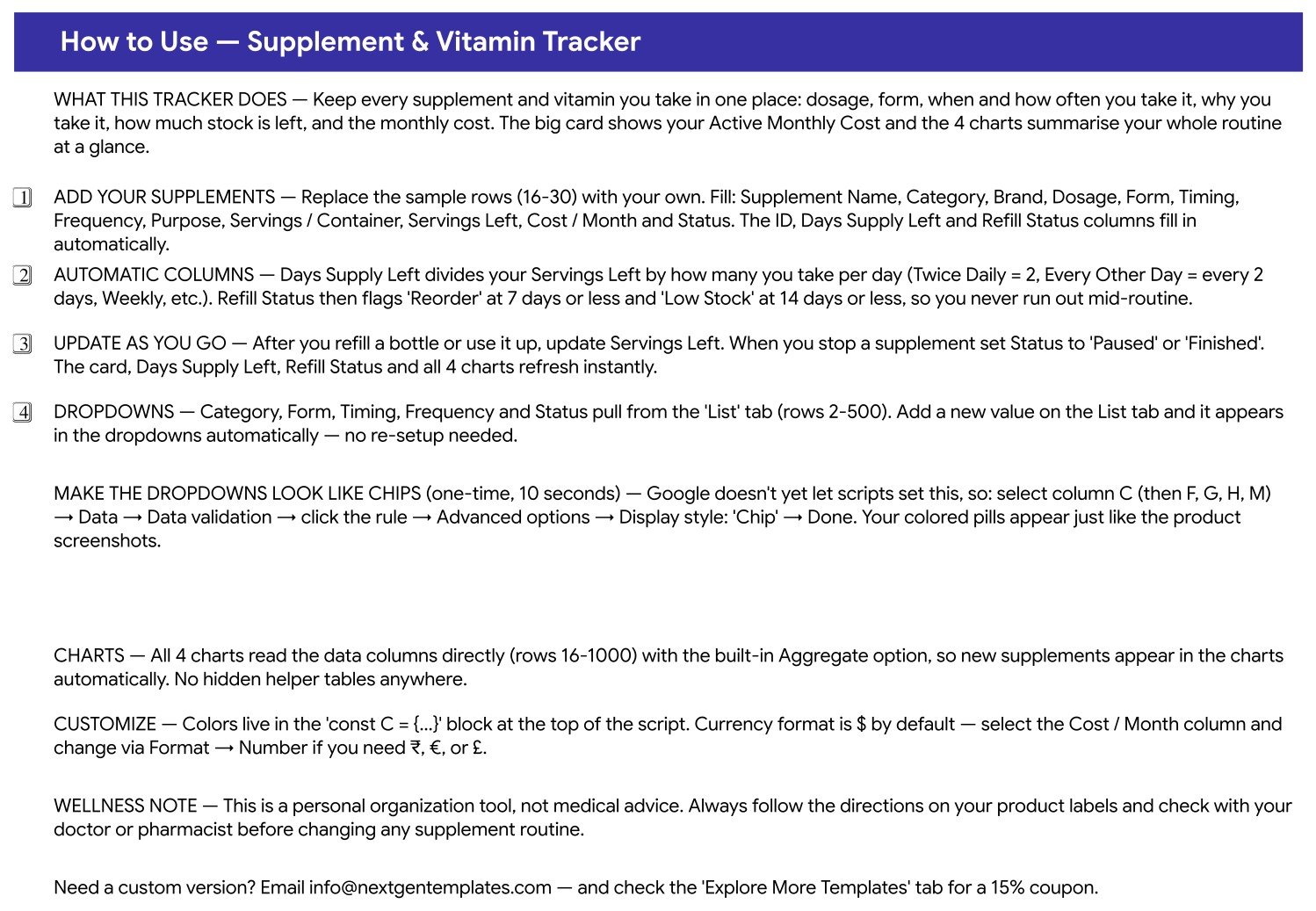
A written walkthrough of the file: what it does, how to replace the sample rows, exactly how Days Supply Left and Refill Status are calculated, how to extend the dropdown lists, the ten-second trick for turning the dropdowns into Google’s coloured “Chip” pills, how the charts read the data, where to change the colour palette and the currency format, and a wellness note making clear this is an organisation tool rather than medical advice.
Explore More Templates
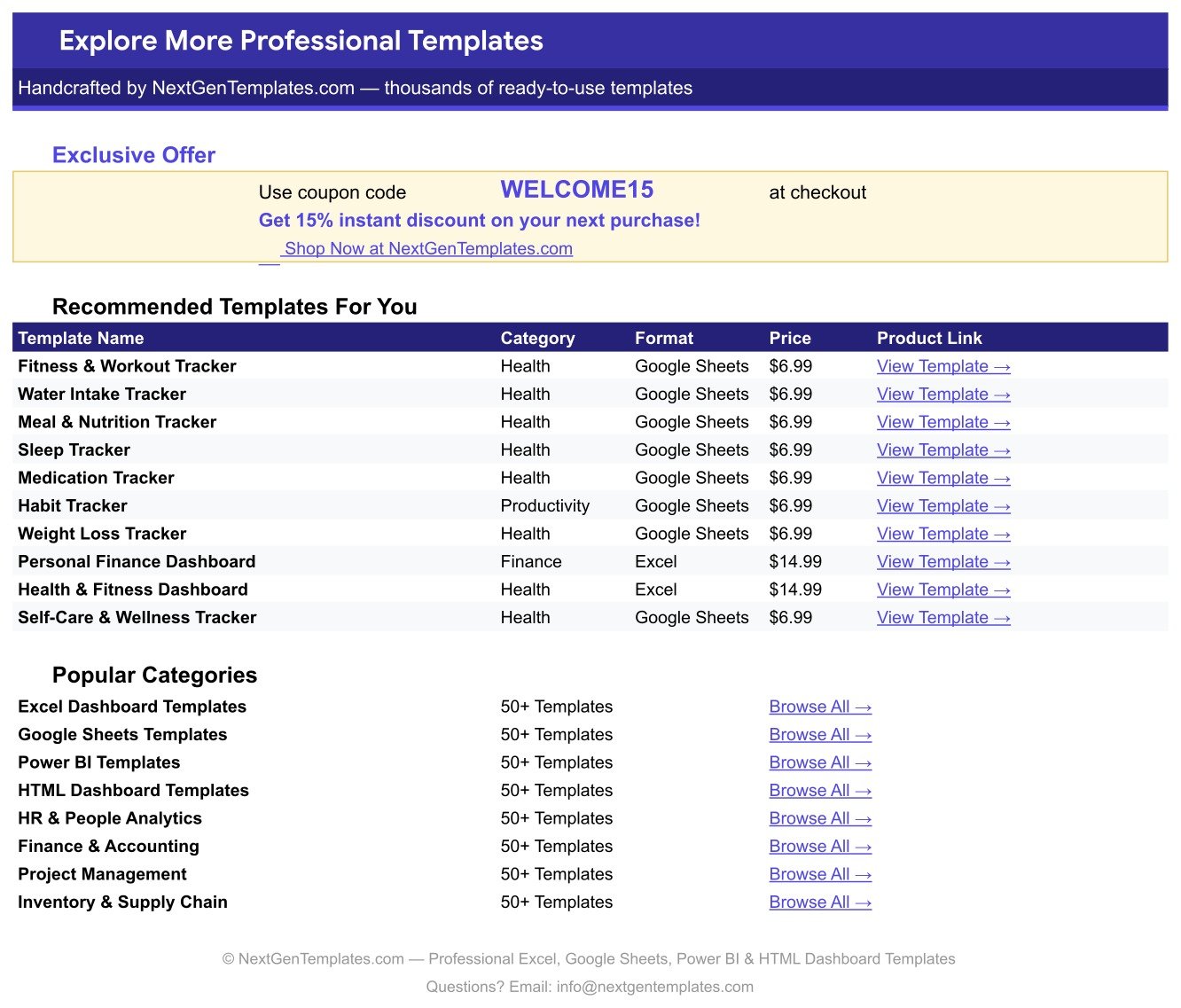
A bonus tab carrying a WELCOME15 coupon for 15% off your next purchase, a table of ten recommended companion templates with prices and links, and shortcuts into the main NextGenTemplates category pages.
List
Five columns holding the dropdown source values for Category, Form, Timing, Frequency and Status, each read from rows 2 to 500. This is the only tab you edit when the shipped vocabulary does not cover something you take.
Supplement & Vitamin Tracker in Google Sheets vs. a Microsoft Excel Tracker vs. a Paid Supplement App — Feature Comparison
| Feature | Supplement & Vitamin Tracker in Google Sheets | Microsoft Excel supplement tracker | Paid supplement / wellness app (Cronometer Gold, MyTherapy Premium, pill-tracker apps) |
|---|---|---|---|
| Cost | ✅ $6.99 one-time | Free file, but needs an Office licence | $3-15 per month, per person |
| Platform | ✅ Google Sheets — any browser, no install | Desktop Excel; mobile editing is limited | Phone app only |
| Setup time | ✅ Under 10 minutes — replace rows 16-30 | Under 10 minutes if the file already has charts | 15-30 minutes of guided onboarding |
| Real-time sharing with a partner or carer | ✅ Yes — share the sheet link | Only via OneDrive co-authoring | Usually a paid “family” tier |
| Mobile access | ✅ Google Sheets app, read and edit | Excel mobile, read-mostly | ✅ Native app |
| Add your own supplement categories | ✅ Type into the List tab, rows 2-500 | Edit the validation range by hand | Restricted to the app’s catalogue |
| Cost-per-month tracking | ✅ Cost / Month column + Active Monthly Cost card | Possible, but you build the formula | Rarely included |
| Reorder alerts | ✅ Reorder at ≤7 days, Low Stock at ≤14 days | Only if you write the rule yourself | ✅ Push notifications |
| Year-1 cost for 2 people | ✅ $6.99 total | $0 plus the Office licence | $72-360 |
| Where your health data lives | ✅ Your own Google Drive | Your own disk or OneDrive | The vendor’s servers |
For someone who wants a shareable, editable record of what they take and what it costs — without a monthly fee and without handing a health log to a third-party app — the Supplement & Vitamin Tracker in Google Sheets sits in the sweet spot.
Who Should Use This Template
Perfect for:
- Anyone taking 5-30 supplements who has lost track of what is in the cupboard and what it costs each month
- People managing a partner’s or a parent’s routine who want one shared sheet both can see and edit
- Athletes and gym-goers cycling protein, creatine, omega-3 and joint stacks who need Active versus Paused at a glance
- Anyone who would rather keep a health log in their own Google Drive than open another app account
- Spreadsheet beginners — every calculated column is already written; you only type text and numbers
Not a fit if:
- You need dose reminders or push notifications — this file sends nothing, it is a log you open and update
- You need interaction, allergy or contraindication checking — the tracker does not do any of that
- You need barcode scanning or automatic label lookup — entries are typed by hand
- You need it for clinical or regulated use — it is a personal organisation tool, not a medical device
- You need SSO, audit trails or HIPAA-grade access controls
Real-World Use Cases
Priya takes eleven supplements and had never added up the cost. She entered each bottle’s price and servings, and the Active Monthly Cost card came back above $200. The Monthly Cost by Supplement chart showed two products accounting for roughly a third of the total. She set both to Paused, watched the card fall, and now reviews it on the first of every month.
Marcus manages his father’s routine from another city. One Google Sheets link is shared with his father and his sister. When a new bottle is opened, Servings Left gets updated; Refill Status turns Low Stock about a fortnight out, and whoever is doing that week’s shopping sees it without anybody having to phone anybody.
Dana is a powerlifter running training blocks. She uses Status to separate what is Active from what is Paused between blocks, and reads Supplement Count by Status to see how much of the stack is actually running. At the end of a block she flips three rows to Paused and the monthly cost corrects itself.
Advantages of the Supplement & Vitamin Tracker in Google Sheets
It answers the cost question honestly. Cost / Month per supplement plus an Active-only total is a combination most supplement apps skip entirely, and it is usually the number that changes behaviour.
It stops the empty-bottle surprise. Because Days Supply Left is derived from Servings Left and Frequency rather than typed, it stays right as long as you update one number when you open or finish a bottle. The two thresholds then do the watching for you.
It is genuinely cheap over time. $6.99 once, against $72-360 a year for two people on a paid wellness app. There are no seats, no renewal and no upgrade prompt.
It is easy to modify. No hidden helper tables means no fragile plumbing. Rename a column, add a chart, change the palette in the script’s const C = {...} block, or switch the currency from $ to ₹, € or £ from Format → Number.
Your data stays yours. The file is an ordinary sheet in your Drive. Nothing is transmitted anywhere, and sharing is the standard Google Sheets link with view or edit rights.
Opportunities for Improvement
An honest list, because it is better to know before you buy.
No reminders. This is the biggest genuine gap against a phone app. The tracker will tell you a bottle is nearly empty the next time you open it; it will not buzz your phone at 8am. If reminders are the whole reason you want a tracker, an app is the better tool.
No adherence history. It records what you take and how much is left — not whether you actually took today’s dose. There is no daily tick-box grid and no streak. Anyone wanting per-day adherence would need to add a second sheet.
Cost is entered, not calculated from price and servings. You type a Cost / Month figure rather than the tracker deriving it from bottle price ÷ servings × servings per month. That is a one-formula addition if you want it.
The dropdown chips need one manual step. Google does not yet let a script set the “Chip” display style, so the coloured pills in the screenshots take about ten seconds of clicking per column the first time. The Instructions tab spells out exactly where.
No interaction or dosage safety layer, by design. The file is deliberately a log, not an advisor. Treat it as a record you bring to a conversation with your doctor or pharmacist, not a substitute for one.
Best Practices
- Update Servings Left the moment you open a bottle, not later. Every automatic column downstream depends on that one number being current.
- Use Paused rather than deleting a row. A paused supplement leaves the Active Monthly Cost card but keeps its history, so restarting it is one dropdown change.
- Fill in Purpose properly. “Sleep & Muscle” or “Joint Health” is what makes a six-month-old row make sense to you — or to a doctor you show it to.
- Extend the List tab before you improvise. Typing a category that is not in the dropdown breaks the Supplement Count by Category chart’s grouping; adding it to the List tab does not.
- Use Notes for the practical detail — “keep refrigerated”, “take away from calcium”, “with black pepper extract”. The sample rows show the pattern.
- Check Refill Status once a week, ideally before your usual shopping day. Low Stock gives you about two weeks of warning; Reorder gives you about one.
Explore Relevant Templates
The closest companion is the Medication & Pill Tracker in Google Sheets, which does for prescriptions what this file does for supplements. Add the Lab Results & Health Metrics Tracker in Google Sheets to see whether your stack is moving the numbers, and the Calorie & Macro Tracker in Google Sheets to put food and supplements in the same picture.
On the training side, the Workout Log Tracker in Google Sheets and the Sleep Tracker in Google Sheets use the same one-page layout, so they will feel familiar within a minute. For chronic-condition logging there is the Blood Sugar (Diabetes) Log Tracker in Google Sheets and the Symptom & Pain Diary Tracker in Google Sheets. The whole range lives under Google Sheets Trackers.
More related walkthroughs on this blog: Intermittent Fasting Tracker in Google Sheets, Meditation Mindfulness Tracker in Google Sheets and Anxiety Trigger Journal Tracker in Google Sheets. Each is a separate template with its own layout and sample data.
New to spreadsheet tracking? The NextGenTemplates Academy learning paths teach the formulas and layout habits behind trackers like this one, with practice files to work through.
Get the Supplement & Vitamin Tracker in Google Sheets
Frequently Asked Questions
What does the Supplement & Vitamin Tracker in Google Sheets track?
The Supplement & Vitamin Tracker in Google Sheets tracks 16 fields per supplement: ID, Supplement Name, Category, Brand, Dosage, Form, Timing, Frequency, Purpose, Servings / Container, Servings Left, Cost / Month, Status, Days Supply Left, Refill Status and Notes. It also shows an Active Monthly Cost card and four charts.
How many supplements can I log?
Roughly 985. The formulas and charts in the Supplement & Vitamin Tracker in Google Sheets already cover rows 16 to 1000, so nothing needs dragging down as you add entries. The 15 sample supplements that ship with the file are meant to be typed straight over.
Does the tracker send reminders to take my supplements?
No. The Supplement & Vitamin Tracker in Google Sheets sends no reminders, alerts or notifications of any kind. What it does automatically is calculate how many days of supply remain and flag Low Stock at 14 days or Reorder at 7 days, so you refill before running out.
How long does setup take?
Under 10 minutes. Open the PDF in your download, click the Google Sheets link, make your own copy, then replace rows 16 to 30 with your supplements. The Active Monthly Cost card, Days Supply Left, Refill Status and all four charts recalculate as you type.
How does this compare to a paid app like Cronometer Gold or MyTherapy Premium?
Paid apps cost $3-15 per month and send push reminders the Supplement & Vitamin Tracker in Google Sheets does not. The tracker is $6.99 once, keeps the data in your own Google Drive, tracks monthly cost per supplement, and lets you add any category you want instead of using a fixed catalogue.
Can I share it with my partner, carer or coach?
Yes. The Supplement & Vitamin Tracker in Google Sheets is an ordinary Google Sheets file, so you share it exactly as you share any sheet — send the link with view or edit rights. There are no per-user fees, no seat limits and no extra “family plan”.
Is this medical advice?
No. The Supplement & Vitamin Tracker in Google Sheets is a personal organisation tool, not medical advice and not a medical device. It does not check doses, interactions or allergies. Follow the directions on your product labels and talk to your doctor or pharmacist before changing any supplement routine.
About the Author
Built by PK — Microsoft Certified Professional with 15+ years of Excel, Google Sheets, and Power BI experience. Founder of NextGenTemplates, reaching 300K+ subscribers across YouTube channels. Every template is hand-built and tested before release.
Conclusion
If you take supplements at all seriously, three numbers are worth having in one place: what you take, how long it lasts, and what it costs. The Supplement & Vitamin Tracker in Google Sheets gives you all three on one page, with 16 columns per supplement, an Active Monthly Cost card, four live charts and automatic Low Stock and Reorder flags — and it stays in your own Google Drive rather than on somebody’s server.
Instant download · One-time payment · No subscription
Last updated: September 2026