The Security Company Dashboard in Google Sheets turns scattered guard rosters, contract records, and incident logs into one connected reporting system. It tracks 4 headline KPIs, 15 interactive charts, and 6 working sheet tabs — and the entire view recalculates the moment you drop new rows into the Data sheet. Setup takes under 10 minutes: make your copy, paste your records, and start filtering.
Most security firms run on spreadsheets that answer one question at a time. This template was built to answer the operational questions a security operations manager actually asks every week — which service types carry the most contract value, which regions are growing, how many hours each shift is consuming, and where incidents are clustering. Because it lives in Google Sheets, the whole team can open the same dashboard from a browser with no software to install and no per-seat license.
Get the Security Company Dashboard in Google Sheets

Key Features of the Security Company Dashboard in Google Sheets
This dashboard tracks 4 KPI cards — Total Contract Value, Total Services, Incidents Logged, and Hours Logged — so leadership sees the headline numbers the moment the file opens. Each card is driven by SUMIFS-style formulas that read directly from the Data sheet.
It ships with 15 charts spread across the Overview, Services, Regions, and Incidents tabs, covering contract value by service type, by region, and by client sector, plus monthly trends for contract value, hours, and incidents. Every chart range auto-expands as you add new rows, so visuals never go stale.
Native Google Sheets slicers sit at the top of each page, letting you filter the whole dashboard by service type, region, shift, or client sector in a single click. A dedicated Search sheet looks up any single service record by its Service ID and returns the full detail line in seconds.
Dashboard Pages Explanation
Overview Page
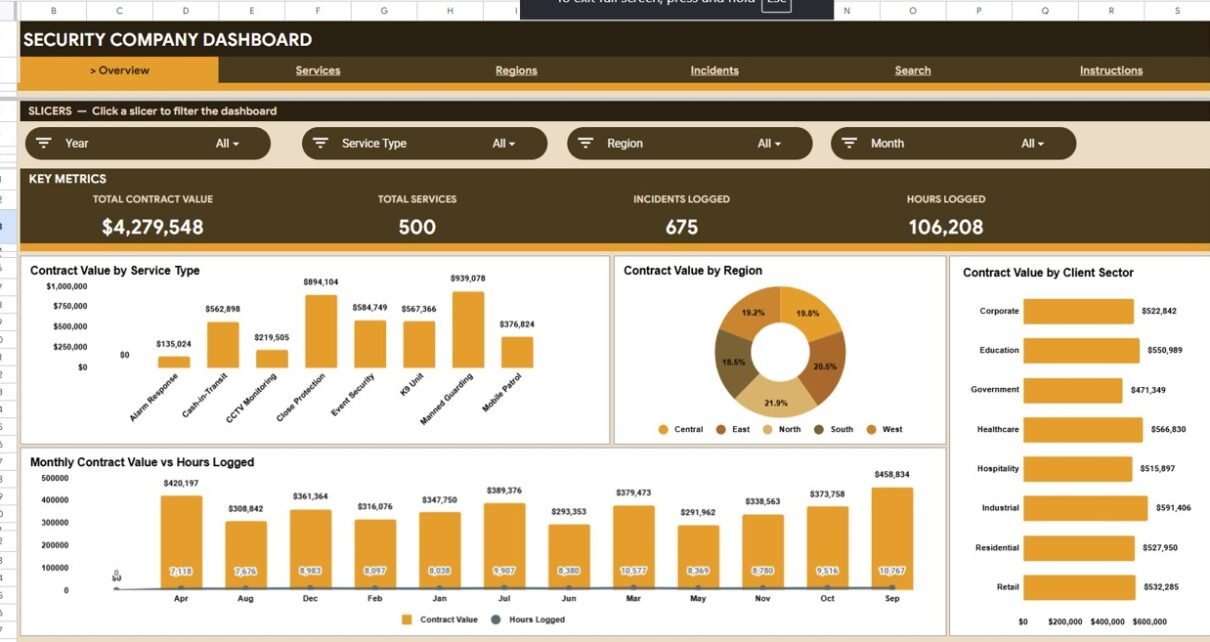
The Overview is the command center. Four KPI cards — Total Contract Value, Total Services, Incidents Logged, and Hours Logged — sit across the top, followed by Contract Value by Service Type, Contract Value by Region, Contract Value by Client Sector, and Monthly Contract Value vs Hours Logged. Slicers let you reshape every chart instantly.
Services Analysis
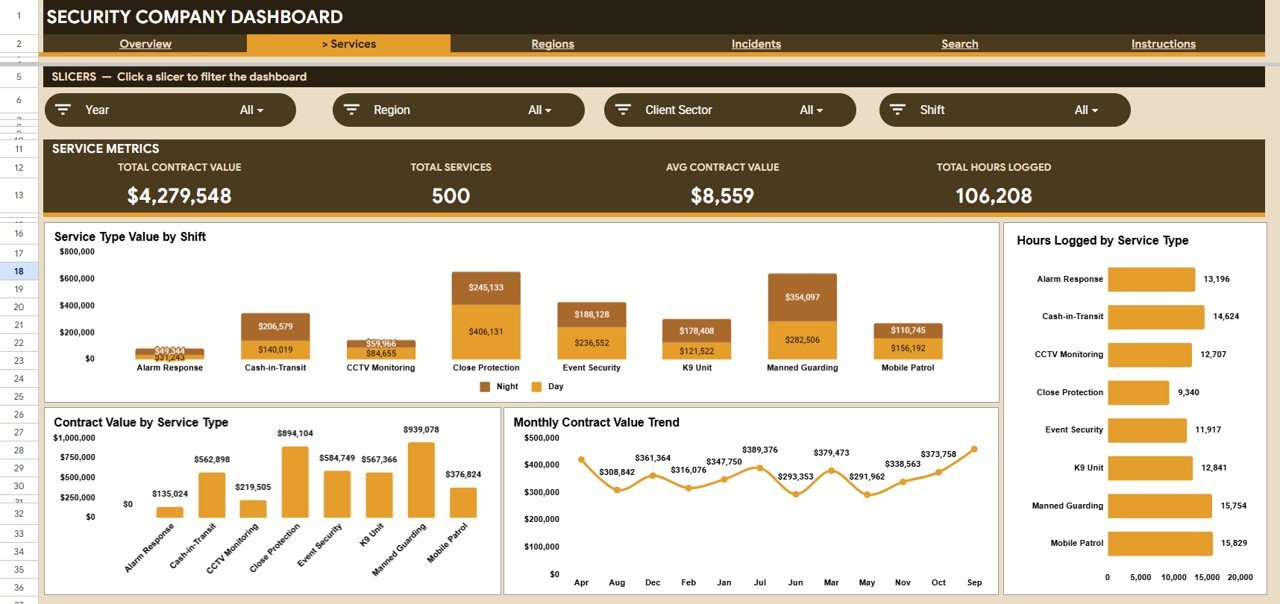
This tab breaks the business down by what you actually sell. It shows Service Type Value by Shift, Hours Logged by Service Type, Contract Value by Service Type, and a Monthly Contract Value Trend — so you can see which guarding, patrol, or monitoring services drive revenue and how they move month to month.
Regions Analysis
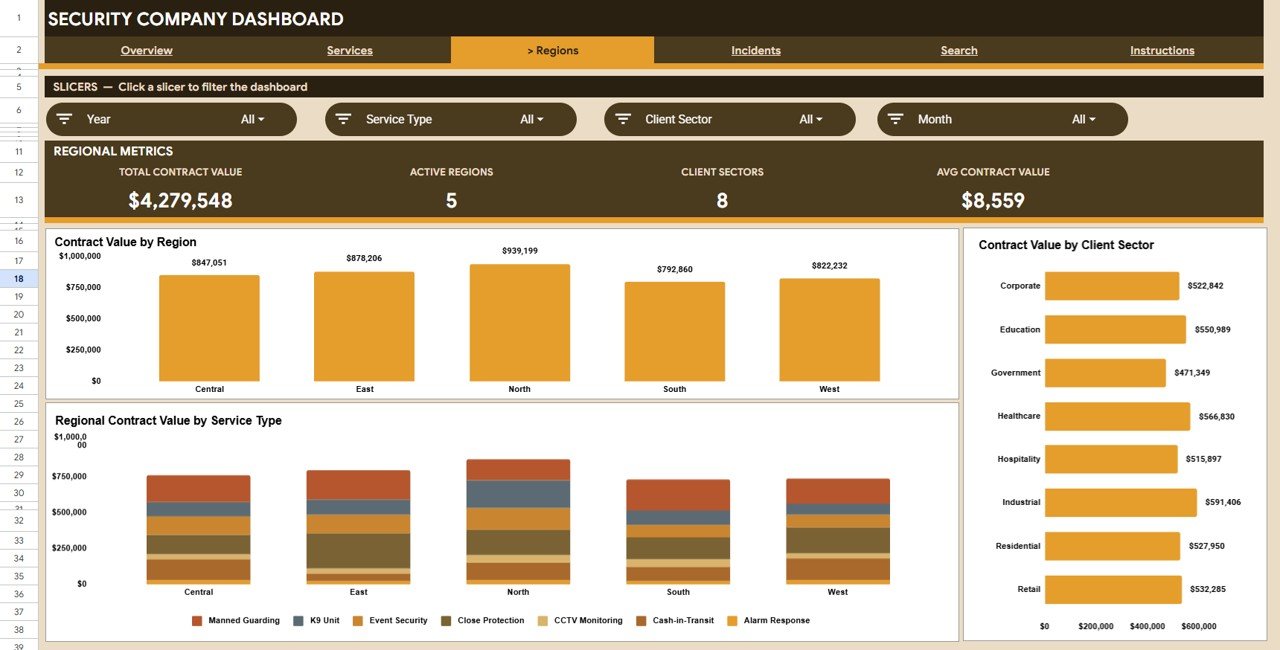
The Regions tab compares performance across every area you operate in. It includes Contract Value by Region, Regional Contract Value by Service Type, and Contract Value by Client Sector, making it easy to spot which territories and client types deserve more guards or more sales focus.
Incidents Analysis
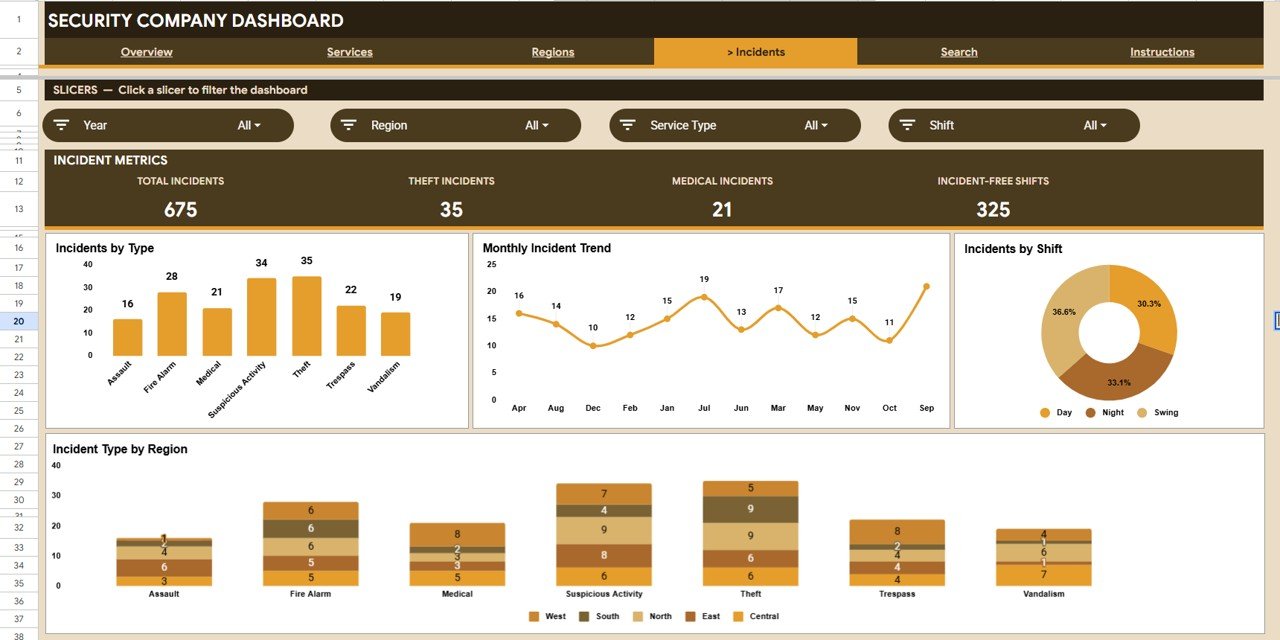
The Incidents tab keeps safety and risk in view. It charts Incidents by Type, a Monthly Incident Trend, Incidents by Shift, and Incident Type by Region — so you can tell whether incidents cluster on night shifts, in specific regions, or around particular incident types.
Search Sheet
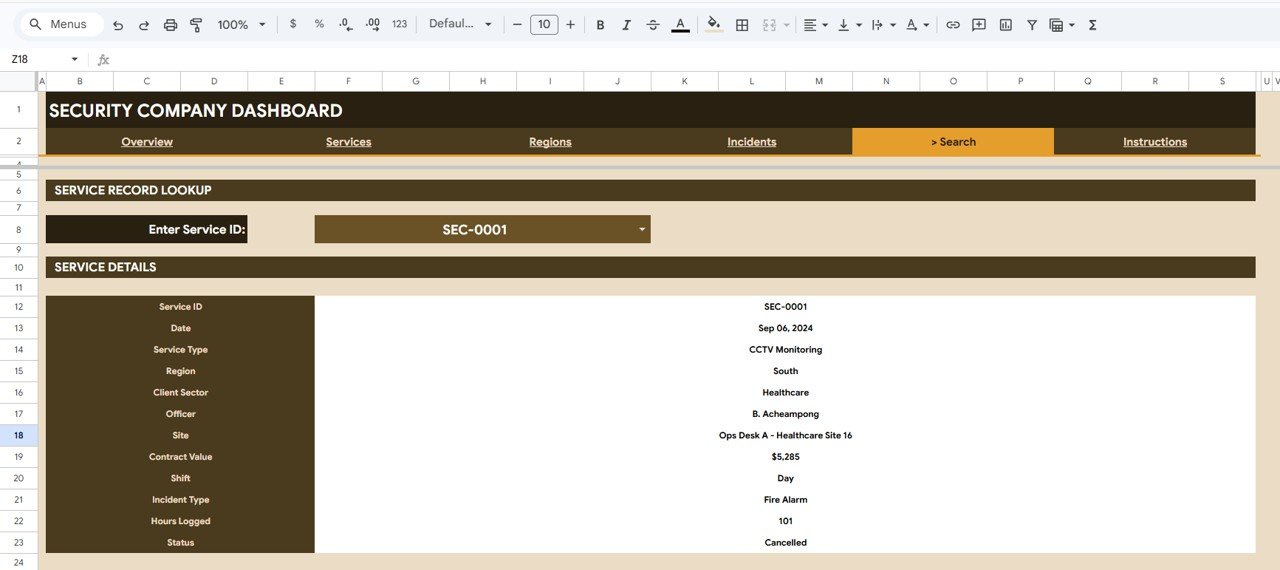
The Search sheet is a single-record lookup. Enter a Service ID and the dashboard instantly returns the complete record — date, service type, region, client sector, officer, site, contract value, shift, incident type, hours logged, and status. It is the fastest way to answer a client or auditor asking about one specific service.
Data Sheet
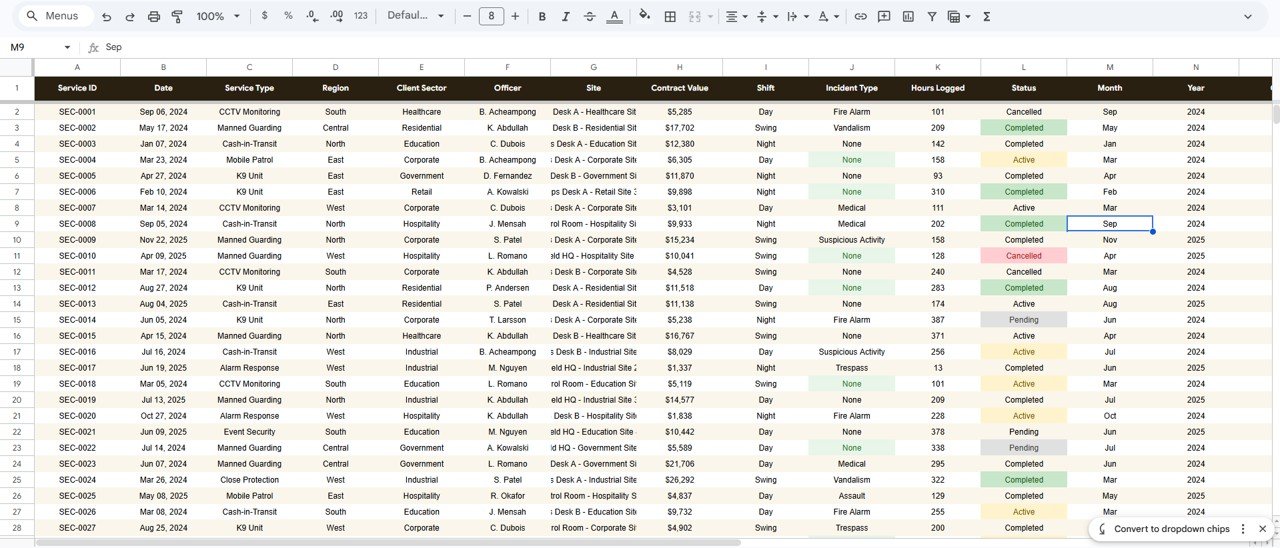
The Data sheet is where everything starts. Add or paste your service records in the same column format and every KPI, chart, and slicer across the workbook updates automatically. This is the only sheet you maintain day to day.
Security Company Dashboard vs Microsoft Excel vs Paid Security Software — Feature Comparison
| Feature | Security Company Dashboard (Google Sheets) | Microsoft Excel Dashboard | TrackTik / Silvertrac (Paid SaaS) |
|---|---|---|---|
| Cost | $9.99 one-time | $9.99-$17.99 one-time | $50-$150+ / user / month |
| Platform | Google Sheets (browser) | Microsoft Excel (desktop) | Proprietary web + app |
| Setup time | Under 10 minutes | Under 10 minutes | Days to weeks (onboarding) |
| Real-time team collaboration | ✅ Built in | Limited (OneDrive) | ✅ Yes |
| Mobile access | ✅ Sheets app | Excel mobile | ✅ Yes |
| Customizable fields | ✅ Fully editable | ✅ Fully editable | Limited to vendor schema |
| Share with a link | ✅ One click | File share | ✅ Account-based |
| Incident logging | ✅ Included | ✅ Included | ✅ Advanced |
| You own your data | ✅ In your Drive | ✅ On your device | Stored on vendor servers |
| Year-1 cost at 5 users | $9.99 | $9.99-$17.99 | $3,000-$9,000+ |
For security firms that want contract, hours, and incident visibility without paying thousands a year for guard-management SaaS, the Security Company Dashboard in Google Sheets sits in the sweet spot.
Who Should Use This Template
Perfect for:
- Owners and operations managers of small to mid-size security and guarding companies
- Security firms juggling multiple service types, regions, and client sectors
- Teams that want one shared, browser-based dashboard instead of monthly manual reports
Not a fit if:
- You need live GPS guard tracking, geofenced tour scanning, or automated dispatch — that needs dedicated field software
- You require enterprise access controls such as SSO and SOC 2 compliance
Real-World Use Cases
Rajesh runs a 60-guard security company across three cities. He uses the Security Company Dashboard in Google Sheets to see contract value by region and which service types are growing, then shifts guards toward the regions winning the most new contracts — without paying per-seat fees for TrackTik.
Maria is an operations manager at a commercial guarding firm. Every Monday she opens the Incidents tab to check the monthly incident trend and incidents by shift, flags night-shift hotspots, and briefs supervisors before the week starts.
David handles client reporting for a facilities-security provider. When a client asks about a specific patrol, he types the Service ID into the Search sheet and reads back the officer, site, hours, and status in seconds.
Advantages of the Security Company Dashboard in Google Sheets
- One-time $9.99 cost replaces recurring SaaS fees that can run into thousands per year.
- Every chart and KPI auto-updates from a single Data sheet — no manual report rebuilding.
- Slicers turn a static report into an interactive tool the whole team can explore.
- Your records stay in your own Google Drive, fully under your control.
Opportunities for Improvement
The template is a reporting and analysis layer, not a live operations platform. It does not capture data automatically from the field — records are entered into the Data sheet. It also does not include real-time GPS tracking or automated guard scheduling. Companies that need those capabilities can pair this dashboard with a dedicated field tool, or graduate to it as their reporting needs mature. For automated workflows, see our Incident Tracker and Report Web App Template.
Best Practices
- Keep the Data sheet columns in their original order so formulas and charts keep resolving.
- Use a consistent Service ID format so the Search sheet lookup always matches.
- Enter incident types from a fixed list to keep the Incidents charts clean.
- Review the Regions and Services tabs monthly to guide where you deploy guards next.
For background on the pivot and chart techniques behind it, Google’s official Google Sheets pivot table guide is a useful reference.
Explore Relevant Templates
If you manage field operations, you may also like our Pest Control Dashboard in Google Sheets, the Equipment Maintenance Management System Web App, and the Tutoring Business Dashboard in Google Sheets. Browse the full range of Google Sheets Dashboards on NextGenTemplates.
Also available as: the same dashboard in Microsoft Excel and Power BI.
Get the Security Company Dashboard in Google Sheets
If you would like to build dashboards like this yourself, the Excel Pivot Tables & Dashboards course on NextGenTemplates Academy covers the approach step by step, with practice files.
Frequently Asked Questions
What KPIs does the Security Company Dashboard in Google Sheets track?
The Security Company Dashboard in Google Sheets tracks 4 KPI cards: Total Contract Value, Total Services, Incidents Logged, and Hours Logged. All four update automatically when you add new service records to the Data sheet.
How long does setup take?
Setup takes under 10 minutes. You make your own copy of the Security Company Dashboard in Google Sheets, paste your service records into the Data sheet in the existing format, and every KPI, chart, and slicer updates on its own.
How does this compare to paid security software like TrackTik?
Paid platforms such as TrackTik or Silvertrac charge $50-$150 per user per month. The Security Company Dashboard in Google Sheets is a one-time $9.99 purchase for reporting and analysis, making it a budget-friendly fit for small and mid-size firms.
Can I filter the dashboard by region or shift?
Yes. The Security Company Dashboard in Google Sheets uses native slicers on each page, so you can filter the entire view by service type, region, shift, or client sector with a single click.
Do I need to install any software?
No. The Security Company Dashboard in Google Sheets runs entirely in Google Sheets through any web browser on desktop or mobile, with nothing to download or install.
Can my whole team use it at once?
Yes. Because it lives in Google Sheets, you can share the Security Company Dashboard with your team by link and multiple people can view and edit at the same time, with no per-user fees.
About the Author
Built by PK — Microsoft Certified Professional with 15+ years of Excel, Google Sheets, and Power BI experience. Founder of NextGenTemplates, reaching 300K+ subscribers across YouTube channels. Every template is hand-built and tested before release.
Conclusion
The Security Company Dashboard in Google Sheets gives security and guarding firms a clear, interactive view of contract value, services, hours, and incidents in one place — for a fraction of the cost of recurring SaaS.
Instant download · One-time payment · No subscription
Last updated: June 2026