The Solar Energy Dashboard in Google Sheets tracks 4 headline KPIs and 14 interactive charts across 6 connected tabs, with native slicers that filter each page in one click. Setup takes under 10 minutes: make your own copy, paste your plant records into the Data tab, and every card, chart, and slicer recalculates automatically. There is no Apps Script to deploy and no add-on to install.
Solar operators usually face a hard choice between monitoring platforms that bill on a subscription and messy spreadsheets that nobody trusts. This Google Sheets solar dashboard sits in the middle: it gives you portfolio-level reporting on energy generation, installed capacity, performance ratio, and CO2 saved, while keeping your data in a sheet you fully own. Below is a walkthrough of every tab so you know exactly what you get before you buy.
Get the Solar Energy Dashboard in Google Sheets
Key Features of the Solar Energy Dashboard in Google Sheets
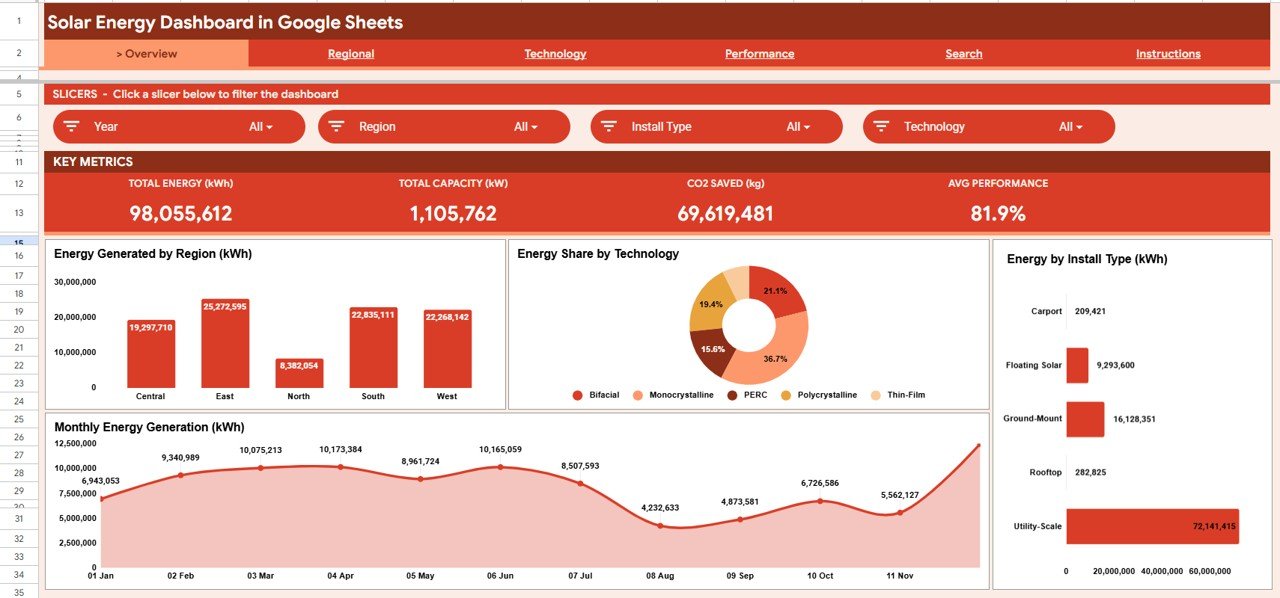
- 4 KPI cards summarize the whole portfolio: Total Energy (kWh), Total Capacity (kW), CO2 Saved (kg), and Average Performance Ratio.
- 14 auto-updating charts cover energy by region, technology share, install type, operational status, and monthly generation trends.
- Native Google Sheets slicers (Year, Region, Install Type, Technology and Status, depending on the page) filter the dashboard without touching a single formula.
- A dedicated Plant ID search tab returns the full profile of any solar site: region, technology, operator, capacity, performance ratio, CO2 saved, status, and month.
- CO2 savings tracking is built in, so you can show environmental impact by region and by install type in ESG and stakeholder reports.
The dashboard is built entirely on native Google Sheets pivot tables, slicers, and formula logic. It runs in any browser, on any device, and updates as soon as you add a new row to the Data tab.
Dashboard Pages Explained
Every page shares the same navigation bar (Overview, Regional, Technology, Performance, Search, Instructions), a row of slicers, and a band of page-specific metric cards. The table below summarizes what each analysis page contains.
| Page | Metric cards | Charts | Slicers |
|---|---|---|---|
| Overview | Total Energy (kWh), Total Capacity (kW), CO2 Saved (kg), Avg Performance | 4 | Year, Region, Install Type, Technology |
| Regional | Total Sites, Total Energy (kWh), Total Capacity (kW), Top Region | 3 | Year, Install Type, Technology, Status |
| Technology | Technologies, Total Energy (kWh), Total Capacity (kW), Avg Performance | 3 | Year, Region, Install Type, Status |
| Performance | Operational Sites, Avg Performance, CO2 Saved (kg), Offline Sites | 4 | Year, Region, Technology, Install Type |
1. Overview Page
The Overview tab opens with the four KPI cards (Total Energy (kWh), Total Capacity (kW), CO2 Saved (kg), and Avg Performance), followed by four charts: Energy Generated by Region, Energy Share by Technology, Energy by Install Type, and Monthly Energy Generation. In the sample data the cards read 98,055,612 kWh, 1,105,762 kW, 69,619,481 kg of CO2 saved, and 81.9% average performance. The slicers across the top filter all of these at once.
2. Regional Analysis
This tab drills into geography with Energy Generated by Region, Installed Capacity by Region, and Monthly Energy Generation by Region across the Central, East, North, South and West regions. Its cards show Total Sites (500 in the sample) and the Top Region (East), so you can see at a glance which regions carry your portfolio and how their output trends month over month.

3. Technology Analysis
The Technology tab compares the five panel technologies (Bifacial, Monocrystalline, PERC, Polycrystalline and Thin-Film) through Energy Share by Technology, Installed Capacity by Technology, and Monthly Energy Generation by Technology. Reading the energy share next to installed capacity helps you judge how much each technology delivers for the capacity you have installed.

4. Performance Analysis
The Performance tab focuses on health and impact with Sites by Operational Status (Commissioning, Maintenance, Offline, Operational), Average Monthly Performance Ratio, CO2 Saved by Install Type, and CO2 Saved by Region. Its cards count Operational Sites and Offline Sites, so reliability and environmental outcomes sit on one screen.

5. Search Sheet
Pick any Plant ID from the dropdown (for example SOLAR-0001) and the Search tab returns that site’s complete record: date, region, install type, technology, operator, description, energy generated, capacity, performance ratio, CO2 saved, status, and month. It is the fastest way to answer a question about a single asset.

6. Data Sheet
The Data tab is your single source of truth. Its columns include Plant ID, Date, Region, Install Type, Technology, Operator, Description, Energy Generated (kWh), Capacity (kW), Performance Ratio, CO2 Saved (kg) and Status. Add your solar plant records in the same column format used by the sample data, and every KPI, chart, slicer, and search result across the dashboard updates automatically.

Google Sheets vs. Excel vs. Paid Solar Monitoring: Feature Comparison
| Feature | Solar Energy Dashboard (Google Sheets) | Excel Dashboard | Paid Solar Monitoring Platform |
|---|---|---|---|
| Pricing model | One-time purchase | One-time purchase | Usually a recurring subscription |
| Platform | Browser-based Google Sheets | Desktop Excel | Vendor cloud and hardware |
| Setup | Under 10 minutes | Under 10 minutes | Needs loggers and onboarding |
| Real-time team collaboration | Built in | Limited | Yes |
| Mobile access | Any browser | App required | Yes |
| Editable / customizable fields | Fully open | Yes | Limited to the vendor schema |
| Share with a link | Native | Manual file sharing | Yes |
| Works without hardware or sensors | Manual or imported data | Yes | No, needs data loggers |
| Live inverter telemetry and alarms | No | No | Yes |
For teams that want portfolio-level solar reporting without a monitoring contract, the Google Sheets dashboard is a practical middle ground. If you need live telemetry, a monitoring platform is still the right tool.
Who Should Use This Template
A good fit for:
- Solar EPC firms and O&M teams managing many sites who need fast portfolio reporting.
- Renewable energy consultants who present generation and CO2 impact to clients.
- Facility and sustainability managers tracking rooftop or ground-mount arrays for ESG reports.
Not a fit if:
- You need live, second-by-second telemetry straight from inverters and data loggers.
- You require automated fault alarms or SCADA-grade control. This is a reporting layer, not a monitoring controller.
Real-World Use Cases
Priya runs O&M for a rooftop solar portfolio. Every Monday she pastes the weekly generation export into the Data tab, uses the Region slicer on the Performance tab to spot clusters with a weak performance ratio, and sends leadership a one-page view of energy, performance ratio, and CO2 saved without logging into several vendor portals.
Daniel is a renewable energy consultant. He uses the Technology Analysis tab to compare each technology’s energy share with its installed capacity, then uses the Search tab to pull a specific plant’s full profile live during a client meeting.
Aisha manages sustainability reporting for a manufacturer. She uses CO2 Saved by Region and CO2 Saved by Install Type to fill in the renewable energy section of the company’s annual ESG report much faster than compiling it by hand.
Advantages of the Solar Energy Dashboard in Google Sheets
The biggest advantage is cost and ownership: a one-time purchase instead of recurring monitoring fees, with the data staying in a file you control. Because it is native Google Sheets, your team collaborates in real time, shares a link instead of emailing files, and works from any device. The slicer-driven design also means non-technical users can filter and explore data without breaking a formula.
Limitations to Keep in Mind
This template is a reporting and analysis layer, not a live monitoring system. It does not pull data automatically from inverters, so you (or a scheduled import) need to refresh the Data tab. Very large portfolios with hundreds of thousands of rows may be better served by a database-backed tool. For most small and mid-size solar operators, manual or scheduled imports are more than enough.
Best Practices
- Keep the Data tab column order identical to the sample so the pivots and the Search tab keep working.
- Standardize Region, Technology, and Install Type labels (use a dropdown list) so slicers group cleanly.
- Duplicate the file each month or quarter to keep a clean historical snapshot for audits.
- Learn the basics of Google Sheets pivot tables and slicers so you can customize charts confidently.
If you want to go further with structured lessons, the Excel Pivot Tables and Dashboards course on NextGenTemplates Academy teaches pivots, charts and slicers step by step in Excel, and the same ideas carry over to dashboards like this one in Google Sheets.
Explore Related Energy Templates
If you want KPI-focused views or other energy reporting, these posts cover related templates:
- Solar Energy KPI Dashboard in Google Sheets
- Solar Energy KPI Scorecard in Google Sheets
- Renewable Energy Dashboard in Google Sheets
- Solar Project Construction Dashboard in Google Sheets
- Energy Consumption Analysis Dashboard in Google Sheets
Also available as: prefer another tool? See the Solar Energy Dashboard in Power BI or the Solar Energy Dashboard in Excel.
Frequently Asked Questions
What KPIs does the Solar Energy Dashboard in Google Sheets track?
It tracks four headline KPIs: Total Energy (kWh), Total Capacity (kW), CO2 Saved (kg), and Average Performance Ratio. On top of that, 14 charts cover region, technology, install type, operational status, and monthly trends. All metrics update automatically from the Data tab.
How long does setup take?
Setup takes under 10 minutes. Make your own copy, paste your plant records into the Data tab in the same format as the sample, and every KPI, chart, slicer, and search result refreshes automatically.
Do I need Apps Script or any add-on?
No. The dashboard is built on native pivot tables and slicers, so there is nothing to deploy or install. It works in any browser on any device with a Google account.
How does this compare to paid solar monitoring software?
Monitoring platforms usually charge a recurring fee and rely on data loggers connected to your inverters. This dashboard is a one-time purchase and a reporting layer you fully own, which suits teams that already have generation data and need clean portfolio analysis rather than live telemetry.
Can I use the Search tab to look up a single plant?
Yes. Choose any Plant ID in the Search tab and it returns that site’s full record, including region, technology, operator, capacity, performance ratio, CO2 saved, status, and month.
Can I add my own regions or technologies?
Yes. Add new regions, technologies, and install types directly in the Data tab, keeping the same column order, and the slicers and charts will include them.
About the Author
Built by PK, a Microsoft Certified Professional with 15+ years of Excel, Google Sheets, and Power BI experience and the founder of NextGenTemplates. Every template is hand-built and tested before release.
Wrapping Up
The Solar Energy Dashboard in Google Sheets gives solar operators, consultants, and sustainability teams a clean, slicer-driven view of energy, capacity, performance, and CO2 impact without recurring software fees. Make a copy, load your plant records into the Data tab, and you will have a shareable portfolio report the same day.
Get the Solar Energy Dashboard in Google Sheets
📅 Last updated: October 2026