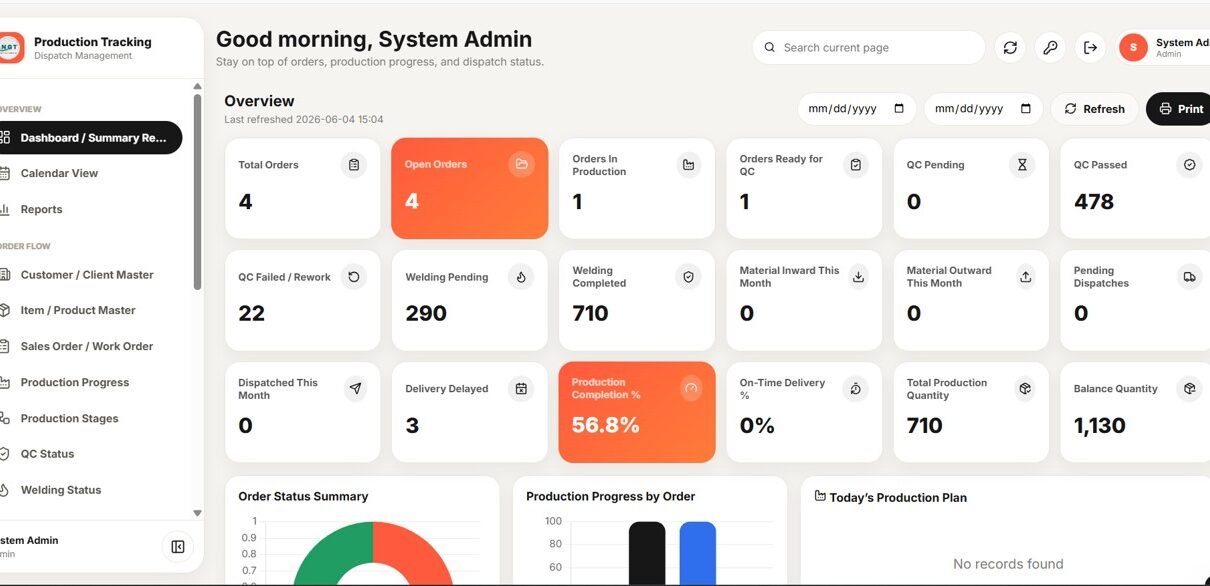
The Production Tracking and Dispatch Management System is a Google Sheets web app that runs an entire make-to-order shop floor across 21 connected modules, from order intake through cutting, fabrication, welding, QC, stores and dispatch. Its dashboard surfaces 18 live KPI cards, 4 analytics charts and 4 action lists, and it ships with 13 built-in reports that export to Excel in one click.
Most small and mid-size fabrication units still track production, QC and dispatch across separate Excel files that never agree with each other. The Production Tracking and Dispatch Management System replaces that scatter with one role-based web app — six roles, one source of truth — that any team member can open in a browser on desktop or mobile.
Get the Production Tracking and Dispatch Management System

🚀 Try the Live Demo Before You Buy
We have deployed this web app in our own Google account so you can test every page, every role — with real sample data — before purchasing. No signup, no email required.
🔑 Test Login Credentials
Sign in as admin to manage the full production tracking and dispatch system, including setup, reports, users, and approvals or as production to manage production planning, shop-floor progress, material status, and dispatch coordination. Additional test roles include store / Store@123, qc / Qc@123, welding / Weld@123, dispatch / Dispatch@123, and viewer / View@123.
💡 What you get after purchase: The full source code (Code.gs + Index.html) plus a step-by-step deployment guide so you can deploy your own private instance in your own Google account in under 15 minutes.
Key Features of the Production Tracking and Dispatch Management System
- Role-based secure login with six roles — Admin, Production Manager, Store/Material User, QC User, Welding Supervisor and Dispatch User — each seeing only the screens their job needs.
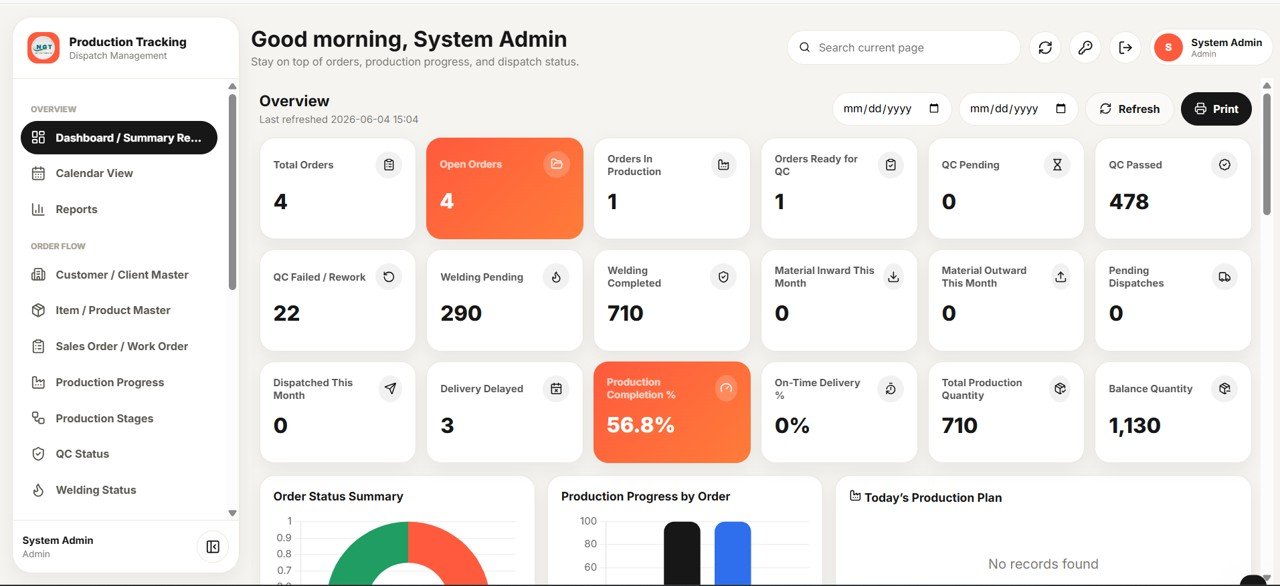
- An 18-card live dashboard covering open and in-production orders, QC pending/passed/failed, welding, material inward/outward, pending and completed dispatches, delivery delays, production completion % and on-time delivery %.
- Live order quantity tracking that keeps Ordered, Produced, QC-Passed and Dispatched quantities in sync for every work order so balance quantity is always correct.
- A full material stock ledger with automatic inward/outward posting, running balances and negative-stock prevention when issuing to production.
- Dispatch and delivery control with printable challans, per-site balance tracking and automatic email delivery reminders.
Because it runs on Google Sheets and Apps Script, the Production Tracking and Dispatch Management System needs no installation and updates in real time for every signed-in user.
Dashboard Pages Explanation
The web app is organised into 21 modules. Here are the screens that matter most day to day.
Dashboard / Summary Report
The command centre shows 18 KPI cards across orders, production, QC, welding, material movement and dispatch, with a date-range filter, refresh and print controls so managers read the whole operation at a glance.
Dashboard Charts and Action Lists
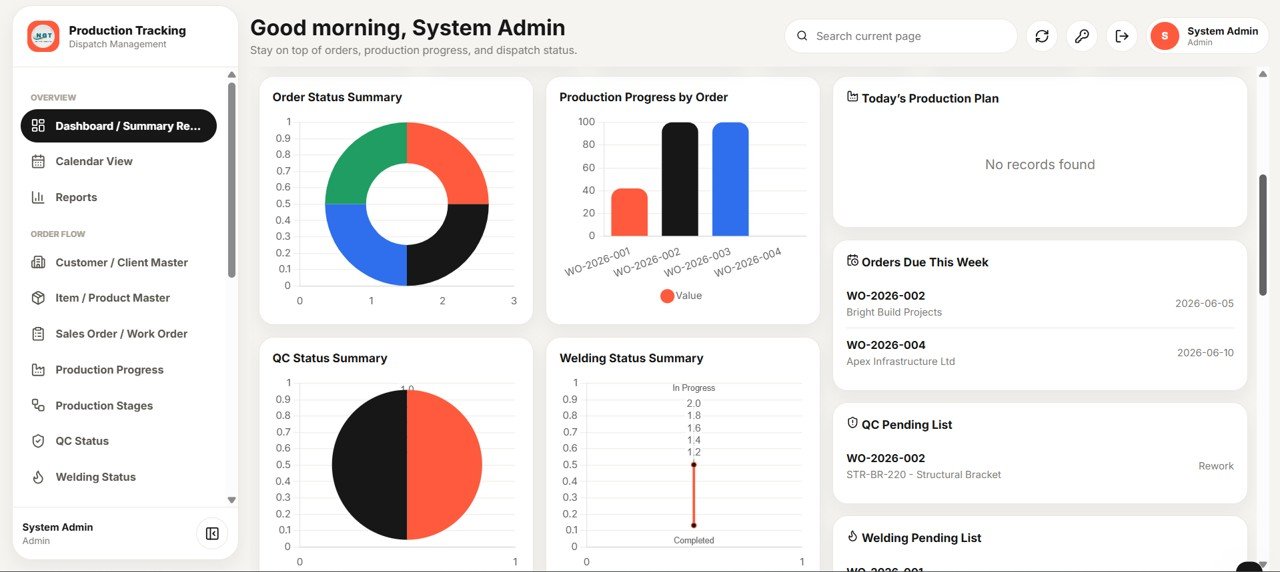
Four charts — Orders by Status, Production Progress by Order, QC Quantity by Status and Welding Quantity by Status — turn rows into trends, while four action lists (Today’s Production Plan, Orders Due This Week, QC Pending and Welding Pending) tell the team what to do next.
Masters: Customer, Item, Order and Material
Four master screens hold the core data. The Customer Master stores contacts, city, state and GSTIN; the Item Master defines drawing numbers with Welding-Required and QC-Required flags; the Sales/Work Order Master tracks ordered, produced, QC-passed and dispatched quantities live; and the Material Master holds opening, current and minimum stock with supplier and storage location.
Daily Tracking: Production, Stages, QC and Welding
Production Progress logs planned, produced and balance quantity per order each day, while Production Stage Tracking follows Cutting, Fabrication, Welding, QC, Packing and Dispatch with planned and actual dates. QC Status Monitoring auto-calculates rejection % and QC status, and Welding Status tracks welder, welding type and pending quantity.

Stores: Material Inward, Outward and Stock Ledger
Material Inward records receipts with challan/invoice number, rate and value; Material Outward issues stock to production with negative-stock prevention; and every movement posts to a Stock Ledger with transaction type, quantity in/out, running balance and a reference module for a complete audit trail.
Dispatch and Delivery
Site Dispatch Tracking manages dispatch number, site, item and balance quantity with printable challans, and Delivery Schedule Monitoring tracks scheduled dates with planned, dispatched and balance quantity plus automatic email reminders.

Admin: Reports, Calendar, Users, Lists and Settings
Thirteen reports (order status, stage-wise production, QC rejection, rework, welder-wise, material stock, low stock and more) export to Excel, a colour-coded Calendar shows production, QC, dispatch and delivery events, and the User Management, List Management and Settings screens control roles, dropdowns and company configuration.
Production Tracking and Dispatch Management System vs. Excel VBA Tool vs. Paid Manufacturing SaaS — Feature Comparison
| Feature | Production Tracking & Dispatch System | Excel VBA Macro Tool | Katana MRP / Odoo Manufacturing |
|---|---|---|---|
| Cost | $24.99 one-time | $15–$60 one-time | $39–$199 / user / month |
| Platform | Google Sheets web app (browser) | Desktop Excel + macros | Cloud SaaS |
| Setup time | Under 15 minutes (Make a Copy) | 1–2 hours, macro prompts | Days of onboarding |
| Real-time multi-user access | ✅ Built-in, role-based | ❌ Single-file, easily corrupted | ✅ Yes |
| Mobile / browser access | ✅ Any device | ❌ Windows desktop only | ✅ Yes |
| QC, welding & dispatch in one tool | ✅ 21 modules included | ❌ Usually separate files | ✅ Yes (premium tiers) |
| Own the source code | ✅ Full Apps Script included | ✅ VBA visible | ❌ Vendor-locked |
| Year-1 cost at 5 users | $24.99 total | ~$60 total | $2,340–$11,940 |
For manufacturers who want real-time, multi-user production and dispatch control without paying per-user SaaS fees, the Production Tracking and Dispatch Management System sits in the sweet spot.
Who Should Use This Template
Perfect for:
- Fabrication, structural, sheet-metal and engineering workshops running make-to-order production
- Production managers who need live order, QC, welding and dispatch status in one screen
- Stores teams that want inward, outward and ledger control with negative-stock prevention
- SMEs that want a multi-user system on Google Sheets instead of a monthly MES or ERP subscription
Not a fit if:
- You need full ERP with finance, procurement and machine-level IoT integration
- Your team cannot use Google Workspace or run an Apps Script web app
- You run process/batch manufacturing needing BOM explosion rather than discrete order tracking
Real-World Use Cases
Ramesh runs a 40-person structural fabrication workshop. He opens the Production Tracking and Dispatch Management System each morning to see open orders, today’s production plan and QC-pending items — instead of chasing four separate Excel files across the floor.
Priya manages stores at an engineering unit. Every receipt and issue she records posts straight to the Stock Ledger with running balances, and negative-stock prevention stops the floor from over-issuing steel before a new inward entry is made.
Daniel heads dispatch for a make-to-order manufacturer. He prints dispatch challans per site, watches balance quantity against each delivery schedule, and lets the system email delivery reminders so customer sites are never surprised.
Advantages of the Production Tracking and Dispatch Management System
The biggest advantage is consolidation: orders, production, QC, welding, material and dispatch live in one place, so balance quantities and KPIs are always consistent. Because it is a one-time $24.99 purchase versus $39–$199 per user per month for SaaS MES tools, a five-user team saves thousands in year one. And since you receive the full Apps Script source, the system is yours to extend — no vendor lock-in and no per-user fees as the team grows.
Opportunities for Improvement
This is an honest assessment. The Production Tracking and Dispatch Management System is built for discrete, order-based manufacturing, so process industries needing recipe/BOM explosion will outgrow it. It does not include finance, payroll or machine-level IoT data capture, and very large plants with hundreds of concurrent users may eventually need a dedicated ERP. For most SME fabrication and engineering workshops, however, these limits rarely bite.
Best Practices
Set up your Customer, Item and Material masters fully before creating work orders so dropdowns and reports stay clean. Record production, QC and material movements daily rather than in batches — the dashboard and ledger are only as current as your last entry. Use List Management to standardise dropdown values across the team, and keep the delivery-reminder days in Settings tuned to your typical lead time so reminders fire at the right moment. For Apps Script deployment guidance, see the official Google Apps Script web apps documentation.
Explore Relevant Templates
Pair this system with the Equipment Maintenance Management System Web App to keep machines running, the Daily Sales Purchase System Web App for procurement, and the GST Billing System Web App for invoicing dispatched goods. For issue logging, see the Incident Tracker and Report Web App; for task tracking, the Advanced Task Management System Web App; and for analytics, the Contract Manufacturing Dashboard in Google Sheets.
Get the Production Tracking and Dispatch Management System
If you would like to learn the spreadsheet skills behind trackers and management systems, the NextGenTemplates Academy learning paths cover them step by step, with practice files.
Frequently Asked Questions
What does the Production Tracking and Dispatch Management System track?
The Production Tracking and Dispatch Management System tracks sales/work orders, daily production, production stages, QC, welding, material inward and outward, stock ledger, site dispatch and delivery schedules across 21 modules, with 18 live dashboard KPIs updating automatically.
Do I need to install any software?
No. The Production Tracking and Dispatch Management System runs entirely in Google Sheets and Apps Script. You make a copy in your own Google Drive, deploy it as a web app, and open it in any browser on desktop or mobile.
How many users and roles does it support?
It supports unlimited users across six built-in roles — Admin, Production Manager, Store/Material User, QC User, Welding Supervisor and Dispatch User — each with role-based access managed from the User Management screen.
How long does setup take?
Most teams are live in under 15 minutes: make a copy, deploy the web app, set company details in Settings, add users, and fill the Customer, Item and Material masters. No coding is required for normal use.
How does this compare to a paid manufacturing SaaS like Katana or Odoo?
Paid MES/ERP tools typically cost $39–$199 per user per month. The Production Tracking and Dispatch Management System is a one-time $24.99 purchase with full Apps Script source you own — ideal for SMEs that want core production and dispatch control without recurring fees.
Can I customise dropdowns and fields?
Yes. The List Management screen lets admins control the dropdown values used across every form and filter, and the full Apps Script source lets you extend the Production Tracking and Dispatch Management System further.
About the Author
Built by PK — Microsoft Certified Professional with 15+ years of Excel, Google Sheets, and Power BI experience. Founder of NextGenTemplates, reaching 300K+ subscribers across YouTube channels. Every template is hand-built and tested before release.
Conclusion
If your shop floor is run on disconnected spreadsheets, the Production Tracking and Dispatch Management System gives you one role-based web app for orders, production, QC, welding, material and dispatch — with live KPIs, a full stock ledger and 13 exportable reports. Try the live demo, then deploy your own copy in minutes.
Instant access · One-time payment · No subscription.
Last updated: June 2026