Gym Membership Tracker in Google Sheets is a simple membership reporting template for gyms, studios, clubs, and trainers that want clean member visibility without paying for a full gym SaaS platform. The file uses 2 practical sheets, 1 top revenue card, 4 overview charts, multiple slicers, and 3 support-list sections to help you review monthly revenue, membership type, status, trainer assignment, monthly fees, and amount paid. For a $6.99 one-time purchase, it gives small fitness teams a shareable Google Sheets workflow that can be edited before live member records are added.Gym Membership Tracker in Google Sheets
The idea is straightforward: copy the tracker to Google Drive, keep the support lists tidy, enter member records in a consistent format, and use the dashboard for billing and retention review. For teams that need shared access, the Google Docs Editors Help Center explains how Sheets files can be shared with specific people or by link using Viewer, Commenter, or Editor permissions.
Get the Gym Membership Tracker in Google Sheets
Key Features of Gym Membership Tracker in Google Sheets
- Overview Page: A dashboard-style sheet with a Total Monthly Revenue card, slicers, and 4 membership charts.
- Total Monthly Revenue card: A fast monthly income snapshot based on the membership data in the file.
- Members by Membership Type: Plan-mix reporting for membership categories such as monthly, annual, student, family, or custom plans.
- Members by Status: A simple way to separate active, inactive, paused, cancelled, trial, or renewal-due members.
- Monthly Fee by Member: Member-level fee comparison for pricing checks and billing review.
- Monthly Fee vs Amount Paid: Side-by-side expected fee and paid amount analysis to identify payment gaps.
- Support List Sheet: Editable lists for membership type, status, and trainer or coach assignments.
- Google Sheets workflow: Copy to Drive, share with staff, and update from a browser or the Sheets app.
Dashboard Pages Explanation
1. Overview Page
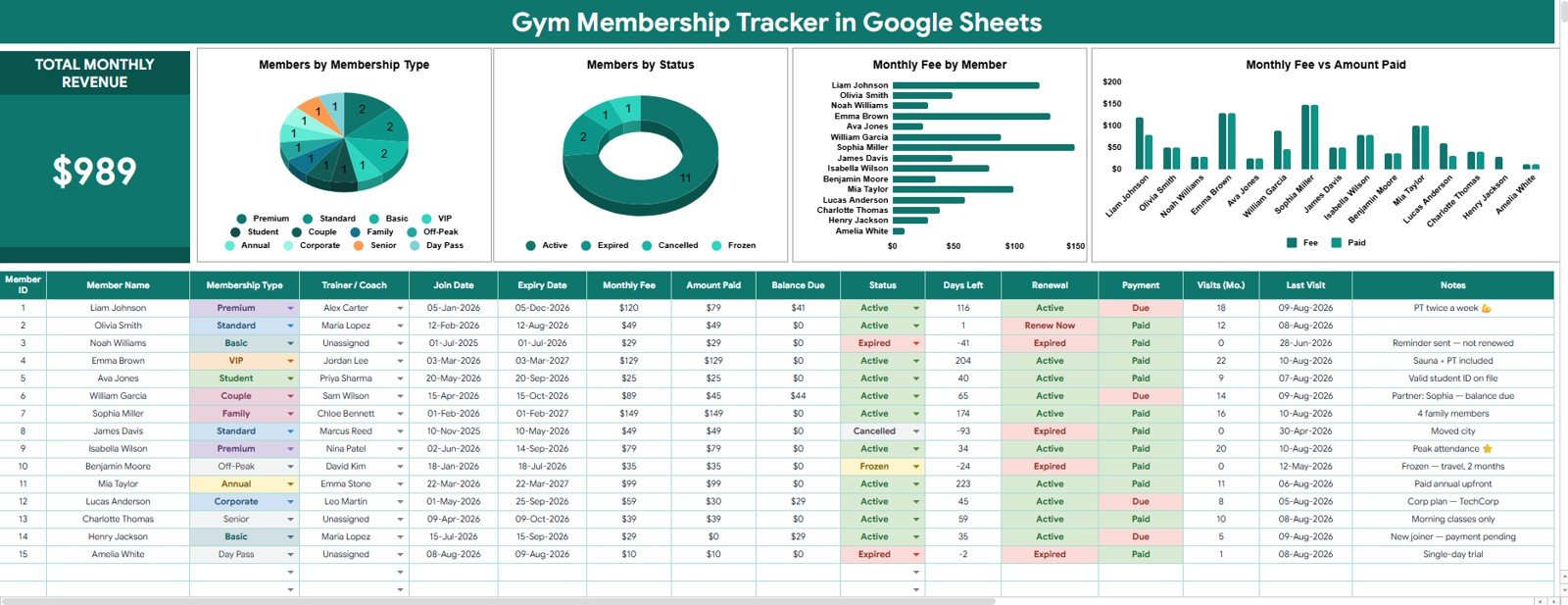
The Overview Page is the main review screen. At the top, it shows the Total Monthly Revenue card so managers can see expected membership income before reviewing individual members.Gym Membership Tracker in Google Sheets
The page also includes slicers for fast filtering. This is useful when you want to view only one membership type, one status group, or one trainer’s assigned members during a quick meeting.
Total Monthly Revenue: This card summarizes the expected monthly revenue from the current membership records. Use it as the first checkpoint for billing review, monthly planning, and quick revenue visibility.
Members by Membership Type: This chart shows how the member base is distributed across available plan types. It helps owners see which membership offers are popular and which plans may need pricing, promotion, or simplification.
Members by Status: This chart groups members by their current state, such as active, paused, cancelled, or renewal due. It helps teams separate healthy member volume from accounts that need follow-up.
Monthly Fee by Member: This chart compares the fee assigned to each member. It helps administrators spot discounted accounts, premium memberships, unusually low fees, and entries that need correction before billing.
Monthly Fee vs Amount Paid by Member: This chart compares what each member should pay with what has actually been paid. It is the most useful view for finding partial payments, unpaid balances, and data-entry mismatches.
2. Support List Sheet
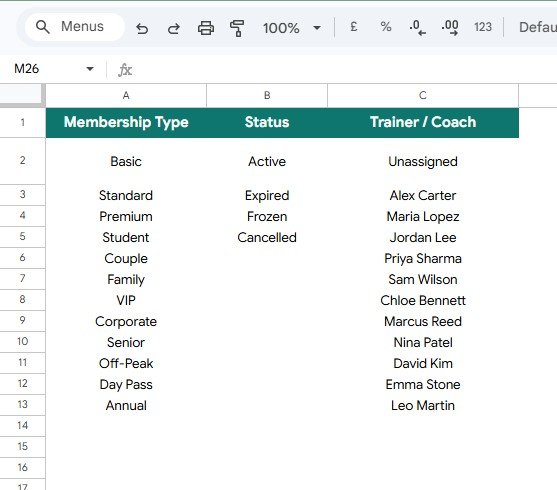
The Support List Sheet keeps the tracker consistent. Instead of allowing every staff member to type a different label, this sheet stores standard values that can be reused across the member records.
Membership Type by Category: This section stores the membership types used in the tracker. Keeping these categories consistent makes the membership-type chart cleaner and easier to trust.Gym Membership Tracker in Google Sheets
Status by Membership State: This section stores the status values used for member tracking. It helps the team avoid messy versions of the same status, such as Active, active, Currently Active, and Actv.Gym Membership Tracker in Google Sheets
Trainer / Coach by Assignment List: This section stores trainer and coach names for member ownership. It is helpful when staff assignments change or when managers want to review which coach is responsible for which members.
Gym Membership Tracker in Google Sheets vs. Microsoft Excel vs. Paid CRM/SaaS – Feature Comparison
| Feature | Gym Membership Tracker in Google Sheets | Microsoft Excel tracker | Paid gym SaaS |
|---|---|---|---|
| Cost | $6.99 one-time purchase | Template cost plus Excel access | Monthly or annual subscription |
| Platform | Google Sheets in browser or mobile app | Excel desktop, web, or mobile | Vendor-hosted web app |
| Setup time | Copy file, edit support lists, add members | Download workbook and configure | Account setup, imports, roles, and training |
| Real-time team collaboration | Native Google Drive sharing | Best with OneDrive or SharePoint | Usually included by plan |
| Mobile access | Google Sheets app or browser | Excel mobile app | Usually included |
| Customizable fields | Editable sheets, lists, formulas, and labels | Editable if workbook is unlocked | Limited by vendor configuration |
| Share with link | Yes, with Drive permissions | Yes, with Microsoft sharing | Usually login based |
| Year-1 cost at 5 users | $6.99 before optional Workspace cost | Template plus license costs | Often hundreds or thousands |
| Membership fee review | Monthly Fee vs Amount Paid by Member | Depends on workbook design | Usually included, but less editable |
| Support lists | Membership type, status, trainer, and coach lists | Manual setup required | Usually controlled by admin settings |
Who Should Use This Template
This template is best for small gyms, boutique fitness studios, yoga studios, pilates studios, martial arts schools, personal training groups, community clubs, and recreation teams that need a simple member tracker with dashboard visibility.
It is also a good fit for gym admins who already collect payments somewhere else but need a central file for tracking membership types, member status, fees, paid amounts, and trainer assignments.
This is not a full member portal or payment system. If your gym needs automated billing, class bookings, access-card entry, waiver signatures, workout plans, app notifications, or SMS reminders, this tracker should sit beside those tools rather than replace them.
Real-World Use Cases
Boutique gym owner: Maya checks Total Monthly Revenue and Members by Status every Monday. She uses the status chart to find paused and renewal-due members before sending follow-up messages.
Studio administrator: Daniel compares Monthly Fee vs Amount Paid by Member before the weekend. The chart helps him find members who paid partially, missed payment, or were entered with the wrong fee.
Trainer coordinator: Aisha uses the Trainer / Coach assignment list to keep member responsibility clear. When a new coach joins, she updates the list once and keeps future records consistent.
Advantages of Gym Membership Tracker in Google Sheets
- It keeps membership, revenue, payment, status, and trainer assignment review in one editable file.
- It gives small teams a low-cost option before they commit to a paid gym management platform.
- It uses Google Sheets, so the file can be shared with managers, admins, and trainers through Drive permissions.
- It makes payment review easier by comparing monthly fees with the amount paid by member.
- It keeps reporting cleaner because the Support List Sheet standardizes membership type, status, and trainer labels.
Opportunities for Improvement
This template is intentionally lightweight. It does not charge cards, send invoices, automate membership renewals, connect to door access systems, sync with workout apps, or send SMS reminders.
If your gym grows into multiple locations or needs real-time billing automation, you may eventually need dedicated software. Until then, this tracker can help you organize the data model and reporting questions before you spend money on a larger system.
Best Practices
Start by cleaning the Support List Sheet before entering member records. A clean list of membership types and status values prevents messy dashboard results later.
Review Monthly Fee vs Amount Paid at least once a week. Small payment gaps are easier to correct while the payment conversation is still fresh.
Keep status values simple. Too many statuses make the chart harder to read, so use only the states your team will actually act on.
Share edit access carefully. Managers and admins may need edit rights, while trainers may only need view access for their assigned members.
Archive cancelled or inactive records on a schedule. Keeping the current member list focused makes the dashboard easier to scan.
Explore Relevant Templates
For deeper fitness performance reporting, see the Fitness and Wellness Dashboard in Google Sheets. For broader facility and activity analysis, use the Sports and Recreation Dashboard in Google Sheets.
Trainer-led businesses may also like the Fitness Trainer Dashboard in Google Sheets. If you want a broader recurring-cost tracker, compare the Subscription and Membership Tracker in Google Sheets.
You can also browse all Google Sheets templates and Google Sheets tracker templates on NextGenTemplates.
If you would like to learn the spreadsheet techniques behind trackers like this, the NextGenTemplates Academy learning paths include practice files to work through.
Get the Gym Membership Tracker in Google Sheets
Frequently Asked Questions
What is included in the Gym Membership Tracker in Google Sheets?
It includes an Overview Page with a Total Monthly Revenue card, 4 charts, slicers, and a Support List Sheet for membership type, status, and trainer or coach assignment lists.
Can I edit the membership types?
Yes. Update the Membership Type by Category section on the Support List Sheet so the tracker matches your real gym plans.
Does it track payments?
It tracks monthly fee and amount paid values so you can compare expected and received amounts. It does not process payments automatically.
Can I share it with my team?
Yes. Because it is built in Google Sheets, you can share the copied file through Google Drive with view or edit access.
Is this a complete gym management system?
No. It is a tracker and dashboard, not a booking app, payment gateway, door access system, or member portal.
Can trainers use this tracker?
Yes. Trainers can use it to review assigned members, but you should control edit access so formulas and support lists are not accidentally changed.
About the Author
Built by PK – Microsoft Certified Professional with 15+ years of Excel, Google Sheets, and Power BI experience. Founder of NextGenTemplates, reaching 300K+ subscribers across YouTube channels. Every template is hand-built and tested before release.
Conclusion
The Gym Membership Tracker in Google Sheets is built for fitness teams that need better member visibility without a complicated system. With 2 sheets, 1 revenue card, 4 charts, slicers, support lists, and a one-time $6.99 price, it gives small gyms a clean way to review monthly revenue, member status, plan mix, trainer assignment, and payment gaps.
Last updated: August 11, 2026.