Gift Card and Store Credit Tracker in Google Sheets is a practical way to organize unused gift cards, refund credits, vouchers, and store credits before they become forgotten money. A Bankrate gift card survey reported that 43% of U.S. adults had at least one unused gift card, voucher, or store credit, with an average unused value of $244. The same survey found that 34% of Americans had lost money because of an expired card, lost card, or store closure.Gift Card and Store Credit Tracker in Google Sheets
Gift cards are still a major shopping category. The National Retail Federation expected total gift card spending to reach $29.1 billion for the 2025 holiday season. That is exactly why a simple balance tracker can matter. The Gift Card and Store Credit Tracker in Google Sheets gives users one editable place to track stores, card types, statuses, original balances, remaining balances, and notes.
Get the Gift Card and Store Credit Tracker in Google Sheets
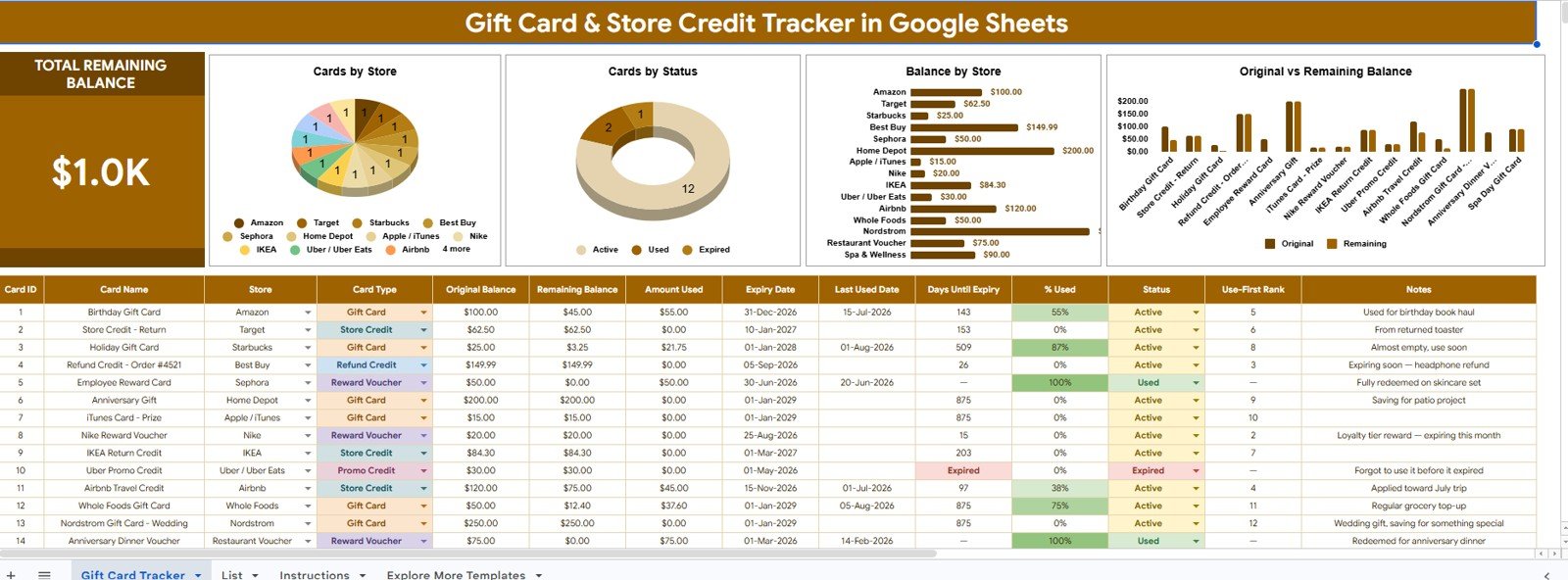
Key Features of Gift Card and Store Credit Tracker in Google Sheets
- Total Remaining Balance card: Start with one headline number showing the value still available across all entered gift cards and store credits.
- Cards by Store: See how many cards or credits belong to each store so scattered balances become easier to review.Gift Card and Store Credit Tracker in Google Sheets
- Cards by Status: Separate active, used, expired, lost, pending, or replaced cards instead of mixing them in one messy list.Gift Card and Store Credit Tracker in Google Sheets
- Balance by Store: Review where the most remaining value sits before shopping, gifting, or planning purchases.Gift Card and Store Credit Tracker in Google Sheets
- Original Balance and Remaining Balance by Card Name: Compare each card’s starting value with the amount still available.Gift Card and Store Credit Tracker in Google Sheets
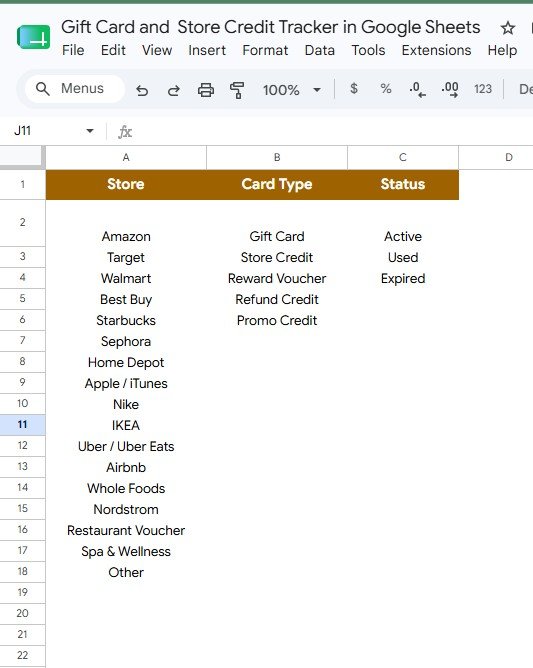
- Editable List Sheet: Maintain dropdown values for stores, card types, and statuses in one setup area.
- Google Sheets format: Copy the tracker into Google Drive and update it from a browser or mobile app.
- No subscription: Use a one-time purchase instead of adding another recurring personal finance or wallet app.
Dashboard Pages Explanation
1 – Overview Page
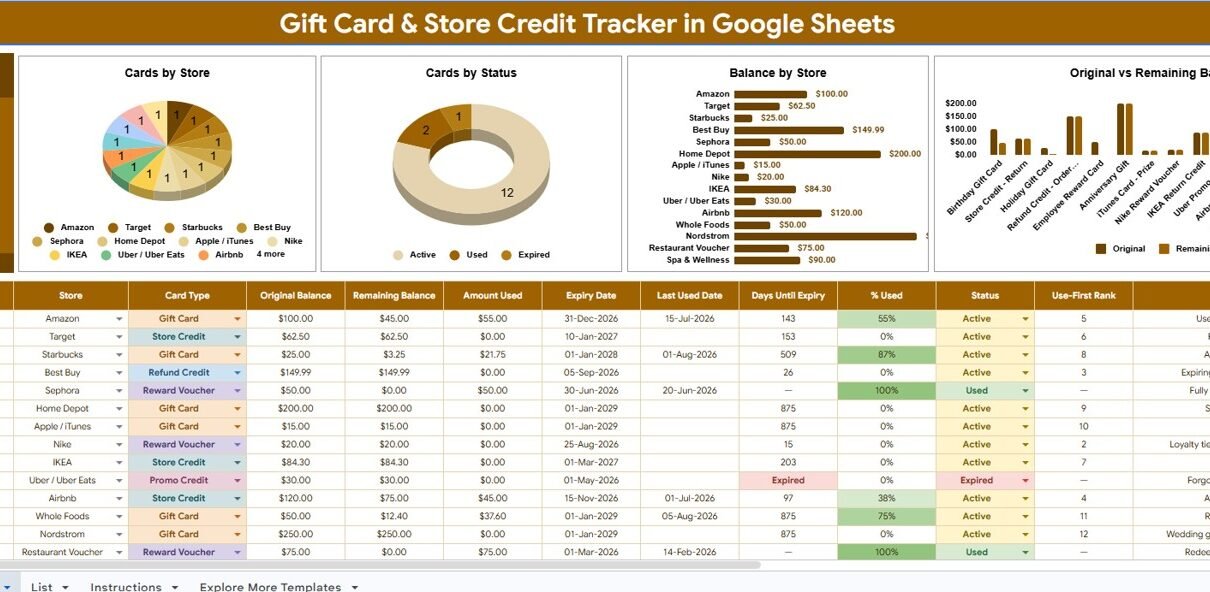
The Overview Page is the main dashboard tab. At the top, it shows the Total Remaining Balance card, which gives users a quick answer to the most important question: how much gift card and store credit value is still available?
Cards by Store: This chart groups the number of cards by store. It is useful when a user has several small credits from the same retailer and wants to decide which store to visit first.
Cards by Status: This chart helps users understand whether cards are active, used, expired, lost, pending, or otherwise categorized. It makes cleanup easier because old or unusable records stand out visually.
Balance by Store: This chart sums the remaining balance by retailer. It is helpful when the user wants to plan shopping around where the most unused money is sitting.
Original Balance and Remaining Balance by Card Name: This chart compares the starting amount and current balance for each card. It helps identify partially used cards that should be finished before opening another balance.
2 – List Sheet
The List Sheet keeps the tracker flexible. It stores the dropdown values used across the file so users do not need to type store names, card types, or statuses from memory every time.
Store selection values: Add retailer names, restaurants, marketplaces, service providers, or custom store labels. Consistent store names make Cards by Store and Balance by Store analysis cleaner.
Card Type selection values: Maintain labels such as gift card, e-gift card, store credit, refund credit, merchandise credit, voucher, reward, or custom card type.
Status selection values: Use clear statuses such as Active, Partially Used, Used, Expired, Lost, Pending, Replaced, or Review Needed so the dashboard stays useful.
Gift Card and Store Credit Tracker in Google Sheets vs. Microsoft Excel Tracker vs. Paid Finance SaaS – Feature Comparison
| Feature | This Google Sheets tracker | Microsoft Excel tracker | Paid finance or wallet app |
|---|---|---|---|
| Cost | $6.99 one-time sale price | Template cost plus Microsoft access | Often monthly, annual, or account based |
| Platform | Google Sheets in Drive | Excel desktop or Excel Online | Vendor-hosted web or mobile app |
| Setup time | Copy file, edit lists, enter cards | Download workbook and customize | Create account and configure app settings |
| Real-time team collaboration | Native Google Drive sharing | Depends on OneDrive or SharePoint | Plan dependent |
| Mobile access | Google Sheets app or browser | Excel app or browser | Usually included |
| Customizable fields | Edit stores, card types, statuses, notes, and charts | Editable if workbook is unlocked | Limited by vendor settings |
| Share with link | Yes, using Drive permissions | Yes, through Microsoft sharing | Usually login controlled |
| Year-1 cost at 5 users | $6.99 before any Google Workspace costs | Template plus license costs | Can become recurring per user or household |
| Card balance review | Total balance, store, status, and card-level charts included | Must be built or customized | Depends on merchant support |
| Bank or wallet connection required | No | No | Often encouraged |
Who Should Use This Template
This template is a good fit for shoppers, families, couples, students, office admins, teachers, nonprofit teams, small businesses, virtual assistants, and anyone who handles multiple cards or credits. It is especially useful after holidays, returns, work rewards, customer refunds, classroom incentives, or team recognition programs.
The tracker is also useful for people who prefer manual control. Because it runs in Google Sheets, users can keep the structure simple, avoid entering store account logins into another app, and share the file only with trusted collaborators.
It is not intended to check live balances automatically, redeem gift cards, sell unwanted cards, recover lost value, or replace a retailer’s official card balance page. Before checkout, users should always confirm the final balance with the retailer.
Real-World Use Cases
Anaya: household gift card cleanup
Anaya gathers gift cards from wallets, drawers, email inboxes, and old birthday envelopes. She enters each one into the tracker, filters by Active status, and sees which stores have enough remaining balance for school supplies and groceries.
Marcus: office rewards management
Marcus manages a small team reward program. He uses the List Sheet to standardize stores and card types, then tracks reward cards issued to employees, pending credits, and cards that still need follow-up.
Priya: budget coaching workflow
Priya asks clients to collect unused gift cards before a no-spend month. The Balance by Store chart often reveals money they can use for necessities before dipping into cash reserves.
Advantages of Gift Card and Store Credit Tracker in Google Sheets
- Simple balance visibility: The Total Remaining Balance card puts unused value in front of the user immediately.
- Cleaner spending decisions: Store and card-level charts help decide which balance to use first.
- Editable labels: Users can adjust store names, card types, and statuses instead of forcing their data into rigid app categories.
- Shareable format: Google Sheets permissions make it easy to share with a spouse, assistant, or team member.
- No account connection: The tracker does not require bank credentials, wallet access, or merchant login data.
Opportunities for Improvement
This is a manual tracker, so accuracy depends on updating balances after each purchase or refund. If a user forgets to update a card after checkout, the dashboard may show a value that is no longer correct.
Advanced users may want to extend the file with reminder dates, conditional formatting for old balances, QR code links to store balance pages, Apps Script email reminders, or import tabs for e-gift card emails. Those additions are possible in Google Sheets, but they are outside the core tracker described here. For users who edit charts, Google’s own help center explains how to add and edit charts in Google Sheets.
Best Practices
- Enter every card as soon as it is received, including e-gift cards from email.
- Use consistent store names from the List Sheet instead of typing new variations.
- Update remaining balance immediately after each purchase or return.Gift Card and Store Credit Tracker in Google Sheets
- Keep a status for Used or Expired so old records do not inflate the active balance.
- Do not store full card numbers, PINs, passwords, or sensitive account details in a shared sheet.
- Check the retailer’s official balance page before checkout.
- Review the tracker before holidays, birthdays, school shopping, and large planned purchases.
Explore Relevant Templates
- Gift Card and Store Credit Tracker in Google Sheets – the template covered in this article.
- Cash Envelope Budget Tracker in Google Sheets – useful for envelope balances and weekly spending control.
- Savings Goal Tracker in Google Sheets – useful for target amounts, priorities, and saved-so-far progress.
- Personal Finance Net Worth Tracker in Google Sheets – useful for assets, liabilities, and liquidity review.
- Browse Google Sheets Tracker Templates – explore more tracker templates from NextGenTemplates.
Want to build skills like this step by step? The NextGenTemplates Academy learning paths walk you through spreadsheet tracking with practice files.
Get the Gift Card and Store Credit Tracker in Google Sheets
Frequently Asked Questions
What is the Gift Card and Store Credit Tracker in Google Sheets?
It is an editable Google Sheets template for tracking gift cards, store credits, card types, stores, statuses, original balances, remaining balances, and notes.Gift Card and Store Credit Tracker in Google Sheets
Does it check gift card balances automatically?
No. The tracker is manual. You should confirm the final usable balance through the retailer’s official balance page before checkout.
Can I customize the store names?
Yes. The List Sheet lets you edit store selection values so the tracker matches your own cards and credits.
Can I track both physical and digital cards?
Yes. Use the Card Type selection values to separate physical gift cards, e-gift cards, store credits, refund credits, vouchers, rewards, and custom types.
Can I share this tracker with another person?
Yes. After copying it to your own Google Drive, you can share the file using Google Sheets permissions.
Is it safe to store card numbers in the tracker?
For safety, avoid storing full card numbers, PINs, passwords, or sensitive account data in a shared spreadsheet. Use notes and labels that help identify the card without exposing sensitive details.Gift Card and Store Credit Tracker in Google Sheets
What pages are included?
The template workflow described here includes an Overview Page and a List Sheet, with charts, slicers, and dropdown values for gift card and store credit tracking.Gift Card and Store Credit Tracker in Google Sheets
About the Author
Built by PK – Microsoft Certified Professional with 15+ years of Excel, Google Sheets, and Power BI experience. Founder of NextGenTemplates, reaching 300K+ subscribers across YouTube channels. Every template is hand-built and tested before release.
Conclusion
The Gift Card and Store Credit Tracker in Google Sheets gives users a straightforward way to organize balances that are easy to forget. By tracking store, type, status, original balance, remaining balance, and card name in one Google Sheets file, users can make better decisions before shopping and reduce the chance of unused value sitting unnoticed.
Last updated: August 10, 2026.Gift Card and Store Credit Tracker in Google Sheets