The Cloud Kitchen Management System Web App covers 28 working screens, 8 dashboard KPI cards and 19 management reports in a single Google Apps Script application. It runs unlimited virtual brands, kitchens and delivery channels from one Google Sheet database, with recipe-linked inventory that deducts ingredients automatically as orders are marked delivered.
Running a cloud kitchen means juggling three or four virtual brands, five delivery aggregators and one shared production line – usually across a POS subscription, a separate inventory tool and a pile of spreadsheets that never reconcile. This Cloud Kitchen Management System Web App collapses all of that into one workspace you own outright, deployed to your own Google account in about ten minutes.
Get the Cloud Kitchen Management System Web App
🚀 Try the Live Demo Before You Buy
We have deployed this web app in our own Google account so you can test every page, every module and all five user roles — with real sample data — before purchasing. No signup, no email required.
🔑 Test Login Credentials
Sign in as admin to unlock every module including Settings, User Management, List Management, Audit Log and Database Archive — or try any of the four staff logins below to see exactly how role-based access control restricts each team member. 💡 Tip: log in as admin first for the full picture, then switch roles to compare the menus.
💡 What you get after purchase: The full source code (Code.gs + Index.html) plus a step-by-step deployment guide so you can deploy your own private instance in your own Google account in under 15 minutes.
Key Features of the Cloud Kitchen Management System Web App
- Multi-brand, multi-kitchen architecture. Every order carries a Brand, Kitchen and Channel tag, so three virtual brands cooking out of one central kitchen stay financially separate while sharing the same production floor and ingredient pool.
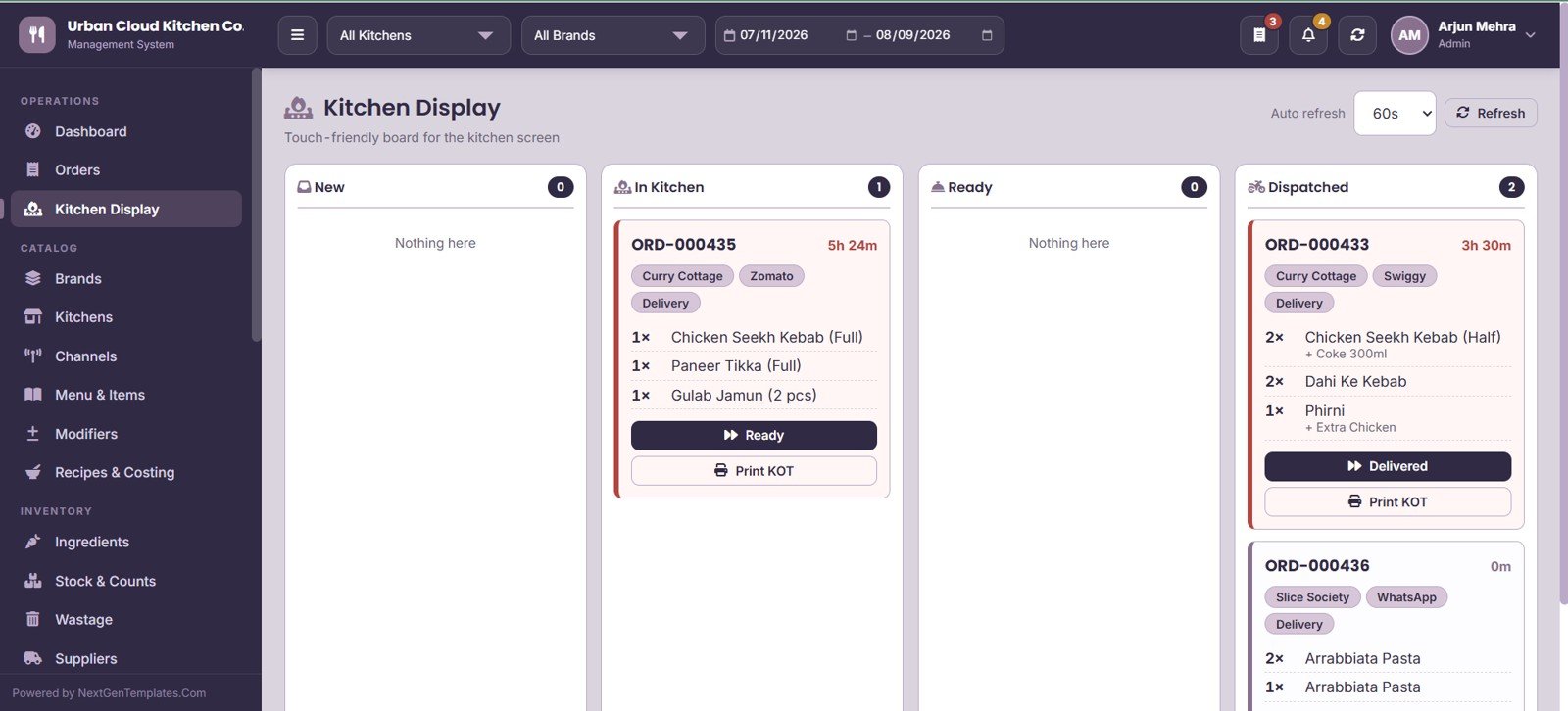
- Live Kitchen Display System. A three-lane KDS board (New, In Kitchen, Ready, Dispatched) auto-refreshes every 60 seconds, shows elapsed time per ticket, and prints KOTs directly from the browser.
- Recipe-linked inventory. Each menu item maps to a recipe of ingredients. When an order is delivered, the system deducts theoretical consumption from stock, so food cost percentage and variance are calculated rather than estimated.
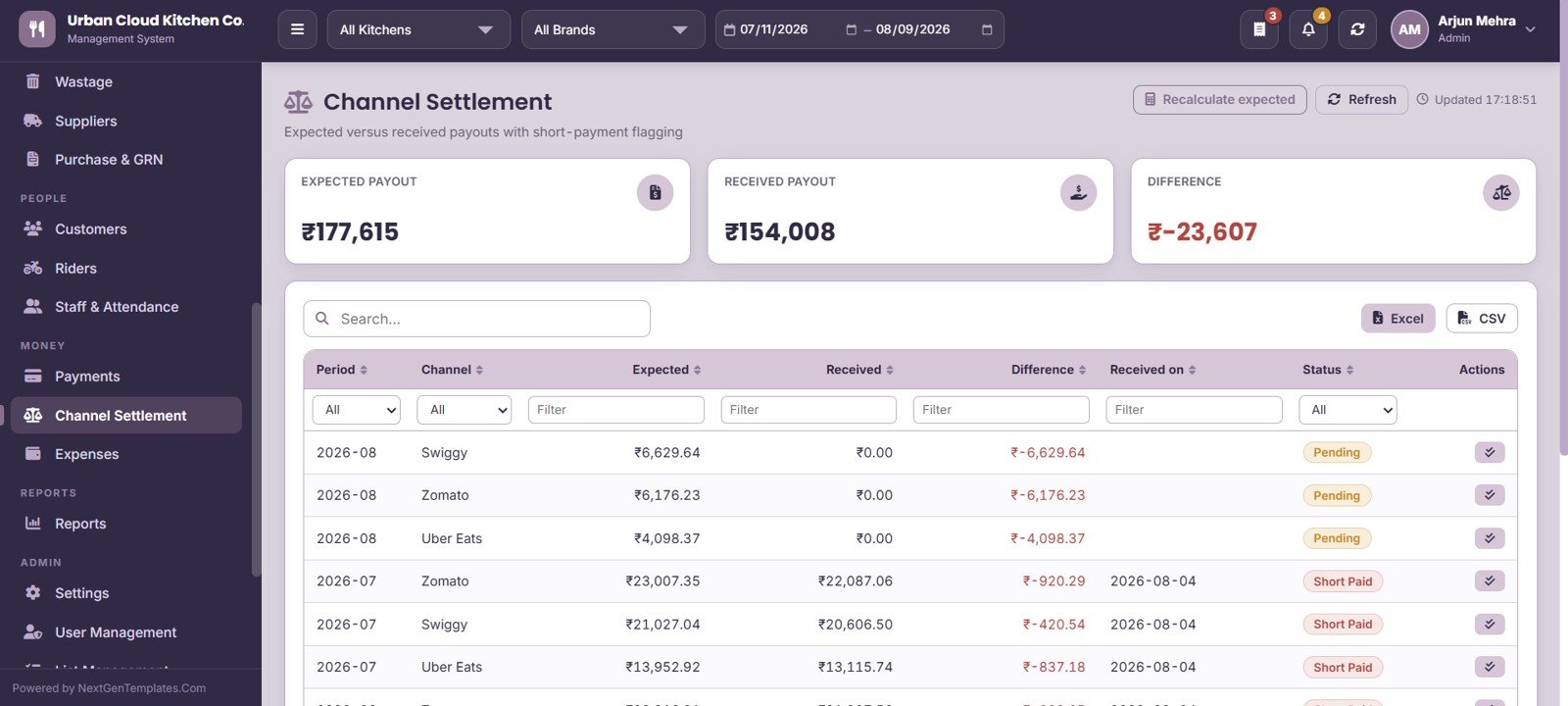
- Channel commission and settlement tracking. Store commission percentage, payment cycle and tax handling per channel, then compare expected payout against what actually landed – short payments are flagged automatically.
- 19 management reports grouped into Sales, Operations, Costing, Inventory, Purchase and Money, including the Menu Engineering Matrix and Consumption vs Theoretical variance report.
- Role-based access control with Admin and User roles, failed-login tracking, and a full audit log of every create, update, delete, login and settings change.
- Runs entirely on your Google account. Data lives in your own Google Sheet. No external server, no per-user fee, no vendor lock-in.
The application is built with Google Apps Script web apps, deployed from your own Drive, so the database and the code both stay under your control.
Screens and Modules Explained
1. Login Page
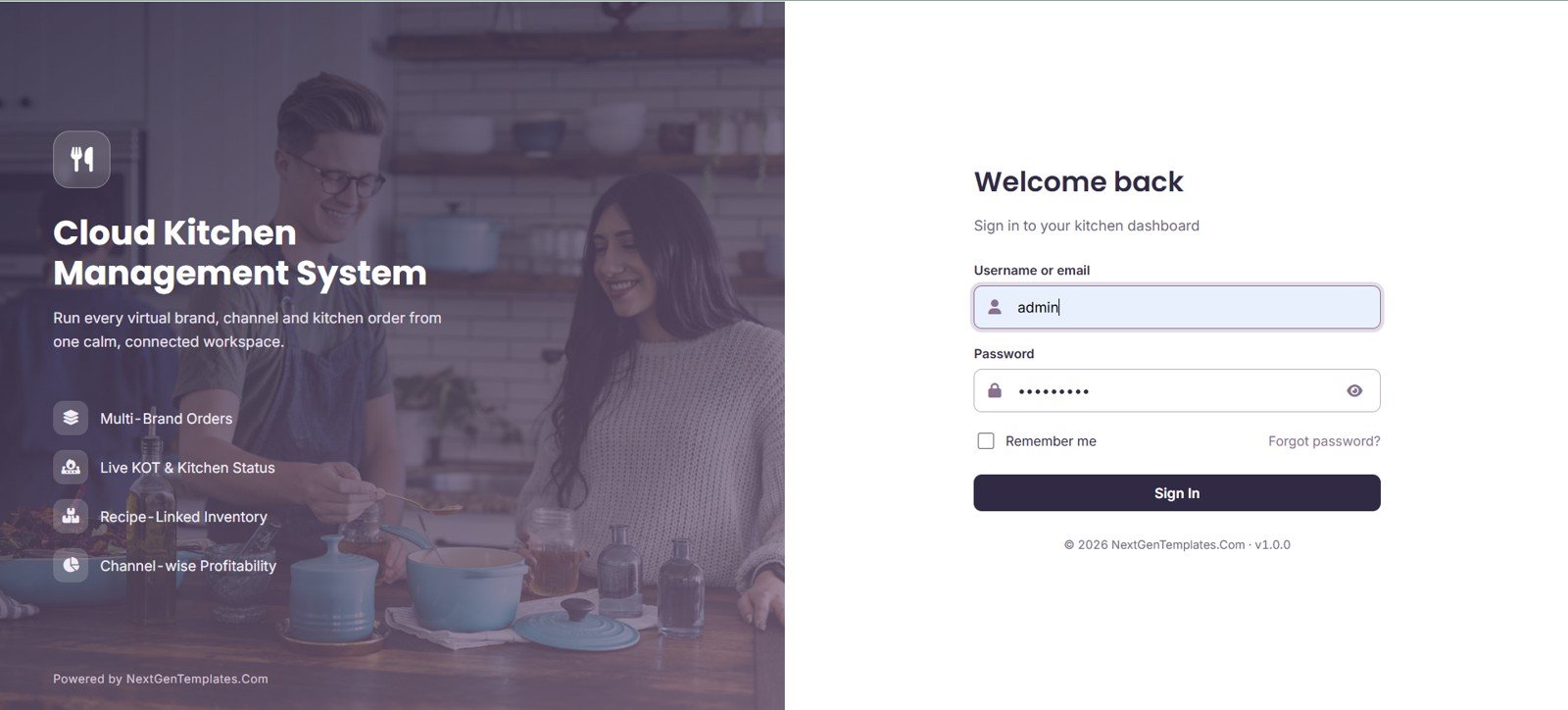
The sign-in screen for the cloud kitchen workspace, with username or email, password, Remember Me and a Forgot Password link. The left panel highlights the four pillars of the system: Multi-Brand Orders, Live KOT and Kitchen Status, Recipe-Linked Inventory and Channel-wise Profitability.
2. Dashboard
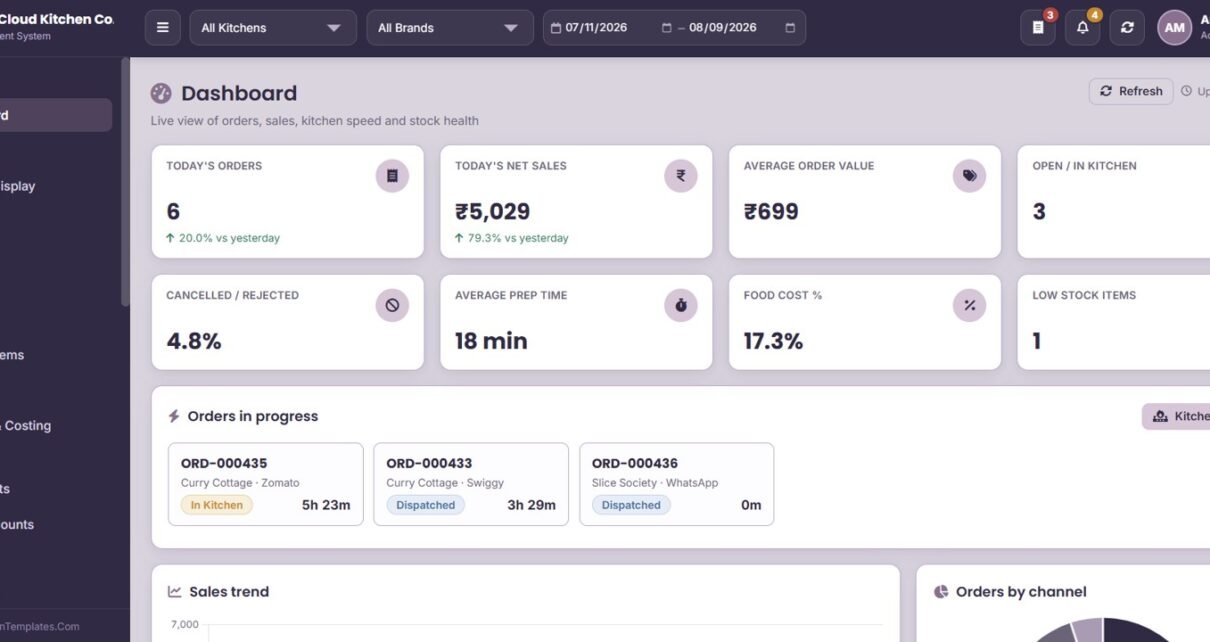
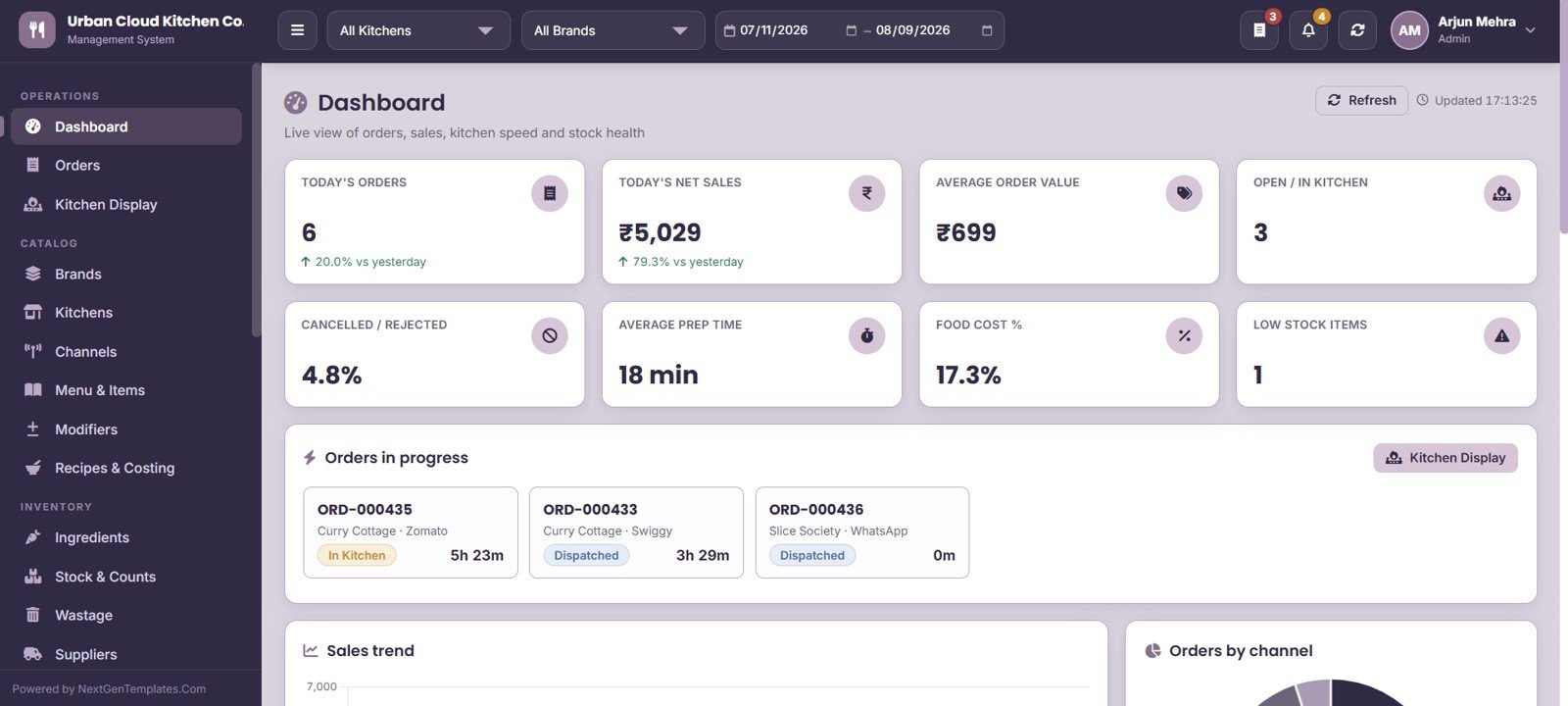
Eight KPI cards summarise the trading day: Today’s Orders, Today’s Net Sales, Average Order Value, Open / In Kitchen, Cancelled / Rejected, Average Prep Time, Food Cost % and Low Stock Items. Below the cards sit an Orders in Progress panel, a Sales Trend chart and an Orders by Channel breakdown, all filtered by Kitchen, Brand and a From/To date range.
3. Orders
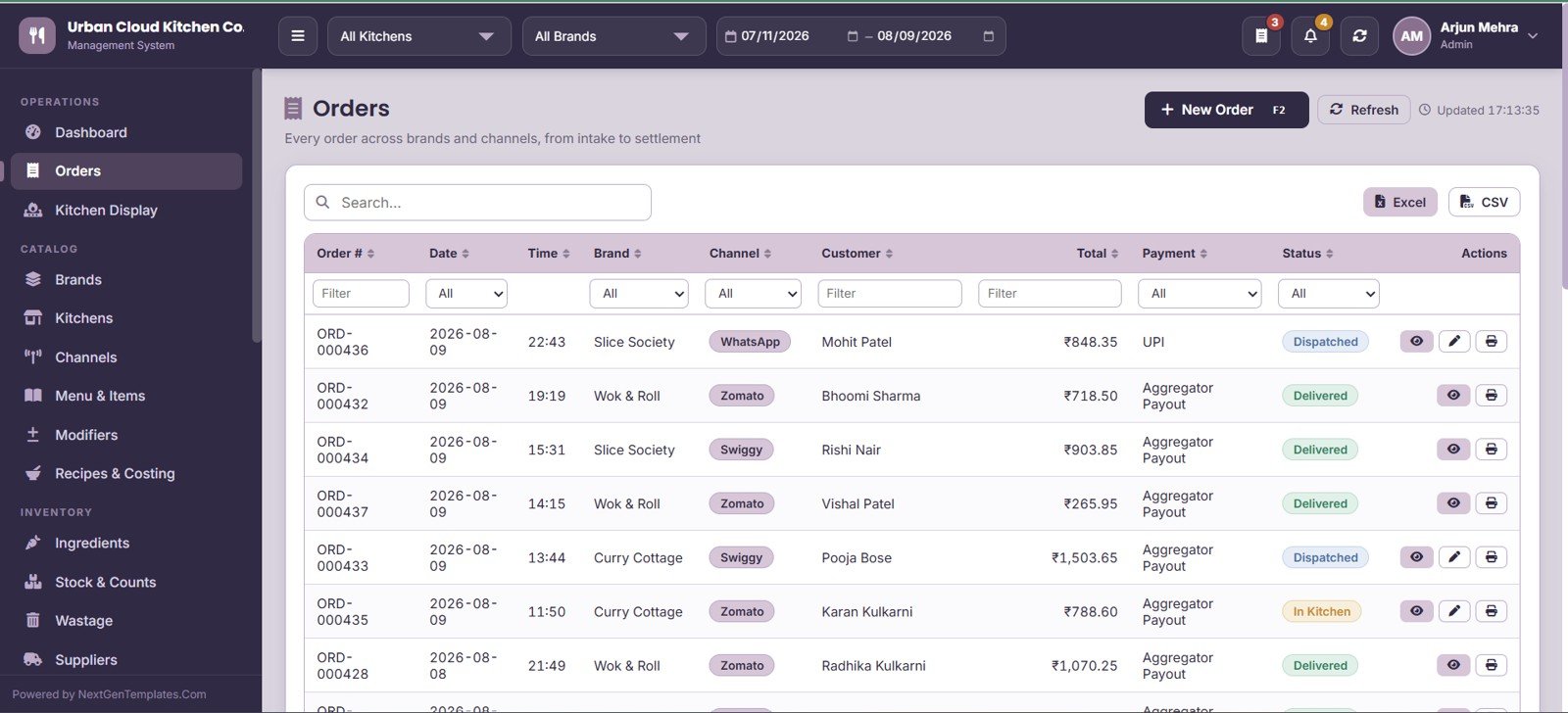
The central order register showing Order #, Date, Time, Brand, Channel, Customer, Total, Payment and Status. New orders are raised from here, and the whole grid exports to Excel or CSV in one click.
4. Order Filters and Actions
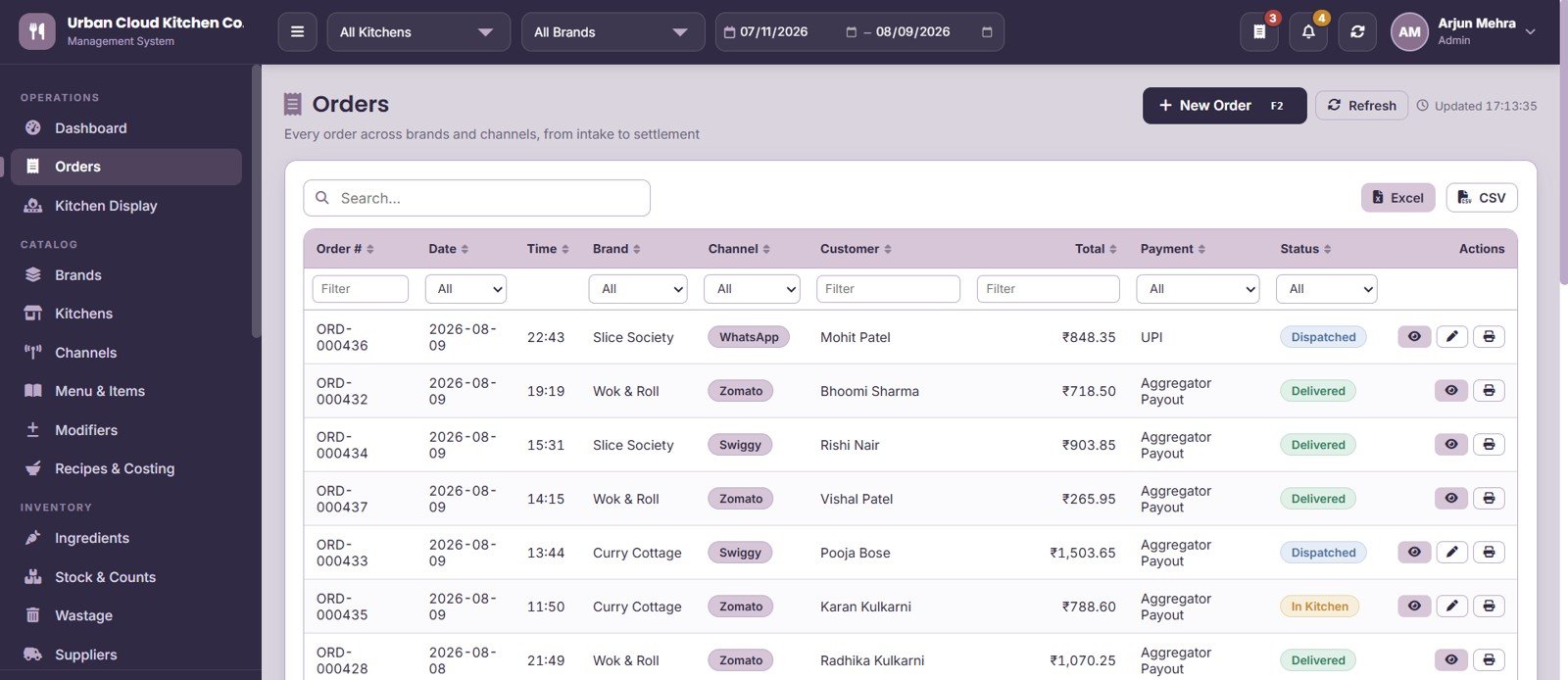
Column-level filters on Date, Brand, Channel, Customer, Total, Payment and Status let you isolate any slice of the order book in seconds. Row actions cover View, Edit and Print, plus one-click status moves to In Kitchen, Dispatched and Delivered.
5. Kitchen Display
A live KDS board with New, In Kitchen, Ready and Dispatched lanes, auto-refreshing on a 60-second cycle. Each ticket shows brand, channel, delivery label, elapsed time and item quantity, with Ready, Delivered and Print KOT buttons for the production team.
6. Brands
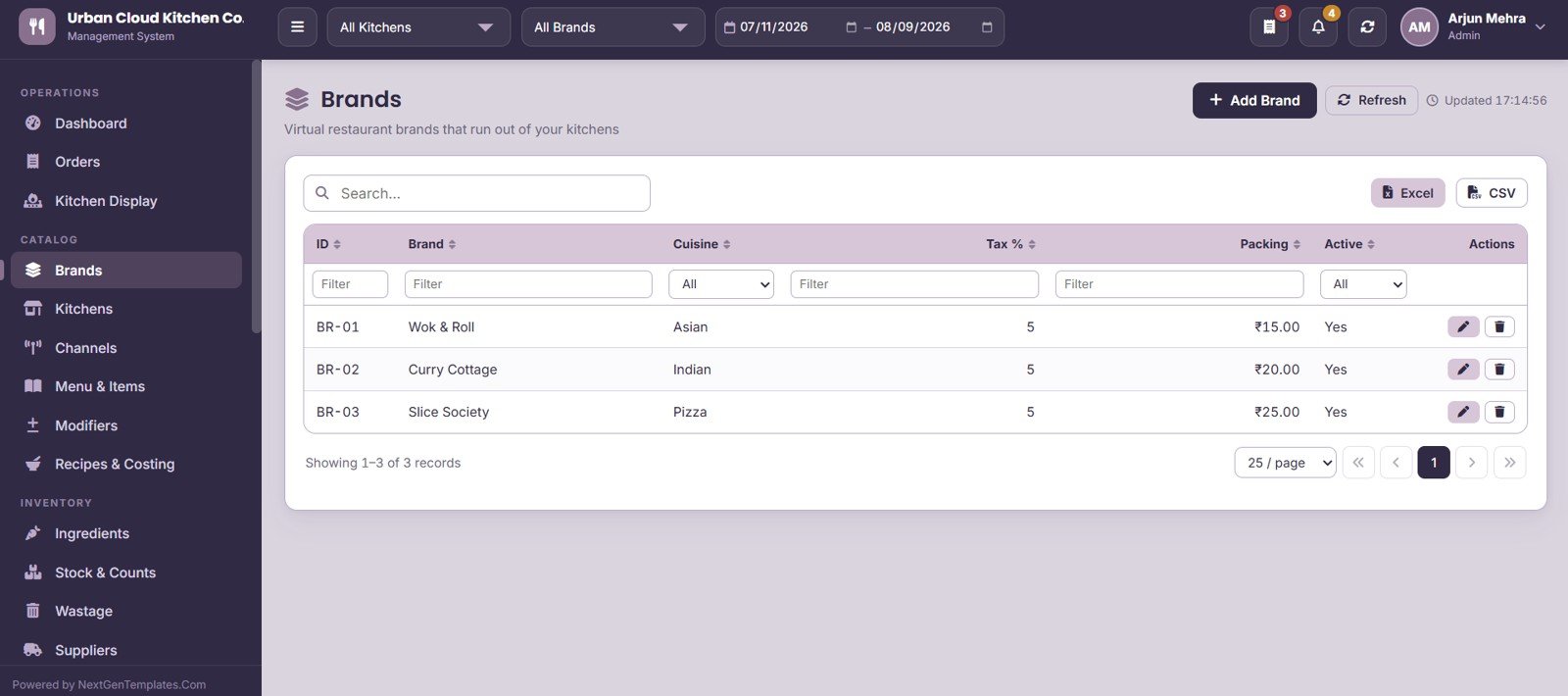
Manage every virtual restaurant brand running out of your kitchens – Wok & Roll, Curry Cottage, Slice Society and so on. Each brand carries its own Cuisine, Tax %, Packing charge and Active flag, so brand-level P&L stays clean.
7. Kitchens / Outlets
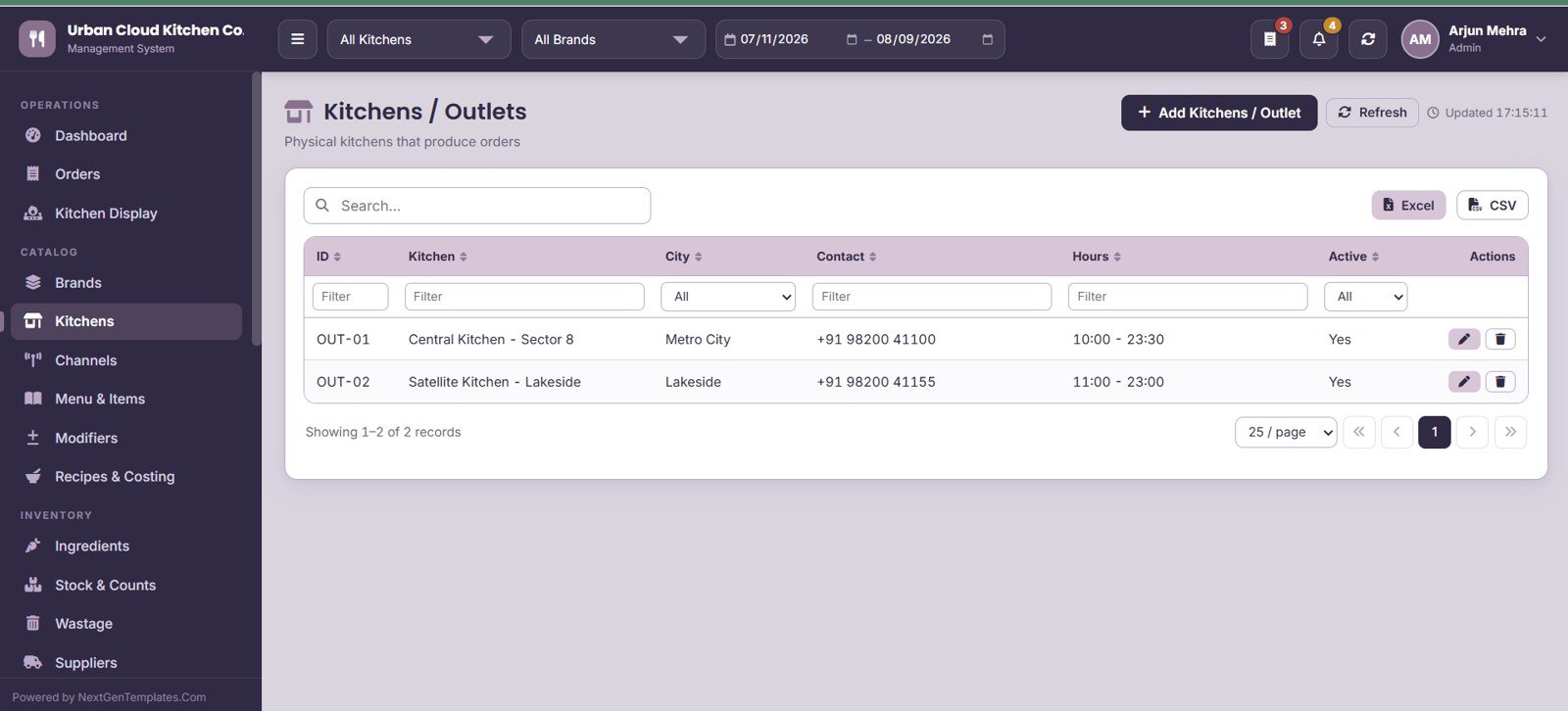
The register of physical production units – for example Central Kitchen Sector 8 and Satellite Kitchen Lakeside – with City, Contact, operating Hours and Active status. Every order and every stock balance is tied back to one of these kitchens.
8. Channels
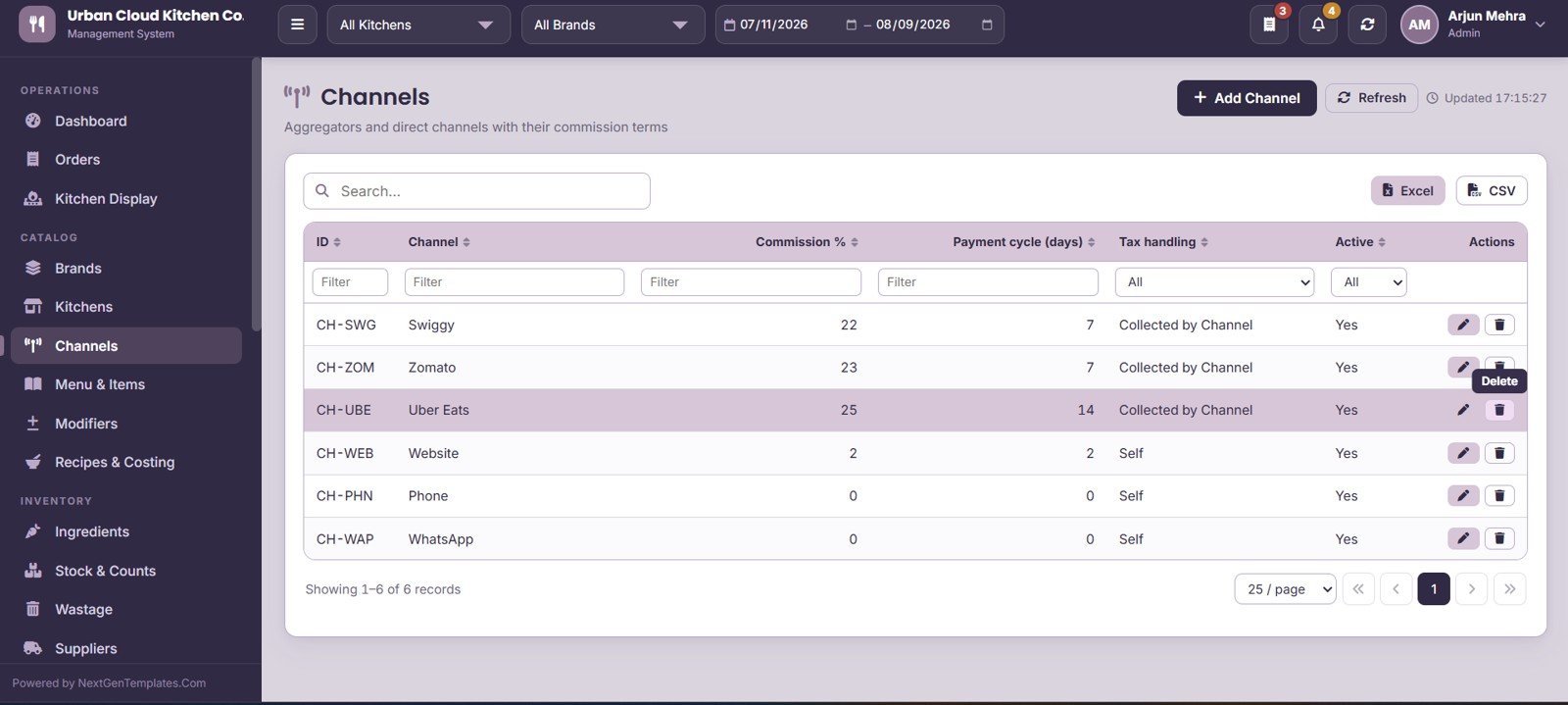
Maintain Swiggy, Zomato, Uber Eats, Website, Phone and WhatsApp as separate sales channels. Each stores its Commission %, Payment cycle in days and Tax handling rule, which is what drives channel-wise profitability and settlement later.
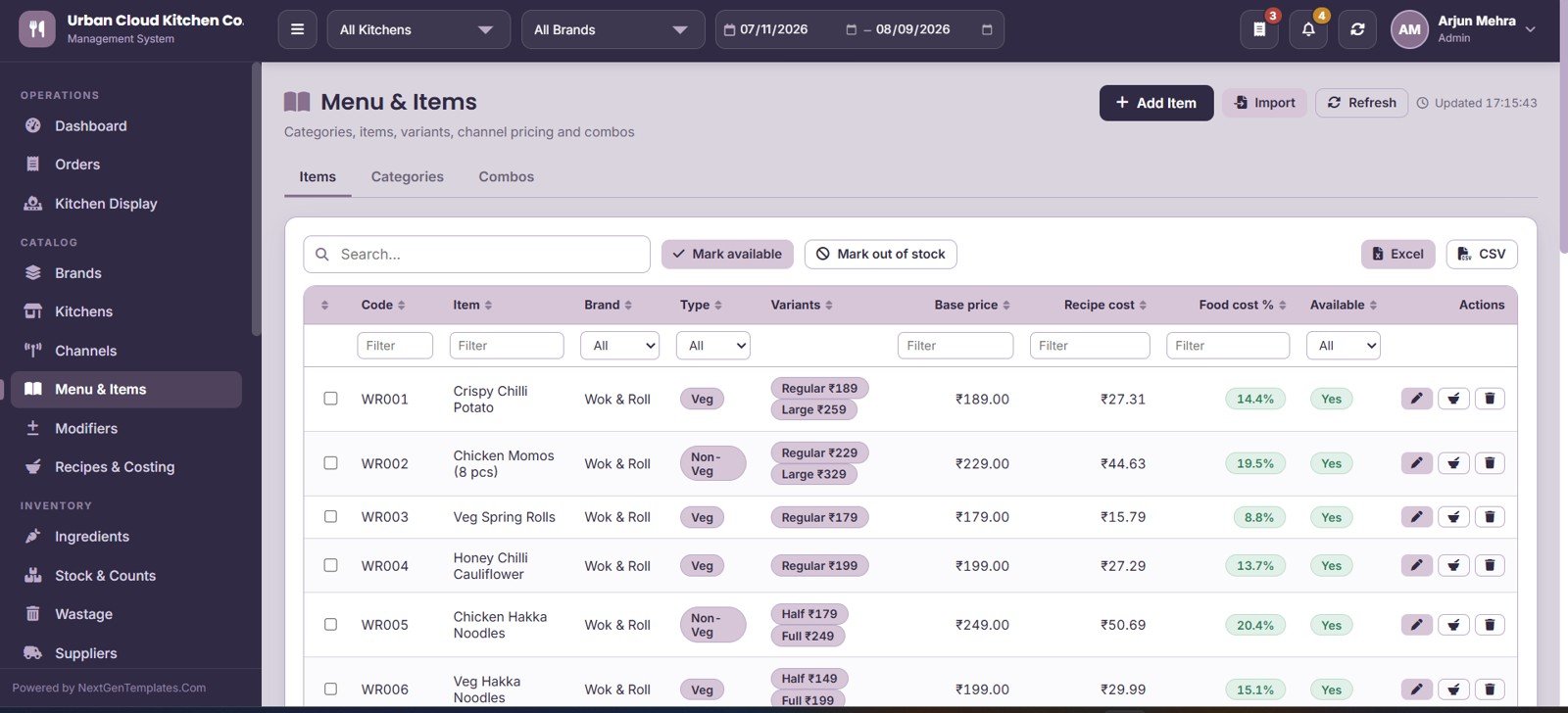
9. Menu & Items
Three tabs – Items, Categories and Combos – hold the full menu with Code, Brand, Type, Variants, Base price, Recipe cost, Food cost % and Availability. Bulk Mark Available / Mark Out of Stock actions let you kill an item across every channel the moment an ingredient runs out.
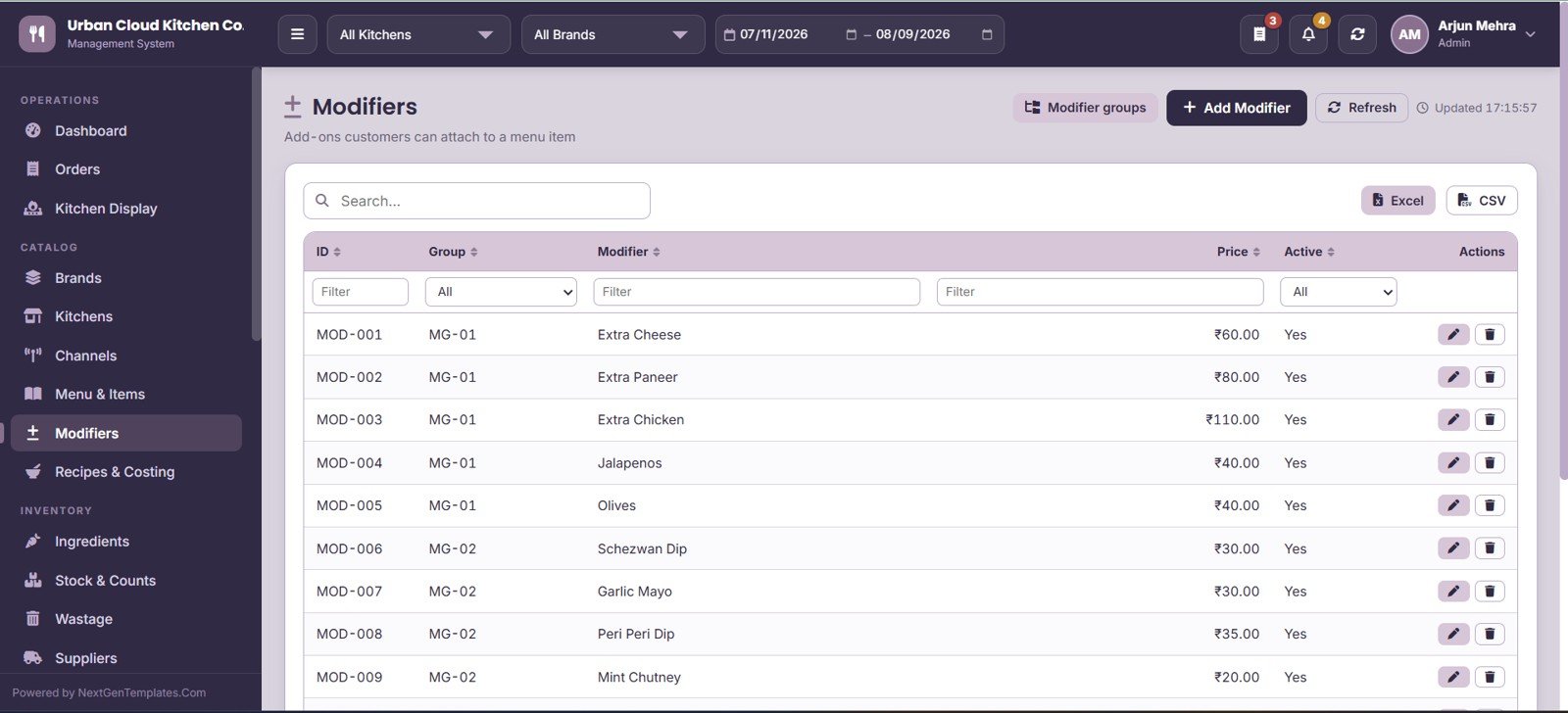
10. Modifiers
Add-ons that customers attach to menu items – Extra Cheese, Extra Paneer, Extra Chicken, Jalapenos, Olives, Garlic Mayo – organised into modifier groups. Each modifier carries its own price and active flag so upsell revenue is captured properly.
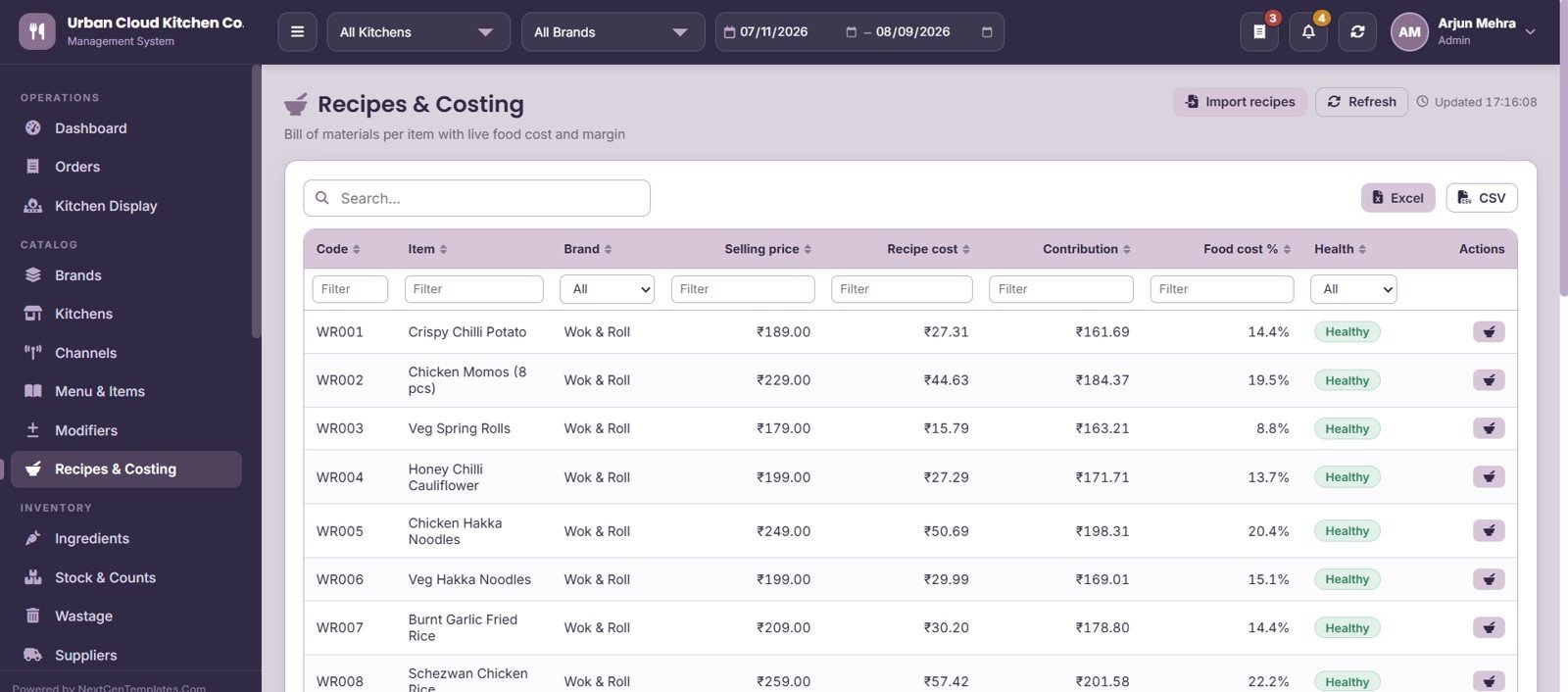
11. Recipes & Costing
Connects every menu item to its recipe cost and shows Selling price, Recipe cost, Contribution, Food cost % and a Health indicator side by side. This is the screen that tells you which dishes are quietly losing money on discount-heavy channels.
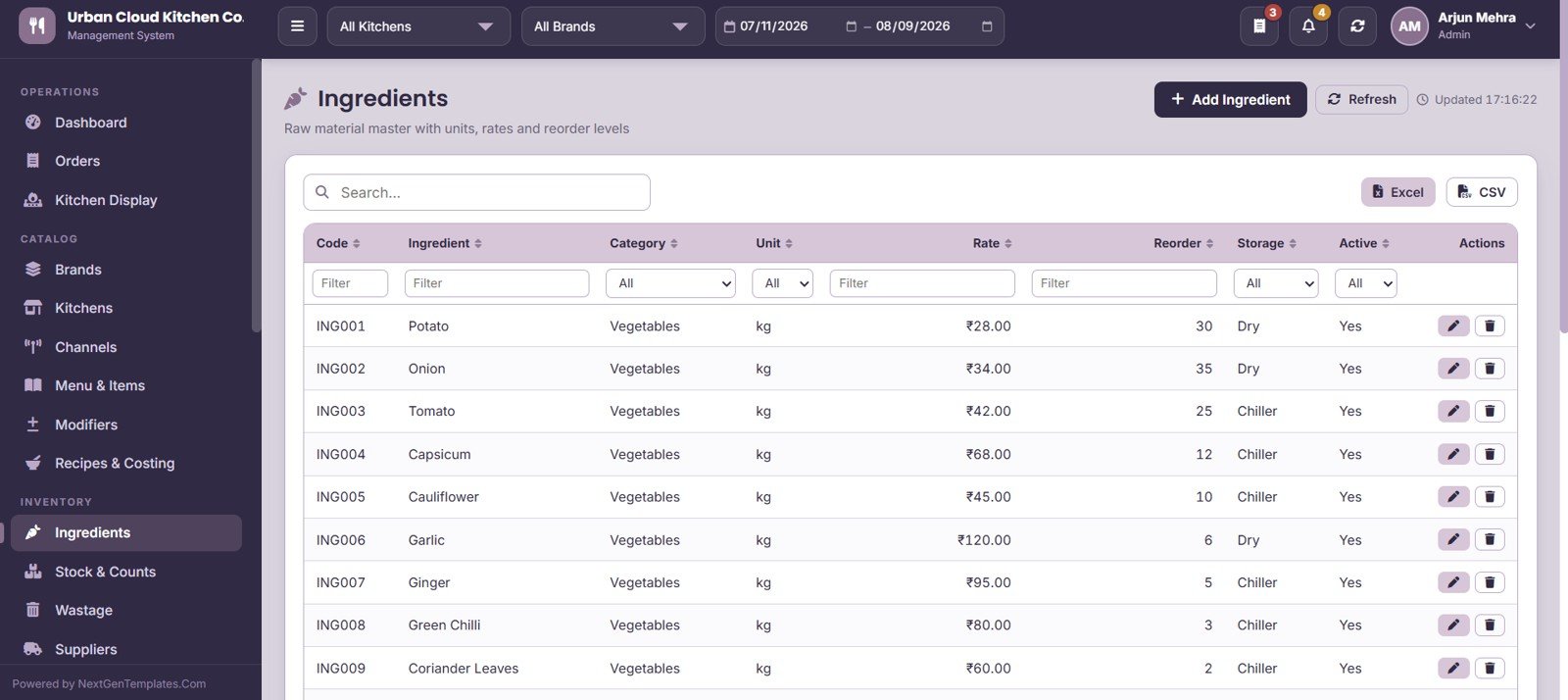
12. Ingredients
The raw material master with Code, Ingredient, Category, Unit, Rate, Reorder level, Storage location and Active flag. Reorder levels here are what trigger the Low Stock Items count on the dashboard.
13. Stock & Counts
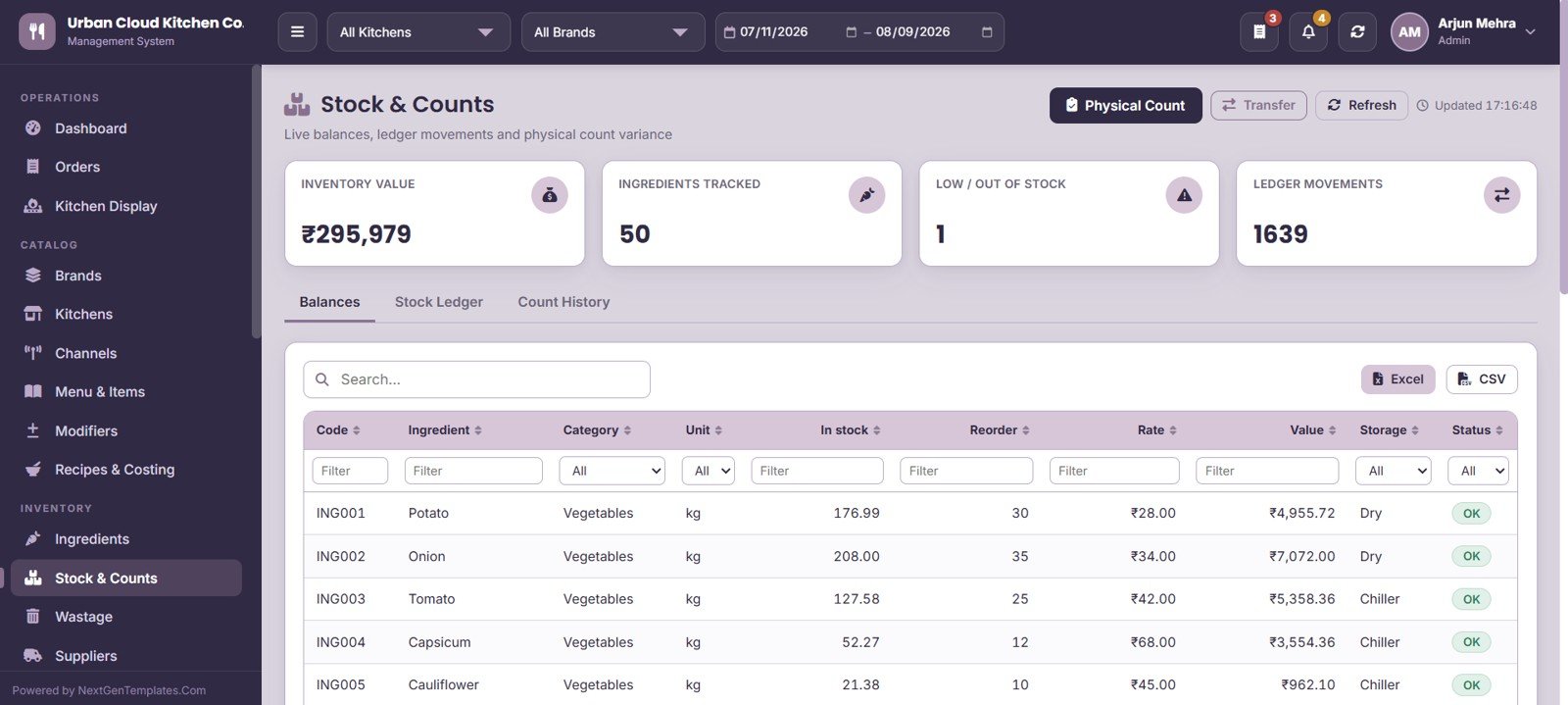
Four cards – Inventory Value, Ingredients Tracked, Low / Out of Stock and Ledger Movements – sit above three tabs: Balances, Stock Ledger and Count History. Physical Count and Transfer actions let you reconcile real shelf stock against system stock and record the variance.
14. Wastage
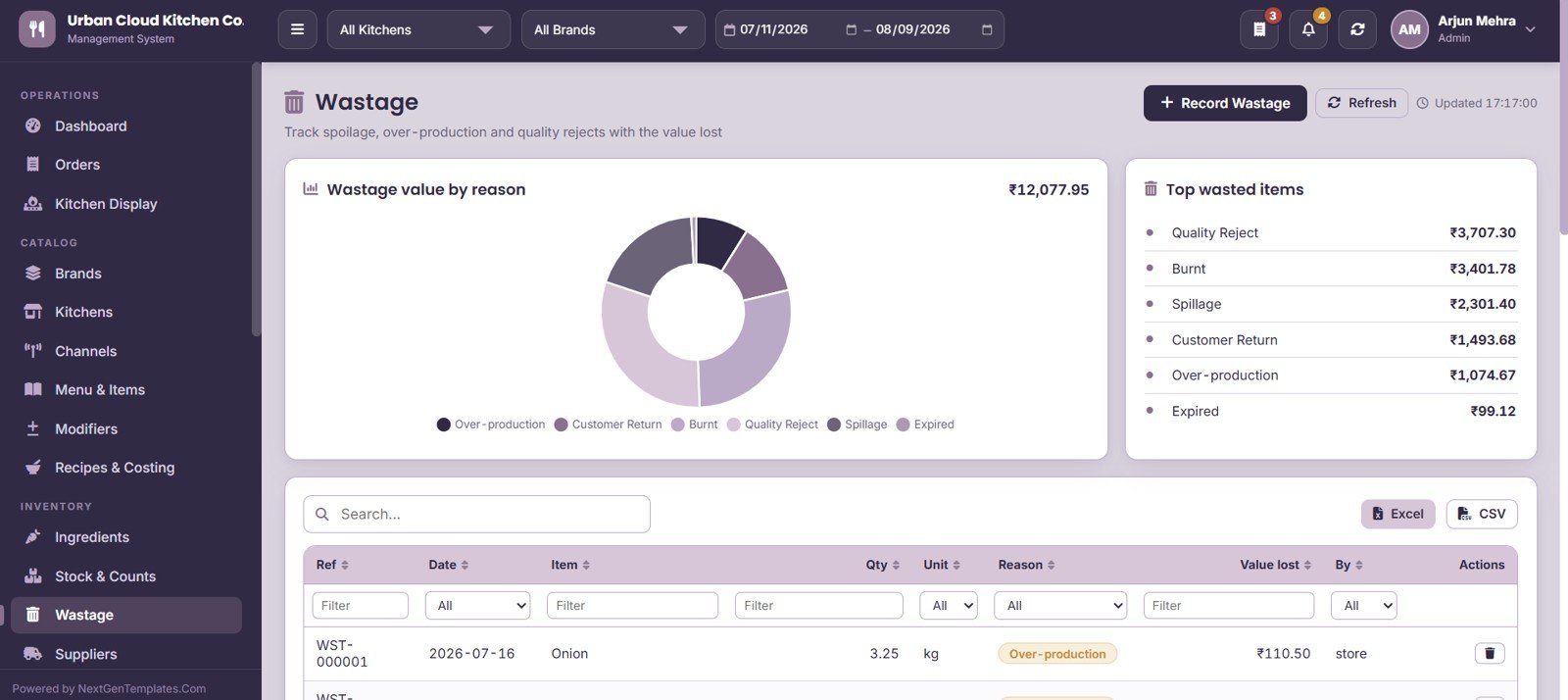
Records spoilage, over-production and quality rejects against six reasons – Over-production, Customer Return, Burnt, Quality Reject, Spillage and Expired – with the value lost calculated per entry. Two panels chart Wastage value by reason and Top wasted items.
15. Suppliers
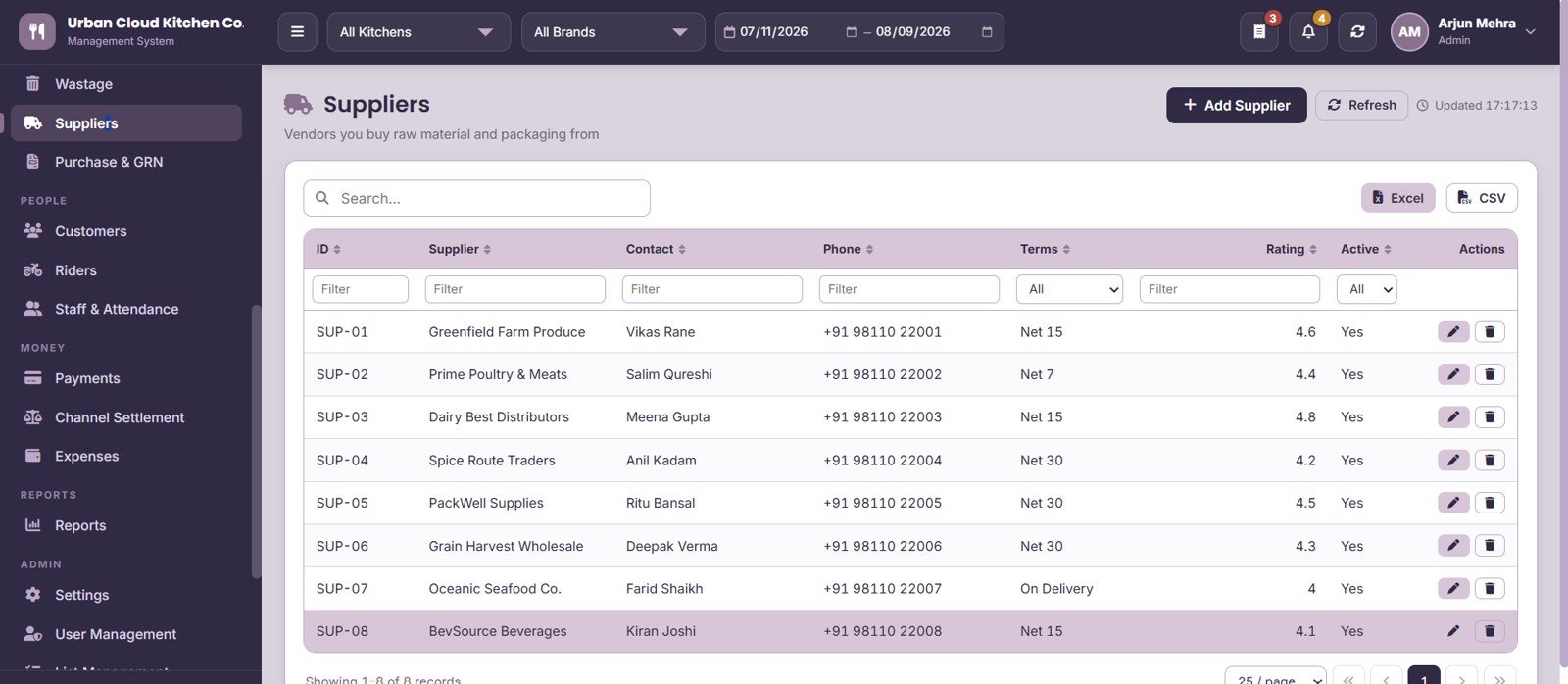
Vendor master for raw material and packaging suppliers, holding Contact, Phone, payment Terms, Rating and Active status. Ratings help you spot which vendors keep missing delivery windows.
16. Purchase & GRN
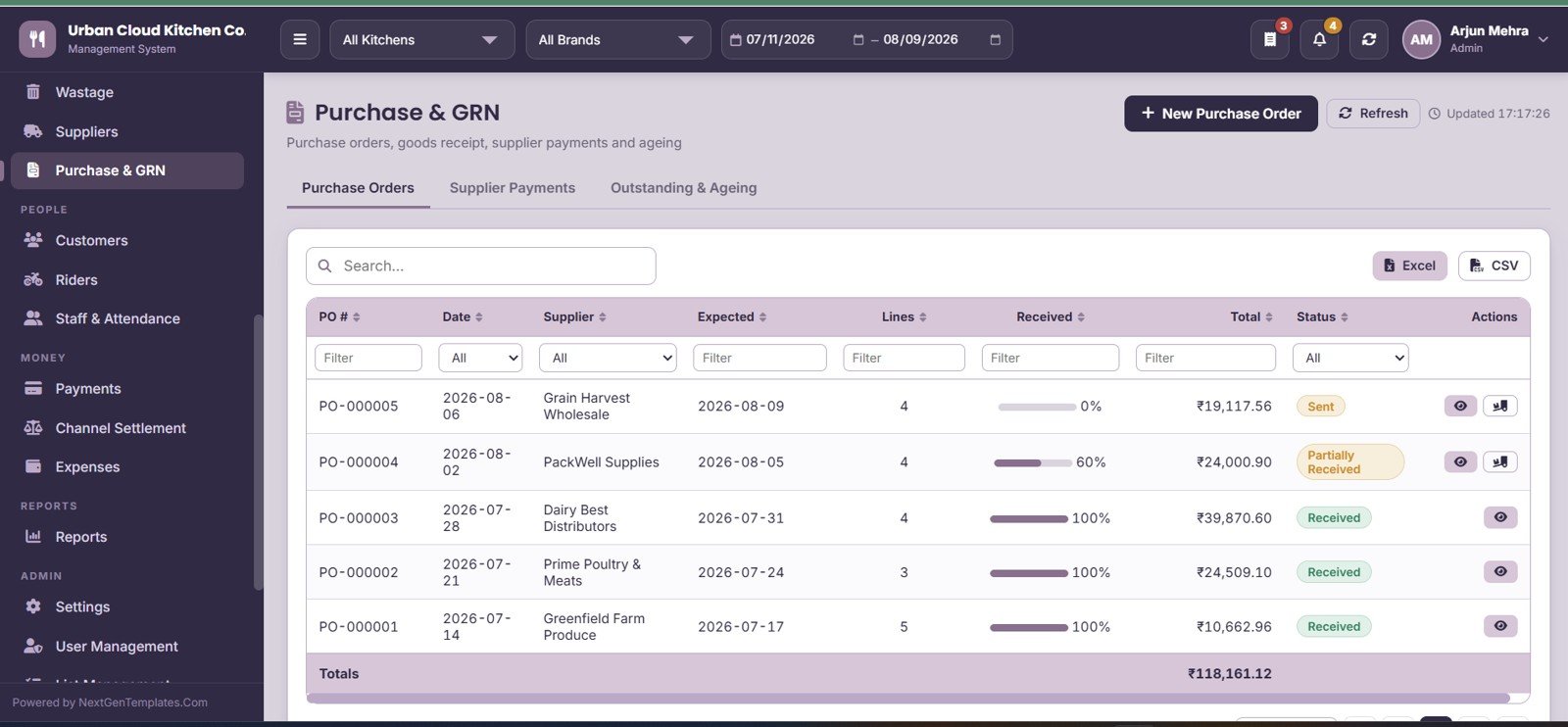
Three tabs cover Purchase Orders, Supplier Payments and Outstanding & Ageing. Each PO tracks Date, Supplier, Expected date, Lines, Received quantity, Total and Status, so partial receipts and pending goods stay visible.
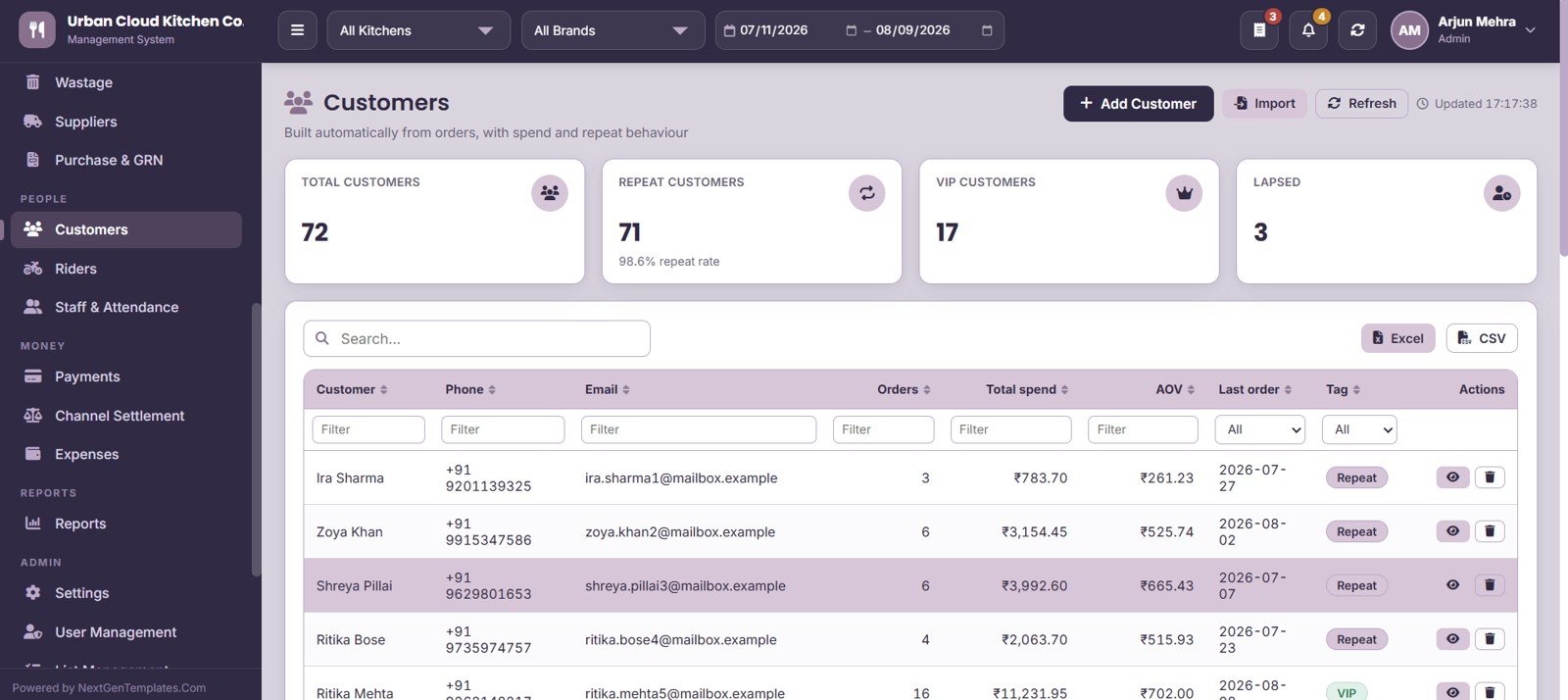
17. Customers
Customer records build themselves from orders, with four cards tracking Total Customers, Repeat Customers, VIP Customers and Lapsed. The grid shows Orders, Total spend, AOV, Last order date and a Tag for segmentation.
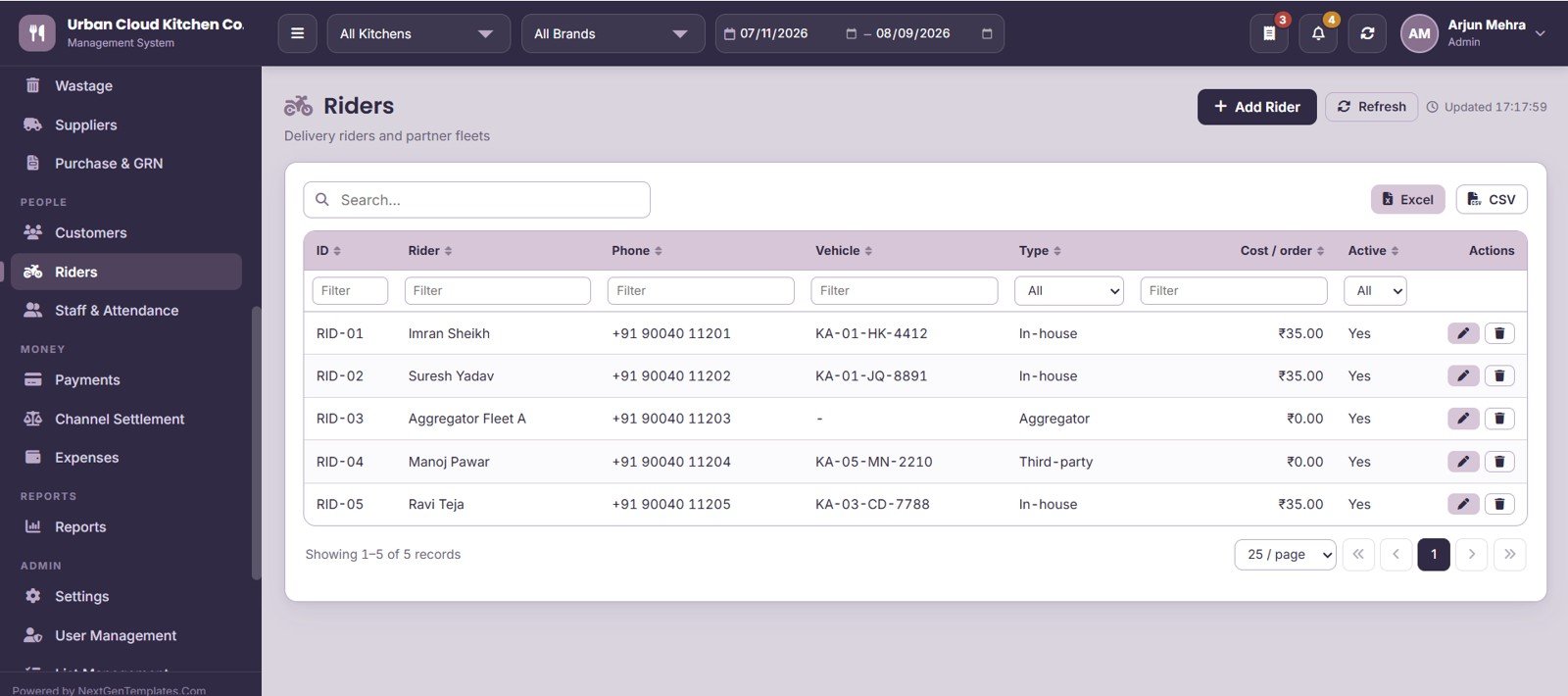
18. Riders
Manages your own delivery riders and partner fleets with Phone, Vehicle, Type and Cost per order. Rider cost per order feeds the Rider Performance report and the true delivery cost of direct orders.
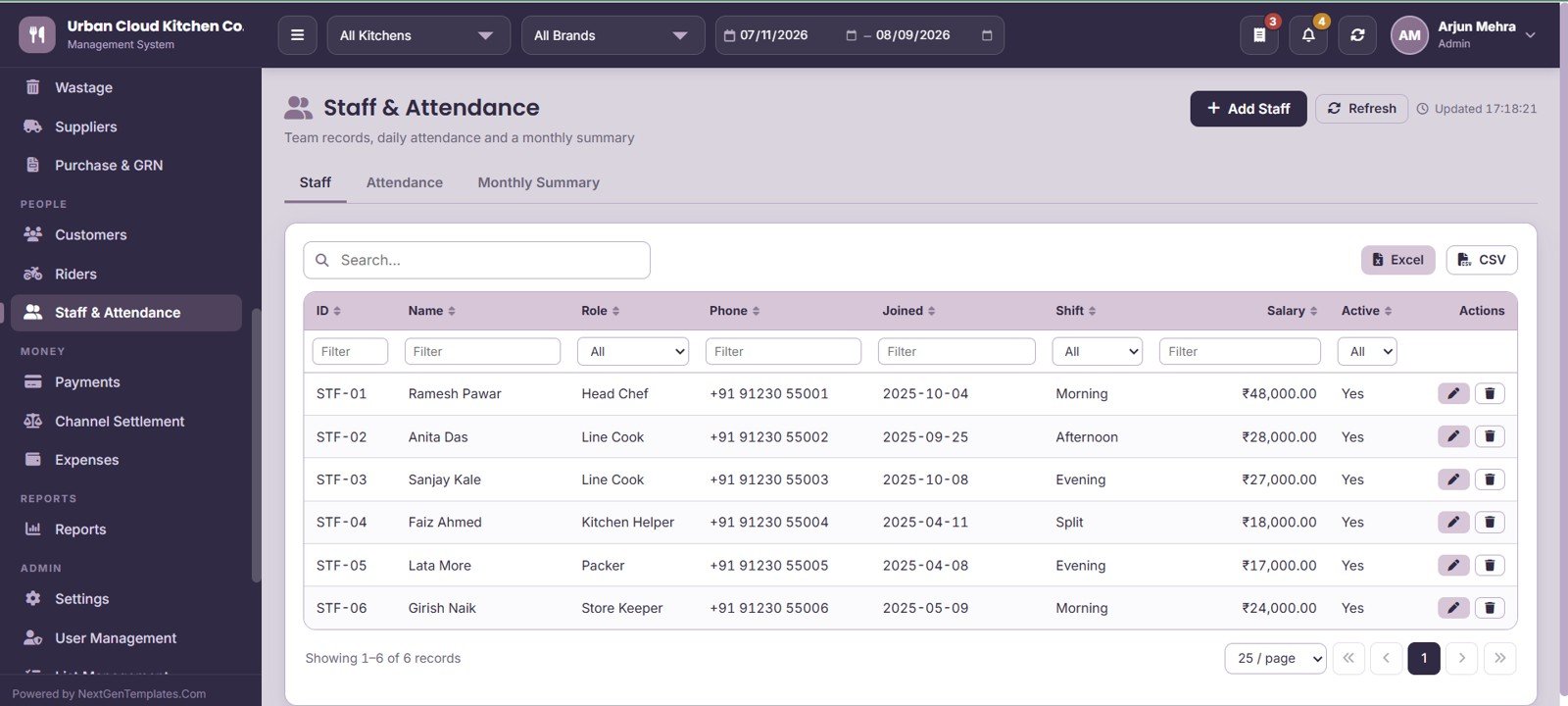
19. Staff & Attendance
Three tabs – Staff, Attendance and Monthly Summary – hold Name, Role, Phone, Joined date, Shift, Salary and Active status. Daily attendance rolls up into a monthly summary you can export for payroll.
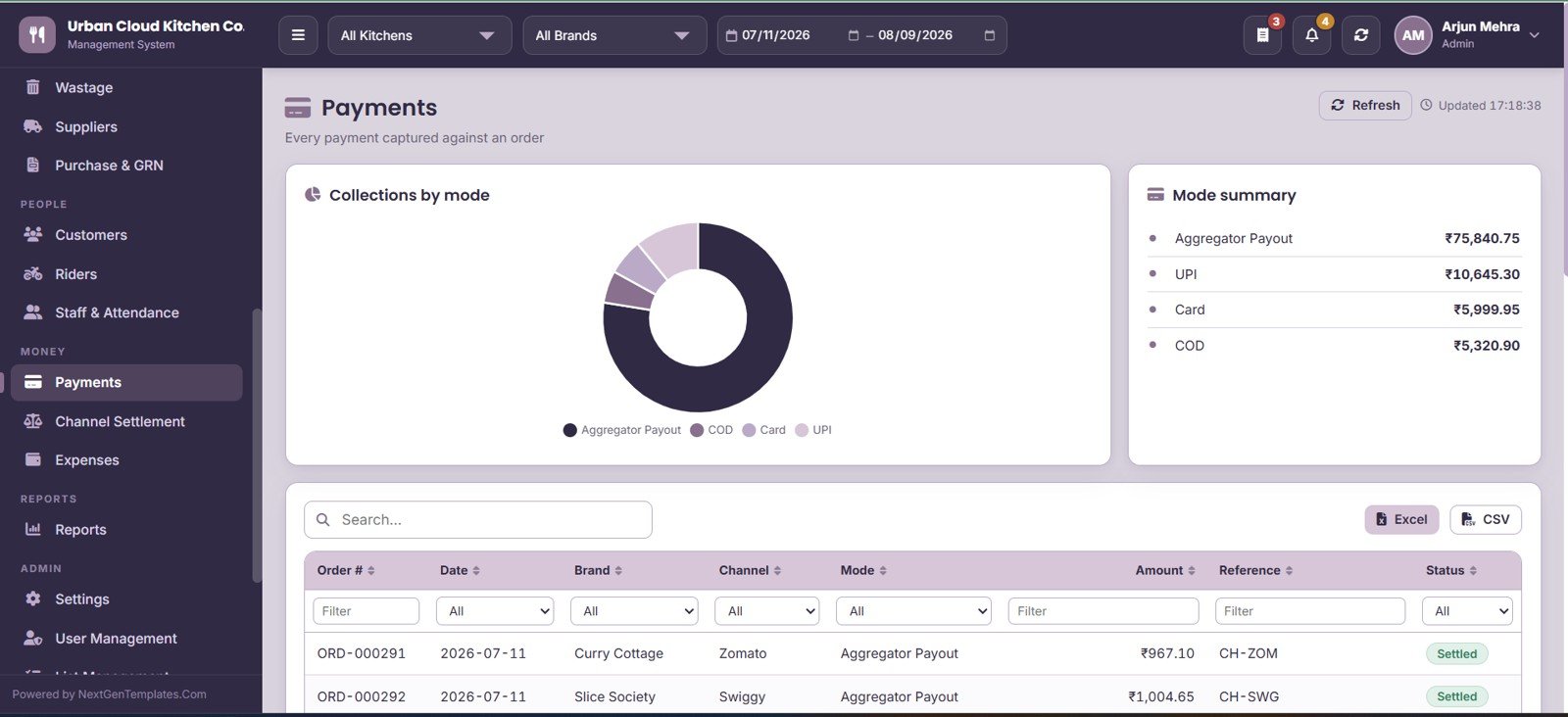
20. Payments
Captures every payment against an order with Order #, Date, Brand, Channel, Mode, Amount, Reference and Status. A Collections by mode panel and Mode summary show exactly how much came in as cash, UPI, card or aggregator credit.
21. Channel Settlement
Compares Expected Payout against Received Payout per period and channel, with the Difference flagged and a Received on date recorded. A Recalculate Expected action rebuilds expected payouts from order value minus channel commission.
22. Expenses
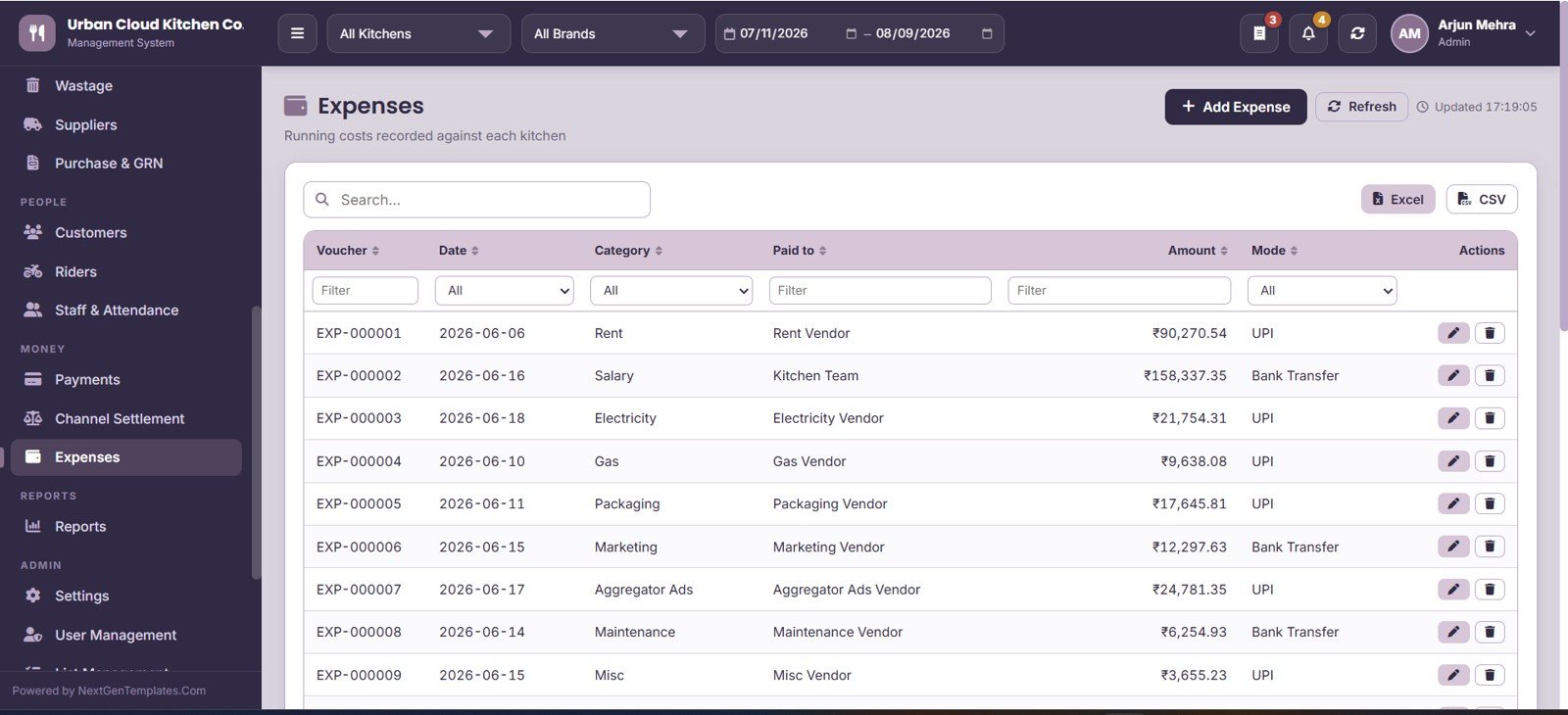
Records running costs against each kitchen with Voucher, Date, Category, Paid to, Amount and Mode. Expense categories are editable from List Management, so rent, gas, packaging and marketing all report separately.
23. Reports
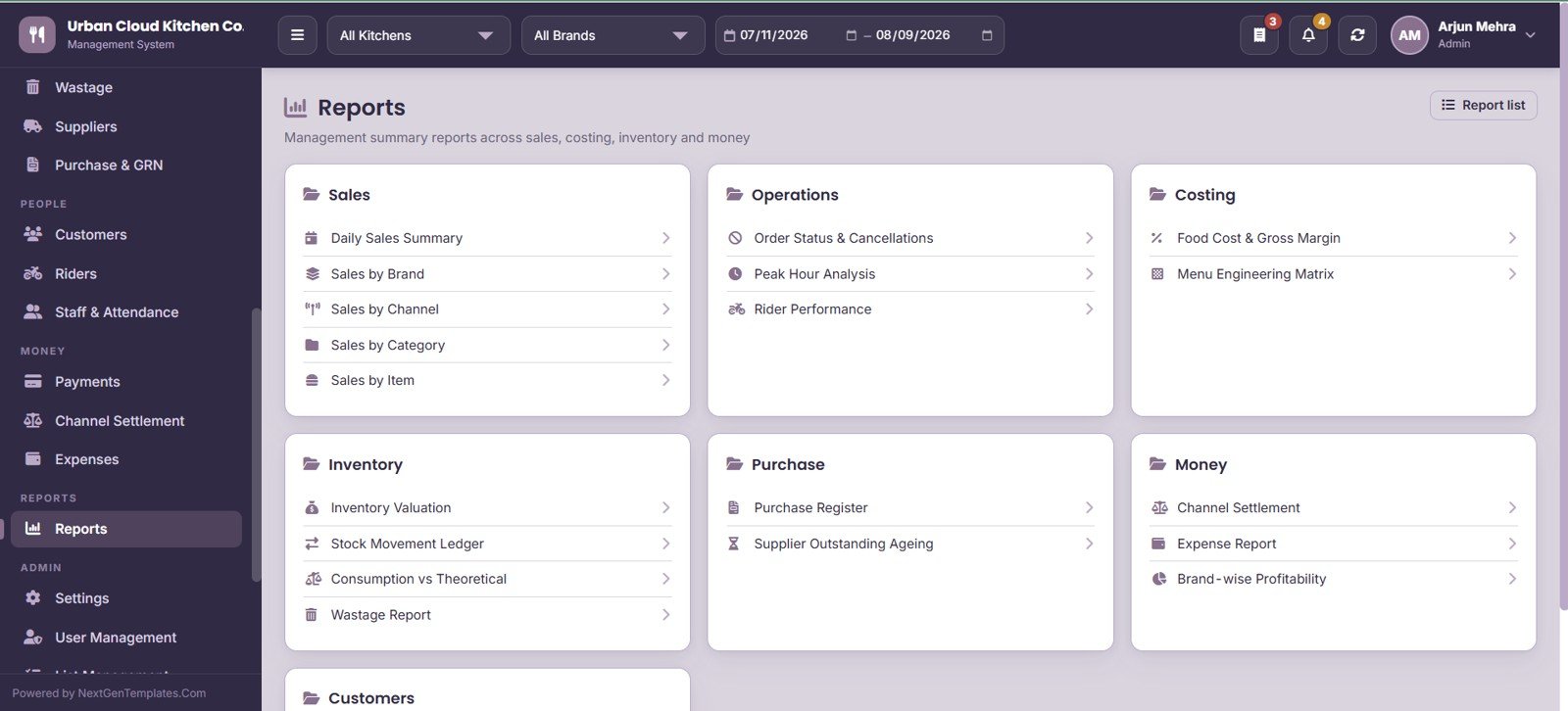
Nineteen management reports grouped into six families: Sales (Daily Sales Summary, Sales by Brand, Channel, Category, Item), Operations (Order Status & Cancellations, Peak Hour Analysis, Rider Performance), Costing (Food Cost & Gross Margin, Menu Engineering Matrix), Inventory (Valuation, Stock Movement Ledger, Consumption vs Theoretical, Wastage), Purchase (Register, Supplier Outstanding Ageing) and Money (Channel Settlement, Expense Report, Brand-wise Profitability).
24. Settings
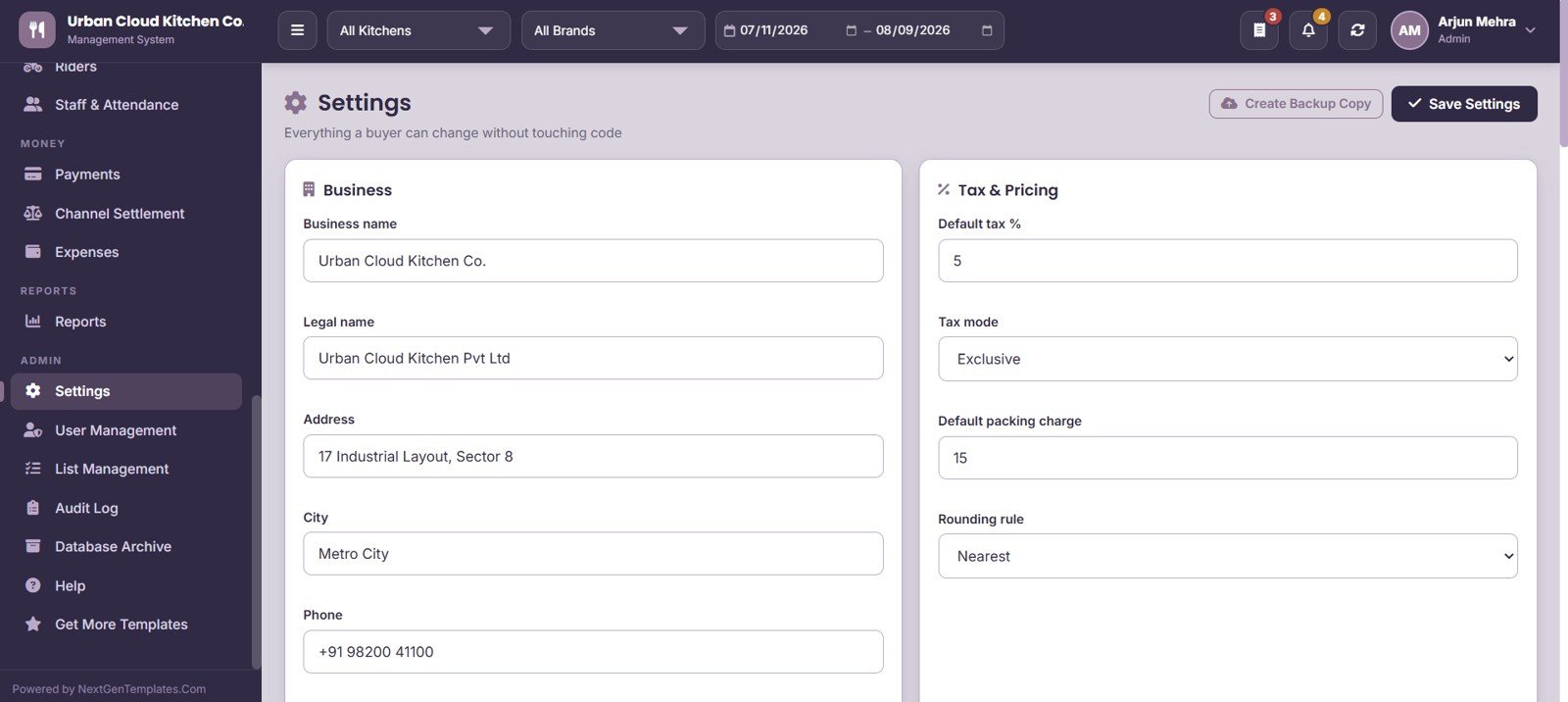
Business profile fields (Business name, Legal name, Address, City, Phone) sit alongside Tax & Pricing rules – Default tax %, Tax mode, Default packing charge and Rounding rule. A Create Backup Copy button snapshots the whole database before you make structural changes.
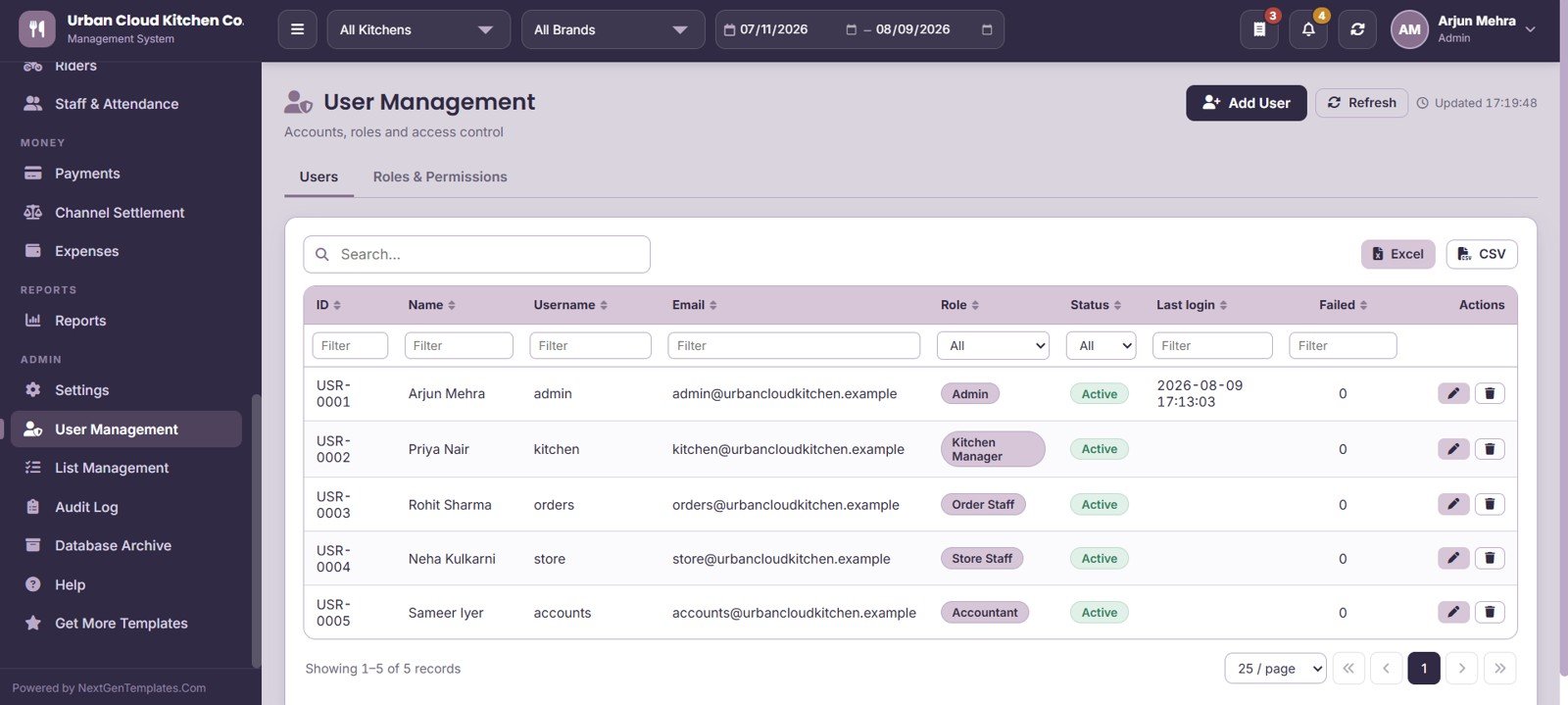
25. User Management
Two tabs – Users and Roles & Permissions – manage accounts with Name, Username, Email, Role, Status, Last login and Failed login count. Roles control which modules each team member can open, so a kitchen lead never sees settlement figures.
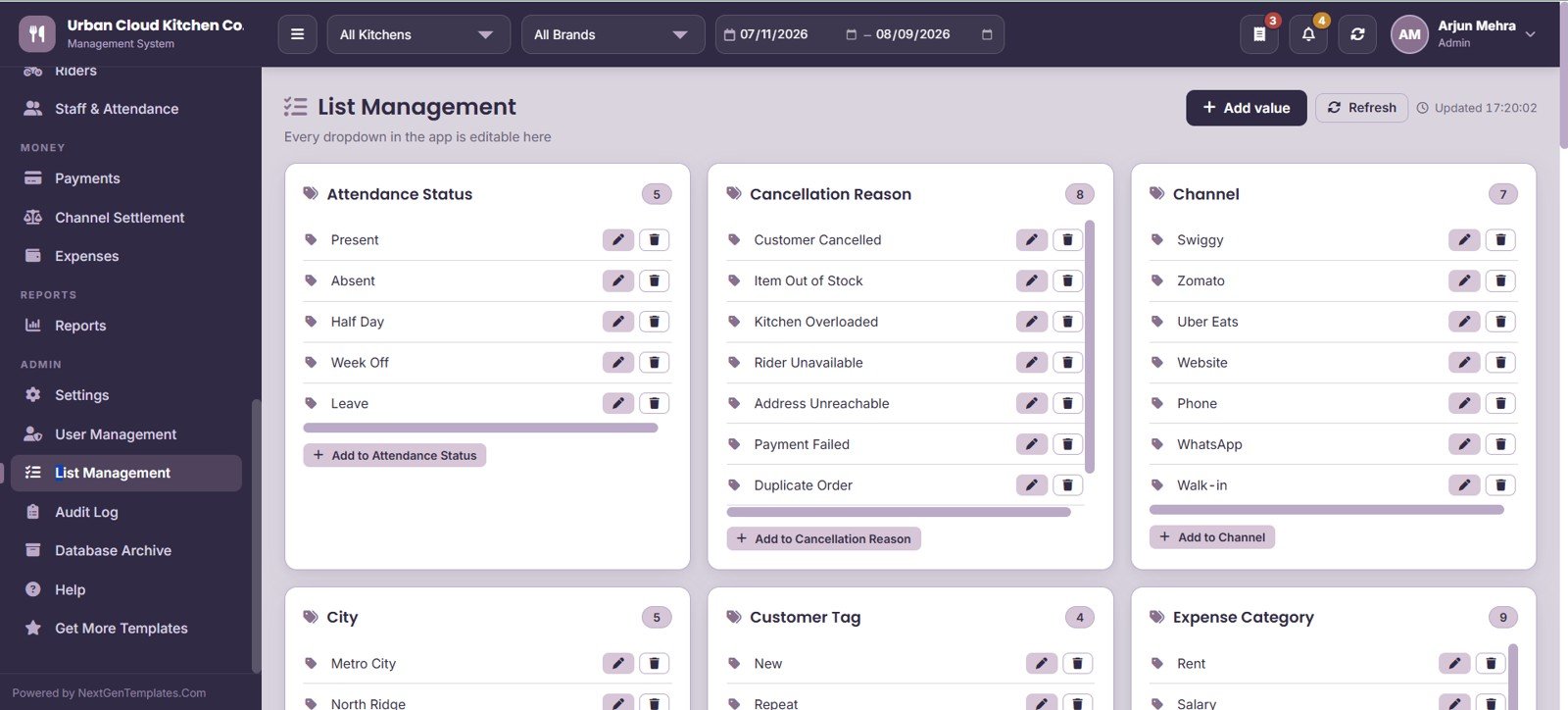
26. List Management
Every dropdown in the application is editable from this one screen – Attendance Status, Cancellation Reason, Channel, City, Customer Tag and Expense Category. Adding a new aggregator or a new cancellation reason takes seconds and needs no code change.
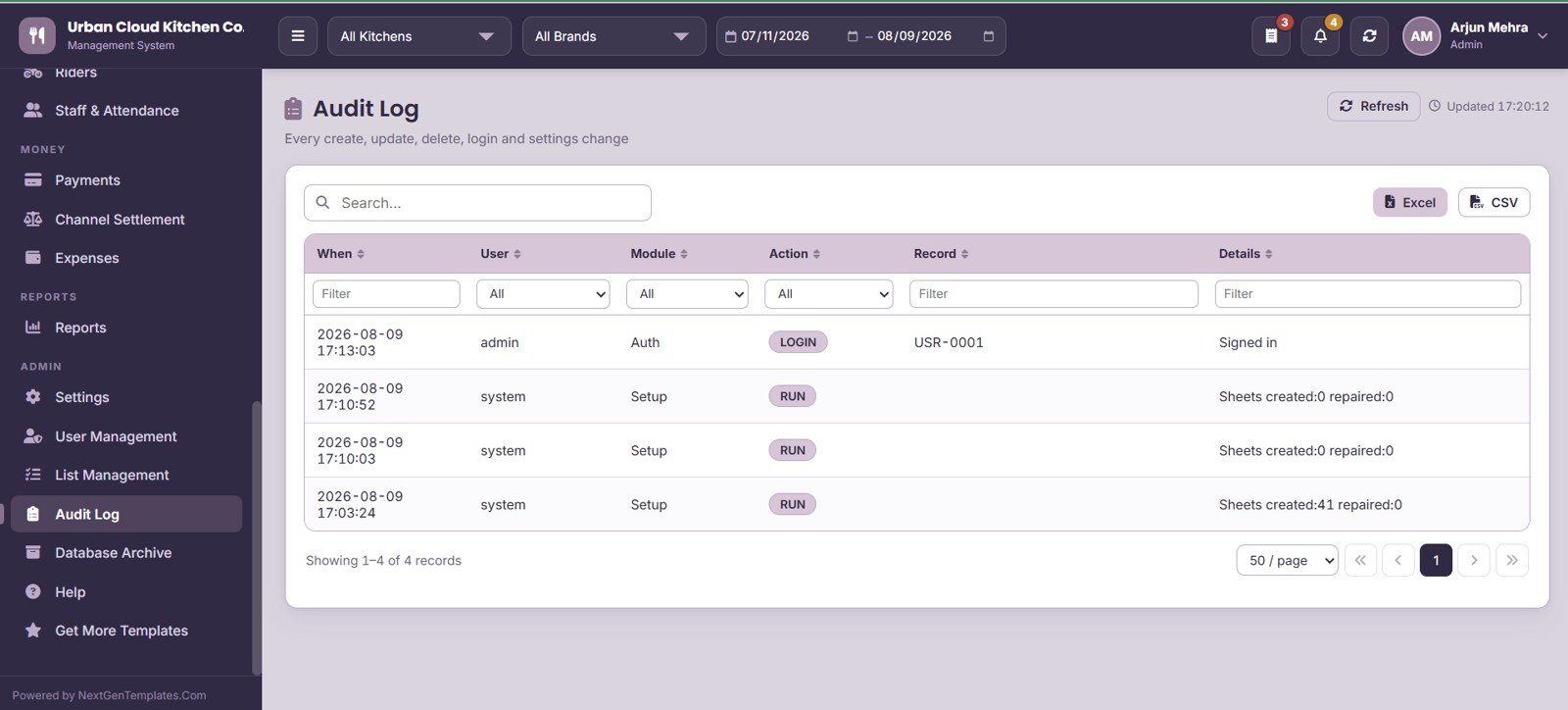
27. Audit Log
Tracks every create, update, delete, login and settings change with When, User, Module, Action, Record and Details. Useful when an order total changes overnight and nobody remembers touching it.
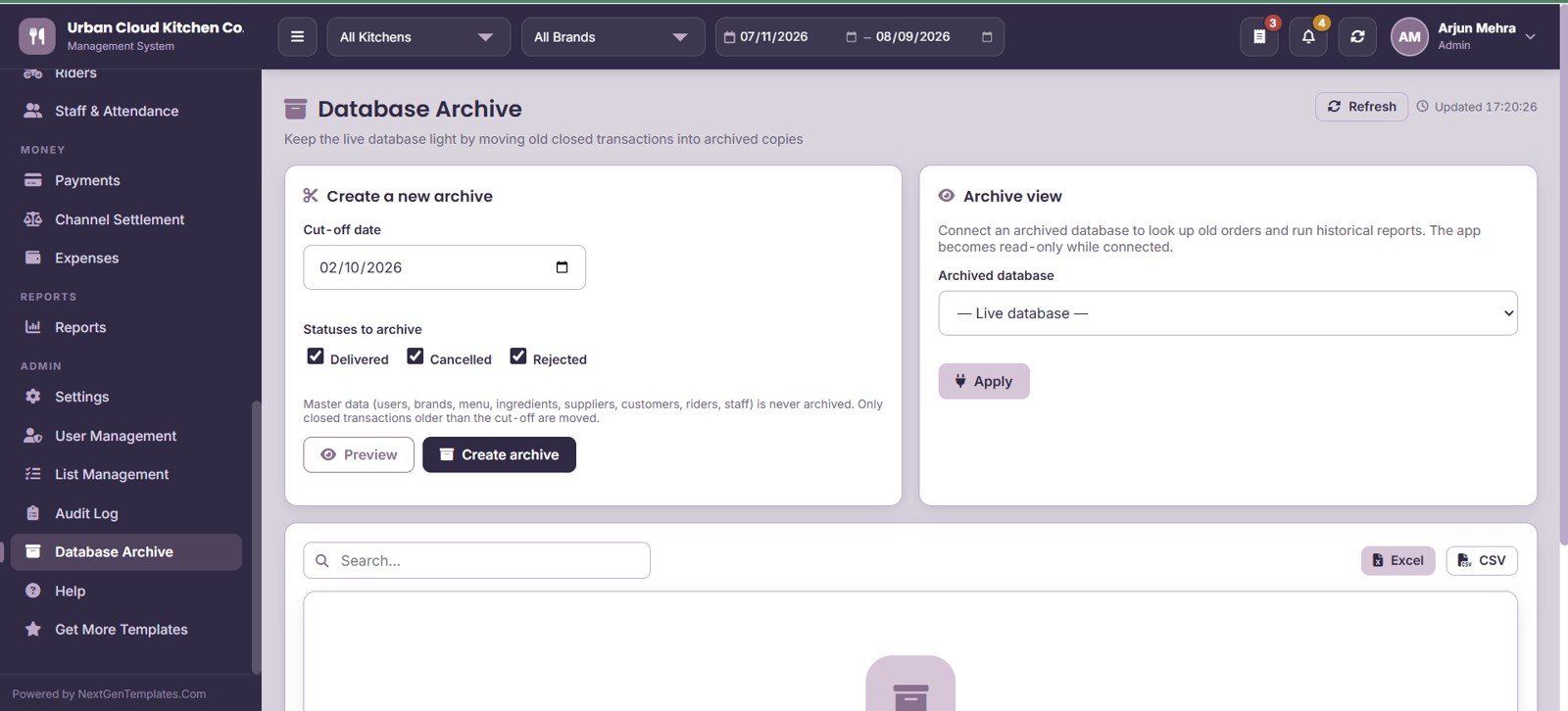
28. Database Archive
Keeps the live database light by moving old Delivered, Cancelled and Rejected transactions into archived copies based on a cut-off date. Preview before archiving, then toggle between Archived database and Live database views at any time.
Cloud Kitchen Management System Web App vs Excel VBA System vs Paid Cloud Kitchen SaaS
| Feature | Cloud Kitchen Management System Web App | Excel VBA Management System | Petpooja / Posist / UrbanPiper |
|---|---|---|---|
| Cost | $39.99 one-time ✅ | $30-60 one-time | $30-120 per outlet / month |
| Platform | Browser, any device ✅ | Windows desktop only | Browser and mobile app |
| Setup time | Under 15 minutes ✅ | 10 minutes | 3-10 days onboarding |
| Real-time team collaboration | Yes, multi-user login ✅ | No, single-file | Yes ✅ |
| Kitchen Display System | Built in, 4 lanes ✅ | Not available | Yes, usually a paid add-on |
| Recipe-linked inventory | Included ✅ | Limited | Higher tier only |
| Channel settlement reconciliation | Included ✅ | Not available | Higher tier only |
| Data ownership | Your own Google Sheet ✅ | Your own file ✅ | Vendor-hosted |
| Year-1 cost at 5 users | $39.99 total ✅ | $30-60 total | $1,800-7,200 |
For cloud kitchen operators who want aggregator reconciliation and recipe costing without a per-outlet monthly bill, the Cloud Kitchen Management System Web App sits in the sweet spot.
Who Should Use This Template
Perfect for:
- Cloud kitchen and virtual restaurant operators running 2-6 brands out of 1-3 production kitchens
- Delivery-only food businesses selling through Swiggy, Zomato, Uber Eats and their own website
- Central kitchen and commissary operations that supply satellite outlets
- Owner-operators who want brand-wise profitability without paying a per-outlet SaaS subscription
- Food entrepreneurs comfortable working inside Google Workspace
Not a fit if:
- You need a direct API integration that pulls orders automatically from Swiggy or Zomato – orders are entered or imported here, not synced live
- You run a dine-in restaurant needing table management, KOT-to-table mapping and split billing – the Restaurant POS Web App is the better fit
- You operate 20+ outlets and need SOC 2, SSO and a dedicated support SLA
- You want offline operation – this is a browser-based Google Apps Script application and needs connectivity
Real-World Use Cases
Rohit runs three virtual brands from one 600 sq ft kitchen in Pune. Wok & Roll, Curry Cottage and Slice Society all share the same fryers and the same ingredient store. He uses the Brand-wise Profitability report to see that Slice Society carries a 41% food cost against Curry Cottage’s 28%, and repriced two pizzas on Zomato the same week.
Anjali manages a central kitchen supplying two satellite units in Bengaluru. She runs Physical Count every Sunday, compares it against Consumption vs Theoretical, and traced a 6 kg weekly paneer gap to over-portioning on one shift – caught because the recipe module gave her a theoretical number to compare against.
Faisal operates a delivery-only kitchen with four aggregator accounts. Every fortnight he opens Channel Settlement, hits Recalculate Expected, and reconciles what each platform actually paid. Last cycle it surfaced a short payment of roughly 4% on one channel that would otherwise have gone unnoticed.
Advantages of the Cloud Kitchen Management System Web App
- No recurring cost. One payment replaces a subscription that typically runs $30-120 per outlet per month – a three-kitchen operation saves several thousand dollars in year one alone.
- Your data stays yours. Everything sits in a Google Sheet in your own Drive. You can export it, back it up, or walk away from the tool without losing a single order record.
- Costing that reflects reality. Because recipes drive consumption, food cost percentage comes from actual recipe mapping rather than a monthly guess.
- Aggregator transparency. Expected-versus-received payout comparison is the single highest-value feature for delivery-first kitchens, where short payments quietly erode margin.
- Fully editable. The Apps Script source is included, so you or your developer can extend any module.
Opportunities for Improvement
Being straight about the limits: there is no live API sync with Swiggy, Zomato or Uber Eats, so orders are keyed in or imported rather than flowing in automatically. Google Apps Script also has execution quotas, which means very high daily volumes (roughly 1,000+ orders a day per kitchen) will feel slower than a dedicated POS. There is no offline mode, and no native mobile app – the interface is responsive but browser-based. Finally, GST or VAT filing files are not generated directly; you export the registers and hand them to your accountant.
Best Practices
- Set up Brands, Kitchens and Channels first, before entering a single order – every downstream report depends on those tags.
- Build recipes for your top 20 selling items before worrying about the long tail. That covers most of your food cost.
- Run Physical Count weekly, not monthly. Weekly variance is actionable; monthly variance is archaeology.
- Reconcile Channel Settlement on the same cycle each aggregator pays, so short payments are caught while the raise-a-ticket window is still open.
- Use Create Backup Copy in Settings before any bulk menu import or archive run.
- Archive Delivered and Cancelled orders older than 6-9 months to keep the live sheet fast.
Explore Relevant Templates
- Restaurant Management System Web App – for full-service dine-in restaurants with table and billing management.
- Restaurant POS Web App – a counter-first point of sale built on the same Apps Script architecture.
- Buffet Restaurant Management System Web App – covers cover-count, buffet pricing and session-based service.
- Catering Business Management System Web App – event-driven food operations with quotes and function tracking.
- Coffee Cafe POS Web App – for cafes and quick-service beverage counters.
- Food Delivery Dashboard in Google Sheets – a lighter, reporting-only companion if you do not need full operations.
If you also want to strengthen the spreadsheet skills behind a system like this, the NextGenTemplates Academy learning paths include practice files for each step.
Get the Cloud Kitchen Management System Web App
Frequently Asked Questions
What does the Cloud Kitchen Management System Web App actually do?
The Cloud Kitchen Management System Web App runs order intake, a live kitchen display, menu and recipe costing, ingredient inventory, purchase and GRN, customers, riders, staff attendance, payments, channel settlement and 19 reports across 28 screens – all from one Google Apps Script application.
Can it handle multiple virtual brands in one kitchen?
Yes. The Cloud Kitchen Management System Web App tags every order with a Brand, Kitchen and Channel, so unlimited virtual brands can share one production kitchen while sales, food cost and profitability report separately for each brand.
Does it connect directly to Swiggy or Zomato?
No. The Cloud Kitchen Management System Web App does not pull orders through an aggregator API. Orders are entered manually or imported, while channel commission, payment cycle and settlement reconciliation are fully automated once the order exists in the system.
How long does setup take?
Most operators have the Cloud Kitchen Management System Web App live in under 15 minutes – make a copy of the file, deploy it as a web app from your own Google account, sign in with the supplied credentials, then enter your brands, kitchens and channels.
How does this compare to Petpooja or Posist?
Paid cloud kitchen platforms charge roughly $30-120 per outlet per month and host your data on their servers. The Cloud Kitchen Management System Web App is a one-time $39.99 purchase, stores everything in your own Google Sheet, and includes KDS, recipe costing and settlement without tier upgrades.
Is the source code editable?
Yes. The Cloud Kitchen Management System Web App ships as editable Google Apps Script, so you can add modules, change field names or adjust reports yourself. There is no obfuscation and no license server.
How many users can log in?
There is no user limit and no per-user fee. The Cloud Kitchen Management System Web App supports unlimited accounts under Admin and User roles, with failed-login tracking and a full audit trail of every change.
About the Author
Built by PK – Microsoft Certified Professional with 15+ years of Excel, Google Sheets and Power BI experience. Founder of NextGenTemplates, reaching 300K+ subscribers across YouTube channels. Every template is hand-built and tested before release.
Conclusion
If you are running a delivery-first food business across several virtual brands and aggregator channels, the reporting gap is rarely about data – it is about the data sitting in four disconnected places. The Cloud Kitchen Management System Web App pulls orders, recipes, stock, riders and settlements into one workspace you own outright, for the price of two weeks of a typical SaaS subscription.
✅ Instant download – One-time payment – No subscription – Lifetime access
Last updated: August 2026