Every organization handles sensitive documents such as employee records, financial files, legal papers, and confidential reports. Over time, these documents reach the end of their retention period and must be destroyed securely. However, when document destruction requests are managed through emails or informal logs, organizations face serious risks related to compliance, data privacy, and audit readiness.
An Office Document Destruction Request Tracker in Google Sheets provides a structured and reliable solution. This ready-to-use tracker helps organizations log document destruction requests, track approvals, monitor destruction methods, and maintain a complete audit trail in one centralized system.
In this article, we will explain how this tracker works, the charts it includes, how the search feature helps, and why organizations should use it to strengthen information governance.
What Is an Office Document Destruction Request Tracker in Google Sheets?
Click to Buy Office Document Destruction Request Tracker in Google Sheets
An Office Document Destruction Request Tracker is a centralized tracking tool designed to manage requests for destroying physical or digital documents. It records request details, approval status, document categories, destruction methods, and responsible departments.
Because the tracker is built in Google Sheets, it offers:
- Real-time updates
- Easy collaboration
- Automatic chart refresh
- Cloud-based access
- No additional software cost
This tracker supports compliance teams, records management teams, HR, legal departments, and IT teams.
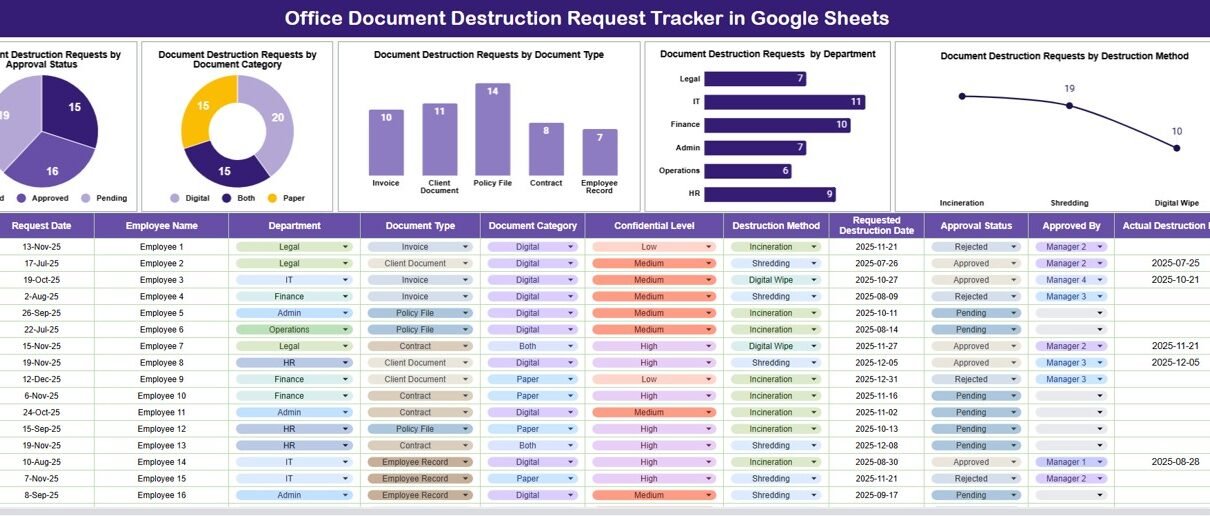
Tracker Sheet Tab – Central Request Log
The Tracker Sheet Tab is the core of this system. All document destruction requests are logged and updated here.
Typical fields include:
- Request ID
- Request Date
- Requestor Name
- Department
- Document Category
- Document Type
- Destruction Method (Shredding, Incineration, Digital Wipe, etc.)
- Approval Status
- Approved By
- Destruction Date
- Remarks
Once data is entered or updated, all charts and insights refresh automatically.
Charts Included in the Document Destruction Tracker
The tracker includes five powerful charts that convert request data into meaningful insights.
Document Destruction Requests by Approval Status
This chart shows the number of requests by approval stage such as Pending, Approved, Rejected, or Completed.
It helps organizations:
-
Track approval bottlenecks
-
Ensure timely decision-making
-
Improve request turnaround time
Document Destruction Requests by Document Category
Click to Buy Office Document Destruction Request Tracker in Google Sheets
This chart breaks down requests by document category, such as:
-
HR Records
-
Financial Documents
-
Legal Files
-
Operational Records
It helps compliance teams understand which document categories generate the most destruction activity.
Document Destruction Requests by Document Type
This chart analyzes requests by document type, such as:
-
Physical Paper
-
Digital Files
-
Archived Records
-
Backup Media
It helps teams plan appropriate destruction methods and resources.
Document Destruction Requests by Department
This chart shows how requests distribute across departments.
It helps management:
-
Identify high-volume departments
-
Improve records management awareness
-
Assign responsibility for compliance follow-ups
Document Destruction Requests by Destruction Method
This chart displays destruction methods used, such as:
-
Shredding
-
Secure Recycling
-
Digital Data Wipe
-
Third-Party Destruction
It helps ensure destruction methods align with data protection policies.

Click to Buy Office Document Destruction Request Tracker in Google Sheets
Search Feature – Search by Keyword and Field Name
The tracker includes a smart search feature that allows users to quickly find specific requests.
You can search by:
-
Request ID
-
Department
-
Document Category
-
Document Type
-
Approval Status
-
Destruction Method
By entering a Search Keyword and selecting the Field Name, users can instantly locate records without scrolling.
This feature proves extremely useful during:
-
Compliance audits
-
Internal reviews
-
Regulatory inspections
-
Management reporting

Click to Buy Office Document Destruction Request Tracker in Google Sheets
Why Organizations Need a Document Destruction Tracker
Improper document destruction creates risks such as data breaches, compliance violations, and legal exposure. This tracker helps organizations:
-
Maintain a clear destruction audit trail
-
Improve compliance with retention policies
-
Reduce data privacy risks
-
Strengthen information governance
-
Simplify audits and inspections
A structured tracker ensures that document destruction remains controlled and accountable.
Advantages of the Office Document Destruction Request Tracker
Click to Buy Office Document Destruction Request Tracker in Google Sheets
Centralized request management
All destruction requests stay in one place.
Improved compliance visibility
Charts highlight pending and approved requests.
Audit-ready documentation
Perfect for internal and external audits.
Better accountability
Departments and approvers remain transparent.
Easy to use
Google Sheets requires no special training.
Cost-effective solution
No additional tools or licenses required.
Opportunities for Improvement
Organizations can enhance this tracker further by adding:
-
Automated approval workflows
-
Retention period validation
-
Role-based access control
-
Document sensitivity classification
-
Third-party vendor tracking
-
SLA monitoring for destruction timelines
These enhancements improve governance maturity.
Best Practices for Using the Tracker
Click to Buy Office Document Destruction Request Tracker in Google Sheets
-
Enforce approval before destruction
-
Standardize document categories and types
-
Review pending requests weekly
-
Retain destruction certificates if applicable
-
Restrict edit access to authorized users
-
Archive completed requests periodically
Following these practices ensures secure and compliant document handling.
Conclusion
An Office Document Destruction Request Tracker in Google Sheets provides organizations with a simple yet powerful way to manage document destruction safely and compliantly. It centralizes requests, improves visibility, supports audits, and reduces data privacy risks. With visual charts and a fast search feature, teams gain clarity and control without complexity.
Visit our YouTube channel to learn step-by-step video tutorials
Youtube.com/@NeotechNavigators
Watch the step-by-step video tutorial:
Click to Buy Office Document Destruction Request Tracker in Google Sheets