Managing office leases across multiple locations, properties, and tenants becomes complicated without a clear monitoring system. Companies often juggle lease expiry dates, monthly rent, deposits, maintenance charges, property utilization, and renewal schedules. When this information is scattered across different files, errors happen — and those errors may lead to unnecessary costs or missed renewal deadlines.Office Lease Management Dashboard in Google Sheets
The Office Lease Management Dashboard in Google Sheets solves this problem instantly. It enables real-time tracking of leases, property performance, tenant insights, financial impact, and space utilization — all inside a single, fully interactive dashboard.
In this article, we will explain every part of the dashboard, including KPIs, charts, lease expiry tracking, financial analysis, tenant insights, and search functionality.
What Is an Office Lease Management Dashboard in Google Sheets?
Click to Buy Office Lease Management Dashboard in Google Sheets
An Office Lease Management Dashboard is a Google Sheets-based solution that centralizes all lease-related information and turns it into meaningful insights.
It helps you track:
- Total leases
- Active vs Expired leases
- Monthly rent
- Deposits
- Maintenance costs
- Area (SqFt) distribution
- Lease expiry and renewal details
- Tenant-wise analytics
- Property-wise performance
Since it is built in Google Sheets, it is simple, fast, collaborative, and easy for teams to update.
Overview Sheet Tab – KPI Cards
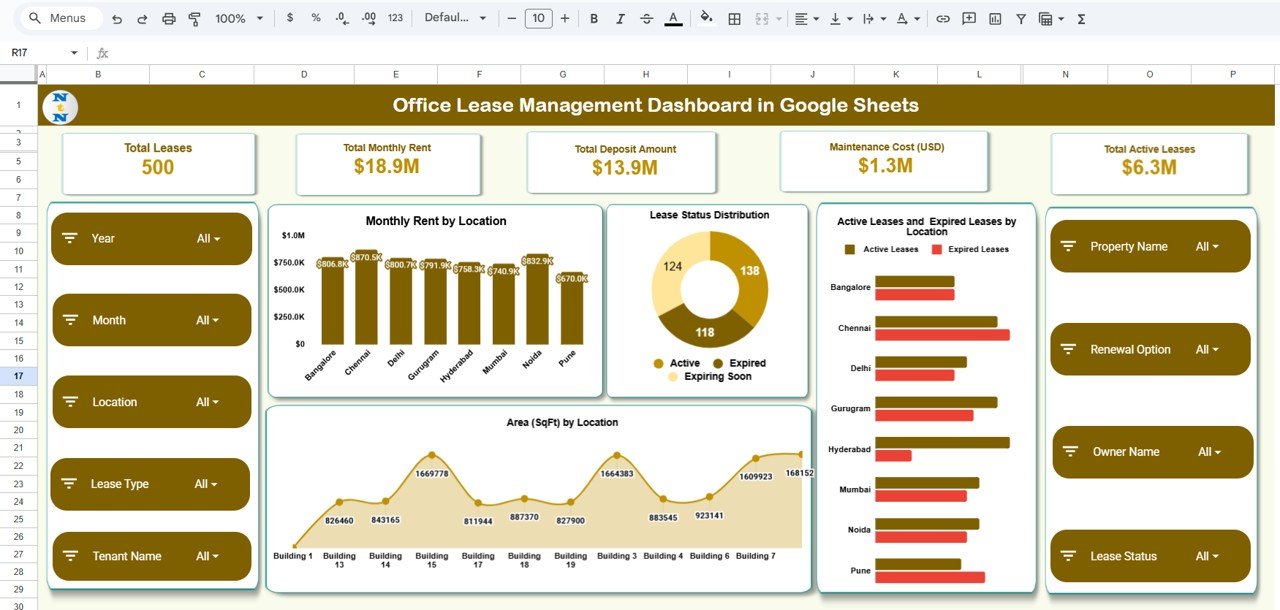
The Overview sheet gives a quick summary of key lease indicators through dashboard cards.
Dashboard Cards Include:
-
Total Leases
-
Total Monthly Rent
-
Total Deposit Amount
-
Maintenance Cost (USD)
-
Total Active Leases
These KPIs help leadership understand the current lease portfolio at a glance.
Dashboard Charts – Main Analysis
The main dashboard area includes essential charts that cover rent distribution, lease status, and property area utilization.
Monthly Rent by Location
Click to Buy Office Lease Management Dashboard in Google Sheets
Shows how much monthly rent is being paid at each office location.
Lease Status Distribution
Highlights the proportion of leases marked as:
-
Active
-
Expired
-
Expiring soon
-
Terminated
-
New
Active vs Expired Leases by Location
Helps identify which locations require new lease planning or negotiation.
Area (SqFt) by Location
Displays the total square footage leased per location — useful for space allocation.
Click to Buy Office Lease Management Dashboard in Google Sheets
Lease Expiry & Renewal Analysis
Tracking upcoming expiry is crucial to avoid last-minute decisions or penalty risks.
Charts Included:
-
Expiring Soon by Location
-
Expired Leases by Lease Type
-
Expiring Soon by Renewal Option
-
Expiring Soon by Property
This section helps real estate or admin teams act quickly and plan lease renewals well in advance.

Click to Buy Office Lease Management Dashboard in Google Sheets
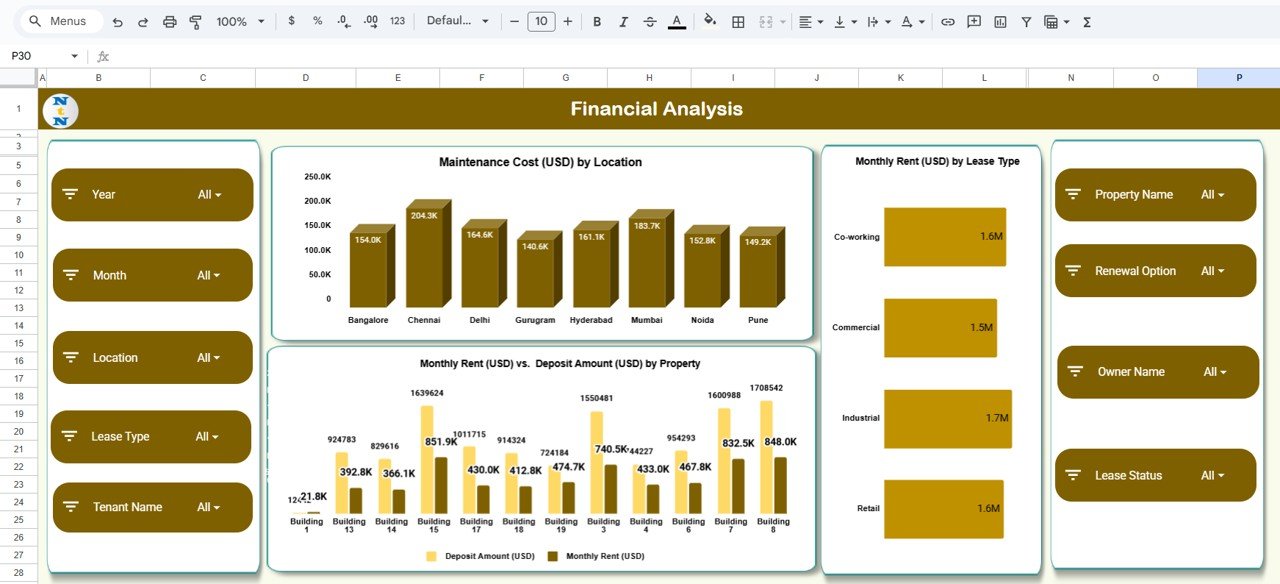
Financial Analysis Section
This section helps organizations understand how much they spend across properties and tenant groups.
Charts Included:
-
Maintenance Cost (USD) by Location
-
Monthly Rent (USD) by Lease Type
-
Monthly Rent (USD) vs Deposit Amount (USD) by Property
These visuals help compare rental values, deposit ratios, and property-wise financial commitments.
Click to Buy Office Lease Management Dashboard in Google Sheets
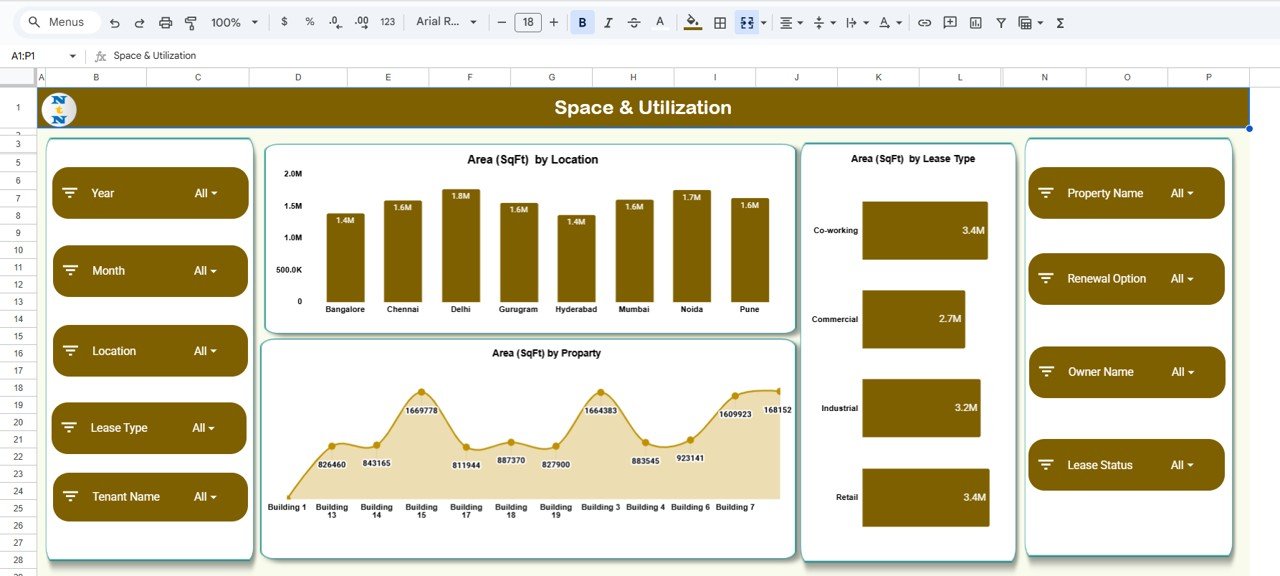
Space & Utilization Analysis
This area provides insights into how much space is leased per property or lease type.
Charts Included:
-
Area (SqFt) by Location
-
Area (SqFt) by Property
-
Area (SqFt) by Lease Type
Organizations use this section for:
-
Workspace planning
-
Floor space allocation
-
Real-estate optimization decisions\
Click to Buy Office Lease Management Dashboard in Google Sheets
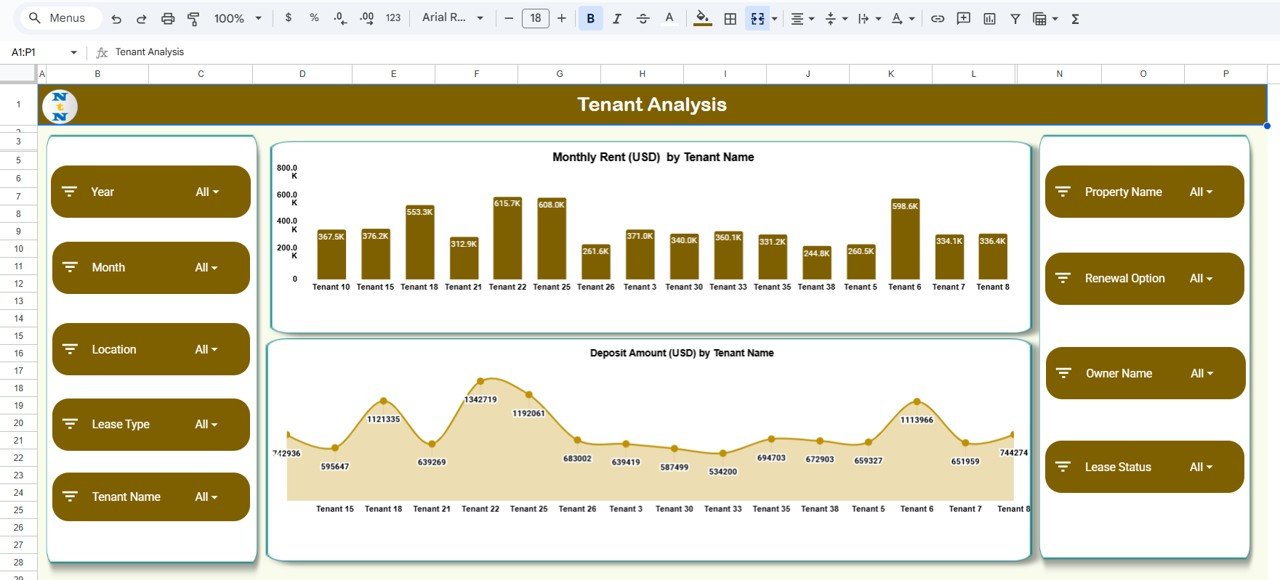
Tenant Analysis Section
Understanding tenant-wise rent and deposits helps evaluate tenant impact on finances.
Charts Included:
-
Monthly Rent (USD) by Tenant Name
-
Deposit Amount (USD) by Tenant Name
This is useful when managing multiple tenants across different properties.
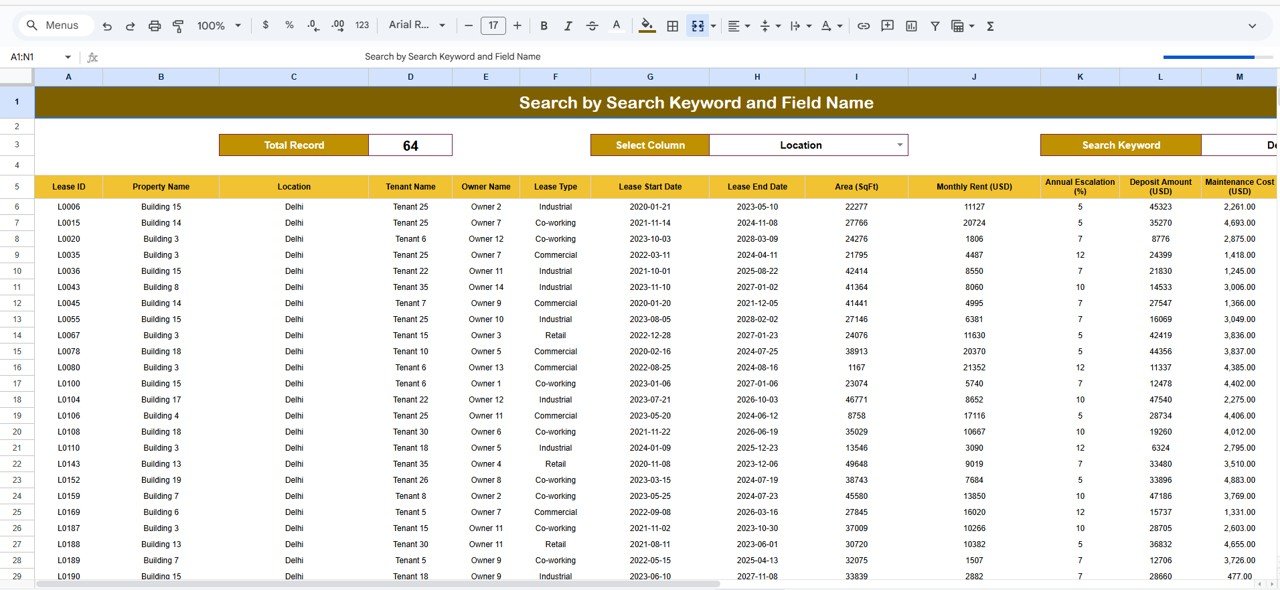
Search Sheet Tab
The Search tab allows users to quickly filter and retrieve lease information.
You can search by:
- Location
- Tenant Name
- Lease Type
- Property
- Monthly Rent
- Deposit Amount
- Status
- Renewal Option
- Any field or keyword
This makes it extremely useful for audit reviews, lease meetings, or management reporting.
Click to Buy Office Lease Management Dashboard in Google Sheets
Data Sheet Tab
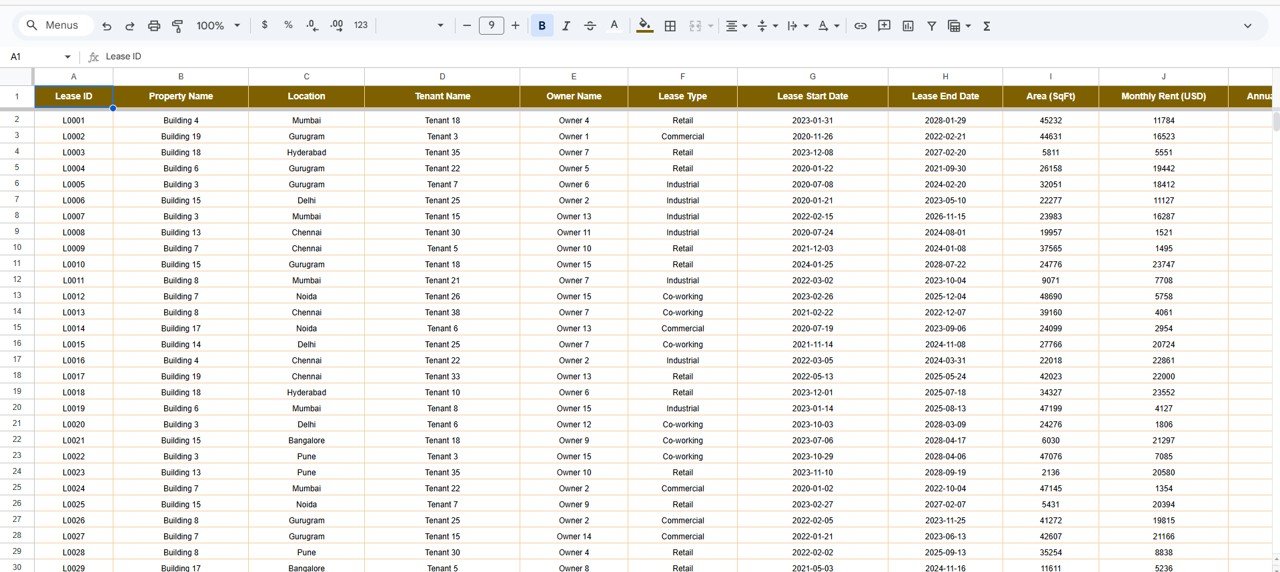
The Data sheet contains all raw information needed for the dashboard.
Typical Data Fields:
- Property Name
- Location
- Lease Type
- Monthly Rent
- Tenant Name
- Deposit Amount
- Maintenance Cost
- Area (SqFt)
- Lease Start Date
- Lease End Date
- Status
- Renewal Option
- Property Owner
- Notes
Whenever you update the Data sheet, the entire dashboard refreshes automatically.
Advantages of the Office Lease Management Dashboard
-
Real-time view of all office leases
-
Avoids missed renewal deadlines
-
Strong financial analysis for rent and deposits
-
Helps optimize office space usage
-
Compares properties & tenants easily
-
Cloud-based collaboration for teams
-
Fully customizable and scalable
Opportunities for Improvement
Click to Buy Office Lease Management Dashboard in Google Sheets
You can enhance this dashboard further with:
-
Email alerts for lease expiry
-
Google Calendar integration
-
Lease escalation (increment %) tracking
-
Document link management for agreements
-
Multi-currency support
-
Rent-per-sqft benchmarking
Best Practices for Effective Lease Management
-
Update the data sheet monthly
-
Track upcoming renewals early
-
Monitor rent increases annually
-
Maintain digital lease copies
-
Compare rent vs deposit values to avoid imbalance
-
Review maintenance charges quarterly
-
Track square footage for space optimization
Conclusion
Click to Buy Office Lease Management Dashboard in Google Sheets
The Office Lease Management Dashboard in Google Sheets is a powerful tool for managing leases across multiple properties. With its detailed charts, KPI cards, expiry alerts, tenant insights, and financial visuals, it helps organizations make informed and timely decisions.
Whether you manage a few office properties or a large portfolio, this dashboard gives you complete visibility and control — without expensive software.
Frequently Asked Questions (FAQ)
1. Can I track multiple lease types?
Yes — Office, Commercial, Co-working, Retail, or any category.
2. Are the charts linked automatically?
Yes, charts update when you change the Data sheet.
3. Can I add more tenant or property fields?
Absolutely — the dashboard is fully customizable.
4. Does the dashboard support multi-location management?
Yes, it is designed for multi-city and multi-property tracking.
5. Can I analyze lease renewals easily?
Yes, with dedicated “Expiry & Renewal” charts.
Visit our YouTube channel to learn step-by-step video tutorials
Youtube.com/@NeotechNavigators
Watch the step-by-step video Demo:
Click to Buy Office Lease Management Dashboard in Google Sheets