Office relocation is a major change for employees. It affects daily commute, work environment, comfort, collaboration, and overall satisfaction. Because of this, collecting and analyzing employee feedback after relocation becomes extremely important. However, many organizations struggle to organize feedback data, identify key issues, and measure satisfaction levels clearly.
This is where an Office Relocation Feedback Tracker in Google Sheets becomes a powerful and practical solution. This ready-to-use tracker helps HR teams and facility managers capture employee feedback, analyze satisfaction trends, and make data-driven decisions to improve the new office experience.Office Relocation Feedback Tracker in Google Sheets
In this article, we will explain how this tracker works, what charts it includes, how the search feature helps, and why organizations should use it after office relocation.Office Relocation Feedback Tracker in Google Sheets
What Is an Office Relocation Feedback Tracker in Google Sheets?
Click to Buy Office Relocation Feedback Tracker in Google Sheets
An Office Relocation Feedback Tracker is a centralized system designed to record, organize, and analyze employee feedback related to office relocation. It captures satisfaction scores, recommendations, location preferences, and feedback categories in one structured Google Sheets file.
Because it is built in Google Sheets, the tracker offers:
-
Real-time collaboration
-
Easy data entry
-
Automatic chart updates
-
Cloud-based access
-
Zero additional software cost
This tracker helps organizations understand how employees feel about the new office setup and what improvements are required.
Tracker Sheet Tab – Core of the Feedback System
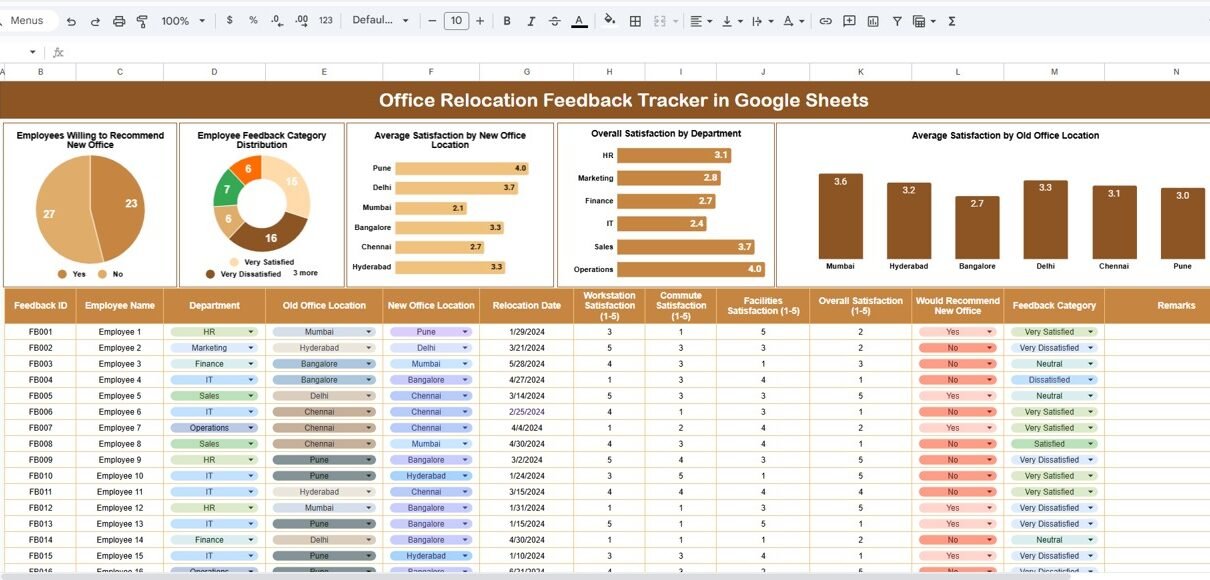
The Tracker Sheet Tab is where all employee feedback data is entered. This sheet usually includes:
-
Employee Name / ID
-
Department
-
Old Office Location
-
New Office Location
-
Satisfaction Score (e.g., 1–5)
-
Willingness to Recommend (Yes/No)
-
Feedback Category (Facilities, Location, Amenities, Commute, Workspace, etc.)
-
Comments
Once data is entered, all charts and insights update automatically.
This sheet ensures feedback stays structured, consistent, and easy to analyze.
Charts Included in the Office Relocation Feedback Tracker
Click to Buy Office Relocation Feedback Tracker in Google Sheets
The tracker includes five powerful charts that transform raw feedback into actionable insights.
Employees Willing to Recommend New Office
This chart shows how many employees are willing to recommend the new office location.
It helps organizations understand:
-
Overall acceptance of the new office
-
Employee confidence in the relocation decision
-
Early signals of satisfaction or dissatisfaction
A higher recommendation rate usually reflects a positive relocation experience.
Employee Feedback Category Distribution
This chart categorizes feedback into different areas such as:
-
Facilities
-
Workspaces
-
Amenities
-
Location
-
Commute
-
Parking
-
Cafeteria
It helps HR and administration teams quickly identify which areas receive the most feedback. For example, if “Commute” dominates the chart, location convenience may need attention.
Average Satisfaction by New Office Location
If employees relocate to multiple new locations or floors, this chart shows the average satisfaction score for each new office location.
It helps organizations:
-
Compare satisfaction across locations
-
Identify underperforming office spaces
-
Prioritize improvements location-wise
This insight becomes useful when planning future expansions or relocations.
Overall Satisfaction by Department
This chart displays satisfaction levels department-wise.
It helps answer questions such as:
-
Are some departments less satisfied than others?
-
Does workspace allocation affect certain teams?
-
Do specific job roles require different setups?
Department-level insights help managers address targeted concerns.
Average Satisfaction by Old Office Location
This chart compares satisfaction based on employees’ previous office locations.
It helps understand:
-
Whether relocation improved or reduced satisfaction
-
How previous office conditions influence perception
-
Adjustment challenges faced by certain employee groups
This analysis helps organizations plan smoother transitions in future relocations.

Click to Buy Office Relocation Feedback Tracker in Google Sheets
Search Feature – Search by Keyword and Field Name
The tracker includes a smart search option that allows users to quickly locate specific feedback records.
You can search by:
-
Employee Name
-
Department
-
Old Office Location
-
New Office Location
-
Feedback Category
This feature saves time and helps HR teams quickly respond to individual employee concerns during discussions or reviews.

Click to Buy Office Relocation Feedback Tracker in Google Sheets
Why Organizations Need an Office Relocation Feedback Tracker
Office relocation without structured feedback often leads to unresolved issues, employee dissatisfaction, and reduced productivity. This tracker solves those challenges by providing:
-
Clear visibility into employee satisfaction
-
Structured feedback management
-
Faster issue identification
-
Data-driven improvement planning
-
Better employee engagement
Organizations that actively track feedback build trust and improve workplace culture.
Advantages of Using the Office Relocation Feedback Tracker
Centralized Feedback Management
All feedback stays in one organized location.
Real-Time Insights
Charts update instantly as new feedback is added.
Better Decision-Making
Management understands what works and what needs improvement.
Employee-Centric Approach
Employees feel heard and valued.
Easy to Use
No technical or software expertise required.
Cloud-Based Access
Teams can collaborate from anywhere.
Opportunities for Improvement in the Tracker
Click to Buy Office Relocation Feedback Tracker in Google Sheets
You can enhance the tracker further by adding:
-
Automated email surveys
-
Sentiment analysis scoring
-
Follow-up action status tracking
-
Trend comparison across months
-
Heatmaps for satisfaction levels
These enhancements make the tracker even more powerful.
Best Practices for Using the Office Relocation Feedback Tracker
Click to Buy Office Relocation Feedback Tracker in Google Sheets
-
Collect feedback within the first 30–60 days after relocation
-
Use consistent rating scales
-
Encourage honest and anonymous feedback
-
Review charts weekly during initial months
-
Share improvement actions with employees
These practices ensure feedback leads to meaningful improvements.
Conclusion
An Office Relocation Feedback Tracker in Google Sheets is an essential tool for organizations undergoing office relocation. It helps capture employee sentiments, analyze satisfaction levels, and identify improvement areas clearly. With structured data, interactive charts, and a smart search feature, this ready-to-use tracker turns feedback into actionable insights.
By using this tracker, organizations can improve employee experience, boost morale, and ensure future relocations become smoother and more successful.
Frequently Asked Questions (FAQs)
Click to Buy Office Relocation Feedback Tracker in Google Sheets
1. Who should use this tracker?
HR teams, facility managers, and leadership teams.
2. Can the tracker handle large teams?
Yes, Google Sheets supports large datasets easily.
3. Is the tracker customizable?
Yes, you can add new fields, charts, or rating scales.
4. Does it support remote access?
Yes, it works fully online.
5. Can we track feedback trends over time?
Yes, with monthly data and trend charts.
6. Do employees need technical skills to respond?
No, data entry is simple and user-friendly.
Visit our YouTube channel to learn step-by-step video tutorials
Youtube.com/@NeotechNavigators
Watch the step-by-step video tutorial:
Click to Buy Office Relocation Feedback Tracker in Google Sheets