Maintaining a safe workplace is a top priority for every organization. Regular safety inspections ensure that equipment works properly, emergency systems function correctly, and employees operate in a risk-free environment. However, manual inspection tracking often leads to missed follow-ups, incomplete reports, or scattered information across multiple files.
To solve these challenges, the Office Safety Inspection Tracker in Google Sheets offers an easy, ready-to-use solution. It helps safety teams track inspections, monitor compliance, identify risks, and follow up on pending actions — all in one smart dashboard.
This article explains every part of the tracker, including dashboard cards, charts, search features, data entry, advantages, best practices, and FAQs.
What Is an Office Safety Inspection Tracker in Google Sheets?
Click to Buy Office Safety Inspection Tracker in Google Sheets
An Office Safety Inspection Tracker is a Google Sheets-based tool that helps organizations record inspection data, track compliance status, identify hazards, and analyze risk scores. It simplifies safety monitoring across office locations and ensures that all issues are detected early.
This ready-to-use tracker includes:
- Automated inspection summaries
- Compliance insights
- Risk scoring indicators
- Pending action tracking
- Location & category analysis
- Searchable inspection database
It works perfectly for admin teams, facility managers, compliance teams, and safety officers.
Key Metrics
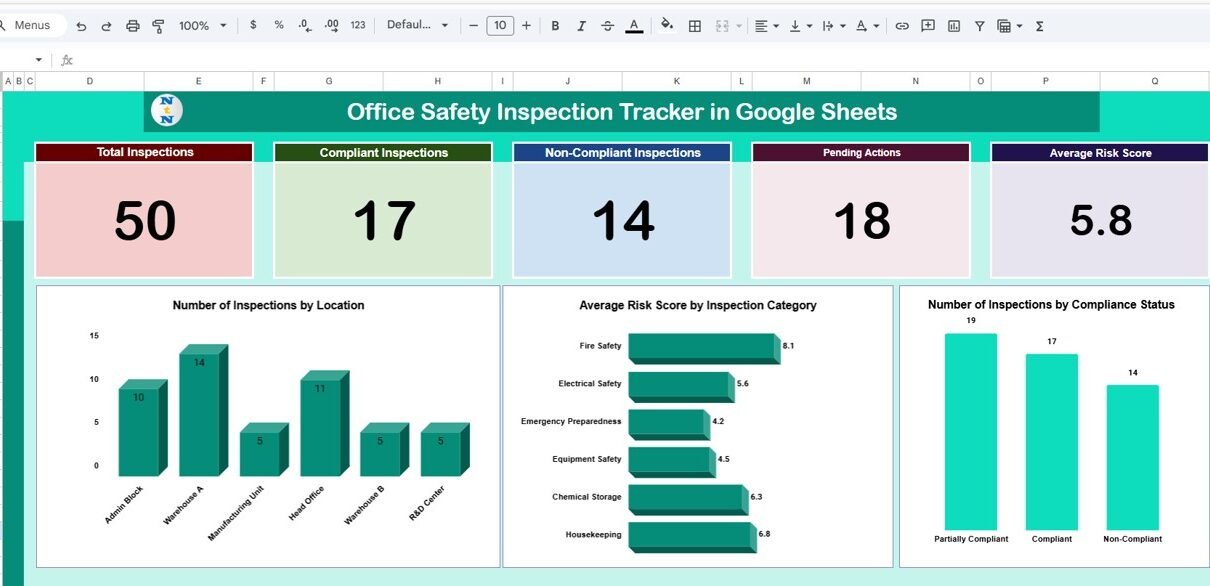
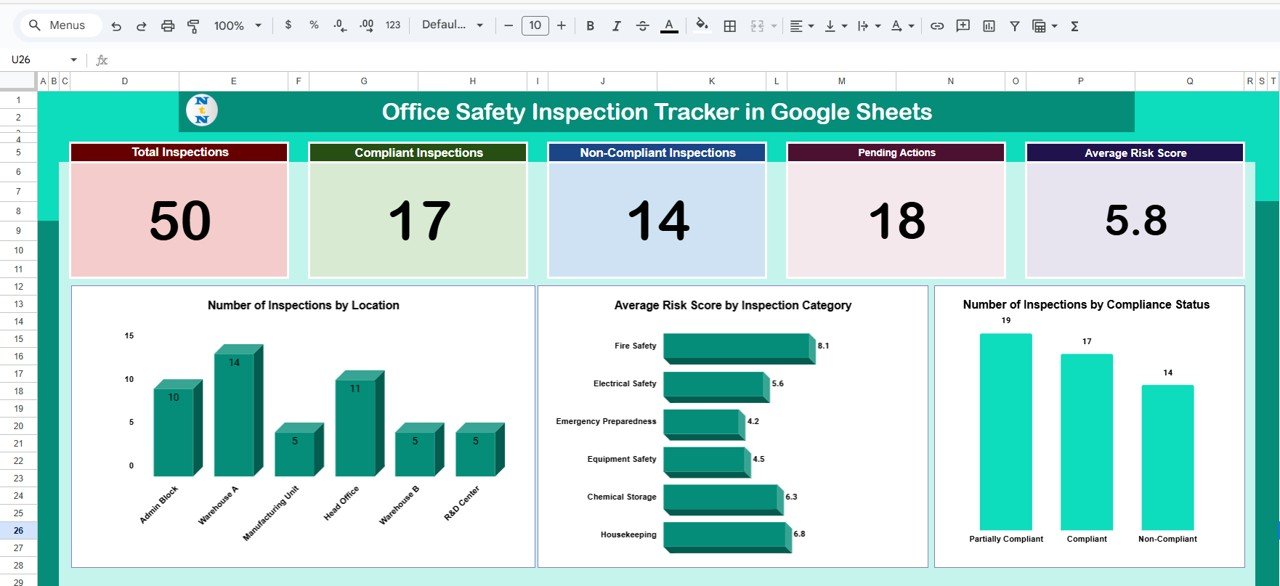
The dashboard includes card-style KPIs that give a quick snapshot of inspection performance.
Dashboard Cards:
-
Total Inspections – overall count of inspections conducted
-
Compliant Inspections – inspections marked as fully compliant
-
Non-Compliant Inspections – inspections that need corrective action
-
Pending Actions – items still awaiting resolution
-
Average Risk Score – numerical indicator showing overall safety risk level
These metrics help teams quickly assess safety performance and areas requiring improvement.
Dashboard Charts – Visual Insights
Click to Buy Office Safety Inspection Tracker in Google Sheets
The tracker includes essential charts to help analyze inspection data from different perspectives.
Number of Inspections by Location
Displays how many inspections occurred at each office location.
This helps identify:
-
High-risk locations
-
Sites needing more frequent inspections
Average Risk Score by Inspection Category
Shows the average risk level for categories like:
-
Fire safety
-
Electrical systems
-
Workspace safety
-
Emergency exits
-
Equipment checks
This makes it easy to determine which inspection categories present the most risk.
Number of Inspections by Compliance Status
A clear comparison of:
-
Compliant
-
Non-compliant
-
Partially compliant
-
Pending
This chart helps safety officers prioritize corrective actions.
Click to Buy Office Safety Inspection Tracker in Google Sheets
Search Sheet Tab
The search tab allows users to find records instantly using any keyword.
Search by:
- Location
- Inspection Category
- Compliance Status
- Risk Score
- Inspector Name
- Date
- Pending Action
- Any Field Name
This feature is extremely helpful during audits and management reviews.

Click to Buy Office Safety Inspection Tracker in Google Sheets
Data Sheet Tab – Inspection Record Details
All inspection data is stored in the Data Sheet, which feeds the dashboard automatically.
Common Data Columns:
- Inspection Date
- Location
- Inspection Category
- Inspector Name
- Compliance Status
- Risk Score
- Findings / Notes
- Pending Action
- Responsible Person
- Target Completion Date
- Status
Updating this sheet automatically refreshes charts and dashboard metrics.

Click to Buy Office Safety Inspection Tracker in Google Sheets
Advantages of the Office Safety Inspection Tracker
-
Organizes all safety inspections in one place
-
Ensures compliance with workplace safety standards
-
Helps identify recurring issues
-
Tracks pending corrective actions
-
Provides risk score insights for better planning
-
Improves inspection frequency and safety accountability
-
Real-time dashboard updates
-
Team-friendly and fully cloud-based
Opportunities for Improvement
Click to Buy Office Safety Inspection Tracker in Google Sheets
You can expand the tracker with additional features:
-
Automated email reminders for pending actions
-
Google Forms integration for inspection submissions
-
Severity-level scoring
-
Photo attachment links
-
Multi-site comparison dashboard
-
Safety training integration
Best Practices for Effective Safety Inspection Tracking
-
Perform inspections regularly
-
Assign clear responsibilities for corrective actions
-
Review high-risk categories monthly
-
Track pending actions until closed
-
Update compliance status immediately after inspections
-
Use consistent risk scoring
-
Maintain inspection entries with accurate notes
Conclusion
Click to Buy Office Safety Inspection Tracker in Google Sheets
The Office Safety Inspection Tracker in Google Sheets is a complete and powerful solution for managing office safety operations. It makes inspection tracking easier, improves safety compliance, reduces risk, and keeps all safety data organized.
Whether you manage one office or an entire network of branches, this tracker helps you maintain a safe, compliant, and well-managed workplace.
Frequently Asked Questions (FAQ)
1. Can I customize inspection categories?
Yes, categories can be edited anytime in the Data Sheet.
2. Does the dashboard update automatically?
Yes, every chart updates instantly based on data entries.
3. Can I track risk levels over time?
Yes, using Risk Score fields and charts.
4. Is this tracker suitable for multiple locations?
Absolutely. You can add unlimited locations.
5. Can I convert this into a mobile form?
Yes — use Google Forms linked to the Data Sheet.
Visit our YouTube channel to learn step-by-step video tutorials
Youtube.com/@NeotechNavigators
Watch the step-by-step video Demo:
Click to Buy Office Safety Inspection Tracker in Google Sheets