Managing office waste efficiently is no longer just an environmental responsibility—it is also a cost, compliance, and sustainability priority for modern organizations. Offices generate multiple types of waste every day, including recyclable, compostable, reusable, and disposable waste. However, when waste data stays scattered across files or remains untracked, organizations struggle to control costs, reduce landfill impact, and improve sustainability performance.
This is where the Office Waste Management Dashboard in Google Sheets becomes an essential tool. It is a ready-to-use dashboard that converts raw waste data into meaningful insights using automated cards, charts, and analysis pages. It allows facility teams, sustainability officers, and management to track waste trends, costs, recycling performance, and vendor efficiency in one centralized system.
In this article, we will explain how this dashboard works, what insights each section provides, and how organizations can use it to improve waste management and sustainability outcomes.
What Is an Office Waste Management Dashboard in Google Sheets?
An Office Waste Management Dashboard is a structured reporting system that tracks waste generation, disposal methods, recycling efforts, composting, and related costs. Built in Google Sheets, this dashboard updates automatically as data changes and provides real-time visibility into waste performance across departments, vendors, and time periods.
Because it runs on Google Sheets, the dashboard offers:
-
Cloud-based access
-
Real-time collaboration
-
No software installation
-
Easy customization
-
Cost-effective sustainability tracking
This dashboard acts as a decision-support tool for organizations that want to reduce waste, control disposal costs, and improve environmental responsibility.
Key Features of the Office Waste Management Dashboard
Click to Buy Office Waste Management Dashboard in Google Sheets
This dashboard includes:
-
A centralized Dashboard Sheet
-
Waste performance cards
-
Multi-level charts
-
Department, vendor, and monthly analysis
-
A powerful search functionality
-
Clean and scalable data structure
Let’s explore each section in detail.
Dashboard Sheet Tab – High-Level Waste Overview
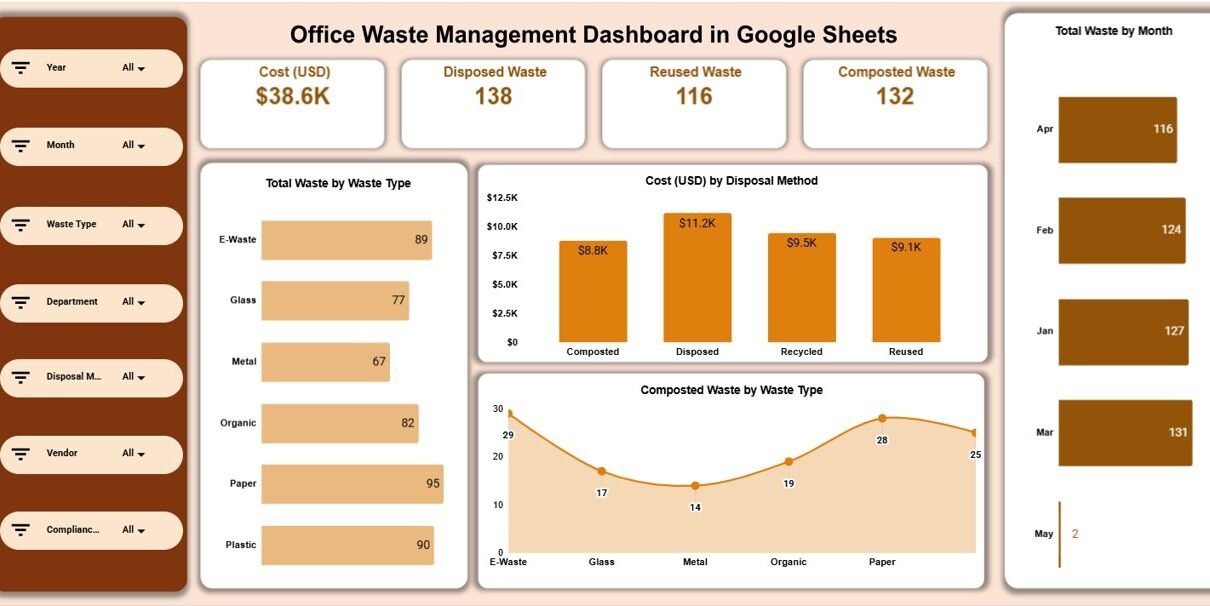
The Dashboard Sheet provides a quick snapshot of overall waste performance. It helps decision-makers understand waste volume, cost impact, and sustainability efforts at a glance.
Key KPI Cards
The dashboard displays the following KPI cards:
-
Cost (USD):
Shows total waste management cost, including disposal, recycling, and vendor charges. -
Disposed Waste:
Indicates waste sent to landfills or incineration. -
Reused Waste:
Tracks waste reused internally or redirected for secondary use. -
Composted Waste:
Shows organic waste diverted to composting programs.
These cards instantly highlight whether waste reduction initiatives are working.
Dashboard Charts
Click to Buy Office Waste Management Dashboard in Google Sheets
1. Total Waste by Waste Type
This chart breaks down waste into categories such as recyclable, reusable, compostable, and disposed waste.
It helps teams identify which waste types dominate overall generation.
2. Cost (USD) by Disposal Method
This chart shows how much money is spent on each disposal method.
It helps organizations understand:
-
High-cost disposal areas
-
Opportunities to shift waste to cheaper, sustainable methods
3. Composted Waste by Waste Type
This chart focuses on composting performance.
It highlights which waste categories contribute most to composting initiatives.
4. Total Waste by Month
This monthly trend chart helps track:
-
Seasonal waste spikes
-
Impact of sustainability programs
-
Month-on-month waste reduction progress

Click to Buy Office Waste Management Dashboard in Google Sheets
Waste Analysis Section
The Waste Analysis section dives deeper into waste type behavior.
Charts Included
-
Reused Waste by Waste Type
Shows which waste categories are successfully reused. -
Total Waste by Waste Type
Provides a consolidated view for comparison across waste categories. -
Recycled Waste by Waste Type
Highlights recycling efficiency and diversion rates.
This section helps sustainability teams focus on waste streams with the highest improvement potential.

Click to Buy Office Waste Management Dashboard in Google Sheets
Department Analysis Section
Waste performance often varies significantly by department. This section provides department-level insights.
Charts Included
-
Reused Waste by Department
Identifies departments contributing most to reuse efforts. -
Cost (USD) by Department
Helps control waste management expenses at departmental level. -
Recycled Waste by Department
Highlights departments leading or lagging in recycling.
These insights support internal awareness programs and targeted waste reduction initiatives.

Click to Buy Office Waste Management Dashboard in Google Sheets
Vendor Analysis Section
Many offices rely on external vendors for waste collection and recycling. This section evaluates vendor performance.
Charts Included
-
Reused Waste by Vendor
-
Cost (USD) by Vendor
-
Recycled Waste by Vendor
This analysis helps procurement and facilities teams:
-
Compare vendor efficiency
-
Control costs
-
Negotiate better service agreements

Click to Buy Office Waste Management Dashboard in Google Sheets
Monthly Trends Section
Understanding trends over time is critical for sustainability planning.
Charts Included
-
Reused Waste by Month
-
Cost (USD) by Month
-
Recycled Waste by Month
These charts reveal whether waste reduction and recycling initiatives deliver consistent improvement over time.

Search Functionality – Smart Waste Data Lookup
The dashboard includes a Search feature that allows users to search data using:
-
Search Keyword
-
Field Name (Department, Vendor, Waste Type, Month, etc.)
This feature helps users:
-
Instantly find specific records
-
Prepare audits and reports quickly
-
Answer management questions without manual filtering

Click to Buy Office Waste Management Dashboard in Google Sheets
Advantages of the Office Waste Management Dashboard
-
Centralized waste tracking
-
Real-time visibility into costs and volumes
-
Improved sustainability reporting
-
Better vendor accountability
-
Department-wise performance transparency
-
Data-driven waste reduction decisions
Opportunities for Improvement
Organizations can enhance the dashboard further by:
-
Adding carbon footprint calculations
-
Introducing waste diversion rate KPIs
-
Integrating IoT or smart bin data
-
Automating alerts for cost spikes
-
Adding sustainability target tracking
Best Practices for Using the Dashboard
Click to Buy Office Waste Management Dashboard in Google Sheets
-
Update waste data regularly
-
Standardize waste categories
-
Review monthly trends during sustainability meetings
-
Use department analysis for awareness campaigns
-
Monitor vendor costs and recycling efficiency
-
Link waste data with ESG or sustainability reports
Conclusion
The Office Waste Management Dashboard in Google Sheets provides a simple yet powerful way to monitor waste generation, disposal costs, recycling performance, and sustainability initiatives. By transforming raw data into actionable insights, this dashboard helps organizations reduce waste, lower costs, and meet environmental goals.
Because it is cloud-based, easy to use, and fully customizable, this dashboard is ideal for offices of all sizes looking to build a more sustainable and cost-efficient workplace.
Frequently Asked Questions (FAQs)
Click to Buy Office Waste Management Dashboard in Google Sheets
1. Who should use this dashboard?
Facilities teams, sustainability managers, operations teams, and leadership.
2. Can the dashboard handle multiple office locations?
Yes, location-wise data can be easily added.
3. Is this suitable for sustainability reporting?
Yes, it supports ESG and internal sustainability tracking.
4. Can new waste types be added?
Yes, the dashboard is fully customizable.
5. Does it require advanced Excel or BI skills?
No, basic Google Sheets knowledge is enough.
Visit our YouTube channel to learn step-by-step video tutorials
Youtube.com/@NeotechNavigators
Watch the step-by-step video tutorial:
Click to Buy Office Waste Management Dashboard in Google Sheets