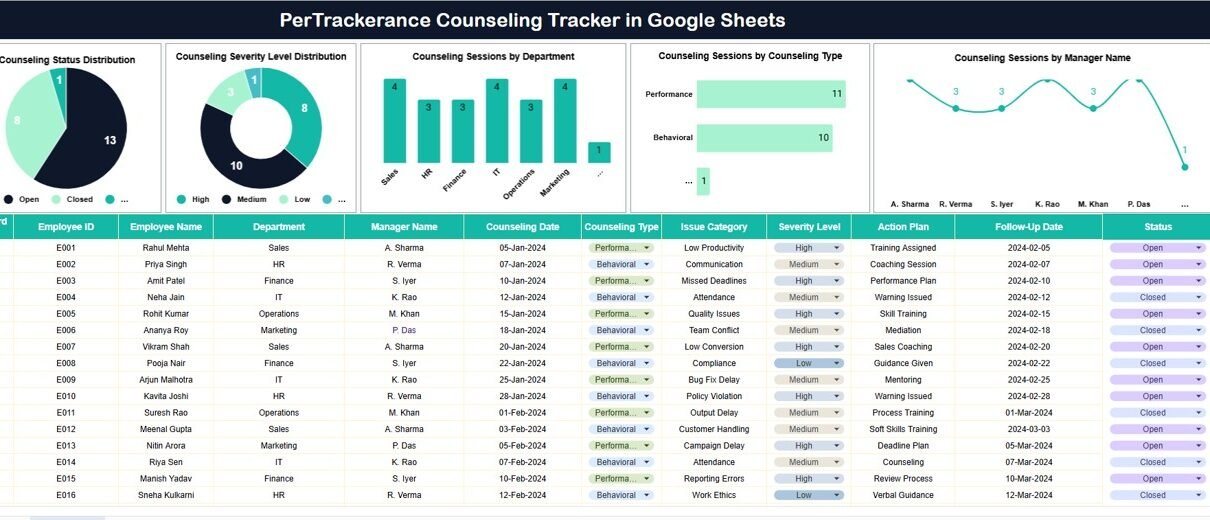
Per Trackerance Counselling Tracker in Google Sheets plays an important role in employee development, behavior improvement, and workplace harmony. Organizations use counselling sessions to address performance gaps, behavioral concerns, and professional growth needs. However, when counselling records remain scattered across emails or documents, HR teams struggle to track status, severity, and outcomes.Per Trackerance Counselling Tracker in Google Sheets
This is where a Performance Counselling Tracker in Google Sheets becomes extremely useful.
This ready-to-use tracker helps HR teams and managers record counselling sessions, monitor counselling status, analyze severity levels, and review trends across departments, counselling types, and managers—all from one centralized Google Sheets file.Per Trackerance Counselling Tracker in Google Sheets
In this article, we will explain how the tracker works, its charts, search functionality, and why organizations should use it for structured counselling management.Per Trackerance Counselling Tracker in Google Sheets
What Is a Performance Counselling Tracker in Google Sheets?
Click to Buy Per Trackerance Counselling Tracker in Google Sheets
A Performance Counselling Tracker is a structured system designed to document and monitor employee counselling sessions related to performance, behavior, or professional development. It helps organizations maintain transparency, consistency, and accountability in counselling processes.Per Trackerance Counselling Tracker in Google Sheets
Because this tracker is built in Google Sheets, it offers:
-
Real-time updates
-
Easy collaboration between HR and managers
-
Automatic chart refresh
-
Cloud-based access
-
No additional software cost
This tracker supports HR teams, people managers, employee relations teams, and compliance officers.Per Trackerance Counselling Tracker in Google Sheets
Tracker Sheet Tab – Central Counselling Records
The Tracker Sheet Tab acts as the core data repository.
Typical fields captured include:
-
Employee ID / Name
-
Department
-
Manager Name
-
Counselling Type (Performance, Behavioral, Developmental, etc.)
-
Counselling Severity Level (Low, Medium, High)
-
Counselling Status (Open, In Progress, Closed)
-
Counselling Session Date
-
Follow-up Required (Yes / No)
-
Remarks / Action Notes
Once data is entered or updated, all charts refresh automatically.
Charts in the Performance Counselling Tracker
Click to Buy Per Trackerance Counselling Tracker in Google Sheets
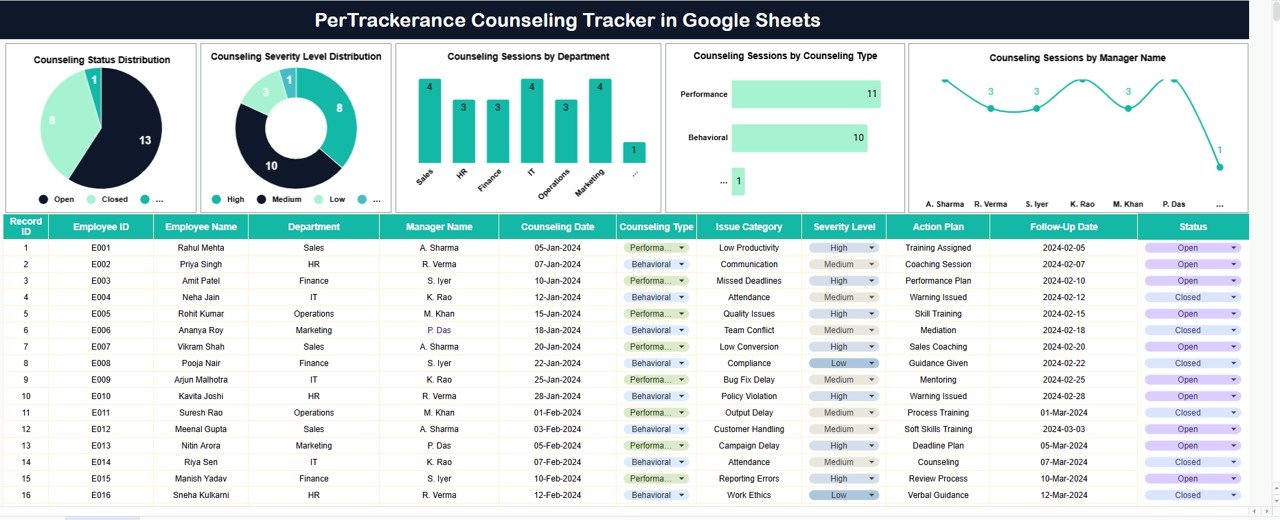
The tracker includes five meaningful charts that convert counselling data into actionable insights.Per Trackerance Counselling Tracker in Google Sheets
Counselling Status Distribution
This chart shows the distribution of counselling sessions by status, such as:
-
Open
-
In Progress
-
Closed
It helps HR teams:
-
Track pending counselling cases
-
Ensure timely follow-ups
-
Avoid unresolved issues
Counselling Severity Level Distribution
This chart displays counselling sessions by severity level.
It helps organizations:
-
Identify high-risk cases early
-
Prioritize critical counselling sessions
-
Allocate HR and managerial attention effectively
Counselling Sessions by Department
This chart highlights counselling volume across departments.
It helps management:
-
Detect departments with frequent counselling needs
-
Identify potential performance or culture issues
-
Plan targeted training or interventions
Counselling Sessions by Counselling Type
This chart categorizes sessions by counselling type, such as:
-
Performance improvement
-
Behavioral counselling
-
Career development
-
Policy-related counselling
It helps HR teams understand the nature of counselling activities.
Counselling Sessions by Manager Name
This chart shows counselling sessions managed by each manager.
It helps organizations:
-
Ensure fair and consistent counselling practices
-
Identify coaching-focused leaders
-
Support managers who handle complex cases
Click to Buy Per Trackerance Counselling Tracker in Google Sheets
Search Feature – Search by Keyword and Field Name
The tracker includes a smart search feature that allows users to quickly find specific counselling records.
You can search by:
-
Employee Name
-
Department
-
Manager Name
-
Counselling Type
-
Severity Level
-
Counselling Status
By entering a Search Keyword and selecting the Field Name, the tracker filters matching records instantly.
This feature proves especially useful during:
-
HR reviews
-
Employee discussions
-
Compliance audits
-
Management reporting

Click to Buy Per Trackerance Counselling Tracker in Google Sheets
Why Organizations Need a Performance Counselling Tracker
Without structured tracking, counselling records often become inconsistent, incomplete, or difficult to retrieve. This tracker helps organizations:Per Trackerance Counselling Tracker in Google Sheets
-
Maintain documented counselling history
-
Improve transparency and accountability
-
Monitor follow-ups and outcomes
-
Reduce compliance risks
-
Support employee development
A centralized tracker ensures counselling remains constructive and well-managed.
Advantages of the Performance Counselling Tracker
Click to Buy Per Trackerance Counselling Tracker in Google Sheets
Centralized counselling records
All sessions stay in one place.
Better visibility
Charts highlight trends and risk areas.
Improved follow-up management
Status tracking ensures timely closure.
Consistent counselling practices
Structured data improves fairness.
Easy collaboration
HR and managers work together smoothly.
Simple and cost-effective
Google Sheets requires no extra tools.
Opportunities for Improvement
You can enhance this tracker further by adding:
-
Counselling outcome ratings
-
Automated follow-up reminders
-
Confidential access controls
-
Linkage with performance reviews
-
Counselling policy references
-
Year-over-year counselling trends
These improvements strengthen employee relations management.
Best Practices for Using the Counselling Tracker
Click to Buy Per Trackerance Counselling Tracker in Google Sheets
-
Document counselling sessions promptly
-
Use consistent severity definitions
-
Monitor open cases regularly
-
Train managers on effective counselling
-
Protect sensitive employee information
-
Review counselling trends quarterly
Following these practices ensures ethical and effective counselling.
Conclusion
A Performance Counselling Tracker in Google Sheets provides organizations with a simple yet powerful way to manage employee counselling sessions. It centralizes records, tracks status and severity, highlights trends, and improves follow-up discipline. With visual charts and a fast search feature, HR teams gain clarity and control without complexity.Per Trackerance Counselling Tracker in Google Sheets
For organizations committed to employee development and workplace fairness, this tracker becomes an essential HR management tool.Per Trackerance Counselling Tracker in Google Sheets
Frequently Asked Questions (FAQs)
Click to Buy Per Trackerance Counselling Tracker in Google Sheets
1. Who should use this tracker?
HR teams, managers, and employee relations teams.
2. Can the tracker handle sensitive data?
Yes, with proper Google Sheets access permissions.
3. Is the tracker customizable?
Yes, fields, charts, and counselling types can be modified.
4. Can it track multiple counselling sessions per employee?
Yes, each session can be logged separately.
5. Does it support audits or investigations?
Yes, it provides clear and searchable counselling records.
6. Does it require technical skills?
No, basic Google Sheets knowledge is sufficient.
Visit our YouTube channel to learn step-by-step video tutorials
Youtube.com/@NeotechNavigators
Watch the step-by-step video tutorial:
Click to Buy Per Trackerance Counselling Tracker in Google Sheets