Managing procurement costs efficiently is one of the biggest challenges for finance, operations, and supply chain teams. Purchase orders, vendor payments, categories, departments, and locations often sit across multiple spreadsheets, making it difficult to understand where money is being spent and where savings are possible.Procurement Cost Analysis Dashboard in Google Sheets
That is exactly why the Procurement Cost Analysis Dashboard in Google Sheets is a powerful, ready-to-use solution. This dashboard transforms raw procurement data into clear KPIs, interactive charts, and actionable insights—directly inside Google Sheets, without complex tools or coding.Procurement Cost Analysis Dashboard in Google Sheets
In this article, we will explain what this dashboard is, how it works, its sheet-wise structure, key features, advantages, best practices, and real-world use cases.Procurement Cost Analysis Dashboard in Google Sheets
What Is a Procurement Cost Analysis Dashboard in Google Sheets?
Click to Buy Procurement Cost Analysis Dashboard in Google Sheets
A Procurement Cost Analysis Dashboard in Google Sheets is a centralized reporting and analysis tool designed to track and analyze procurement spend, purchase orders, quantities, vendors, payment terms, and order statuses.
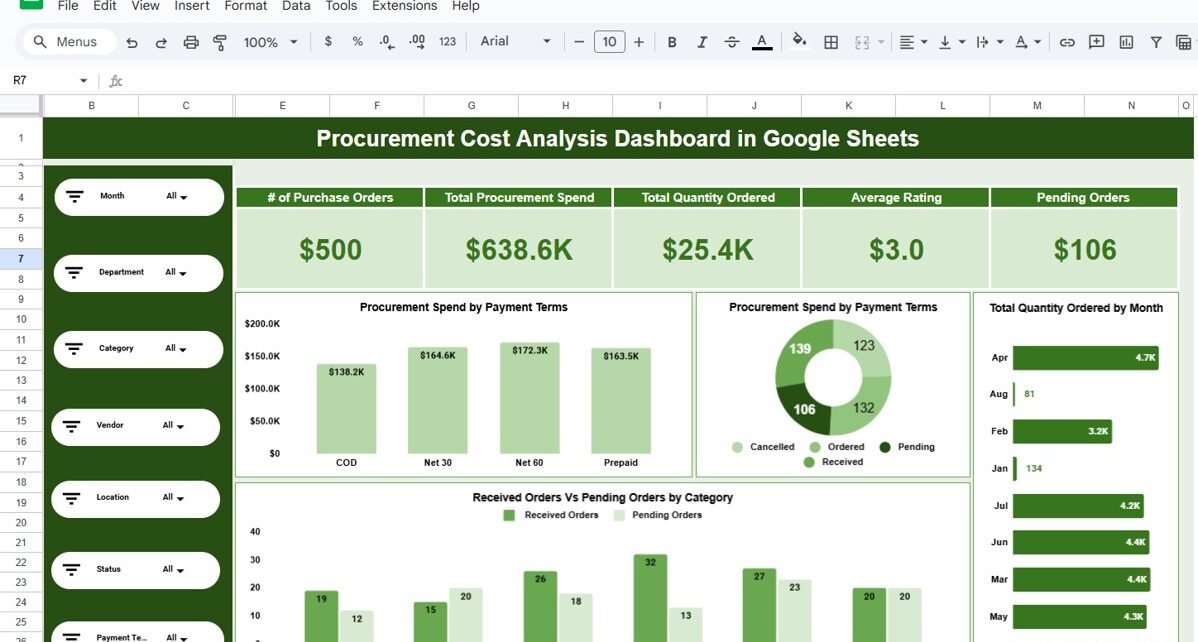
Instead of manually reviewing multiple sheets, procurement managers and finance teams can monitor all critical metrics from a single interactive dashboard. With slicers and filters, users can instantly analyze data by month, department, category, vendor, location, status, or payment terms.
As a result, decision-makers gain better cost visibility, improved vendor control, and stronger budget governance.
Key Objectives of This Dashboard
The primary goals of this dashboard are to:
-
Provide complete visibility into procurement spending
-
Track purchase order volume and quantities ordered
-
Monitor pending, received, and cancelled orders
-
Analyze vendor-wise and department-wise spend
-
Identify cost optimization and negotiation opportunities
-
Support data-driven procurement decisions
Dashboard Structure Overview
This ready-to-use dashboard is organized into multiple analysis pages, each focused on a specific procurement perspective.
1. Overview Sheet
The Overview sheet gives a high-level snapshot of procurement performance.
KPI Cards
At the top of the dashboard, you will find key KPI cards such as:
-
Number of Purchase Orders
-
Total Procurement Spend
-
Total Quantity Ordered
-
Average Vendor Rating
-
Pending Orders
These KPIs instantly summarize procurement health without scrolling through data tables.
Overview Charts
The overview section also includes:
-
Procurement Spend by Payment Terms
-
Order Status Distribution (Ordered, Received, Pending, Cancelled)
-
Total Quantity Ordered by Month
-
Received Orders vs Pending Orders by Category
This combination of KPIs and charts helps users quickly understand spending patterns and order backlogs.

Click to Buy Procurement Cost Analysis Dashboard in Google Sheets
2. Vendor Analysis
The Vendor Analysis sheet focuses on supplier performance and dependency.
Key Insights Covered
-
Procurement Spend by Vendor
-
Number of Purchase Orders by Vendor
-
Total Quantity Ordered by Vendor
-
Received Orders vs Pending Orders by Vendor
This page helps identify:
-
High-spend vendors
-
Vendors with frequent delays
-
Opportunities for vendor consolidation
-
Vendors requiring renegotiation or performance improvement

Click to Buy Procurement Cost Analysis Dashboard in Google Sheets
3. Departmental Analysis
The Departmental Analysis sheet provides insights into internal procurement behavior.
Charts Included
-
Procurement Spend by Department
-
Number of Purchase Orders by Department
-
Total Quantity Ordered by Department
-
Received vs Pending Orders by Department
With this analysis, organizations can:
-
Track departmental procurement efficiency
-
Identify departments with higher pending orders
-
Improve internal budget control
-
Enforce procurement policies more effectively

Click to Buy Procurement Cost Analysis Dashboard in Google Sheets
4. Category & Item Insights
The Category & Item Insights sheet analyzes procurement by item type.
Analysis Available
-
Procurement Spend by Category
-
Number of Purchase Orders by Category
-
Total Quantity Ordered by Category
-
Received vs Pending Orders by Category
This page is especially useful for identifying:
-
High-cost categories
-
Frequently ordered items
-
Categories causing order delays
-
Cost reduction opportunities through bulk purchasing

Click to Buy Procurement Cost Analysis Dashboard in Google Sheets
5. Location & Payment Terms Analysis
This section focuses on geographical and financial dimensions of procurement.
Location Analysis
-
Total Quantity Ordered by Location
-
Received vs Pending Orders by Location
Payment Terms Analysis
-
Procurement Spend by Payment Terms
-
Number of Purchase Orders by Payment Terms
This analysis helps procurement and finance teams optimize payment cycles, manage cash flow, and compare procurement efficiency across locations.

Click to Buy Procurement Cost Analysis Dashboard in Google Sheets
Advantages of a Procurement Cost Analysis Dashboard in Google Sheets
-
Centralized procurement visibility in one dashboard
-
No advanced tools or BI software required
-
Real-time filtering and analysis
-
Easy collaboration and sharing
-
Faster identification of cost overruns and delays
-
Improved vendor and department accountability
Best Practices for Using This Dashboard
-
Update procurement data regularly to keep insights accurate
-
Standardize category, vendor, and department names
-
Review pending orders weekly to reduce delays
-
Use vendor analysis to support negotiations
-
Monitor payment terms to improve cash flow planning
Who Can Use This Dashboard?
Click to Buy Procurement Cost Analysis Dashboard in Google Sheets
This dashboard is ideal for:
-
Procurement Managers
-
Finance & Accounting Teams
-
Supply Chain Managers
-
Operations Teams
-
Business Owners & Leadership
-
Internal Audit & Compliance Teams
Final Thoughts
The Procurement Cost Analysis Dashboard in Google Sheets is a practical, business-ready solution for organizations that want better control over procurement spending without investing in complex systems.
By combining KPI cards, visual charts, interactive filters, and structured analysis pages, this dashboard empowers teams to make faster, smarter, and more cost-effective procurement decisions.
Visit our YouTube channel to learn step-by-step video tutorials
Youtube.com/@NeotechNavigators
Watch the step-by-step video tutorial:
Click to Buy Procurement Cost Analysis Dashboard in Google Sheets