Managing project budgets is never static. Even the most carefully planned projects often face cost changes due to scope updates, vendor price changes, unforeseen risks, or timeline extensions. Because of this reality, organizations need a structured and transparent way to track budget changes. That is exactly where a Project Budget Adjustment Request Tracker in Google Sheets becomes essential.
This ready-to-use tracker helps project managers, finance teams, and leadership monitor budget adjustment requests, understand financial impact, and make faster approval decisions. Moreover, it provides clear visibility into original versus revised budgets, adjustment reasons, departmental trends, and approval status—all in one place.Project Budget Adjustment Request Tracker in Google Sheets
In this article, you will learn what this tracker is, how it works, how each chart supports decision-making, its advantages, opportunities for improvement, best practices, and answers to common questions.Project Budget Adjustment Request Tracker in Google Sheets
What Is a Project Budget Adjustment Request Tracker in Google Sheets?
A Project Budget Adjustment Request Tracker in Google Sheets is a centralized system used to record, monitor, and analyze budget change requests across multiple projects. Instead of managing emails, documents, or disconnected spreadsheets, this tracker consolidates everything into one structured file.Project Budget Adjustment Request Tracker in Google Sheets
Because it runs on Google Sheets, the tracker offers:
- Real-time collaboration
- Instant chart updates
- Simple data entry
- Zero software cost
- Easy customization
- As a result, teams gain better control over project finances and reduce the risk of unapproved or poorly tracked budget changes.
Why Do Organizations Need a Budget Adjustment Tracker?
Click to Buy Project Budget Adjustment Request Tracker in Google Sheets
Project budgets often change due to valid business reasons. However, without proper tracking, these changes create confusion and financial risk. Therefore, organizations use a structured tracker to:Project Budget Adjustment Request Tracker in Google Sheets
- Maintain budget transparency
- Track approval status clearly
- Compare original vs revised budgets
- Identify frequent adjustment reasons
- Control departmental overspending
- Support audit and compliance needs
This tracker ensures that every budget change follows a clear, documented process.
Overview of the Tracker Sheet Tab
The Tracker Sheet Tab is the core data entry area of the system. Every budget adjustment request gets recorded here.
Typical fields include:
- Request ID
- Project Name
- Department
- Original Budget
- Revised Budget
- Adjustment Amount
- Adjustment Reason
- Request Status
- Requested By
- Approval Date
- Comments
As soon as you enter or update data, all dashboard charts refresh automatically. This real-time behavior keeps decision-makers informed at all times.
Charts Included in the Project Budget Adjustment Tracker
Click to Buy Project Budget Adjustment Request Tracker in Google Sheets
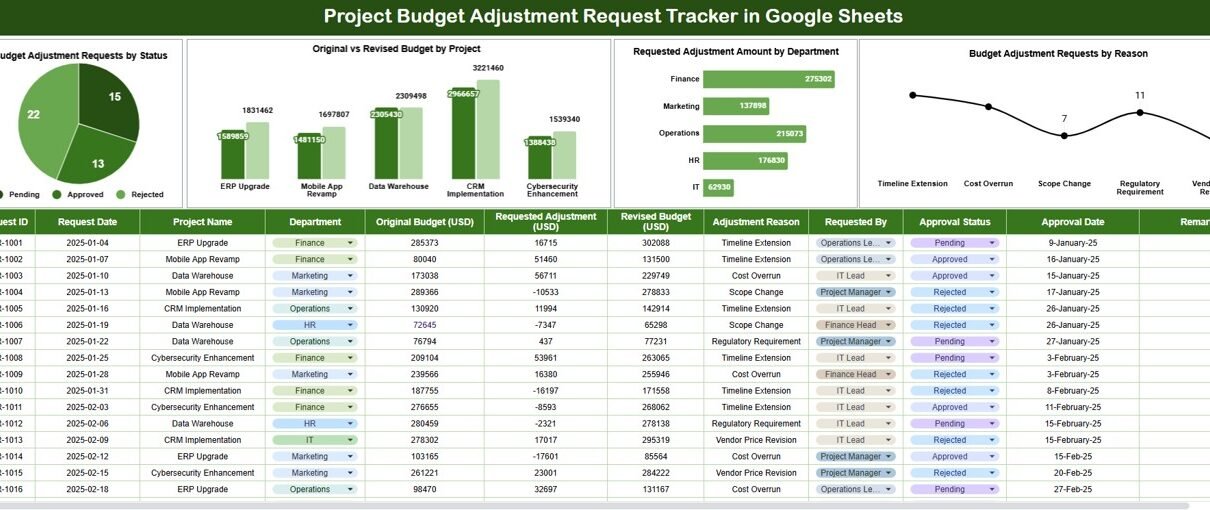
The tracker includes four powerful charts, each designed to answer critical financial questions quickly.
1. Budget Adjustment Requests by Status
This chart shows the distribution of requests across different statuses, such as:
- Pending
- Approved
- Rejected
- On Hold
Why this chart matters:
It helps managers understand approval bottlenecks. For example, a high number of pending requests may indicate delays in financial review or missing documentation.
2. Original vs Revised Budget by Project
This chart compares the original approved budget with the revised budget after adjustment.
Why this chart matters:
It clearly shows which projects experience the largest budget changes. As a result, leadership can identify high-risk or frequently changing projects and take corrective action early.
3. Requested Adjustment Amount by Department
This chart highlights the total adjustment amount requested by each department.
Why this chart matters:
It reveals spending patterns across departments. If one department consistently requests higher adjustments, management can investigate root causes such as poor planning or scope creep.
4. Budget Adjustment Requests by Reason
This chart categorizes requests based on reasons, such as:
- Scope Change
- Vendor Cost Increase
- Timeline Extension
- Resource Addition
- Compliance Requirement
- Unexpected Risk
Why this chart matters:
It helps organizations improve future planning. For example, frequent scope changes may signal weak project requirements at the planning stage.

Click to Buy Project Budget Adjustment Request Tracker in Google Sheets
Search Functionality – Search by Keyword and Field Name
The tracker includes a smart search feature that allows users to locate requests instantly.
You simply enter:
-
Search Keyword (e.g., project name, department, requester)
-
Field Name (e.g., Project Name, Status, Reason, Department)
The tracker then filters results dynamically.
Benefits of the Search Feature
-
Saves time during reviews
-
Improves response speed to finance queries
-
Helps during audits and compliance checks
-
Supports management discussions and reporting
Instead of scrolling through hundreds of rows, users find exactly what they need in seconds.

Click to Buy Project Budget Adjustment Request Tracker in Google Sheets
Advantages of Using the Project Budget Adjustment Request Tracker
1. Improved Financial Transparency
Every budget change stays documented, visible, and traceable.
2. Faster Approval Cycles
Clear status tracking reduces confusion and follow-ups.
3. Better Budget Control
Teams quickly identify projects with frequent or large adjustments.
4. Reduced Manual Effort
Automated charts eliminate manual reporting work.
5. Easy Collaboration
Finance, project, and leadership teams work on the same file.
6. Audit-Ready Documentation
Historical records support internal and external audits.
Opportunities for Improvement in the Tracker
Click to Buy Project Budget Adjustment Request Tracker in Google Sheets
Although the tracker is powerful, organizations can enhance it further.
1. SLA Tracking
Add fields to measure approval turnaround time.
2. Automated Notifications
Use Google Apps Script to notify approvers automatically.
3. Risk Classification
Tag high-risk budget changes for faster escalation.
4. Approval Level Matrix
Route requests differently based on adjustment amount.
5. Year-Over-Year Comparison
Analyze how budget adjustments evolve across years.
These improvements increase governance and financial discipline.
Best Practices for Using the Budget Adjustment Tracker
1. Record Requests Immediately
Avoid delays that cause data gaps or confusion.
2. Standardize Adjustment Reasons
Consistent reason categories improve reporting quality.
3. Review Status Weekly
Regular reviews prevent approval backlogs.
4. Compare Adjustments Against Project Performance
Link financial changes to delivery outcomes.
5. Control Access Carefully
Limit editing rights to maintain data integrity.
6. Use Charts in Review Meetings
Visual insights help leadership make faster decisions.
Who Should Use This Tracker?
Click to Buy Project Budget Adjustment Request Tracker in Google Sheets
This tracker benefits many roles, including:
- Project Managers
- Finance Teams
- PMO Offices
- Department Heads
- Senior Management
- Internal Auditors
Because it is simple and flexible, both small teams and large enterprises can use it effectively.
Conclusion
A Project Budget Adjustment Request Tracker in Google Sheets gives organizations the structure they need to manage budget changes confidently. It improves transparency, speeds up approvals, and strengthens financial control. Moreover, its ready-to-use design, interactive charts, and smart search functionality make it easy for any team to adopt.
When used consistently, this tracker reduces financial surprises, supports better planning, and ensures every budget change aligns with business goals.
Frequently Asked Questions (FAQs)
Click to Buy Project Budget Adjustment Request Tracker in Google Sheets
1. Is this tracker suitable for multiple projects?
Yes, it supports unlimited projects and departments.
2. Can I customize adjustment reasons?
Yes, you can modify or add reason categories easily.
3. Does it work for small teams?
Absolutely. Both small and large organizations can use it.
4. Can I automate approvals?
Yes, Google Apps Script allows workflow automation.
5. Is the tracker secure?
Yes, Google Sheets permissions control access and editing rights.
6. Can I export reports?
Yes, you can download data as Excel or PDF files.
Visit our YouTube channel to learn step-by-step video tutorials
Youtube.com/@NeotechNavigators
Watch the step-by-step video tutorial:
Click to Buy Project Budget Adjustment Request Tracker in Google Sheets