Managing project scope changes becomes challenging when teams rely on email threads, chats, or scattered documents. Requests get missed, priorities become unclear, and project timelines get affected. To avoid confusion and delays, organizations now use structured tools to track change requests. One of the most effective and user-friendly tools is the Project Scope Change Request Tracker in Google Sheets.
This ready-to-use tracker helps project managers, PMO teams, and stakeholders capture all scope changes in a single place. It provides full visibility into change requests, their status, priority, type, and the project they belong to.Project Scope Change Request Tracker in Google Sheets
In this detailed article, we explain everything you need to know about this tracker—its structure, key features, benefits, best practices, opportunities for improvement, and FAQs.Project Scope Change Request Tracker in Google Sheets
What Is a Project Scope Change Request Tracker?
Click to Buy Project Scope Change Request Tracker in Google Sheets
A Project Scope Change Request Tracker is a tool that helps project teams manage and record every change request raised during a project lifecycle. It ensures that all scope changes are:
- Documented
- Reviewed
- Prioritized
- Approved or declined
- Completed on time
Because this tracker is built in Google Sheets, it becomes:
- Cloud-based
- Device-friendly
- Easy to share
- Quick to update
- Perfect for collaboration
- Zero-installation
It organizes change requests clearly and reduces the risk of delays caused by unplanned or unclear changes.
Why Use Google Sheets to Track Scope Changes?
Google Sheets offers several advantages:
- Real-Time Collaboration: Multiple team members can update and review change requests simultaneously.
- Cloud Access: Work from any location or device.
- Easy Customization: You can modify fields, add formulas, or create automated workflows easily.
- Visual Charts: Built-in charts help visualize trends and patterns.
- Cost-Effective: No expensive project management software needed.
Because of these powerful capabilities, Google Sheets is perfect for scope change tracking.
Tracker Structure & Features
Click to Buy Project Scope Change Request Tracker in Google Sheets
Your Project Scope Change Request Tracker in Google Sheets includes two important sheet tabs:
1. Tracker Sheet Tab
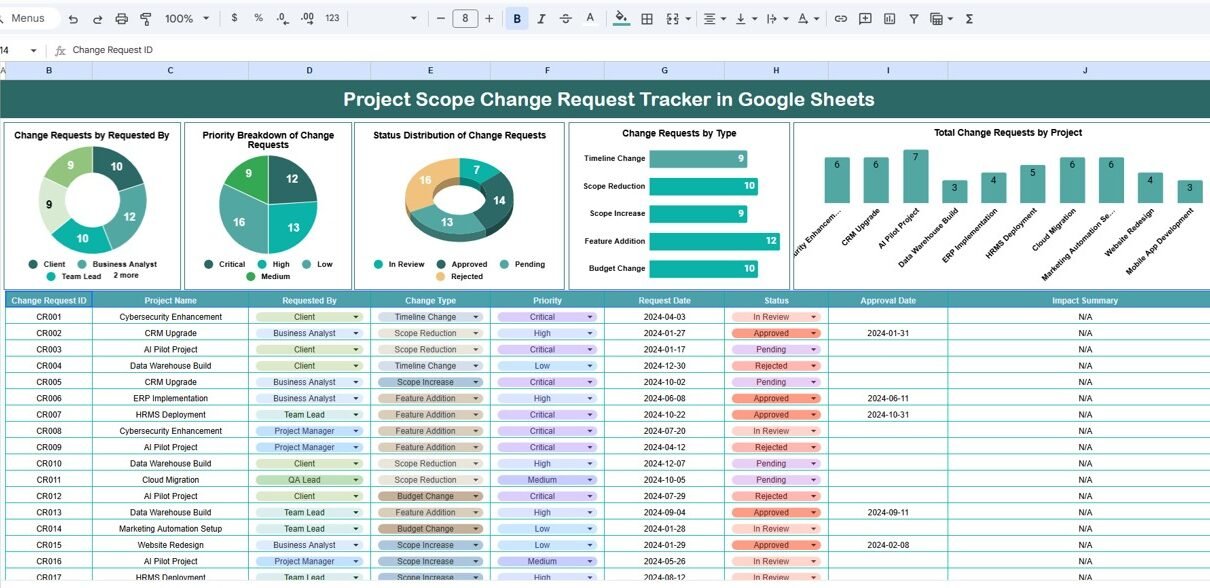
This sheet is the core of the system. It includes data fields for every scope change request and interactive charts that summarize project performance.
Charts Included:
Change Requests by Requested By
Shows who is raising the most scope change requests.
Helps identify user patterns and workload.
Priority Breakdown of Change Requests
Displays urgent, high, medium, and low priority change requests.
Useful for planning and resource allocation.
Status Distribution of Change Requests
Shows whether requests are pending, approved, rejected, in-progress, or completed.
Helps track overall progress and bottlenecks.
Change Requests by Type
Categorizes requests into:
- Scope increase
- Scope decrease
- Feature addition
- Feature modification
- Bug fix
- Compliance update
Total Change Requests by Project
Shows how many change requests belong to each project.
Great for understanding project complexity and requirement volatility.
These charts give a complete visual overview of all changes taking place across projects.

Click to Buy Project Scope Change Request Tracker in Google Sheets
2. Search Sheet Tab
This tab helps teams quickly find any scope change request without scrolling.
Features:
-
Search by Keyword
-
Select Field Name such as Status, Type, Priority, Requested By, or Project
-
Instantly filter relevant requests
-
Reduce lookup time
-
Improve accuracy
The search tab makes the tracker much more efficient, especially when handling large datasets.

Click to Buy Project Scope Change Request Tracker in Google Sheets
Advantages of Project Scope Change Request Tracker
- Single Source of Truth: All scope changes live in one organized sheet.
- Clear Visibility: Managers and stakeholders can see all change requests at a glance.
- Faster Decision-Making: Charts highlight urgent requests and pending approvals instantly.
- Better Project Control: Teams can track how change requests affect timelines and budgets.
- Improved Accountability: Every request shows who raised it and who approved it.
- Real-Time Updates; Teams collaborate and update the tracker simultaneously.
- Easy Reporting; Charts make it simple to present change request trends in meetings.
Opportunities for Improvement
Enhance the tracker by adding:
- Approval Workflow Automation: Use email notifications or Google Apps Script for approvals.
- Impact Analysis Section: Include fields for time impact, cost impact, and resource impact.
- Request Aging Tracker: Highlight requests pending for too long.
- Project Manager Comments Section: Capture remarks or decisions for clarity.
- Attachment Links: Link documents, screenshots, or requirement files directly.
- SLA Monitoring: Track how long each request takes to process.
Best Practices for Using the Tracker
Click to Buy Project Scope Change Request Tracker in Google Sheets
Keep Statuses Standardized
Use labels like Submitted, Under Review, Approved, Rejected, Completed.
- Update the Tracker Daily: Avoid data gaps to ensure accuracy.
- Prioritize Requests Clearly: Use consistent priority levels (Urgent, High, Medium, Low).
- Conduct Weekly Review Meetings: Use charts to discuss pending or overdue requests.
- Use Filters and Search Function: Improve turnaround time by finding requests quickly.
- Maintain History Logs: Track decisions and timelines for audit use.
Conclusion
The Project Scope Change Request Tracker in Google Sheets is a powerful tool that brings structure, visibility, and control to change management processes. With built-in charts, search capability, and easy customization, this tracker ensures that your team handles every change request efficiently and transparently.Project Scope Change Request Tracker in Google Sheets
It helps you manage requests across projects, understand priority levels, identify bottlenecks, and make better decisions—without using costly project management tools.Project Scope Change Request Tracker in Google Sheets
Whether you run multiple projects or a single complex initiative, this tracker keeps your change requests organized and easy to monitor.Project Scope Change Request Tracker in Google Sheets
Frequently Asked Questions (FAQs)
Click to Buy Project Scope Change Request Tracker in Google Sheets
1. What does this tracker do?
It records and tracks all project scope change requests in one central Google Sheet.
2. Who should use this tracker?
Project managers, PMO teams, team leads, product teams, and stakeholders.
3. Can I add custom fields?
Yes, you can add fields like cost impact, time impact, or comments.
4. Do the charts update automatically?
Yes, all charts update when you update the tracker sheet.
5. Can I integrate this with Google Forms?
Yes, change requests can be submitted through a form that feeds into the tracker.
6. Is this tracker ready to use?
Yes, the template is fully set up and ready for immediate use.
7. Can I track multiple projects at once?
Yes, the tracker supports project-wise analysis through charts.
Visit our YouTube channel to learn step-by-step video tutorials
Youtube.com/@NeotechNavigators
Watch the step-by-step video Demo:
Click to Buy Project Scope Change Request Tracker in Google Sheets