Project delays are common in almost every organization. Changes in scope, resource constraints, external dependencies, approvals, or unexpected risks often force project teams to request additional time. However, many organizations still manage time extension requests through emails, verbal approvals, or unstructured Excel files. As a result, approvals get delayed, accountability weakens, and project timelines become unclear.
That is exactly where a Project Time Extension Request Tracker in Google Sheets becomes extremely useful. This ready-to-use tracker helps teams log, monitor, analyze, and approve time extension requests in a structured and transparent way. Moreover, it provides real-time visibility through charts and a powerful search function.
What Is a Project Time Extension Request Tracker in Google Sheets?
Click to Buy Project Time Extension Request Tracker in Google Sheets
A Project Time Extension Request Tracker is a centralized system used to capture and manage requests for extending project deadlines. It records critical details such as project name, department, priority, reason for delay, requested extension days, approval status, and project manager.
Because this tracker is built in Google Sheets, it offers several advantages:
- Easy online access
- Real-time collaboration
- Automatic chart updates
- No software installation
- Simple customization
As a result, organizations can control project timelines better while maintaining complete transparency.
Why Do Organizations Need a Time Extension Request Tracker?
Projects rarely fail because of a single delay. Instead, unmanaged and untracked extensions slowly derail timelines and budgets. Therefore, organizations need a structured system to manage time extension requests.
A Project Time Extension Request Tracker helps to:
- Track all extension requests in one place
- Reduce approval delays
- Improve accountability
- Identify recurring delay patterns
- Support data-driven project decisions
- Improve communication between teams
Because everything stays documented, managers gain better control over project delivery.
Overview of the Tracker Structure
Click to Buy Project Time Extension Request Tracker in Google Sheets
This ready-to-use tracker consists of:
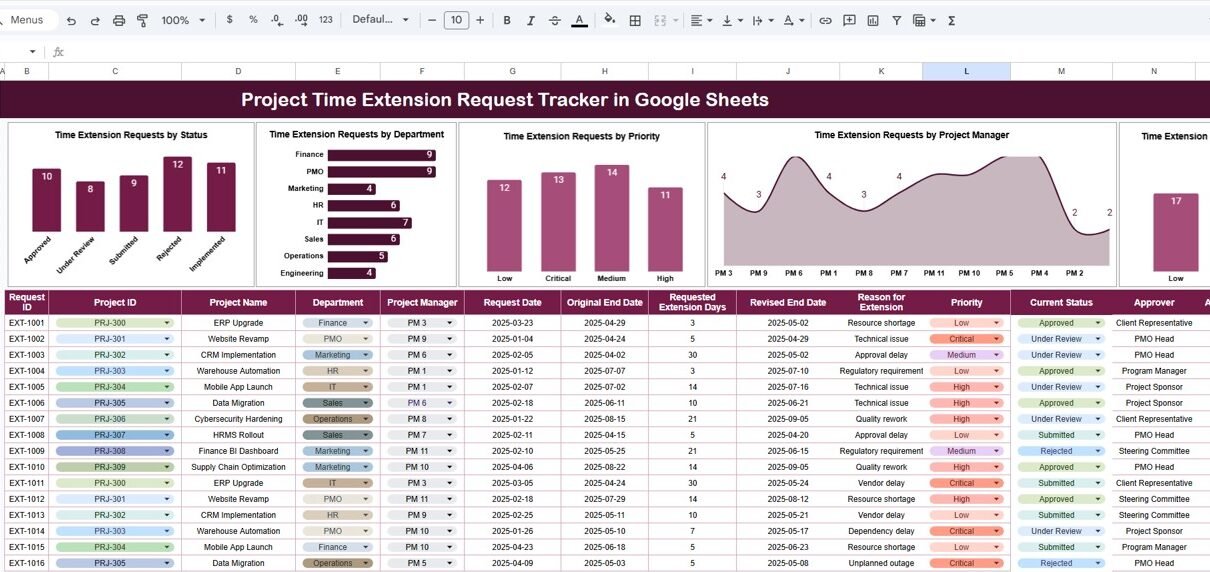
- Tracker Sheet Tab (main data entry and tracking area)
- Interactive Charts for analysis
- Search Panel for quick filtering
Let us explore each part in detail.
Tracker Sheet Tab
The Tracker Sheet Tab is the core of the entire system. Here, project teams enter every time extension request.
Typical fields in the tracker include:
- Request ID
- Project Name
- Department
- Project Manager
- Original End Date
- Requested Extension (Days)
- Revised End Date
- Priority Level (Low, Medium, High, Critical)
- Reason for Extension
- Request Status (Pending, Approved, Rejected, In Review)
- Request Date
- Approval Date
- Remarks
Once users enter or update any record, all charts update automatically. Therefore, managers always see the latest status without manual reporting.
Charts Included in the Tracker
Click to Buy Project Time Extension Request Tracker in Google Sheets
The dashboard contains four insightful charts, each designed to highlight a different aspect of time extension management.
1. Time Extension Requests by Status
This chart shows how many requests fall under each status, such as:
- Pending
- Approved
- Rejected
- Under Review
This view helps project leaders quickly understand approval bottlenecks. For example, if many requests remain pending, it signals delays in decision-making.
2. Time Extension Requests by Department
This chart highlights which departments request the most extensions.
It helps organizations to:
- Identify departments facing frequent delays
- Investigate process inefficiencies
- Allocate additional resources
- Improve planning accuracy
Over time, this chart reveals patterns that support long-term improvement.
3. Time Extension Requests by Priority
Not all delays carry the same impact. This chart categorizes extension requests based on priority levels.
Managers can instantly see:
- How many critical extensions exist
- Whether high-priority delays increase
- Which requests require immediate action
As a result, teams can focus on what matters most.
4. Time Extension Requests by Project Manager
This chart displays requests grouped by project manager.
It helps leadership:
- Understand workload challenges
- Identify managers handling complex projects
- Provide targeted support or training
- Balance project ownership
This insight improves fairness and accountability across teams.

Click to Buy Project Time Extension Request Tracker in Google Sheets
Search Functionality – Search by Keyword and Field Name
The tracker includes a smart search feature that saves time and effort.
Users simply enter:
-
Search Keyword (e.g., project name, department, manager)
-
Field Name (e.g., Status, Priority, Project Manager)
The tracker instantly filters matching records.
This feature helps users:
- Find specific requests quickly
- Respond faster during reviews
- Support audits and governance
- Reduce manual scrolling
As a result, productivity increases significantly.

Click to Buy Project Time Extension Request Tracker in Google Sheets
Advantages of Using a Project Time Extension Request Tracker
1. Improved Transparency
Every request remains visible, documented, and traceable. Therefore, confusion and miscommunication reduce drastically.
2. Faster Decision-Making
Charts and structured data help managers approve or reject requests quickly.
3. Better Accountability
Each request links to a department and project manager, which improves ownership.
4. Data-Driven Insights
Historical data highlights recurring issues and planning gaps.
5. Easy Collaboration
Because Google Sheets works online, teams collaborate from anywhere.
6. No Additional Cost
Organizations avoid expensive project management software for basic tracking.
Opportunities for Improvement in the Tracker
Although the tracker is powerful, organizations can enhance it further.
Some improvement opportunities include:
- Adding SLA tracking for approval timelines
- Capturing root cause categories for delays
- Integrating with project management tools
- Adding automated email alerts
- Tracking cost impact of time extensions
- Including risk level classification
These enhancements make the tracker even more strategic.
Best Practices for Using the Project Time Extension Request Tracker
Click to Buy Project Time Extension Request Tracker in Google Sheets
1. Standardize Request Criteria
Clearly define when teams should raise extension requests.
2. Update Status Regularly
Ensure approvals and rejections reflect immediately in the tracker.
3. Review Charts Weekly
Frequent reviews help teams act early on risks.
4. Train Project Managers
Ensure everyone follows the same data entry standards.
5. Analyze Trends Quarterly
Use historical data to improve planning and estimation accuracy.
6. Restrict Editing Rights
Maintain data accuracy with controlled access.
Who Can Use This Tracker?
This tracker is ideal for:
- Project Managers
- PMO Teams
- Department Heads
- Operations Managers
- Construction & Engineering Teams
- IT & Software Project Teams
- Consulting Firms
Any organization that manages deadlines can benefit from this tracker.
Conclusion
Click to Buy Project Time Extension Request Tracker in Google Sheets
A Project Time Extension Request Tracker in Google Sheets provides a simple yet powerful way to manage project delays professionally. It replaces scattered emails and informal approvals with a transparent, structured, and data-driven system. Because it includes visual charts and a smart search function, it helps managers make faster and better decisions.
By using this tracker consistently, organizations improve planning accuracy, reduce unnecessary delays, and increase overall project success rates.
Frequently Asked Questions (FAQs)
1. Can I customize the tracker fields?
Yes, the tracker is fully customizable.
2. Does it support multiple departments?
Yes, you can track unlimited departments and projects.
3. Is Google Sheets secure for this data?
Yes, with proper access controls.
4. Can I track approval turnaround time?
Yes, by adding approval date fields and formulas.
5. Does the tracker update charts automatically?
Yes, charts refresh as soon as data changes.
6. Can I use this for large projects?
Yes, it works for both small and large project portfolios.
Visit our YouTube channel to learn step-by-step video tutorials
Youtube.com/@NeotechNavigators
Watch the step-by-step video tutorial:
Click to Buy Project Time Extension Request Tracker in Google Sheets