Managing resource availability and scheduling across teams can be challenging — especially when multiple departments, projects, and users are involved. The Resource Booking Tracker in Google Sheets provides a simple yet powerful way to track, monitor, and visualize resource utilization and booking status in real time.
This article explains the complete structure, key features, and best practices of this ready-to-use tracker, helping you streamline bookings and improve operational efficiency.
What Is a Resource Booking Tracker in Google Sheets?
A Resource Booking Tracker is a centralized management tool that allows organizations to schedule and monitor the usage of shared resources — such as meeting rooms, equipment, vehicles, or project tools.
Built using Google Sheets, this tracker enables easy collaboration, automated reporting, and visual insights into how resources are being used across locations and departments.
It’s designed for facilities managers, admin teams, or project coordinators who need to manage resource allocation efficiently and avoid scheduling conflicts.
Structure of the Tracker
Click to Buy Resource Booking Tracker in Google Sheets
The Resource Booking Tracker in Google Sheets includes the following key components:
Tracker Sheet Tab
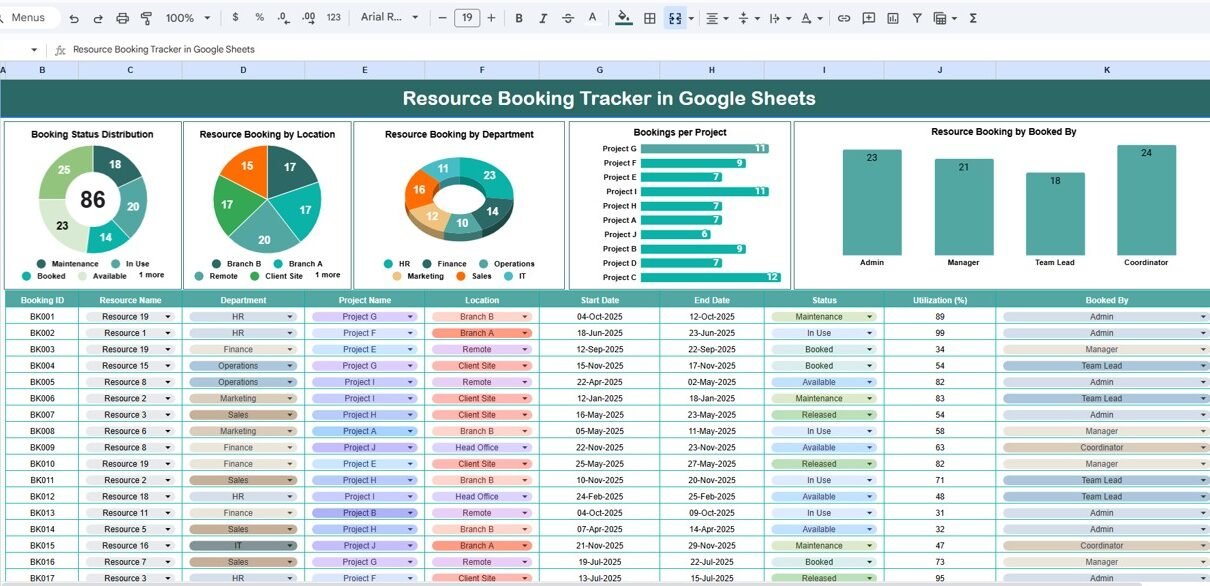
The Tracker Sheet serves as the main dashboard for monitoring resource utilization and booking trends.
Charts Included:
-
Booking Status Distribution
Displays the breakdown of all bookings (e.g., Confirmed, Pending, Canceled, Completed), helping you quickly understand overall status ratios. -
Resource Booking by Location
Shows how resources are distributed or booked across different sites or offices. -
Resource Booking by Department
Analyzes which departments are utilizing the most resources. -
Bookings per Project
Illustrates total bookings by project or client, providing insights into resource demand by workload. -
Resource Booking by Booked By
Identifies the most active users or teams creating bookings — useful for tracking departmental engagement.
These charts auto-update as new bookings are added to the data sheet.

Click to Buy Resource Booking Tracker in Google Sheets
Search Sheet Tab
The Search Sheet simplifies data retrieval with keyword-based search functionality.
Examples:
-
Search “Location = HQ” → View all bookings at headquarters.
-
Search “Status = Pending” → Display all pending resource requests.
-
Search “Department = IT” → List resources booked by the IT department.
This makes it easy for users to find and filter booking records without manually scrolling through large datasets.

Click to Buy Resource Booking Tracker in Google Sheets
Advantages of the Resource Booking Tracker
-
Centralized Management: Track all resource bookings in one place.
-
Real-Time Insights: Automatically updates visuals and summaries.
-
Departmental Transparency: Shows which teams use resources the most.
-
Improved Utilization: Identifies idle or overused resources.
-
Conflict Reduction: Helps avoid double-bookings or scheduling overlaps.
-
Collaboration Friendly: Accessible to multiple users simultaneously in Google Sheets.
Opportunities for Improvement
Enhance functionality by:
-
Integrating Google Forms: Automate new booking submissions.
-
Adding Notifications: Use Google Apps Script to alert when bookings are confirmed or canceled.
-
Including Calendar Integration: Sync with Google Calendar for visual scheduling.
-
Adding Cost Metrics: Track cost per booking or hourly usage rates.
-
Highlighting Overlaps: Use conditional formatting to flag time conflicts automatically.
Best Practices
Click to Buy Resource Booking Tracker in Google Sheets
-
Keep booking statuses standardized (Confirmed, Pending, Canceled, Completed).
-
Update records immediately after booking or cancellation.
-
Use consistent department and location names to ensure accurate analytics.
-
Review utilization trends monthly to balance workload and resource demand.
-
Protect formula and chart cells from accidental editing.
Conclusion
The Resource Booking Tracker in Google Sheets is an essential tool for any organization looking to manage and optimize shared resources effectively.
It helps prevent scheduling conflicts, improves visibility across departments, and offers data-driven insights into resource utilization — all in an intuitive, cloud-based format.
Visit our YouTube channel to learn step-by-step video tutorials
Youtube.com/@NeotechNavigators
Watch the step-by-step video Demo: