Search engine optimization drives modern digital marketing. Businesses invest time, effort, and money into creating content, improving rankings, and increasing website visibility. However, many marketing teams struggle to measure SEO performance clearly. They often manage multiple spreadsheets, tools, and reports, which makes analysis slow and confusing.
Therefore, organizations need a structured system that tracks SEO performance using measurable indicators. This is where the SEO Content Performance KPI Dashboard in Google Sheets becomes extremely valuable.
The SEO Content Performance KPI Dashboard in Google Sheets provides a centralized, data-driven solution to monitor SEO metrics, evaluate content effectiveness, and compare performance against targets and previous results. Instead of manually calculating numbers, teams can instantly analyze Monthly-To-Date (MTD) and Year-To-Date (YTD) performance through an automated dashboard.
In this complete guide, you will learn everything about the SEO Content Performance KPI Dashboard, including its structure, KPIs, formulas, benefits, best practices, and real-world applications.
What Is an SEO Content Performance KPI Dashboard in Google Sheets?
An SEO Content Performance KPI Dashboard is a structured analytics system that tracks and visualizes SEO performance metrics using predefined KPIs.
Google Sheets makes this solution powerful because it offers:
- Cloud-based accessibility
- Real-time collaboration
- Automated calculations
- Dynamic dashboards
- Easy customization
Instead of reviewing SEO tools individually, marketing teams can analyze all important metrics in one dashboard.
Why Do Businesses Need an SEO KPI Dashboard?
Click to Buy SEO Content Performance KPI Dashboard in Google Sheets
SEO generates large amounts of performance data. Teams monitor rankings, traffic, engagement, conversions, and backlinks simultaneously. However, without structured tracking, decision-making becomes difficult.
An SEO KPI dashboard helps businesses:
- Measure content performance accurately
- Compare actual results with targets
- Track monthly and yearly progress
- Identify high-performing content
- Improve SEO strategy faster
As a result, marketers shift from guesswork to data-driven optimization.
Key Features of SEO Content Performance KPI Dashboard in Google Sheets
This dashboard includes six structured worksheets, each designed for a specific analytical purpose.
1. Dashboard Sheet Tab – Central Performance Overview
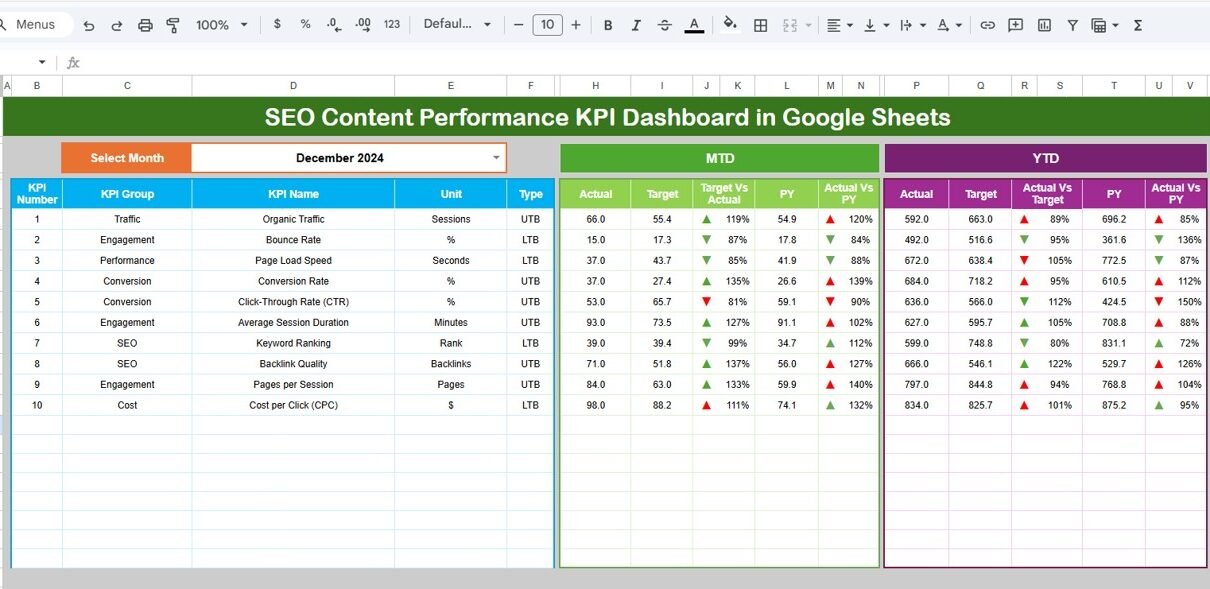
The Dashboard Sheet acts as the main control panel where users view all KPI insights.
Month Selection Feature
-
Users select a month from the dropdown in cell D3.
-
The entire dashboard updates automatically based on the selected month.
Performance Metrics Displayed
The dashboard shows:
MTD (Month-To-Date) Metrics
- Actual Value
- Target Value
- Previous Year Value
- Target vs Actual comparison
- Previous Year vs Actual comparison
Conditional formatting displays up and down arrows, which instantly show performance direction.
YTD (Year-To-Date) Metrics
- YTD Actual
- YTD Target
- YTD Previous Year
- Target vs Actual comparison
- Previous Year vs Actual comparison
Therefore, users understand both short-term and long-term performance instantly.

2. KPI Trend Sheet Tab – Detailed KPI Analysis
Click to Buy SEO Content Performance KPI Dashboard in Google Sheets
The KPI Trend Sheet allows deeper analysis of individual KPIs.
Interactive KPI Selection
Users select a KPI from dropdown range C3.
Once selected, the dashboard displays:
- KPI Group
- KPI Unit
- KPI Type
- Performance Direction (Lower the Better / Upper the Better)
- KPI Formula
- KPI Definition
This sheet helps teams understand not only performance but also KPI logic.

Click to Buy SEO Content Performance KPI Dashboard in Google Sheets
3. Actual Number Sheet Tab – Data Entry for Current Year
This sheet stores actual SEO performance data.
Key Functionality
-
Enter MTD and YTD actual values.
-
Change reporting month from cell E1.
-
Enter the first month of the financial year in E1.
Because the dashboard connects dynamically, every update reflects automatically.

4. Target Sheet Tab – Performance Goals Management
In this sheet, users define monthly and yearly targets.
You enter:
-
KPI Target (MTD)
-
KPI Target (YTD)
Targets help organizations measure whether SEO efforts meet expectations.

Click to Buy SEO Content Performance KPI Dashboard in Google Sheets
5. Previous Year Number Sheet Tab – Historical Comparison
Historical data provides essential performance context.
Users enter previous-year values exactly like current-year entries. Consequently, teams can measure growth trends and seasonal performance changes.

6. KPI Definition Sheet Tab – KPI Documentation Center
This sheet acts as a KPI knowledge base.
Users define:
- KPI Name
- KPI Group
- Unit of Measurement
- KPI Formula
- KPI Definition
This ensures consistency across teams and prevents confusion.

Click to Buy SEO Content Performance KPI Dashboard in Google Sheets
Advantages of SEO Content Performance KPI Dashboard in Google Sheets
Centralized SEO Monitoring
-
All KPIs available in one place
-
Reduced reporting complexity
-
Improved visibility
Automated Performance Tracking
-
Automatic calculations
-
Dynamic month selection
-
Faster reporting
Data-Driven Decision Making
-
Compare targets vs results
-
Analyze historical performance
-
Improve campaign planning
Team Collaboration
-
Cloud-based sharing
-
Real-time updates
-
Easy accessibility
Cost-Effective Solution
-
No expensive BI tools required
-
Works within Google Workspace
Best Practices for the SEO Content Performance KPI Dashboard
Click to Buy SEO Content Performance KPI Dashboard in Google Sheets
Define Clear KPI Objectives
Choose KPIs aligned with business goals.
Update Data Regularly
Maintain consistent monthly updates.
Focus on Actionable Metrics
Track KPIs that influence decisions.
Use Consistent Definitions
Maintain KPI definitions in the definition sheet.
Analyze Trends, Not Just Numbers
Observe performance over time.
Align SEO with Business Outcomes
Measure conversions, not only traffic.
Who Should Use an SEO KPI Dashboard?
Click to Buy SEO Content Performance KPI Dashboard in Google Sheets
This dashboard benefits:
- SEO Specialists
- Content Marketing Teams
- Digital Marketing Agencies
- Website Owners
- Marketing Managers
- Growth Strategists
Conclusion
The SEO Content Performance KPI Dashboard in Google Sheets provides a powerful yet simple way to measure SEO success. Instead of managing multiple reports, teams gain a centralized platform for tracking KPIs, comparing targets, and analyzing trends.
With six structured worksheets — Dashboard, KPI Trend, Actual Numbers, Target, Previous Year Data, and KPI Definitions — organizations achieve complete SEO visibility.
Moreover, businesses improve decision-making, optimize content strategy, and drive measurable growth using data-backed insights.
Ultimately, when marketers track the right KPIs consistently, SEO transforms from an uncertain activity into a predictable growth engine.
Frequently Asked Questions (FAQs)
Click to Buy SEO Content Performance KPI Dashboard in Google Sheets
What is an SEO KPI Dashboard?
An SEO KPI Dashboard tracks key search engine optimization metrics using structured performance indicators.
Why use Google Sheets for SEO dashboards?
Google Sheets allows real-time collaboration, automation, and easy accessibility without expensive tools.
What is MTD and YTD in SEO reporting?
MTD shows performance for the current month, while YTD shows performance from the start of the year.
How often should SEO KPIs be updated?
Teams should update KPIs monthly for accurate analysis.
Can beginners use this dashboard?
Yes. The dashboard uses dropdowns and structured inputs, making it beginner-friendly.
Which KPI is most important for SEO?
Organic traffic and conversion rate remain the most critical KPIs because they directly impact business growth.
Visit our YouTube channel to learn step-by-step video tutorials
Youtube.com/@NeotechNavigators
Watch the step-by-step video tutorial:
Click to Buy SEO Content Performance KPI Dashboard in Google Sheets