Every organization wants a skilled, confident, and future-ready workforce. Yet many teams struggle because they do not track employee skills properly. Without clear visibility into strengths, weaknesses, training needs, department-level skills, and competency gaps, managers find it difficult to plan training or create development strategies. Because of this growing need, an Employee Skill Assessment Tracker in Google Sheets becomes a powerful and easy-to-use solution.
This tracker helps HR teams, department managers, and leadership understand employee capability levels in real time. It shows skill distribution, training demand, competency scores, and department-level insights using dynamic charts and a smart search system. Because the tracker is built in Google Sheets, it updates instantly, supports collaboration, and works on any device.
In this article, you will learn how the tracker works, what charts it includes, how to use the search feature, and how organizations benefit from having a structured skill-assessment system.
What Is an Employee Skill Assessment Tracker in Google Sheets?
An Employee Skill Assessment Tracker is a ready-to-use tool that helps organizations evaluate, monitor, and improve employee skills. It stores skill ratings, assessment scores, manager reviews, and training needs. The tracker then converts this data into interactive charts and insights.
Because it uses Google Sheets, HR teams get:
-
Real-time collaboration
-
Easy data entry
-
Instant visual updates
-
No software installation
-
Unlimited customization
The tracker becomes a single source of truth for skill evaluation across departments.
Key Features of the Employee Skill Assessment Tracker
Click to Buy Employee Skill Assessment Tracker in Google Sheets
This tool includes a main Tracker Sheet Tab, a full Search System, and several dynamic charts that offer deeper insight into your workforce.
Let’s explore each feature one by one.
Tracker Sheet Tab
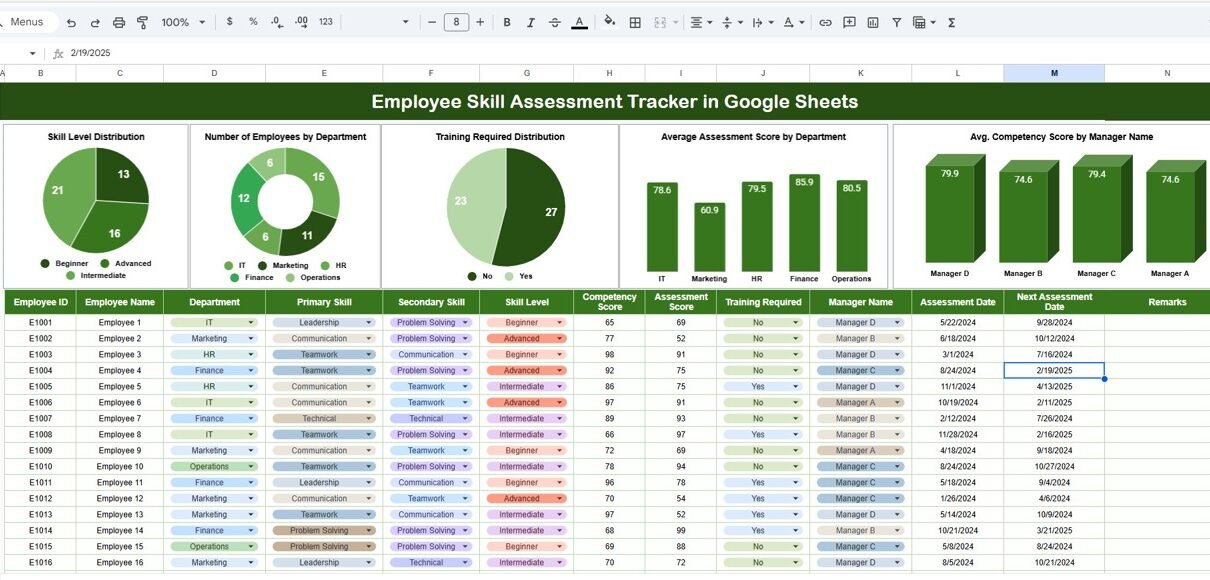
This is the core of the entire system. The Tracker Sheet stores:
- Employee Name
- Employee ID
- Department
- Manager Name
- Skills Evaluated
- Competency Ratings
- Assessment Score
- Training Required (Yes/No)
- Comments
You enter or paste employee skill details here. The moment you add or update data, the entire dashboard refreshes.
The tracker supports:
Because everything stays in one structured place, HR teams can manage skill records without confusion.
Charts Included in the Tracker
Click to Buy Employee Skill Assessment Tracker in Google Sheets
The dashboard contains five powerful charts, each designed to give clear visibility into employee capability levels.
Skill Level Distribution
This chart shows the number of employees at each skill level (1 to 5).
It helps you understand:
This distribution chart becomes the first indicator of overall workforce strength.
Number of Employees by Department
This chart displays how many employees belong to each department.
It helps HR teams analyze:
When combined with average assessment scores, this chart becomes a powerful planning tool.
Training Required Distribution
This chart highlights how many employees need further training.
It helps management take action because:
Companies save time and money when they know exactly who needs training and why.
Average Assessment Score by Department
This is one of the most valuable performance indicators.
It shows:
These insights help leaders make data-driven HR decisions.
Average Competency Score by Manager Name
This chart tells you how each manager’s team performs.
It helps identify:
This chart also reveals how manager coaching affects employee performance.

Click to Buy Employee Skill Assessment Tracker in Google Sheets
Search Functionality (Smart Search System)
The tracker includes a Search Panel where you enter:
-
Search Keyword
-
Field Name (Employee Name, Department, Manager Name, Skill, etc.)
Once you enter these two values, the tracker filters the records instantly.
This helps you:
Find employees quickly
Filter by department or manager
Pull out training-related employees
Locate skill-specific data instantly
The search system is designed to save time and improve productivity.

Click to Buy Employee Skill Assessment Tracker in Google Sheets
Why Do Organizations Need an Employee Skill Assessment Tracker?
Most companies rely on scattered Excel files, manual reports, or outdated records. This creates confusion and slows down skill development. A Skill Assessment Tracker solves these problems because it offers:
- Clear insights into employee strengths
- Accurate identification of training needs
- Better planning for L&D (Learning & Development)
- Improved talent management decisions
- Transparent performance visibility
When managers understand the skill landscape, they create stronger teams and more successful organizations.
Advantages of the Employee Skill Assessment Tracker in Google Sheets
Click to Buy Employee Skill Assessment Tracker in Google Sheets
- Real-Time Visibility: You get instant insights into skill gaps, competencies, and training needs.
- Simple and User-Friendly: Even non-technical users manage it easily.
- Reduces HR Workload; Automated charts and search remove manual work.
- Improves Training Planning: Teams understand who needs training and why.
- Supports Employee Growth: Employees get clear goals and development direction.
- Enhances Manager Decision-Making: Managers compare competency and take action quickly.
- Works Online Across Devices; Google Sheets supports remote teams effortlessly.
Opportunities for Improvement in the Skill Tracker
Although the tracker is powerful, you can still enhance it further by adding features such as:
- Integration with HR Tools: Connect with HR portals (e.g., BambooHR, Zoho People).
- Auto-Generated Employee Reports: Generate PDF skill summaries automatically.
- Skill Gap Heatmap: Visualize skill shortages across departments.
- Historical Trend Dashboard: Track yearly improvement based on assessments.
- Weighted Scoring System: Assign weight to critical skills for better accuracy.
- Automated Alerts: Notify managers when employee skill falls below a threshold.
These improvements make the tracker even more powerful for strategic HR planning.
Best Practices for Using the Skill Assessment Tracker
Click to Buy Employee Skill Assessment Tracker in Google Sheets
- Conduct assessments every quarter: Frequent reviews keep data accurate.
- Maintain consistent rating standards: Define each level clearly for fairness.
- Involve managers and team leads: They understand employee performance closely.
- Use the search tool for faster insights: This helps during performance reviews.
- Track training impact: Update scores after training sessions to measure improvement.
- Protect employee data: Use Google Sheets access controls to maintain privacy.
Conclusion
An Employee Skill Assessment Tracker in Google Sheets helps organizations evaluate capabilities, track progress, and make smarter HR decisions. It is simple, powerful, and easy to use. Moreover, it updates in real time and offers clear visual insights that guide learning and development planning. Because it includes smart charts and search features, it becomes an essential tool for HR teams, managers, and leadership.
With structured data, well-defined scoring, and a clean dashboard layout, your organization can build a stronger, more skilled, and future-ready workforce.
Frequently Asked Questions (FAQs)
Click to Buy Employee Skill Assessment Tracker in Google Sheets
1. Who can use this skill assessment tracker?
HR teams, managers, team leads, L&D professionals, and leadership.
2. How often should skills be assessed?
Quarterly or biannually, depending on organizational needs.
3. Can I add more skills or departments?
Yes, the tracker is completely customizable.
4. Does it work for remote teams?
Yes, Google Sheets supports collaboration from anywhere.
5. Can I track training progress?
Yes, you can update team scores after training.
6. Do I need technical skills to use the tracker?
No, basic Google Sheets skills are enough.
Visit our YouTube channel to learn step-by-step video tutorials
Youtube.com/@NeotechNavigators
Watch the step-by-step video tutorial:
Click to Buy Employee Skill Assessment Tracker in Google Sheets