IT security incidents have become a daily reality for organizations of all sizes. Malware attacks, phishing attempts, data breaches, unauthorized access, and system vulnerabilities can disrupt business continuity and damage trust. However, many organizations still manage security incidents through emails, spreadsheets, or disconnected tools. As a result, response time increases, accountability weakens, and risk exposure grows.IT Security Incident Report Tracker in Google Sheets
An IT Security Incident Report Tracker in Google Sheets provides a centralized, structured, and visual approach to managing security incidents. It helps security teams log incidents, monitor severity, track response time, analyze trends, and improve incident response efficiency. Moreover, because this tracker works in Google Sheets, teams collaborate easily while maintaining real-time visibility.IT Security Incident Report Tracker in Google Sheets
Get the IT Security Incident Report Tracker in Google Sheets
In this article, we explain how this tracker works, its charts, search functionality, benefits, improvement opportunities, best practices, and frequently asked questions.IT Security Incident Report Tracker in Google Sheets
What Is an IT Security Incident Report Tracker in Google Sheets?
An IT Security Incident Report Tracker is a centralized system that records and monitors all security-related incidents across an organization. It tracks key information such as:IT Security Incident Report Tracker in Google Sheets
- Incident ID
- Incident Date
- Incident Type
- Severity Level
- Location
- Response Team
- Response Time (Hours)
- Incident Status
- Root Cause
- Corrective Actions
Because the tracker runs on Google Sheets, all stakeholders see updated information instantly, which helps teams react faster and reduce risk.
This tracker supports:
- IT security teams
- SOC analysts
- IT managers
- Compliance teams
- Risk management teams
Key Features of the IT Security Incident Report Tracker
This ready-to-use tracker includes:
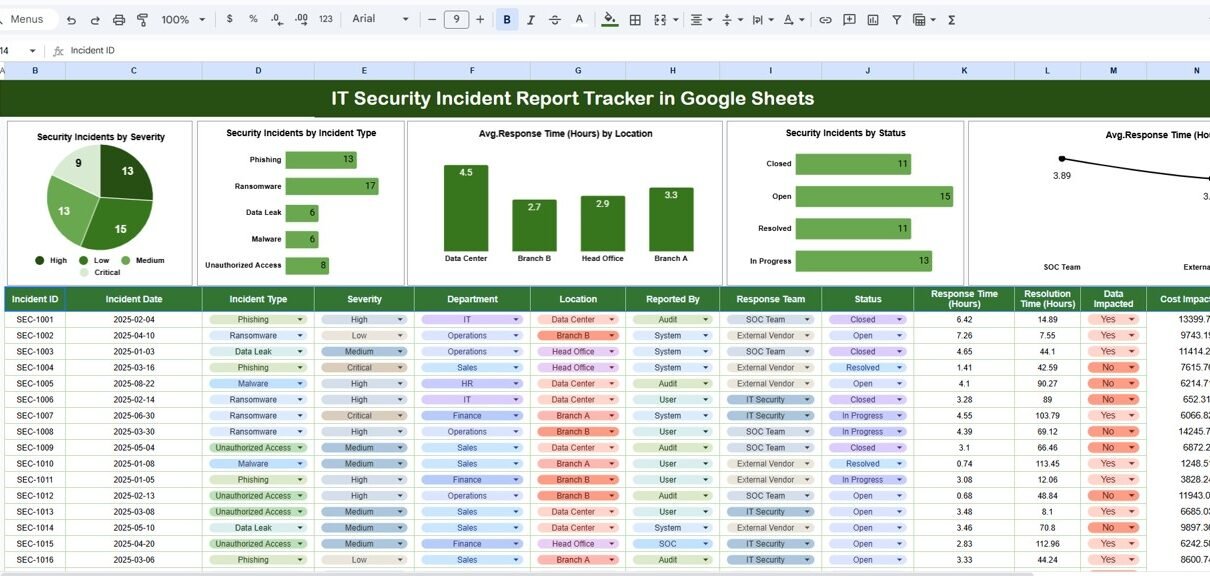
A structured Tracker Sheet Tab
Five visual charts for analysis
A dedicated Search Sheet Tab
Response time and severity tracking
Location and response team insights
These features work together to strengthen security incident management.
Tracker Sheet Tab
The Tracker Sheet Tab is the primary data entry sheet. All security incidents get logged here.
Typical columns include:
- Incident ID
- Incident Date
- Incident Type (Malware, Phishing, Data Breach, Access Violation)
- Severity (Low, Medium, High, Critical)
- Location
- Detected By
- Assigned Response Team
- Response Start Time
- Response End Time
- Response Time (Hours – Auto Calculated)
- Incident Status (Open, In Progress, Contained, Closed)
- Impact Description
- Root Cause
- Resolution Notes
Once users update this sheet, all charts and insights refresh automatically.
Dashboard Charts – Security Insights at a Glance
The tracker includes multiple charts that turn raw incident data into meaningful insights.
Security Incidents by Severity
This chart displays incidents by severity level:
-
Low
-
Medium
-
High
-
Critical
Helps security teams prioritize response
Highlights overall risk exposure
Supports escalation planning
Security Incidents by Incident Type
This chart shows incidents by type such as:
-
Malware
-
Phishing
-
Access Violation
-
Data Breach
-
System Misconfiguration
Identifies most common attack vectors
Helps strengthen preventive controls
Supports security awareness planning
Average Response Time (Hours) by Location
This chart shows the average response time by location.
Highlights slow-response locations
Helps improve regional incident readiness
Supports resource redistribution
Security Incidents by Status
This chart groups incidents by status:
-
Open
-
In Progress
-
Contained
-
Closed
Tracks backlog of unresolved incidents
Improves incident closure accountability
Helps compliance teams during reviews
Average Response Time (Hours) by Response Team
This chart compares performance by response team.
Identifies high-performing teams
Highlights training or capacity gaps
Improves team-level accountability

Search Sheet Tab – Smart and Fast Filtering
The tracker includes a powerful Search Sheet Tab.
You enter:
-
Search Keyword (Incident ID, location, severity, incident type, team name)
-
Field Name (Severity, Type, Status, Location, Response Team)
The tracker filters matching records instantly.
Saves investigation time
Helps during audits and reviews
Avoids manual scrolling
Improves response coordination

Why Organizations Need an IT Security Incident Tracker
Without structured tracking, organizations face:
-
Delayed response times
-
Incomplete incident records
-
Poor root-cause analysis
-
Weak compliance evidence
-
Higher security risk
This tracker ensures consistent documentation, faster resolution, and better decision-making.
Advantages of the IT Security Incident Report Tracker
✅ Centralized Incident Recording
All security incidents stay in one place.
✅ Faster Incident Response
Response time tracking improves efficiency.
✅ Better Risk Visibility
Severity and status insights support prioritization.
✅ Improved Team Accountability
Performance tracking strengthens ownership.
✅ Audit & Compliance Ready
Well-documented incidents help during audits.
✅ Easy Collaboration
Google Sheets enables real-time team access.
Opportunities for Improvement
Organizations can enhance the tracker by adding:
🔹 SLA-based response benchmarks
🔹 Automated alerts for critical incidents
🔹 Incident aging analysis
🔹 Integration with SIEM tools
🔹 Risk scoring based on impact
Best Practices for Using the Security Incident Tracker
✔ Log incidents immediately after detection
✔ Define severity levels clearly
✔ Review response time charts weekly
✔ Close incidents with detailed root cause notes
✔ Limit edit permissions for data integrity
✔ Use search during investigations and audits
Conclusion
An IT Security Incident Report Tracker in Google Sheets enables organizations to manage cybersecurity incidents with clarity, speed, and accountability. It transforms raw incident logs into visual insights that support faster response, better risk management, and stronger compliance. Because the tracker is simple, collaborative, and ready to use, it serves as an effective security operations tool for modern organizations.
If you want to build trackers like this on your own, the NextGenTemplates Academy learning paths take you through the spreadsheet skills step by step.
Get the IT Security Incident Report Tracker in Google Sheets
Frequently Asked Questions (FAQs)
1. Who should use this tracker?
IT security teams, SOC teams, IT managers, and compliance teams.
2. Does it track response time automatically?
Yes, response time calculates based on start and end time.
3. Can we customize incident types and severity levels?
Yes, the tracker is fully customizable.
4. Is this tracker suitable for audits?
Yes, it keeps a complete incident history.
5. Can alerts be added later?
Yes, Google Apps Script supports automation and alerts.