Personal Expense Tracker in Google Sheets is a ready-to-use, cloud-based template designed to help you take complete control of your day-to-day spending. If you have ever struggled with tracking where your money goes each month, this Google Sheets expense tracker brings clarity through visual dashboards, monthly comparisons, and fully customizable settings — all inside a single spreadsheet you can access from any device.
Whether you are a salaried professional, a freelancer juggling multiple income streams, a student on a tight budget, or simply someone who wants to build healthier financial habits, this template gives you the tools to monitor, analyze, and optimize your personal expenses effortlessly.
Key Features of Personal Expense Tracker in Google Sheets
👉 Click here to Purchase Personal Expense Tracker in Google Sheets
This expense tracker template is packed with features that make personal finance management simple and visual. Here is what sets it apart:
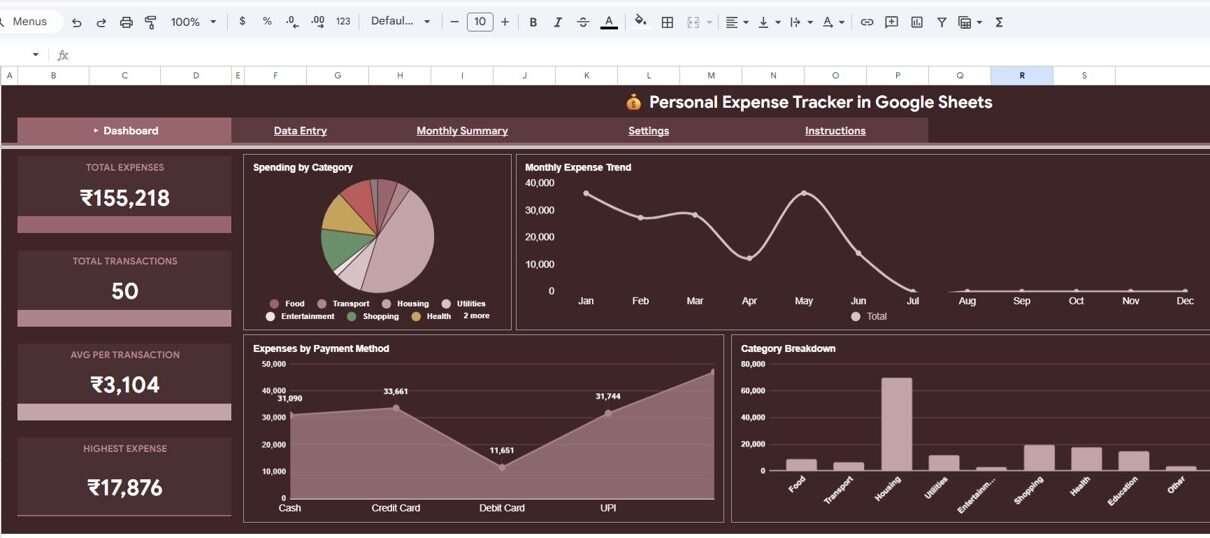
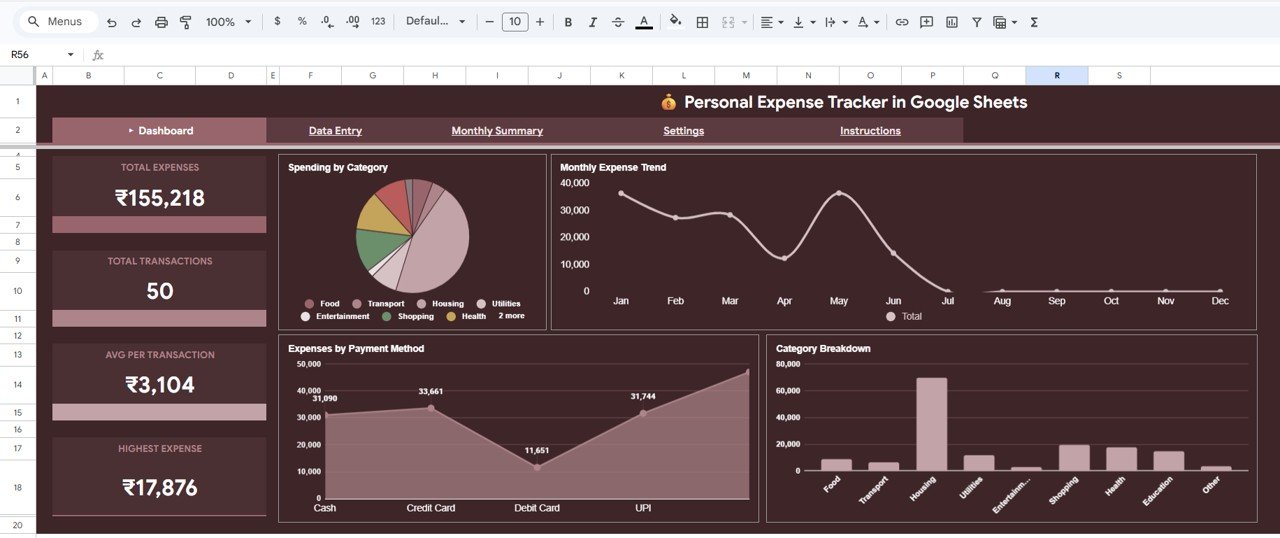
- 4 KPI Cards on the Dashboard – Get an instant snapshot of your Total Expenses, Total Transactions, Average Per Transaction, and Highest Expense without scrolling through raw data.
- 4 Interactive Chart Types – Visualize your spending patterns through Spending by Category, Monthly Expense Trend by Month, Expenses by Payment Method, and Category Breakdown by Category.
- Built-in Slicers and Filters – The Dashboard page includes multiple slicers that let you filter your expense data by any dimension with a single click.
- Monthly Budget vs Actual Comparison – The Monthly Summary page shows you exactly how your actual spending compares to the budget limits you set, helping you spot overspending patterns early.
- Fully Customizable Settings – Define your own expense categories, set budget limits per category, and configure payment methods through the dedicated Settings page.
- Zero Technical Skills Required – Just enter your transactions in the Data Entry sheet and everything else updates automatically.
- Cloud-Based Access – Works on any device through Google Drive — laptop, tablet, or phone.
Dashboard Pages Explained
👉 Click here to Purchase Personal Expense Tracker in Google Sheets
1. Dashboard
The Dashboard is the main overview page of the Personal Expense Tracker in Google Sheets. At the top, you will find 4 high-level KPI cards that display your Total Expenses, Total Transactions, Average Per Transaction, and Highest Expense. These cards give you an instant financial health check without diving into details.
Below the cards, the dashboard presents 4 powerful charts. The Spending by Category chart shows how your money is distributed across different expense categories like groceries, rent, entertainment, and utilities. The Monthly Expense Trend by Month chart visualizes your spending pattern over time, helping you identify months where you spent more than usual. The Expenses by Payment Method chart breaks down whether you are spending more through cash, credit card, debit card, or digital wallets. Finally, the Category Breakdown by Category chart provides a detailed proportional view of each spending category.
Multiple slicers are provided on this page so you can quickly filter the entire dashboard by date range, category, payment method, or any other dimension.
Dashboard2. Monthly Summary
The Monthly Summary page dives deeper into your spending analysis with two key visualizations. The Monthly Spending by Category chart shows how your spending in each category changes from month to month, making it easy to spot seasonal patterns or unusual spikes. The Budget vs Actual by Monthly Average chart compares what you planned to spend versus what you actually spent, calculated as a monthly average across your tracked period.
This page is particularly useful for anyone who sets monthly budget targets and wants to see at a glance which categories are within budget and which need attention.
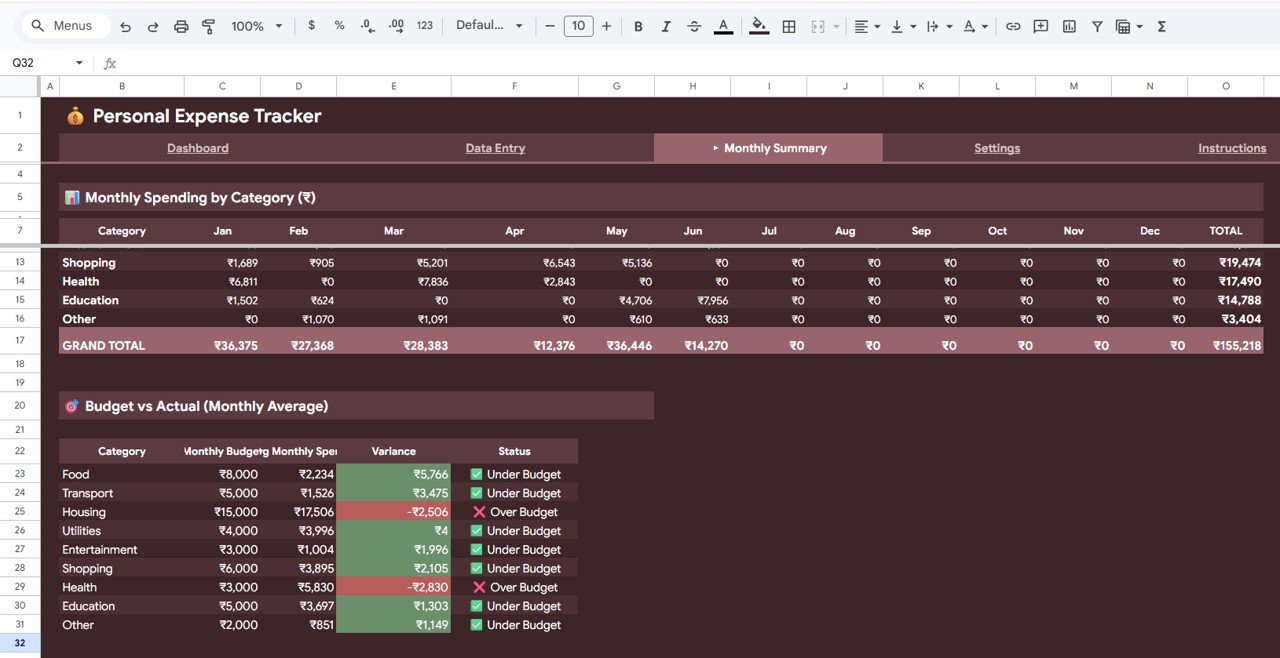 Monthly Summary
3. Settings
The Settings page is where you customize the tracker to fit your personal financial life. Here you can define your Expense Categories and Budget Limits by Category — for example, you might set a monthly limit of $500 for groceries, $200 for entertainment, and $100 for dining out. You can also manage your Payment Methods list so that the data entry dropdown menus reflect exactly how you pay for things.
This level of customization ensures the tracker adapts to your unique spending habits rather than forcing you into a rigid structure.
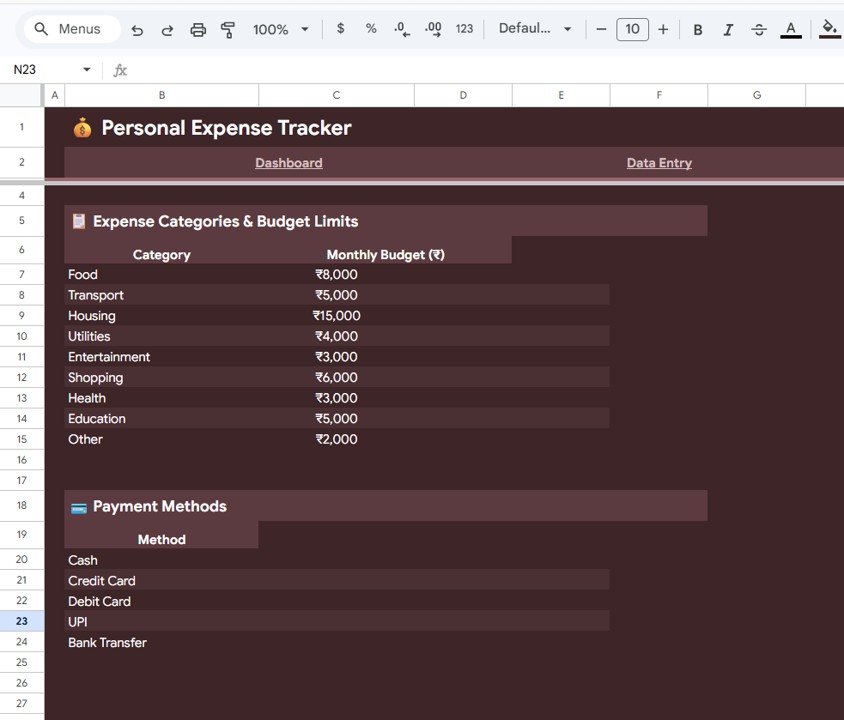 Settings
4. Data Entry Sheet
The Data Entry sheet is your transaction log. This is the only sheet where you need to manually input information. Simply add each expense with the date, amount, category, payment method, and an optional description. Once you enter data here, all charts, KPIs, and summaries across the template update automatically.
The sheet comes pre-loaded with sample data so you can see how everything works before replacing it with your own transactions.
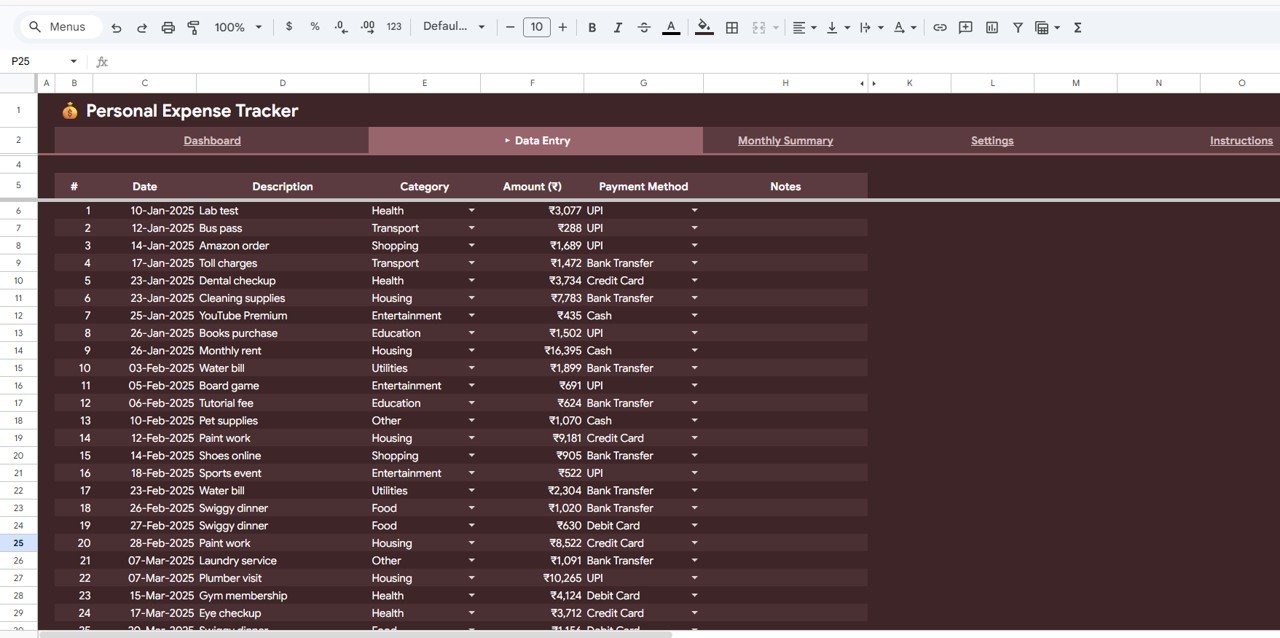 Data Entry Tab
Advantages of Personal Expense Tracker in Google Sheets
Unlike generic budgeting apps that require subscriptions and complex setups, this Google Sheets expense tracker gives you complete ownership of your data. You do not need to share sensitive financial information with third-party services. Everything stays securely in your Google Drive.
The visual dashboard approach means you spend less time analyzing numbers and more time understanding your spending behavior. The budget vs actual comparison is especially powerful for anyone trying to reduce expenses in specific categories. And because it runs entirely in Google Sheets, there is nothing to install, no compatibility issues, and it works seamlessly across Windows, Mac, Android, and iOS devices.
This template is also ideal for couples or families who want to track shared household expenses in a single, collaborative spreadsheet that everyone can access simultaneously.
Opportunities for Improvement
👉 Click here to Purchase Personal Expense Tracker in Google Sheets
While this tracker covers personal expense management comprehensively, users who also want to track income, savings goals, or investment portfolios alongside expenses may want to pair this with the Personal Finance Dashboard in Google Sheets which offers a more holistic financial management view. Additionally, users tracking business expenses separately may benefit from maintaining a dedicated business expense spreadsheet alongside this personal tracker.
Best Practices for Using This Expense Tracker
- Enter expenses daily – The more consistently you log transactions, the more accurate your dashboard insights will be. Try to enter expenses at the end of each day.
- Review the dashboard weekly – Spend 5 minutes each week reviewing the Dashboard page to catch overspending early before it becomes a habit.
- Set realistic budget limits – Use the first month of tracking to establish baseline spending, then set budget limits in the Settings page based on real data rather than guesswork.
- Use the Monthly Summary for course correction – At the end of each month, review the Budget vs Actual analysis to identify categories that need adjustment.
- Customize categories to your lifestyle – Generic categories like “Miscellaneous” hide spending patterns. Create specific categories that reflect how you actually spend money.
Explore Relevant Templates
👉 Click here to Purchase Personal Expense Tracker in Google Sheets
If you found the Personal Expense Tracker in Google Sheets useful, you might also like these related Google Sheets Tracker Templates:
- Personal Finance Dashboard in Google Sheets – A comprehensive 6-page dashboard covering income, expenses, investments, budget analysis, and transaction search.
- Monthly Budget Plan Template in Google Sheets – Plan and track your monthly budget with detailed income vs expense breakdowns.
- Emergency Fund Tracker in Google Sheets – Monitor your emergency savings progress with goal-based tracking.
- Debt Payoff Calculator Template in Google Sheets – Plan your debt repayment strategy with snowball and avalanche methods.
- Annual Personal Financial Statement Template in Google Sheets – Track your complete financial position including assets, liabilities, and net worth.
Frequently Asked Questions
What is the best Google Sheets template for tracking personal expenses?
The Personal Expense Tracker in Google Sheets is one of the best options available. It includes a visual dashboard with 4 KPI cards, 4 analytical charts, monthly budget vs actual comparison, customizable expense categories with budget limits, and a simple data entry sheet. It works on any device through Google Drive and requires no technical skills to use.
How do I track my daily expenses in Google Sheets?
With the Personal Expense Tracker in Google Sheets, you simply open the Data Entry sheet and add each transaction with the date, amount, category, and payment method. All dashboard charts and KPI cards update automatically as you enter data. The built-in slicers let you filter your spending by any dimension.
Can I set monthly budget limits in this expense tracker?
Yes. The Settings page allows you to define custom expense categories and set budget limits for each category. The Monthly Summary page then compares your actual spending against these limits so you can quickly see which categories are over or under budget.
Is this expense tracker free to use?
The Personal Expense Tracker in Google Sheets is a premium template available at a one-time cost of $4.99 (regularly $9.99). Once purchased, you receive a Google Sheets copy link that creates your own editable version in Google Drive. There are no recurring subscription fees.
Do I need to know formulas to use this template?
No. All formulas, charts, and KPI calculations are pre-built into the template. You only need to enter your transaction data in the Data Entry sheet. Everything else — including the dashboard, monthly summary, and budget comparisons — updates automatically.
Can multiple people use this tracker at the same time?
Yes. Since it is a Google Sheets template, multiple users can access and edit the spreadsheet simultaneously through Google Drive. This makes it perfect for couples or families tracking shared household expenses together.
Conclusion
The Personal Expense Tracker in Google Sheets is a simple yet powerful tool for anyone who wants to understand and control their personal spending. With its visual dashboard, monthly budget comparisons, customizable settings, and effortless data entry, it transforms raw transaction data into actionable financial insights — all inside Google Sheets.
👉 Click here to Purchase Personal Expense Tracker in Google Sheets
For more templates and tutorials, visit our YouTube channel:
👉 Youtube.com/@NeoTechNavigators
👉 Click here to Purchase Personal Expense Tracker in Google Sheets