The Visitor Entry Management System Web App Template is built for reception, security, facility, and admin teams that need a structured way to manage visitors from pre-registration to checkout. The template includes 10 connected pages, 9 high-level overview cards, visitor trend analysis, host approval tracking, badge management, visitor pass control, and a blacklist/watchlist workflow. For teams still relying on paper entry registers or scattered spreadsheets, this gives a much cleaner operating model at a one-time sale price of $24.99 instead of a monthly visitor SaaS subscription.Visitor Entry Management System Web App Template
Get the Visitor Entry Management System Web App Template
This template is especially useful for offices, schools, clinics, warehouses, coworking spaces, residential societies, factories, and campuses where the front desk needs to know who is expected, who is inside, who has checked out, which badges are assigned, and which visitors need extra review.
🚀 Try the Live Demo Before You Buy
We have deployed this web app in our own Google account so you can test every page and every role — with real sample data — before purchasing. No signup, no email required.
🔑 Test Login Credentials
Sign in with any of the four roles below to explore the system from each perspective — from full admin setup to reception check-in, host approvals, and manager-level reporting. All demo passwords are abcd.
💡 What you get after purchase: The full source code (Code.gs + Index.html) plus a step-by-step deployment guide so you can deploy your own private instance in your own Google account in under 15 minutes.
Key Features of Visitor Entry Management System Web App Template
- 10-page visitor management workspace: Overview, Quick Check-In, Visitor Registration, Quick Check-Out, Expected Visitor / Pre-Registration, Host Approval Workflow, Visitor Pass, Badge Management, Blacklist / Watchlist, and Host / Employee Master.Visitor Entry Management System Web App Template
- 9 executive overview cards: Total Visitors Today, Checked-In Visitors, Checked-Out Visitors, Currently Inside, Expected Today, Pending Approvals, Blacklist Alerts, Overstayed Visitors, and Visitors This Month.Visitor Entry Management System Web App Template
- Fast reception workflow: Quick Check-In helps the front desk capture visitor details, assign badges, and use operational tips by category.
- Planned visitor control: Expected Visitor / Pre-Registration gives admin teams a clear queue of approved, pending, and upcoming visits.
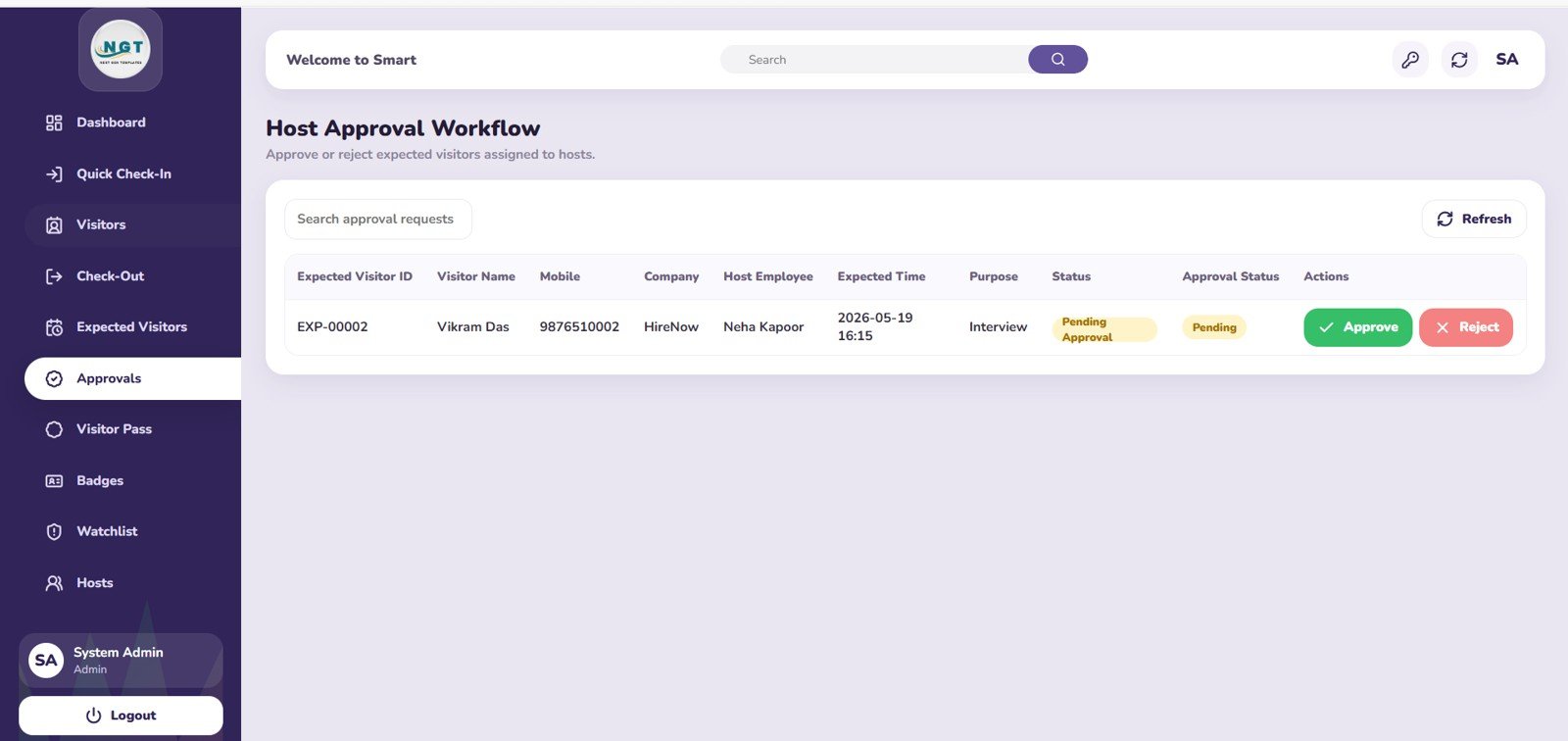
- Host approval visibility: Pending approvals are grouped by host employee, purpose, and expected time so reception can follow up before visitors wait too long.
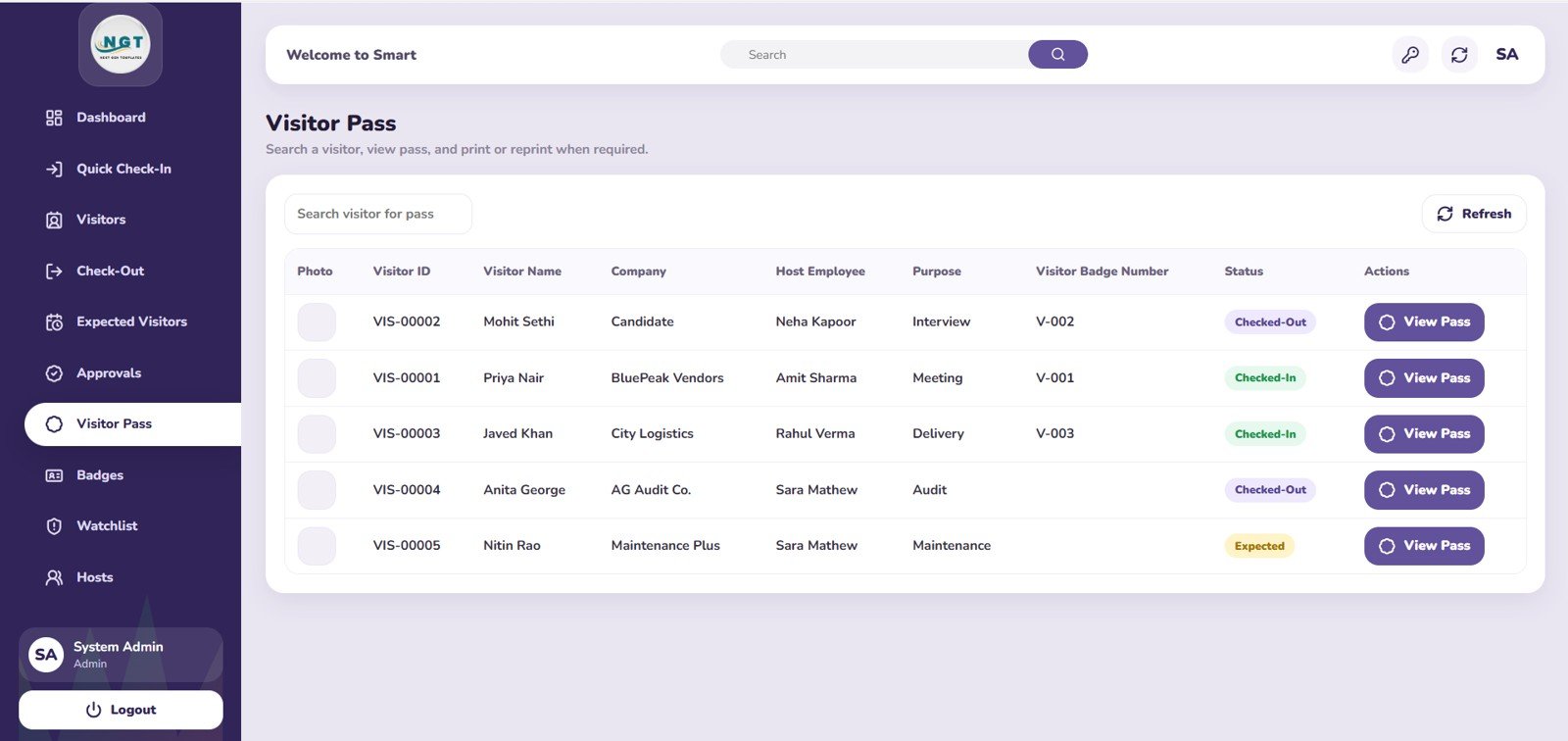
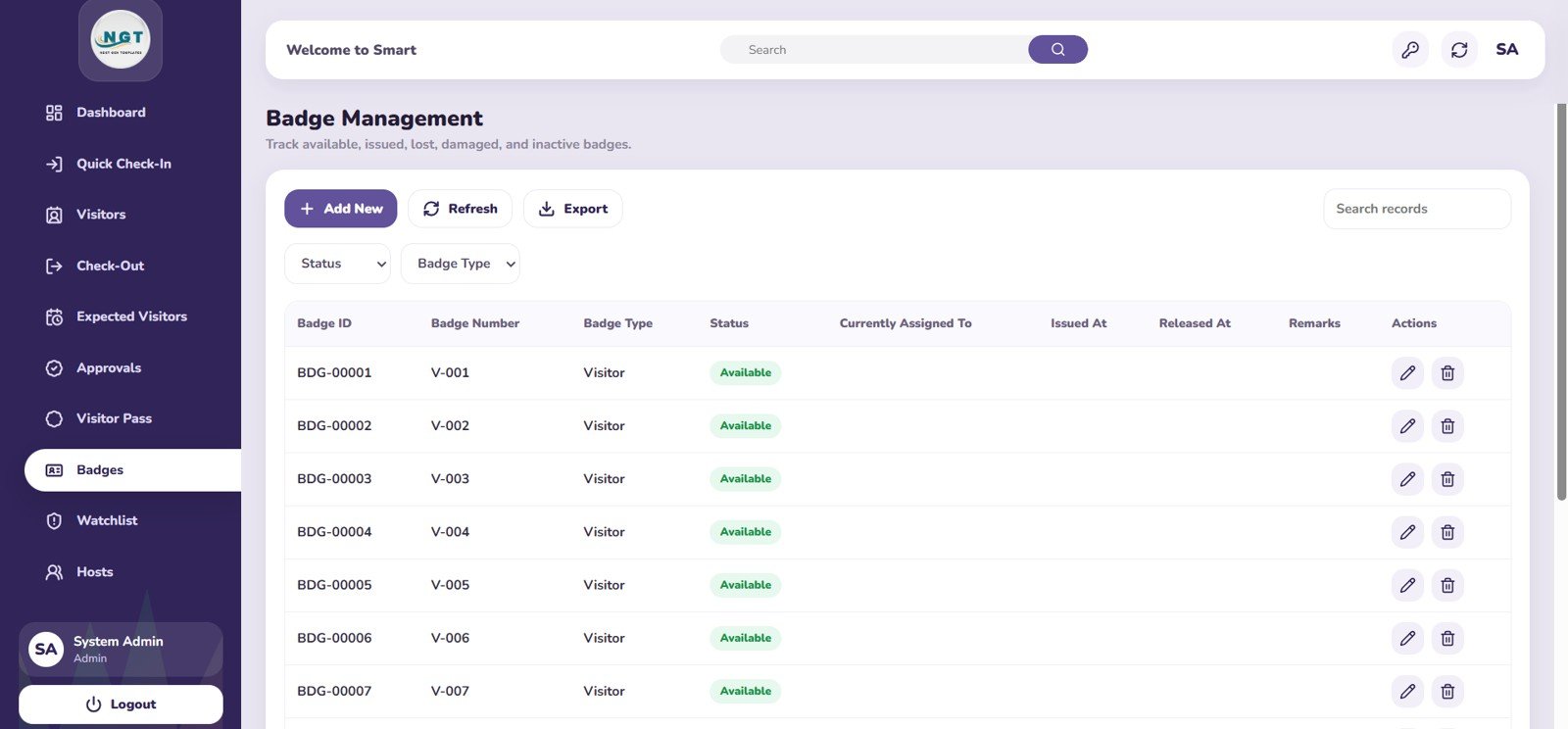
- Badge and pass tracking: Visitor Pass and Badge Management pages help teams track issue, assignment, release, and status.Visitor Entry Management System Web App Template
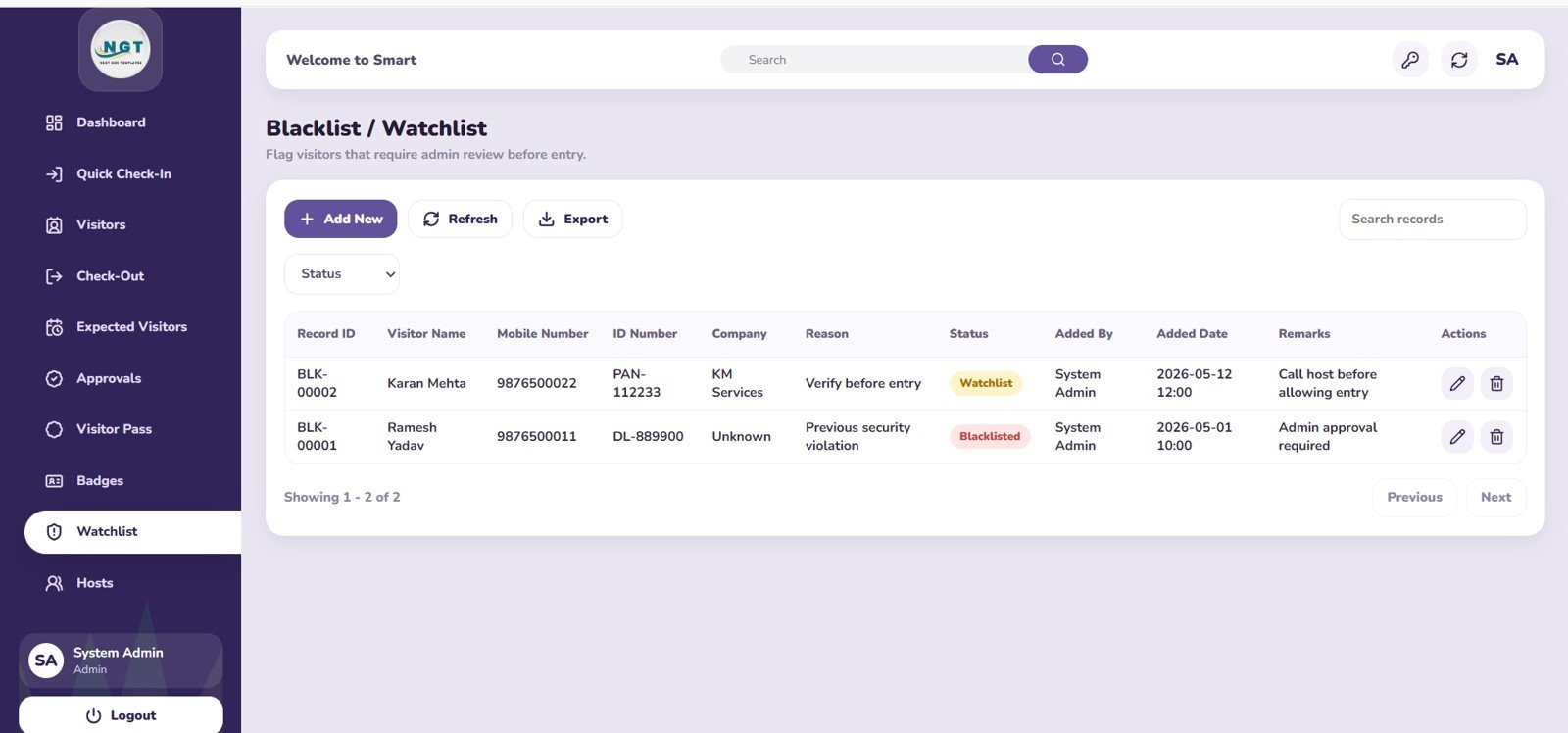
- Watchlist support: Blacklist / Watchlist records flagged visitors by status, reason, company, added by, and added date.
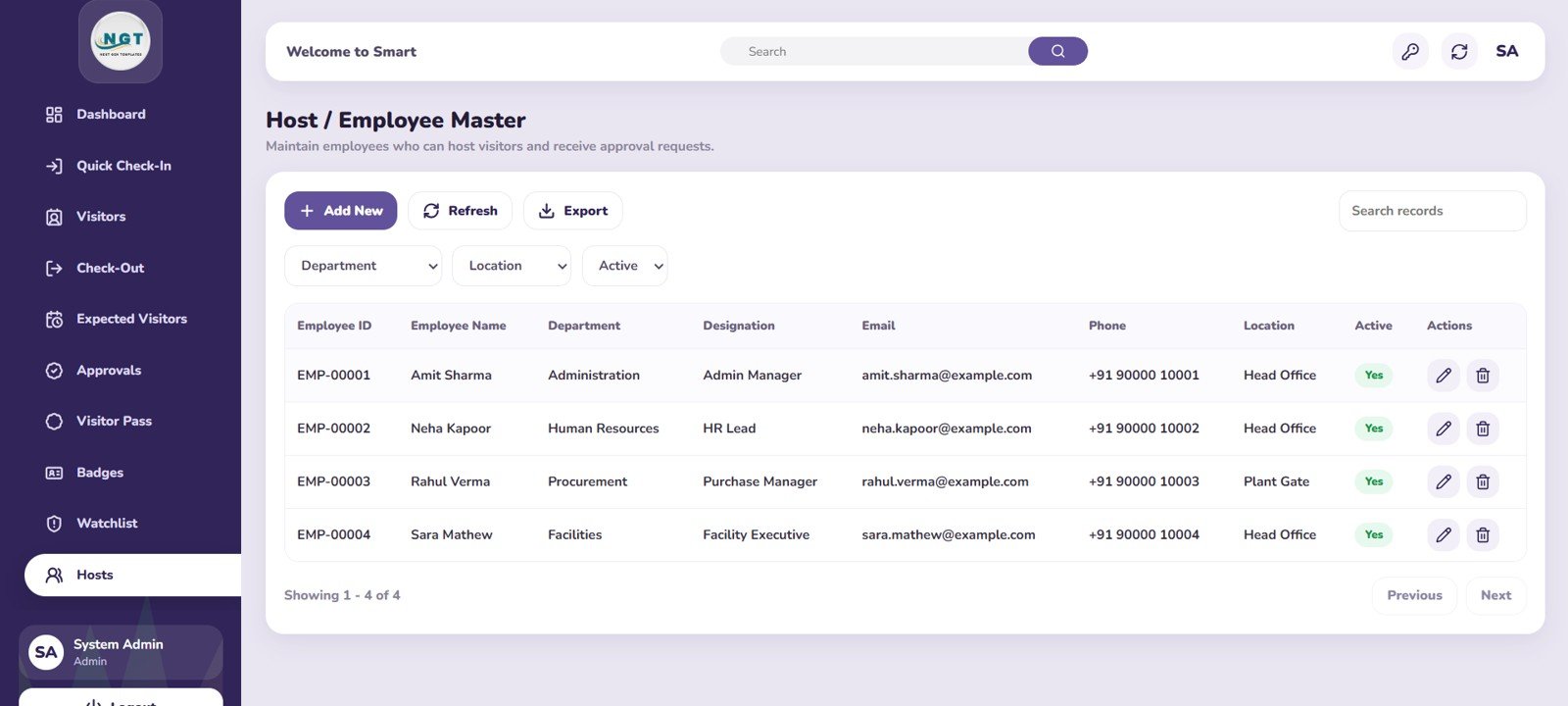
- Editable master data: Host / Employee Master keeps departments, designations, locations, and active status aligned with approval routing.
Dashboard Pages Explanation
1. Overview Page
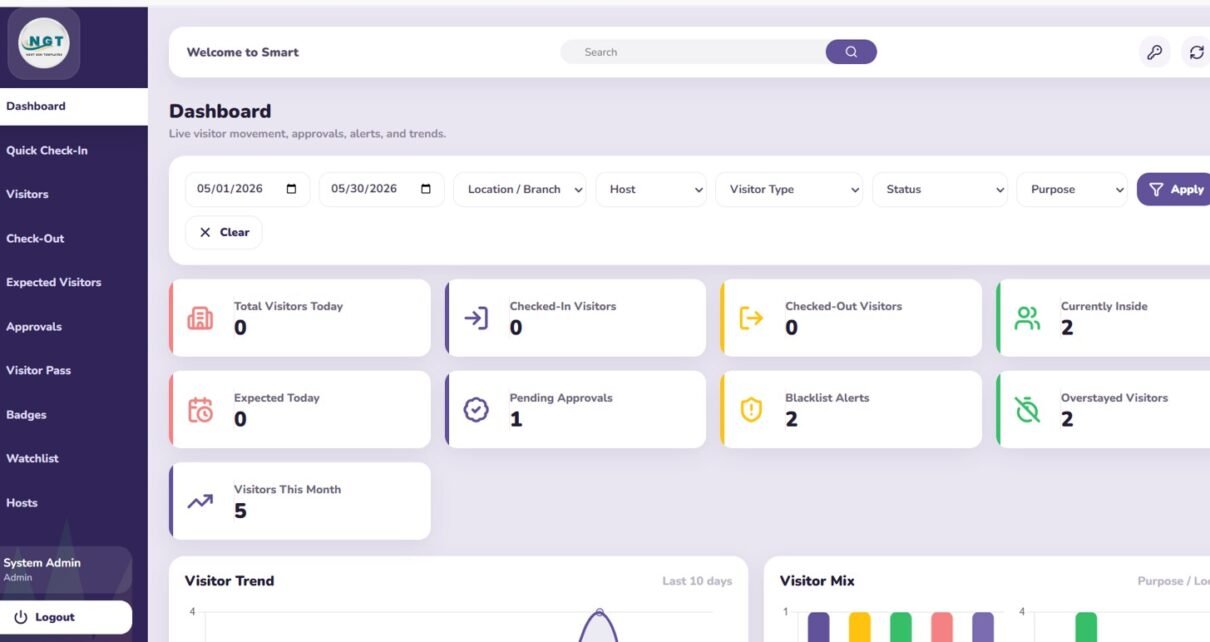
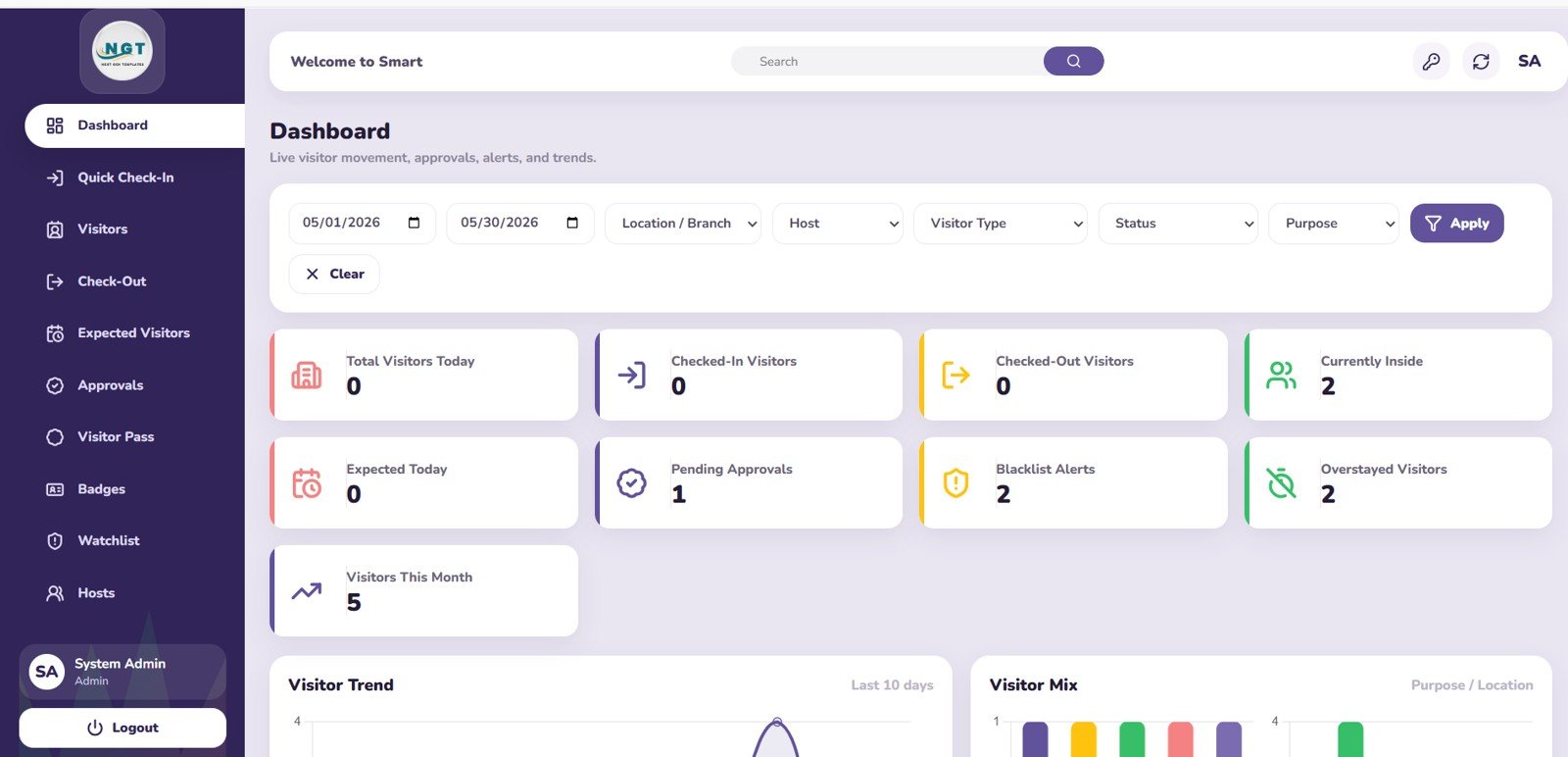
The Overview page gives management the daily control panel. At the top, cards show Total Visitors Today, Checked-In Visitors, Checked-Out Visitors, Currently Inside, Expected Today, Pending Approvals, Blacklist Alerts, Overstayed Visitors, and Visitors This Month.
Visitor Trend by Day: This chart shows how visitor volume changes across days, helping teams identify busy lobby periods. It is useful for planning reception staffing, security coverage, and badge availability.
Visitor Mix by Purpose and Location: This chart explains why visitors are coming and which locations generate the most traffic. It helps managers see whether visits are driven by meetings, vendors, interviews, deliveries, maintenance, or other purpose categories.
2. Quick Check-In
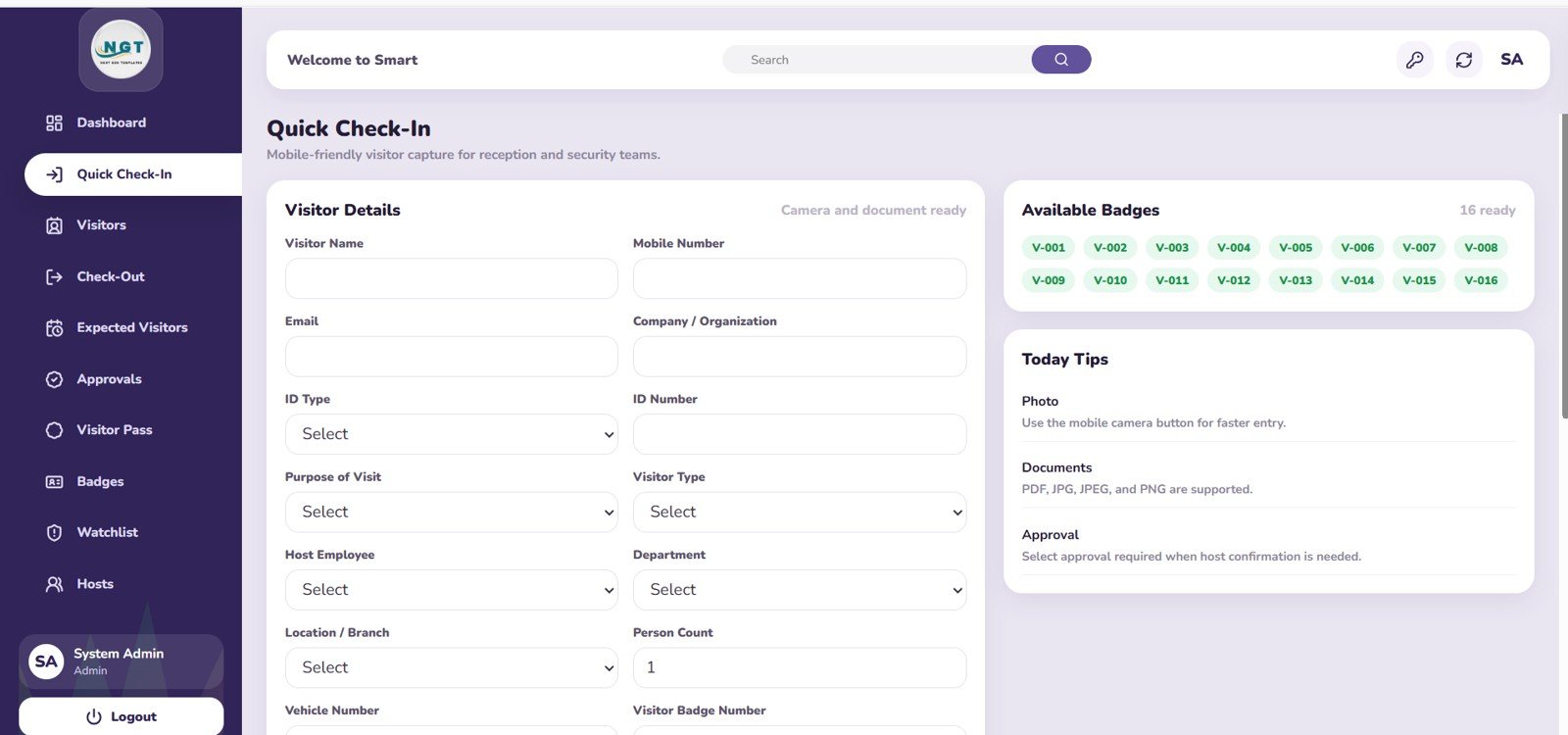
The Quick Check-In page is designed for the reception team. It includes a visitor details entry form, available badges by status, and Today Tips by Category so the front desk can complete check-in without jumping across multiple tools.
The available badge analysis helps staff avoid assigning a badge that is already in use. The tips area gives process reminders by category, which is helpful for new reception employees or temporary security staff.
3. Visitor Registration
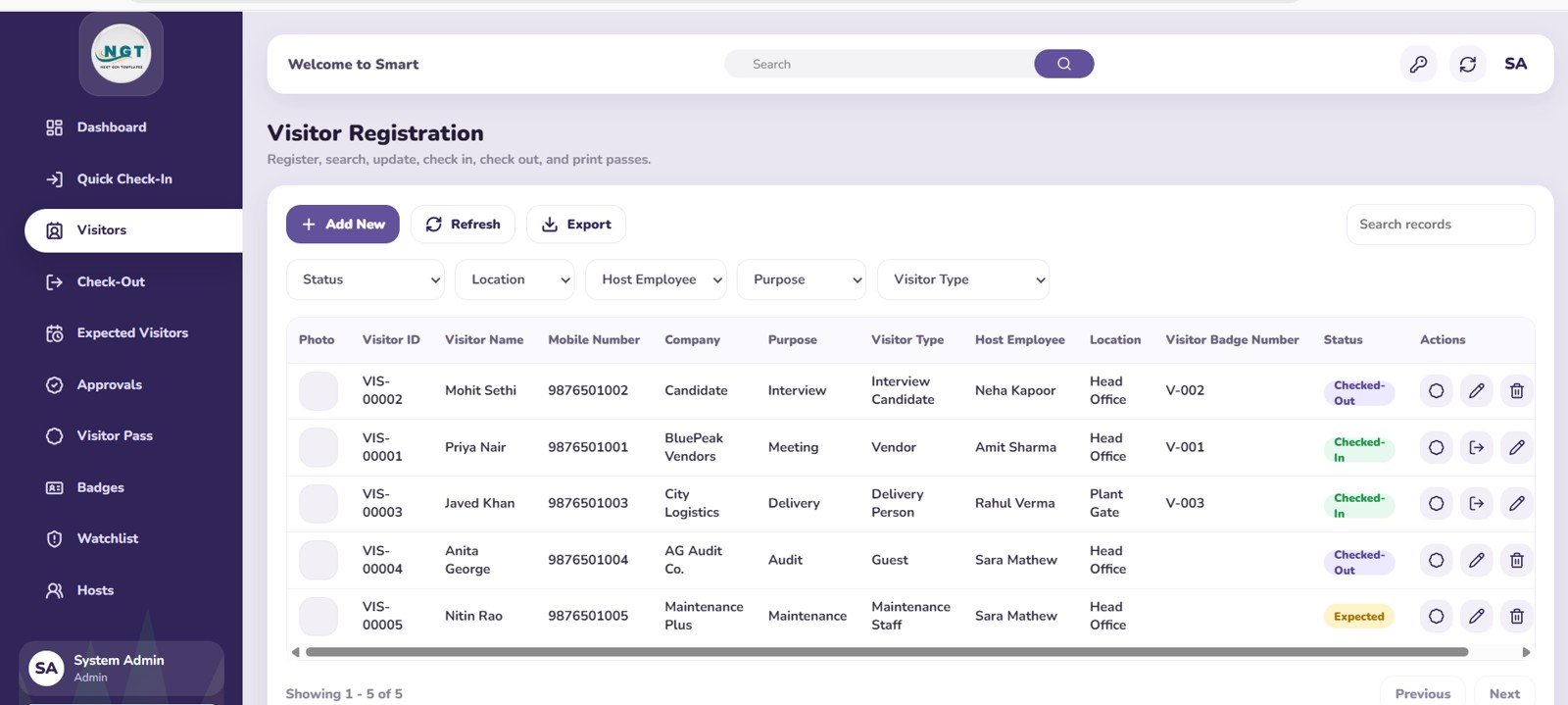
The Visitor Registration page is the main visitor record area. It analyzes visitor records by status, location, host employee, purpose, and visitor type.
This makes audit work much easier because the admin team can see whether active, completed, pending, expected, or blocked records are distributed properly. It also helps identify the employees, locations, and visit purposes that create the most reception traffic.
4. Quick Check-Out
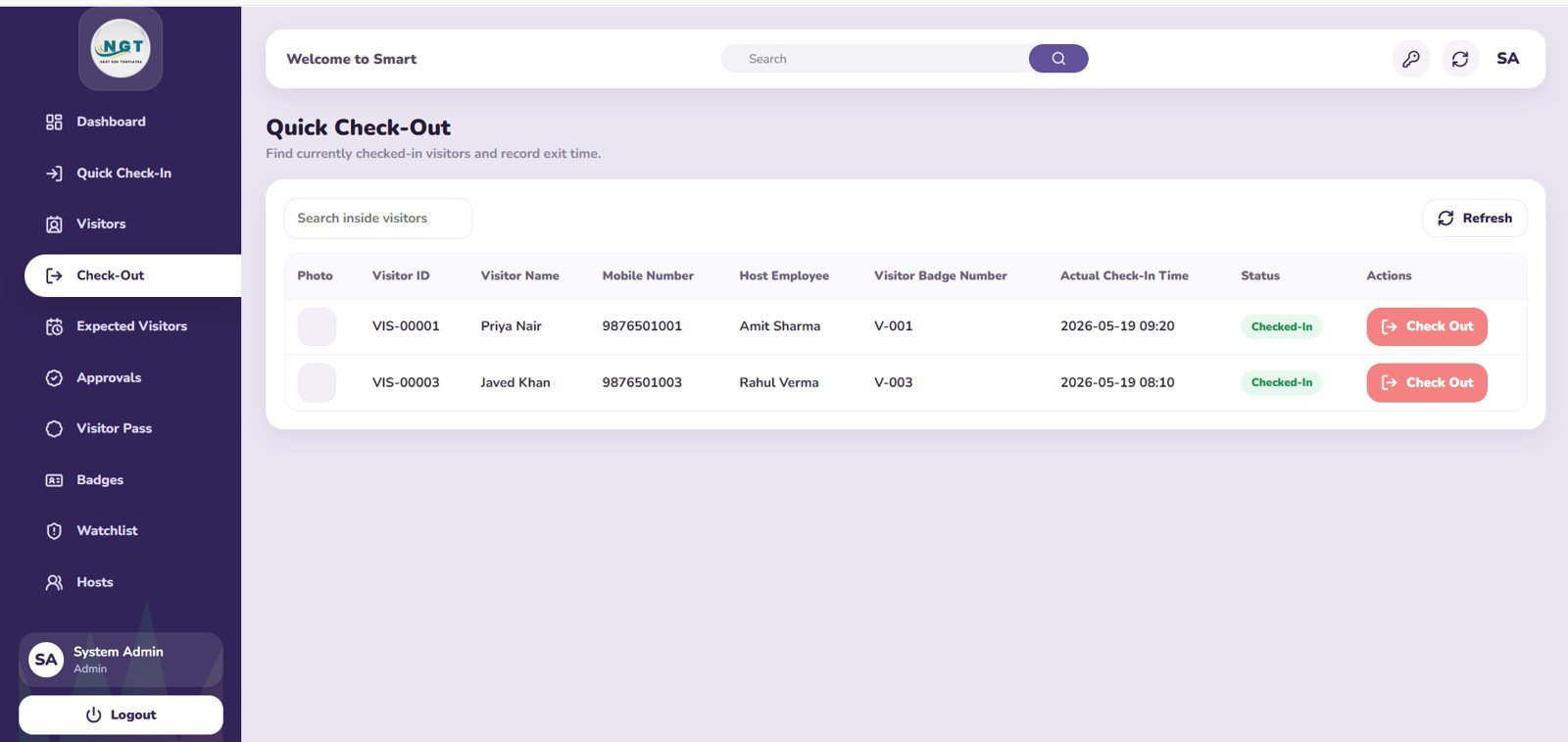
The Quick Check-Out page focuses on visitors who are currently inside. It groups checked-in visitors by host employee, badge number, and actual check-in time.
This page is useful at the end of the day, during shift handover, or during security checks. If a visitor has not checked out, the team can quickly see who hosted them, which badge is assigned, and how long they have been inside.
5. Expected Visitor / Pre-Registration
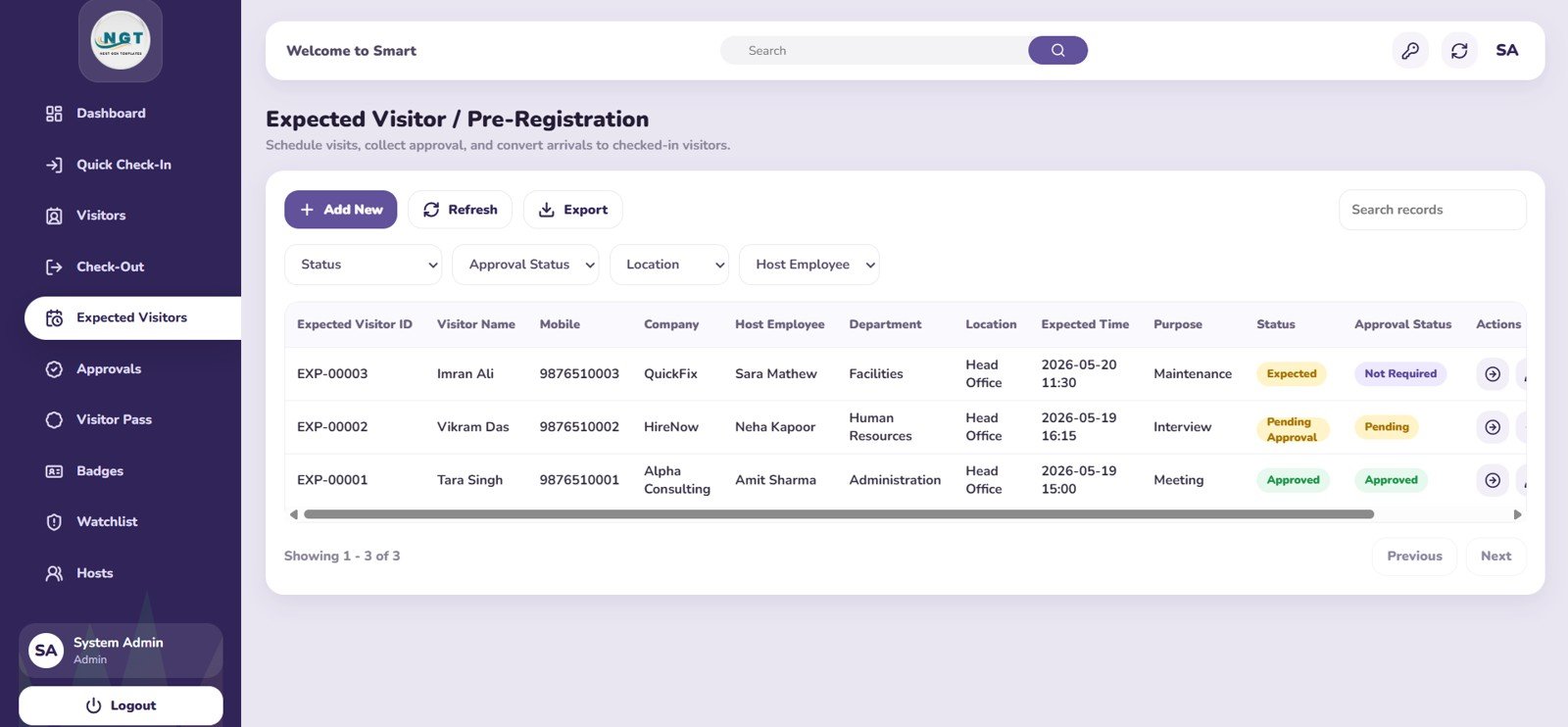
The Expected Visitor / Pre-Registration page helps teams prepare before visitors arrive. Expected visitors are analyzed by status, approval status, location, host employee, department, and purpose.
This is helpful for scheduled meetings, vendor visits, interviews, inspections, deliveries, and events. A receptionist can review the expected list in the morning and prepare badges or follow up on incomplete approvals before the visitor reaches the gate.
6. Host Approval Workflow
The Host Approval Workflow page shows pending approvals by host employee, pending approvals by purpose, and pending approvals by expected time.
This page keeps the approval process visible instead of buried in email or chat. It helps reception and admin teams nudge the right host employee, prioritize time-sensitive arrivals, and reduce visitor waiting time.
7. Visitor Pass
The Visitor Pass page analyzes visitor passes by status, host employee, purpose, and badge number. It works as a pass-control layer between check-in, host visit, and checkout.
Security teams can use it to verify whether a pass is active, completed, pending, or otherwise flagged. The badge number connection makes it easier to reconcile physical badge usage with the visitor record.
8. Badge Management
The Badge Management page analyzes badges by status, badge type, current assignment, issued time, and released time.
This helps teams reduce missing badges, duplicate badge assignments, and manual handover confusion. Badge release time is especially helpful when checking whether a badge has been returned after a visit.
9. Blacklist / Watchlist
The Blacklist / Watchlist page tracks flagged visitors by status, reason, company, added by, and added date.
This gives the security team a central review area for visitors who should be denied, escalated, or reviewed before entry. It is not a replacement for a regulated security database, but it adds practical control for internal visitor management.
10. Host / Employee Master
The Host / Employee Master page analyzes host employees by department, designation, location, and active status.
This page supports cleaner approvals because visitor records need accurate host data. If employees change department, leave the company, or move location, the master page helps keep the workflow current.
Visitor Entry Management System Web App Template vs. Spreadsheet Register vs. Paid Visitor SaaS – Feature Comparison
| Feature | Visitor Entry Management System Web App Template | Spreadsheet Register | Paid Visitor SaaS |
|---|---|---|---|
| Cost | $24.99 one-time sale price | Low cost but more manual control | Monthly subscription, often by location or user |
| Platform | Web app template | Excel or Google Sheets | Vendor-hosted SaaS |
| Setup time | Deploy and customize master data | Fast but unstructured | Vendor onboarding and settings |
| Real-time team collaboration | Depends on deployment setup | Limited unless cloud-shared | Usually included |
| Mobile access | Browser-based if deployed for mobile use | Limited spreadsheet experience | Usually included |
| Customizable fields | Editable source and data structure | Editable but fragile | Limited by vendor plan |
| Share with link | Possible based on hosting/deployment settings | Possible with Drive or OneDrive | Usually included |
| Year-1 cost at 5 users | $24.99 plus your own setup | Low software cost, higher admin effort | Can reach hundreds or thousands per year |
| Badge and pass tracking | Built-in pages | Manual columns | Usually included |
| Watchlist review | Built-in page | Manual sheet/filter | Usually included |
Who Should Use This Template
This template is a good fit for small and mid-sized organizations that need better visitor control without buying enterprise visitor software. It works well for front offices, school reception areas, manufacturing gates, healthcare admin desks, coworking front desks, housing society offices, and local business campuses.
It is also useful for consultants and operations teams that want a starting point for a custom visitor entry workflow. Because the structure is already mapped across visitor records, badges, host approvals, passes, and watchlist data, the customization work can start from a working process instead of a blank page.
Real-World Use Cases
Corporate Front Desk
A front desk team uses pre-registration to prepare visitors for scheduled meetings. When guests arrive, reception selects the host, assigns a badge, and checks them out before closing the day.
School or Training Center Reception
A school office tracks parents, vendors, trainers, and service visitors. The watchlist page helps the admin team keep important visitor restrictions visible.
Factory Gate or Warehouse Entry
Security staff use the badge page and quick checkout workflow to confirm that vendors and contractors have left the premises and returned temporary badges.
Advantages of Visitor Entry Management System Web App Template
- Reduces paper register dependency: Visitor movement becomes searchable, filterable, and easier to audit.
- Improves host accountability: Pending approvals are visible by host employee, expected time, and purpose.
- Improves badge discipline: Badge status, assignment, issued time, and released time are all tracked in one place.
- Supports safer front-desk decisions: The watchlist page helps teams identify flagged visitors before entry.
- Gives managers a daily dashboard: Cards and trend charts make it easier to see lobby workload and visitor risk.
Opportunities for Improvement
- The template is not a hardware access-control system, so teams needing turnstiles, QR scanners, RFID devices, or biometric integration may need customization.
- It does not replace regulated security platforms for high-compliance environments.
- Automation such as email notifications, SMS alerts, or ID document scanning may require additional development based on the deployment platform.
- The final digital file URL should be attached to the WooCommerce product before publication.
Best Practices
- Keep host employee records updated so approvals route to the right person.
- Define badge numbering rules before daily rollout to avoid duplicate badge assignments.
- Use pre-registration for scheduled meetings, interviews, contractors, and vendors.
- Review Currently Inside and Overstayed Visitors at shift handover.
- Limit edit access to trusted reception, security, and admin users.
- Review the Google Apps Script web app documentation if you deploy or customize the template using Apps Script.
Explore Relevant Templates
- Visitor Entry Management System Web App Template
- Employee Attendance Payroll Management System – HR Web App Template
- Complaint Management System: Web App Version
- Web App Based: Hotel Booking Management System
- Browse all Mini Web Apps
Curious how management systems like this come together? The NextGenTemplates Academy learning paths build the underlying spreadsheet skills step by step, with practice files.
Get the Visitor Entry Management System Web App Template
Frequently Asked Questions
What does the Visitor Entry Management System Web App Template include?
It includes 10 pages for overview reporting, quick check-in, visitor registration, quick checkout, expected visitors, host approvals, visitor passes, badge management, blacklist/watchlist records, and host employee master data.
Can I track visitors who are currently inside?
Yes. The Overview page includes a Currently Inside card, and the Quick Check-Out page groups active visitors by host employee, badge number, and actual check-in time.
Does it support host approvals?
Yes. The Host Approval Workflow page shows pending approvals by host employee, purpose, and expected time so the reception team can follow up quickly.
Can I manage badges?
Yes. Badge Management tracks badges by status, type, current assignment, issued time, and released time.
Does it include a blacklist or watchlist?
Yes. The Blacklist / Watchlist page tracks flagged visitors by status, reason, company, added by, and added date.
Is this a full access-control system?
No. It is a visitor management web app template. Hardware access control, biometric scanning, gate automation, and regulated security integrations would require additional setup or customization.
About the Author
Built by PK – Microsoft Certified Professional with 15+ years of Excel, Google Sheets, and Power BI experience. Founder of NextGenTemplates, reaching 300K+ subscribers across YouTube channels. Every template is hand-built and tested before release.
Conclusion
The Visitor Entry Management System Web App Template gives reception and security teams a practical way to manage visitor intake, host approvals, temporary badges, visitor passes, watchlist records, and checkout control from one organized workspace. It is best for teams that want more structure than a register or spreadsheet but do not need an expensive enterprise visitor SaaS platform.
Instant digital template. One-time payment. No monthly template subscription.
Last updated: May 21, 2026