The Weekly Expense Tracker Template in Google Sheets is a free 7-day spending log built for individuals, couples, and freelancers who want a lightweight cash-flow view without a $7+ per month subscription. The template tracks daily expenses across 8 categories, auto-calculates weekly totals and category averages, and renders 4 KPI cards plus 2 live charts — all in a 2-sheet Google Sheets file you can copy in under 3 minutes.Weekly Expense Tracker Template in Google Sheets
🌍 More than 8,400+ teams in 40+ countries already use NextGenTemplates to replace paid SaaS tools with one-time-purchase Excel, Google Sheets, Power BI, and HTML templates. This weekly tracker is our completely free entry point for personal-finance users who prefer Google Sheets over installing yet another budgeting app.Weekly Expense Tracker Template in Google Sheets
✅ 100% FREE · Instant access · No subscription · No credit card · Lifetime use
Introduction to the Weekly Expense Tracker Template in Google Sheets
👉 Click here to Purchase (download free)
Most personal-finance failures don’t come from not earning enough — they come from not knowing where the money actually goes. Monthly budgets are useful for planning, but they’re too coarse for catching the daily spending leaks that quietly drain $50–$300 a month. A weekly view sits in the sweet spot: short enough to stay motivated, long enough to surface patterns.
The Weekly Expense Tracker Template in Google Sheets is engineered for exactly that use case. It logs every expense into a simple daily entry sheet and reports back with category breakdowns, daily averages, and budget alerts in a separate Summary sheet. Because it lives in Google Sheets, you can log from your phone at the cafe, your tablet at home, or your laptop at the office — and any household member with a Google account can co-edit the file in real time.Weekly Expense Tracker Template in Google Sheets
Unlike Mint, YNAB, or Rocket Money, the tracker does not require linking your bank account, does not charge a monthly fee, and works in regions where US-centric finance apps don’t operate. According to Google’s official Sheets documentation, formulas and drop-down validations work identically across desktop, web, and mobile — meaning the tracker behaves the same whether you log from a browser or the Google Sheets app.
Key Features of Weekly Expense Tracker Template in Google Sheets
💰 Daily expense logging across 8 categories — Capture spending in Food, Transport, Bills, Entertainment, Shopping, Health, Education, and Other for each day of the week. Drop-down menus prevent typos and keep your reporting clean.
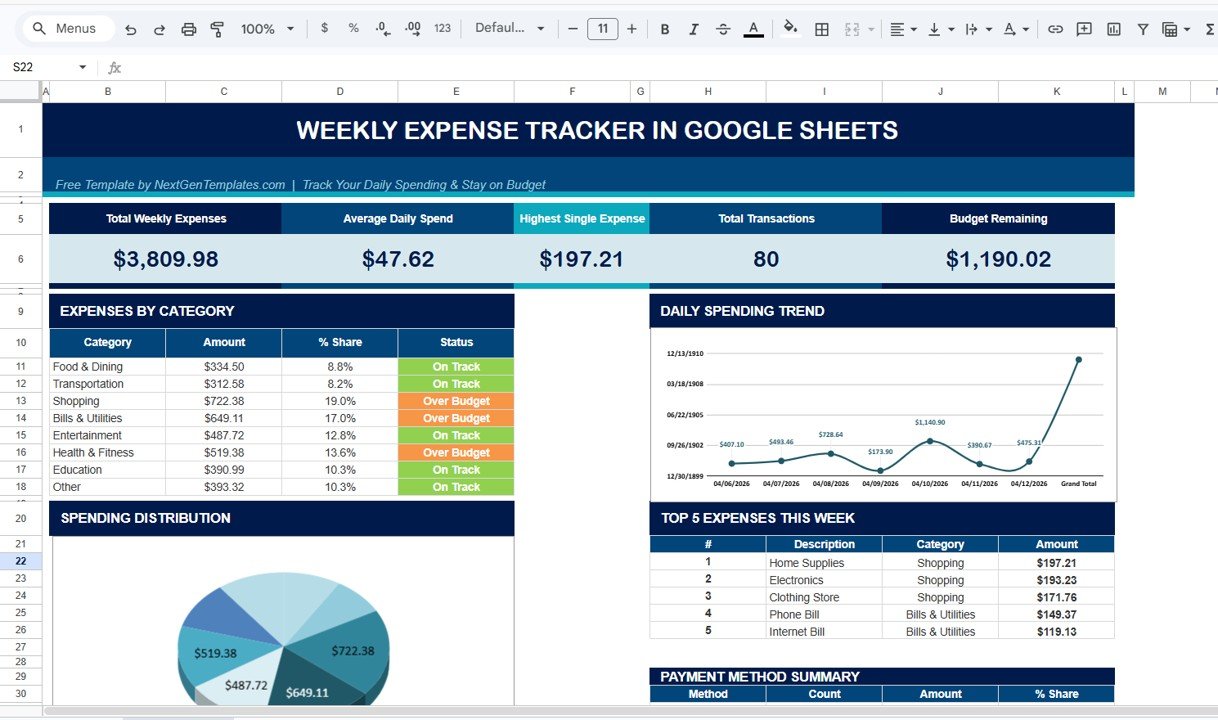
📊 Auto-updating weekly totals and averages — Daily and weekly grand totals recalculate every time you add a row. Built-in formulas surface your highest-spending day, average daily spend, and total weekly outflow without manual math.
📈 Visual category breakdown charts — A live pie chart shows where every dollar went this week. A bar chart compares actual versus budgeted spending so overspending categories are obvious at a glance.
🔁 Reusable week-over-week format — Duplicate the weekly tab to track multiple weeks side-by-side, or roll values into a monthly summary using the SUMIF formulas already wired in.
🌐 Cloud-based with real-time sync — Works in any browser on desktop, tablet, or phone. Google Sheets syncs instantly across devices, with no manual save required.
👨👩👧 Share with your partner or family — Use Google’s native share button to grant edit access. Real-time co-editing means everyone sees the same numbers without spreadsheet emails.Weekly Expense Tracker Template in Google Sheets
Sheets Explanation
👉 Click here to Purchase (download free)
The Weekly Expense Tracker Template ships with two sheets, each with a single, focused job. The structure is intentionally minimal so you can start logging within minutes of opening the file.
Sheet 1 — Weekly Expense Entry
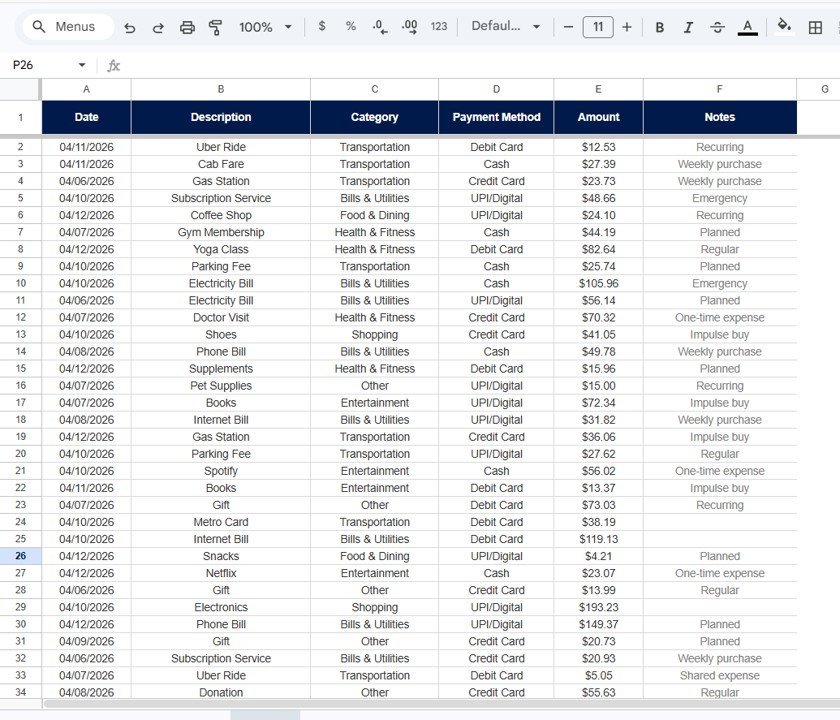
This is the main daily logging sheet. Each row represents a single expense with columns for Date, Day, Category, Description, Payment Method, and Amount. Drop-down lists in the Category and Payment Method columns keep your data consistent and reportable. Daily totals appear at the bottom of the sheet, and the weekly grand total updates live the moment you log a new entry. The sheet is pre-formatted with conditional highlighting that calls out days where total spend crosses your daily ceiling.
Weekly Expense Entry Sheet
Sheet 2 — Weekly Summary & Analysis
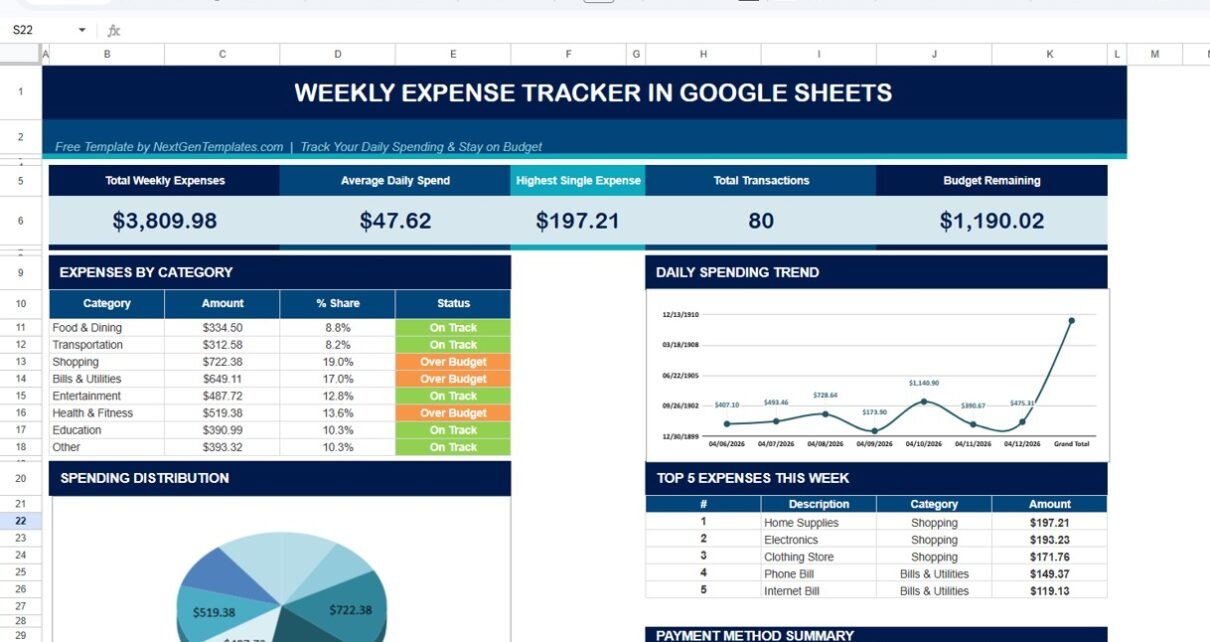
This is the reporting layer. The top of the sheet displays four KPI cards — Total Spent, Highest Category, Highest Day, and Daily Average — all driven by formulas pulling from Sheet 1. Below the cards sits a category-wise breakdown table with totals and percentages, paired with a pie chart for visual share-of-wallet. A second bar chart compares actual versus budgeted spend per category, with the budget figures editable directly in the Settings range. Any time you change a budget, the variance recalculates instantly.Weekly Expense Tracker Template in Google Sheets
Weekly Summary & Analysis Sheet
Who Should Use This Template
✅ Perfect for:
- Individuals starting their first expense-tracking habit who want a 7-day commitment, not a 12-month system
- Couples and roommates sharing expenses who need a single source of truth they can both edit live
- Students, freelancers, and gig workers with variable income who need a lightweight weekly cash-flow view
- People uncomfortable linking bank accounts to apps like Mint or Rocket Money
- Anyone living in Google Workspace who prefers Sheets over installing another appWeekly Expense Tracker Template in Google Sheets
❌ Not a fit if:
- You need automatic bank-feed import — this is manual entry only
- You run a small business needing GST/VAT invoicing or accrual accounting
- You want investment portfolio tracking, debt payoff schedules, or net-worth dashboards (use the Personal Finance Dashboard in Excel instead)
- You need 12-month rolling forecasts (use the Personal Monthly Budget Tracker in Google Sheets)
Real-World Use Cases
👉 Click here to Purchase (download free)
Priya is a 24-year-old graduate student in Delhi. Her income comes from a part-time research stipend, and she logs every coffee, metro ride, and rent split into the Weekly Expense Tracker from her phone during her commute. At the end of week 4, she spotted that food delivery alone was eating 32% of her weekly spend — and switched to meal-prepping for the following week. The pie chart in the Summary sheet was what made the pattern impossible to ignore.Weekly Expense Tracker Template in Google Sheets
Mark and Jenna share a New York apartment with two kids. They added each other to the same Google Sheets file and split logging duties — Mark logs grocery and utility runs, Jenna logs after-school activities and household supplies. The shared weekly view replaced a $14.99 per month family-budgeting subscription and ended the “who paid for what” Sunday arguments. Real-time co-editing means both can see the running total before deciding on a Friday-night takeout order.
Sam is a freelance graphic designer with irregular project income. He uses the Weekly Expense Tracker to keep personal and business spending separate, screenshotting the weekly summary into his accountant’s WhatsApp every Friday. Setup took him 4 minutes; weekly maintenance is 5 minutes per Sunday morning. When his business expenses cross a threshold, the budget-vs-actual bar chart flags it in red, prompting him to reclassify before the month closes.
Advantages of Weekly Expense Tracker Template
👉 Click here to Purchase (download free)
Saves real money on subscriptions. A typical paid budgeting app costs $84–$180 per year. This template costs nothing and handles the same daily logging job for individuals, couples, and small households.
Privacy-first by design. No bank-account linking, no third-party access tokens, no data sold to advertisers. Your spending data lives only in your own Google Drive.
Works on any device, anywhere. The Google Sheets mobile apps for iOS and Android render the tracker identically to desktop. You can log a $4 coffee in 15 seconds without opening a laptop.
Truly customizable. Categories, payment methods, and budget ceilings are all in editable Settings ranges. Add, rename, or remove anything without breaking formulas or charts.
Builds a habit, not a system. A weekly cycle is short enough to feel rewarding when you finish, which is why behavior-design researchers consistently recommend short feedback loops over monthly cycles for new financial habits.Weekly Expense Tracker Template in Google Sheets
Opportunities for Improvement
The template is intentionally lightweight, which means there are some legitimate limitations to flag honestly:
No automatic transaction import. Every expense is manual entry. If you have 80+ transactions a week, a tool with bank-feed integration will save you time despite the subscription cost.
Single-currency. The template assumes one currency per file. Multi-currency users will need a small formula tweak in the Amount column or a separate file per currency.
Weekly horizon only. The tracker shines for 7-day cycles. For monthly trends, annual summaries, or year-over-year comparisons, our paid Personal Monthly Budget Tracker in Google Sheets is a better fit.
No investment or debt tracking. The template covers income and expenses only. Net-worth tracking, debt payoff schedules, and investment portfolios live in our Personal Finance Dashboard in Excel.
Best Practices
👉 Click here to Purchase (download free)
Log in batches, not in real time. Most users find that a 2-minute end-of-day batch (review your wallet receipts and bank app, log 5–10 entries) works better than trying to log each expense individually.
Set realistic budgets first. Track 2 baseline weeks before setting category budgets. Budgets based on real data are easier to hit than budgets based on aspiration.
Review every Sunday. Treat the Summary sheet as your weekly money meeting. 5 minutes of review on Sunday changes how you spend on Monday.
Duplicate the sheet for each week. Right-click the Weekly Expense Entry tab → Duplicate → rename with the date range. After 4 weeks, you have a clean monthly view by stacking values into a fifth tab.
Pair with a habit tracker. Pair the expense tracker with our Habit Tracker in Google Sheets to lock in saving and budgeting routines.
Explore Relevant Templates
Once you’ve outgrown the weekly view, level up with our paid finance templates:
- 📅 Personal Monthly Budget Tracker in Google Sheets — Full 4-page monthly view with budget setup, monthly tracking, annual summary ($6.99)
- 💸 Personal Expense Tracker in Google Sheets — Detailed expense logging with category analytics and trend charts ($6.99)
- 💼 Personal Finance Dashboard in Excel — Net-worth view with investments, debt, and 12-month forecast ($17.99)
- 🎯 Habit Tracker in Google Sheets — Build savings discipline with daily habit tracking ($6.99)
- 📊 Weekly Expense Tracker in Excel — The same weekly tracker for Excel users (FREE)
Browse the full Google Sheets Templates Library for hundreds of ready-to-use spreadsheets across personal finance, project management, HR, sales, and operations.
Frequently Asked Questions
👉 Click here to Purchase (download free)
Is the Weekly Expense Tracker Template in Google Sheets really 100% free?
Yes — the Weekly Expense Tracker Template in Google Sheets is completely free with no credit card required, no subscription, and no hidden upgrades. You can use it forever, share it with family, and customize it however you need. The download includes a PDF with the official Google Sheets copy link.
How do I get the editable Google Sheets file?
After downloading the free package from NextGenTemplates, open the included PDF — it contains the official “Make a Copy” link. Click it and Google Drive instantly creates an editable copy in your own account. You never edit our master file, so your data stays fully private.
Can I use the Weekly Expense Tracker on my phone?
Yes — Google Sheets has free native iOS and Android apps. Sign in to the same Google account where you copied the template and your tracker appears instantly. Mobile-friendly drop-down menus keep logging to a 30-second task even on a small screen.
How does the Weekly Expense Tracker compare to Mint or YNAB?
Mint and YNAB charge $0–$15 per month and require linking your bank account. The Weekly Expense Tracker Template in Google Sheets is free forever, manual-entry only, and works without bank-account access — ideal for users who prioritize privacy or live where Mint and YNAB don’t operate.
Can I share the tracker with my spouse or roommates?
Yes — use Google Sheets’ built-in Share button to grant edit access to anyone with a Google account. Real-time co-editing means changes appear instantly for everyone. This is the same way teams collaborate in Google Docs, with no extra setup needed.
How long does it take to set up the Weekly Expense Tracker Template?
Setup takes under 3 minutes — copy the file to your Google Drive, set your weekly category budgets in the Summary sheet, and start logging. There are no scripts to enable, no add-ons to install, and no permissions to request. The template is fully ready to use on first open.
Can I customize the categories or add new ones?
Absolutely — every category list lives in a hidden Settings range in the Summary sheet. Edit the list and the drop-downs in the Weekly Expense Entry sheet update automatically. Add as many categories as you need to match how you actually spend.
About the Author
Built by PK — Microsoft Certified Professional with 15+ years of Excel, Google Sheets, and Power BI experience. Founder of NextGenTemplates, reaching 300K+ subscribers across YouTube channels (@PK-AnExcelExpert, @NextGenTemplates, @NeoTechNavigators). Every template is hand-built and tested before release.
Conclusion
The Weekly Expense Tracker Template in Google Sheets is the free entry point to a complete personal-finance system. It does one thing exceptionally well — log a week of spending and surface the patterns — and hands the next-level monthly, annual, and net-worth tracking to our paid templates when you’re ready.
👉 Click here to Purchase (download free) the Weekly Expense Tracker Template in Google Sheets.
✅ Instant download · One-time payment (FREE) · No subscription
🎥 Visit our YouTube channel for step-by-step video tutorials: YouTube.com/@NeoTechNavigators