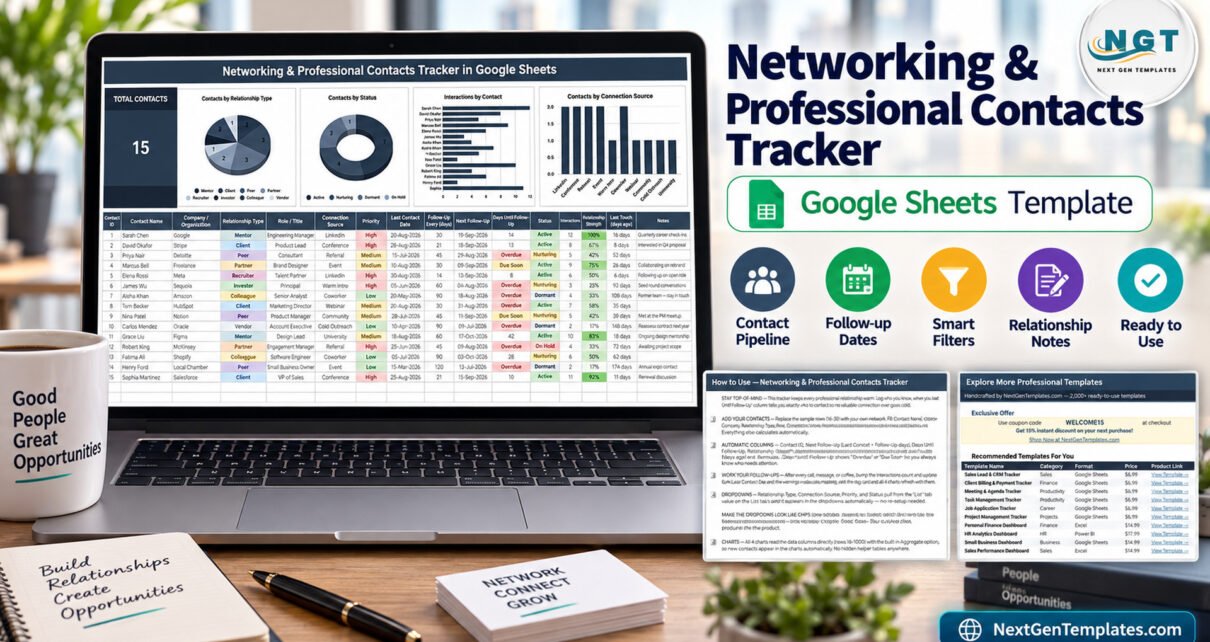
The Professional Contacts Tracker in Google Sheets is a single-page relationship tracker built from 16 columns, 5 automatic formula columns, 1 KPI card and 4 live charts. It ships with 15 sample contacts in rows 16 to 30, its charts are wired from row 16 to row 1000, and it classifies every contact across 8 relationship types, 10 connection sources, 3 priority levels and 4 pipeline statuses.Networking & Professional Contacts Tracker in Google Sheets
Most professionals do not lose contacts because they forgot the name. They lose them because nine months went past and nobody wrote down when the last conversation happened. A contact list in a notes app has no concept of due. This tracker fixes exactly that one problem: it stores when you last spoke, how often you intend to speak, and it turns the gap between those two numbers into a red Overdue flag you cannot scroll pastNetworking & Professional Contacts Tracker in Google Sheets
Get the Networking & Professional Contacts Tracker
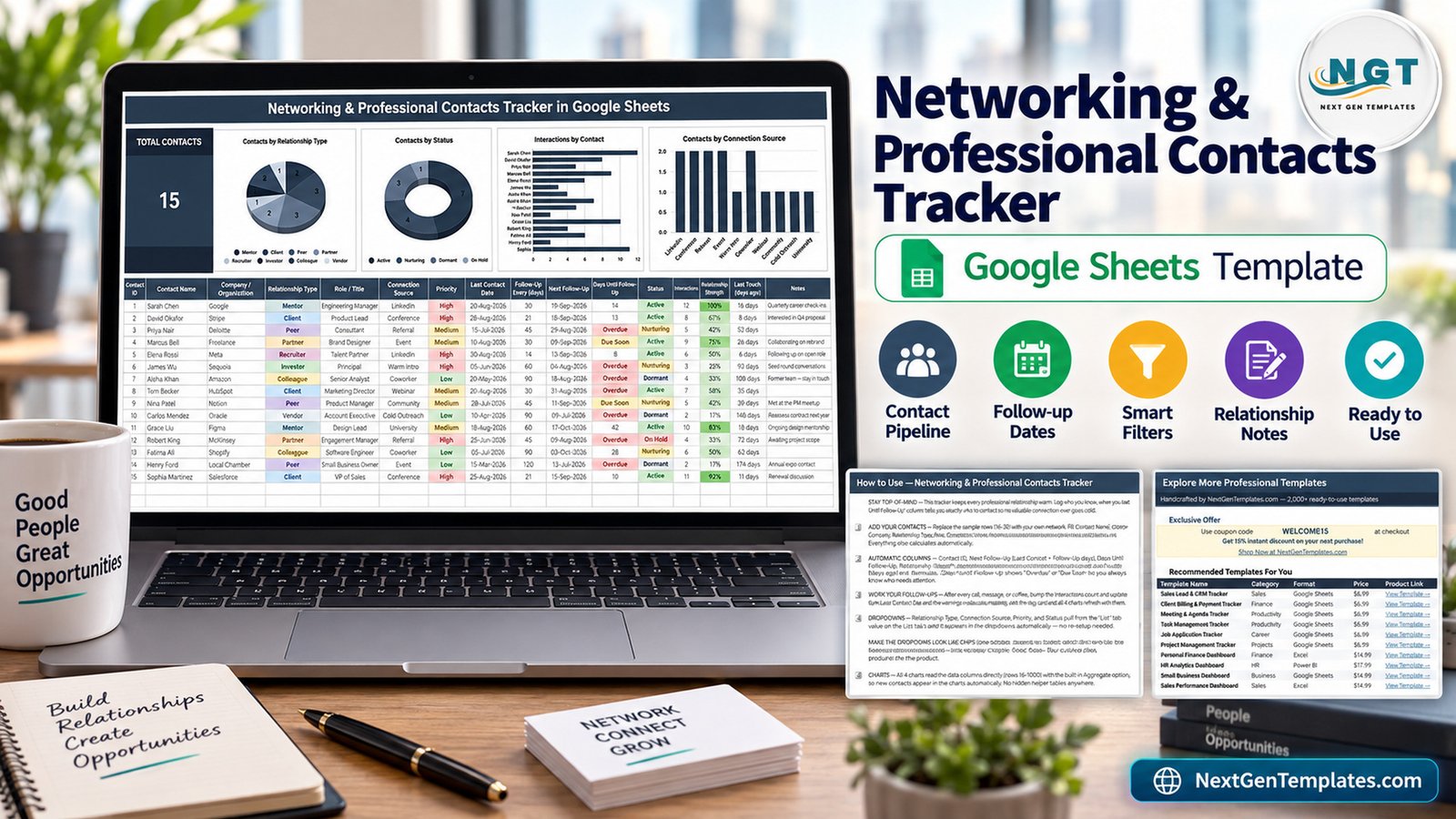
Key Features of the Professional Contacts Tracker in Google Sheets
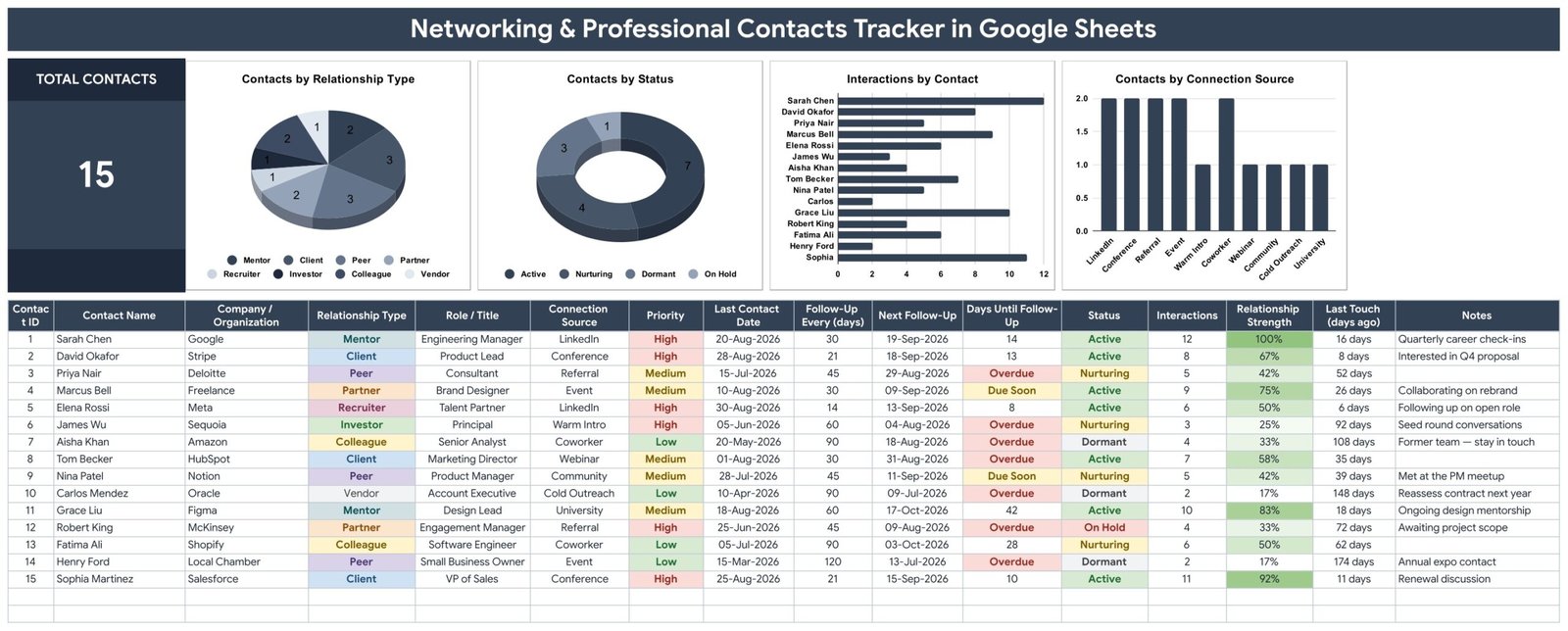
Five columns calculate themselves. Contact ID, Next Follow-Up, Days Until Follow-Up, Relationship Strength and Last Touch (days ago) are formulas. You supply a Last Contact Date and a Follow-Up Every (days) interval; the sheet derives the rest.Networking & Professional Contacts Tracker in Google Sheets
Overdue and Due Soon warnings. The Days Until Follow-Up column shows a plain number while you still have time, switches to an amber Due Soon as the date approaches, and turns a red Overdue once it passes. Six of the fifteen sample rows are already overdue, which is a fair reflection of most real networks.Networking & Professional Contacts Tracker in Google Sheets
Relationship Strength as a percentage. Each row carries an Interactions count, and the tracker converts that into a 0-100% Relationship Strength with green conditional shading. Sarah Chen at 12 interactions reads 100%; a vendor contacted twice reads 17%.Networking & Professional Contacts Tracker in Google Sheets
Four dropdown columns backed by a List tab. Relationship Type, Connection Source, Priority and Status all read from a separate List tab across rows 2 to 500, so adding a new category is a one-cell edit rather than a data-validation rebuild.Networking & Professional Contacts Tracker in Google Sheets
Charts with no helper tables. All four charts read the data columns directly through the built-in Aggregate option. There are no hidden intermediate tables in the file, which is the usual reason a spreadsheet dashboard breaks when somebody inserts a row.Networking & Professional Contacts Tracker in Google Sheets
Template Structure — Every Page Explained
Page 1: The Networking Contacts Tracker
The main page leads with a Total Contacts KPI card, then four charts: Contacts by Relationship Type, Contacts by Status, Interactions by Contact and Contacts by Connection Source. Relationship types cover Mentor, Client, Peer, Partner, Recruiter, Investor, Colleague and Vendor. Connection sources cover LinkedIn, Conference, Referral, Event, Warm Intro, Coworker, Webinar, Community, Cold Outreach and University. Beneath the charts sits the 16-column table, with colour-coded chips on Relationship Type, Priority and Status.Networking & Professional Contacts Tracker in Google Sheets
Page 2: How to Use
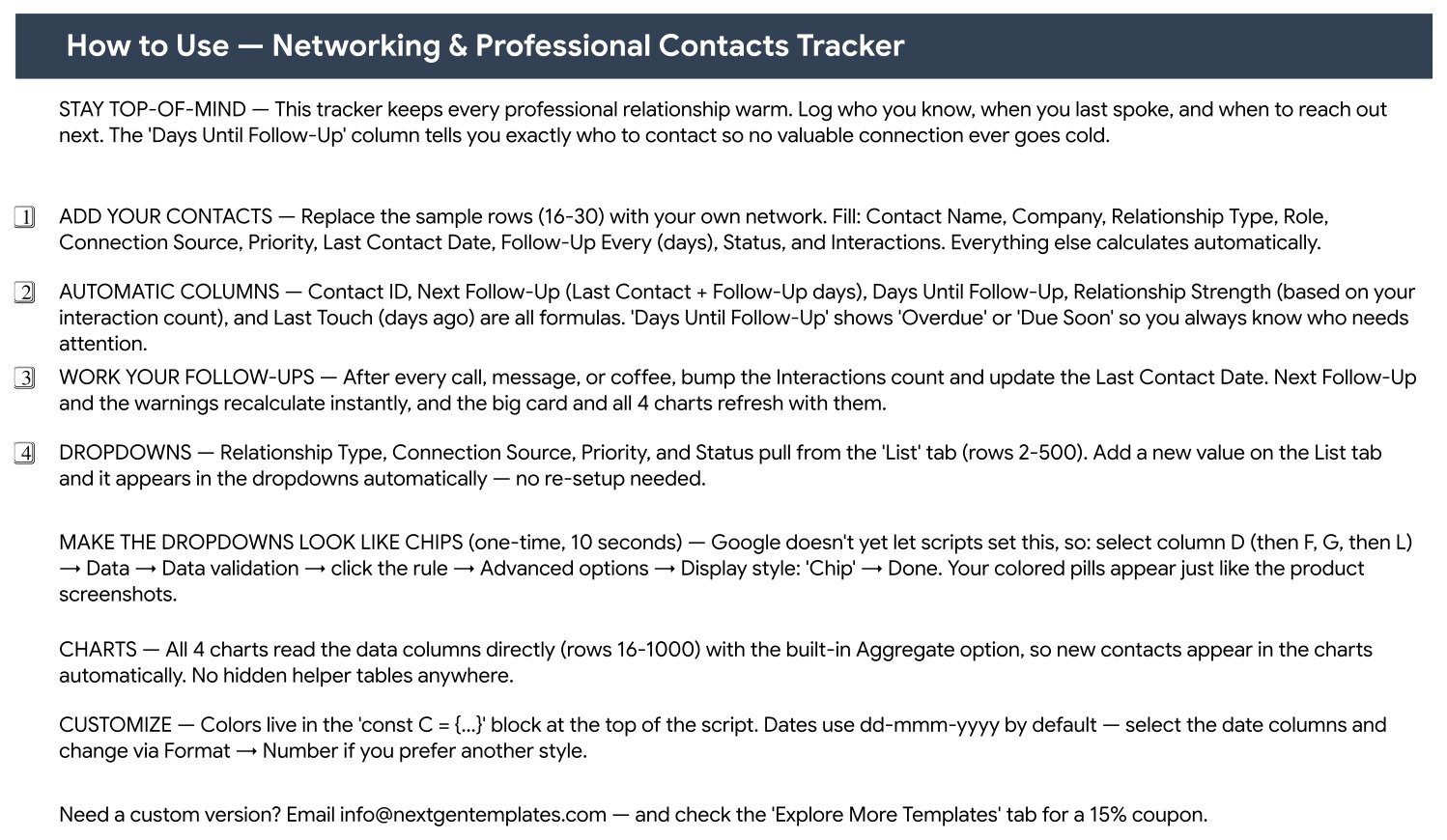
An instruction tab written for this specific file rather than a generic manual. It names the sample rows to overwrite, separates the ten fields you type from the five that calculate, explains the Overdue and Due Soon logic, and covers the one-time ten-second step that turns the four dropdown columns into coloured chips through Data → Data validation → Advanced options → Display style: ChipNetworking & Professional Contacts Tracker in Google Sheets
Page 3: Explore More Templates
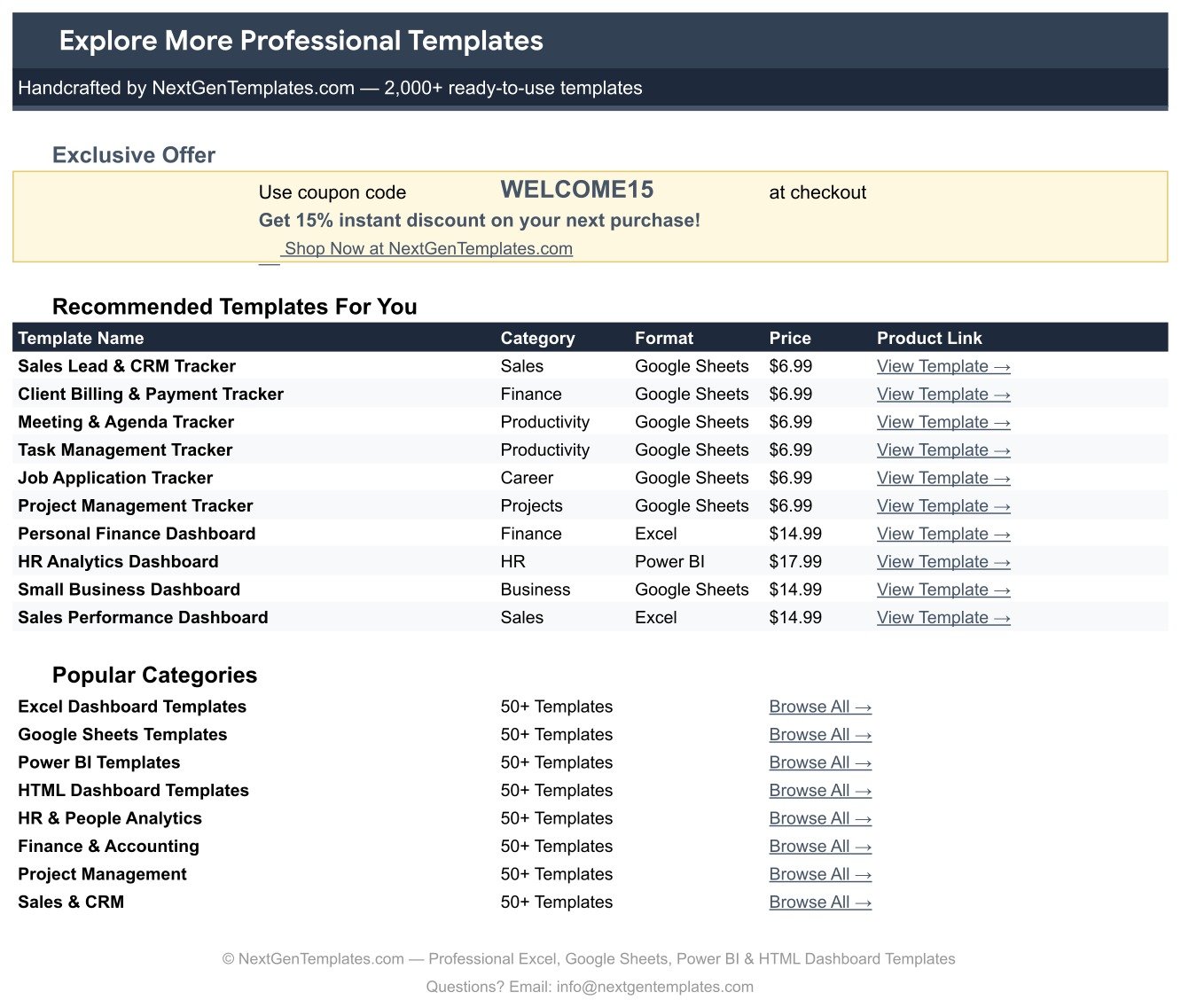
A reference tab listing other NextGenTemplates products with their category, format and price, plus a WELCOME15 coupon code for 15% off a future purchase.
A fourth List tab holds the dropdown values. That is the whole file — deliberately small, because a relationship tracker you actually open every Monday beats a twelve-tab system you open twiceNetworking & Professional Contacts Tracker in Google Sheets
This Tracker vs. an Excel Contact Sheet vs. Paid CRM
| Feature | Networking & Professional Contacts Tracker in Google Sheets | Excel contact sheet | HubSpot / Salesforce / Pipedrive |
|---|---|---|---|
| Cost | ✅ $6.99 one-time | Excel licence required | $20-165 / user / month |
| Platform | ✅ Google Sheets, any browser | Windows / Mac desktop | Web app + mobile app |
| Setup time | ✅ Under 10 minutes | Hours, built from scratch | Days, plus onboarding |
| Real-time collaboration | ✅ Native | Only via OneDrive co-authoring | ✅ Yes |
| Mobile access | ✅ Google Sheets mobile app | Limited | ✅ Yes |
| Overdue follow-up flags | ✅ Built in | Write the formulas yourself | ✅ Yes, as task queues |
| Editable categories | ✅ List tab, rows 2-500 | ✅ Fully editable | Admin-gated on lower plans |
| Share with a link | ✅ Yes | File attachment | Seat required per viewer |
| Year-1 cost at 5 users | ✅ $6.99 total | Licence cost only | $1,200-9,900 |
For anyone who wants follow-up discipline without paying per seat for a full sales CRM, this tracker sits in the sweet spot.
Who Should Use This Template
Perfect for:
- Consultants, freelancers and agency owners whose next project comes from someone they already knoNetworking & Professional Contacts Tracker in Google Sheets
- Job seekers juggling recruiters, mentors and referrals across a long search
- Founders keeping investors, advisors and partners warm between funding conversations
- Business development, community and partnerships managers working a list of 50-800 peopleNetworking & Professional Contacts Tracker in Google Sheets
- Anyone who already lives in Google Drive and wants a shared contact list, not a new login
Not a fit if:
- You need deal stages, revenue forecasting or quota reporting — this tracks relationships, not pipeline value
- You expect automatic email logging, calendar sync or push reminders — the Last Contact Date is updated by hand
- Your organisation requires SSO, audit logging or SOC 2 controls over contact records
- Google Drive is blocked at work; this is a Google Sheets file, not an Excel workbook
Real-World Use Cases
Priya, independent brand consultant, 140 contacts. Every Monday she sorts by Days Until Follow-Up, clears the red rows first, and uses Relationship Strength to decide who deserves a phone call instead of a message. Her whole CRM cost is one $6.99 purchase.
Marcus, six months into a job search. Recruiters, former managers and two mentors live in one sheet. He tags each by Connection Source, sets a 14-day follow-up interval on High priority rows, and can see at a glance which introductions have gone quiet.
Elena, partnerships lead at a 25-person SaaS company. She shares the tracker with her co-founder over a link, filters Status to Nurturing before quarterly planning, and reads the Contacts by Connection Source chart to work out which conferences actually produced lasting relationships.
Advantages of This Google Sheets Tracker
The obvious advantage is cost: a five-person team pays $6.99 once instead of $1,200 to $9,900 a year for CRM seats. The less obvious one is behavioural. Because Days Until Follow-Up is computed rather than typed, the sheet nags you without you having to remember to set a reminder — and because it runs in Google Sheets, it opens on a phone between meetings. There is also nothing to migrate: it is a spreadsheet, so exporting to CSV and moving on later costs nothing.
Opportunities for Improvement
It is worth being honest about the limits. The tracker does not send reminder emails; it shows you what is overdue when you open it, which means it rewards a weekly habit and punishes neglect. Interaction counts are entered manually rather than pulled from Gmail or a calendar. The Relationship Strength score is derived purely from interaction volume, so a single deep conversation scores lower than five quick messages. And the coloured chip display on the four dropdown columns needs one manual ten-second setup step, because Apps Script cannot yet set that display style. None of these are defects — they are the trade-offs of a $6.99 spreadsheet instead of a subscription platform.
Best Practices
- Set realistic follow-up intervals. A 30-day cycle on 200 contacts is 7 touches a day; 90 days on the long tail is more honest.
- Update Last Contact Date the same day you speak. Everything downstream depends on it.
- Use Priority, not volume, to decide who gets a shorter interval.
- Write one concrete line in Notes — “interested in Q4 proposal” beats “nice chat”.
- Review the Contacts by Status chart monthly and deliberately move Dormant contacts out rather than letting them inflate the list.
- Add your own values to the List tab early, so your categories match how you actually think about your network.
Explore Relevant Templates
Most buyers of this tracker pair it with something downstream. Once a conversation becomes work, the Proposal & Quote Tracker in Google Sheets takes over, and the Retainer & Recurring Client Tracker in Google Sheets keeps ongoing arrangements visible. Job seekers usually run this alongside the Job Application Tracker in Google Sheets. Freelancers tend to add the Freelance Marketplace Gig Tracker in Google Sheets, the Billable Hours & Time Tracker in Google Sheets, and for anyone running a second income stream, the Side Hustle Income Tracker in Google Sheets.
Looking to build stronger spreadsheet tracking skills? The NextGenTemplates Academy learning paths walk you through it step by step with practice files.
Frequently Asked Questions
What does the Professional Contacts Tracker in Google Sheets track?
It tracks 16 fields per contact: name, company, relationship type, role, connection source, priority, last contact date, follow-up interval, status, interactions and notes, plus five calculated columns — Contact ID, Next Follow-Up, Days Until Follow-Up, Relationship Strength and Last Touch in days.
How many contacts does it hold?
The charts are wired from row 16 to row 1000, giving room for roughly 985 contacts. The 15 sample rows are intended to be overwritten with your own network.
How long does setup take?
Under 10 minutes. Open the copy link in the included PDF, save the file to your Google Drive, overwrite the sample rows, and optionally spend ten seconds switching the four dropdown columns to Chip display so they match the screenshots.
How does this compare to HubSpot or Pipedrive?
A paid CRM costs $20-165 per user per month and manages deals, quotas and automated sequences. This tracker is a one-time $6.99 purchase that manages people and follow-up timing. Buy the CRM for revenue forecasting; buy this to stop losing touch.
Is this the Excel or the Power BI version?
Neither. This is the Google Sheets edition. NextGenTemplates also publishes similarly named Excel workbooks, Power BI reports and KPI scorecards, and those are separate products with different pages and different download files.
Can I add my own relationship types?
Yes. Relationship Type, Connection Source, Priority and Status all read from the List tab across rows 2 to 500. Add a value there and it appears in the dropdown immediately — no script editing required. Google’s own Docs Editors Help covers the underlying data-validation behaviour.
Do I need to know spreadsheet formulas?
No. Every formula in the Professional Contacts Tracker in Google Sheets is already written. You type plain values in ten columns and the tracker handles the dates, the percentages and the Overdue and Due Soon warnings on its own.
About the Author
Built by PK — Microsoft Certified Professional with 15+ years of Excel, Google Sheets and Power BI experience. Founder of NextGenTemplates, reaching 300K+ subscribers across YouTube channels. Every template is hand-built and tested before release.
Conclusion
Networking does not fail at the introduction. It fails in month four, when a good contact quietly goes cold because nobody was counting. This tracker is a small, honest fix for that: 16 columns, 4 charts, one KPI card and an Overdue flag that does the remembering for you.
Get the Networking & Professional Contacts Tracker
Instant download · One-time payment · No subscription
Last updated: September 2026