The Monthly Sales Goals Calendar in Google Sheets tracks sales targets, events, and deadlines across 5 interactive sheets with 4 navigation views — Annual, Monthly, Daily, and Events database. With 7 data fields per event and dynamic date-range filtering, this template replaces manual calendar tracking for sales teams of any size. Setup takes under 10 minutes — enter your events and every view updates automatically.
According to HubSpot’s 2024 Sales Trends Report, 41% of sales reps say prospecting is the hardest part of their job, and teams without a structured calendar lose an average of 5.8 hours per week on scheduling conflicts. The Monthly Sales Goals Calendar in Google Sheets eliminates this friction by centralizing every sales event, goal, and deadline in one shared, real-time document that the whole team can edit.
Key Features of Monthly Sales Goals Calendar in Google Sheets
👉 Click here to Purchase the Monthly Sales Goals Calendar in Google Sheets
This Google Sheets calendar template includes 5 worksheets with 4 navigation views, a 7-field events database, dynamic month/year selectors, date-range filtering, and multi-event detection on the monthly calendar.
The 4-View Navigation System lets you switch between Annual, Monthly, Daily, and Events views from a single Home sheet. Each view serves a different planning purpose — from full-year strategic mapping to daily event preparation. The Monthly View supports dropdown-driven month and year selection, rebuilding the calendar automatically when you change either value.
The Events Database captures 7 fields per entry: auto-generated ID, Date, Day of week, Event Name, Time, Location, and Description. All other views pull data from this single source of truth, so you never have to enter the same event twice. The Monthly View displays 1 event per date cell and flags dates with multiple events as “more than 1…” for quick scanning.
The Daily View includes a date-range filter — enter a Start Date and End Date (double-click to open Google Sheets’ built-in date picker) and the sheet displays all matching events in a detailed list. This is ideal for weekly sales meeting preparation, sprint planning, or exporting a filtered list for management reports.
Template Sheets Explanation
👉 Click here to Purchase the Monthly Sales Goals Calendar in Google Sheets
Home Sheet
This is the index page with 4 clickable navigation buttons: Annual View, Monthly View, Daily View, and Events. Each button jumps directly to the corresponding sheet tab, making it easy to switch between views without scrolling through tabs manually.
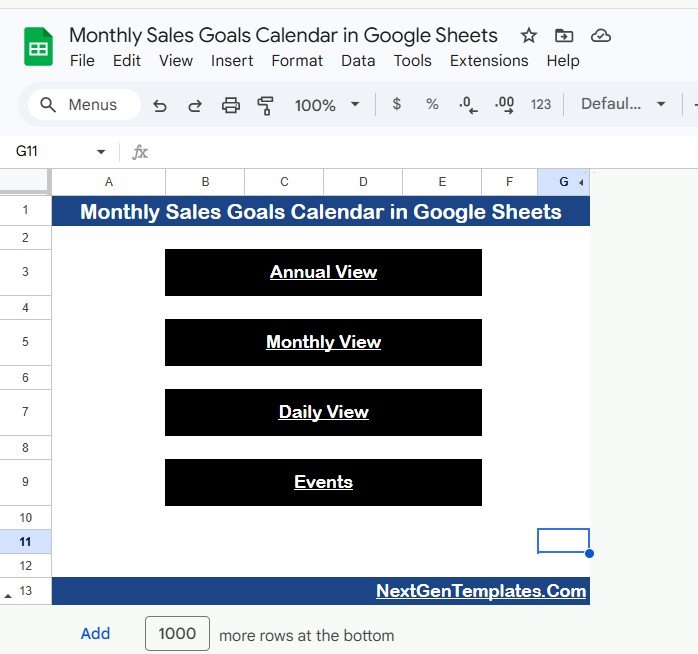 Monthly Sales Goals Calendar in Google Sheets
Annual View Sheet
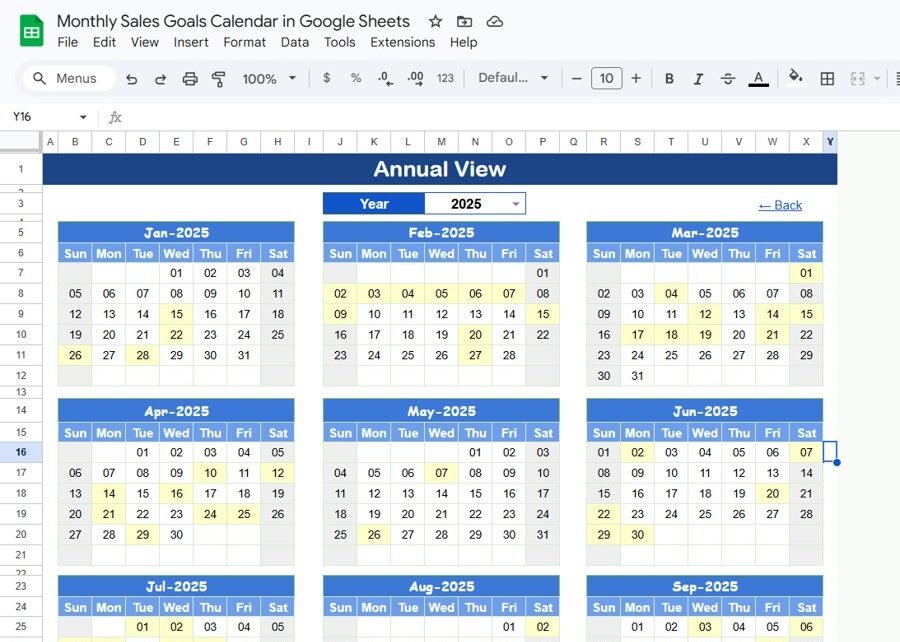
Displays all 12 months in a compact calendar layout on a single sheet. Sales managers use this view for full-year planning — mapping product launch dates, quarterly revenue targets, trade shows and conferences, and seasonal promotions. The annual layout makes it easy to spot gaps in the sales calendar and allocate resources across quarters.
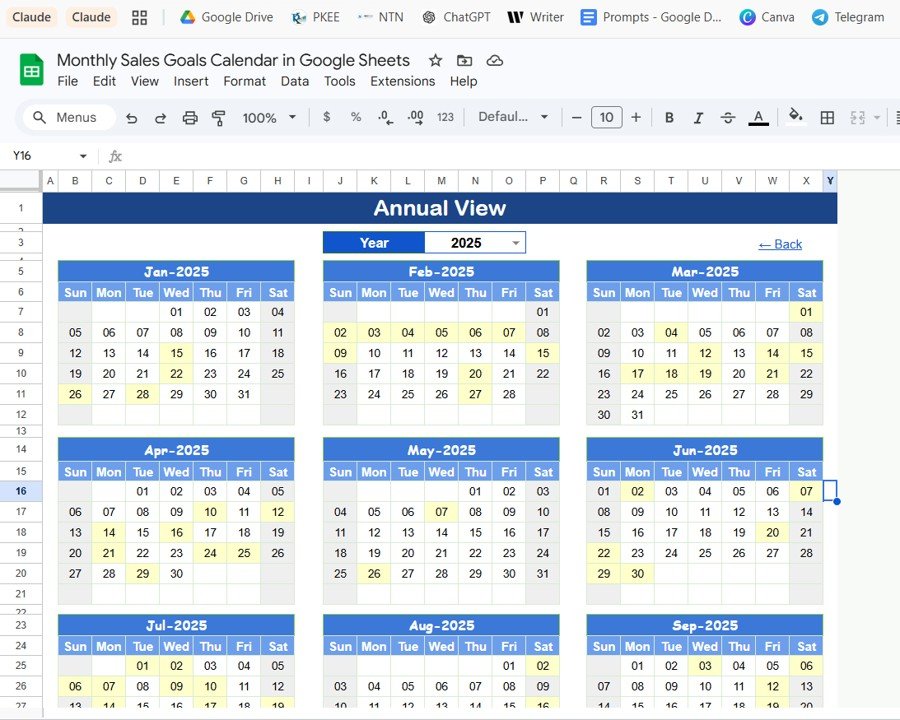 Annual View Sheet
Monthly View Sheet
A single-month calendar driven by Month and Year dropdowns at the top. When you change either dropdown, the entire calendar rebuilds to show the selected period. Each date cell displays the first scheduled event, and if more than one event exists on a date, it shows “more than 1…” as a visual indicator. This view is where most daily planning happens — checking upcoming demos, follow-up calls, and proposal deadlines for the current month.
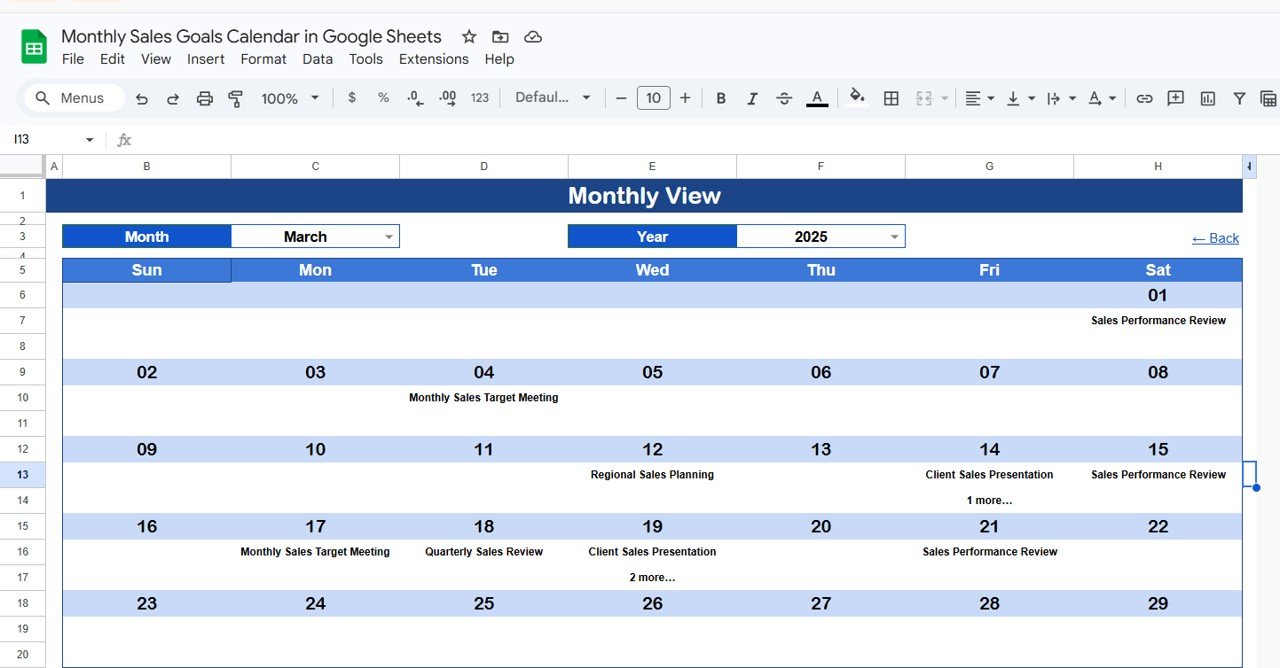 Monthly View Sheet
Daily View Sheet
Shows all events within a user-selected date range. Set the Start Date and End Date at the top of the sheet — double-click any date cell to open Google Sheets’ native calendar picker. The sheet automatically filters and displays all events within that period with full details: Date, Day, Event Name, Time, Location, and Description. This is the go-to view for weekly sales meeting prep and sprint reviews.
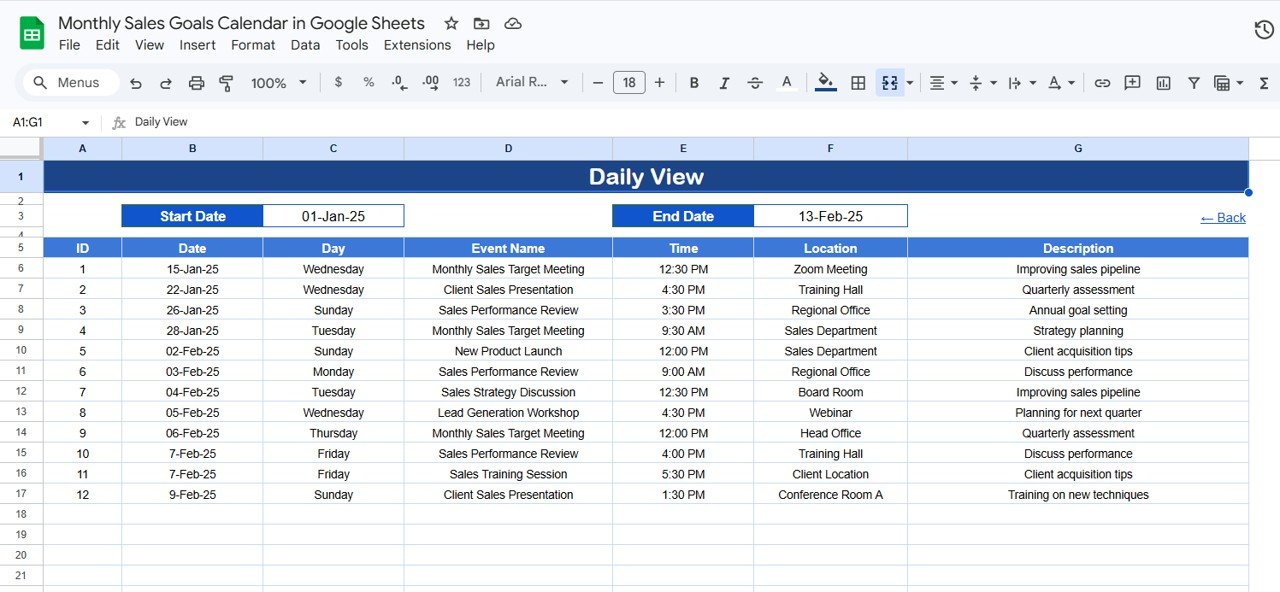 Daily View Sheet
Events Sheet
The central database where all sales events are stored. Each row captures: ID (auto-generated), Date, Day (Sunday, Monday, etc.), Event Name, Time, Location, and Description. To add a new event, simply fill in the next available row. This sheet feeds all three calendar views — Annual, Monthly, and Daily — so every entry appears across the template automatically.
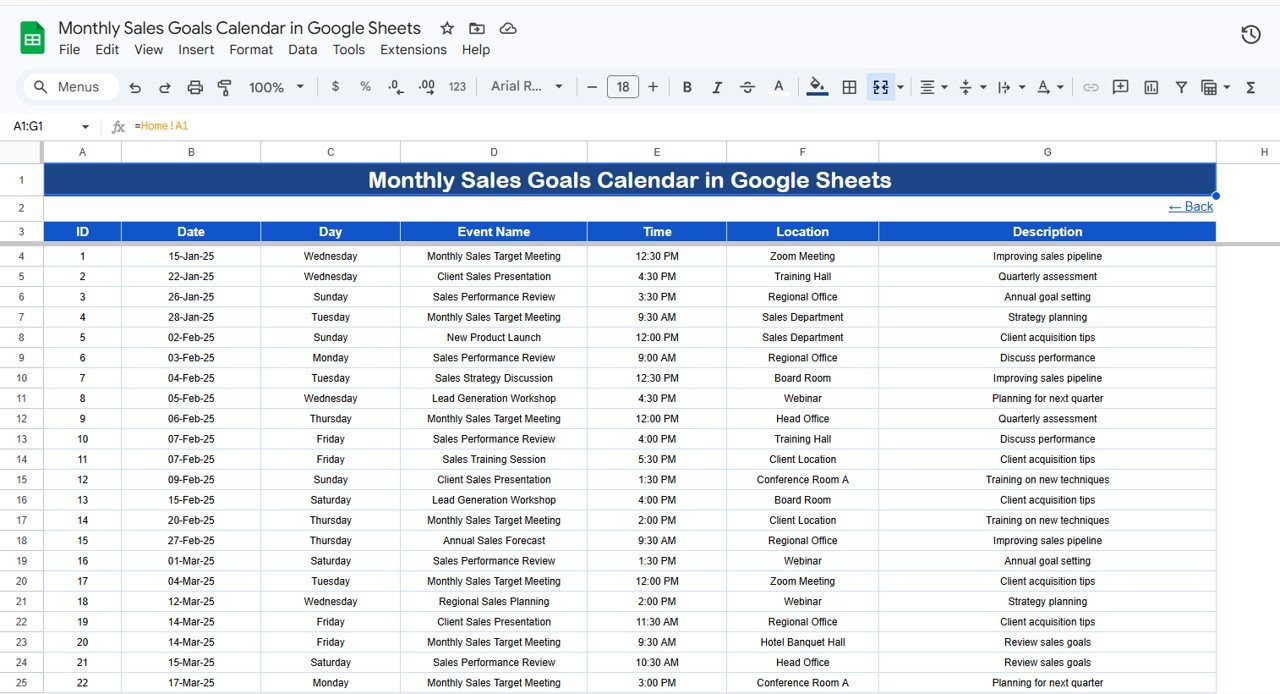 Events Sheet
Monthly Sales Goals Calendar vs. Microsoft Excel Calendar vs. Salesforce — Feature Comparison
| Feature | Monthly Sales Goals Calendar (Google Sheets) | Microsoft Excel Calendar | Salesforce Calendar |
|---|---|---|---|
| Cost | $4.99 one-time | $4.99–$9.99 one-time | $25–$300/user/month |
| Platform | Google Sheets (browser-based) | Microsoft Excel (desktop) | Cloud SaaS |
| Setup Time | Under 10 minutes | 10–15 minutes | Days to weeks |
| Real-Time Team Collaboration | ✅ Built-in | ❌ Requires OneDrive/SharePoint | ✅ Built-in |
| Mobile Access | ✅ Google Sheets app | ⚠️ Limited on mobile | ✅ Salesforce app |
| Customizable Fields | ✅ Fully editable | ✅ Fully editable | ⚠️ Admin config needed |
| Share with Link | ✅ One-click | ❌ Email attachment | ⚠️ License per viewer |
| Year-1 Cost at 5 Users | $4.99 total | $4.99 + Excel licenses | $1,500–$18,000 |
| Annual + Monthly + Daily Views | ✅ All 3 included | ⚠️ Varies | ✅ Built-in |
For sales teams that want structured goal tracking without paying per-user SaaS fees, the Monthly Sales Goals Calendar in Google Sheets sits in the sweet spot between a basic spreadsheet and enterprise CRM.
Who Should Use This Template
👉 Click here to Purchase the Monthly Sales Goals Calendar in Google Sheets
Perfect for:
- Sales managers at 5–200 person teams tracking monthly targets, follow-ups, and deadlines
- Small business owners coordinating promotional events, product launches, and seasonal sales cycles
- Freelancers and solo consultants scheduling client calls, demos, and proposal deadlines
- Startup founders who need a shared sales calendar without paying for Salesforce or HubSpot
Not a fit if:
- You need CRM-integrated pipeline automation with Salesforce, HubSpot, or Pipedrive
- Your workflows require automated email triggers or rules tied to calendar events
- Your organization mandates SOC 2 compliance and enterprise-grade audit trails
Real-World Use Cases
Mike manages a 15-person B2B sales team at a SaaS startup. He uses the Monthly Sales Goals Calendar to plot quarterly revenue targets, track demo bookings, and schedule pipeline reviews. Before this template, the team relied on scattered Google Calendar invites — now every deadline and target lives in one shared sheet that the whole team edits in real time.
Priya runs a boutique e-commerce brand with seasonal product launches. She uses the Annual View to map all 4 seasonal campaigns, the Monthly View to coordinate social media pushes and flash sales, and the Events sheet to log every promotional activity. The template replaced a paid project management tool that cost her $12/month per user.
Carlos is a real estate agent tracking open houses, client follow-ups, and closing deadlines. He enters every showing, inspection, and contract deadline into the Events sheet, then uses the Daily View to prepare for each week. The date-range filter saves him 30 minutes of manual calendar scanning every Monday morning.
Advantages of Monthly Sales Goals Calendar in Google Sheets
The biggest advantage is real-time collaboration at zero marginal cost. Unlike Excel calendars that require email attachments or SharePoint setup, this Google Sheets template lets your entire sales team view and edit the same calendar simultaneously. At $4.99 one-time vs. $25–$300/user/month for Salesforce, the cost savings are immediate — a 10-person team saves $2,988–$35,988 in the first year alone.
The 4-view architecture means you don’t need separate tools for annual planning, monthly tracking, and daily scheduling. Everything lives in one file. The Events database acts as a single source of truth that feeds all views, eliminating the data duplication that plagues teams using multiple disconnected calendars.
Google Sheets’ native mobile app support means sales reps in the field can check upcoming events, add new meetings, and update event details from their phone — no laptop required. For more robust financial tracking alongside your calendar, consider pairing this with the Budget Tracking Calendar in Google Sheets.
Opportunities for Improvement
👉 Click here to Purchase the Monthly Sales Goals Calendar in Google Sheets
This template does not include automated reminders or notifications — Google Sheets lacks native push notification support. For teams that need automatic alerts before events, you would need to pair this with Google Calendar or a third-party automation tool like Zapier.
The Monthly View shows only the first event per date cell. For dates with 3–5 overlapping events, you need to switch to the Daily View for full detail. Teams with very high event density (10+ events per day) may find the Monthly View less useful and rely primarily on the Daily View.
There is no built-in analytics or reporting — the template tracks events but does not generate performance charts, goal-vs-actual comparisons, or sales metrics. For KPI tracking, pair this with a dedicated sales KPI dashboard.
Best Practices
Use the Annual View first at the start of each quarter to map out major milestones: product launches, trade shows, quarterly targets, and seasonal promotions. Then drill into the Monthly View for week-by-week planning. Reserve the Daily View for weekly meeting prep — set the date range to the upcoming 7 days every Monday morning.
Standardize your Event Name conventions across the team. Use prefixes like “DEMO:”, “CALL:”, “DEADLINE:”, or “MEETING:” so events are easy to scan in any view. Keep descriptions short (1–2 sentences) and include the responsible sales rep’s initials for accountability.
For detailed guidance on Google Sheets calendar and event management features, refer to Google’s official Sheets documentation.
Explore Relevant Templates
📌 Budget Tracking Calendar in Google Sheets – Track monthly budgets alongside your sales goals for complete financial visibility.
📌 Trade Show & Conference Calendar in Google Sheets – Plan industry events that feed your sales pipeline.
📌 Seasonal Promotions Calendar in Google Sheets – Map promotional campaigns aligned with your monthly sales targets.
📌 Dealer Network KPI Dashboard in Google Sheets – Monitor dealer performance metrics for data-driven territory management.
📌 Enterprise Event Planning Register Tracker in Google Sheets – Manage large-scale event logistics and registration data.
Browse all Google Sheets Dashboard Templates and Calendar Templates on NextGenTemplates.
Frequently Asked Questions
👉 Click here to Purchase the Monthly Sales Goals Calendar in Google Sheets
How many events can the Monthly Sales Goals Calendar track?
The Monthly Sales Goals Calendar in Google Sheets has no hard limit on events. You can add hundreds of sales events, meetings, and deadlines to the Events sheet. All views — Annual, Monthly, and Daily — update automatically as you add new rows.
Can I customize the fields in the Events sheet?
Yes. The Events sheet includes 7 default columns: ID, Date, Day, Event Name, Time, Location, and Description. You can add columns like Sales Rep, Priority, or Revenue Target without breaking the calendar views.
Does the Monthly View show all events on a single date?
The Monthly View displays the first event per date cell. Dates with multiple events show “more than 1…” as an indicator. Switch to the Daily View with that date range to see all events in full detail.
How does this compare to Salesforce for tracking sales goals?
Salesforce offers CRM-integrated calendars starting at $25/user/month. The Monthly Sales Goals Calendar in Google Sheets costs $4.99 one-time for unlimited users. For teams that need visual calendar planning without pipeline automation, this template delivers equivalent functionality at a fraction of the cost.
Can my whole team edit this calendar at the same time?
Yes. Google Sheets supports real-time collaboration natively. Share the template link and everyone can add, edit, and view events simultaneously — no extra licenses or per-user fees required.
How long does setup take?
Setup takes under 10 minutes. Open the PDF guide included in your download, click the Google Sheets copy link, and start entering your sales events. The template comes pre-formatted with sample data you can replace immediately.
Is this template compatible with Google Sheets mobile app?
Yes. The Monthly Sales Goals Calendar works on the Google Sheets mobile app for both iOS and Android. You can view events, add new entries, and switch between views from your phone or tablet.
About the Author
Built by PK — Microsoft Certified Professional with 15+ years of Excel, Google Sheets, and Power BI experience. Founder of NextGenTemplates, reaching 300K+ subscribers across YouTube channels. Every template is hand-built and tested before release.
Conclusion
The Monthly Sales Goals Calendar in Google Sheets gives sales teams a structured, visual way to track targets, events, and deadlines without paying for enterprise CRM software. With 5 interconnected sheets, 4 navigation views, and real-time Google Sheets collaboration, it handles everything from annual planning to daily event prep in one $4.99 template.
👉 Click here to Purchase the Monthly Sales Goals Calendar in Google Sheets
✅ Instant download · One-time payment · No subscription
🎥 Visit our YouTube channel for step-by-step tutorials: Youtube.com/@NeoTechNavigators